Microsoft Agent Framework web search that works with any model

To give a Microsoft Agent Framework agent web search that works with any model, write the search as a function tool and pass it in the agent's tools list. The framework's built-in web search is a hosted tool that only some providers support. A function tool runs on every provider that supports function calling, and the version below adds a per-run search budget.
Short answer: Use the hosted tool from client.get_web_search_tool() if you are on OpenAI, Foundry, Anthropic or Gemini and only need answers with citations. Write a function tool (below) when you use Ollama, Mistral, Bedrock or another provider without hosted search, when you need the ranked result list itself, or when you want a hard cap on searches per run. Attach an MCP server with MCPStreamableHTTPTool when you want many data tools without writing code. With our API, search costs from $0.03 per 1,000 — pay as you go, no subscription.
Why doesn't the built-in web search work everywhere?
Because the search runs inside the model provider, not in your code. Agent Framework's web search page gets the tool from the chat client with client.get_web_search_tool() and says plainly that availability "depends on the underlying agent provider". The provider runs the query, picks the results and bills you for it.
That is fine on the providers that offer it. In the 1.26.0 packages, get_web_search_tool() is implemented by the OpenAI, Foundry, Anthropic and Gemini clients, and not by the Ollama, Mistral or Bedrock clients. The model providers page lists function tools as supported on Azure OpenAI, OpenAI, Foundry, Anthropic, Ollama, Foundry Local, Amazon Bedrock, Google Gemini and Mistral. A function tool is therefore the one search setup that moves with you when you change models.
There are two more reasons teams write their own. First, a hosted tool hands the model a finished set of sources, not a ranked list you can store, filter or count. Second, Microsoft's own route has strings attached: on Foundry, web search added directly to an agent uses Web IQ, while web search in a toolbox uses Grounding with Bing Search, and the Foundry web search docs note that Microsoft's Data Protection Addendum does not apply to data sent to Grounding with Bing.
The newer harness agent adds the hosted search tool by default when the client supports it. If you register your own search tool there, pass disable_web_search=True so the agent does not get two search tools.
How do you write the search tool?
Write an async Python method with typed, described parameters and return a string. Agent Framework turns the method name into the tool name, the docstring into its description, and Annotated + Pydantic Field descriptions into the parameter schema, as its function tools guide shows.
The tool below calls our organic results endpoint, keeps the top five results and returns them as numbered lines, which a model reads more easily than raw JSON. Install first:
pip install agent-framework==1.26.0
export SERPENT_API_KEY=sk_live_your_api_key
The agent-framework package installs the core plus the provider packages, including httpx, which the tool uses. Save this as serp_tool.py:
import os
from typing import Annotated

import httpx
from pydantic import Field

SEARCH_URL = "https://apiserpent.com/api/search/quick"


class WebSearch:
    """A web search tool for Microsoft Agent Framework with a per-run search budget."""

    def __init__(self, engine: str = "google", max_searches: int = 5, n_results: int = 5):
        self.engine = engine            # google, bing, yahoo, ddg or brave
        self.max_searches = max_searches
        self.n_results = n_results
        self.searches = 0

    async def web_search(
        self,
        query: Annotated[str, Field(description="Short keyword search query.")],
        country: Annotated[str, Field(description="Two-letter country code, e.g. us, gb, de.")] = "us",
    ) -> str:
        """Search the web. Returns the top results as numbered lines: title, URL, snippet.
        Use it for current facts, prices, news and documentation."""
        if self.searches >= self.max_searches:
            return "Search budget used up. Answer from the results you already have."
        self.searches += 1
        async with httpx.AsyncClient(timeout=30) as http:
            resp = await http.get(
                SEARCH_URL,
                params={"q": query, "country": country, "engine": self.engine},
                headers={"X-API-Key": os.environ["SERPENT_API_KEY"]},
            )
        resp.raise_for_status()
        organic = resp.json()["results"]["organic"][: self.n_results]
        if not organic:
            return f"No results for {query!r}."
        return "\n".join(
            f"{r['position']}. {r['title']}\n   {r['url']}\n   {r.get('snippet', '')}"
            for r in organic
        )
Three choices are deliberate. The tool is a method on a class, the pattern Microsoft's guide recommends when tools share state, so the search counter lives on the instance and the model never sees it. The country argument is part of the schema, so the agent can ask for German or Indian results when a task needs them; our API accepts 112 country codes, listed under country support. The engine is a setting, not an input: you choose Google, Bing, Yahoo, DuckDuckGo or Brave when you build the agent, and the model cannot switch it mid-task.
The method is async and uses httpx, so a search does not block the event loop while other tool calls run. Agent Framework runs the function calls from one model turn concurrently by default.
How do you attach it to an agent?
Create a fresh WebSearch for each agent and pass its bound method in tools. A new instance means a new budget for every run. Save this as agent_app.py:
import asyncio

from agent_framework import Agent
from agent_framework.openai import OpenAIChatClient

from serp_tool import WebSearch


def build_agent(client, engine: str = "google", max_searches: int = 5) -> Agent:
    search = WebSearch(engine=engine, max_searches=max_searches)  # fresh budget per agent
    return Agent(
        client=client,
        name="researcher",
        instructions=(
            "Answer with current facts from the web. Search before answering anything "
            "time-sensitive, and cite every URL you use."
        ),
        tools=[search.web_search],
    )


async def main() -> None:
    client = OpenAIChatClient(model="gpt-5.4-mini")  # reads OPENAI_API_KEY; any chat client works
    client.function_invocation_configuration["max_function_calls"] = 8
    agent = build_agent(client)
    result = await agent.run("What changed in the latest Microsoft Agent Framework release?")
    print(result.text)


if __name__ == "__main__":
    asyncio.run(main())
Nothing in build_agent depends on OpenAI. Swap the client line for OllamaChatClient, AnthropicClient, a Foundry client or any other chat client from the framework, and the same tool works, because function tools are the part every provider shares. The max_function_calls line is a second guard, explained in the spend section below.
What does a run look like?
The code above runs on agent-framework 1.26.0 with Python 3.15 (22 November 2026). For the logged run, two things were stubbed so nothing paid was called. The HTTP request returned the documented example response from our docs, and the model was a scripted stand-in built on the framework's own BaseChatClient and FunctionInvocationLayer that asked for a search, then answered.
Everything in between, including the framework's tool schema, function invocation loop and limits, was the real package.
This is the schema the framework built from the method and sent to the model:
{"name": "web_search",
 "description": "Search the web. Returns the top results as numbered lines: title, URL, snippet.\nUse it for current facts, prices, news and documentation.",
 "parameters": {"properties": {
     "country": {"default": "us", "description": "Two-letter country code, e.g. us, gb, de.", "type": "string"},
     "query": {"description": "Short keyword search query.", "type": "string"}},
   "required": ["query"], "type": "object"}}
The scripted model asked for weather today in gb. The tool sent one HTTP call with these parameters:
{"url": "https://apiserpent.com/api/search/quick",
 "params": {"q": "weather today", "country": "gb", "engine": "google"}}
And the model received this observation back:
1. Weather Forecast - Today
   https://example.com/weather
   Today's weather forecast...
The documented example contains one result, so the tool returned one; a live search returns up to the five the tool keeps. The response shape, with results.organic holding position, title, URL and snippet, is the one in our docs. Building the agent with engine="yahoo" changed only the engine parameter on the request, and every block key is always present whatever the engine, so the same parser serves all five.
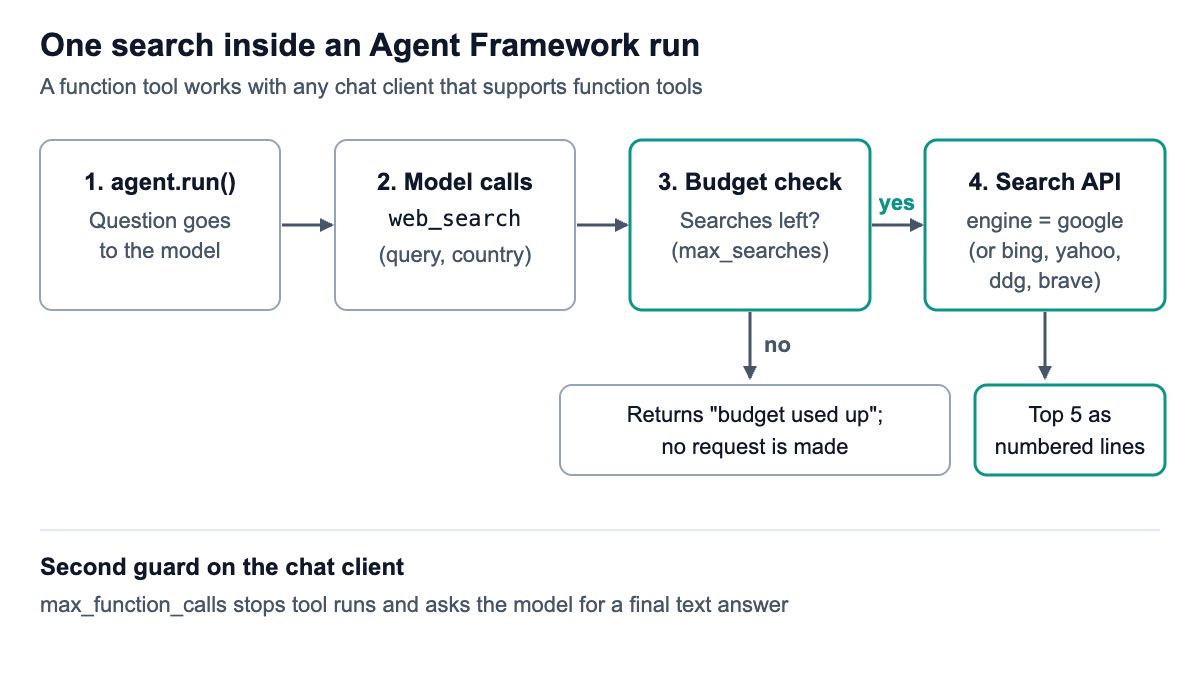
How do you cap search spend?
Put the limit in the tool. When the budget is spent, the tool returns a short message telling the model to answer from what it has, and no request is made. In the logged run with max_searches=2, the scripted model asked for three different searches: two HTTP calls went out, and the third tool call returned "Search budget used up. Answer from the results you already have."
Agent Framework adds a limit of its own on the chat client. Its function_invocation_configuration holds max_iterations (40 by default in 1.26.0), max_function_calls and max_duration_seconds (both unlimited by default). Microsoft's guide says that when a limit is reached the client "stops invoking tools and asks the model for a final text response", and that the limits are best effort because they are checked after each batch of tool calls.
The logged run matched that. With max_function_calls=2 and a scripted model that wanted four searches, two HTTP calls went out, then the framework sent the next model request with tool_choice set to none and the model answered in text. Because one model turn can request several calls at once, a single batch can overshoot this limit; the counter inside the tool cannot, which is why the example keeps both.
If several agents run at once, keep one WebSearch per agent run. A shared instance would share its counter, and parallel tool calls in one turn would race on it.
What does search cost at your volume?
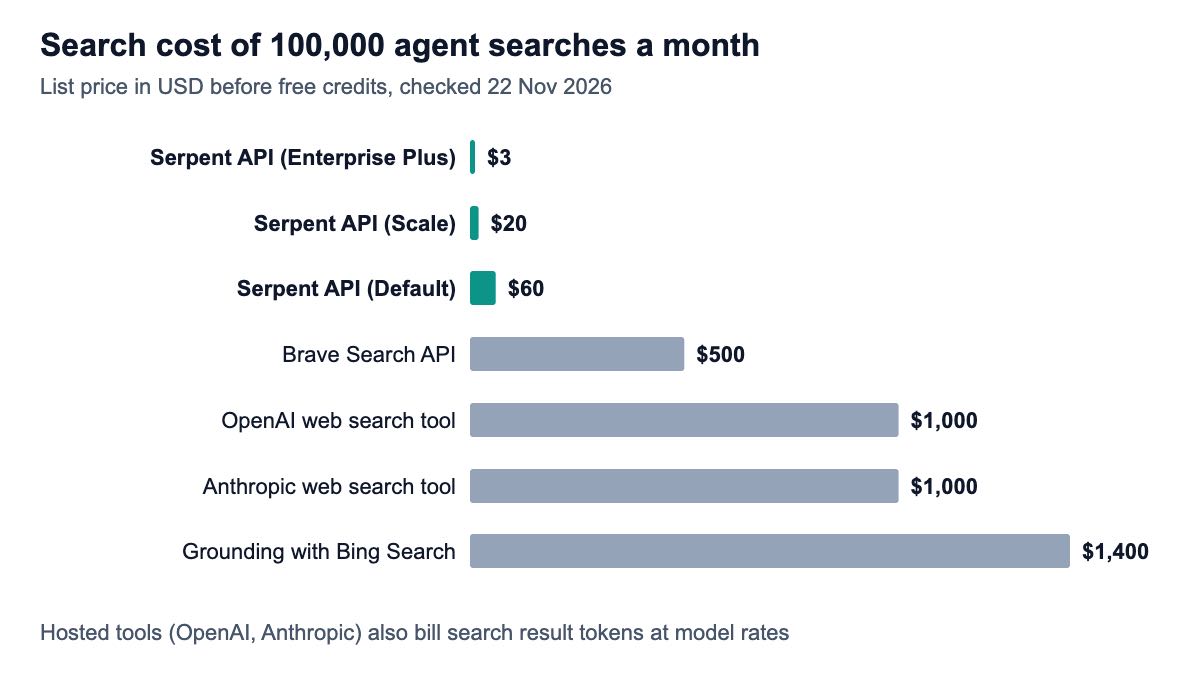
Far less than the hosted tools, and the gap grows with volume. The table prices 10,000, 100,000 and 1,000,000 searches a month at each provider's list rate, before any free credit, checked on 22 November 2026.
| Search option | Per 1,000 searches | 10,000 / month | 100,000 / month | 1,000,000 / month |
|---|---|---|---|---|
| Serpent API, Default ($10 deposit) | $0.60 | $6 | $60 | $600 |
| Serpent API, Growth ($100 deposit) | $0.30 | $3 | $30 | $300 |
| Serpent API, Scale ($500 deposit) | $0.20 | $2 | $20 | $200 |
| Serpent API, Enterprise ($1,000 deposit) | $0.15 | $1.50 | $15 | $150 |
| Serpent API, Enterprise Plus ($1,250 deposit) | $0.03 | $0.30 | $3 | $30 |
| Brave Search API | $5.00 | $50 | $500 | $5,000 |
| OpenAI web search tool | $10.00 + tokens | $100 | $1,000 | $10,000 |
| Anthropic web search tool | $10.00 + tokens | $100 | $1,000 | $10,000 |
| Grounding with Bing Search | $14.00 | $140 | $1,400 | $14,000 |
Prices come from Brave ($5 per 1,000 requests, with $5 of free credit each month), OpenAI's pricing page ($10 per 1,000 calls plus search content tokens at model rates), Anthropic's web search docs ($10 per 1,000 searches plus tokens) and Microsoft's Bing APIs page ($14 per 1,000 transactions, up to 1 million a day). Our Grounding with Bing pricing breakdown explains what counts as a transaction there.
The units are not identical. A hosted tool call returns sources the model has already read, while a results API returns a ranked list your tool formats. In both cases the results you pass to the model cost input tokens, so keeping five results instead of ten trims that part of the bill. Our tier depends on deposit size, not volume; the pricing page lists every rate.
Coming from Semantic Kernel's Bing search?
Replace the Bing connector with the function tool above; the agent code gets shorter, not longer. Microsoft retired the public Bing Search and Bing Custom Search APIs on 11 August 2025, according to its lifecycle notice. Semantic Kernel's Bing text search page still describes a component that calls the Bing Web Search API with your own Bing key, so code built on it has nothing left to call.
Microsoft's answer for new work is Agent Framework, which reached version 1.0 for .NET and Python on 3 April 2026. The 1.0 announcement links migration guides for Semantic Kernel and AutoGen and tells teams that "now is the time to migrate".
The Semantic Kernel migration guide maps the pieces. There is no plugin or kernel to register: a plain function, or a method on a class, goes straight into tools. If you have working KernelFunction code you want to keep for now, Semantic Kernel 1.38 or later can convert it with .as_agent_framework_tool(). A search plugin that only wrapped Bing is simpler to rewrite as the tool above.
The engine list in the tool includes Bing alongside Google, Yahoo, DuckDuckGo and Brave; our Bing SERP API page covers that engine. For a wider look at what replaced the Bing API, see our Bing Search API replacements comparison.
Can you use an MCP server instead?
Yes. Agent Framework connects to remote MCP servers with MCPStreamableHTTPTool, which takes a name, a URL and fixed headers. Our hosted MCP server takes the key in a header and gives the client one tool per endpoint, billed exactly like the matching REST call. Save this as mcp_option.py:
import os

from agent_framework import Agent, MCPStreamableHTTPTool
from agent_framework.openai import OpenAIChatClient

serpent_mcp = MCPStreamableHTTPTool(
    name="serpent",
    url="https://api.apiserpent.com/mcp",
    static_headers={"X-API-Key": os.environ.get("SERPENT_API_KEY", "sk_live_your_api_key")},
)

agent = Agent(
    client=OpenAIChatClient(model="gpt-5.4-mini"),
    instructions="Answer with current facts from the web and cite every URL you use.",
    tools=[serpent_mcp],
)
This definition builds on agent-framework 1.26.0; the logged run constructed it but did not connect, so the connection itself is not shown here. Our docs explain how to offer the agent only some tool families with a ?services= parameter on the URL.
The trade-off is control. The MCP route gives the agent every tool the server lists, with no budget logic of yours. The function tool gives it exactly one tool, your budget and your output format.
For production agents we would pick the function tool; to explore what data an agent could use, the MCP route is quicker. Our comparison of web search MCP servers covers the alternatives.
Why isn't my agent calling the tool?
Usually the description. If the question can be answered from the model's memory and the tool description is vague, the model will not search. Say in the docstring what the tool is for ("current facts, prices, news and documentation"), and say in the instructions that answers must cite URLs, as the example does.
Other common causes: a parameter has no type hint, so the schema the model sees is weaker than you think (print it as the logged run did); the tool returns a large JSON blob the model struggles with, which numbered lines fix; or the model writes full-sentence queries, which the "Short keyword search query" description discourages. If a provider rejects tools entirely, check the model itself supports function calling, since some small local models do not.
For richer results such as People Also Ask or related searches, call the per-page results endpoint and add those blocks to the tool's output. The same tool pattern appears in our CrewAI, Pydantic AI and OpenAI Agents SDK tutorials if you run more than one framework.
Which route should you pick?
On OpenAI, Foundry, Anthropic or Gemini, needing cited answers only: the hosted tool from get_web_search_tool() is the least code. Budget $10 to $14 per 1,000 searches plus tokens.
On Ollama, Mistral, Bedrock or switching providers: the function tool. It is the setup the provider matrix supports everywhere function tools exist.
Needing the ranked list, a choice of engine, or a hard per-run cap: the function tool, with the budget inside it and max_function_calls as a backstop.
Exploring many data sources at once: an MCP server through MCPStreamableHTTPTool, then move the tools you keep into code. For the token side of the bill, our agent cost math post has worked numbers.
How we checked this
The code was run on 22 November 2026 with agent-framework 1.26.0, agent-framework-core 1.26.0, agent-framework-openai 1.18.2, httpx 0.28.1 and pydantic 2.14.4 on Python 3.15, in a virtual environment. Two parts were stubbed and nothing paid was called: the HTTP request returned the documented example response from our docs, and the model was a scripted stand-in built on the framework's BaseChatClient. The output, package versions and full scripts are logged with the article's evidence.
Sources: 7 Microsoft Learn and devblog pages, 4 official pricing pages, and the agent-framework release list on PyPI, opened 22 November 2026. What we could not verify: how a live model chooses queries with this tool, result quality, latency, and how often a live model batches several searches into one turn, which decides how far max_function_calls can overshoot.
Give your agent live search
Serpent API returns Google, Bing, Yahoo, DuckDuckGo and Brave results as JSON, from $0.03 per 1,000 — pay as you go, no subscription. New accounts get 10 free API calls, enough to try the tool above.
Get Your Free API KeyExplore: SERP API · Playground · Docs · Pricing
FAQ
Does Microsoft Agent Framework have a web search tool?
Yes, as a hosted tool. In Python you get it from a chat client with client.get_web_search_tool() and pass it to the agent. The search runs inside the model provider, so it only works with providers that support hosted web search, such as the OpenAI, Foundry, Anthropic and Gemini clients. On Ollama, Mistral or Bedrock, write web search as a function tool that calls a search API, which works anywhere function tools do.
How do I add a custom tool in Microsoft Agent Framework?
Write a Python function or method with type hints and a docstring, and pass it in the tools list when you create the Agent. The function name becomes the tool name and the docstring its description. Add Annotated with a Pydantic Field to describe each parameter, or use the @tool decorator to set the name and description explicitly. Async functions work, and methods on a class let tools share state.
What replaced the Bing Search connector in Semantic Kernel?
Microsoft retired the public Bing Search APIs on 11 August 2025, so the Bing connector has no API to call. Microsoft now points new agent work to Agent Framework, where web search is either a hosted tool on supported providers or a function tool you write around any search API. The function tool in this article works with any model that supports function calling, and its engine setting chooses which search engine the results come from.
How do I limit tool calls in Microsoft Agent Framework?
Set function_invocation_configuration on the chat client: max_iterations, max_function_calls and max_duration_seconds. When a limit is reached, the client stops running tools and asks the model for a final text answer. Microsoft notes the limits are best effort, checked after each batch of tool calls. For a hard cap on paid searches, also keep a counter inside the tool, as in the example.
Can Agent Framework use web search with Ollama or other local models?
Not through the hosted tool, which Ollama does not provide. Agent Framework's provider table lists function tools as supported on Ollama, so a search function tool works, provided the model you run supports function calling. The tool itself makes an ordinary HTTPS request to the search API, so only the search call leaves your machine.
Sources
Microsoft documentation (checked 22 November 2026):
- Agent Framework: Web Search
- Agent Framework: Using function tools with an agent
- Agent Framework: Model providers
- Semantic Kernel to Agent Framework migration guide
- Semantic Kernel Bing text search
- Foundry Agent Service: web search tool
- Bing Search API retirement notice
- Microsoft Agent Framework version 1.0 (3 April 2026)
- agent-framework on PyPI
Official pricing (checked 22 November 2026):