Add Web Search to the OpenAI Agents SDK — With Any Model, Not Just OpenAI's

The OpenAI Agents SDK ships a one-line web search: add WebSearchTool() to your agent and it just works. Right up until you swap the model.
Point the same agent at Claude, Gemini, Llama or any other provider and the hosted tool is gone — it only exists on OpenAI's Responses models. The docs say so plainly, and nothing in the July 2026 release changed it.
This guide shows the fix: a custom web_search function tool that works with every model the SDK can drive. We ran every line of code here against openai-agents 0.18.3 (released July 17, 2026), and we measured what each search-result format actually costs you in tokens — because that part is where most tutorials stay silent.
TL;DR: The hosted WebSearchTool is locked to OpenAI Responses models. For any other model, write a ~20-line @function_tool that calls a SERP API and returns trimmed JSON (position, title, url, snippet). Attach the model through LitellmModel or the new Any-LLM adapter. Keep tool output under ~1,000 tokens — a raw results-page HTML dump costs 76,246 tokens; the trimmed JSON of the same query's top 10 costs 781.
Why WebSearchTool won't run on other models
The restriction is not a bug and not undocumented — it's the design. Hosted tools execute on OpenAI's servers, inside the Responses API.
The SDK's tools documentation puts it in the first sentence: "OpenAI offers a few built-in tools when using the OpenAIResponsesModel" — and WebSearchTool heads that list, alongside FileSearchTool, CodeInterpreterTool and the newer ToolSearchTool.
The models page is even more direct about mixing providers: "OpenAI supports structured outputs, multimodal input, and hosted file search and web search, but many other providers don't support these features… Don't send unsupported tools to providers that don't understand them."
So if your agent needs to search the web and you want model freedom — Claude for reasoning, a cheap model for volume, or just no vendor lock-in — the hosted tool is off the table. What's left is the mechanism the SDK actually built for this: function tools.
Verified July 21, 2026 against openai-agents v0.18.3 (Python) and @openai/agents v0.13.5 (JS), both released July 17, 2026.
The fix: a custom web_search function tool
A function tool is any Python function with a docstring. The SDK reads the signature with inspect, builds the JSON schema with pydantic, and hands the model a tool it can call. Here is the complete, working tool — imports, auth and all:
# pip install openai-agents httpx   (tested on openai-agents 0.18.3, Jul 21 2026)
import json
import os

import httpx
from agents import Agent, Runner, function_tool


@function_tool
async def web_search(query: str, num_results: int = 5) -> str:
    """Search the web and return the top organic results.

    Args:
        query: The search query.
        num_results: How many results to return (1-10).
    """
    async with httpx.AsyncClient(timeout=30) as client:
        r = await client.get(
            "https://apiserpent.com/api/search/quick",
            params={"q": query, "country": "us"},
            headers={"X-API-Key": os.environ["SERPENT_API_KEY"]},
        )
        r.raise_for_status()
        organic = r.json()["results"]["organic"][:num_results]
    # Return a COMPACT payload — this string lands in the model's context window.
    return json.dumps(
        [{"position": x["position"], "title": x["title"], "url": x["url"],
          "snippet": (x.get("snippet") or "")[:300]}
         for x in organic],
        ensure_ascii=False,
    )


agent = Agent(
    name="Research assistant",
    instructions="Answer using the web_search tool. Cite the URLs you used.",
    tools=[web_search],
)

result = Runner.run_sync(agent, "What is the current Node.js LTS version?")
print(result.final_output)
Three deliberate choices in that tool:
The docstring is the prompt. The SDK lifts the tool description and per-argument descriptions straight from it. Write it for the model, not for your linter.
It returns a string of trimmed JSON, not the raw response. Whatever your tool returns is appended to the conversation and re-read by the model on every subsequent turn. The measurements below show why trimming here is worth real money.
Snippets are capped at 300 characters. Position, title, URL and a short snippet are what the model needs to decide what to cite; anything more is padding you pay for repeatedly.
Here's the real output from our test run on July 21, 2026 (run end-to-end through the SDK's LiteLLM adapter path with a non-OpenAI chat model — the exact setup from the next section):
The current Node.js **LTS (Long Term Support)** version is **Node.js 24.x**, with
the latest release being **v24.11.0**, codenamed **"Krypton"**. It entered LTS
status on October 28, 2025, and will continue to receive updates through the end
of April 2028.

For the most up-to-date information, you can always check the official Node.js
website: https://nodejs.org/en/blog/release/v24.11.0
One tool call, one grounded answer with a citation, ~15 seconds end to end. The agent decided to search, got 5 compact results, and answered from them. If you need more than 10 results per call, the full /api/search endpoint pages up to 100.
Wiring in any model (LiteLLM, Any-LLM, custom clients)
The 2026 SDK gives you three built-in integration points plus two official beta adapters. Most tutorials still show the 2025 story — the docs were restructured this year, so here is the current map.
Built-in, for OpenAI-compatible endpoints (Groq, OpenRouter, local vLLM, most gateways): pick the scope you need.
| You want | Use | Scope |
|---|---|---|
| One endpoint for everything | set_default_openai_client(AsyncOpenAI(base_url=..., api_key=...)) | Global |
| One provider for a single run | ModelProvider passed to the run | Per run |
| Different models per agent | Agent(model=OpenAIChatCompletionsModel(...)) | Per agent |
The adapters, for everyone else. The models page now lists two: "The SDK currently includes Any-LLM and LiteLLM as best-effort, beta adapter integrations." LiteLLM is the established one — Claude in one line:
# pip install "openai-agents[litellm]"
from agents import Agent, Runner, function_tool, set_tracing_disabled
from agents.extensions.models.litellm_model import LitellmModel

set_tracing_disabled(disabled=True)  # traces upload to OpenAI; skip without an OpenAI key

agent = Agent(
    name="Research assistant",
    instructions="Answer using the web_search tool. Cite the URLs you used.",
    model=LitellmModel(model="anthropic/claude-sonnet-5"),  # any LiteLLM model string
    tools=[web_search],   # the SAME tool from above — nothing changes
)

result = Runner.run_sync(agent, "What is the current Node.js LTS version?")
That's the whole point of the pattern: the web_search tool doesn't know or care which model calls it. We ran this exact adapter path end-to-end on July 21, 2026 — the output above came from it. Model strings follow LiteLLM's provider format (anthropic/…, gemini/…, and so on).
The newer Any-LLM adapter (pip install "openai-agents[any-llm]") does the same job with AnyLLMModel and any-llm/… prefixes routed through MultiProvider, and lets you pin api="responses" or api="chat_completions" explicitly. Both adapters are labeled beta; if you only ever use OpenAI models, the docs tell you to stay on the native OpenAIResponsesModel path instead.
The three gotchas with non-OpenAI providers
All three are documented under "Troubleshooting non-OpenAI providers" on the models page, and all three will hit you in the first ten minutes if you don't know them:
1. Tracing 401s. The SDK uploads traces to OpenAI's servers by default. No OpenAI key → a 401 in your logs on every run. Fix: set_tracing_disabled(disabled=True) (or point tracing elsewhere).
2. Structured outputs 400s. Some providers reject response_format with BadRequestError… 'response_format.type' : value is not one of the allowed values ['text','json_object']. Keep agent outputs plain-text with these providers, and validate JSON yourself.
3. Silent feature gaps. Hosted tools (including WebSearchTool), the new deferred tool loading (@function_tool(defer_loading=True), tool_namespace()) and ToolSearchTool are all "supported only with OpenAI Responses models" and are "rejected on Chat Completions models and on non-Responses backends." Function tools like ours work everywhere.
One more practical note: some Chat-Completions-compatible providers stream tool calls oddly; the SDK added buffer_streamed_tool_calls=True on OpenAIProvider for exactly that (v0.17.7 release notes).
What a search result costs in tokens (measured)
Every tutorial says "keep tool output small." Almost none says what small is worth. So we measured it.
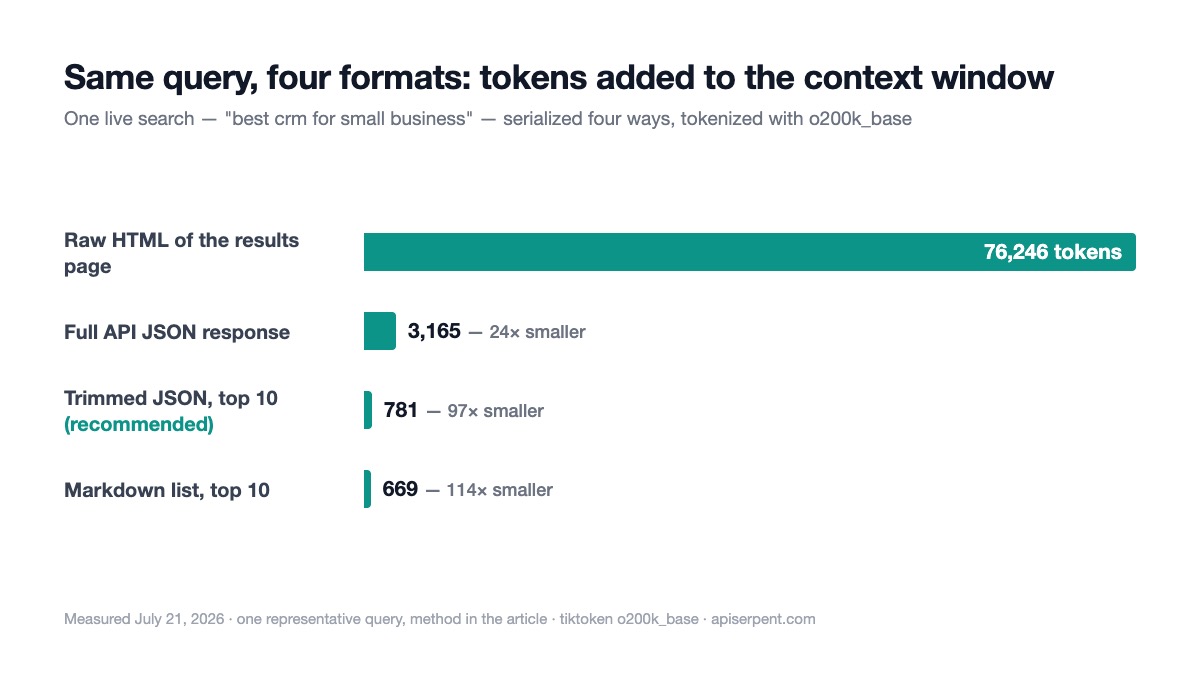
Method: one live query ("best crm for small business", US) on July 21, 2026. We took (a) the raw HTML of a live search results page for that query, saved the same hour; (b) the full JSON response from our /api/search endpoint, exactly as returned — 14 organic results plus ads, People-Also-Ask, related-searches and AI-overview blocks; (c) a markdown list of the top 10 results; (d) the trimmed JSON schema from the tool above (position, title, url, snippet≤300 chars, top 10). Tokens counted with tiktoken's o200k_base — the encoding for GPT-4o/4.1/5.x-family models.
| What the tool hands the model | Bytes | Tokens (o200k_base) |
|---|---|---|
| Raw HTML of the results page | 209,380 | 76,246 |
| Full API JSON response, as returned | 13,272 | 3,165 |
| Trimmed JSON, top 10 (recommended) | 3,118 | 781 |
| Markdown list, top 10 | 2,722 | 669 |
Raw HTML costs 97× the trimmed JSON — for the same query. This is one representative measurement, not an average, but the shape is stable: page chrome, scripts and markup dwarf the actual results. If your "search tool" is a scraper that returns page HTML into the context window, you are paying for 75,000 tokens of noise per call, then paying for them again every turn they stay in history.
Markdown edges out trimmed JSON by ~14% — but it loses machine structure. Our honest recommendation: trimmed JSON for tool outputs (models parse it reliably, and it survives handoffs and programmatic post-processing), markdown only when the text is going straight to a human.
Two tokenizer footnotes worth knowing. First, tiktoken.encoding_for_model("gpt-5.4-mini") raises KeyError — the dotted 5.x names aren't in its model map — so call tiktoken.get_encoding("o200k_base") directly. Second, if you're counting for Claude, use Anthropic's free count-tokens endpoint against your exact target model: their docs note that newer Claude models tokenize the same text into roughly 30% more tokens than older ones.

The handoff trap: old search results bill forever
Here's the part that bites multi-agent apps. The handoffs doc: "When a handoff occurs, it's as though the new agent takes over the conversation, and gets to see the entire previous conversation history."
That history includes every tool result. Hand off from a research agent to a writing agent and every search result the researcher pulled is re-sent to the model — on the handoff, and on every turn after it. A 3,000-token tool output re-read over 20 turns is 60,000 input tokens you didn't plan for.
Three levers, all shipped in the SDK:
# 1 — strip tool history at the handoff boundary
from agents import Agent, handoff
from agents.extensions import handoff_filters

writer = Agent(name="Writer")
to_writer = handoff(agent=writer, input_filter=handoff_filters.remove_all_tools)
# 2 — auto-trim stale tool outputs on every model call
from agents import RunConfig
from agents.extensions import ToolOutputTrimmer
config = RunConfig(
call_model_input_filter=ToolOutputTrimmer(
recent_turns=2, # never trim the last 2 user turns
max_output_chars=500, # outputs above this become trim candidates
preview_chars=200, # what survives of a trimmed output
trimmable_tools={"web_search"},
),
)3 — compact the whole history: OpenAIResponsesCompactionSession wraps any session store and compacts stored history via the Responses API after each turn (OpenAI-model runs), and RunConfig.nest_handoff_history collapses the prior transcript into a single summary message at handoffs. Both are in the current sessions/handoffs docs.
The cheap habit that makes all of this smaller: return trimmed JSON from the tool in the first place. A 781-token tool output is a rounding error even when it does get re-sent; a 76,000-token HTML dump is a budget line.
The JavaScript/TypeScript version
The JS SDK (@openai/agents, v0.13.5) has the same split: hosted tools are listed under "Hosted tools (OpenAI Responses API)", and custom tools use tool() with a Zod schema:
// npm i @openai/agents zod
import { Agent, run, tool } from '@openai/agents';
import { z } from 'zod';

const webSearch = tool({
  name: 'web_search',
  description: 'Search the web and return the top organic results as JSON.',
  parameters: z.object({
    query: z.string(),
    numResults: z.number().int().min(1).max(10).default(5),
  }),
  async execute({ query, numResults }) {
    const r = await fetch(
      `https://apiserpent.com/api/search/quick?q=${encodeURIComponent(query)}&country=us`,
      { headers: { 'X-API-Key': process.env.SERPENT_API_KEY } },
    );
    if (!r.ok) throw new Error(`Search failed: ${r.status}`);
    const { results } = await r.json();
    return JSON.stringify(
      results.organic.slice(0, numResults).map((x) => ({
        position: x.position, title: x.title, url: x.url,
        snippet: (x.snippet || '').slice(0, 300),
      })),
    );
  },
});

const agent = new Agent({
  name: 'Research assistant',
  instructions: 'Answer using the web_search tool. Cite the URLs you used.',
  tools: [webSearch],
});

const result = await run(agent, 'What is the current Node.js LTS version?');
console.log(result.finalOutput);
For non-OpenAI models in JS, the official route is the Vercel AI SDK adapter in @openai/agents-extensions, which accepts any AI-SDK model. If you're building in that ecosystem anyway, our SERP-for-agents guide covers the same trimming schema from the TypeScript side.
Hosted search pricing vs doing it yourself
Even where the hosted tool is available, the economics favor owning the search step at volume.
OpenAI's pricing page (checked July 21, 2026) lists web_search at $10.00 per 1,000 calls, plus the retrieved search-content tokens billed at your model's input rate; the preview variant for non-reasoning models is $25.00 per 1,000 with content tokens free. A Serpent web search is $0.60 per 1,000 on the Default tier, $0.30 at Growth, $0.10 at Scale — and because the search is decoupled, you control exactly how many tokens reach the model and can cache popular queries.
We've done the full comparison — including Gemini grounding and the fan-out problem — in the grounding-cost teardown, and the agent-search landscape (Tavily, Exa, Brave) in this benchmark. For deeper builds on this pattern, see the deep-research agent tutorial, the LangChain cost math, and the SERP MCP server build. If you're normalizing results across providers, this field-mapping reference saves an afternoon.
Give your agents real web search
Serpent is a pay-as-you-go SERP API built for AI apps — Google, Bing, Yahoo, DuckDuckGo and Brave behind one JSON schema, up to 100 results per call. Free to start, then from $0.60 per 1,000 down to $0.10 at Scale. No subscription.
Get Your Free API KeyExplore: SERP API · Documentation · Pricing
FAQ
Does the OpenAI Agents SDK WebSearchTool work with Claude or Gemini?
No. WebSearchTool is a hosted tool that only runs on OpenAI Responses models, and the SDK docs tell you not to send unsupported tools to other providers. To search the web with Claude, Gemini or any other model, write a custom function tool that calls a SERP API and returns compact JSON.
How do I use a non-OpenAI model with the OpenAI Agents SDK?
Three built-in routes: set_default_openai_client for any OpenAI-compatible endpoint, a ModelProvider per run, or Agent.model per agent. For everything else the SDK ships two beta adapters — Any-LLM and LiteLLM. LitellmModel(model="anthropic/…") drops Claude into an agent in one line.
How many tokens does a web search result add to my context window?
It depends entirely on the format. In our July 2026 measurement of one query, the raw HTML of a results page was 76,246 tokens, the full SERP API JSON response was 3,165, and a trimmed JSON of the top 10 results (position, title, url, snippet) was 781 — about 97× less than raw HTML.
Do tool outputs carry across agent handoffs?
Yes — by default the receiving agent sees the entire previous conversation history, including every tool result, and it is re-sent to the model on every later turn. Use handoff input_filters like remove_all_tools, the ToolOutputTrimmer extension, or a compaction session to stop old search results from re-billing forever.
What does OpenAI's hosted web search tool cost?
As of July 2026 OpenAI lists the web_search tool at $10 per 1,000 calls, plus the retrieved search content tokens billed at your model's input rate. The preview variant for non-reasoning models is $25 per 1,000 calls with content tokens free. A pay-as-you-go SERP API call costs a fraction of a cent.