Pydantic AI web search: a tool that works on every model

To give a Pydantic AI agent web search, write an async Python function that calls a search API, and pass it in tools=[...]. Pydantic AI turns its docstring into the schema the model sees. The built-in WebSearchTool is the other route, but it only runs on some providers and costs $10 per 1,000 searches on OpenAI and Anthropic.
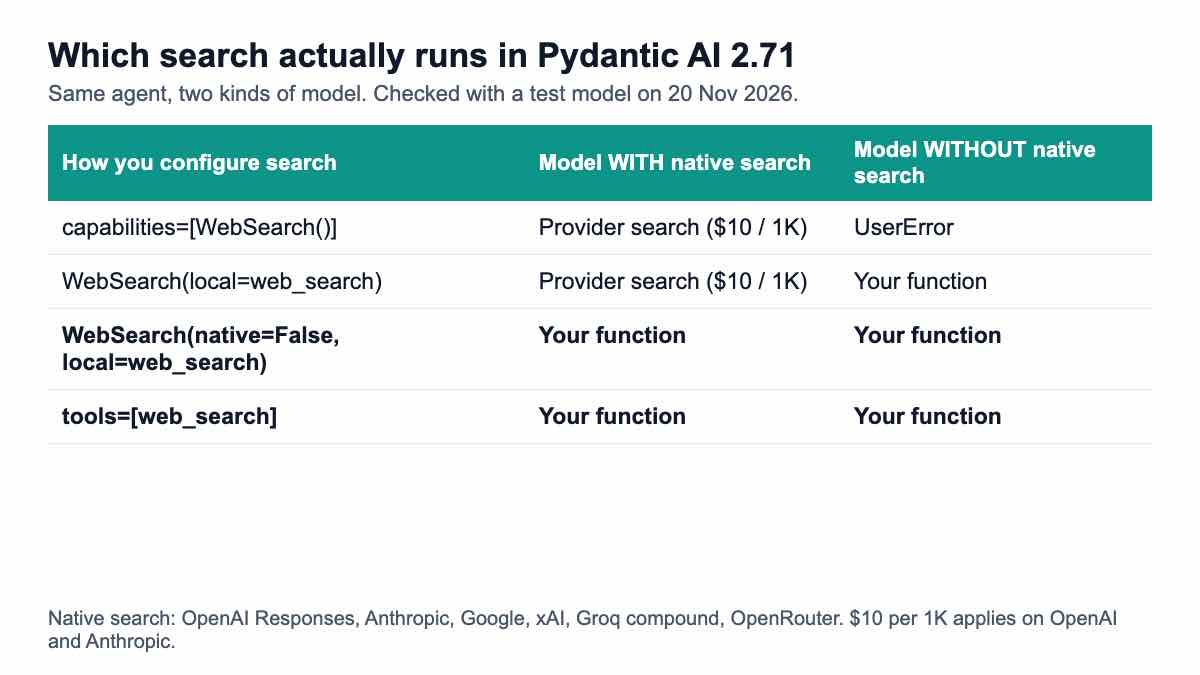
Short answer: For a prototype on OpenAI or Anthropic, the native WebSearch capability is the least code. For production, cost control or any model without native search, use your own function tool on a SERP API: it works on every provider, you choose the fields the model reads, and a search can cost from $0.03 per 1,000. If you want the capability wrapper anyway, write WebSearch(native=False, local=your_function), because WebSearch(local=your_function) quietly uses the provider's search whenever it can.
What are your web search options in Pydantic AI?
You have four ways in, and they differ in who runs the search and who pays for it. Pydantic AI 2.x ships a provider-native WebSearchTool, a WebSearch capability that wraps it, two "common tools" for DuckDuckGo and Tavily, and plain function tools that you write yourself.
The native tool hands the search to the model provider. The native tools page lists OpenAI Responses, Anthropic, Google, xAI, Groq (compound models) and OpenRouter as supported, and OpenAI Chat Completions, Bedrock, Mistral, Cohere and Hugging Face as unsupported. On OpenAI you must be on the Responses API.
The common tools live in pydantic_ai.common_tools. The common tools docs describe duckduckgo_search_tool() (install the duckduckgo extra) and tavily_search_tool(api_key) (the tavily extra). The Exa tools on that page are marked deprecated and "will be removed in v3", so avoid building on them.
| Route | How you add it | Who runs the search | Works on any model? | List price per 1,000 searches |
|---|---|---|---|---|
| Native WebSearchTool | capabilities=[NativeTool(WebSearchTool())] | The model provider | No (6 providers) | $10 on OpenAI and Anthropic, plus tokens |
| WebSearch capability | capabilities=[WebSearch()] | Provider, or your local tool | Only with local= | Same as the route it picks |
| DuckDuckGo common tool | tools=[duckduckgo_search_tool()] | DuckDuckGo | Yes | No published API price (unverified) |
| Tavily common tool | tools=[tavily_search_tool(key)] | Tavily | Yes | $5.00 to $8.00 (1,000 free a month) |
| Your own function tool | tools=[web_search] | Any search API you call | Yes | Whatever your API charges (from $0.03) |
How do you write the search tool?
Write one async function with type hints and a Google-style docstring. Pydantic AI reads the summary line as the tool description and each Args: line as that parameter's description, so the docstring is the prompt the model gets for your tool.
This version calls Google results through the search endpoint, keeps the top eight organic rows and returns typed objects. A 400 means the model sent a bad argument, so the tool raises ModelRetry with the message from the response and lets the model fix its call. Anything else (a bad key, no credit, a server error) stops the run instead of looping.
# search_tool.py - a web search tool for Pydantic AI backed by a SERP API
import os

import httpx
from pydantic import BaseModel
from pydantic_ai import ModelRetry

SERPENT_URL = "https://apiserpent.com/api/search"


class SearchHit(BaseModel):
    position: int
    title: str
    url: str
    snippet: str = ""


def make_client() -> httpx.AsyncClient:
    return httpx.AsyncClient(timeout=30)


async def web_search(query: str, country: str = "us", freshness: str | None = None) -> list[SearchHit]:
    """Search Google and return the top organic results.

    Args:
        query: The search query, phrased the way a person would type it into Google.
        country: Two-letter country code for localized results, for example "us", "gb" or "de".
        freshness: Optional time filter: "d" for the past day, "7d" for the past week, "m" for the past month.
    """
    params = {"q": query, "country": country}
    if freshness:
        params["freshness"] = freshness
    async with make_client() as client:
        r = await client.get(SERPENT_URL, params=params,
                             headers={"X-API-Key": os.environ["SERPENT_API_KEY"]})
    if r.status_code == 400:
        # A bad parameter (an unknown country code, say): let the model fix its call.
        raise ModelRetry(f"web_search rejected the arguments: {r.json().get('message')}")
    r.raise_for_status()  # 401 / 402 / 429 / 5xx stop the run instead of looping
    organic = r.json()["results"]["organic"][:8]
    return [
        SearchHit(position=o["position"], title=o["title"], url=o["url"], snippet=o.get("snippet") or "")
        for o in organic
    ]
Two design choices matter more than they look. First, the tool returns four short fields, not the whole response. The full JSON also carries ads (where present), related searches and metadata the model does not need, and every character it reads is billed as input tokens on most providers.
Second, make_client() is its own function. That one line is what makes the tool testable later: a test swaps it for a client with a fake transport, and nothing else in the code changes.
Here is the schema Pydantic AI generated from that function on version 2.71.0. This is exactly what the model is shown:
web_search | Search Google and return the top organic results.
{
 "additionalProperties": false,
 "properties": {
  "query": {
   "description": "The search query, phrased the way a person would type it into Google.",
   "type": "string"
  },
  "country": {
   "default": "us",
   "description": "Two-letter country code for localized results, for example \"us\", \"gb\" or \"de\".",
   "type": "string"
  },
  "freshness": {
   "anyOf": [{"type": "string"}, {"type": "null"}],
   "default": null,
   "description": "Optional time filter: \"d\" for the past day, \"7d\" for the past week, \"m\" for the past month."
  }
 },
 "required": ["query"],
 "type": "object"
}
Only query is required, so a model can call the tool with one argument. The country default keeps results consistent, and freshness lets the model ask for the past day or week when the question is about news. Both map one to one to the documented country and freshness parameters.
How do you attach it to an agent?
Pass the function in tools=[...]. Add an output_type if you want the answer and its sources as a typed object instead of free text.
# agent_app.py - the agent that uses the tool
from pydantic import BaseModel
from pydantic_ai import Agent, UsageLimits

from search_tool import web_search


class Answer(BaseModel):
    answer: str
    sources: list[str]


agent = Agent(
    "openai:gpt-5.6-sol",
    tools=[web_search],
    output_type=Answer,
    instructions=(
        "Answer with web_search when the question needs current facts. "
        "Search at most twice. Put every URL you relied on in sources."
    ),
    defer_model_check=True,  # resolve the OpenAI provider (and its key) on first run, not at import
)

if __name__ == "__main__":
    result = agent.run_sync(
        "What is the easiest way to tie a tie?",
        usage_limits=UsageLimits(tool_calls_limit=3),
    )
    print(result.output)
Three lines in that file do real work. output_type=Answer makes the model return its answer through a validated schema, so result.output.sources is always a list of strings you can store or render.
UsageLimits(tool_calls_limit=3) is a hard cap. The instruction "search at most twice" is a request the model can ignore; the limit ends the run with UsageLimitExceeded before a fourth search is sent, which puts a ceiling on what one question can cost you. In a test where the model asked for a search on every turn and the limit was 1, exactly one HTTP request went out.
defer_model_check=True delays creating the OpenAI provider until the first run. Without it, importing this module with no OPENAI_API_KEY set raises a UserError, which breaks test collection in CI. The model id is a string, so swapping to "anthropic:...", "google:..." (the v2 name for the old google-gla: prefix) or a local model does not touch the tool.
What does a run look like?
Here is the run log from 20 Nov 2026. Pydantic AI 2.71.0 did all of its real work: schema generation, the agent loop, ModelRetry handling and output validation. Two things were replaced, and only two: the LLM was a scripted FunctionModel, and the HTTP call was answered with the response published in the response format docs. So the results below are the documented shape, not a live search.
The script made the model's first call use country="zz" on purpose, to show the error path:
model sees: [('ToolReturnPart', 'web_search rejected the arguments: country is not a supported 2-letter code')]
model sees: [('ToolReturnPart', 'list')]
--- HTTP requests the tool made ---
GET https://apiserpent.com/api/search?q=how+to+tie+a+tie&country=zz X-API-Key: sk_live_test
GET https://apiserpent.com/api/search?q=how+to+tie+a+tie&country=us X-API-Key: sk_live_test
--- result.output ---
answer='Start with 4 Ways to Tie a Tie - wikiHow: it walks through four knots.' sources=['https://www.wikihow.com/Tie-a-Tie', 'https://www.youtube.com/watch?v=mS6lX5QVUu0']
--- usage ---
RunUsage(input_tokens=265, output_tokens=84, requests=3, tool_calls=1)
The 400 came back as unsupported_country, the tool raised ModelRetry, and the model saw the reason as plain text and corrected the country. That is the behaviour you want from an agent: fix a bad argument once, without your code knowing anything about countries.
Note tool_calls=1. Pydantic AI counted only the successful call, so the rejected attempt did not use up the tool_calls_limit. The token numbers are estimates from the test model, not a provider bill.
Why does WebSearch(local=...) skip your function?
Because the capability prefers the provider's search, and treats your function as the backup for models that lack one. The WebSearch docs say it in a code comment: "Native preferred; custom callable as fallback".
This is easy to miss. You pass WebSearch(local=web_search), test on a model without native search, see your function called, then deploy on Claude or a Responses-API OpenAI model. In v2 the plain openai: prefix means the Responses API (per the migration guide; openai-chat: is Chat Completions), so the openai:gpt-5.6-sol model used on this page is one of them. From then on every search is a $10-per-1,000 provider search, and your function is never offered to the model.
The run log shows it. A test model whose profile declares native web search support got these tools:
WebSearch(local=web_search)                   -> function tools=[] native tools=['WebSearchTool']
WebSearch(native=False, local=web_search)     -> function tools=['web_search'] native tools=[]
If you prefer the capability API, for example to keep search next to your other capabilities, set native=False. The tool keeps your function's name; in a 20 Nov 2026 check, a function called my_lookup was offered to the model as my_lookup.
# capability_variant.py - the same tool plugged into Pydantic AI's WebSearch capability
from pydantic_ai import Agent
from pydantic_ai.capabilities import WebSearch

from search_tool import web_search

# native=False: never use the model provider's own search; always call web_search.
agent = Agent(
    "openai:gpt-5.6-sol",
    capabilities=[WebSearch(native=False, local=web_search)],
    defer_model_check=True,
)
One more rule from the same page: setting a restricting field such as allowed_domains or max_uses on WebSearch itself disables the local route, and on a model that cannot apply the restriction the capability raises UserError. If you need a domain allow-list with your own function, put it in the query (for example site:) or in your function's code.
What broke in Pydantic AI v2?
The search wiring changed names, and most tutorials you will find still show v1. Pydantic AI 2.0.0 shipped on 23 June 2026 (PyPI), and the migration guide maps Agent(builtin_tools=[...]) to Agent(capabilities=[NativeTool(...)]).
Old code does not fail politely. On 2.71.0, Agent('test', builtin_tools=[]) raises TypeError: Agent.__init__() got an unexpected keyword argument 'builtin_tools'.
- Module rename:
pydantic_ai.builtin_toolsis nowpydantic_ai.native_tools. - No silent fallback:
WebSearch()no longer falls back to a local search by default. Without a native-capable model and withoutlocal=, it raises. - Usage is a property:
result.usage()still works on 2.71.0 but prints a deprecation warning; useresult.usage. - Exa common tools: deprecated, to be removed in v3, with the replacement living in a separate package.
Plain function tools did not change. A function passed in tools=[...] works the same way it did in v1, which is one more reason to own the search tool rather than depend on a wrapper that moves between releases.
What does each search cost at 1K, 100K and 1M a month?
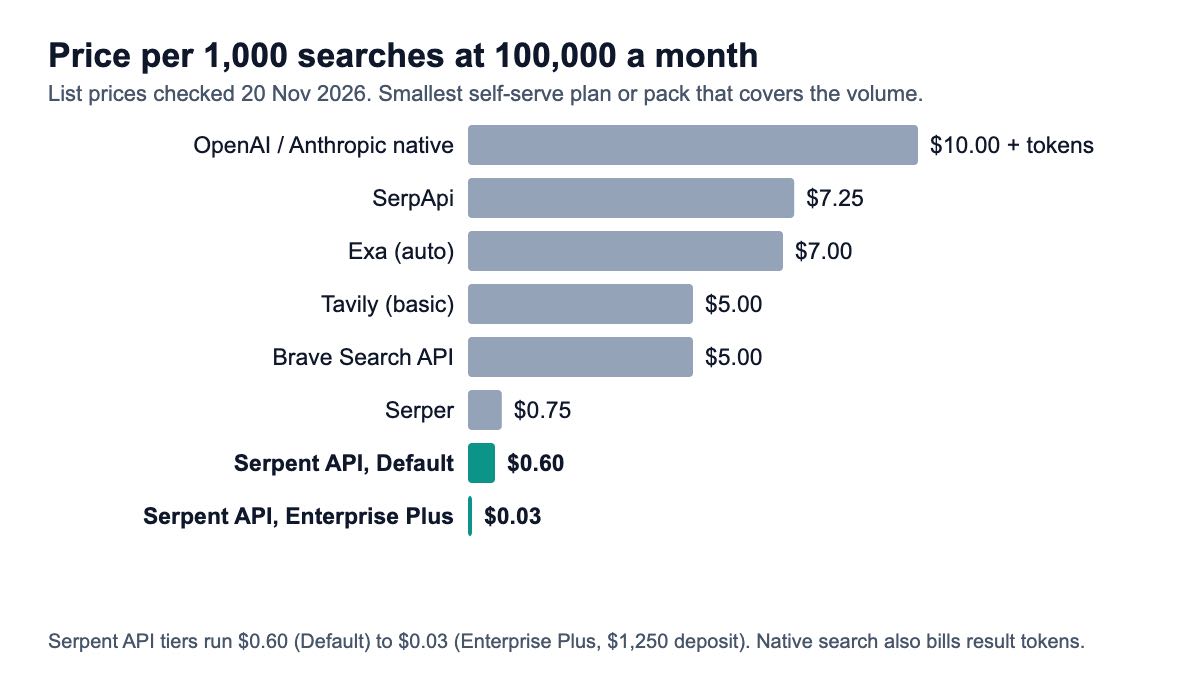
Native search on OpenAI or Anthropic is the most expensive route at every volume, at $10 per 1,000 calls before tokens. A SERP API called from your own function is the cheapest, from $0.03 per 1,000. The table uses each vendor's list price on 20 Nov 2026 and the smallest self-serve plan or pack that covers the volume.
| Search option | 1,000 / month | 100,000 / month | 1,000,000 / month | Rule used |
|---|---|---|---|---|
| OpenAI web search tool | $10.00 | $10.00 | $10.00 | $10 per 1K calls + search content tokens at model rates |
| Anthropic web search | $10.00 | $10.00 | $10.00 | $10 per 1K searches; results count as input tokens |
| Exa (auto) | $0 (free credit) | $7.00 | $7.00 | $7 per 1K; $10 free credit each month |
| Brave Search API | $0 (free credit) | $5.00 | $5.00 | $5 per 1K; $5 free credit each month |
| Tavily (basic search) | $0 (free tier) | $5.00 | $7.70 | 1,000 free credits; Growth $500 for 100K; $0.008 each after |
| SerpApi | $25.00 | $7.25 | $3.75 | Starter $25, Searcher $725, Cloud 1M $3,750 a month |
| Serper | $8.33 | $0.75 | $0.50 | $50 / $375 / $1,250 packs; credits expire after 6 months |
| Serpent API, Default (pay as you go) | $0.60 | $0.60 | $0.60 | Pay as you go |
| Serpent API, Growth ($100 deposit) | $0.30 | $0.30 | $0.30 | Pay as you go |
| Serpent API, Scale ($500 deposit) | $0.10 | $0.10 | $0.10 | Pay as you go |
| Serpent API, Enterprise ($1,000 deposit) | $0.05 | $0.05 | $0.05 | Pay as you go |
| Serpent API, Enterprise Plus ($1,250 deposit) | $0.03 | $0.03 | $0.03 | Pay as you go |
Two notes on reading it. Serper's $8.33 at 1,000 a month is the $50 minimum pack spread over its six-month life; its list rate is $1.00 per 1,000. Native search also bills the search content as tokens, so its real cost per answer is higher than the per-call price.
The cost gap is wider than the table suggests for agents, because one question often triggers two or three searches. At 100,000 questions a month and two searches each, native search is about $2,000 before tokens; the same 200,000 searches on a SERP API are $120 at the $0.60 rate or $6 at $0.03. Run your own numbers on the pricing page.
How do you test it without an LLM key?
Use FunctionModel for the model and httpx.MockTransport for the network. The test below runs the real agent from agent_app.py with no OPENAI_API_KEY set and no network access, and asserts on the parsed sources rather than on a status code.
# test_agent.py - no LLM key, no network: a scripted model plus a fake HTTP transport
import json
import os

import httpx
from pydantic_ai import models
from pydantic_ai.messages import ModelResponse, ToolCallPart, ToolReturnPart
from pydantic_ai.models.function import AgentInfo, FunctionModel

import search_tool
from agent_app import agent

models.ALLOW_MODEL_REQUESTS = False   # fail loudly if anything tries a real model
os.environ["SERPENT_API_KEY"] = "sk_test"
DOCS = json.load(open("docs-response.json"))   # the response shown at /docs#response-format
search_tool.make_client = lambda: httpx.AsyncClient(
    transport=httpx.MockTransport(lambda request: httpx.Response(200, json=DOCS)))


def script(messages, info: AgentInfo) -> ModelResponse:
    returned = [p for p in messages[-1].parts if isinstance(p, ToolReturnPart)]
    if not returned:  # turn 1: ask for a search
        return ModelResponse(parts=[ToolCallPart("web_search", {"query": "how to tie a tie"})])
    hits = returned[0].content  # turn 2: answer through the output tool
    return ModelResponse(parts=[ToolCallPart(info.output_tools[0].name,
                                             {"answer": hits[0].title, "sources": [h.url for h in hits]})])


with agent.override(model=FunctionModel(script)):
    result = agent.run_sync("How do I tie a tie?")

assert result.output.sources[0] == "https://www.wikihow.com/Tie-a-Tie"
print(result.output)
print(result.usage)
Output on 20 Nov 2026:
answer='4 Ways to Tie a Tie - wikiHow' sources=['https://www.wikihow.com/Tie-a-Tie', 'https://www.youtube.com/watch?v=mS6lX5QVUu0']
RunUsage(input_tokens=172, output_tokens=40, requests=2, tool_calls=1)
models.ALLOW_MODEL_REQUESTS = False is the safety net: if any code path tries a real provider, the test fails instead of spending money. agent.override(model=...) swaps the model only inside the with block, so the production module stays untouched.
Save docs-response.json from the documented response. Then, before you ship, make one live call with your real key and compare the parsed fields to the fixture; a fixture proves your parsing, and only a live call proves the integration.
Which one should you pick?
- A demo on Claude or a Responses-API OpenAI model:
capabilities=[WebSearch()]. Least code, citations handled by the provider, $10 per 1,000 searches plus tokens. - Any model, including Bedrock, Mistral, Groq non-compound or a local model: your own function tool. Native search is not available there.
- Cost-sensitive production: your own function on a SERP API, capped with
UsageLimits. It is the only route where you choose what the model reads and what a search costs. - You want Tavily's extracted page content:
tavily_search_tool, budgeting $5.00 to $8.00 per 1,000 after the free 1,000. - A team already standardised on capabilities:
WebSearch(native=False, local=web_search), so the provider's search never takes over.
If you are weighing search APIs more broadly, the comparison of SERP APIs, Tavily and Exa for agents covers result quality and payload shape, and choosing a web search API for agents and RAG covers the wider field. The same function-tool pattern also works in the OpenAI Agents SDK with any model. For the architecture behind it (when to search, caching, what to send the model), see giving an AI agent real-time search.
How we checked this
Code: every snippet on this page was run on 20 Nov 2026 with pydantic-ai-slim 2.71.0, httpx 0.28.1 and Python 3.12.13. The LLM was Pydantic AI's own FunctionModel with a scripted reply, and the HTTP call returned the response published in the API docs; no live search or model call was made. The command log, package list and output are kept with the post's evidence files.
Sources: 6 official documentation pages (Pydantic AI web search, native tools, common tools, migration; Anthropic web search; OpenAI pricing), 5 official pricing pages (Tavily, Exa, Brave, SerpApi, Serper) and PyPI release history, all opened 20 Nov 2026. Our own prices come from the pricing page on the same day.
What we could not verify: how a real model phrases its answer or how often it decides to search; live latency of any provider; DuckDuckGo's terms for programmatic use. Token counts in the logs are test-model estimates, not provider billing.
Give your Pydantic AI agent Google search results
One GET request per search, typed results, from $0.03 per 1,000 — pay as you go, no subscription. Start with 10 free API calls.
Get Your Free API KeyExplore: SERP API · Playground · Docs · Pricing
FAQ
Does Pydantic AI have a built-in web search tool?
Yes, two kinds. WebSearchTool is a native tool that asks the model provider to search, and it works on OpenAI Responses, Anthropic, Google, xAI, Groq compound models and OpenRouter. The WebSearch capability wraps it and can call a local function on other models. There are also common tools for DuckDuckGo and Tavily; only the DuckDuckGo tool has no API bill, and we could not confirm DuckDuckGo's terms for programmatic use.
How do I add a custom search tool to a Pydantic AI agent?
Write a function with typed parameters and a Google-style docstring, then pass it as Agent(model, tools=[my_search]), or register it with the @agent.tool_plain decorator. Use @agent.tool with a RunContext first argument when the tool needs dependencies such as an HTTP client or an API key from deps. Return a small list of objects, not the full API response, to keep tokens down.
Why is my agent using the provider's search instead of my function?
You probably passed WebSearch(local=my_function). That capability prefers native search whenever the model supports it and only uses your function on models that do not. Use WebSearch(native=False, local=my_function), or skip the capability and pass the function in tools=[...]. You can check by inspecting info.function_tools in a FunctionModel test, as shown above.
What replaced builtin_tools in Pydantic AI v2?
The capabilities argument. Agent(builtin_tools=[WebSearchTool()]) becomes Agent(capabilities=[NativeTool(WebSearchTool())]), and the module pydantic_ai.builtin_tools is now pydantic_ai.native_tools. Passing builtin_tools= on 2.71.0 raises a TypeError. Function tools passed in tools=[...] did not change between v1 and v2.
How much does web search cost in a Pydantic AI agent?
Pydantic AI itself is free; you pay the search provider. On 20 Nov 2026, native search on OpenAI or Anthropic was $10 per 1,000 calls plus tokens, Exa $7, Brave $5, Tavily $5.00 to $8.00 after a free 1,000 a month, and a SERP API called from your own tool from $0.03 per 1,000. Cap searches per run with UsageLimits(tool_calls_limit=...) so one question cannot run away with the bill.
Can I limit how many searches the agent makes?
Yes. Pass usage_limits=UsageLimits(tool_calls_limit=3) to run or run_sync, and the run ends with UsageLimitExceeded before the call that would pass the limit is made. In the run shown above, a call rejected with ModelRetry did not count toward the limit; only the successful call did. For native search on Anthropic, max_uses on the tool caps searches per turn inside the provider.
Sources
Official documentation (checked 20 November 2026):
- Pydantic AI: WebSearch capability
- Pydantic AI: native tools and provider support
- Pydantic AI: common tools (DuckDuckGo, Tavily, Exa)
- Pydantic AI: V1 to V2 migration
- PyPI: pydantic-ai-slim release history
- Anthropic: web search tool, usage and pricing
Official pricing pages (checked 20 November 2026):
- OpenAI API pricing (tools)
- Tavily API credits
- Exa pricing
- Brave Search API plans
- SerpApi pricing
- Serper pricing
Vendor integration guides reviewed: