CrewAI Web Search Without Serper, in One Custom Tool

To give a CrewAI agent web search without Serper, subclass BaseTool, call any search API inside _run, and pass the tool to your agent. It takes about 50 lines. The version below adds country targeting, a choice of engine and a hard cap on paid searches per crew run, and it runs on crewai 1.15.44.
Short answer: Keep CrewAI's SerperDevTool if a Serper key and Google results are all you need. Write a custom BaseTool (below) when you want another provider, a per-run search budget, or a result format your agents read well. Attach a hosted MCP server through the agent's mcps field when you want many tools without writing any. With our API, search costs from $0.03 per 1,000 — pay as you go, no subscription, and the MCP route is billed the same per call as the custom tool.
What search does CrewAI give you out of the box?
CrewAI's documented web search tool is SerperDevTool, which calls serper.dev and reads its key from the SERPER_API_KEY environment variable. According to its docs page, it takes a search_url, country, location, locale and n_results, which defaults to 10.
The tools package also ships wrappers for other providers, such as a Brave search tool that reads BRAVE_API_KEY and an Exa search tool. If one of those matches the provider you want, use it and stop here.
Most teams write their own tool for one of three reasons. They want a provider that has no wrapper, control the wrapper does not expose (a per-run budget or a specific engine), or the tool's output shaped for their agents, for example numbered lines instead of raw JSON. CrewAI makes this easy: a tool is a Pydantic class with a name, a description, an input schema and a _run method, as its custom tools guide shows.
How do you write the custom search tool?
Subclass BaseTool, describe the input with a Pydantic model, and call the search API in _run. The tool below calls our organic results endpoint, keeps the top five results, and returns them as numbered lines that a language model reads easily.
Install first. The [anthropic] extra is only needed for the model used in the next section; use the extra for your own provider instead.
pip install "crewai[anthropic]==1.15.44" requests
export SERPENT_API_KEY=sk_live_your_api_key
Save this as serp_tool.py:
import os
from typing import Type

import requests
from crewai.tools import BaseTool, EnvVar
from pydantic import BaseModel, Field, PrivateAttr

SEARCH_URL = "https://apiserpent.com/api/search/quick"


class WebSearchInput(BaseModel):
    """Input schema for WebSearchTool."""
    query: str = Field(..., description="Short keyword search query.")
    country: str = Field("us", description="Two-letter country code, e.g. us, gb, de.")


class WebSearchTool(BaseTool):
    name: str = "web_search"
    description: str = (
        "Searches Google and returns the top results as numbered lines: "
        "title, URL and snippet. Use it for current facts, prices, news and docs."
    )
    args_schema: Type[BaseModel] = WebSearchInput
    env_vars: list[EnvVar] = [
        EnvVar(name="SERPENT_API_KEY", description="API key for apiserpent.com"),
    ]
    n_results: int = 5
    engine: str = "google"  # also: bing, yahoo, ddg, brave
    max_searches: int = 5   # paid searches allowed per crew run
    _searches: int = PrivateAttr(default=0)

    def _run(self, query: str, country: str = "us") -> str:
        if self._searches >= self.max_searches:
            return "Search budget used up. Write the answer from the results you have."
        self._searches += 1
        resp = requests.get(
            SEARCH_URL,
            params={"q": query, "country": country, "engine": self.engine, "num": 10},
            headers={"X-API-Key": os.environ["SERPENT_API_KEY"]},
            timeout=30,
        )
        resp.raise_for_status()
        organic = resp.json()["results"]["organic"][: self.n_results]
        if not organic:
            return f"No results for {query!r}."
        return "\n".join(
            f"{r['position']}. {r['title']}\n   {r['url']}\n   {r.get('snippet', '')}"
            for r in organic
        )
A few choices here are deliberate. The description tells the model when to use the tool, which matters more than any other line; CrewAI's guide calls it "vital for effective utilization". The country argument is part of the input schema, so the agent can ask for German or Indian results when the task needs them; our API accepts 112 country codes, listed under country support. The engine field is a setting rather than an input, so you choose Google, Bing, Yahoo, DuckDuckGo or Brave when you build the crew, not the model mid-task.
The env_vars list is CrewAI's way of declaring which environment variables a tool needs, which helps anyone reading your crew see the dependency. The budget lives in the tool itself; the section on overspending explains why.
How do you plug it into a crew?
Pass an instance to the agent's tools list. Each crew build creates a fresh tool, so the search budget resets for every run. Save this as crew_app.py:
from crewai import Agent, Crew, Process, Task

from serp_tool import WebSearchTool


def build_crew(llm, max_searches: int = 5) -> Crew:
    search = WebSearchTool(max_searches=max_searches)  # hard cap on paid searches
    researcher = Agent(
        role="Market researcher",
        goal="Answer with current facts from the web and cite every URL used",
        backstory="You check claims against live search results before you write.",
        tools=[search],
        llm=llm,
        max_iter=8,
        verbose=False,
    )
    task = Task(
        description="{question}",
        expected_output="A short answer with the source URLs.",
        agent=researcher,
    )
    return Crew(agents=[researcher], tasks=[task], process=Process.sequential)


if __name__ == "__main__":
    from crewai import LLM
    crew = build_crew(LLM(model="anthropic/claude-sonnet-4-5"))
    print(crew.kickoff(inputs={"question": "What did the latest CrewAI release change?"}))
Any model CrewAI supports works here; swap the LLM(...) line for your provider. The max_iter=8 setting caps how many reasoning steps the agent takes, which is a second guard on top of the search budget.
What does a run look like?
The code above runs on crewai 1.15.44 with Python 3.13 (20 November 2026). For the logged run, two things were stubbed so no paid service was called: the HTTP request returned the example response from our documentation, and the model was a scripted stand-in built on CrewAI's own BaseLLM class that asked for a search and then answered. Everything between, including CrewAI's agent loop, tool execution and caching, was the real framework.
The agent's search went out as one HTTP call with these parameters:
{"url": "https://apiserpent.com/api/search/quick",
 "params": {"q": "weather today", "country": "gb", "engine": "google", "num": 10}}
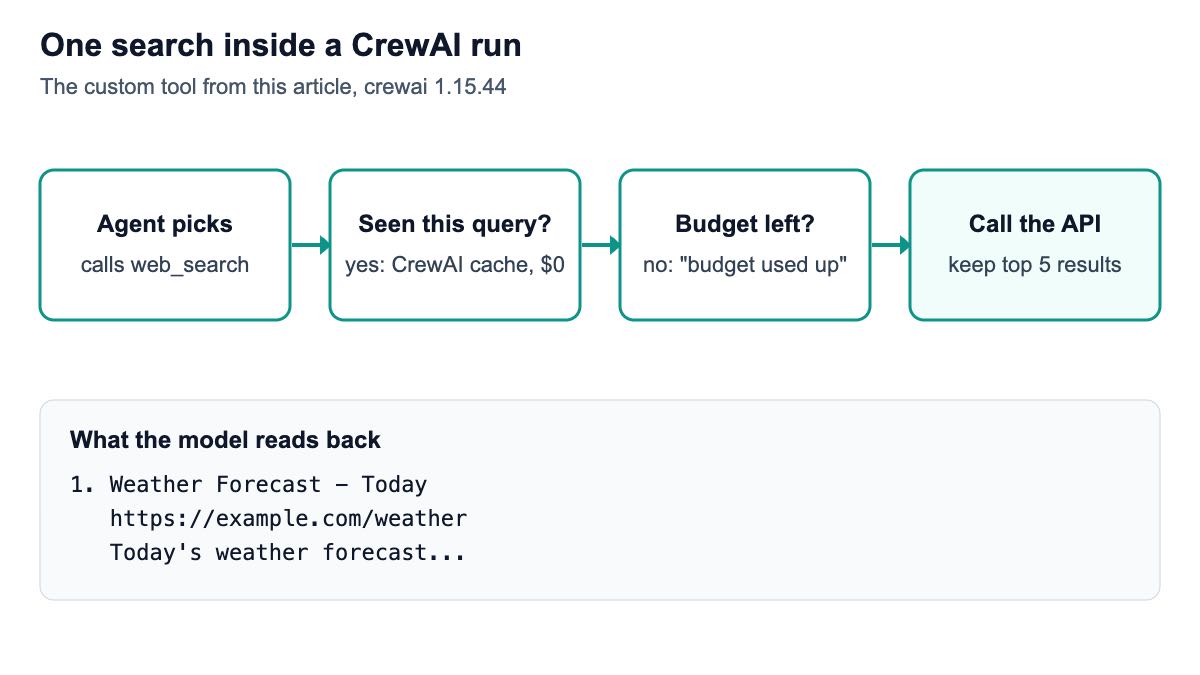
And this is the observation the model received back from the tool:
1. Weather Forecast - Today
   https://example.com/weather
   Today's weather forecast...
The documented example contains one result, so the tool returned one result; a search with more results returns up to the five you keep. The response shape, with results.organic holding position, title, URL and snippet, is the one in our docs, and every block key is always present whatever the engine, so the same parser works when you switch engines.
The run showed one more useful behaviour. When the scripted model asked for the same query twice and then a new one, only two HTTP calls went out: CrewAI answered the repeated query from its tool cache. CrewAI's tools page says all tools support caching, and its agents page lists an agent's cache setting as on by default, so repeated identical searches inside a run cost nothing extra.
How do you stop a crew from overspending on search?
Put the limit in the tool, as above. When the budget is spent, the tool returns a short message telling the agent to answer from what it has, and no request is made. In the logged run with max_searches=2, the scripted model asked for three different searches; two HTTP calls went out, and the third tool call returned "Search budget used up. Write the answer from the results you have."
CrewAI also has a built-in max_usage_count field on every tool. It is worth knowing how it counted in our environment before relying on it.
In the logged run on crewai 1.15.44, inside a crew, each real search moved the counter by two: a limit of 2 allowed one search, 4 allowed two, and 6 allowed three. Called directly with tool.run(), the same tool counted one per call. That may change in a later release, but a counter you own inside _run behaves the same way in every version, which is why the tool above uses one.
Two settings complete the guard. max_iter on the agent caps the reasoning loop, and max_rpm on the agent or crew caps requests per minute if you run many crews at once. Together with the search budget they turn "the agent searched 40 times on a bad prompt" into a bounded cost. If you build agents in LangGraph instead, our LangGraph web search agent tutorial keeps the same kind of search budget in the graph's state.
What does search cost per crew run?
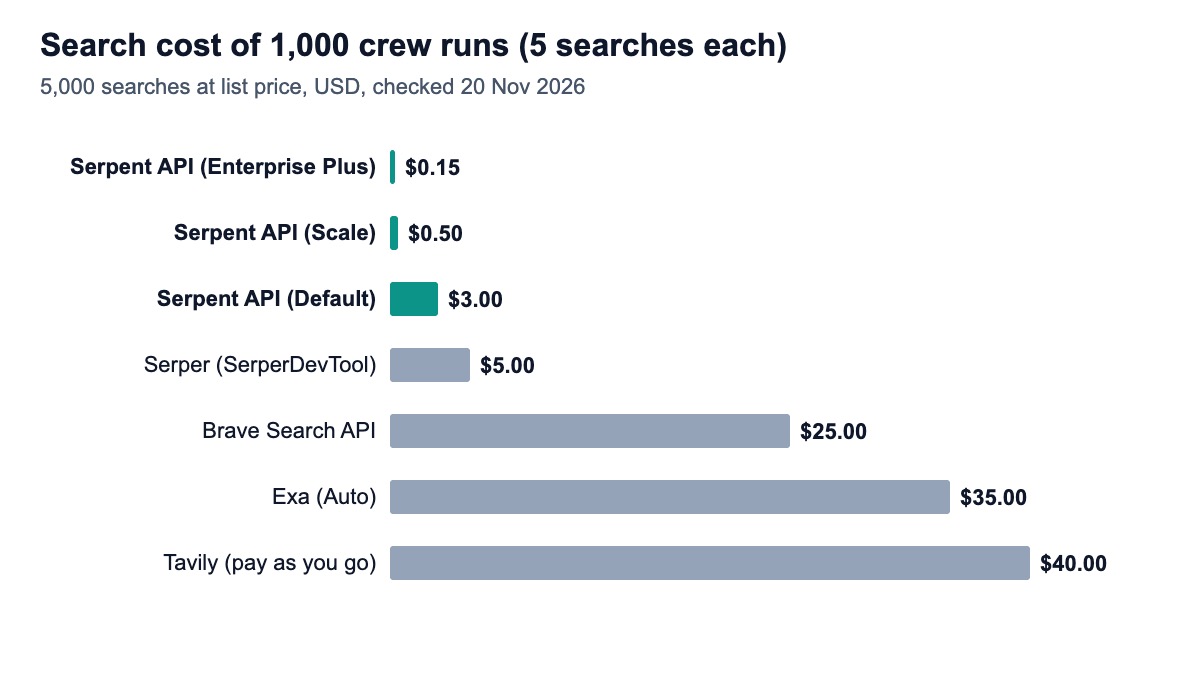
Search is cheap next to the model, but it is the line you control most directly. With a five-search budget, 1,000 crew runs make at most 5,000 searches. The table prices that at each provider's list rate, before any free monthly credit, checked on 20 November 2026.
| Search provider | Price per 1,000 searches | 5,000 searches |
|---|---|---|
| Serpent API, Default | $0.60 | $3.00 |
| Serpent API, Growth ($100 deposit) | $0.30 | $1.50 |
| Serpent API, Scale ($500 deposit) | $0.10 | $0.50 |
| Serpent API, Enterprise ($1,000 deposit) | $0.05 | $0.25 |
| Serpent API, Enterprise Plus ($1,250 deposit) | $0.03 | $0.15 |
| Serper (SerperDevTool), 50k pack | $1.00 | $5.00 |
| Brave Search API | $5.00 | $25.00 |
| Exa (Auto) | $7.00 | $35.00 |
| Tavily, pay as you go (basic) | $8.00 | $40.00 |
Prices come from Serper, Brave, Exa and Tavily; a basic Tavily search uses one credit, per its credits page. Serper's packs expire after six months, so a small user who buys the $50 pack pays more per search than the headline rate. Our tier depends on deposit size, not volume; see the pricing page for every rate.
For a full picture, add the model's tokens, which usually dominate: each search result you keep becomes input tokens on the next step. Keeping five results instead of ten, as the tool does, roughly halves that part of the bill. Our LangChain cost math post walks through the token side with worked numbers.
Can you use an MCP server instead?
Yes. CrewAI agents accept MCP servers directly through the mcps field, using MCPServerHTTP with a URL and headers, per CrewAI's MCP docs. Our hosted MCP server takes the key in a header and exposes one tool per endpoint, billed exactly like the REST calls.
import os
from crewai import Agent, LLM
from crewai.mcp import MCPServerHTTP

serpent_mcp = MCPServerHTTP(
    url="https://api.apiserpent.com/mcp",
    headers={"X-API-Key": os.environ.get("SERPENT_API_KEY", "sk_live_your_api_key")},
)
researcher = Agent(
    role="Market researcher",
    goal="Answer with current facts from the web and cite every URL used",
    backstory="You check claims against live search results before you write.",
    mcps=[serpent_mcp],
    llm=LLM(model="anthropic/claude-sonnet-4-5"),
)
This agent definition builds on crewai 1.15.44; the logged run constructed it but did not connect to the server, so the connection itself is not shown here.
The trade-off is control. The MCP route gives the agent every tool the server offers, maps and YouTube included, with no budget logic. The custom tool gives it exactly one tool with your budget and output format.
For production crews we would pick the custom tool; for exploring what data your agents could use, the MCP route is quicker. Our docs explain how to limit the server to the tool families you want with a URL parameter.
Why isn't my agent calling the tool?
Usually the description. If the task can be answered from the model's memory and the tool description is vague, the agent will not search. Say in the description what the tool is for ("current facts, prices, news and docs"), and say in the task or goal that answers must cite URLs, as the example does.
Other common causes: the input schema field names do not match the _run arguments, so CrewAI cannot pass the input through; the tool returns a huge JSON blob the model struggles to use, which numbered lines fix; or the query is a full sentence, which most search engines handle worse than keywords. The input description "Short keyword search query" nudges the model toward better queries.
If you need city-level results, our API accepts a location parameter alongside country; add it to the input schema and pass it through. For richer results such as People Also Ask or related searches, call the full results endpoint instead and include those blocks in the tool's output. Our older guide on giving agents real-time search covers result formatting in more depth, and our Serper alternatives comparison covers the choice of provider.
How we checked this
The code was run on 20 November 2026 with crewai 1.15.44, pydantic 2.12.5 and requests 2.34.2 on Python 3.13, in a virtual environment. Two parts were stubbed and nothing paid was called: the HTTP request returned the example response from our documentation, and the model was a scripted stand-in built on CrewAI's BaseLLM. The output, package versions and full scripts are logged with the article's evidence.
Sources: 7 CrewAI documentation pages, the crewai page on PyPI, 4 official pricing pages and Tavily's credits documentation, opened the same day. What we could not verify: how a live model chooses queries with this tool, result quality, latency, and whether the max_usage_count counting seen on 1.15.44 is intended behaviour.
Give your crew live search
Serpent API returns Google, Bing, Yahoo, DuckDuckGo and Brave results as JSON, from $0.03 per 1,000 — pay as you go, no subscription. New accounts get 10 free API calls, enough to test the tool above.
Get Your Free API KeyExplore: SERP API · Playground · Docs · Pricing
FAQ
What is the default web search tool in CrewAI?
CrewAI's documented web search tool is SerperDevTool from the crewai_tools package. It calls serper.dev, reads its key from the SERPER_API_KEY environment variable, and accepts country, location, locale and a result count that defaults to 10. CrewAI also ships wrappers for Brave and Exa, and any other provider can be added with a custom BaseTool.
How do I create a custom tool in CrewAI?
Import BaseTool from crewai.tools, define a Pydantic model for the input, and subclass BaseTool with a name, a description, args_schema set to that model, and a _run method that does the work and returns a string. For very small tools, the @tool decorator on a plain function with a docstring does the same job. Pass the tool instance to the agent's tools list.
Can I use CrewAI without a Serper API key?
Yes. SerperDevTool is optional. Use another built-in search tool, write a custom BaseTool that calls any search API, or attach an MCP server through the agent's mcps field. The custom tool in this article needs only a key for the search API it calls, set as SERPENT_API_KEY, plus whatever your model provider needs.
How do I limit how many searches a CrewAI agent makes?
Keep a counter inside the tool's _run method and return a "budget used up" message once it reaches your limit, as in the example. Add max_iter on the agent to cap reasoning steps. CrewAI's max_usage_count field also exists, but in our logged run on version 1.15.44 it counted two per real search inside a crew, so test it in your version before relying on it.
Does CrewAI cache search results?
Yes. CrewAI's documentation says all tools support caching, and an agent's cache setting is on by default. In the logged run, a repeated identical query inside one crew run was answered from the cache without a second HTTP request. You can control what gets cached by setting a cache_function on the tool, or turn caching off on the agent.
Sources
CrewAI documentation (checked 20 November 2026):
- SerperDevTool
- Create custom tools
- Tools concepts (caching, failures)
- MCP servers as tools
- Exa search tool
- Brave search tool
- Agents (cache, max_iter, max_rpm)
- crewai on PyPI
Official pricing (checked 20 November 2026):