Agno Web Search Tool: Build Your Own on a SERP API

An Agno web search tool is any Python function you hand to an agent's tools list, so you are not limited to the bundled toolkits. For a free start use WebSearchTools; for control over cost, country and the fields the model reads, write a short @tool that calls a SERP API.
Short answer: prototype with WebSearchTools(), which needs no search key; use a vendor's bundled toolkit if you already pay Brave, Serper, Tavily or SerpApi; pass the model vendor's native search tool if you are tied to one vendor and accept $10 per 1,000 searches plus tokens; and for a production agent across models, where you choose the fields and the price per search, write your own @tool on a SERP API. The rest of this guide builds and tests that last one on agno 3.2.1.
Which search option should an Agno agent use?
There are four, and they differ on three things: whether you need a search key, whether the tool works with any model, and what each search costs. The figure puts them side by side as of 22 November 2026, on agno 3.2.1 (released 17 November 2026 on PyPI).
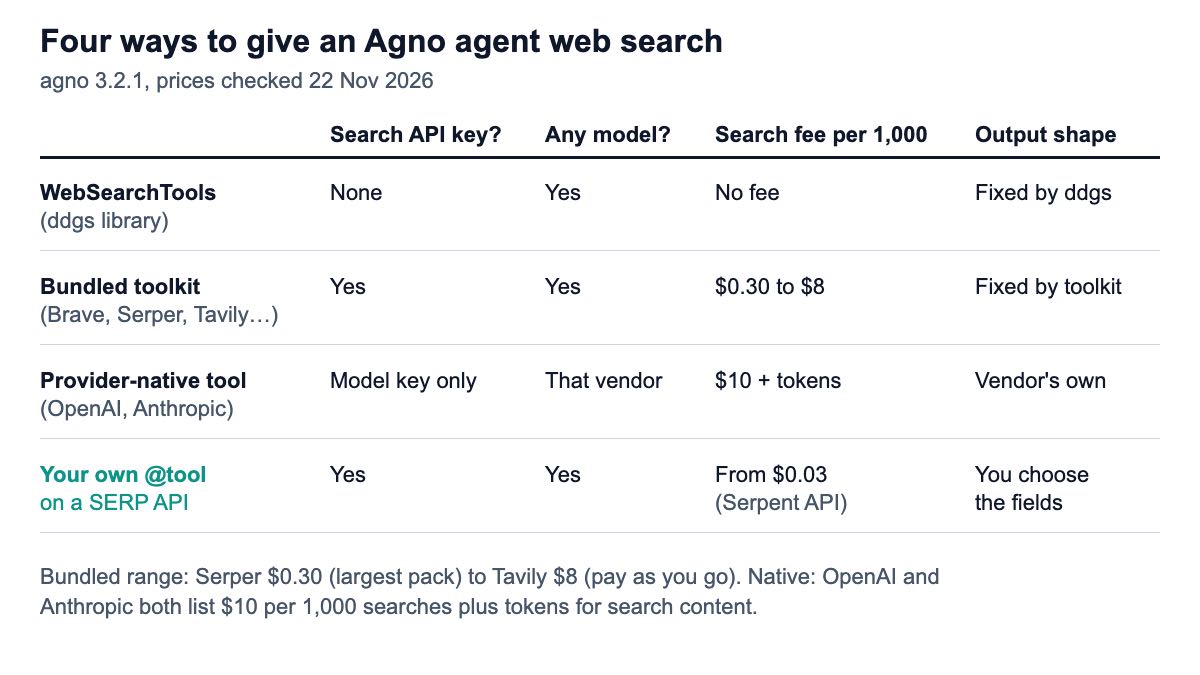
Option 1, WebSearchTools: Agno's docs call it the recommended toolkit for general web search. It needs no search key and adds two functions, web_search and search_news.
Option 2, a bundled toolkit: Agno 3.2.1 ships search toolkits for Brave, Serper, SerpApi, SearchApi, Tavily, Exa, Linkup, Parallel, Perplexity, SearxNG, Scavio and more. Each wraps one vendor, reads that vendor's key from an environment variable and returns that vendor's shape.
Option 3, a provider-native tool: OpenAI and Anthropic run web search on their side. In Agno you pass it as a plain dict in the tools list: OpenAI's search tool type with an OpenAIResponses model, or Anthropic's web_search_20250305 with a max_uses cap. Both vendors list $10 per 1,000 searches plus tokens for the search content.
Option 4, your own function: Agno turns any Python function into a tool, reading its docstring and type hints to describe it to the model. You choose the search provider, the country, how many results, and which fields the model reads.
What does the built-in WebSearchTools give you?
It gives you a working agent in two lines, at no search cost. The toolkit is built on the ddgs metasearch library and takes a backend argument: auto, duckduckgo, google, bing, brave, yandex or yahoo.
It also takes a timelimit of d, w, m or y, a region code such as uk-en, and a fixed_max_results cap. Each function returns 5 results by default.
pip install -U agno ddgs openai

from agno.agent import Agent
from agno.tools.websearch import WebSearchTools

agent = Agent(tools=[WebSearchTools()])
agent.print_response("What's happening in France?", markdown=True)
That is the right start for a notebook. Three things push teams off it later.
- No contract.
ddgsis an open-source library, not a paid service, so there is no agreed volume or support line. Agno's toolkit code catches the library'sRatelimitExceptionand returns it as an error string, so plan for rate-limit errors. - A fixed output. The model gets whatever the library returns. You cannot add a field, drop a long one, or keep the same shape when you change provider.
- A news quirk. Agno's example notes that the
modifierprefix (saysite:github.com) applies only toweb_search, not tosearch_news, and that explicit-backend agents should setenable_news=False.
The bundled vendor toolkits fix the contract problem but not the shape problem. One more trap: Agno's SerpApiTools reads its key from SERP_API_KEY (in the docs and in the 3.2.1 source), not the SERPAPI_API_KEY name some tutorials export, so a copied setup can fail with a missing key.
How do you write a custom web search tool?
Write a normal function with type hints and a docstring, and decorate it with @tool. Agno's custom-tools page says plain functions work too; the decorator is how you rename the tool or add options such as stop_after_tool_call, requires_confirmation or cache_results.
This one calls the per-page search endpoint with engine=google, asks for one page of 10 results, and hands the model only four fields per result. Install the packages first:
pip install agno==3.2.1 httpx openai
export SERPENT_API_KEY=sk_live_your_api_key
import json
import os
import httpx
from agno.tools import tool
SERPENT_URL = "https://apiserpent.com/api/search"
_http = httpx.Client(timeout=30)
@tool(name="web_search")
def web_search(query: str, country: str = "us") -> str:
"""Search Google and return the top organic results.
Args:
query: The search, written the way a person would type it into Google.
country: Two-letter country code for the results, for example "us", "gb" or "de".
Returns:
A JSON list of results, each with position, title, url and snippet.
"""
r = _http.get(
SERPENT_URL,
params={"q": query, "engine": "google", "country": country, "num": 10},
headers={"X-API-Key": os.environ.get("SERPENT_API_KEY", "")},
)
if r.status_code != 200:
try:
code = r.json().get("code")
except ValueError:
code = None
return json.dumps({"error": code or f"http_{r.status_code}"})
organic = r.json().get("results", {}).get("organic", [])
rows = [
{k: row.get(k) for k in ("position", "title", "url", "snippet")}
for row in organic[:10]
]
return json.dumps(rows)Three choices in that code matter more than they look.
numis fixed, not a model argument. Per-page search bills one charge per page requested, so a model that asks for 50 results would pay for five pages. Keepingnum=10out of the model's reach keeps every search at one charge.- Four fields, not the whole response. The full response also carries ads, related searches, People Also Ask and more. Every key is always present, empty when a block is absent, so the same parser works on every query, but the model pays tokens for all of it. Cut it to what the answer needs.
- The key comes from the environment. Send it in the
X-API-Keyheader; our authentication docs discourage putting it in the URL because URLs end up in logs.
Put it on an agent like any other tool. tool_call_limit is explained further down.
from agno.agent import Agent
from agno.models.openai import OpenAIChat
from serp_tool import web_search

agent = Agent(
    model=OpenAIChat(id="gpt-5.4-mini"),
    tools=[web_search],
    instructions=["Search before answering questions about current rankings.", "Cite the URL you used."],
    tool_call_limit=3,
)
agent.print_response("What ranks first on Google for best seo tools?")
Because the tool is just a function, it works the same with Claude, Gemini, a local Ollama model or any other model class Agno supports. Swap the model= line and nothing else changes.
What does the model actually see?
It sees a JSON schema that Agno builds from your docstring and type hints, so the docstring is your prompt for the tool. This is the schema agno 3.2.1 generated for the function above, printed from web_search.to_dict() in the run log:
{
 "name": "web_search",
 "description": "Search Google and return the top organic results.",
 "parameters": {
  "type": "object",
  "properties": {
   "query": {"type": "string",
             "description": "The search, written the way a person would type it into Google."},
   "country": {"type": "string",
               "description": "Two-letter country code for the results, for example \"us\", \"gb\" or \"de\"."}
  },
  "required": ["query"],
  "additionalProperties": false
 }
}
Two details are worth copying. country has a default, so it is optional in the schema and the model only sends it when the question is about another market. The Args: lines became the parameter descriptions, so write them for a model that has never seen your code: say what a good query looks like and give examples of valid values.
The Returns: section did not reach the schema in this version. If the model needs to know the shape it gets back, say so in the first docstring line or in the agent's instructions.
How do you test the agent without a model key?
Give Agno's real OpenAIChat model an httpx client whose transport you script, and stub the search call the same way. Agno, the OpenAI client and your tool all run for real; only the two network calls are replaced. The search stub below returns the documented example response from our docs, saved as docs-response.json.
import json

import httpx
from agno.agent import Agent
from agno.models.openai import OpenAIChat

import serp_tool

DOC = json.load(open("docs-response.json"))  # the documented example response from our docs
serp_tool._http = httpx.Client(transport=httpx.MockTransport(lambda req: httpx.Response(200, json=DOC)))


def scripted_model(request):
    body = json.loads(request.content)
    tool_msgs = [m for m in body["messages"] if m.get("role") == "tool"]
    if not tool_msgs:  # turn 1: ask for a search
        call = {"id": "call_1", "type": "function",
                "function": {"name": "web_search", "arguments": '{"query": "best seo tools"}'}}
        msg, finish = {"role": "assistant", "content": None, "tool_calls": [call]}, "tool_calls"
    else:  # turn 2: answer from the tool result
        top = json.loads(tool_msgs[0]["content"])[0]
        msg, finish = {"role": "assistant", "content": f"Top result: {top['url']}"}, "stop"
    return httpx.Response(200, json={"id": "t", "object": "chat.completion", "created": 0, "model": "test",
                                     "choices": [{"index": 0, "message": msg, "finish_reason": finish}],
                                     "usage": {"prompt_tokens": 1, "completion_tokens": 1, "total_tokens": 2}})


agent = Agent(
    model=OpenAIChat(id="gpt-5.4-mini", api_key="test",
                     http_client=httpx.Client(transport=httpx.MockTransport(scripted_model))),
    tools=[serp_tool.web_search],
)
run = agent.run("What ranks first on Google for best seo tools?")
assert run.tools[0].tool_name == "web_search"
print(run.tools[0].tool_args, "->", run.content)
Output on Python 3.15.2 with agno 3.2.1, openai 3.57.0 and httpx 0.28.1 (22 November 2026):
{'query': 'best seo tools'} -> Top result: https://example.com/seo-toolsThe URL is the placeholder from the documented example, not a ranking. What the test proves is the wiring: Agno offered the tool to the model, passed the model's arguments into your function, sent the result back as a tool message and finished the run. The run log also confirms the request the tool built: https://apiserpent.com/api/search?q=best+seo+tools&engine=google&country=us&num=10 with the key in the header.
Put this file in your CI. It costs nothing, needs no secrets and breaks loudly when an Agno upgrade changes how tools are called.
What should the tool return when a search fails?
Return a short error the model can read, not an exception. A small JSON object lets the model tell the user what happened or carry on without search, and it is the same pattern Agno's own WebSearchTools uses for its errors.
Every error body from our API starts with the same four fields, success, error, code and message, and the error codes page says code is the stable field to branch on. So the tool passes only code through. With the stub answering 402 with the documented body, the tool returned:
{"error": "insufficient_credits"}Add one line to the agent's instructions telling it what to do with an error (for example, "If web_search returns an error, say that search is unavailable and answer from what you know, marked as unverified").
How do you stop an agent from searching too much?
Set tool_call_limit on the agent. Agno's docs say the counter spans the model requests in one response loop, and that calls beyond the limit "fail gracefully" instead of crashing the run.
To see what that means for the bill, the run log has a scripted model that asks for a new search on every turn, five times, then answers. With and without the cap:
| Setting | Searches sent to the search API | Model requests |
|---|---|---|
tool_call_limit=None | 5 | 6 |
tool_call_limit=2 | 2 | 6 |
The cap held the paid searches at 2. It did not shorten the conversation: the model still made 6 requests, because it kept asking and kept being told no. Searches are capped, tokens are not.
So use two controls together. tool_call_limit caps search spend. An instruction such as "Search at most twice, then answer" cuts the wasted model turns. A third, optional control is cache_results=True on the decorator, which stores a tool result on disk for cache_ttl seconds (3,600 by default) so a repeated query within the hour is not paid for twice.
What does agent search cost per month?
At 100,000 searches a month, search fees range from $3 to $1,000 depending on the option, before any model tokens. I read every vendor's pricing page on 22 November 2026. Each cell is the cheapest published plan or rate that covers that volume, search fees only.
| Option and plan | 1,000 a month | 100,000 a month | 1,000,000 a month |
|---|---|---|---|
| Serpent API — Default ($10 deposit) | $0.60 | $60 | $600 |
| Serpent API — Growth ($100 deposit) | $0.30 | $30 | $300 |
| Serpent API — Scale ($500 deposit) | $0.20 | $20 | $200 |
| Serpent API — Enterprise ($1,000 deposit) | $0.15 | $15 | $150 |
| Serpent API — Enterprise Plus ($1,250 deposit) | $0.03 | $3 | $30 |
| Serper (packs at $1.00, $0.75, $0.50 per 1,000; valid 6 months) | $1 (from a $50 pack) | $75 | $500 |
| Brave Search API ($5 per 1,000, $5 free credit monthly) | $0 | $495 | $4,995 |
| Tavily (basic search = 1 credit) | $0 (free 1,000) | $500 (Growth) | $7,992 (pay as you go) |
| SerpApi | $25 (Starter) | $725 (Searcher) | $3,750 (Cloud 1M) |
| OpenAI web search tool | $10 | $1,000 | $10,000 |
| Anthropic web search | $10 | $1,000 | $10,000 |
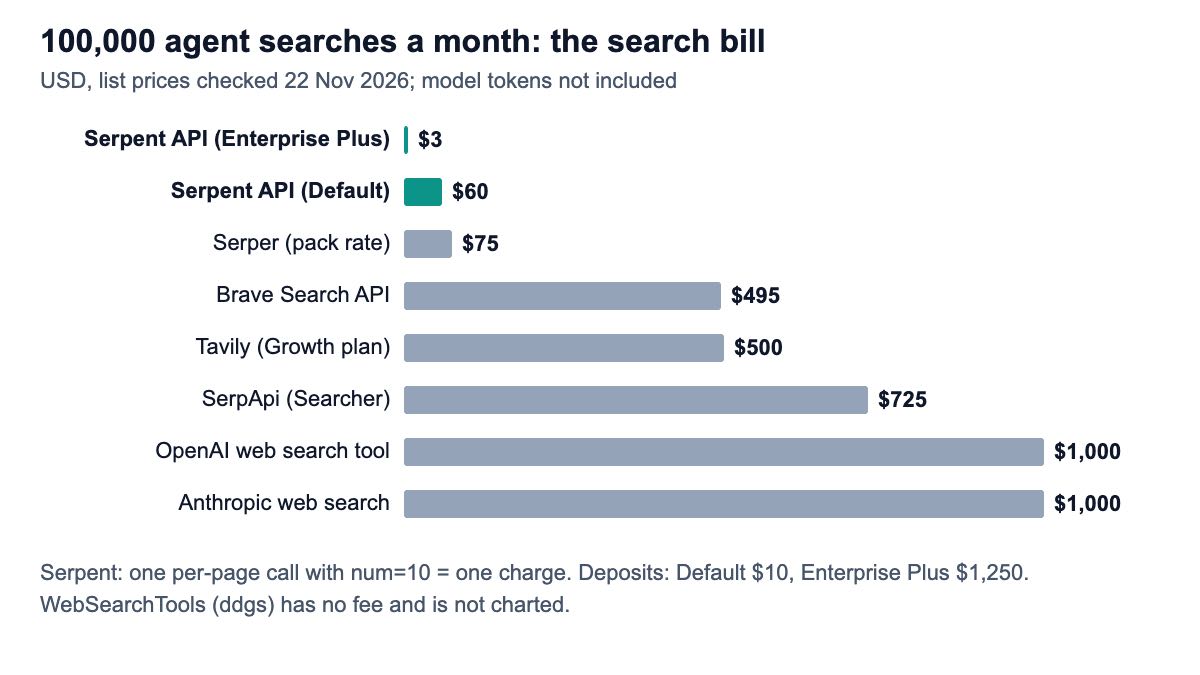
How to read it. At 1,000 searches a month, Brave's and Tavily's free allowances make them free, so the cheapest option there is not a paid one. From 100,000 a month the custom tool on our Web price is the cheapest row at every one of our tiers except Default at 1,000,000, where Serper's $500 is lower than our Default $600. Our rows are the per-page price for one page of 10 results, which is what the tool above sends, and the native rows exclude the search content their vendors bill as tokens.
The cost that is easy to miss is tokens. Anthropic's docs say search results count as input tokens, and OpenAI bills search content tokens at model rates for its web search tool. A custom tool that returns four fields per result keeps that number small on any provider.
Which one should you pick?
- A notebook, a demo, a hackathon:
WebSearchTools(). Free, no key, two lines. - You already pay Brave, Tavily, Exa or Serper: their bundled Agno toolkit, and check which environment variable it reads.
- One model vendor forever, low volume: the native tool (OpenAI's dict or Anthropic's
web_search_20250305withmax_uses). It is the least code. - Production, several models, or a cost target: your own
@toolon a SERP API, withtool_call_limit, compact output and the stubbed test in CI. That is the version built above. - An assistant rather than an agent you code: skip the function and connect our hosted MCP server from Claude Code, Cursor or VS Code instead.
The same pattern in other frameworks: CrewAI, Pydantic AI, LlamaIndex, LangGraph and Mastra. To compare search APIs for agents more broadly, see the best web search APIs for AI agents and Tavily alternatives.
How we checked this
Sources: 16 external pages read on 22 November 2026, 9 from Agno (docs and PyPI) and 7 vendor pricing or docs pages (OpenAI, Anthropic, Brave, Tavily, Serper, SerpApi and SerpApi's blog), plus our own docs and pricing pages and the agno 3.2.1 source code.
Code: every snippet except the two install lines and the production agent (which needs live keys) ran locally on Python 3.15.2 with agno 3.2.1, openai 3.57.0 and httpx 0.28.1. The production agent uses the same construction as the test, which did run. No call went to our API or to any model vendor: the search call returned the documented example response from our docs and the model was scripted, so the answer text in the output shows wiring, not model quality. Cost table: list prices times volume in a small script, kept with the run log.
What we could not verify: how a real model phrases its queries or answers; real latency; the rate limits of the ddgs library; and whether Agno's MCP tools connect to our MCP server, which is why this post shows no Agno MCP code.
Give your Agno agent a search tool you control
Google, Bing, Yahoo, DuckDuckGo and Brave results as JSON, from $0.03 per 1,000 — pay as you go, no subscription. Start with 10 free calls; see pricing.
Get Your Free API KeyExplore: SERP API · Playground · Docs · Pricing
FAQ
Does Agno have a built-in web search tool?
Yes. WebSearchTools from agno.tools.websearch is the toolkit Agno's docs recommend for general web search. It is built on the ddgs metasearch library, needs no search key, and adds web_search and search_news functions that return 5 results by default. Agno also ships vendor toolkits for Brave, Serper, SerpApi, Tavily, Exa and others, and you can pass OpenAI's or Anthropic's native search tool as a dict.
How do I create a custom tool in Agno?
Write a Python function with type hints and a docstring with an Args: section, then put it in the agent's tools list. Agno builds the tool's JSON schema from the docstring and hints. Add the @tool decorator from agno.tools when you want to rename the tool or use options such as stop_after_tool_call, requires_confirmation or cache_results.
How do I limit how many times an Agno agent searches?
Pass tool_call_limit when you create the agent. Agno counts tool calls across the model requests in one response loop and lets extra calls fail gracefully. In a local run with a model scripted to keep searching, a limit of 2 held the searches at 2, but the model still made 6 requests, so pair the cap with an instruction that tells the model to stop searching.
Can I use Agno web search with Claude or a local model?
Yes, with any tool except a provider-native one. WebSearchTools, the vendor toolkits and your own functions are ordinary tools, so they work with any model class Agno supports, including Claude, Gemini and Ollama. Anthropic's native web_search_20250305 tool works only with Claude models, and OpenAI's built-in search dict only with OpenAI's Responses models.
Why does my SerpApiTools agent say the API key is missing?
Check the variable name. In agno 3.2.1 and in Agno's toolkit page, SerpApiTools reads SERP_API_KEY. Some setups export SERPAPI_API_KEY instead, which the toolkit does not read. Either export SERP_API_KEY or pass api_key= when you create the toolkit.
Sources
Agno docs and package (checked 22 November 2026):
- agno on PyPI (3.2.1, 17 Nov 2026)
- Agno: Web Search (WebSearchTools)
- Agno: WebSearch Tools example
- Agno: Python functions as tools and the @tool decorator
- Agno: Tool call limit
- Agno: SerpApi toolkit
- Agno: Brave Search toolkit
- Agno: OpenAI built-in web search
- Agno: Anthropic web search
Vendor pricing and docs (checked 22 November 2026):
- Anthropic: web search tool and pricing
- OpenAI: API pricing (web search)
- Brave Search API pricing
- Tavily: API credits
- Serper pricing
- SerpApi pricing
- SerpApi: serpapi-search-tools announcement (6 Aug 2026)
Our docs (checked 22 November 2026): search endpoint, error codes, pricing.