Google ADK Custom Search Tool That Works With Any Model

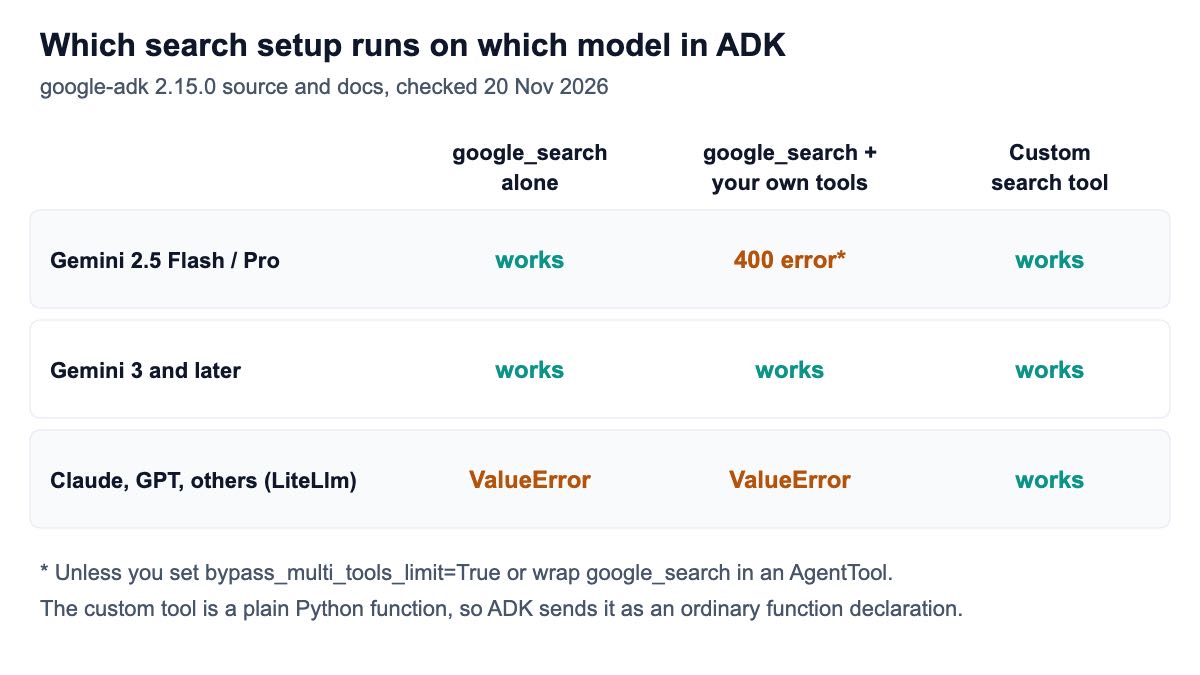
Google ADK's built-in google_search tool only runs on Gemini models, and on Gemini 2.5 it cannot share an agent with your own function tools. A custom search tool, a plain Python function that calls a SERP API, has neither limit: it works with any model ADK supports and sits next to any other tool.
Short answer: On Gemini 3 with no other tools, the built-in google_search is the simplest choice. On Gemini 2.5 with your own tools, either construct GoogleSearchTool(bypass_multi_tools_limit=True), wrap search in an AgentTool, or replace it with a custom function tool. On Claude, GPT or any model through LiteLlm, use a custom function tool, because the built-in one refuses non-Gemini models. Pick the custom tool too when you need ranked results, a country, or a fixed price per search: ours costs from $0.03 per 1,000 searches — pay as you go, no subscription.
What exactly are the google_search limits?
There are two, and both trace back to Gemini rather than to ADK's design. First, google_search is a Gemini built-in: ADK asks Gemini to search, so no other model can use it. Second, Gemini models before 3.0 reject a request that mixes a built-in search tool with ordinary function declarations.
Both show up in ADK's own code. In google-adk 2.15.0, the search tool adds Gemini's search to the request only when the model name is a Gemini model, and otherwise raises an error. In the logged run, asking it to prepare a request for claude-sonnet-4-5 raised ValueError: Google search tool is not supported for model claude-sonnet-4-5. The same version's model utilities explain the second limit in a comment: earlier Gemini models "reject that combination with 400 INVALID_ARGUMENT: Tool use with function calling is unsupported."
Developers meet the second limit as an error message. A Classmethod write-up from April 2026 reports "400 INVALID_ARGUMENT: Multiple tools are supported only when they are all search tools" on gemini-2.5-flash with ADK 1.28, and fixes it by moving to a Gemini 3 preview model, which allows built-in tools and functions in the same request.
ADK's limitations page describes the rule as "use of specific tools within an agent excludes the use of any other tools in that agent", lists Google Search among those tools, and says ADK Python v1.16.0 and higher "can bypass this limitation for the Google Search and Agent Search tools, but not by default". It also says built-in tools cannot be used inside a sub-agent unless constructed with the bypass flag.
How do you write a custom search tool?
Write a Python function with type hints and a docstring, and put it in the agent's tools list. ADK's function tools guide says the framework wraps it as a FunctionTool automatically, uses the docstring as the description the model sees, treats parameters without defaults as required, and recommends returning a dictionary with a status key.
Install ADK and set your keys:
pip install google-adk==2.15.0 requests
export SERPENT_API_KEY=sk_live_your_api_key
export GOOGLE_API_KEY=your_gemini_key
Then save this as search_agent.py. It calls our organic results endpoint and returns the top five results; the second function is there only to show that the search tool sits happily next to any other tool:
import os

import requests
from google.adk.agents import Agent

SEARCH_URL = "https://apiserpent.com/api/search/quick"


def web_search(query: str, country: str = "us") -> dict:
    """Searches the web (Google results) for current information.

    Args:
        query: Short keyword query, for example "adk 2.0 release notes".
        country: Two-letter country code for local results, for example "us" or "de".

    Returns:
        A dict with status and the top results (position, title, url, snippet).
    """
    try:
        resp = requests.get(
            SEARCH_URL,
            params={"q": query, "country": country, "engine": "google", "num": 10},
            headers={"X-API-Key": os.environ["SERPENT_API_KEY"]},
            timeout=30,
        )
        resp.raise_for_status()
    except requests.RequestException as exc:
        return {"status": "error", "error_message": str(exc)}
    organic = resp.json()["results"]["organic"]
    return {
        "status": "success",
        "results": [
            {"position": r["position"], "title": r["title"],
             "url": r["url"], "snippet": r.get("snippet", "")}
            for r in organic[:5]
        ],
    }


def get_word_count(text: str) -> dict:
    """Counts the words in a piece of text. A second, ordinary tool."""
    return {"status": "success", "words": len(text.split())}


def make_agent(model):
    return Agent(
        name="researcher",
        model=model,
        description="Answers questions with current web search results.",
        instruction=(
            "Use web_search for anything current and cite the URLs you used. "
            "Use get_word_count when asked about length."
        ),
        tools=[web_search, get_word_count],
    )


root_agent = make_agent(os.environ.get("ADK_MODEL", "gemini-2.5-flash"))
Three choices here are worth copying. The docstring documents both arguments, which is what Gemini reads to fill them in. The country argument lets the model ask for local results; our API accepts 112 country codes, listed under country support. And network errors come back as {"status": "error", ...} instead of an exception, so the model can tell the user the search failed rather than the run crashing.
To use Bing, Yahoo, DuckDuckGo or Brave results instead, change engine; the response has the same keys on every engine, per our API docs, so the parsing does not change.
How do you run it?
The adk command-line tool that installs with the package has run and web commands for trying an agent interactively. To call it from your own code, use a Runner with an in-memory session service:
import asyncio

from google.adk.runners import Runner
from google.adk.sessions import InMemorySessionService
from google.genai import types

from search_agent import root_agent


async def ask(question: str) -> str:
    sessions = InMemorySessionService()
    runner = Runner(app_name="search_demo", agent=root_agent, session_service=sessions)
    await sessions.create_session(app_name="search_demo", user_id="u1", session_id="s1")
    message = types.Content(role="user", parts=[types.Part(text=question)])
    answer = ""
    async for event in runner.run_async(user_id="u1", session_id="s1", new_message=message):
        if event.is_final_response() and event.content:
            answer = "".join(part.text or "" for part in event.content.parts)
    return answer


if __name__ == "__main__":
    print(asyncio.run(ask("What changed in the latest ADK release?")))
The code runs on google-adk 2.15.0 with Python 3.13 (20 November 2026). For the logged run, two parts were stubbed so nothing paid was called: the HTTP request returned the example response from our documentation, and the model was a scripted stand-in built on ADK's own BaseLlm class that asked for one search and then answered. The runner, the session service, the function-tool wrapping and the event loop were the real framework.
The events from that run, printed one per line:
tools declared to the model: ['web_search', 'get_word_count']
[researcher] function_call web_search {'query': 'weather today', 'country': 'uk'}
[researcher] function_response {"status": "success", "results": [{"position": 1,
    "title": "Weather Forecast - Today", "url": "https://example.com/weather",
    "snippet": "Today's weather forecast..."}]}
[researcher] text: Answer citing https://example.com/weather
Both functions reached the model as ordinary function declarations, and one HTTP request went out to /api/search/quick with q=weather today, country=uk, engine=google and num=10. The documented example holds a single result, so one came back; a live search returns up to the five the tool keeps.
Does it work with Claude or GPT?
Yes, because nothing in the tool depends on Gemini. ADK runs other models through the LiteLlm wrapper, documented on its LiteLLM models page, which asks for LiteLLM 1.84 or newer. You build the model with LiteLlm(model="anthropic/..."), as in that page's own examples, and pass it to the make_agent function above instead of a Gemini model name; set ANTHROPIC_API_KEY instead of GOOGLE_API_KEY.
The agent keeps the same two tools, because ADK sends a function tool to any model as an ordinary function declaration. (The LiteLLM package did not finish installing in our test environment, so this combination is not part of the logged run; the scripted model in the run is itself a non-Gemini BaseLlm, and it received both tools.) This is the main reason to own your search tool in ADK: you can change models, or run several, without changing how your agents search. The OpenAI Agents SDK version of this pattern solves the same problem there.
What if you want to keep google_search too?
You have two documented options on Gemini 2.5, and one on Gemini 3. On Gemini 3, you can put google_search and your function tools in the same agent; ADK 2.15.0 treats Gemini 3 and later as accepting the combination.
On Gemini 2.5, construct the tool yourself with the bypass flag: GoogleSearchTool(bypass_multi_tools_limit=True). The shared google_search instance leaves the flag off, as the limitations page notes. In the logged run, with the flag set and more than one tool on the agent, ADK replaced the search tool with a GoogleSearchAgentTool, a small search-only agent the main agent calls like any other tool. Without the flag, the tool was passed through unchanged, which is what triggers the 400 error on Gemini 2.5.
The other option is to do that wrapping yourself with AgentTool:
from google.adk.agents import Agent
from google.adk.tools import google_search
from google.adk.tools.agent_tool import AgentTool

from search_agent import web_search

grounding_agent = Agent(
    name="google_grounding",
    model="gemini-2.5-flash",
    instruction="Answer the question using Google Search.",
    tools=[google_search],
)
root_agent = Agent(
    name="researcher",
    model="gemini-2.5-flash",
    instruction="Use web_search for ranked results; ask google_grounding for a grounded summary.",
    tools=[AgentTool(agent=grounding_agent), web_search],
)
This agent builds on google-adk 2.15.0 and exposes two tools, google_grounding and web_search; the logged run constructed it without calling Gemini. The two search paths are complementary. Gemini's built-in search returns a written answer with sources chosen by the model, while the function tool returns the ranked list of pages, titles and snippets, which your code can store, filter or show to a user.
What does each option cost?
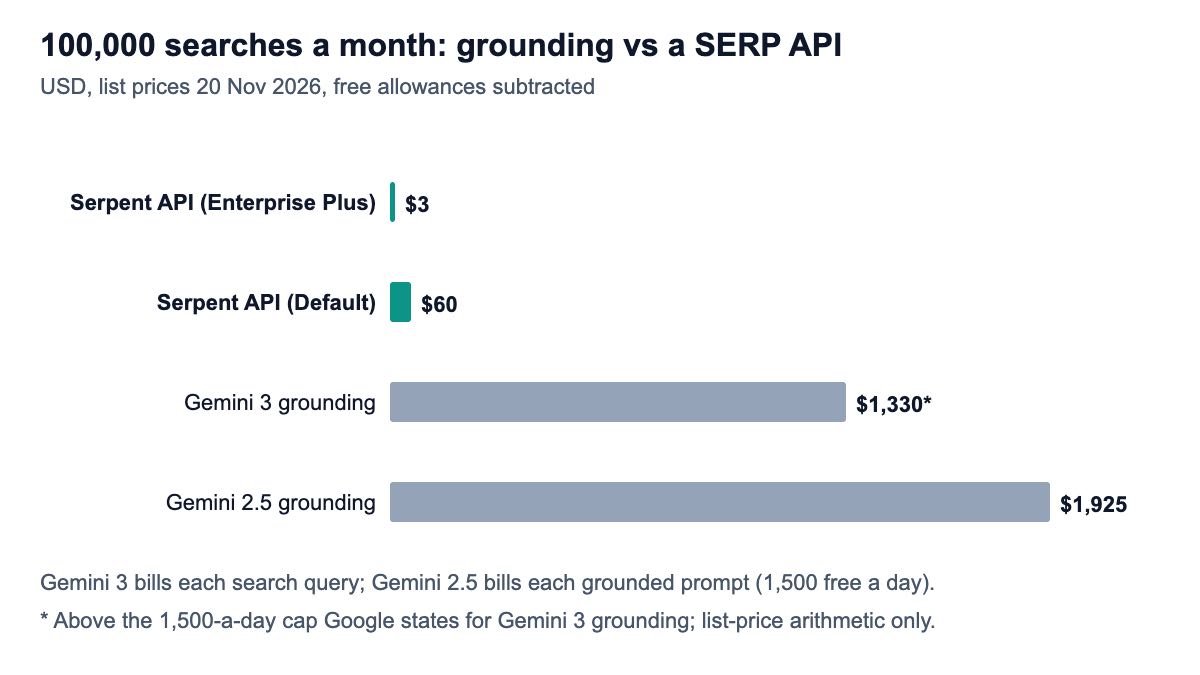
Gemini's Grounding with Google Search is billed per use on top of tokens, and the unit changed with Gemini 3. According to Google's Gemini API pricing page, Gemini 3 models include 5,000 free search requests a month, shared across all Gemini 3 and newer models, and then cost $14 per 1,000, with each search query the model runs charged. The same page says this is "subject to a daily cap of 1,500 requests per day", and that grounding is not available on the free tier for Gemini 3, so you need a paid-tier key. Gemini 2.5 models include 1,500 free requests a day on the paid tier and then cost $35 per 1,000 grounded prompts.
| Option | Price per 1,000 | 1,000 a month | 100,000 a month | 1,000,000 a month |
|---|---|---|---|---|
| Serpent API, Default | $0.60 | $0.60 | $60 | $600 |
| Serpent API, Growth ($100 deposit) | $0.30 | $0.30 | $30 | $300 |
| Serpent API, Scale ($500 deposit) | $0.10 | $0.10 | $10 | $100 |
| Serpent API, Enterprise ($1,000 deposit) | $0.05 | $0.05 | $5 | $50 |
| Serpent API, Enterprise Plus ($1,250 deposit) | $0.03 | $0.03 | $3 | $30 |
| Gemini 3 grounding (per search query) | $14 | $0 (5,000 free) | $1,330* | $13,930* |
| Gemini 2.5 grounding (per grounded prompt) | $35 | $0 (1,500 free a day) | $1,925 | $33,425 |
The units are not identical. One Gemini 3 grounded answer can run several search queries, and Google's page says each query is charged; Gemini 2.5 is billed per grounded prompt; a function-tool search is exactly one call. Both approaches add tokens: grounding through the model's own context, the function tool through the results it returns. Our prices are on the pricing page; the tier follows your deposit size, not your volume.
For light use the free allowances make grounding free, and that is a fine reason to use it. The difference shows at scale, and when you need what grounding does not give you: a fixed price per search, the ranked list itself, or a model other than Gemini. Our post on cutting LLM web search costs covers the same trade-off across providers.
Which setup should you use?
Gemini 3, search is the only tool, low volume. Use the built-in google_search. On a paid-tier key, the 5,000 free monthly requests cover a lot of testing and small apps.
Gemini 2.5 with your own tools. Add the custom function tool, or construct GoogleSearchTool(bypass_multi_tools_limit=True) if you specifically want Gemini's grounded answers. The custom tool avoids the 400 error and keeps search cost flat.
Claude, GPT or a local model. Use the custom function tool; the built-in one will not run.
Your app shows, stores or ranks results. Use the custom function tool, because it returns the ranked list with positions and URLs. For People Also Ask and other page blocks where present, point it at our full results endpoint.
You expect real volume. Price both at your monthly volume with the table above, then decide. For other agent frameworks, see our guide to giving agents real-time search.
How we checked this
The code was run on 20 November 2026 in a fresh Python 3.13 virtual environment with google-adk 2.15.0, google-genai 2.34.0 and requests 2.34.2. The HTTP request was stubbed with the documented example response and the model was a scripted BaseLlm subclass, so no paid service was called. The non-Gemini error, the bypass-flag replacement and the Gemini 3 rule were observed by calling ADK's own code paths without a model call. Commands, versions, scripts and output are logged with this article's evidence.
Sources: 4 ADK documentation pages, the google-adk PyPI page, one third-party write-up and Google's Gemini API pricing page, opened the same day. What we could not verify: live Gemini behaviour, how many search queries a typical Gemini answer runs when grounding is on, whether Google raises the 1,500-a-day Gemini 3 grounding cap for larger accounts (its pricing page does not say), and answer quality with either search path.
Give your ADK agents search that works with any model
Serpent API returns Google, Bing, Yahoo, DuckDuckGo and Brave results as JSON, from $0.03 per 1,000 searches, pay as you go, no subscription. New accounts get 10 free API calls, enough to test the tool above.
Get Your Free API KeyExplore: SERP API · Playground · Docs · Pricing
FAQ
Why does ADK say multiple tools are supported only when they are all search tools?
Because Gemini models before 3.0 reject a request that combines a built-in search tool such as google_search with ordinary function declarations. ADK passes your tools to the model, and the model returns a 400 INVALID_ARGUMENT error. Fix it by moving to a Gemini 3 model, constructing GoogleSearchTool with bypass_multi_tools_limit=True, wrapping search in an AgentTool, or replacing google_search with a custom function tool.
Can I use google_search with Claude or GPT in ADK?
No. In google-adk 2.15.0 the google_search tool only adds Gemini's search to requests for Gemini models and raises a ValueError for any other model name. For Claude, GPT or other models through LiteLlm, give the agent a custom function tool that calls a search API; ADK sends it as an ordinary function declaration that any tool-calling model can use.
How do I create a custom tool in Google ADK?
Write a Python function with type hints and a docstring, and add it to the agent's tools list. ADK wraps it as a FunctionTool automatically, uses the docstring as the tool description, and treats parameters without default values as required. Return a dictionary, ideally with a status key, so the model can tell success from failure.
How much does Gemini grounding with Google Search cost?
On Google's Gemini API pricing page, checked 20 November 2026, Gemini 3 models include 5,000 free search requests a month on the paid tier, shared across Gemini 3 and newer models, then cost $14 per 1,000, with each search query charged and a stated cap of 1,500 requests a day. Gemini 2.5 models include 1,500 free requests a day on the paid tier, then cost $35 per 1,000 grounded prompts. Token costs are billed separately.
What does bypass_multi_tools_limit do?
It lets google_search share an agent with other tools on models that otherwise refuse the combination. You set it when constructing the tool, GoogleSearchTool(bypass_multi_tools_limit=True), because the shared google_search instance leaves it off. When the agent has more than one tool, ADK then swaps the built-in tool for a small search-only agent that the main agent calls like a function.
Sources
Google ADK documentation and package (checked 20 November 2026):
- ADK tool limitations
- ADK function tools
- ADK LiteLLM models
- ADK models overview
- google-adk on PyPI
- adk-python source on GitHub
Pricing and reports (checked 20 November 2026):