A smolagents web search tool you can target and cap

To give a smolagents agent web search you can target by country and cap per run, subclass Tool, call a search API in forward(), and pass the tool to a CodeAgent or ToolCallingAgent. The built-in search tools take a query and nothing else. The tool below, under 50 lines, adds a country input and a spend limit, and runs on smolagents 1.26.0.
Short answer: For quick experiments, the built-in WebSearchTool needs no key. For Google results from a key you already hold, use GoogleSearchTool with SerpApi or Serper. For production agents, write a Tool subclass (below) so you control the country, the engine, the output format and how many paid searches a run may make; if you only need a different endpoint, subclass ApiWebSearchTool in about 20 lines. With our API, search costs from $0.03 per 1,000 — pay as you go, no subscription.
Which search tools does smolagents ship with?
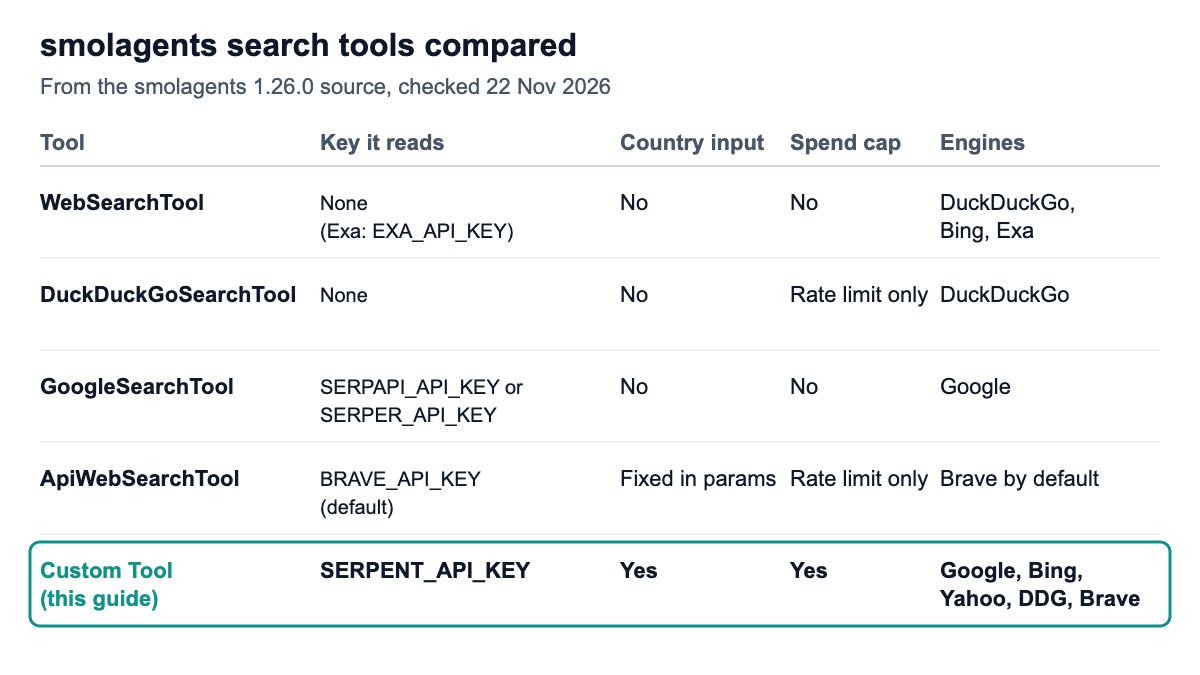
Four, all named web_search, and none takes a country or limits spend. The built-in tools reference lists them; the details below come from the 1.26.0 source, since the reference page leaves several parameters out.
WebSearchToolneeds no key by default. Withengine="duckduckgo"(the default) it fetches DuckDuckGo's lite HTML page and parses it; withengine="bing"it reads Bing's RSS results; withengine="exa"it calls Exa's API usingEXA_API_KEY.DuckDuckGoSearchTooluses theddgspackage, returns 10 results by default and limits itself to one query a second.GoogleSearchToolcalls SerpApi (SERPAPI_API_KEY) or, withprovider="serper", Serper (SERPER_API_KEY). Its only optional input isfilter_year.ApiWebSearchToolcalls the Brave Search API by default withBRAVE_API_KEY, but takes any endpoint, headers and fixed parameters.
The no-key options read public result pages rather than an API with published limits, so they are fine for a notebook and fragile for a service. The keyed options are steadier, but the model still cannot ask for German results, and nothing stops a looping agent from spending your quota.
How do you write a custom search tool?
Subclass Tool and set four attributes and one method, as smolagents' tools tutorial describes: a name, a description, an inputs dictionary, an output_type and forward(). The tool below calls our organic results endpoint, keeps the top five results and returns them in the same markdown shape as the built-in tools.
pip install smolagents==1.26.0 requests
export SERPENT_API_KEY=sk_live_your_api_key
Save this as serp_tool.py:
import os

import requests
from smolagents import Tool

SEARCH_URL = "https://apiserpent.com/api/search/quick"


class SerpentSearchTool(Tool):
    name = "web_search"
    description = (
        "Searches the web and returns the top results as markdown links with snippets. "
        "Use it for current facts, prices, news and documentation."
    )
    inputs = {
        "query": {"type": "string", "description": "Short keyword search query."},
        "country": {
            "type": "string",
            "description": "Two-letter country code, e.g. us, gb, de. Defaults to us.",
            "nullable": True,
        },
    }
    output_type = "string"

    def __init__(self, engine: str = "google", max_results: int = 5, max_searches: int = 5):
        super().__init__()
        self.engine = engine  # google, bing, yahoo, ddg or brave
        self.max_results = max_results
        self.max_searches = max_searches
        self.searches = 0

    def forward(self, query: str, country: str | None = None) -> str:
        if self.searches >= self.max_searches:
            return "Search budget used up. Answer from the results you already have."
        self.searches += 1
        resp = requests.get(
            SEARCH_URL,
            params={"q": query, "country": country or "us", "engine": self.engine},
            headers={"X-API-Key": os.environ["SERPENT_API_KEY"]},
            timeout=30,
        )
        resp.raise_for_status()
        organic = resp.json()["results"]["organic"][: self.max_results]
        if not organic:
            return f"No results for {query!r}. Try a shorter or different query."
        return "## Search Results\n\n" + "\n\n".join(
            f"[{r['title']}]({r['url']})\n{r.get('snippet', '')}" for r in organic
        )
Four details matter. The name stays web_search, so any prompt written for the built-in tools still works. The country input is marked "nullable": True, and forward() gives it a default of None, so a call without it works; smolagents raises an error when the tool is created if an argument with a default is not marked nullable.
Our API accepts 112 country codes, listed under country support. The engine is a constructor setting, not an input, so you pick Google, Bing, Yahoo, DuckDuckGo or Brave when you build the agent and the model cannot switch it.
The tool takes constructor arguments, which is fine in your own code. If you plan to share it on the Hub with push_to_hub(), the tools tutorial says __init__ may take only self and imports must sit inside the methods; move the settings to class attributes for that case.
CodeAgent or ToolCallingAgent?
Either works with the same tool. A CodeAgent writes Python that calls web_search(...); a ToolCallingAgent writes JSON tool calls. The guided tour recommends code agents for multi-step reasoning and tool-calling agents for "simple, atomic tools" where you want strict validation. Save this as agent_app.py:
from smolagents import CodeAgent, InferenceClientModel, ToolCallingAgent

from serp_tool import SerpentSearchTool


def build_agent(model, kind: str = "code", max_searches: int = 5):
    search = SerpentSearchTool(max_searches=max_searches)  # fresh budget per agent
    if kind == "code":
        return CodeAgent(tools=[search], model=model, max_steps=6)
    return ToolCallingAgent(tools=[search], model=model, max_steps=6)


if __name__ == "__main__":
    model = InferenceClientModel(model_id="Qwen/Qwen3-Next-80B-A3B-Thinking")
    agent = build_agent(model)
    print(agent.run("What changed in the latest smolagents release? Cite the URLs."))
Any model class works: InferenceClientModel for Hugging Face Inference Providers, LiteLLMModel for OpenAI, Anthropic or a local Ollama model, and others listed in the guided tour. A CodeAgent runs the model's Python on your machine by default. The secure execution guide explains the safeguards in its local interpreter, warns that "no local python sandbox can ever be completely secure", and offers remote executors such as E2B, Modal, Blaxel and Docker through executor_type.
What does a run look like?
The code above runs on smolagents 1.26.0 with Python 3.15 (22 November 2026). For the logged run, two things were stubbed so nothing paid was called. The HTTP request returned the documented example response from our docs, and the model was a scripted stand-in built on smolagents' own Model class.
Everything else was the real package: the CodeAgent parsed the scripted Python and executed it in smolagents' local interpreter, and the ToolCallingAgent executed scripted JSON tool calls. The scripted code agent wrote this step:
results = web_search(query="weather today", country="gb")
print(results)
The tool sent one HTTP call with these parameters:
{"url": "https://apiserpent.com/api/search/quick",
 "params": {"q": "weather today", "country": "gb", "engine": "google"}}
And the model saw this observation:
## Search Results

[Weather Forecast - Today](https://example.com/weather)
Today's weather forecast...
The documented example contains one result, so the tool returned one; a live search returns up to the five the tool keeps. When the scripted model left out country, the request went out with country=us, and the ToolCallingAgent produced the same request from its JSON call. smolagents also showed the model this signature for the tool, built from inputs:
def web_search(query: string, country: string) -> string:
    """Searches the web and returns the top results as markdown links with snippets. Use it for current facts, prices, news and documentation.
    Args:
        query: Short keyword search query.
        country: Two-letter country code, e.g. us, gb, de. Defaults to us.
    """
Why does a CodeAgent need a search budget?
Because one step can run many searches. A CodeAgent step is a block of Python, and Python has loops, so max_steps limits model turns, not searches. In smolagents 1.26.0, max_steps defaults to 20.
The logged run shows it. With max_searches=2, the scripted code agent wrote one step that looped over three queries:
for q in ["q one", "q two", "q three"]:
    print(web_search(query=q))
Two HTTP calls went out, and the third call printed "Search budget used up. Answer from the results you already have." That one step would otherwise have spent three searches, and a model that writes a loop over twenty keywords would spend twenty. The counter inside forward() is the only limit that sees every call.
The budget lasts as long as the tool instance. build_agent creates a new tool for every agent, so each agent starts with a full budget; if you reuse one agent for many tasks, reset agent.tools["web_search"].searches = 0 before each run(), or build a new agent.
Is there a shorter way?
Yes, if you only need a different endpoint. ApiWebSearchTool already sends a GET request with your headers and fixed parameters, enforces one query a second, and formats numbered markdown. Override extract_results() to read another API's shape. Save this as short_tool.py:
import os

from smolagents import ApiWebSearchTool


class SerpentApiSearchTool(ApiWebSearchTool):
    def __init__(self, engine: str = "google", country: str = "us"):
        super().__init__(
            endpoint="https://apiserpent.com/api/search/quick",
            api_key_name="SERPENT_API_KEY",
            headers={"X-API-Key": os.environ["SERPENT_API_KEY"]},
            params={"engine": engine, "country": country},
        )

    def extract_results(self, data: dict) -> list:
        return [
            {"title": r["title"], "url": r["url"], "description": r.get("snippet", "")}
            for r in data["results"]["organic"][:5]
        ]
Called directly in the logged run, it sent engine=google, country=us and the query, and returned "1. [Weather Forecast - Today](https://example.com/weather)" with the snippet below it. The trade-off: the country is fixed when you build the tool, and there is no spend cap, so use the full tool for agents that run unattended.
What does search cost at your volume?
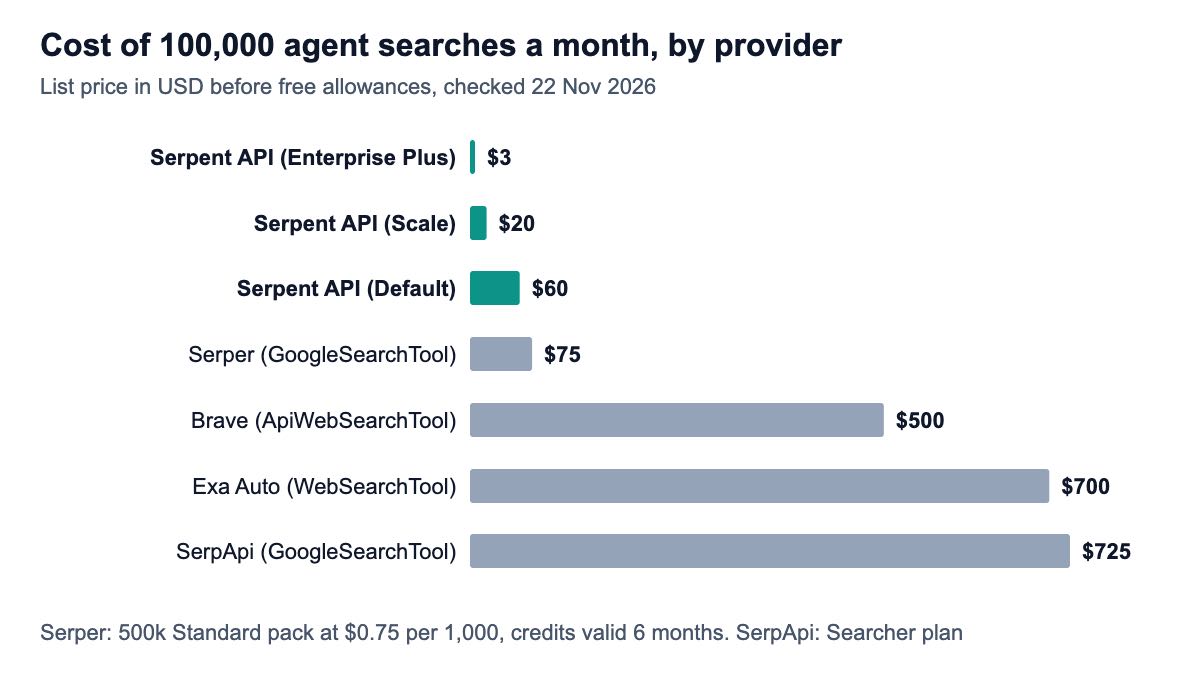
From the Growth tier up, less than every keyed provider the built-in tools call, at every volume in the table; at the Default rate, Serper's largest pack here is cheaper at 1 million searches a month. It prices 10,000, 100,000 and 1,000,000 searches a month at list price, checked on 22 November 2026.
| Provider (smolagents tool) | Billing | 10,000 / month | 100,000 / month | 1,000,000 / month |
|---|---|---|---|---|
| Serpent API, Default ($10 deposit) | $0.60 per 1,000 | $6 | $60 | $600 |
| Serpent API, Growth ($100 deposit) | $0.30 per 1,000 | $3 | $30 | $300 |
| Serpent API, Scale ($500 deposit) | $0.20 per 1,000 | $2 | $20 | $200 |
| Serpent API, Enterprise ($1,000 deposit) | $0.15 per 1,000 | $1.50 | $15 | $150 |
| Serpent API, Enterprise Plus ($1,250 deposit) | $0.03 per 1,000 | $0.30 | $3 | $30 |
| Serper (GoogleSearchTool) | Prepaid packs, 6-month validity | $10 ($1.00 pack rate) | $75 ($0.75) | $500 ($0.50) |
| Brave Search API (ApiWebSearchTool) | $5 per 1,000 | $50 | $500 | $5,000 |
| Exa, Auto (WebSearchTool engine="exa") | $7 per 1,000 | $70 | $700 | $7,000 |
| SerpApi (GoogleSearchTool) | Monthly plan | $150 (Production) | $725 (Searcher) | $3,750 (Cloud 1M) |
Rules: Serper sells prepaid packs ($50 for 50,000, $375 for 500,000, $1,250 for 2.5 million) whose credits last six months, so each cell uses the cheapest pack you would finish within that time; the smallest purchase is still $50. Exa charges $7 per 1,000 Auto searches with up to 10 results. Brave includes $5 of credit a month, and SerpApi uses the smallest plan that covers the volume. The no-key WebSearchTool engines have no per-search fee.
Our tier depends on deposit size, not volume; the pricing page lists every rate. Model tokens come on top for every option, and they usually cost more than the search itself; keeping five results instead of ten trims that part.
Can you use an MCP server instead?
Yes. smolagents' MCPClient loads tools from a Streamable HTTP server when you pass a dictionary with the server's url and "transport": "streamable-http", per the tools tutorial. Our hosted MCP server lives at https://api.apiserpent.com/mcp, takes the key as an X-API-Key header, and bills each tool call exactly like the matching REST call.
We have not shown this route as runnable code here, because MCPClient connects to the server as soon as it is created and the logged run made no network calls. The tutorial also carries a security warning worth reading before you connect any server.
The trade-off is the same as in other frameworks. MCP gives the agent every tool the server lists, which is quick for exploring; the custom tool gives it one tool, your format and your budget, which is what we would run in production. Our web search MCP server comparison covers the other servers.
Why isn't my agent searching well?
It never searches. Make the description say when to use the tool ("current facts, prices, news and documentation"), and ask for cited URLs in the task, as the example does.
It sends whole sentences as queries. The input description "Short keyword search query" helps; most engines handle keywords better.
It gets results from the wrong country. Mention the market in the task ("German prices") so the model fills country; the input exists for exactly this.
smolagents rejects the tool at start-up. Check that every key in inputs matches a forward() argument, and that any argument with a default is marked nullable. In a check logged with the evidence, an extra forward() argument and a defaulted argument without "nullable": True both raised errors on creation.
For richer results such as People Also Ask or related searches, call the per-page results endpoint and add those blocks to the output. The same tool pattern appears in our CrewAI, Pydantic AI and LlamaIndex tutorials, and our Serper alternatives comparison covers the provider choice behind GoogleSearchTool.
How we checked this
The code was run on 22 November 2026 with smolagents 1.26.0 and requests 2.34.2 on Python 3.15, in a virtual environment. Two parts were stubbed and nothing paid was called: the HTTP request returned the documented example response from our docs, and the model was a scripted stand-in built on smolagents' Model class. The output, versions and full scripts are logged with the article's evidence. The built-in tools were described from the installed 1.26.0 source.
Sources: 4 smolagents documentation pages, the smolagents source on GitHub, the smolagents page on PyPI, and 4 official pricing pages, opened 22 November 2026. What we could not verify: how a live model chooses queries or loops with this tool, result quality, latency, and the MCP route, which was not run.
Give your smolagents agent live search
Serpent API returns Google, Bing, Yahoo, DuckDuckGo and Brave results as JSON, from $0.03 per 1,000 — pay as you go, no subscription. New accounts get 10 free API calls, enough to try the tool above.
Get Your Free API KeyExplore: SERP API · Playground · Docs · Pricing
FAQ
What is the default web search tool in smolagents?
The guided tour uses WebSearchTool, which needs no API key: by default it reads DuckDuckGo's lite results page, and it can read Bing's RSS results or call Exa instead. smolagents also ships DuckDuckGoSearchTool, GoogleSearchTool for SerpApi or Serper keys, and ApiWebSearchTool, which calls the Brave Search API by default. All four are named web_search and take only a query, plus filter_year on GoogleSearchTool.
How do I create a custom tool in smolagents?
Either decorate a function with @tool, giving it type hints and a docstring with an Args section, or subclass Tool and set name, description, inputs, output_type and a forward method. Use the subclass when the tool needs settings or state, such as an API key, an engine choice or a search counter. Pass an instance in the agent's tools list.
How do I make a smolagents tool input optional?
Add "nullable": True to that input in the inputs dictionary and give the matching forward() argument a default value, such as country: str | None = None, so a call without it still works. smolagents compares the inputs with the forward() signature when the tool is created: a forward() argument missing from inputs, or an argument with a default that is not marked nullable, raises an error before the agent runs.
How do I limit how many searches a smolagents agent makes?
Keep a counter inside the tool's forward() method and return a short "budget used up" message once it reaches your limit. max_steps limits model turns, not tool calls, and a CodeAgent can call a tool many times inside one step with a loop. In the logged run, a single step looping over three queries made only two requests once the tool's budget was two.
Can smolagents use Google search results?
Yes. GoogleSearchTool calls SerpApi or Serper with your key for that service. A custom Tool can call any results API, including ours with engine set to google, and also accept a country code from the model. Our API returns Google, Bing, Yahoo, DuckDuckGo and Brave results in the same JSON shape, so one tool covers all five by changing a setting.
Sources
smolagents documentation and source (checked 22 November 2026):
- Built-in tools reference
- Tools tutorial (custom tools, MCPClient)
- Guided tour (CodeAgent, ToolCallingAgent, models)
- Secure code execution
- default_tools.py at v1.26.0
- smolagents on PyPI
Official pricing (checked 22 November 2026):