LangGraph Web Search Agent With Google Results, Not Tavily

A LangGraph web search agent needs three pieces: a search function wrapped as a tool, a model node that can call it, and a tools node that runs the calls and loops back. This tutorial builds one on Google results from a SERP API instead of Tavily, adds a hard cap on paid searches, and runs on langgraph 1.2.24.
Short answer: Wrap your search API in a @tool function, bind it to the model, and connect an agent node and a tools node in a StateGraph with a conditional edge. Keep a search counter in the graph state so the agent cannot run up the bill. If you do not need a custom graph, LangChain's create_agent builds the same loop in one line with the same tool. Our search API is from $0.03 per 1,000 — pay as you go, no subscription; Tavily, the usual default, lists $8 per 1,000 basic searches pay as you go.
Why swap Tavily for a SERP API in LangGraph?
Because many LangGraph tutorials make Tavily the default without saying why, and it is not always the right search for your agent. The LangChain OpenTutorial agent chapter, for example, imports TavilySearchResults and has you set TAVILY_API_KEY in your environment. That works, and Tavily is a good product for agents that want long passages from pages.
A SERP API returns something different: ranked search engine results as structured data, for the country you ask for. That matters when your agent answers "what is the current price of X in Germany", checks a ranking, or needs results localised to a country or city. It also costs less per search. Tavily charges $0.008 per credit pay as you go, and a basic search uses one credit, per its credits page; ours is from $0.03 per 1,000 — pay as you go, no subscription.
The graph itself does not care. LangGraph calls whatever function you register as a tool, so the swap is one function. Everything else in this tutorial works with any search API that returns titles, URLs and snippets. If you are still choosing between the two kinds of search API, our SERP API vs Tavily vs Exa guide explains the difference.
How do you write the search tool?
Decorate a plain function with @tool. LangChain turns the function name, type hints and docstring into the schema the model sees, so the docstring is your instruction to the model about when and how to search.
Install the packages first. The Anthropic package is only for the model in the example; any chat model with tool calling works.
pip install langgraph==1.2.24 langchain==1.5.2 langchain-anthropic requests
export SERPENT_API_KEY=sk_live_your_api_key
export ANTHROPIC_API_KEY=your_model_key
The tool calls our organic results endpoint with a query, a country and the engine, and keeps the top five results:
import os
from typing import Annotated

import requests
from typing_extensions import TypedDict
from langchain.chat_models import init_chat_model
from langchain_core.messages import SystemMessage, ToolMessage
from langchain_core.tools import tool
from langgraph.graph import StateGraph, START, END
from langgraph.graph.message import add_messages
from langgraph.prebuilt import ToolNode

SEARCH_URL = "https://apiserpent.com/api/search/quick"
MAX_SEARCHES = 4  # hard cap on paid searches per question


@tool
def web_search(query: str, country: str = "us") -> list[dict]:
    """Search the web (Google results) for current facts, prices, news or docs.
    Returns the top results as position, title, url and snippet.
    Use short keyword queries, not full sentences."""
    resp = requests.get(
        SEARCH_URL,
        params={"q": query, "country": country, "engine": "google", "num": 10},
        headers={"X-API-Key": os.environ["SERPENT_API_KEY"]},
        timeout=30,
    )
    resp.raise_for_status()
    organic = resp.json()["results"]["organic"]
    return [
        {"position": r["position"], "title": r["title"],
         "url": r["url"], "snippet": r.get("snippet", "")}
        for r in organic[:5]
    ]
Two details are worth copying. The docstring tells the model to use short keyword queries, because search engines handle "langgraph 1.2 release notes" better than a full question. And the tool returns a small list of dictionaries rather than the whole response, which keeps the tokens the model reads per search low. The full response, documented in our API docs, has the same keys on every engine, so you can switch engine to bing, yahoo, ddg or brave without touching the parser.
How do you build the graph?
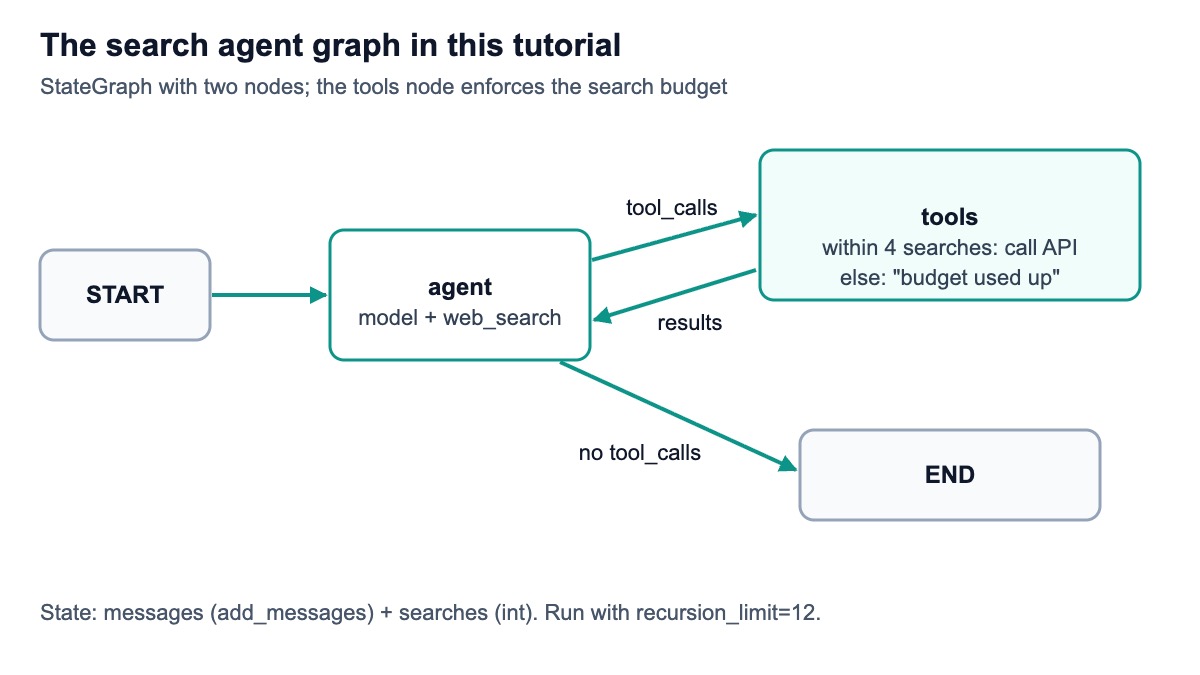
Use a StateGraph with two nodes, agent and tools, and a conditional edge that sends the flow to tools whenever the model asked for a search. The state holds the message list and a search counter.
class State(TypedDict):
    messages: Annotated[list, add_messages]
    searches: int


SYSTEM = SystemMessage(
    "Answer with facts from web_search results and cite the URLs you used. "
    "Search only when the question needs current information."
)


def build_graph(llm):
    llm_with_tools = llm.bind_tools([web_search])

    def agent(state: State):
        reply = llm_with_tools.invoke([SYSTEM] + state["messages"])
        return {"messages": [reply]}

    def route(state: State):
        last = state["messages"][-1]
        return "tools" if getattr(last, "tool_calls", None) else END

    tool_node = ToolNode([web_search])

    def tools(state: State):
        calls = state["messages"][-1].tool_calls
        used = state.get("searches", 0)
        if used + len(calls) > MAX_SEARCHES:
            # Budget spent: answer every pending call without paying for a search,
            # so the model writes its answer from the results it already has.
            note = "Search budget used up. Answer now from the results above."
            return {"messages": [ToolMessage(note, tool_call_id=c["id"]) for c in calls]}
        out = tool_node.invoke(state)
        return {"messages": out["messages"], "searches": used + len(calls)}

    graph = StateGraph(State)
    graph.add_node("agent", agent)
    graph.add_node("tools", tools)
    graph.add_edge(START, "agent")
    graph.add_conditional_edges("agent", route, ["tools", END])
    graph.add_edge("tools", "agent")
    return graph.compile()
Here is what each part does. add_messages is the reducer that appends each node's new messages to the list; LangGraph's Graph API docs recommend it for message lists because it can also update a message by ID. The agent node calls the model with the system prompt and the history. route sends the flow to tools if the last message contains tool calls, and ends the run otherwise.
The tools node wraps LangGraph's prebuilt ToolNode, which runs every tool call in the last message, including several in parallel, and returns one ToolMessage per call. The wrapper adds the budget: it counts searches in state, and once a batch would go over MAX_SEARCHES it answers the calls with a short note instead of searching. The edge from tools back to agent closes the loop.
To run it against your own model, add a small entry point. It needs your model provider's key; the logged run below used a scripted stand-in instead.
if __name__ == "__main__":
    llm = init_chat_model(os.environ.get("AGENT_MODEL", "anthropic:claude-sonnet-4-5"))
    app = build_graph(llm)
    result = app.invoke(
        {"messages": [("user", "What changed in the latest LangGraph release?")], "searches": 0},
        {"recursion_limit": 12},
    )
    print(result["messages"][-1].content)
    print("searches used:", result["searches"])
What does a run look like?
The code above runs on langgraph 1.2.24, langchain 1.5.2 and langchain-core 1.8.4 with Python 3.13 (20 November 2026). For the logged run, two parts were stubbed so nothing paid was called: the HTTP request returned the example response from our documentation, and the model was a scripted stand-in built on LangChain's GenericFakeChatModel, set to ask for one search and then answer. The graph, the ToolNode, the reducer and the routing were the real library.
No live model and no live search took part. Separately, build_graph also compiled with the ChatAnthropic class that init_chat_model returns, using a placeholder key and sending no request.
This is the message list the run printed after one question, copied from the log:
[human] What's the weather today in London?
[ai]  [{'name': 'web_search', 'args': {'query': 'weather today', 'country': 'uk'}, 'id': 'call_1', 'type': 'tool_call'}]
[tool] [{"position": 1, "title": "Weather Forecast - Today", "url": "https://example.com/weather", "snippet": "Today's weather forecast..."}]
[ai] Forecast summary from https://example.com/weather
searches used: 1
One HTTP request went out, to /api/search/quick with q=weather today, country=uk, engine=google and num=10, carrying the key in the X-API-Key header. The documented example contains a single result, so the tool returned one item; a live search returns up to the five the tool keeps.
How do you stop the agent from searching forever?
Count searches in state and refuse to pay for more than you allow, as the tools node does. In the logged run, the scripted model asked for five searches in a row with MAX_SEARCHES = 4: four HTTP requests went out, the fifth call got back "Search budget used up. Answer now from the results above.", and the model then wrote its final answer.
Answering the call, rather than ending the graph, matters. Chat model APIs expect every tool call in the history to have a matching tool result; a run that stops right after a tool call leaves the conversation in a state many providers reject on the next turn. Returning a ToolMessage for each pending call keeps the history valid and gives the model a clear instruction.
Note one design choice: if the model asks for several searches at once and the batch would exceed the cap, the whole batch is refused. That keeps the logic simple and the spend predictable. If you prefer to run the calls that still fit, slice the tool calls before handing them to ToolNode.
Also set recursion_limit when you invoke the graph. LangGraph's default is 10,007 super-steps from version 1.1.4, per the Graph API docs, which is far more than a search agent needs. A limit of 12 allows the four searches plus the model turns between them; in the logged run, the five-search scenario finished inside a limit of 12 with four searches made. LangGraph raises GraphRecursionError if a run goes past it.
Is there a shorter version?
Yes. LangChain 1.x has create_agent, which builds the same model-and-tools loop, as its agents docs show; LangChain's v1 migration guide recommends it in place of the older create_react_agent. With the same web_search tool:
from langchain.agents import create_agent

agent = create_agent(
    "anthropic:claude-sonnet-4-5",
    tools=[web_search],
    system_prompt="Cite the URLs you used.",
)
result = agent.invoke({"messages": [{"role": "user", "content": "What's the weather today in London?"}]})
print(result["messages"][-1].content)
We ran this snippet unchanged with the same stubs: the model string was handed the scripted stand-in when create_agent resolved it, so no request went to Anthropic. It built a graph with model and tools nodes, made one search request and printed the scripted answer. Use it when you do not need custom state. Build the graph yourself, as above, when you want a search budget in state, extra nodes such as a planner or a page reader, or control over routing. If your team builds with CrewAI instead, our CrewAI web search tool guide wraps the same search in a custom tool with its own per-run budget.
What does the search cost per question?
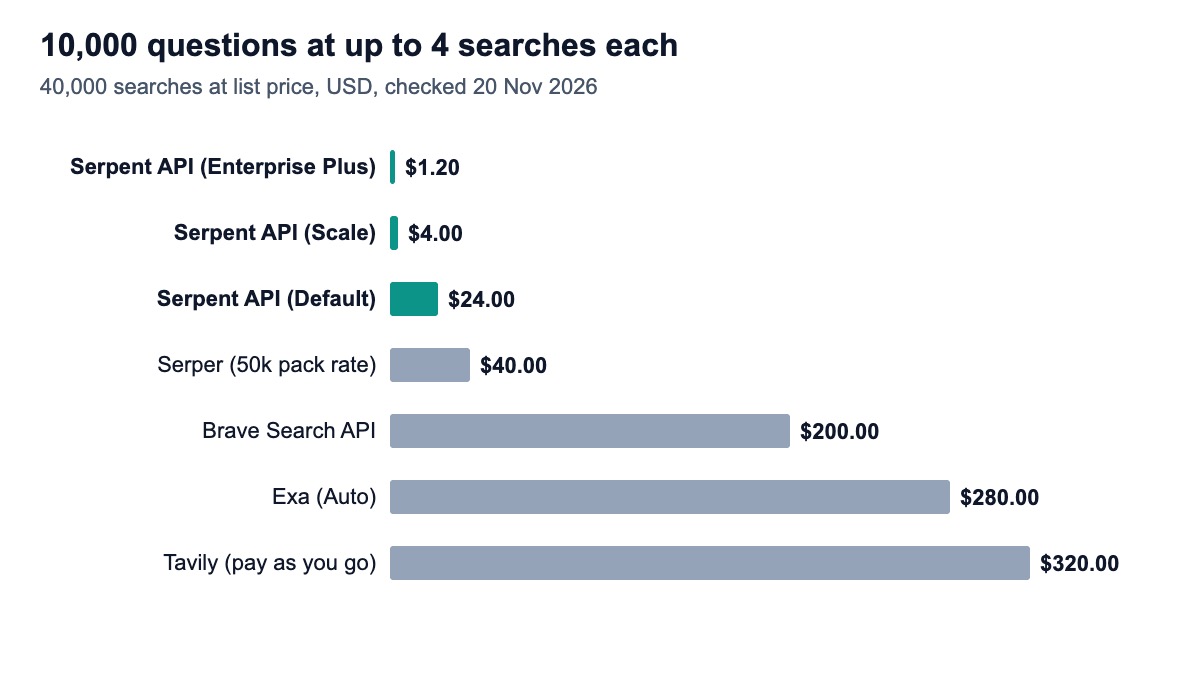
At most four searches per question, so 10,000 questions make at most 40,000 searches. The table prices that at list rates checked on 20 November 2026, before free credits.
| Search provider | Price per 1,000 searches | 40,000 searches |
|---|---|---|
| Serpent API, Default | $0.60 | $24.00 |
| Serpent API, Growth ($100 deposit) | $0.30 | $12.00 |
| Serpent API, Scale ($500 deposit) | $0.10 | $4.00 |
| Serpent API, Enterprise ($1,000 deposit) | $0.05 | $2.00 |
| Serpent API, Enterprise Plus ($1,250 deposit) | $0.03 | $1.20 |
| Serper (50k pack) | $1.00 | $40.00 |
| Brave Search API | $5.00 | $200.00 |
| Exa (Auto) | $7.00 | $280.00 |
| Tavily, pay as you go (basic) | $8.00 | $320.00 |
Prices come from Tavily, Exa, Brave, Serper and our pricing page. Tavily's credits page lists monthly plans down to $5 per 1,000 on its $500-a-month Growth plan (100,000 credits), and Serper says its pack credits are valid for six months. Our tier is set by deposit size, not volume.
Model tokens usually cost more than search. Each result the tool keeps becomes input tokens for every later model turn in that run, which is why the tool trims to five results with short snippets. Our LangChain cost math post works through the token side.
Where do you go from here?
Read pages, not just snippets. Add a fetch_page tool or a reader node that downloads the top two or three URLs. Searching first and reading selectively costs less than a search API that returns every page's text. Our deep research agent tutorial shows the plan, search and read pattern.
Use more of the results page. Switch the tool to the full results endpoint to get People Also Ask, related searches and other blocks, which make good follow-up queries for a research agent.
Target a city. Add a location argument, such as "Austin, TX", next to country; our API accepts it on both endpoints.
Remember across turns. Compile the graph with a checkpointer, such as LangGraph's in-memory saver, and pass a thread ID, so a follow-up question can reuse earlier results instead of searching again. For retrieval-augmented generation patterns, see our real-time RAG guide.
How we checked this
The code was run on 20 November 2026 in a fresh Python 3.13 virtual environment with langgraph 1.2.24, langchain 1.5.2, langchain-core 1.8.4 and requests 2.34.2. The HTTP request was stubbed to return the documented example response and the model was a scripted stand-in built on LangChain's fake chat model, so no live model, no live search and no paid service was called. The create_agent snippet ran unchanged with the same stubs. We keep the commands, versions, scripts and output on file.
Sources: 4 LangChain and LangGraph documentation pages, the LangGraph PyPI page, one third-party tutorial and 5 vendor pricing pages (two of them Tavily's), opened the same day. What we could not verify: how a live model chooses queries with this tool, answer quality, latency, and whether LangChain's own LangGraph quickstart still uses Tavily (the page we expected returned an error).
Plug Google results into your graph
Serpent API returns Google, Bing, Yahoo, DuckDuckGo and Brave results as JSON, from $0.03 per 1,000 — pay as you go, no subscription. New accounts get 10 free API calls, enough to test this agent.
Get Your Free API KeyExplore: SERP API · Playground · Docs · Pricing
FAQ
How do I add web search to a LangGraph agent?
Write a function that calls a search API and decorate it with @tool from langchain_core.tools. Bind it to your chat model with bind_tools, add an agent node that calls the model and a tools node built on ToolNode, and connect them with a conditional edge that goes to tools when the model's last message has tool calls. Add an edge from tools back to the agent so the model can read the results.
Can I use LangGraph without Tavily?
Yes. LangGraph has no built-in search provider; Tavily appears in many tutorials only as an example. Any function you register as a tool works, including a SERP API, Exa, Brave or your own internal search. The rest of the graph does not change, because the model only sees the tool's name, description and the results it returns.
What is the difference between create_agent and create_react_agent?
Both build a model-and-tools loop as a LangGraph graph. create_react_agent comes from langgraph.prebuilt and is the older entry point; create_agent comes from langchain.agents in LangChain 1.x and is the one LangChain's current agent docs use. For full control, such as a search budget in state or extra nodes, build the StateGraph yourself as in this tutorial.
How do I limit the number of searches in LangGraph?
Keep a counter in the graph state and check it in the tools node. When the next batch of tool calls would pass your limit, return a ToolMessage for each call saying the budget is used up, without calling the API, so the model answers from what it has. Also pass recursion_limit when you invoke the graph, because the default allows over 10,000 steps.
How much does a LangGraph search agent cost to run?
Two parts: search and model tokens. At four searches per question, 10,000 questions cost from $1.20 in searches on our API, against $320 on Tavily pay as you go. Model tokens usually cost more, so trim results to the few the model needs and keep snippets short.
Sources
LangGraph and LangChain (checked 20 November 2026):
- LangGraph Graph API (reducers, recursion limit)
- LangChain agents (create_agent)
- LangChain v1 migration guide (create_agent replaces create_react_agent)
- LangGraph agentic RAG tutorial
- langgraph on PyPI
- LangChain OpenTutorial, building an agent with LangGraph
Official pricing (checked 20 November 2026):