LlamaIndex web search tool: Google search results for your agent

A LlamaIndex agent gets live web search from a tool: an async Python function wrapped in FunctionTool and passed to FunctionAgent(tools=[...]). The function calls a search API and returns short text. LlamaHub also ships Tavily, Exa, Brave and Google tool specs, but a 40-line custom tool is cheaper and you control what the model reads.
Short answer: For a quick prototype with Tavily's extracted page content, use TavilyToolSpec with a FunctionAgent, not the OpenAIAgent its docs still show. For Google results at production volume, write your own FunctionTool on a SERP API: from $0.03 per 1,000 searches against $4 to $8 for the hosted search APIs. Avoid GoogleSearchToolSpec for new work, because it calls Google's Custom Search JSON API, which is closed to new customers and ends on 1 January 2027.
Which search tools can a LlamaIndex agent use?
Any tool a FunctionAgent can call, which in practice means a LlamaHub tool spec or your own function. A tool spec is a class that bundles several related functions; .to_tool_list() turns it into the FunctionTool objects an agent takes.
The search specs on PyPI on 20 Nov 2026 were llama-index-tools-tavily-research 0.7.0, llama-index-tools-exa 0.7.0, llama-index-tools-brave-search 0.7.0 and llama-index-tools-google 0.9.0, all uploaded on 14 November 2026. Vendors also publish their own, such as Bright Data's and Nimble's.
| Option | Package | What it calls | List price per 1,000 searches | Watch out for |
|---|---|---|---|---|
| TavilyToolSpec | llama-index-tools-tavily-research 0.7.0 | Tavily search | $5.00 to $8.00 (1,000 free a month) | Docs sample uses removed OpenAIAgent |
| ExaToolSpec | llama-index-tools-exa 0.7.0 | Exa search and contents | $7 (auto), $4 (lite) | Docs sample uses removed OpenAIAgent |
| BraveSearchToolSpec | llama-index-tools-brave-search 0.7.0 | Brave Search API | $5 | Brave's own index, not Google's |
| GoogleSearchToolSpec | llama-index-tools-google 0.9.0 | Google Custom Search JSON API | $5 (100 a day free) | Closed to new customers; ends 1 Jan 2027 |
| Your own FunctionTool | llama-index-core only | Any SERP API | From $0.03 on Serpent API | You write about 40 lines |
Of the four specs I installed only Tavily's; the "what it calls" column for Google comes from reading the 0.9.0 wheel's source, and the rest from each vendor's docs. If you need Google results, the custom tool is the only row in the table that returns them and is open to new users.
Why doesn't the Tavily or Exa sample work as written?
Because both still build the agent with OpenAIAgent.from_tools(...), and LlamaIndex removed that class. Version 0.13.0 of llama-index-core, released 30 July 2025, removed OpenAIAgent, AgentRunner, FunctionCallingAgent and the old ReActAgent, and its release notes tell everyone to move to FunctionAgent, ReActAgent (the new workflow version), CodeActAgent or AgentWorkflow.
The import from llama_index.agent.openai import OpenAIAgent comes from a separate package, llama-index-agent-openai. Its latest release, 0.4.12 from June 2025, pins llama-index-core<0.13. A dry-run install into an environment with core 0.14.26 plans to downgrade core to 0.12.52.post1, a July 2025 release, so following the sample can silently roll your whole stack back about 16 months.
The fix is one line. Keep the vendor's tool spec and change the agent:
# tavily_fix.py - Tavily's LlamaIndex tool spec on the current FunctionAgent (constructed offline; no search is sent)
from llama_index.core.agent.workflow import FunctionAgent
from llama_index.llms.openai import OpenAI
from llama_index.tools.tavily_research.base import TavilyToolSpec

tavily_tool = TavilyToolSpec(api_key="tvly-YOUR_API_KEY")
# instead of: agent = OpenAIAgent.from_tools(tavily_tool.to_tool_list())
agent = FunctionAgent(tools=tavily_tool.to_tool_list(), llm=OpenAI(model="gpt-5.6-sol", api_key="unused"))
print(type(agent).__name__, [t.metadata.name for t in agent.tools])
With llama-index-tools-tavily-research 0.7.0 installed next to core 0.14.26 (no downgrade), that prints FunctionAgent ['search', 'extract']: the spec's two tools load straight into the current agent.
The Google spec has a different problem. The 0.9.0 source builds its URL from https://www.googleapis.com/customsearch/v1, and Google's Custom Search JSON API overview now says it "is closed to new customers" and that existing customers "have until January 1, 2027 to transition". If an agent you run uses it, see migrating off the Custom Search API.
How do you write the search tools?
Write plain async functions, describe each parameter with Annotated[..., Field(description=...)], and wrap them with FunctionTool.from_defaults(..., description=...). This file gives the agent two tools, one for the web and one for news, both on Google results:
# serpent_tools.py - live web and news search tools for LlamaIndex agents
import os
from typing import Annotated

import httpx
from llama_index.core.tools import FunctionTool
from pydantic import Field

BASE = "https://apiserpent.com"
COUNTRY = "us"
MAX_RESULTS = 8
Freshness = Annotated[str | None, Field(description='Time filter: "d" past day, "7d" past week, "m" past month, "y" past year.')]


def make_client() -> httpx.AsyncClient:
    return httpx.AsyncClient(base_url=BASE, timeout=30,
                             headers={"X-API-Key": os.environ["SERPENT_API_KEY"]})


async def web_search(
    query: Annotated[str, Field(description="The search query, phrased the way a person would type it.")],
    freshness: Freshness = None,
) -> str:
    """Search Google for current web pages. Use it for facts that may have changed recently."""
    params = {"q": query, "country": COUNTRY}
    if freshness:
        params["freshness"] = freshness
    async with make_client() as client:
        r = await client.get("/api/search", params=params)
    r.raise_for_status()
    rows = r.json()["results"]["organic"][:MAX_RESULTS]
    return "\n\n".join(
        f"[{o['position']}] {o['title']}\n{o['url']}\n{o.get('snippet') or ''}" for o in rows
    ) or "No results."


async def news_search(
    query: Annotated[str, Field(description="What the news should be about: a company, person or event.")],
    freshness: Freshness = "7d",
) -> str:
    """Search Google News for recent articles. Use it for announcements, launches and events."""
    params = {"q": query, "country": COUNTRY, "num": MAX_RESULTS}
    if freshness:
        params["freshness"] = freshness
    async with make_client() as client:
        r = await client.get("/api/news", params=params)
    r.raise_for_status()
    rows = r.json()["results"]["articles"]
    return "\n\n".join(
        f"[{a['position']}] {a['title']} ({a.get('source')}, {a.get('publishedTime')})\n{a['url']}\n{a.get('snippet') or ''}"
        for a in rows
    ) or "No articles."


# Pass description= so LlamaIndex does not prepend the full Python signature to it.
SEARCH_TOOLS = [
    FunctionTool.from_defaults(async_fn=fn, name=fn.__name__, description=fn.__doc__)
    for fn in (web_search, news_search)
]
Both tools return plain text: a numbered list of title, URL and snippet. That format is easy for a model to cite, and it is a fraction of the size of the JSON it came from. They map to the documented web search and news search parameters: q, country, freshness and, for news, num.
The news tool defaults to the past week, because a news question with no time limit tends to pull last year's articles. The model can still widen it to "m" or "y" when the question needs it.
Errors are left to raise_for_status(). In a FunctionAgent, an exception inside a tool is caught and handed back to the model as the tool's output, so a bad key or an empty balance shows up as text the model can report instead of a crash. With a stubbed 402 response, the model received Client error '402 Payment Required' ... and the ToolCallResult event carried tool_output.is_error == True, which is the flag to alert on.
What does the model actually read?
Less than you would get by default, which is the point of the two non-obvious lines in that file. I checked both by printing the tool metadata and output on 20 Nov 2026.
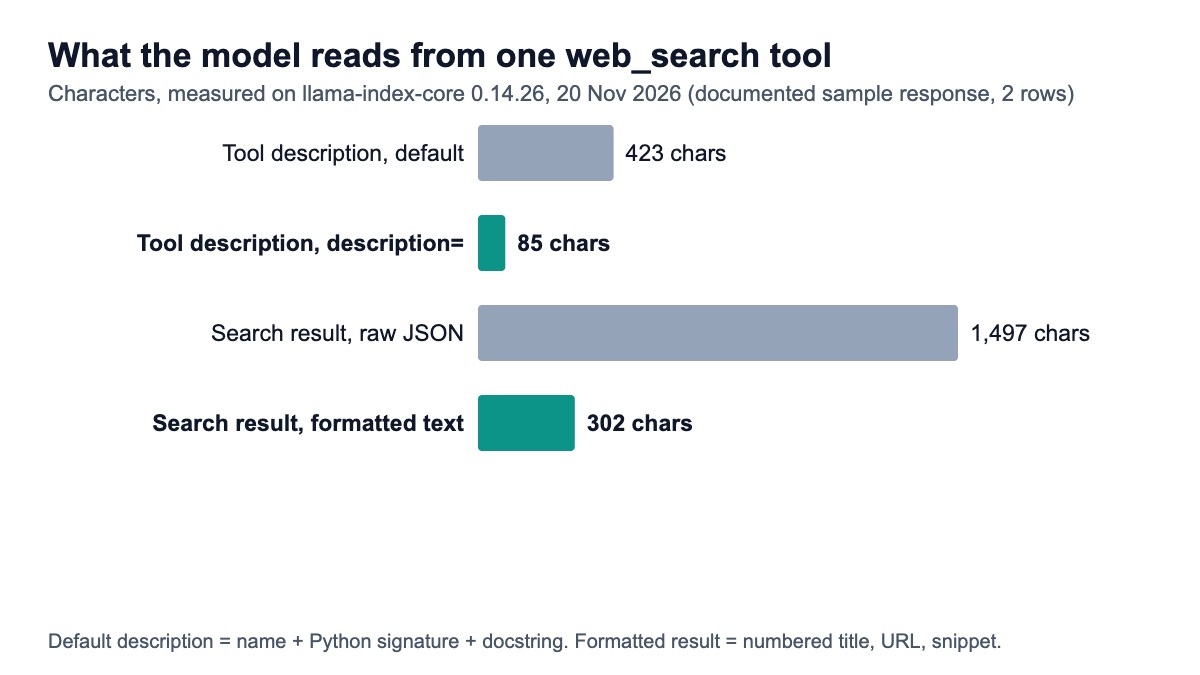
The description: If you skip description=, LlamaIndex builds one from the function's name, its full Python signature and its docstring. With Annotated parameters that came to 423 characters, most of it a repr like FieldInfo(annotation=NoneType, required=True, ...). Passing the docstring as description= cut it to 85 characters of plain English. That text is sent on every model call, for every tool.
The parameter descriptions: LlamaIndex reads per-parameter descriptions out of a docstring only in a few exact forms: query (str): description in a Google-style Args: block, :param query: description or @param query description. A line such as query: The search query, without the type in brackets, is not picked up, and the schema then has only a title and a type for that parameter (we read this in the 0.14.26 FunctionTool source). Annotated[str, Field(description=...)] puts the description in the JSON schema whatever the docstring looks like, and that schema is where function-calling models look for it.
The result: For the documented sample response, the raw JSON was 1,497 characters for two organic rows. The formatted tool output was 302 characters, 80% smaller, and keeps everything a model needs to answer and cite. With eight rows per search and two or three searches per question, that difference adds up on every call.
How do you wire it into a FunctionAgent?
Pass the tool list, an LLM that supports function calling and a system prompt, then iterate over the handler's events to see each search as it happens:
# agent_app.py - a FunctionAgent that searches the live web
import asyncio

from llama_index.core.agent.workflow import FunctionAgent, ToolCall, ToolCallResult
from llama_index.llms.openai import OpenAI

from serpent_tools import SEARCH_TOOLS

agent = FunctionAgent(
    tools=SEARCH_TOOLS,
    llm=OpenAI(model="gpt-5.6-sol"),
    system_prompt=(
        "You answer questions about current events and facts. Call web_search or news_search "
        "when the answer may have changed since your training data. Cite the URLs you used."
    ),
)


async def main() -> None:
    handler = agent.run("How do I tie a tie? Give me the best guide.")
    async for ev in handler.stream_events():
        if isinstance(ev, ToolCall):
            print(f"-> {ev.tool_name}({ev.tool_kwargs})")
        elif isinstance(ev, ToolCallResult):
            print(f"<- {ev.tool_name}: {str(ev.tool_output)[:120]}...")
    response = await handler
    print(response)


if __name__ == "__main__":
    asyncio.run(main())
This is the output on llama-index-core 0.14.26. The agent loop, tool schemas, event stream and tool execution were real. The OpenAI model was replaced by LlamaIndex's own MockFunctionCallingLLM with a scripted reply, and the HTTP call was answered with the response published in the response format docs, so the rows are the documented sample rather than a live search:
-> web_search({'query': 'how to tie a tie'})
<- web_search: [1] 4 Ways to Tie a Tie - wikiHow
https://www.wikihow.com/Tie-a-Tie
Have you graduated beyond the clip-on tie? ...

[5] ...
The clearest step-by-step guide is wikiHow's: https://www.wikihow.com/Tie-a-Tie
--- HTTP requests the tools made ---
GET https://apiserpent.com/api/search?q=how+to+tie+a+tie&country=us X-API-Key: sk_live_test
Two things to copy from it. agent.run() returns a handler immediately; you stream events from it and then await it for the final response. And agent.run() must be called inside a running event loop: asyncio.run(agent.run("...")) fails with RuntimeError: no running event loop, so wrap it in an async def main() as above.
To keep a conversation across turns, create ctx = Context(agent) once and pass ctx=ctx to every agent.run(). Without it each run starts with an empty history, and the agent searches again for things it already found.
How do you test it without an OpenAI key?
Swap the agent's LLM for MockFunctionCallingLLM with a scripted response_generator, and swap the HTTP client for one with httpx.MockTransport. This test runs the real agent from agent_app.py with no network and asserts on the parsed answer:
# test_agent.py - no OpenAI key, no network: a scripted LLM plus a fake HTTP transport
import asyncio
import json
import os

import httpx
from llama_index.core.base.llms.types import ChatMessage, MessageRole, ToolCallBlock
from llama_index.core.llms.mock import MockFunctionCallingLLM

os.environ["SERPENT_API_KEY"] = "sk_test"
os.environ.setdefault("OPENAI_API_KEY", "unused")  # agent_app builds an OpenAI LLM at import
import serpent_tools  # noqa: E402
from agent_app import agent  # noqa: E402

DOCS = json.load(open("docs-response.json"))  # the response shown at /docs#response-format
serpent_tools.make_client = lambda: httpx.AsyncClient(
    base_url=serpent_tools.BASE, transport=httpx.MockTransport(lambda r: httpx.Response(200, json=DOCS)))


def script(messages, **kwargs) -> ChatMessage:
    tool_msgs = [m for m in messages if m.role == MessageRole.TOOL]
    if not tool_msgs:  # turn 1: call web_search
        return ChatMessage(role=MessageRole.ASSISTANT, blocks=[
            ToolCallBlock(tool_call_id="call_1", tool_name="web_search", tool_kwargs={"query": "how to tie a tie"})])
    first_url = tool_msgs[-1].content.splitlines()[1]  # turn 2: answer from the tool output
    return ChatMessage(role=MessageRole.ASSISTANT, content=f"Best guide: {first_url}")


async def main() -> None:
    agent.llm = MockFunctionCallingLLM(response_generator=script, is_chat_model=True)
    response = await agent.run("How do I tie a tie?")  # agent.run() needs a running event loop
    assert "wikihow.com/Tie-a-Tie" in str(response)
    print(response)
    print([t.tool_name for t in response.tool_calls])


asyncio.run(main())
Output on 20 Nov 2026:
Best guide: https://www.wikihow.com/Tie-a-Tie
['web_search']
The scripted function receives the same messages a real model would, including the tool output, so it is also a cheap way to check exactly what your tools put in front of the model. Before you ship, make one live call with your real key and compare the parsed rows with this fixture.
What does each option cost per 1,000 searches?
The custom tool on a SERP API is the cheapest at every volume, from $0.03 per 1,000. The hosted search APIs sit between $5 and $8 once their free allowance is used. The table uses each vendor's list price on 20 Nov 2026 and the smallest self-serve plan or pack that covers the volume.
| Search option | 1,000 / month | 100,000 / month | 1,000,000 / month | Rule used |
|---|---|---|---|---|
| Google Custom Search (existing customers) | $0 (free 100 a day) | $4.85 | Over the 10,000-a-day cap | $5 per 1K after 100 free a day; closed to new customers |
| Exa (auto) | $0 (free credit) | $7.00 | $7.00 | $7 per 1K; $10 free credit each month |
| Tavily (basic search) | $0 (free tier) | $5.00 | $7.70 | 1,000 free credits; Growth $500 for 100K; $0.008 each after |
| Brave Search API | $0 (free credit) | $5.00 | $5.00 | $5 per 1K; $5 free credit each month |
| SerpApi | $25.00 | $7.25 | $3.75 | Starter $25, Searcher $725, Cloud 1M $3,750 a month |
| Serper | $8.33 | $0.75 | $0.50 | $50 / $375 / $1,250 packs; credits expire after 6 months |
| Serpent API, Default (pay as you go) | $0.60 | $0.60 | $0.60 | No subscription |
| Serpent API, Growth ($100 deposit) | $0.30 | $0.30 | $0.30 | No subscription |
| Serpent API, Scale ($500 deposit) | $0.10 | $0.10 | $0.10 | No subscription |
| Serpent API, Enterprise ($1,000 deposit) | $0.05 | $0.05 | $0.05 | No subscription |
| Serpent API, Enterprise Plus ($1,250 deposit) | $0.03 | $0.03 | $0.03 | No subscription |
Google Custom Search at 100,000 a month: 3,000 free queries (100 a day) and 97,000 paid at $5 per 1,000, which is $485, or $4.85 per 1,000. Its 10,000-a-day cap is 300,000 a month, so 1,000,000 a month is not possible on it. Serper's $8.33 at 1,000 a month is its $50 minimum pack spread over the six months before the credits expire.
Exa's $10 and Brave's $5 monthly credits are counted only in the first column; at higher volumes they take $10 or $5 off the monthly bill. Both tools above ask for one page of results, so each search is one charge on Serpent API.
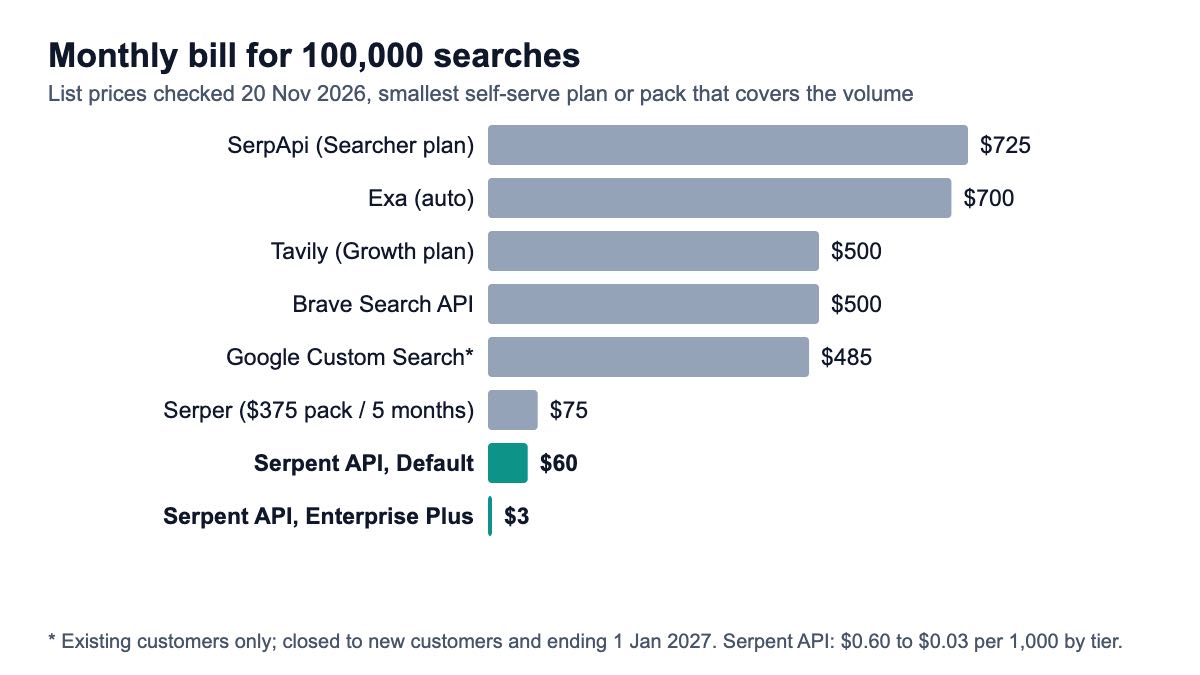
In monthly terms, 100,000 searches cost $725 on SerpApi, $700 on Exa, $500 on Tavily or Brave, $485 on Google Custom Search, $75 on Serper and $60 down to $3 on Serpent API, depending on the tier. Each question your agent answers can trigger two or three searches, so multiply these by your average. The news tool is priced separately on the pricing page; it starts lower than web search.
Which one should you pick?
- You want page content, not just links:
TavilyToolSpecorExaToolSpec, on aFunctionAgent. Both fetch text from the result pages, which saves a separate fetch step, at $4 to $8 per 1,000 searches. - You want Google results at volume: a custom
FunctionToolon a SERP API. It is the cheapest route and the only one in this list that returns Google results and is open to new users. - You run GoogleSearchToolSpec today: plan the move before 1 January 2027; the custom tool above is a drop-in replacement for an agent that only needs titles, URLs and snippets.
- You need an index that is not Google's:
BraveSearchToolSpecat $5 per 1,000. - You are building retrieval, not an agent: pull results into nodes instead of tools; the live-search RAG tutorial has a LlamaIndex reader for that, and gpt-researcher with a custom retriever covers multi-step research.
For the trade-offs between result types, read SERP API vs Tavily vs Exa for agents; if you also run LangChain, its version of this tool uses the same endpoint.
How we checked this
Code: every Python snippet on this page was run on 20 Nov 2026 with llama-index-core 0.14.26, llama-index-llms-openai 0.9.0, httpx 0.28.1 and Python 3.12.13. The LLM was LlamaIndex's MockFunctionCallingLLM with a scripted reply, and HTTP calls returned the responses published in the API docs; no live search or OpenAI call was made.
The character counts (423 vs 85, 1,497 vs 302) come from the same run. The Tavily fix was run with llama-index-tools-tavily-research 0.7.0 installed, constructing the agent only; no Tavily search was sent. The Exa, Brave and Google specs were not installed.
Sources: 5 pages that rank for the query (Tavily, Exa, Bright Data and Nimble docs or blogs, one DEV tutorial), Google's Custom Search overview, the LlamaIndex 0.13.0 release notes, PyPI metadata for six packages, and 5 official pricing pages, all opened 20 Nov 2026. Our prices come from the pricing page the same day.
What we could not verify: how a real model chooses between the web and news tools; live latency; whether the Exa and Brave specs need any change on core 0.14 beyond the agent class; whether Exa bills page text requested on a search on top of the search price (its pricing page does not say).
Give your LlamaIndex agent Google search results
Web and news search over one key, from $0.03 per 1,000 — pay as you go, no subscription. Start with 10 free API calls.
Get Your Free API KeyExplore: SERP API · Playground · Docs · Pricing
FAQ
Does LlamaIndex have a built-in web search tool?
Not in llama-index-core. Web search comes from LlamaHub packages such as llama-index-tools-tavily-research, llama-index-tools-exa, llama-index-tools-brave-search and llama-index-tools-google, or from your own function wrapped in FunctionTool. Each package needs that provider's API key. The Google one calls the Custom Search JSON API, which no longer accepts new customers, so new projects usually pick one of the others or a custom tool.
How do I give a LlamaIndex agent Google search results?
Write an async function that calls a SERP API with the query and returns the top results as short text, wrap it with FunctionTool.from_defaults(async_fn=..., description=...), and pass it to FunctionAgent(tools=[...], llm=...). The full code is above. GoogleSearchToolSpec also returns Google results, but only for existing Custom Search customers and only until 1 January 2027.
What replaced OpenAIAgent in LlamaIndex?
FunctionAgent, imported from llama_index.core.agent.workflow. LlamaIndex 0.13.0 removed OpenAIAgent, AgentRunner and FunctionCallingAgent. FunctionAgent takes tools, llm and system_prompt, and you call await agent.run("...") instead of agent.chat(...). Installing the old llama-index-agent-openai package to keep OpenAIAgent downgrades core below 0.13.
Is there a cheaper alternative to Tavily for LlamaIndex?
Yes, if you need search results rather than extracted page text. Tavily's basic search works out at $5.00 to $8.00 per 1,000 after 1,000 free credits a month. A custom FunctionTool on a SERP API returns Google's titles, URLs and snippets from $0.03 per 1,000 on Serpent API, or $0.50 to $1.00 on Serper. If your agent needs page content, add a fetch tool for the two or three URLs it actually cites.
Why does my LlamaIndex tool ignore my parameter descriptions?
Usually because the docstring is not in one of the exact forms LlamaIndex parses. It picks up name (type): description lines in a Google-style Args: block, :param name: and @param name; a plain name: description line is skipped, and the whole docstring still goes into the tool description after the function's signature. Use Annotated[str, Field(description="...")] for each parameter so the description lands in the JSON schema, and pass description= to FunctionTool.from_defaults so the signature is not repeated in the description.
Sources
Official documentation and release records (checked 20 November 2026):
- Google: Custom Search JSON API overview
- LlamaIndex v0.13.0 release notes (mirror)
- PyPI: llama-index-core
- PyPI: llama-index-agent-openai
- PyPI: llama-index-tools-google
Vendor integration guides (opened 20 November 2026):
- Tavily: LlamaIndex integration
- Exa: LlamaIndex integration
- Bright Data: LlamaIndex SERP agent
- Nimble: LlamaIndex connector
Official pricing pages (checked 20 November 2026):