Mastra web search tool: a createTool any model can use

A Mastra agent gets web search from a tool: either Mastra's built-in webSearchTool, which asks the model provider to search, or your own createTool that calls a search API. The built-in one is three lines but only runs on OpenAI, Anthropic, Gemini and xAI models, or through Mastra Gateway. A custom tool runs on any model and costs far less per search.
Short answer: For a quick demo on a supported provider, import webSearchTool from @mastra/core/tools. For page content, use @mastra/tavily. For Google results on any model at production volume, write a 50-line createTool on a SERP API, add toModelOutput so the model reads compact text, and pay from $0.03 per 1,000 searches instead of $10 for provider search.
What are your web search options in Mastra?
There are three routes: the provider's own search, a vendor integration package, or your own tool. Mastra's Tools documentation describes the first: import webSearchTool from @mastra/core/tools and Mastra resolves it at run time to the active provider's native search.
That page says webSearchTool "supports OpenAI, Anthropic, Google Gemini, and xAI models". If Mastra cannot infer one of those providers from the active model, the run fails with a MastraError. Models served through Mastra Gateway use the gateway's own openrouter.web_search instead. Mastra's old web search guide URL now opens that same Tools page.
The vendor packages are thin wrappers that each add a set of tools. @mastra/tavily adds tavily-search, tavily-extract, tavily-crawl and tavily-map. @mastra/brightdata adds a Google search tool and a page fetch tool, and Exa says it ships as a native Mastra tool.
| Route | How you add it | Runs on | Returns | List price per 1,000 searches |
|---|---|---|---|---|
| Provider search | tools: { search: webSearchTool } | OpenAI, Anthropic, Gemini, xAI | Model's own cited answer | $10 on OpenAI and Anthropic, plus tokens |
| @mastra/tavily | createTavilyTools() | Any model | Results with content snippets | $5.00 to $8.00 (1,000 free a month) |
| Exa | Exa's Mastra integration | Any model | Results and page contents | $7 (auto), $4 (lite) |
| @mastra/brightdata | createBrightDataTools() | Any model | Google organic results, page fetch | Not stated on the integration page |
| Your own createTool | tools: { webSearchTool } | Any model | Whatever fields you choose | From $0.03 on Serpent API |
How do you write the search tool with createTool?
Define an input schema with zod, an output schema, a toModelOutput function and an execute function that calls the API. This one sends a GET to the documented search endpoint with your key in the X-API-Key header and keeps the top eight organic results:
// src/mastra/tools/web-search.ts
import { createTool } from '@mastra/core/tools';
import { z } from 'zod';

const SERPENT_URL = 'https://apiserpent.com/api/search';

export const webSearchTool = createTool({
  id: 'web-search',
  description:
    'Search Google for current web pages. Use it for facts that may have changed recently. ' +
    'Returns the top organic results with title, URL and snippet.',
  inputSchema: z.object({
    query: z.string().describe('The search query, phrased the way a person would type it'),
    country: z.string().length(2).default('us').describe('Two-letter country code, e.g. us, gb, de'),
    freshness: z.enum(['d', '7d', 'm', 'y']).optional()
      .describe('Time filter: d past day, 7d past week, m past month, y past year'),
  }),
  outputSchema: z.object({
    results: z.array(z.object({
      position: z.number(),
      title: z.string(),
      url: z.string(),
      snippet: z.string(),
    })),
  }),
  // The model gets compact text; your app still gets the full structured result.
  toModelOutput: ({ results }) => ({
    type: 'text',
    value: results.map((r) => `[${r.position}] ${r.title}\n${r.url}\n${r.snippet}`).join('\n\n'),
  }),
  execute: async ({ query, country, freshness }, { abortSignal }) => {
    const params = new URLSearchParams({ q: query, country });
    if (freshness) params.set('freshness', freshness);
    const res = await fetch(`${SERPENT_URL}?${params}`, {
      headers: { 'X-API-Key': process.env.SERPENT_API_KEY! },
      // give up after 30 s, or as soon as the agent run is cancelled
      signal: abortSignal ? AbortSignal.any([abortSignal, AbortSignal.timeout(30_000)]) : AbortSignal.timeout(30_000),
    });
    if (!res.ok) {
      const body = await res.json().catch(() => ({}));
      throw new Error(`web-search failed: ${res.status} ${body.code ?? ''} ${body.message ?? ''}`.trim());
    }
    const data = await res.json();
    return {
      results: data.results.organic.slice(0, 8).map((o: any) => ({
        position: o.position,
        title: o.title,
        url: o.url,
        snippet: o.snippet ?? '',
      })),
    };
  },
});
Every field has a job. The .describe() text becomes the JSON schema the model reads, so write it for the model. z.enum on freshness means a bad value is rejected before any request goes out. country has a default, so the model can call the tool with only a query.
execute takes the validated input first and a context object second. The context carries abortSignal; combining it with a 30-second timeout through AbortSignal.any means the request stops when the agent run is cancelled or when it takes too long, whichever comes first.
toModelOutput is the line most tutorials skip. Mastra's docs describe it as the way to give the model "a smaller or multimodal representation" while your application keeps the full result. Here the model gets a numbered text list, and your code still gets typed objects in result.toolResults, under each entry's payload.result.
How do you attach it to an agent?
Put the tool in the agent's tools object and pick a model string. The model id below is the one Mastra's own web search example uses:
// src/mastra/agents/research-agent.ts
import { Agent } from '@mastra/core/agent';
import { webSearchTool } from '../tools/web-search';

export const researchAgent = new Agent({
  id: 'research-agent',
  name: 'Research Agent',
  instructions:
    'Answer questions about current facts. Call web-search when the answer may have changed ' +
    'since your training data, at most twice per question. Cite every URL you used.',
  model: 'openai/gpt-5.6-sol',
  tools: { webSearchTool },
});
One naming detail decides what the model calls your tool. The docs state that the tool name in responses "is determined by the object key you use", not by the tool's id. With tools: { webSearchTool }, the model is offered a tool called webSearchTool; the id of web-search never appears in the model's tool list. If your instructions say "call web-search", match the key to the instruction, for example tools: { 'web-search': webSearchTool }, or refer to the key.
Then call it from a route, a workflow step or a script with await researchAgent.generate('...', { maxSteps: 3 }). maxSteps caps the number of model turns in one call, which also caps how many searches a single question can trigger.
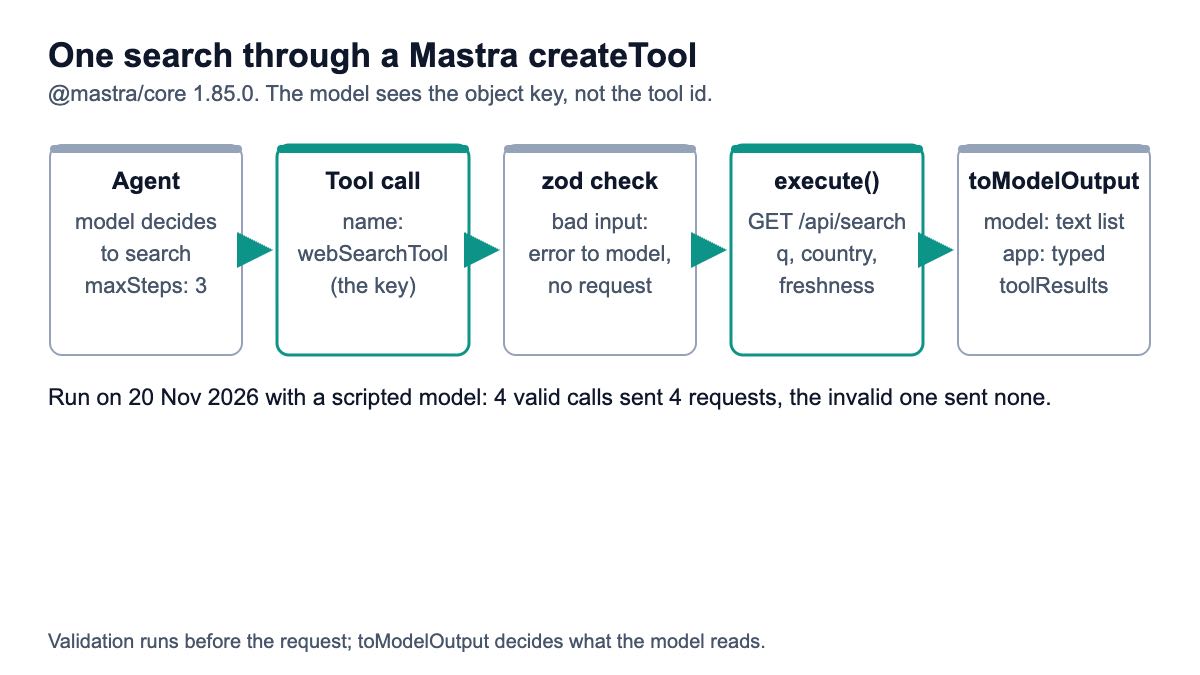
What does the model see, and what does your app get?
Here is the output from 20 Nov 2026 on @mastra/core 1.85.0, ai 7.0.177 and zod 4.6.7. Mastra's agent loop, schema validation and toModelOutput were real. The OpenAI model was replaced by MockLanguageModelV3 from ai/test with a scripted reply, and fetch returned the response published in the response format docs, so the rows are the documented sample rather than a live search.
The tool as offered to the model:
webSearchTool | Search Google for current web pages. Use it for facts that may have changed recently. Returns the top organic results with title, URL and snippet.
{"type":"object","properties":{"query":{"type":"string","description":"The search query, phrased the way a person would type it"},"country":{"default":"us","description":"Two-letter country code, e.g. us, gb, de","type":"string","minLength":2,"maxLength":2},"freshness":{"description":"Time filter: d past day, 7d past week, m past month, y past year","type":"string","enum":["d","7d","m","y"]}},"required":["query"],"additionalProperties":false}
What the model received back from the tool, after toModelOutput:
[1] 4 Ways to Tie a Tie - wikiHow
https://www.wikihow.com/Tie-a-Tie
Have you graduated beyond the clip-on tie? ...

[5] How to Tie a Tie Perfectly (Beginner Tutorial) | Easiest Step-by-Step ...
https://www.youtube.com/watch?v=mS6lX5QVUu0
In this video, you'll learn: The easiest method to tie a tie ...
And what the application got in result.toolResults (each entry's payload.result), plus the request the tool sent:
[{"results":[{"position":1,"title":"4 Ways to Tie a Tie - wikiHow","url":"https://www.wikihow.com/Tie-a-Tie","snippet":"Have you graduated beyond the clip-on tie? ..."}, ...]}]
GET https://apiserpent.com/api/search?q=how+to+tie+a+tie&country=us X-API-Key: sk_live_test
The model asked for {"query":"how to tie a tie"} with no country, and the request still carried country=us: zod applied the default before execute ran. The run took two steps, one tool call and one answer.
What happens with a bad argument or a failed request?
A bad argument never reaches the network. When execute was called with freshness: "week", Mastra returned an object instead of running the function:
{"error":true,"message":"Tool input validation failed for web-search. Please fix the following errors and try again:\n- freshness: Invalid option: expected one of \"d\"|\"7d\"|\"m\"|\"y\"\n\nProvided arguments: {...}"}Inside an agent run that message goes back to the model, which can correct the value and call again. The run log counted HTTP requests: four tool executions with valid input sent four requests, and the invalid one sent none.
A request the API refuses is an exception from execute. With an unsupported country code the tool threw web-search failed: 400 unsupported_country country is not a supported 2-letter code. The code field is the stable value to branch on; the error code table lists every one, from missing_api_key to insufficient_credits.
How do you test it without an OpenAI key?
Replace the model with MockLanguageModelV3 and replace fetch with a function that returns a saved response. This test runs the real agent from research-agent.ts, with no network and no OPENAI_API_KEY:
// test-agent.ts - no OpenAI key, no network: a scripted model plus a fake fetch
import { readFileSync } from 'node:fs';
import { MockLanguageModelV3 } from 'ai/test';
import { researchAgent } from './src/mastra/agents/research-agent';

process.env.SERPENT_API_KEY = 'sk_test';
const DOCS = readFileSync('docs-response.json', 'utf8'); // the response shown at /docs#response-format
globalThis.fetch = (async () => new Response(DOCS, { status: 200 })) as typeof fetch;

const usage = { inputTokens: { total: 1, noCache: 1, cacheRead: 0, cacheWrite: 0 },
                outputTokens: { total: 1, text: 1, reasoning: 0 } };
const model = new MockLanguageModelV3({
  doGenerate: async ({ prompt }: any) => {
    const toolMsg = prompt.findLast((m: any) => m.role === 'tool');
    if (!toolMsg) {
      // turn 1: call the tool by its KEY in `tools`, not by its id
      return { content: [{ type: 'tool-call', toolCallId: 'c1', toolName: 'webSearchTool',
        input: JSON.stringify({ query: 'how to tie a tie' }) }],
        finishReason: { unified: 'tool-calls', raw: 'tool_calls' }, usage, warnings: [] };
    }
    const firstUrl = String(toolMsg.content[0].output.value).split('\n')[1];
    return { content: [{ type: 'text', text: `Best guide: ${firstUrl}` }],
      finishReason: { unified: 'stop', raw: 'stop' }, usage, warnings: [] };
  },
});

// internal helper; the cast is needed because ai/test types differ slightly from Mastra's model type
researchAgent.__updateModel({ model: model as any });
const result = await researchAgent.generate('How do I tie a tie?', { maxSteps: 3 });
if (!result.text.includes('wikihow.com/Tie-a-Tie')) throw new Error('unexpected answer');
console.log(result.text);
console.log(result.toolCalls.map((c: any) => c.payload.toolName));
Output with npx tsx test-agent.ts (the project's package.json has "type": "module" for the top-level await):
Best guide: https://www.wikihow.com/Tie-a-Tie
[ 'webSearchTool' ]
__updateModel has a double-underscore name, which usually signals an internal helper that can change between releases. If you prefer not to rely on it, export a small factory that builds the agent with a model argument and call that from both production code and tests. Before shipping, make one live call with your real key and compare the parsed rows with your fixture.
What does each option cost per 1,000 searches?
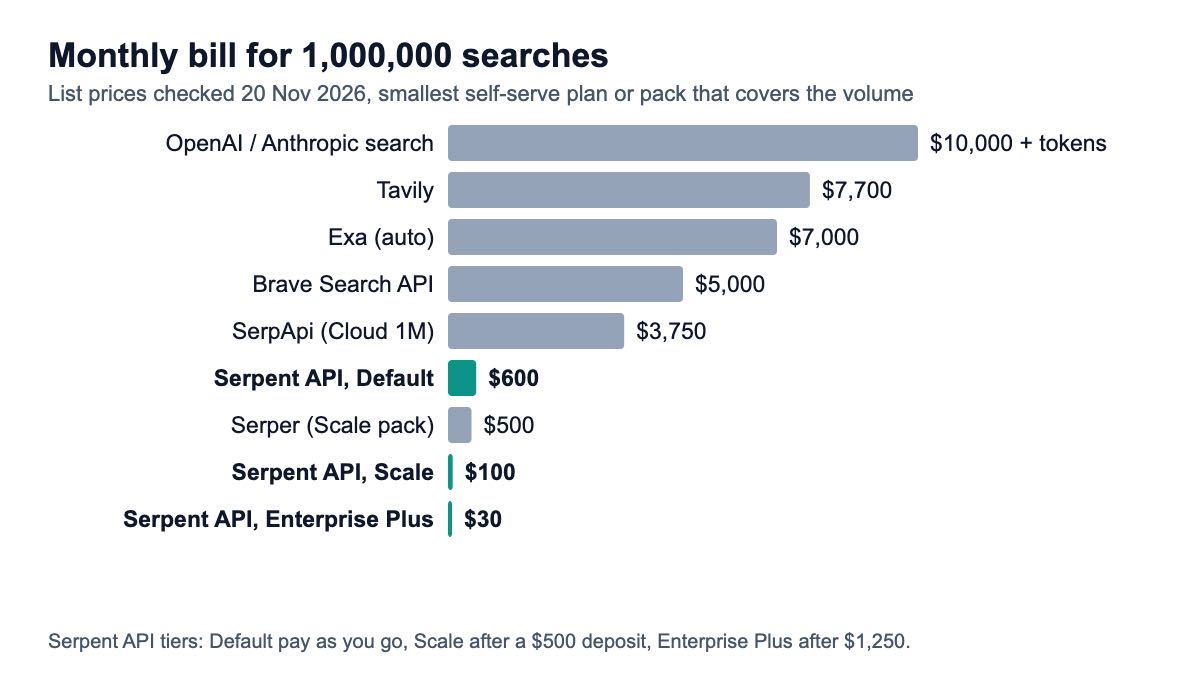
Provider search costs the most, at $10 per 1,000 on OpenAI and Anthropic before tokens. A custom tool on a SERP API costs the least, from $0.03 per 1,000. The table uses list prices on 20 Nov 2026 and the smallest self-serve plan or pack that covers each volume.
| Search option | 1,000 / month | 100,000 / month | 1,000,000 / month | Rule used |
|---|---|---|---|---|
| OpenAI or Anthropic provider search | $10.00 | $10.00 | $10.00 | $10 per 1K; search content billed as tokens |
| Tavily (basic search) | $0 (free tier) | $5.00 | $7.70 | 1,000 free credits; Growth $500 for 100K; $0.008 each after |
| Exa (auto) | $0 (free credit) | $7.00 | $7.00 | $7 per 1K; $10 free credit each month |
| Brave Search API | $0 (free credit) | $5.00 | $5.00 | $5 per 1K; $5 free credit each month |
| SerpApi | $25.00 | $7.25 | $3.75 | Starter $25, Searcher $725, Cloud 1M $3,750 a month |
| Serper | $8.33 | $0.75 | $0.50 | $50 / $375 / $1,250 packs; credits expire after 6 months |
| Serpent API, Default (pay as you go) | $0.60 | $0.60 | $0.60 | No subscription |
| Serpent API, Growth ($100 deposit) | $0.30 | $0.30 | $0.30 | No subscription |
| Serpent API, Scale ($500 deposit) | $0.10 | $0.10 | $0.10 | No subscription |
| Serpent API, Enterprise ($1,000 deposit) | $0.05 | $0.05 | $0.05 | No subscription |
| Serpent API, Enterprise Plus ($1,250 deposit) | $0.03 | $0.03 | $0.03 | No subscription |
At a million searches a month the spread is wide: $10,000 for provider search, $7,700 on Tavily, $7,000 on Exa, $5,000 on Brave, $3,750 on SerpApi, $500 on Serper, and from $30 on Serpent API — pay as you go, no subscription (the table above shows each tier). Serper's $8.33 at 1,000 a month is its $50 minimum pack spread over six months. Exa's $10 and Brave's $5 monthly credits are counted only in the first column; at higher volumes they take $10 or $5 off the monthly bill. The tool above asks for one page of results, so each search is one charge on Serpent API.
The table counts searches, not questions. An agent that searches twice per question doubles every number, which is why maxSteps and a clear "at most twice" instruction belong in the agent definition. Compare tiers on the pricing page.
What changed from older Mastra tutorials?
Mastra reached 1.0.0 on 20 January 2026 (npm), and the tool API is the main thing that moved. In the 0.x releases, execute received one object and the input sat inside it, so tutorials from 2025 write execute: async ({ context }) => context.query; the type definitions in @mastra/core 0.10.0 (May 2025) still show that shape. The current docs say "execute has exactly one signature: execute(inputData, context)", with the validated input first.
- Agents take an
id: current examples set bothidandnameonnew Agent({...}). - Model strings:
'openai/gpt-5.6-sol'style ids replace importing a provider function for the common cases; AI SDK model objects are still accepted. - Provider search is built in:
webSearchToolfrom@mastra/core/toolsreplaces hand-wiring each provider's search tool. - zod 4:
@mastra/core1.85.0 accepts zod 3.25+ or 4; the code above ran on zod 4.6.7.
If you are moving from the Vercel AI SDK, the shape will feel familiar: Mastra runs on AI SDK models, and the AI SDK version of this tool uses the same request. For a Next.js route that calls the API without an agent, see the Next.js integration guide.
Which one should you pick?
- A demo on OpenAI, Anthropic, Gemini or xAI:
webSearchTool. Three lines, and the provider handles citations. - Any other model, or Mastra Gateway with full control: your own
createTool. Provider search is not available on other models, and the gateway swaps in its own. - The agent needs page text, not links:
@mastra/tavilyor Exa, at $4 to $8 per 1,000 searches after their free allowance. - Google results at volume: a
createToolon a SERP API withtoModelOutput, from $0.03 per 1,000. - Several frameworks share one search backend: put the call behind an MCP server once; this guide builds one.
For a broader comparison of result types, read SERP API vs Tavily vs Exa for agents.
How we checked this
Code: the tool, agent and test on this page were typechecked with TypeScript in strict mode and run on 20 Nov 2026 with Node 26.5.0, @mastra/core 1.85.0, ai 7.0.177 and zod 4.6.7. The model was MockLanguageModelV3 with a scripted reply, and fetch returned the response published in the API docs; no live search or OpenAI call was made.
Sources: Mastra's Tools documentation and integration pages for Tavily and Bright Data, 3 vendor pages that rank for the query (Tavily, Exa, Olostep), npm release history, and 7 official pricing pages, all opened 20 Nov 2026. The Mastra web-search template page that still ranks returned a 404.
What we could not verify: provider search pricing for Gemini and xAI inside Mastra; Bright Data's SERP price for the Mastra tool; whether Exa bills page text requested on a search on top of the search price (its pricing page does not say); how a real model decides when to search; live latency.
Give your Mastra agent Google search results
One GET request per search, any model, from $0.03 per 1,000 — pay as you go, no subscription. Start with 10 free API calls.
Get Your Free API KeyExplore: SERP API · Playground · Docs · Pricing
FAQ
Does Mastra have a built-in web search tool?
Yes: webSearchTool, imported from @mastra/core/tools, resolves to the model provider's own search on OpenAI, Anthropic, Google Gemini and xAI models. On Mastra Gateway it uses the gateway's openrouter.web_search. On other models it is not available, so you add a vendor package such as @mastra/tavily or write your own tool with createTool. Provider search on OpenAI and Anthropic costs $10 per 1,000 searches plus tokens.
How do I create a custom search tool in Mastra?
Call createTool from @mastra/core/tools with an id, a description, a zod inputSchema and an execute(inputData, context) function that calls your search API and returns the fields you want. Add an outputSchema for typed results and toModelOutput to send the model a compact text version. Attach it with tools: { webSearchTool } on the agent. The full file is above.
Why does my Mastra tool show up under a different name?
Because Mastra names tools by the key in the agent's tools object, not by the tool's id. tools: { webSearchTool } gives the model a tool called webSearchTool even if the id is web-search. Use a key that matches what your instructions tell the model to call, and expect the key, not the id, in toolCalls and stream events.
What is toModelOutput in Mastra?
An optional function on a tool that turns the tool's output into what the model reads, while your application still receives the full output. A search tool can return typed result objects for your UI and logs, and send the model a short numbered list of titles, URLs and snippets. That cuts the input tokens on every turn after a search, which matters most when an agent searches several times per question.
Is there a cheaper alternative to Tavily for Mastra?
For search results without page text, yes. Tavily's basic search is $5.00 to $8.00 per 1,000 after 1,000 free credits a month. A createTool wrapper on a SERP API returns Google titles, URLs and snippets for $0.50 to $1.00 per 1,000 on Serper or from $0.03 on Serpent API. If the agent needs the text of a page, add a fetch step for the one or two URLs it cites.
Sources
Official documentation (checked 20 November 2026):
- Mastra: Tools (createTool, webSearchTool, toModelOutput, naming)
- Mastra: Tavily integration
- Mastra: Bright Data integration
- npm: @mastra/core
- Anthropic: web search tool pricing
Vendor integration pages (opened 20 November 2026):
Official pricing pages (checked 20 November 2026):