How to Scrape Telegram Channels with Python and Node

To scrape a public Telegram channel in Python or Node, request its web preview at t.me/s/<channel>, parse the post blocks, and follow the before link for older pages. The parser in this guide does that in 172 lines of Python and 73 of Node. The alternative is one API request that returns the posts as JSON.
Short answer: For a one-off export, or a channel you will read a handful of times, write the parser. It is free, and you will understand every field. For a monitor that runs on a schedule, for dozens of channels, or for a feature other people depend on, one API call is less code to own. It is pay as you go, $1.00 per 1,000 requests (one request = one page of up to 20 posts), with no subscription.
Many public Telegram channels keep a web preview that anyone can open without an account. The address is t.me/s/ followed by the channel name, for example t.me/s/durov. The page is plain HTML, so a few dozen lines of code can turn it into data.
This guide does the job two ways. The parser in the first half was run on pages saved on 21 November 2026, and the output shown is what it printed. The second half is the same job as a single request.
Every number below comes from those saved pages or from saved sample answers dated the same day. Nothing was fetched live while writing this post.
What does a public channel page contain?
Two things: a header with the channel's name, subscriber count and description, and a list of up to 20 posts. The saved Durov page holds 20 posts, ids 546 to 567, and lists them oldest first, so the newest post is at the bottom.
Each post is a block with the parts you want in predictable places. This table maps them to the markup on the saved pages:
| You want | Where it sits | What it looks like |
|---|---|---|
| Post id | data-post attribute on the post block | durov/567 |
| Date | datetime attribute of the time element | 2026-11-20T20:47:30+00:00 |
| Text | the .tgme_widget_message_text block | Line breaks are br tags; emoji sit inside i and b tags |
| Views | .tgme_widget_message_views | 789K |
| Reactions | .tgme_reaction chips | A count such as 29.1K, beside an emoji or an emoji id |
| Subscribers | the .tgme_channel_info_counter labelled subscribers | 9.91M |
| Older posts | the a.tme_messages_more link, its data-before attribute | 546 |
Dates come as ISO 8601 timestamps with an offset, read from the time element. Those class names belong to Telegram's page, not to a published contract. They worked on the pages saved for this post and can change without notice. That is why the saved pages double as test fixtures throughout this guide.
How do you parse a channel page in Python?
The usual pair is requests for the download and BeautifulSoup for the parsing. BeautifulSoup was not installed on the machine used for this post, so the code builds its own small tree with Python's built-in html.parser. The first two blocks, about 90 lines, are that plumbing. The last two hold the Telegram-specific logic.
If you use BeautifulSoup, keep the logic and swap the plumbing. A BeautifulSoup version was not run for this post, so test yours against saved pages the way this guide does.
The four blocks below are one file, tg_diy.py, in order. First the tree builder, which turns the page into nested nodes with a tag, attributes and children:
import re
from html.parser import HTMLParser

import requests

VOID = {"br", "img", "meta", "link", "input", "source", "hr", "area", "base", "col", "embed", "wbr"}


class Node:
    def __init__(self, tag, attrs, parent):
        self.tag, self.attrs, self.parent, self.kids = tag, dict(attrs), parent, []

    def classes(self):
        return (self.attrs.get("class") or "").split()


class Tree(HTMLParser):
    """A tiny DOM builder: BeautifulSoup does this part for you."""

    def __init__(self):
        super().__init__(convert_charrefs=True)
        self.root = self.cur = Node("root", {}, None)

    def handle_starttag(self, tag, attrs):
        node = Node(tag, attrs, self.cur)
        self.cur.kids.append(node)
        if tag not in VOID:
            self.cur = node

    def handle_startendtag(self, tag, attrs):
        self.cur.kids.append(Node(tag, attrs, self.cur))

    def handle_endtag(self, tag):
        n = self.cur
        while n is not self.root:
            if n.tag == tag:
                self.cur = n.parent
                return
            n = n.parent

    def handle_data(self, data):
        self.cur.kids.append(data)
Next the helpers: find nodes by class or tag, check whether a node sits inside a given class, extract text, and turn a printed count into a number. parse_count turns 789K into 789000. The page rounds, so the number is rounded too.
def walk(node):
    for kid in node.kids:
        if isinstance(kid, Node):
            yield kid
            yield from walk(kid)


def find_all(node, cls=None, tag=None):
    return [n for n in walk(node) if (tag is None or n.tag == tag) and (cls is None or cls in n.classes())]


def first(node, cls=None, tag=None):
    found = find_all(node, cls, tag)
    return found[0] if found else None


def inside(node, cls):
    p = node.parent
    while p is not None:
        if cls in p.classes():
            return True
        p = p.parent
    return False


def text(node):
    if node is None:
        return ""
    out = []

    def go(n):
        for kid in n.kids:
            if isinstance(kid, str):
                out.append(kid)
            elif kid.tag == "br":
                out.append("\n")
            else:
                go(kid)

    go(node)
    lines = "".join(out).replace("\xa0", " ").split("\n")
    return "\n".join(" ".join(line.split()) for line in lines).strip()


def parse_count(s):
    """'950' -> 950, '1.2K' -> 1200, '9.91M' -> 9910000. Rounded, because the page rounds."""
    m = re.fullmatch(r"(\d+(?:\.\d+)?)([kmb]?)", "".join(s.split()).lower())
    if not m:
        return None
    return round(float(m[1]) * {"": 1, "k": 1e3, "m": 1e6, "b": 1e9}[m[2]])
Then one post and one page. Two lines in parse_post look odd and matter: the text lookup skips any text block that sits inside a reply quote, and the video list is de-duplicated. The pitfalls section below shows why.
def parse_post(m):
    ref = m.attrs["data-post"]  # "durov/567"
    date = first(first(m, "tgme_widget_message_date") or m, tag="time")
    own = [t for t in find_all(m, "tgme_widget_message_text") if not inside(t, "tgme_widget_message_reply")]
    reply = first(m, "tgme_widget_message_reply", "a")
    views = first(m, "tgme_widget_message_views")
    reactions = []
    for r in find_all(m, "tgme_reaction"):
        tg = first(r, tag="tg-emoji")
        if "tgme_reaction_paid" in r.classes():
            label = "stars"
        elif tg is not None:
            label = "custom:" + tg.attrs.get("emoji-id", "?")
        else:
            label = text(first(r, tag="b"))
        count = parse_count("".join(k for k in r.kids if isinstance(k, str)) or text(r))
        reactions.append({"emoji": label, "count": count})
    videos = [v.attrs["src"] for v in find_all(m, tag="video")]
    return {
        "id": int(ref.split("/")[1]),
        "date": date.attrs.get("datetime") if date else None,
        "text": text(own[0]) if own else "",
        "views": parse_count(text(views)) if views else None,
        "reply_to_id": int(reply.attrs["href"].rstrip("/").split("/")[-1]) if reply else None,
        "videos": list(dict.fromkeys(videos)),
        "reactions": reactions,
    }


def parse_page(html):
    tree = Tree()
    tree.feed(html)
    root = tree.root
    subscribers = None
    for c in find_all(root, "tgme_channel_info_counter"):
        if text(first(c, "counter_type")) == "subscribers":
            subscribers = parse_count(text(first(c, "counter_value")))
    posts = [parse_post(m) for m in find_all(root, "tgme_widget_message") if "data-post" in m.attrs]
    more = first(root, "tme_messages_more")
    return {
        "title": text(first(root, "tgme_channel_info_header_title")),
        "subscribers": subscribers,
        "posts": sorted(posts, key=lambda p: p["id"], reverse=True),  # the page lists oldest first
        "more": int(more.attrs["data-before"]) if more is not None and more.attrs.get("data-before") else None,
    }
Last, the download and the paging loop. The loop follows the link the page offers instead of doing arithmetic on ids. The page_kind function at the end is explained in the section on empty pages.
def fetch_page(channel, before=None):
    params = {"before": before} if before else {}
    r = requests.get(f"https://t.me/s/{channel}", params=params, timeout=30)
    r.raise_for_status()
    return r.text


def pages(channel, limit=3, get=fetch_page):
    """Yield up to `limit` pages, newest first, following the 'before' link."""
    before = None
    for _ in range(limit):
        page = parse_page(get(channel, before))
        yield page
        before = page["more"]
        if not before:
            break


def page_kind(html):
    """Tell the pages that hold no posts apart by their <title>."""
    m = re.search(r"<title>([^<]*)</title>", html)
    title = m.group(1) if m else ""
    if "tgme_widget_message" in html:
        return "channel with posts"
    if title.startswith("Telegram: View @"):
        return "channel exists, web preview off"
    if title.startswith("Telegram: Contact @"):
        return "no public channel with that name"
    return "not a channel page"
A short script uses it. It prints the newest three posts of one channel, then reads two pages of another:
from tg_diy import pages

for page in pages("durov", limit=1):
    print(f'{page["title"]}: {page["subscribers"]:,} subscribers, {len(page["posts"])} posts on this page, older posts: before={page["more"]}')
    for p in page["posts"][:3]:
        top = ", ".join(f'{r["emoji"]} {r["count"]:,}' for r in p["reactions"][:2])
        print(p["id"], p["date"], f'{p["views"]:,} views |', top)
        print("   ", p["text"][:70].replace("\n", " "))

print()
seen = []
for n, page in enumerate(pages("bloomberg", limit=2), 1):
    ids = [p["id"] for p in page["posts"]]
    print(f'page {n}: {len(ids)} posts, ids {ids[0]} down to {ids[-1]}, next before={page["more"]}')
    seen += ids
print(len(seen), "posts,", len(set(seen)), "distinct ids")
With the download replaced by a read of the saved file (see how we checked this), it printed:
Pavel Durov: 9,910,000 subscribers, 20 posts on this page, older posts: before=546
567 2026-11-20T20:47:30+00:00 789,000 views | stars 18,400, custom:5399847211989246390 34,600
    I was offered $256,000 for the @pride username on Telegram.  I don’t n
566 2026-11-19T22:12:20+00:00 1,080,000 views | stars 10,800, custom:5373223594484587136 37,000
    Apple finally made a phone that’s both too big and too small.  It fold
565 2026-11-18T17:42:19+00:00 1,470,000 views | stars 17,600, custom:5399847211989246390 49,800
    🇮🇶 Iraq blocked Telegram (2nd time this year).  We feel sorry for the

page 1: 20 posts, ids 3225 down to 3206, next before=3206
page 2: 20 posts, ids 3205 down to 3186, next before=3186
40 posts, 40 distinct ids
Python 3.9 and 3.15 printed the same text. Post 567 has 789,000 views. Its reactions are a Stars count, shown as stars, and numeric ids for custom emoji, which come up again below. The last three lines are paging, which has its own section.
How do you parse it in Node?
Node 18 and later has fetch built in, and cheerio does the job BeautifulSoup does in Python. Install it with npm install cheerio; the output in this post was produced with cheerio 1.2.0. Save the module as tg_diy.mjs. It is three blocks, in order. First the count parser, the text helper and one post:
import * as cheerio from "cheerio";

export function parseCount(s) {
  const m = /^(\d+(?:\.\d+)?)([kmb]?)$/i.exec(s.replace(/\s/g, ""));
  if (m === null) return null;
  return Math.round(parseFloat(m[1]) * { "": 1, k: 1e3, m: 1e6, b: 1e9 }[m[2].toLowerCase()]);
}

function textOf(node) {
  const copy = node.first().clone();
  copy.find("br").replaceWith("\n");
  return copy.text().split("\n").map((line) => line.replace(/\s+/g, " ").trim()).join("\n").trim();
}

function parsePost($, el) {
  const m = $(el);
  const own = m.find(".tgme_widget_message_text")
    .filter((_, t) => $(t).closest(".tgme_widget_message_reply").length === 0).first();
  const reply = m.find("a.tgme_widget_message_reply").first();
  const views = m.find(".tgme_widget_message_views").first();
  const reactions = m.find(".tgme_reaction").toArray().map((r) => {
    const chip = $(r);
    const custom = chip.find("tg-emoji").attr("emoji-id");
    const label = chip.hasClass("tgme_reaction_paid") ? "stars" : custom ? "custom:" + custom : chip.find("b").text();
    return { emoji: label, count: parseCount(chip.clone().children().remove().end().text() || chip.text()) };
  });
  const videos = [...new Set(m.find("video").toArray().map((v) => $(v).attr("src")))];
  return {
    id: Number(m.attr("data-post").split("/")[1]),
    date: m.find(".tgme_widget_message_date time").attr("datetime") ?? null,
    text: textOf(own),
    views: views.length ? parseCount(views.text()) : null,
    reply_to_id: reply.length ? Number(reply.attr("href").replace(/\/$/, "").split("/").pop()) : null,
    videos,
    reactions,
  };
}
Then one page, which reads the subscriber counter, every post block and the older-posts link:
export function parsePage(html) {
  const $ = cheerio.load(html);
  let subscribers = null;
  $(".tgme_channel_info_counter").each((_, c) => {
    if ($(c).find(".counter_type").text().trim() === "subscribers") {
      subscribers = parseCount($(c).find(".counter_value").text());
    }
  });
  const posts = $(".tgme_widget_message[data-post]").toArray().map((el) => parsePost($, el));
  const more = $(".tme_messages_more").attr("data-before");
  return {
    title: textOf($(".tgme_channel_info_header_title")),
    subscribers,
    posts: posts.sort((a, b) => b.id - a.id), // the page lists oldest first
    more: more ? Number(more) : null,
  };
}
And the download and paging loop. AbortSignal.timeout(30000) gives the request a 30-second limit, which MDN documents. An async generator hands you one page at a time:
export async function fetchPage(channel, before) {
  const url = new URL(`https://t.me/s/${channel}`);
  if (before) url.searchParams.set("before", before);
  const res = await fetch(url, { signal: AbortSignal.timeout(30000) });
  if (res.ok === false) throw new Error(`HTTP ${res.status}`);
  return res.text();
}

export async function* pages(channel, limit = 3, get = fetchPage) {
  let before = null;
  for (let i = 0; i < limit; i++) {
    const page = parsePage(await get(channel, before));
    yield page;
    before = page.more;
    if (before === null) break;
  }
}
The script is the same job as the Python one:
import { pages } from "./tg_diy.mjs";

for await (const page of pages("durov", 1)) {
  console.log(`${page.title}: ${page.subscribers.toLocaleString("en-US")} subscribers, ${page.posts.length} posts on this page, older posts: before=${page.more}`);
  for (const p of page.posts.slice(0, 3)) {
    const top = p.reactions.slice(0, 2).map((r) => `${r.emoji} ${r.count.toLocaleString("en-US")}`).join(", ");
    console.log(p.id, p.date, `${p.views.toLocaleString("en-US")} views |`, top);
    console.log("   ", Array.from(p.text).slice(0, 70).join("").replace(/\n/g, " "));
  }
}

console.log();
const seen = [];
let n = 0;
for await (const page of pages("bloomberg", 2)) {
  const ids = page.posts.map((p) => p.id);
  console.log(`page ${++n}: ${ids.length} posts, ids ${ids[0]} down to ${ids.at(-1)}, next before=${page.more}`);
  seen.push(...ids);
}
console.log(seen.length, "posts,", new Set(seen).size, "distinct ids");
Its output is the text shown above, character for character. The Node module is 73 lines against 172 for Python, and most of the difference is the tree builder and helpers that cheerio supplies, plus the page_kind function, which the Node module does not have.
How do you page back through older posts?
Each page links to the next older one. The link carries a data-before value, which is the smallest post id on the page, and the request is t.me/s/<channel>?before=<that id>. On the saved Bloomberg pages, page 1 held ids 3225 down to 3206 and offered before=3206. The request for 3206 returned ids 3205 down to 3186.
The last lines of the output above show it: two pages, 40 posts, 40 distinct ids, and the ids 3186 to 3225 with no gap. Nothing repeated between the pages.
Two rules come out of the saved pages. First, take the cursor from the page; do not compute it. Durov's 20 posts span 22 ids, so stepping back by the page size lands in the wrong place.
Second, stop when the page offers no older link. Every saved page in this guide was a newer page with a link, so I cannot show you what the last page of a channel looks like. Test that case before you rely on it. Fetch one page at a time, and keep the timeout.
What goes wrong that you can see in the saved pages?
Six things show up in the saved pages. The code above already handles each one, and the counts below come from a short audit script that reuses the parser on the same files.
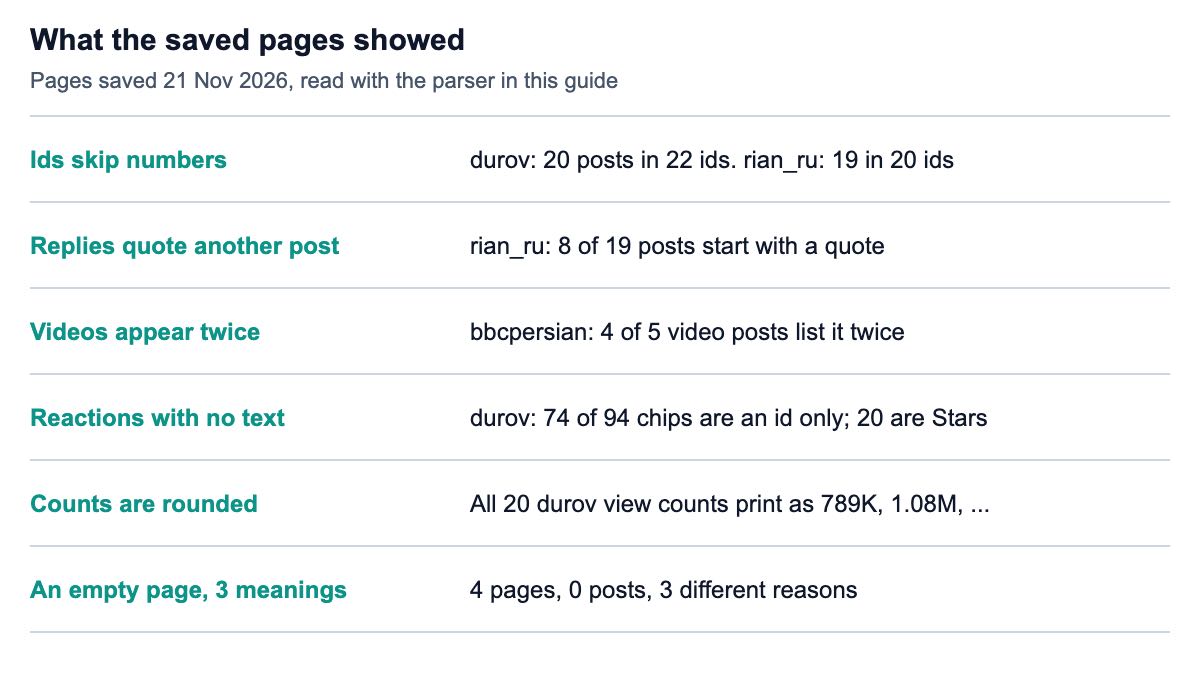
| What you see | Where | What the parser does |
|---|---|---|
| Ids skip numbers | durov: 20 posts in 22 ids. rian_ru: 19 in 20 | Follows the page's own link, never counts ids |
| Replies quote another post | rian_ru: 8 of 19 posts | Skips text blocks inside the reply element |
| Videos appear twice | bbcpersian: 4 of 5 video posts | De-duplicates the list |
| Reactions with no text | durov: 74 of 94 chips are an id only | Labels them custom:<id> |
| Counts are rounded | every view count on three channel pages | Rounds on the way in; treat as approximate |
| An empty page has several meanings | 4 pages, 0 posts | Reads the page title first |
Ids skip numbers. The id missing from the rian_ru page, 350243, sits right after post 350242, which carries a two-photo album. The likely explanation is that the album used up the next id, but the page does not say so. Durov's missing 549 and 550 have no such neighbour on the saved page, so the page gives no reason at all.
Replies quote another post. In the rian_ru page, 8 of the 19 posts are replies. A reply block holds a copy of the quoted message in an element with the same class as the post's own text, and it comes first.
A selector that takes the first text block returned the quoted text for all 8. For post 350226 the first block starts with the quoted post (“До шести выросло число погибших…”), while the post's own text starts “Лантратова готовит обращение в ООН…”.
Videos appear twice. In the bbcpersian page, 4 of the 5 posts with a video list the same file twice, once as a blurred background copy. Without the de-duplication in parse_post, each of those posts would report two videos.
Reactions with no text. Channels can use custom emoji as reactions. On the saved Durov page, 74 of the 94 reaction chips are custom emoji with only a numeric id, and the other 20 are Stars.
The other two channels use ordinary emoji: 215 chips on Bloomberg and 38 on rian_ru. Turning an id into a picture needs a lookup you build yourself.
Counts are rounded. Every view count on the three channel pages is abbreviated: 789K, 64.6K, 145K, 4.95M, and the subscriber count 9.91M. That is three significant digits. A view count shown as 789K is within a few hundred of the true figure, and one shown as 1.08M is within a few thousand.
What does an empty page mean?
Four of the saved pages hold no posts, and the parser returns an empty list for all four. The reasons are different, and a plain if not posts cannot tell them apart. The page title can:
| Saved page | Page title | What it means |
|---|---|---|
| coindesk | Telegram: View @coindesk, with “11 202 subscribers” | The channel exists; its web preview is off |
| bbcnews | Telegram: Contact @bbcnews | No public channel has that name |
| an invented name | Telegram: Contact @thischanneldoesnotexist7781 | No public channel has that name |
| wsj | Telegram Messenger | The name is too short to be a channel; the home page came back |
The page_kind function at the end of tg_diy.py reads the title. A second script ran it, with the parser, over five saved pages:
posts-durov.html                       posts=20  channel with posts
view-coindesk-preview-off.html         posts=0   channel exists, web preview off
contact-bbcnews-not-a-channel.html     posts=0   no public channel with that name
contact-invented-name.html             posts=0   no public channel with that name
home-wsj-short-name.html               posts=0   not a channel page
Treat this as a starting point, not a complete list: the saved set has one example of each case, and Telegram can add others. The practical lesson is to log the page kind whenever a channel returns nothing, so an empty result never gets mistaken for a quiet channel.
How do you get the same channel with one request in Python?
Send a GET request to https://apiserpent.com/api/telegram/channel with your key in the X-API-Key header. One parameter is required, channel: a username with or without @ or a t.me link, 4 to 32 letters, digits or underscores, starting with a letter. One is optional, before: the next_before value from the previous answer.
Install requests, put your key in place of the placeholder, and run this:
import requests

API_KEY = "sk_live_your_api_key"
URL = "https://apiserpent.com/api/telegram/channel"


def get_channel(channel, before=None):
    params = {"channel": channel}
    if before:
        params["before"] = before
    r = requests.get(URL, params=params, headers={"X-API-Key": API_KEY}, timeout=60)
    r.raise_for_status()
    return r.json()


data = get_channel("durov")
if not data["posts"]:
    print("No posts came back; preview_enabled =", data["preview_enabled"])
else:
    print(f'{data["title"]}: {data["subscribers"]:,} subscribers, {len(data["posts"])} posts, next_before={data["next_before"]}')
    for p in data["posts"][:3]:
        top = ", ".join(f'{r["emoji"] or "custom:" + r["custom_emoji_id"]} {r["count"]:,}' for r in p["reactions"][:2])
        print(p["id"], p["date"], f'{p["views"]:,} views |', top)
        print("   ", p["text"][:70].replace("\n", " "))

print()
seen, before = [], None
for n in range(2):
    page = get_channel("bloomberg", before)
    ids = [p["id"] for p in page["posts"]]
    print(f'page {n + 1}: {len(ids)} posts, ids {ids[0]} down to {ids[-1]}, next_before={page["next_before"]}')
    seen += ids
    before = page["next_before"]
    if not before:
        break
print(len(seen), "posts,", len(set(seen)), "distinct ids")

print()
quiet = get_channel("coindesk")
print(f'coindesk: {quiet["subscribers"]:,} subscribers, preview_enabled={quiet["preview_enabled"]}, posts={len(quiet["posts"])}')
The output, from the saved sample answers (the HTTP call was replaced by a stand-in, see how we checked this):
Pavel Durov: 9,910,000 subscribers, 20 posts, next_before=546
567 2026-11-20T20:47:30+00:00 789,000 views | ⭐ 18,400, custom:5399847211989246390 34,600
    I was offered $256,000 for the @pride username on Telegram.  I don’t n
566 2026-11-19T22:12:20+00:00 1,080,000 views | ⭐ 10,800, custom:5373223594484587136 37,000
    Apple finally made a phone that’s both too big and too small.  It fold
565 2026-11-18T17:42:19+00:00 1,470,000 views | ⭐ 17,600, custom:5399847211989246390 49,800
    🇮🇶 Iraq blocked Telegram (2nd time this year).  We feel sorry for the

page 1: 20 posts, ids 3225 down to 3206, next_before=3206
page 2: 20 posts, ids 3205 down to 3186, next_before=3186
40 posts, 40 distinct ids

coindesk: 11,202 subscribers, preview_enabled=False, posts=0
The code tests posts and preview_enabled rather than trusting the HTTP status. A channel with its preview off is a normal answer with an empty list, and the last line shows one: 11,202 subscribers, preview_enabled false and no posts. Reactions come back as three kinds: a star for Stars, an emoji for ordinary reactions, and a custom_emoji_id with an empty emoji for custom ones.
You can try the same request without code in the playground, or read what the Telegram Channel API page lists for each field.
And in Node?
Same call with Node's built-in fetch. Save it as api.mjs so top-level await works:
const API_KEY = "sk_live_your_api_key";
const ENDPOINT = "https://apiserpent.com/api/telegram/channel";

async function getChannel(channel, before) {
  const params = new URLSearchParams({ channel });
  if (before) params.set("before", before);
  const res = await fetch(`${ENDPOINT}?${params}`, { headers: { "X-API-Key": API_KEY } });
  if (res.ok === false) throw new Error(`HTTP ${res.status}`);
  return res.json();
}

const data = await getChannel("durov");
if (data.posts.length === 0) {
  console.log("No posts came back; preview_enabled =", data.preview_enabled);
} else {
  console.log(`${data.title}: ${data.subscribers.toLocaleString("en-US")} subscribers, ${data.posts.length} posts, next_before=${data.next_before}`);
  for (const p of data.posts.slice(0, 3)) {
    const top = p.reactions.slice(0, 2).map((r) => `${r.emoji || "custom:" + r.custom_emoji_id} ${r.count.toLocaleString("en-US")}`).join(", ");
    console.log(p.id, p.date, `${p.views.toLocaleString("en-US")} views |`, top);
    console.log("   ", Array.from(p.text).slice(0, 70).join("").replace(/\n/g, " "));
  }
}

console.log();
const seen = [];
let before = null;
for (let n = 1; n <= 2; n++) {
  const page = await getChannel("bloomberg", before);
  const ids = page.posts.map((p) => p.id);
  console.log(`page ${n}: ${ids.length} posts, ids ${ids[0]} down to ${ids.at(-1)}, next_before=${page.next_before}`);
  seen.push(...ids);
  before = page.next_before;
  if (before === null) break;
}
console.log(seen.length, "posts,", new Set(seen).size, "distinct ids");

console.log();
const quiet = await getChannel("coindesk");
console.log(`coindesk: ${quiet.subscribers.toLocaleString("en-US")} subscribers, preview_enabled=${quiet.preview_enabled}, posts=${quiet.posts.length}`);
It prints the same lines as the Python version. The one difference is that JavaScript writes the boolean as false where Python writes False. The request function is seven lines in both languages.
What does the answer look like?
One JSON object per request: the channel's facts, up to 20 posts newest first, and the cursor for the next page. This is the saved answer for channel=durov, trimmed to its header and first post (the picture URL is shortened and the description left out):
{
  "success": true,
  "channel": "durov",
  "title": "Pavel Durov",
  "subscribers": 9910000,
  "photo_url": "https://cdn4.telesco.pe/file/I0Afn...",
  "preview_enabled": true,
  "posts": [
    {
      "id": 567,
      "url": "https://t.me/durov/567",
      "date": "2026-11-20T20:47:30+00:00",
      "text": "I was offered $256,000 for the @pride username on Telegram.\n\nI don’t need the username.\n\nBut if I sell, does that mean I sold my pride? 🤔",
      "views": 789000,
      "edited": true,
      "author": "Pavel Durov",
      "forwarded_from": "",
      "reply_to_id": null,
      "photos": [],
      "videos": [],
      "documents": [],
      "link_preview": null,
      "reactions": [
        {
          "emoji": "⭐",
          "custom_emoji_id": "",
          "count": 18400
        },
        {
          "emoji": "",
          "custom_emoji_id": "5399847211989246390",
          "count": 34600
        },
        {
          "emoji": "",
          "custom_emoji_id": "5373223594484587136",
          "count": 14000
        },
        {
          "emoji": "",
          "custom_emoji_id": "5334575279731909928",
          "count": 8890
        }
      ]
    },
    /* 19 more posts, same fields */
  ],
  "next_before": 546
}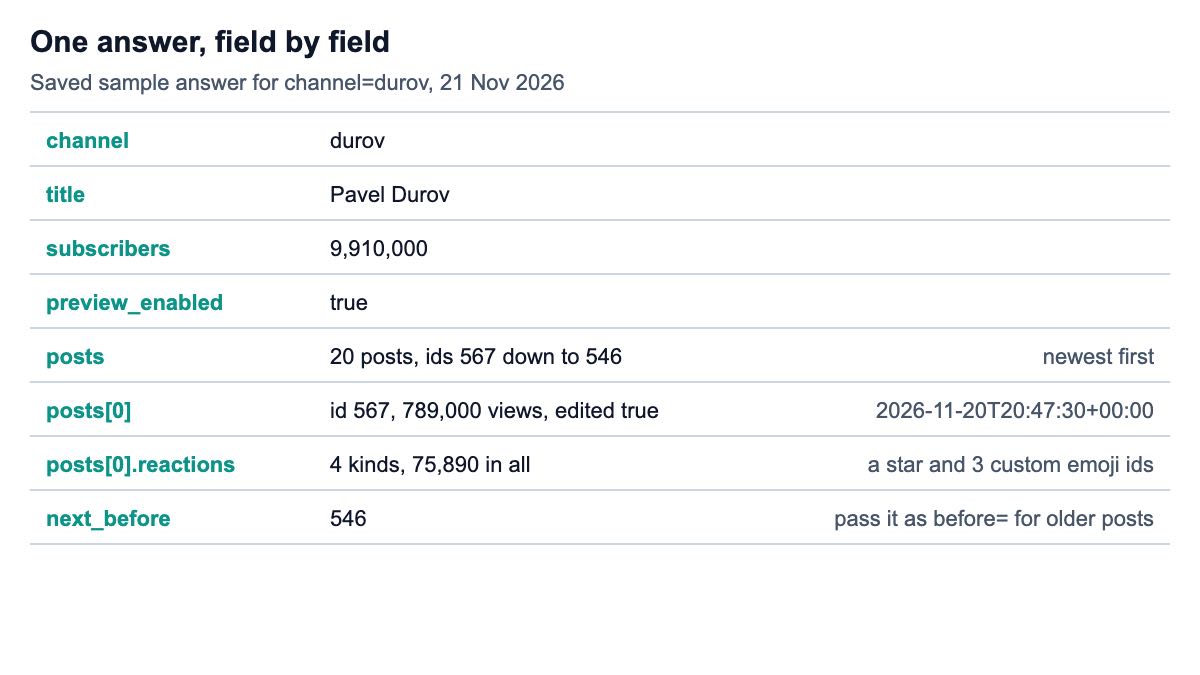
Every field is always present. A value the channel does not show comes back empty, as an empty string, null or an empty list, instead of disappearing. The post fields are id, url, date, text, views, edited, author, forwarded_from, reply_to_id, photos, videos, documents, link_preview and reactions, and the documentation describes each one.
Counts such as views are whole numbers, rounded the way Telegram shows them: 789000 rather than the exact count. Subscribers are the figure on the channel page, or null when it is not shown. Post text arrives as ordinary UTF-8, Cyrillic included. This is post 350226 from the saved rian_ru answer, trimmed to the first paragraph of its text:
{
 "id": 350226,
 "date": "2026-11-21T11:39:13+00:00",
 "views": 145000,
 "edited": false,
 "reply_to_id": 350219,
 "text": "Лантратова готовит обращение в ООН из-за преступлений киевского режима против мирных граждан в поселке Юбилейное.",
 "reactions": [
  {
   "emoji": "👍",
   "custom_emoji_id": "",
   "count": 651
  },
  {
   "emoji": "👎",
   "custom_emoji_id": "",
   "count": 56
  }
 ]
}
The reply link is a plain field, reply_to_id, and text holds the post's own words.
What does it cost to read a channel?
The API is pay as you go, $1.00 per 1,000 requests, and one request is one page of up to 20 posts. A thousand posts is therefore about 50 requests, or $0.05. Checking 100 channels once a day for 30 days is 3,000 requests, or $3.00.
The do-it-yourself route has no per-request fee. You pay in your own time instead: the 172 lines above, the saved pages you keep as tests, and the next time Telegram changes its markup. If you are weighing the API against per-post pricing from other services, the price comparison for Telegram channel APIs works the numbers out at three volumes.
Which route should you pick?
- A one-off export, a class project or learning how the page is built: the parser. It is free, and the saved pages make it easy to test.
- A monitor that runs every hour, or dozens of channels: one API call per page. The monitoring guide builds a small watcher on top of it, with alerts and view growth.
- A product feature other people rely on: the API, which leaves less of your own code to maintain.
- Posts from private channels, member lists or sending messages: neither route. Those need Telegram's own developer interfaces and an account of your own.
- Thousands of pages through your own parser: parser speed starts to matter. The benchmark of six Python HTML parsers shows how much it can differ.
If you work with other platforms too, the Social Media API page lists what else is available under the same key, and the guide to YouTube transcripts follows the same two-route pattern.
How we checked this
Code. Every snippet was executed on 21 November 2026 (UTC) on Python 3.15.2 and 3.9.6, which printed identical output, and on Node 26.5.0 with cheerio 1.2.0. The packages requests and BeautifulSoup were not installed, so the Python parser uses the standard library, and every download was replaced by a stand-in that reads a saved page or a saved sample answer. The request URLs, the before parameter and the X-API-Key header were checked by the stand-ins, but no live request was made to any site.
Saved pages. Nine pages saved on 21 November 2026: Durov, Bloomberg (pages 1 and 2), rian_ru (Russian), bbcpersian (Persian, right to left), and the four pages with no posts. The counts in the pitfalls section come from an audit script that reuses the parser and counts blocks by class.
API answers. The answers shown are real answers from this API, saved on 21 November 2026 while it was tested before launch. Channels post every day, so run the examples against the live endpoint for current numbers.
What I could not verify:
- No request was made to t.me while writing this post, so I cannot say the class names or paging link are unchanged today.
- The last page of a channel, a channel with fewer than 20 posts and the largest channels were not among the saved pages.
- A BeautifulSoup version of the parser was not run.
- The sentence about Telegram's own developer interfaces rests on general knowledge. I did not re-read Telegram's developer pages for this post.
Try one channel before you write code
Serpent's Telegram Channel API is pay as you go, $1.00 per 1,000 requests, with no subscription. Paste a channel name into the playground and see the JSON.
Get Your Free API KeyExplore: Telegram Channel API · Playground · Docs · Pricing
FAQ
How do I scrape a Telegram channel with Python?
Public channels keep a web preview at t.me/s followed by the channel name. Download that page with requests, parse the post blocks with BeautifulSoup or the standard library, and read the id, date, text and view count from each. This guide's tg_diy.py does it in 172 lines. The alternative is one GET request to the Telegram Channel API with your key in the X-API-Key header, which returns the posts as JSON.
Can I read a Telegram channel without logging in?
Yes, if the channel is public and its owner has left the web preview on. The page opens in any browser without an account, and so does the same page in a script. If the preview is off, the page shows the channel's name and subscriber count but no posts. A private channel has no public page at all.
How do I get older posts from a channel?
Each page links to the next older one through a before value, which is the smallest post id on the page. Request t.me/s/channel?before=3206 and you get the posts older than 3206. Take the value from the page rather than counting back by 20, because post ids skip numbers.
Why does my parser return no posts for a channel that exists?
Four different pages hold no posts: a channel whose preview is off, a name that belongs to no public channel, an invalid name, and a channel with nothing in the window you asked for. Read the page title before you read posts. In the saved pages, the titles were Telegram: View @name, Telegram: Contact @name and Telegram Messenger for a name Telegram rejects.
Why do Telegram view counts look like 1.2K, and can I get exact numbers?
The page prints counts in short form, for example 789K or 4.95M, which is three significant digits. A parser can only turn that back into a rounded number, so 789K becomes 789000. Small counts below one thousand are exact. Treat larger counts as approximate, and compare the same post over time rather than comparing posts of different ages.
Why do reactions come back with an id instead of an emoji?
Channels can use custom emoji for reactions, and the page marks them with a numeric id and no character. On the saved Durov page, 74 of 94 reaction chips were custom emoji and 20 were Stars. The API returns an empty emoji and a custom_emoji_id for those, with the count. Keep the ids and build a small lookup table for the ones you care about.
Sources
Parsing and request libraries (links checked when this post was drafted, 21 Nov 2026):
- Python html.parser documentation
- Beautiful Soup documentation
- Requests documentation
- cheerio documentation
Platform and standards references: