How to Get YouTube Transcripts with Python and Node
To get a YouTube transcript in Python or Node, send one GET request with the video link and read the JSON that comes back. You get timed lines or plain text, in the video's own language or one you pick. The open-source route is free but leaves six jobs with you.
Short answer: For a notebook or a one-off script on your own laptop with a handful of videos, an open-source package is free and fine. For anything that runs on a server, serves users or touches hundreds of videos, one API call is less code to own. The Python and Node versions are below, from $0.016 per 1,000 transcripts — pay as you go, no subscription. For captions on videos you own, YouTube's official Data API has a captions method, but it needs sign-in as someone who can edit the video.
Almost every YouTube video you watch has captions, and those captions are the transcript. Getting them into your own code sounds like a ten-minute job, and for the first video it usually is. The trouble starts with the second language, the first video with no captions, and the day the script moves from your laptop to a server.
This guide shows both routes. The code for the one-call route is complete, and the output shown comes from two recorded responses dated 20 November 2026: a 12-minute TED talk and a 63-minute MIT lecture.
What does getting a YouTube transcript involve?
It means picking one caption track out of several and reading it as timed lines. A video can carry a human-written track, an automatic one, and tracks in other languages, so “the transcript” is really a choice.
Real videos show how much that choice varies. The MIT lecture used below offers three tracks: English written by a person, English generated automatically, and Spanish. The TED talk offers 41 tracks across 40 language codes, because English appears twice, once human-written and once automatic.
Each line of a transcript has a start time and a duration in seconds, plus the text. You can keep the lines to jump to a moment, or join them into one string to summarise or search. Most projects eventually need both forms.
What do you have to build for the do-it-yourself route?
Six jobs, once you count everything between a pasted link and a clean transcript. Open-source packages cover the middle of that list, and the rest stays in your code.
The best-known Python option is the youtube-transcript-api project on GitHub, published on PyPI. Node developers have a similarly named youtube-transcript package on npm. Both are free, open-source ways to fetch the captions YouTube shows to viewers. I did not install or run either for this post, so read their project pages before relying on them.
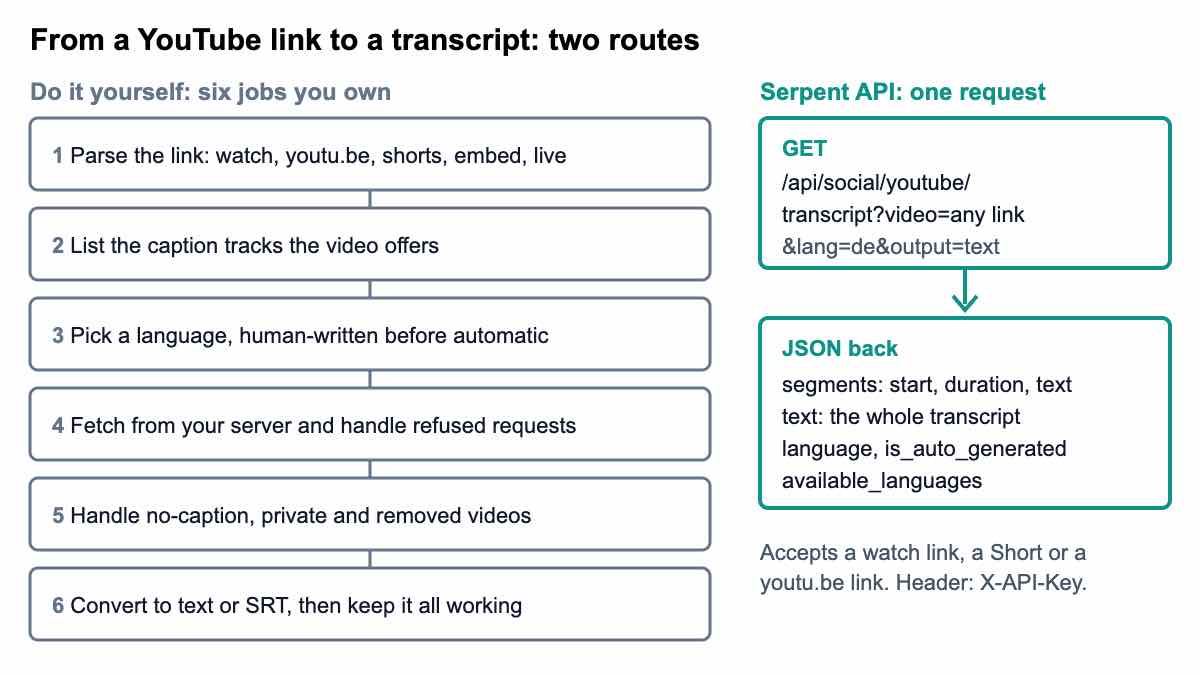
| Job | What it means | Where it bites |
|---|---|---|
| 1. Parse the link | Turn watch, youtu.be, Shorts, embed, live and mobile links into an 11-character id | A pattern written for watch links fails on Shorts |
| 2. List the caption tracks | Find out which languages exist and whether each is human or automatic | Two tracks can share one language code |
| 3. Pick a language and track | Choose an order of preference and a second choice | Codes are not always the ones you expect |
| 4. Fetch from your server | Run the request from the machine that will host your code | A request that works from a laptop can fail from a cloud host, so test where it will run |
| 5. Handle missing videos | Captions switched off, none in your language, private or removed videos | Each case needs its own message and its own test |
| 6. Convert and maintain | Produce text or SRT, then keep the code working as YouTube changes | An update you did not plan for |
Job 1 is the easiest to show. This function takes an id or any common link and returns the id, using only the standard library:
import re
from urllib.parse import parse_qs, urlparse

ID = re.compile(r"^[A-Za-z0-9_-]{11}$")


def video_id(value):
    """Return the 11-character id from an id or any common YouTube link."""
    value = value.strip()
    if ID.match(value):
        return value
    url = urlparse(value if "//" in value else "https://" + value)
    host = url.netloc.lower().removeprefix("www.").removeprefix("m.")
    parts = [p for p in url.path.split("/") if p]
    if host == "youtu.be" and parts:
        candidate = parts[0]
    elif host.endswith("youtube.com"):
        if parts[:1] == ["watch"]:
            candidate = parse_qs(url.query).get("v", [""])[0]
        elif parts[:1] in (["shorts"], ["embed"], ["live"]) and len(parts) > 1:
            candidate = parts[1]
        else:
            candidate = ""
    else:
        candidate = ""
    if not ID.match(candidate):
        raise ValueError("no video id in " + repr(value))
    return candidate


def stamp(seconds):
    ms = round(seconds * 1000)
    h, ms = divmod(ms, 3_600_000)
    m, ms = divmod(ms, 60_000)
    s, ms = divmod(ms, 1000)
    return f"{h:02}:{m:02}:{s:02},{ms:03}"


def to_srt(segments):
    blocks = []
    for i, seg in enumerate(segments, 1):
        end = seg["start"] + seg["duration"]
        blocks.append(f'{i}\n{stamp(seg["start"])} --> {stamp(end)}\n{seg["text"]}\n')
    return "\n".join(blocks)


if __name__ == "__main__":
    for link in [
        "8jPQjjsBbIc",
        "https://www.youtube.com/watch?v=8jPQjjsBbIc&t=42s",
        "https://youtu.be/8jPQjjsBbIc?si=abc",
        "https://m.youtube.com/watch?v=8jPQjjsBbIc",
        "https://www.youtube.com/shorts/8jPQjjsBbIc",
        "https://www.youtube.com/embed/8jPQjjsBbIc",
        "https://www.youtube.com/live/8jPQjjsBbIc",
    ]:
        print(video_id(link), "<-", link)

    print()
    print(to_srt([
        {"start": 13.24, "duration": 2.56, "text": "A few years ago, I broke into my own house."},
        {"start": 16.88, "duration": 1.216, "text": "I had just driven home,"},
    ]))
Running that file prints the id for each form of link, then two SRT blocks built from the first two lines of the TED response (more on SRT below):
8jPQjjsBbIc <- 8jPQjjsBbIc
8jPQjjsBbIc <- https://www.youtube.com/watch?v=8jPQjjsBbIc&t=42s
8jPQjjsBbIc <- https://youtu.be/8jPQjjsBbIc?si=abc
8jPQjjsBbIc <- https://m.youtube.com/watch?v=8jPQjjsBbIc
8jPQjjsBbIc <- https://www.youtube.com/shorts/8jPQjjsBbIc
8jPQjjsBbIc <- https://www.youtube.com/embed/8jPQjjsBbIc
8jPQjjsBbIc <- https://www.youtube.com/live/8jPQjjsBbIc

1
00:00:13,240 --> 00:00:15,800
A few years ago, I broke into my own house.

2
00:00:16,880 --> 00:00:18,096
I had just driven home,
That is about 25 lines for one job (it needs Python 3.9 or later), with the Python urllib.parse module doing the URL splitting. The one-call route accepts the same links directly, so you can paste them straight into the request.
The do-it-yourself route has real advantages. It costs nothing in fees, it runs entirely in your own code, and it is a good way to learn how captions are structured. If you only ever fetch a few videos from your own machine, it may be all you need.
What breaks first when the script moves to a server?
The request. The Python package's own README warns that YouTube blocks most IP addresses known to belong to cloud providers, so a script that runs happily on your laptop can fail the moment you deploy it to a cloud host.
Two slower problems follow. Unofficial packages follow YouTube's pages, which change without notice, so a working script can stop working until the package is updated or you patch it. And a loop that fetches one video at a time gets slow quickly: at the 2.4-second median call time in the 54-video check below, a thousand videos is about 40 minutes, so you need parallel requests and your own backoff.
None of this is a reason to avoid the packages for personal work. It is the reason a team shipping a product usually moves the job to an API. If you are comparing prices, the price comparison for YouTube transcript APIs works the cost out at three volumes.
How do you get a transcript with one request in Python?
Send a GET request to https://apiserpent.com/api/social/youtube/transcript with your key in the X-API-Key header. You need one parameter, video, which is an 11-character id or any YouTube link. Two are optional: lang, such as en, de or pt-BR, and output, which is segments by default or text.
Install requests, put your key in place of the placeholder, and run this:
import requests

API_KEY = "sk_live_your_api_key"
URL = "https://apiserpent.com/api/social/youtube/transcript"


def get_transcript(video, lang=None, output="segments"):
    params = {"video": video, "output": output}
    if lang:
        params["lang"] = lang
    r = requests.get(URL, params=params, headers={"X-API-Key": API_KEY}, timeout=60)
    r.raise_for_status()
    return r.json()


data = get_transcript("https://www.youtube.com/watch?v=8jPQjjsBbIc")

if not data.get("segments"):
    print("No transcript came back for this video")
else:
    print(f'{data["title"]} ({data["channel"]}, {data["duration_seconds"]} s)')
    print("language:", data["language"], "| auto-generated:", data["is_auto_generated"])
    print("segments:", len(data["segments"]), "| tracks offered:", len(data["available_languages"]))
    for seg in data["segments"][:3]:
        print(f'{seg["start"]:>7.2f}s  {seg["text"]}')
The output for the TED talk:
How to stay calm when you know you'll be stressed | Daniel Levitin | TED (TED, 740 s)
language: en | auto-generated: False
segments: 260 | tracks offered: 41
  13.24s  A few years ago, I broke into my own house.
  16.88s  I had just driven home,
  18.12s  it was around midnight in the dead of Montreal winter,
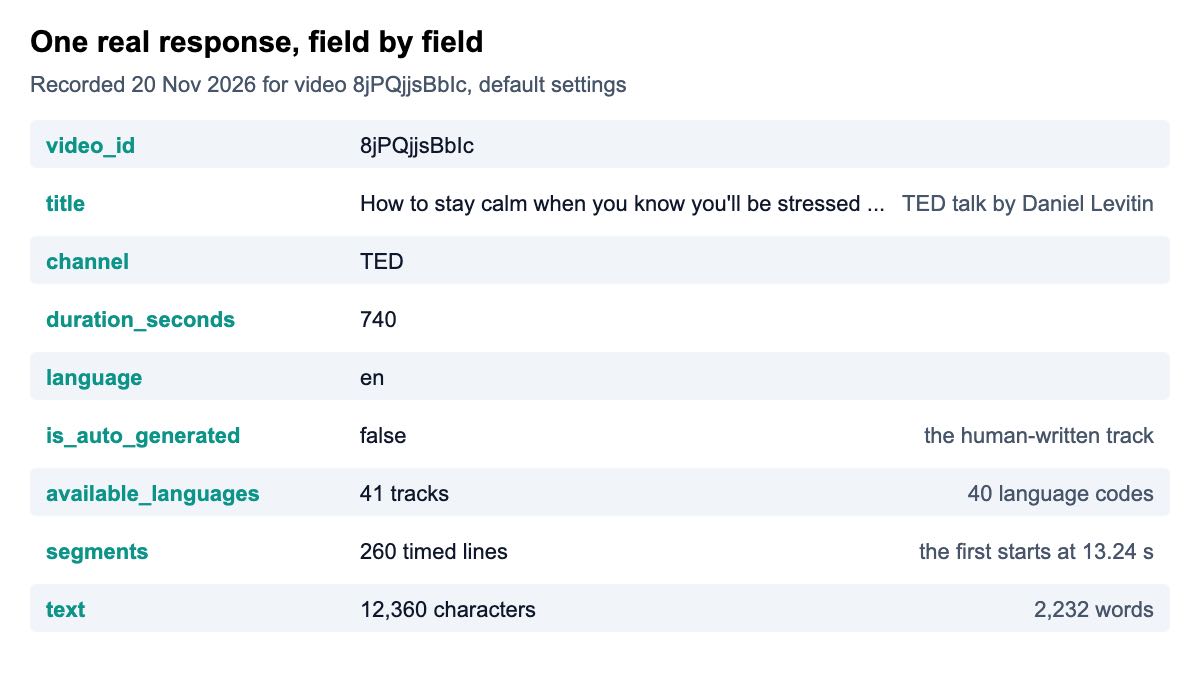
The response has nine fields: video_id, title, channel, duration_seconds, language, is_auto_generated, available_languages, segments and text. The documentation describes each one. The recorded response for this talk has 260 segments, the first starting at 13.24 seconds, and its text is 12,360 characters and 2,232 words.
Notice that the code checks segments rather than the HTTP status. A video with no captions, a private video and a removed video can all come back without a transcript, so the reliable test is whether you got lines. Make that check before you write anything to your database.
Before you build anything, you can try the same request in the playground, which needs no code, or read what the YouTube Transcript API page lists for each field.
And in Node?
Node 18 and later includes fetch, so the Node version needs no packages. This example uses output=text and asks for the 63-minute MIT lecture. Save it as transcript.mjs so top-level await works:
const API_KEY = "sk_live_your_api_key";
const ENDPOINT = "https://apiserpent.com/api/social/youtube/transcript";

async function getTranscript(video, { lang, output = "segments" } = {}) {
  const params = new URLSearchParams({ video, output });
  if (lang) params.set("lang", lang);
  const res = await fetch(`${ENDPOINT}?${params}`, { headers: { "X-API-Key": API_KEY } });
  if (res.ok === false) throw new Error(`HTTP ${res.status}`);
  return res.json();
}

const data = await getTranscript("xAcTmDO6NTI", { output: "text" });

if (data.text) {
  console.log(`${data.title} (${data.channel}, ${data.duration_seconds} s)`);
  console.log(`${data.text.length} characters, ${data.text.split(/\s+/).length} words`);
  console.log(data.text.slice(0, 120) + "...");
} else {
  console.log("No transcript came back for this video");
}
The output:
Lecture 1: Introduction to CS and Programming Using Python (MIT OpenCourseWare, 3810 s)
52276 characters, 9903 words
[SQUEAKING] [RUSTLING] [CLICKING] ANA BELL: All right, so welcome to the first lecture of 6.100L. That's our new number....
The lecture comes back as 52,276 characters and 9,903 words in a single string. The text starts with [SQUEAKING] [RUSTLING] [CLICKING] because the human-written captions describe sounds as well as speech, so strip bracketed cues if you feed the text to a model. In output=text mode the segments list is returned empty, so ask for the default output when you need timestamps.
For the JavaScript side of the request, the MDN page for AbortSignal.timeout() shows how to put a time limit on a fetch() call.
How do you choose the language, and which track do you get?
Pass lang to choose; leave it out and you get the video's own main language, with a human-written transcript preferred over an automatic one. The MIT lecture shows this. It offers an automatic English track and a human-written one, and the response came back with is_auto_generated false.
The available_languages list tells you what exists before you ask. Each entry has a code, a name and an is_auto_generated flag. Use the code exactly as listed. In the TED talk the list includes zh-CN, fr-CA and pt-BR, and Hebrew appears as iw, the older code, not he.
Language codes follow the BCP 47 convention, but the list in the response is the safest source for what a given video accepts.
A small helper keeps the choice in one place. It takes an ordered list of codes and returns the first one the video offers, human-written before automatic:
def pick_language(available, wanted):
    """Return the first wanted code the video offers, human-written track first."""
    for code in wanted:
        tracks = [t for t in available if t["code"].lower() == code.lower()]
        tracks.sort(key=lambda t: t["is_auto_generated"])
        if tracks:
            return tracks[0]["code"], tracks[0]["is_auto_generated"]
    return None, None
Run against the two recorded responses, it behaves like this:
ted ['ja', 'en'] -> ('ja', False)
ted ['he'] -> (None, None)
ted ['iw'] -> ('iw', False)
mit ['de', 'en'] -> ('en', False)
mit ['en'] -> ('en', False)
The he line returns nothing for the TED talk, which is exactly the gotcha: the video offers Hebrew, but under iw. The recorded MIT lecture has no German track, so a request for ["de", "en"] falls through to English.
How do you turn the result into SRT or plain text?
For plain text, request output=text and you have one string. For SRT subtitles, request the default output and build the file from segments, because each segment already has a start time and a duration. The to_srt function in the helper file above does exactly that, and its output is the two blocks shown earlier: 00:00:13,240 --> 00:00:15,800 for the first line.
The SRT format is simple, a counter, a time range and the text, and the SubRip format page documents it. Write the result to a .srt file and most video players will load it next to the video.
If you plan to feed transcripts to a language model rather than a video player, the guide to YouTube Transcripts for AI and RAG Pipelines shows how to cut the segments into timestamped chunks.
How fast is a call, and what does it cost?
On a fixed set of 54 real videos, chosen before any call was made, the median call took about 2.4 seconds. That set covered 11 languages, Shorts, two-hour lectures, music, live archives and private or removed videos, and every public video with captions returned its transcript.
The two recorded calls above are single examples. The TED request, with 41 tracks and 260 lines, took 6,517 milliseconds, and the MIT text request took 1,274 milliseconds. Set a generous timeout, as the Python code does, and expect some spread around the median.
Serpent's YouTube Transcript API is from $0.016 per 1,000 transcripts — pay as you go, no subscription, with 10 free API calls on a new account. The pricing page shows how deposit size sets the rate, and the price comparison sets it beside the other options.
Which route should you pick?
- A notebook, a class project or a few videos from your own machine: an open-source package. It is free, and the limits do not matter at that scale.
- A script that runs on a server, a scheduled job or a product feature: one API call. The six jobs above are not code you want to own.
- Hundreds or thousands of videos: the API, with a thread pool or an async client around the Python function above, and a check for empty results on every response.
- Captions on your own channel's videos: YouTube's official Data API captions resource, since you can sign in as the owner.
- Other YouTube data, such as search results, channels and playlists: the YouTube API and the YouTube API guide, with the provider view in best YouTube API providers.
If you work with other platforms too, the Social Media API page lists what else is available under the same key.
How we checked this
Code. Every snippet was executed on 20 November 2026 on Python 3.15.2 and Node 26.5.0 against the two recorded responses. The HTTP call was replaced by a stand-in, because requests was not installed on the machine, so the request URL, the X-API-Key header and the parameters were checked but no live call was made. The output shown is what the snippets printed.
Recorded data. The TED and MIT responses were captured on 20 November 2026. The 54-video check is a fixed list drawn before any call was made; the median of about 2.4 seconds comes from it.
Every video in that list that anyone can watch without signing in, and that has captions, returned its transcript. Treat the figure as a vendor's own result and test your own list.
What I could not verify:
- I did not install or run the Python or Node open-source packages. Their behaviour is described from the Python project's README (re-read on 20 November 2026, including its cloud-address warning) and the package registries, and may have changed.
- I re-read YouTube's captions.download documentation on 20 November 2026: it requires permission to edit the video. Check it again before you build on it.
- Package version numbers are left out because they change often.
Try one video before you write code
Serpent's YouTube Transcript API is from $0.016 per 1,000 transcripts — pay as you go, no subscription, with 10 free API calls to start. Paste any YouTube link into the playground and see the JSON.
Get Your Free API KeyExplore: YouTube Transcript API · Playground · Docs · Pricing
FAQ
How do I get a YouTube transcript in Python?
Send a GET request to the transcript endpoint with the video link and an API key, then read the JSON. With the requests library that is one call: pass the link as the video parameter and your key in the X-API-Key header. The response holds timed segments and the full text. Check that segments is not empty before you use the result.
Is there an official YouTube API for transcripts?
YouTube's Data API has a captions resource with list and download methods. Downloading a caption track requires authorisation as someone who can edit the video, so it suits your own channel rather than other people's videos. Check the current documentation before you build on it. For public videos you do not own, developers use an open-source package or a transcript API.
Why does my transcript script work locally but fail on a server?
The Python package's README warns that YouTube blocks most IP addresses known to belong to cloud providers, so code that works from a home connection can fail on a cloud host. Test from the machine that will run the code, not only from your laptop.
What is the difference between auto-generated and human-written transcripts?
Human-written tracks are uploaded by the channel or contributors, and auto-generated ones are produced automatically by YouTube. Many videos have only the automatic one. The API flags which you got with is_auto_generated, and by default it prefers the human-written track when one exists. Automatic text usually has more errors on names, jargon and overlapping speech.
How do I get transcripts for many videos?
Loop over the links and call the API for each one, with a thread pool or async client so several requests run at once. Keep a list of the videos that came back empty, so you can review them rather than lose them. A call takes about 2.4 seconds at the median, so a thousand videos in sequence takes roughly 40 minutes.
Can I download a YouTube transcript as an SRT file?
Yes. Request the default output, which includes segments with a start time and a duration for every line, and write them as SubRip blocks: a counter, a time range such as 00:00:13,240 --> 00:00:15,800, and the text. The to_srt function in this guide does it in about a dozen lines. Plain text needs no conversion, so use output=text instead.
Sources
Open-source projects and platform documentation (links checked when this post was drafted, 20 Nov 2026):
- youtube-transcript-api on GitHub
- youtube-transcript-api on PyPI
- youtube-transcript on npm
- YouTube Data API: Captions resource
Standards and language references: