I Benchmarked 6 Ways to Parse a SERP in Python. The Fastest Was 46x Quicker
Almost every "scrape search results in Python" tutorial reaches for BeautifulSoup(html, "html.parser"). It's readable, it's forgiving, and it's the slowest way to do the job by a wide margin. When you're parsing one page that doesn't matter. When you're parsing millions, the parser you pick decides your CPU bill.
So I stopped guessing and measured it. I captured one real search-results page — a 125,560-byte SERP with 10 organic results — and parsed it 300 times each with selectolax, lxml, BeautifulSoup (both backends), parsel and a raw regex, extracting the result titles every time. Same page, same target, same machine, on July 22, 2026. The spread between fastest and slowest was 46x, and two of the "correct-looking" options quietly returned the wrong data.
TL;DR: On a real 125KB SERP, selectolax was the fastest correct parser at 0.45 ms/parse — ~4x faster than lxml, ~12x faster than BeautifulSoup(lxml), and ~46x faster than the popular BeautifulSoup(html.parser). Raw regex was fastest overall (0.11 ms) but didn't decode entities and is fragile. parsel's ::text silently fragmented 10 titles into 16. And parsing google.com/search directly returned zero results — Google's organic results are JavaScript-rendered, so the fastest parser can't help; you need a rendered page or a JSON SERP API.
The results, up front
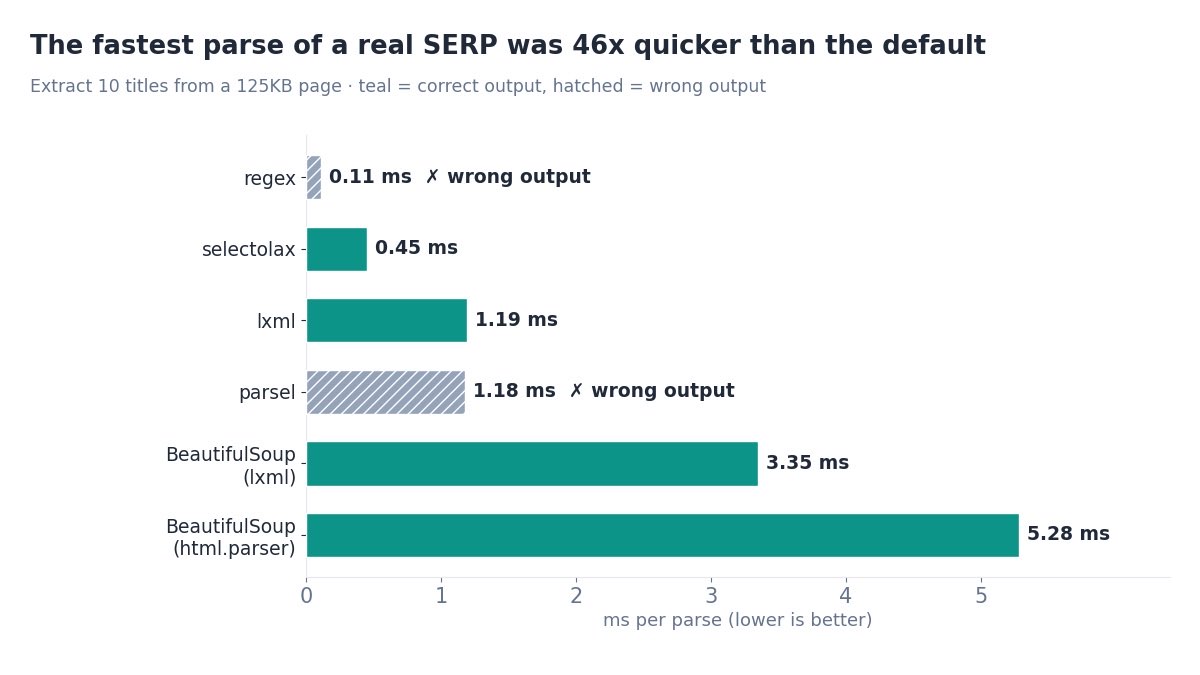
Here is the whole benchmark in one table. Every parser extracted the organic result titles from the same 125,560-byte page. Timing is the median of 5 samples of 300 parses each; memory is the tracemalloc peak of a single parse on Python 3.12.
| Parser | ms / parse | vs fastest correct | Peak KB | Titles | Correct? |
|---|---|---|---|---|---|
regex (re) | 0.11 | 0.25x | 6.9 | 10 | No — entities not decoded, fragile |
| selectolax | 0.45 | 1.0x | 368 | 10 | Yes (minor spacing quirk) |
| parsel | 1.18 | 2.6x | 368 | 16 (!) | No — ::text fragmented titles |
| lxml | 1.19 | 2.7x | 9.3 | 10 | Yes — cleanest output |
| BeautifulSoup (lxml) | 3.35 | 7.5x | 691 | 10 | Yes |
| BeautifulSoup (html.parser) | 5.28 | 11.8x | 618 | 10 | Yes — but slowest by far |
Read the "vs fastest correct" column against selectolax, the fastest option that returned the right 10 titles. The headline everyone quotes — "46x" — is regex (0.11 ms) against BeautifulSoup's stdlib backend (5.28 ms). But regex got the data wrong, so the honest comparison is selectolax vs the BeautifulSoup default: still a brutal 11.8x.
How I tested (reproducible)
No synthetic HTML. I fetched a genuine search-results page and froze it as a fixture, so every parser sees byte-for-byte the same input. Details, so you can reproduce or poke holes:
- Fixture: a real Bing SERP for
best serp api— 125,560 bytes, 10 organic results in<h2>tags, captured July 22, 2026. (Why Bing and not Google? See the Google section — Google's raw HTML had no results to parse.) - Task: extract the organic result titles. A realistic, apples-to-apples job every parser can do.
- Timing:
time.perf_counter()over 300 parses, repeated 5 times, median reported — so a stray GC pause can't skew it. - Memory:
tracemallocpeak on one parse. Caveat below. - Versions (Python 3.12): selectolax 0.3.27, lxml 5.3.0, beautifulsoup4 4.12.3 (soupsieve 2.9.1), parsel 1.9.1, cssselect 1.2.0.
The extraction code was the idiomatic one-liner for each library, so this measures what you'd actually write:
from selectolax.parser import HTMLParser
titles = [n.text(strip=True) for n in HTMLParser(html).css("h2")]

import lxml.html
titles = [e.text_content().strip() for e in lxml.html.fromstring(html).cssselect("h2")]

from bs4 import BeautifulSoup
titles = [t.get_text(strip=True) for t in BeautifulSoup(html, "lxml").find_all("h2")]

from parsel import Selector
titles = [x.strip() for x in Selector(text=html).css("h2 a::text").getall()]

import re
titles = [re.sub(r"<[^>]+>", "", m).strip()
          for m in re.findall(r"<h2[^>]*>(.*?)</h2>", html, re.S)]
Speed: selectolax runs away with it
The ranking is clean and it is not close. Ignoring regex (which we'll disqualify in a second), selectolax at 0.45 ms is the fastest real parser, and the gap widens as you move down the list:
- selectolax — 0.45 ms. It wraps the Lexbor/Modest C engine, so the parse happens in native code and Python just walks the result. This is why it wins.
- lxml — 1.19 ms (2.7x). Also C (libxml2), also fast, and as you'll see it produced the cleanest titles of anything here.
- parsel — 1.18 ms (2.6x). Scrapy's selector layer, built on lxml, so the speed matches — but watch the correctness column.
- BeautifulSoup (lxml) — 3.35 ms (7.5x). Same lxml engine underneath, but BeautifulSoup builds its own Python object tree on top, and that tree is the tax.
- BeautifulSoup (html.parser) — 5.28 ms (11.8x). The pure-Python stdlib backend — the exact line most tutorials copy — is the slowest thing in the test.
Multiply that by scale. At a million pages, the difference between selectolax and BeautifulSoup(html.parser) is roughly 0.45 vs 5.28 CPU-seconds per thousand — about 80 minutes of CPU versus a little over 15. Same result, 5x the machine time, for the convenience of the default import.
Correctness: two parsers lied
Speed is meaningless if the output is wrong, and two of the six returned data you would not want to ship.
regex returned 10 titles — with the HTML still in them. The first title came back as Best Buy | Official Online Store | Shop Now & Save — the ampersand never decoded. Regex also matches any <h2> on the page, not just result blocks, so a layout tweak that adds an <h2> sidebar heading silently pollutes your data. It's the fastest, and it's the one you can least trust.
parsel returned 16 titles for 10 results. The culprit is the idiomatic h2 a::text selector: ::text returns each text node separately, so any title with a nested tag (a <strong>, a <span>) splits into two rows. One result's title arrived as the fragment Buy | Official Online Store... with the word "Best" orphaned onto its own line. parsel is a fine library — but ::text is the wrong extraction call here; you want .css("h2 a").xpath("string()") instead.
The clean performers were lxml (text_content() gave perfectly joined titles) and BeautifulSoup (get_text(strip=True), correct but slow). selectolax was correct with one cosmetic wrinkle: .text() concatenates adjacent inline nodes without a space, so Best Buy came through as BestBuy. Fixable with separator=" ", but worth knowing before it bites you.
The lesson isn't "regex bad, parsel bad." It's that fast and correct are two different columns, and the popular one-liners for each library don't all land in both. If your scraper has to survive markup changes, the robustness of the selector matters as much as raw speed — a theme we go deeper on in building a scraper that survives selector drift.
Memory: an order of magnitude apart
Latency isn't the only cost. Peak allocations, measured with tracemalloc, ranged from single-digit KB to nearly 700 KB on the same 125KB document:
| Parser | Peak tracked memory |
|---|---|
| regex | 6.9 KB |
| lxml | 9.3 KB |
| selectolax | 368 KB |
| parsel | 368 KB |
| BeautifulSoup (html.parser) | 618 KB |
| BeautifulSoup (lxml) | 691 KB |
Honest caveat: tracemalloc only sees Python-level allocations. lxml and selectolax do most of their work in C, so their true memory footprint is higher than these numbers suggest — lxml's 9 KB is "low," not literal. The signal that is reliable: BeautifulSoup builds a large Python object tree (600–690 KB of tracked allocations) that the C parsers don't. If you fan out parsing across many workers, that per-parse tree is memory you pay for on every core.
The catch: Google returns no HTML to parse
Here's the plot twist that sends most "parse Google in Python" tutorials into the ditch. I tried to use Google as the fixture. A plain HTTP GET to google.com/search?q=best+serp+api returned HTTP 200 and a 92,290-byte page — with zero organic result titles in it. Not blocked. Just empty of results.
Google renders its organic results with JavaScript now. The initial HTML a non-browser client receives is a shell; the results are painted in afterward by scripts a parser never runs. We covered the shift in detail in Google Search now requires JavaScript, and it has a blunt consequence here: no HTML parser — not selectolax, not lxml, not regex — can extract results that aren't in the HTML. The benchmark you just read is real, but it had to run on a Bing SERP because Bing still ships its results server-side.
So for Google specifically you have two honest paths. Render the page in a headless browser (Playwright or a lighter setup) and then parse the rendered DOM — heavier, slower, more infrastructure. Or skip HTML parsing entirely and call a SERP API that returns the organic results as structured JSON. When the data arrives pre-parsed, "which HTML parser is fastest" stops being your problem at all.
# The whole parsing question disappears when the API returns JSON
import requests

r = requests.get(
    "https://apiserpent.com/api/search/quick",
    params={"q": "best serp api", "country": "us"},
    headers={"X-API-Key": "YOUR_API_KEY"},
    timeout=40,
)
for row in r.json()["results"]["organic"]:
    print(row["position"], row["title"], row["url"])
# 1 Best SERP API 2026 — Independent Comparison ...  https://serpapi.cc/
# 2 Best SERP APIs 2026: 12 Tested, Ranked by Real Cost  https://cloro.dev/...
# 3 8 Best SERP APIs in 2026  https://www.scrapingbee.com/...
That's a live response from Serpent's Google SERP API — titles, URLs and positions already extracted. No selector, no entity decoding, no markup-drift risk. For the cases where you do control the HTML (Bing, an internal app, an archived page), the benchmark above stands. For Google in 2026, the fastest parser is the one you never have to run.
Which parser should you actually use?
Boiled down to a decision:
- Default to selectolax. Fastest correct parser, clean CSS API, tiny dependency. For high-volume scraping it's the obvious pick. Just pass
separator=" "to.text(). - Reach for lxml when you want the cleanest text extraction or you're already using XPath. It's ~2.7x slower than selectolax but rock-solid and its
text_content()handled nested markup flawlessly. - Use parsel if you're in a Scrapy project — but extract with
.xpath("string()"), not::text, or you'll fragment titles. - Keep BeautifulSoup for readability-first scripts and one-offs where 5 ms doesn't matter. If you must use it at scale, at least pass
"lxml"as the backend to claw back ~1.6x. - Avoid regex for structured HTML. Fastest on paper, wrong in practice, and the first thing to break.
- For Google results, don't parse at all — the data isn't in the HTML. Use a headless browser or a JSON SERP API.
If you're weighing that last point — run and maintain a rendering pipeline, or pay for parsed JSON — we lay out the real numbers in the true cost of running your own Google scraper and the pure code paths in 3 tested ways to scrape Google in Python. And if you only need the SERP features pulled apart — People Also Ask, AI Overviews, snippets — see parsing Google SERP features in Python.
Skip the parser question entirely
Serpent's Google SERP API returns organic results, People Also Ask, AI Overviews and more as structured JSON — up to 100 results per call across Google, Bing, Yahoo, DuckDuckGo and Brave. No selectors, no headless browser, no markup-drift breakage at 3am. Free to start, then from $0.60 per 1,000.
Get Your Free API KeyExplore: Google SERP API · Docs · Playground
FAQ
What is the fastest Python HTML parser?
For real HTML, selectolax is the fastest correct parser — 0.45 ms on a real 125KB SERP, about 4x faster than lxml and ~46x faster than BeautifulSoup's stdlib html.parser backend. A raw regex was faster (0.11 ms) but returned undecoded entities and is fragile, so it's not a safe default.
Is selectolax faster than BeautifulSoup?
Yes — about 12x faster than BeautifulSoup(lxml) and ~46x faster than BeautifulSoup(html.parser) in this test, with identical correct output. selectolax runs on a C engine (Lexbor), so the parse happens outside the Python interpreter.
Should I use regex to parse HTML?
Only for a throwaway one-off. Regex was fastest but returned titles with raw HTML entities and matched any <h2> on the page, so a single markup change breaks it silently. Use selectolax or lxml for anything you rely on.
Why does parsing google.com/search return no results?
Because Google renders organic results with JavaScript. A plain HTTP request received a 92KB page with zero result titles in this test. No parser can extract what isn't in the HTML — you need a headless browser or a JSON SERP API.
How much memory do Python HTML parsers use?
Measured with tracemalloc (Python-side allocations only), lxml and regex stayed tiny while BeautifulSoup peaked near 600–690 KB on the same 125KB document; selectolax and parsel sat around 370 KB. At millions of pages the parser changes your memory bill, not just latency.
What did you benchmark the parsers on?
A single real 125,560-byte Bing SERP for "best serp api", captured July 22, 2026, with 10 organic results in h2 tags. Timing is the median of 5 samples of 300 parses each on Python 3.12; memory is the tracemalloc peak of one parse.