Connect Open WebUI web search to any search API with a small bridge

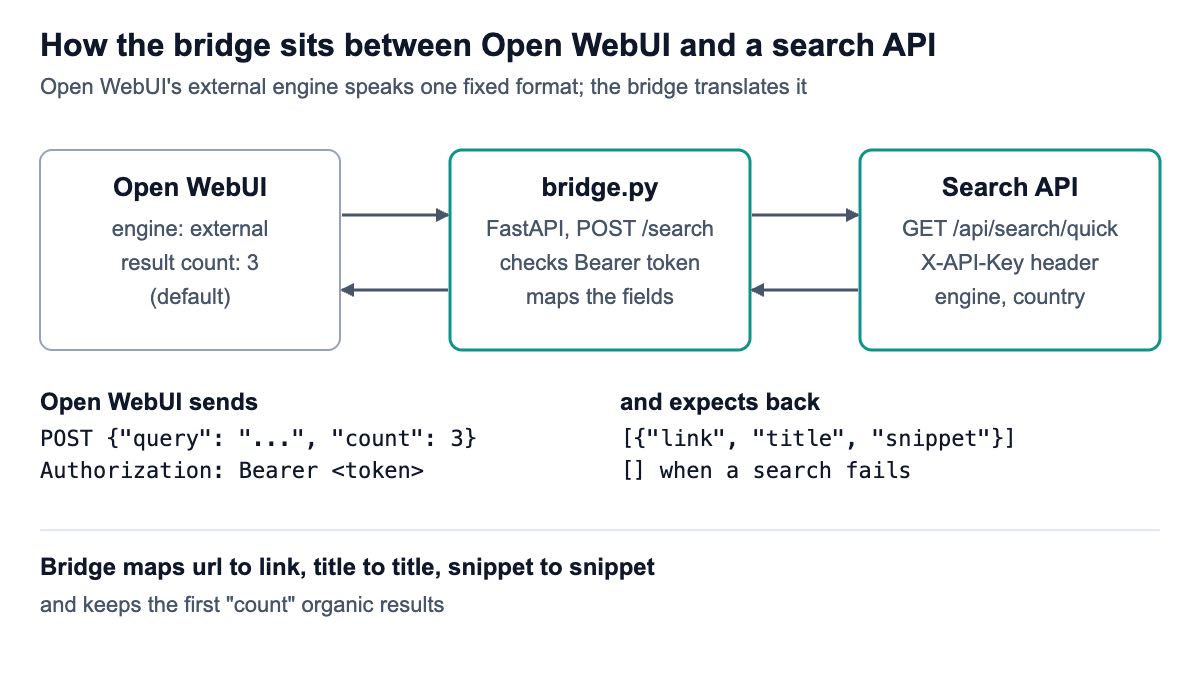
To use a search API that Open WebUI does not list, set the web search engine to external and point it at a small bridge that translates Open WebUI's request into the API's own. Open WebUI sends a fixed JSON request and expects a fixed list back. The 45-line FastAPI bridge below does the translation, and its tests send exactly what Open WebUI 0.13.4 sends.
Short answer: If your provider is already in Open WebUI's engine list (Brave, Serper, SerpApi, SearchApi, Tavily, Exa and more), pick it there and stop. If it is not, or you want to choose the engine and country yourself, run the bridge below and use the external engine; it works with both the classic search toggle and native tool calling. If you want the model to have many data tools, not just search, add an MCP server under External Tool Servers instead. With our API, search costs from $0.03 per 1,000 — pay as you go, no subscription.
Which search engines does Open WebUI support?
About thirty, plus a slot for your own. The WEB_SEARCH_ENGINE entry in Open WebUI's environment reference lists hosted APIs such as Brave, Serper, SerpApi, SearchApi, Tavily, Exa, Kagi and Perplexity, self-hosted options such as SearXNG, and a final option, external, which "uses your own search endpoint".
The web search overview separates two jobs: the search engine finds pages, and the web loader reads them. This guide is about the first job. The loader keeps working as before, whichever engine you choose.
Use the external engine when your provider is not in the list, when you want to pick the engine and country per deployment, or when you want to filter or log results before Open WebUI sees them. Open WebUI's external provider page names the same reasons.
What does the external engine send and expect?
A POST with a query and a count, and a JSON list of links, titles and snippets in return. The external provider page documents the contract, and the client code in Open WebUI 0.13.4 (backend/open_webui/retrieval/web/external.py, released 17 November 2026) matches it:
- Request:
POSTto your URL with the JSON body{"query": "...", "count": 3}, anAuthorization: Bearer <key>header, an Open WebUI User-Agent, and optional user-identity headers. - Response: a JSON array of objects with
link,titleandsnippet. Open WebUI keeps the firstcountitems. - Errors: the docs ask for an empty array when a search fails or finds nothing. In the source, any exception, including a non-200 status, is logged and treated as no results.
The count comes from WEB_SEARCH_RESULT_COUNT, which defaults to 3. Most search APIs, ours included, take a GET request with different field names, so they cannot answer this contract directly. A feature request filed on 19 November 2026, issue #34705, says so plainly: the request shape is fixed, and today the only workaround is a separate service that translates Open WebUI's requests. The issue was closed the same day, and the engine list on 22 November showed no configurable alternative, so the bridge is still the way to do it.
How do you write the bridge?
A FastAPI app with one POST route. It checks the bearer token Open WebUI sends, calls our organic results endpoint with your API key, and maps each result's url to link. Install and set the environment:
pip install fastapi uvicorn httpx
export SERPENT_API_KEY=sk_live_your_api_key
export BRIDGE_TOKEN=a-long-random-string
Save this as bridge.py:
import os

import httpx
from fastapi import FastAPI, Header, HTTPException
from pydantic import BaseModel

SEARCH_URL = "https://apiserpent.com/api/search/quick"
SERPENT_API_KEY = os.environ["SERPENT_API_KEY"]     # your Serpent API key
BRIDGE_TOKEN = os.environ["BRIDGE_TOKEN"]           # shared secret, also set in Open WebUI
ENGINE = os.environ.get("SEARCH_ENGINE", "google")  # google, bing, yahoo, ddg or brave
COUNTRY = os.environ.get("SEARCH_COUNTRY", "us")

app = FastAPI()


class SearchRequest(BaseModel):
    query: str
    count: int = 5


class SearchResult(BaseModel):
    link: str
    title: str | None = None
    snippet: str | None = None


@app.post("/search")
async def search(req: SearchRequest, authorization: str | None = Header(None)) -> list[SearchResult]:
    if authorization != f"Bearer {BRIDGE_TOKEN}":
        raise HTTPException(status_code=401, detail="Unauthorized")
    try:
        async with httpx.AsyncClient(timeout=30) as http:
            resp = await http.get(
                SEARCH_URL,
                params={"q": req.query, "engine": ENGINE, "country": COUNTRY},
                headers={"X-API-Key": SERPENT_API_KEY},
            )
        resp.raise_for_status()
        organic = resp.json()["results"]["organic"]
    except (httpx.HTTPError, KeyError, ValueError):
        return []  # Open WebUI's docs ask for an empty list when a search fails
    return [
        SearchResult(link=r["url"], title=r.get("title"), snippet=r.get("snippet"))
        for r in organic[: max(1, req.count)]
    ]
Run it with uvicorn bridge:app --host 0.0.0.0 --port 8888 on a machine Open WebUI can reach, or in a container on the same Docker network.
Four choices are deliberate.
The bridge has its own token, separate from your Serpent API key, so the key never sits in Open WebUI's settings and you can change either one without touching the other.
The engine and country are environment settings: set SEARCH_ENGINE=yahoo or SEARCH_COUNTRY=de for a German deployment; our API accepts 112 country codes, listed under country support. The bridge sets a 30-second timeout on its own call, because Open WebUI's request to the bridge has none in the 0.13.4 source. And it ignores the user-identity headers Open WebUI may send, so no user data goes further than the bridge.
How do you know it works?
By sending it exactly what Open WebUI sends. The test below uses FastAPI's TestClient, which runs the app in process with no server, and stubs the bridge's own request so it returns the documented example response from our docs. On the other side, it builds the request the way Open WebUI 0.13.4's external.py does and parses the reply with that file's list comprehension. It ran on FastAPI 0.165.0, httpx 0.28.1 and Python 3.15 on 22 November 2026.
The four checks and what they returned:
- Open WebUI-shaped request, right token,
count3: status 200, and Open WebUI's parser read[{"link": "https://example.com/weather", "title": "Weather Forecast - Today", "snippet": "Today's weather forecast..."}]. The documented example holds one result, so one came back; a live search returns up tocount. - Wrong token: status 401 and no outgoing search, so a stranger who finds the bridge cannot spend your credit.
- Search call answered with HTTP 500: the bridge returned
[]with status 200, as the external provider docs ask. - Settings: with
SEARCH_ENGINE=yahooandSEARCH_COUNTRY=de, the outgoing request carried{"q": "wetter heute", "engine": "yahoo", "country": "de"}.
The full test file, its output and the copy of Open WebUI's client code it mirrors are logged with the article's evidence. Open WebUI itself was not installed for this; the request it sends was taken from its source.
How do you configure Open WebUI?
In the admin panel, as the external provider page describes:
- Open Admin Panel, then Settings, then Web Search.
- Turn Web Search on and set Web Search Engine to
external. - External Web Search URL: the bridge's address, for example
http://bridge:8888/search. - External Web Search API Key: the value of
BRIDGE_TOKEN, not your Serpent API key. - Save.
The same settings exist as environment variables, per the environment reference: ENABLE_WEB_SEARCH=true, WEB_SEARCH_ENGINE=external, EXTERNAL_WEB_SEARCH_URL and EXTERNAL_WEB_SEARCH_API_KEY.
Three related settings are worth a look. WEB_SEARCH_RESULT_COUNT (default 3) is the count Open WebUI asks for. BYPASS_WEB_SEARCH_WEB_LOADER makes Open WebUI use only the snippets instead of opening each page, which is faster and avoids sites that block page readers. WEB_SEARCH_CONCURRENT_REQUESTS (default 0, unlimited) limits parallel searches if you want to pace them.
The bridge also serves native tool calling. Open WebUI's agentic search page says the model's search_web tool queries the configured engine and receives titles, links and snippets, with the count capped at WEB_SEARCH_RESULT_COUNT; a separate fetch_url tool reads full pages.
Should you use MCP instead?
Only if you want more than search. Open WebUI has supported MCP natively since v0.6.31, per its MCP page: an admin opens Settings, then Integrations, adds a connection under External Tool Servers with Type set to MCP (Streamable HTTP), and enters the URL and auth.
For our hosted MCP server, the URL is https://api.apiserpent.com/mcp, Auth is Bearer and the Key is your sk_live_ key; our docs accept the key as Authorization: Bearer. Each tool call is billed like the matching REST call.
The differences matter.
The page recommends models with reliable native tool calling for MCP tools, MCP servers can be added only by admins, and the page itself says that for most deployments OpenAPI tool servers remain the preferred integration. The external engine, by contrast, feeds Open WebUI's own web search in both the classic and native modes. For plain web search we would use the bridge; for an assistant that should also look up maps, YouTube or Reddit data, MCP. Our web search MCP server comparison covers other servers.
What does search cost at your volume?
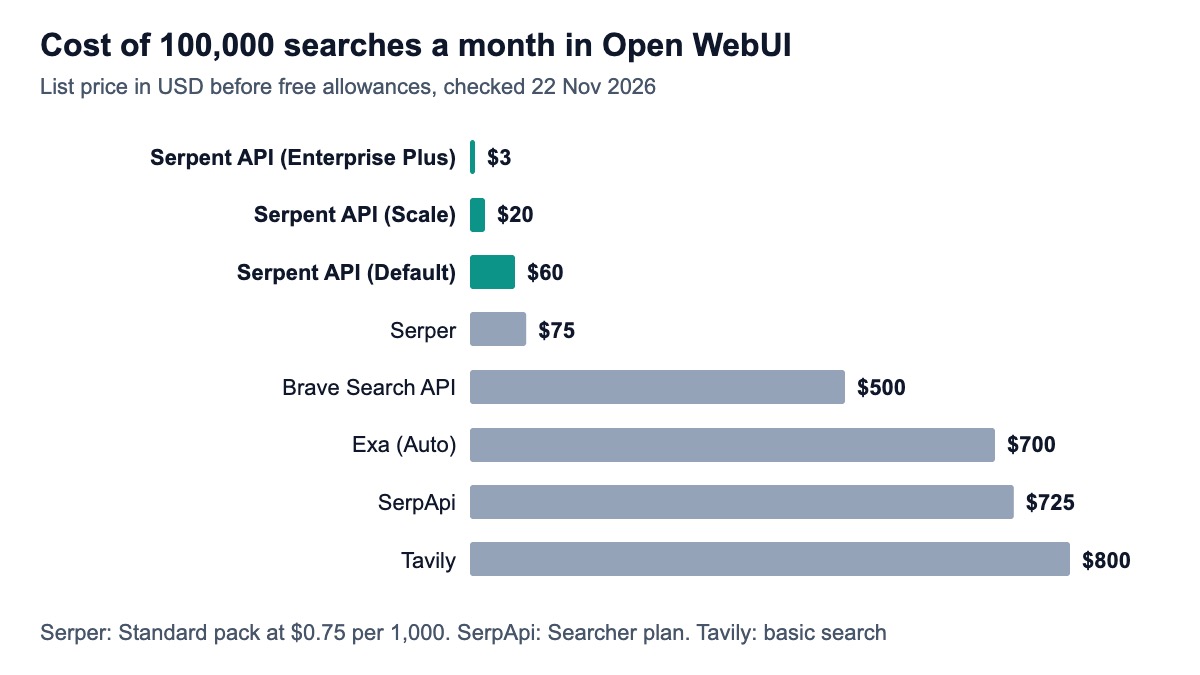
One web search per chat message is the usual pattern, so searches track messages. The table prices 10,000, 100,000 and 1,000,000 searches a month at list price for providers Open WebUI supports natively, checked on 22 November 2026.
| Provider | Billing | 10,000 / month | 100,000 / month | 1,000,000 / month |
|---|---|---|---|---|
| Serpent API, Default ($10 deposit) | $0.60 per 1,000 | $6 | $60 | $600 |
| Serpent API, Growth ($100 deposit) | $0.30 per 1,000 | $3 | $30 | $300 |
| Serpent API, Scale ($500 deposit) | $0.20 per 1,000 | $2 | $20 | $200 |
| Serpent API, Enterprise ($1,000 deposit) | $0.15 per 1,000 | $1.50 | $15 | $150 |
| Serpent API, Enterprise Plus ($1,250 deposit) | $0.03 per 1,000 | $0.30 | $3 | $30 |
| Serper | Prepaid packs, 6-month validity | $10 ($1.00 pack rate) | $75 ($0.75) | $500 ($0.50) |
| Brave Search API | $5 per 1,000 | $50 | $500 | $5,000 |
| Exa, Auto | $7 per 1,000 | $70 | $700 | $7,000 |
| SerpApi | Monthly plan | $150 (Production) | $725 (Searcher) | $3,750 (Cloud 1M) |
| Tavily, basic search | $0.008 per credit | $80 | $800 | $8,000 |
Rules: Serper's credits last six months, so each cell uses the cheapest pack you would finish in that time ($50 for 50,000, $375 for 500,000, $1,250 for 2.5 million). Brave includes $5 of credit a month; Exa includes up to 10 results per Auto search; SerpApi uses the smallest plan that covers the volume; a basic Tavily search uses one credit, per its credits page.
From the Growth tier up, our rate is the lowest in the table at every volume; at the Default rate, Serper's largest pack here is cheaper at 1 million searches a month. Our tier depends on deposit size, not volume, and the pricing page lists every rate. The bridge itself is free to run on any small machine.
Why are my results empty?
Open WebUI treats any failure as "no results", so an empty answer can hide several problems. Check the bridge's log first.
401 in the bridge log. The External Web Search API Key in Open WebUI does not match BRIDGE_TOKEN. An empty key sends Authorization: Bearer with nothing after it.
No request in the bridge log at all. Open WebUI cannot reach the URL. Inside Docker, localhost means the Open WebUI container itself; use the bridge's service name or the host's address.
Results arrive, but answers ignore them. The search worked and the page reader failed: Open WebUI tries to open each link, and some sites block page readers. Turn on BYPASS_WEB_SEARCH_WEB_LOADER to use the snippets alone, and see Open WebUI's troubleshooting guide for loader settings.
A 401 from the search API in the bridge log. SERPENT_API_KEY is wrong or missing; our authentication docs show the header the bridge sends.
If you would rather run search entirely yourself, our SearXNG write-up covers that route, and our Serper alternatives and Tavily alternatives comparisons cover the hosted providers in Open WebUI's list.
How we checked this
The bridge was exercised on 22 November 2026 with FastAPI 0.165.0, httpx 0.28.1, pydantic 2.14.4 and Starlette 1.10.0 on Python 3.15, using FastAPI's in-process test client; no server was started and nothing paid was called. The bridge's request returned the documented example response from our docs. The client side reproduced the request in Open WebUI 0.13.4's external.py, read from its source on GitHub; Open WebUI itself was not installed. Output, versions and files are logged with the article's evidence.
Sources: 6 Open WebUI documentation pages, Open WebUI's source and releases on GitHub, one GitHub issue, and 6 official pricing or credits pages, opened 22 November 2026. What we could not verify: the bridge behind a live Open WebUI instance, how much the page reader adds to response time, and result quality for any provider.
Give Open WebUI live search
Serpent API returns Google, Bing, Yahoo, DuckDuckGo and Brave results as JSON, from $0.03 per 1,000 — pay as you go, no subscription. New accounts get 10 free API calls, enough to test the bridge.
Get Your Free API KeyExplore: Google SERP API · Playground · Docs · Pricing
FAQ
How do I add a custom search engine to Open WebUI?
Set Web Search Engine to external in Admin Panel, Settings, Web Search, then enter your endpoint's URL and an API key. Open WebUI sends a POST with a JSON body holding query and count, plus a bearer token, and expects a JSON array of objects with link, title and snippet. If your search provider uses a different format, run a small bridge that translates between the two, like the FastAPI example in this article.
What is EXTERNAL_WEB_SEARCH_URL in Open WebUI?
It is the environment variable for the External Web Search URL setting: the full address of the endpoint Open WebUI calls when the web search engine is set to external. EXTERNAL_WEB_SEARCH_API_KEY holds the key Open WebUI sends as a bearer token. Set WEB_SEARCH_ENGINE=external and ENABLE_WEB_SEARCH=true alongside them, or make the same changes in the admin panel.
How many results does Open WebUI web search return?
WEB_SEARCH_RESULT_COUNT controls it and defaults to 3. Open WebUI sends that number as count in its request to the search engine and keeps that many results. In native tool-calling mode, the model's search_web tool uses the same value as its default and as a cap when the model asks for more. Raising it gives the model more sources but adds tokens and page-reading time.
Can Open WebUI use an MCP server for web search?
Yes, since v0.6.31. An admin adds the server under Settings, Integrations, External Tool Servers with the type MCP (Streamable HTTP) and the server's URL and auth. Its tools can then be used in chats, and the page recommends a model with reliable native tool calling. For plain web search, the external search engine is simpler because it feeds Open WebUI's built-in web search in every mode.
Why does Open WebUI web search return nothing?
Open WebUI treats any error from the search engine as an empty result, so check the engine's logs. Common causes are a mismatched bearer token, a URL the Open WebUI container cannot reach (localhost inside Docker points at the container itself), a wrong search API key, or results that load but whose pages cannot be read; turning on the web loader bypass makes Open WebUI use snippets only.
Sources
Open WebUI documentation and source (checked 22 November 2026):
- External web search provider
- Web search overview
- Agentic search and URL fetching
- Environment variable configuration
- Model Context Protocol (MCP)
- external.py at v0.13.4
- Open WebUI releases
- Issue #34705: configurable custom web search providers
Official pricing (checked 22 November 2026):