n8n AI Agent web search with an MCP server or one HTTP Request tool

To give the n8n AI Agent web search, connect a search tool to the agent's Tool connector. Two setups need only a credential: the MCP Client Tool pointed at a search MCP server, or the HTTP Request node used as a tool, with $fromAI() filling in the query. SerpApi users have a third: the verified SerpApi Official node, which n8n's docs recommend.
Short answer: If you already pay for SerpApi, install the verified SerpApi Official node, as n8n's docs advise now that the built-in SerpApi tool is deprecated. For several data tools with almost no setup, use the MCP Client Tool with a hosted MCP server; for one tool whose fields and token use you control, the HTTP Request tool with Optimize Response; if you run everything yourself, the SearXNG tool and your own instance. With our API, search costs from $0.03 per 1,000 — pay as you go, no subscription.
What search tools can the n8n AI Agent use?
Any node attached to the AI Agent's Tool connector, and for web search that means five realistic choices. n8n's Tools Agent docs list the HTTP Request node among the tools it can use, and the MCP Client Tool turns any MCP server's tools into agent tools.
- SerpApi Official, the verified community node built by SerpApi. It replaces the built-in SerpApi (Google Search) tool, covered in the next section.
- MCP Client Tool, a built-in node that connects to a remote MCP server, such as our hosted MCP server, and exposes the server's tools to the agent.
- HTTP Request tool, the ordinary HTTP Request node attached as a tool, calling any search API you have a key for.
- SearXNG tool, built in, but it needs your own SearXNG instance with JSON output switched on, per its docs page. The docs add that result quality depends on how that instance is configured.
- Other community nodes from search vendors. Check who maintains one and whether it is verified before you rely on it.
The rest of this guide covers the two setups that work on any n8n instance without installing anything: MCP and HTTP Request. If you want n8n to run searches on a schedule instead of on demand, our n8n daily rank tracker tutorial covers that workflow.
What happened to the SerpApi tool?
n8n deprecated it and pointed users to SerpApi's own node. The SerpApi (Google Search) node page says: "The SerpApi (Google Search) node is deprecated from n8n 2.35.0. Use the verified SerpApi Official community node instead."
So SerpApi users are not stuck. n8n's integration page says SerpApi Official is "built and maintained by our partners at SerpApi and verified by n8n", and that verified nodes need a one-time setup by an instance owner before others can use them. If SerpApi's plans suit your volume, that is the shortest path, and you keep the same account and results.
The deprecation is still a good moment to look at the bill. SerpApi sells monthly plans, while some search APIs charge per call with no subscription; the cost section below compares them at three volumes. Our SerpApi pricing breakdown and SerpApi alternatives comparison go further.
How do you set up the MCP Client Tool?
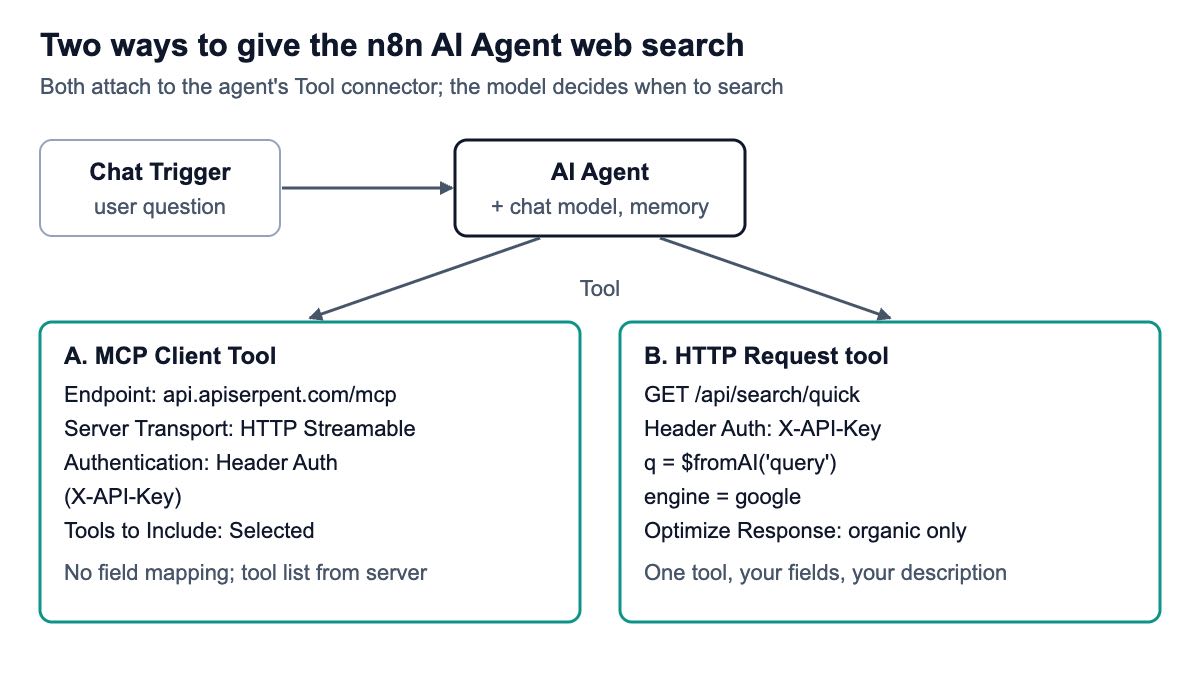
Add the MCP Client Tool to the agent's Tool connector, paste the server URL, and add a Header Auth credential with the API key. The tools then come from the server; there is nothing to map.
One detail first. n8n's MCP Client Tool docs page still names the URL field "SSE Endpoint". In the node's source at the latest release, n8n 2.48.7, current versions of the node show an Endpoint field and a Server Transport setting whose default is HTTP Streamable, with Server Sent Events marked deprecated. If your editor shows the older single field, update n8n.
- Endpoint:
https://api.apiserpent.com/mcp - Server Transport: HTTP Streamable.
- Authentication: Header Auth. Create a credential with Name
X-API-Keyand Value your key (sk_live_…). Our docs also accept the key asAuthorization: Bearer, so Bearer Auth works too. - Tools to Include: Selected, then pick
web_search. Add others, such asnews_search, only if the agent needs them.
"Selected" matters more than it looks. Our server offers one tool per endpoint, from maps to Reddit, and every tool's description goes to the model on every turn. Exposing one or two tools keeps the agent's choice simple and the prompt short. Our MCP docs also describe a ?services= parameter on the URL that limits the server to the tool families you name.
Billing is the same as the REST API: per our docs, every tool call is billed as the matching REST call, and listing the tools is free. As a node you can paste into the canvas, the setup looks like this:
{
  "nodes": [
    {
      "parameters": {
        "endpointUrl": "https://api.apiserpent.com/mcp",
        "serverTransport": "httpStreamable",
        "authentication": "headerAuth",
        "include": "selected",
        "includeTools": ["web_search"]
      },
      "name": "Serpent MCP",
      "type": "@n8n/n8n-nodes-langchain.mcpClientTool",
      "typeVersion": 1.2,
      "position": [820, 320],
      "credentials": { "httpHeaderAuth": { "id": "", "name": "Serpent API key" } }
    }
  ],
  "connections": {}
}
This JSON parses, and every parameter and option name in it appears in the MCP Client Tool's source at n8n 2.48.7. After pasting, select your own Header Auth credential in the node and connect it to the agent's Tool input.
How do you set up the HTTP Request tool?
Attach an HTTP Request node to the Tool connector, point it at a search endpoint, and let the model fill in the query with $fromAI(). This gives you one tool, a description you write, and a response you trim before it reaches the model.
The fastest start is n8n's cURL import, described on the HTTP Request node page: paste the example request from our standard search docs and n8n fills the method, URL, query and header. Move the key out of the header into a Header Auth credential so it is not stored in the node, then set the fields below.
- Description: "Search the web. Returns the top organic results with title, URL and snippet. Use it for current facts, prices, news and documentation."
- Method: GET. URL:
https://apiserpent.com/api/search/quick - Authentication: Generic Credential Type, then Header Auth, with Name
X-API-Keyand Value your key. The same credential serves the MCP setup. - Send Query Parameters: on, Using Fields Below. Add
qwith the expression{{ $fromAI('query', 'Short keyword search query', 'string') }},countrywith{{ $fromAI('country', 'Two-letter country code, e.g. us, gb, de', 'string', 'us') }}, andenginefixed togoogle. - Optimize Response: on, expecting JSON. Field Containing Data:
results. Include Fields: Selected, Fields:organic.
The $fromAI() function is how n8n lets the model supply a parameter. Per n8n's guide to AI-filled parameters, it takes a key, an optional description, a type and a default, and the key must be 1 to 64 letters, digits, underscores or hyphens. It only works in tools attached to the AI Agent. Keeping engine fixed means the model chooses what to search for, not which engine; switch the value to yahoo, ddg or brave if you prefer another engine.
Optimize Response matters for cost. Our response carries every result block, such as ads and People Also Ask, always present and empty when a page has none. The two settings above pass only the organic rows to the model. Here is the documented example response from our docs after that trim, which is what the agent would read:
[{"organic": [{"position": 1,
               "title": "Weather Forecast - Today",
               "url": "https://example.com/weather",
               "snippet": "Today's weather forecast...",
               "displayedUrl": "example.com"}]}]
The full node, ready to paste:
{
  "nodes": [
    {
      "parameters": {
        "toolDescription": "Search the web. Returns the top organic results with title, URL and snippet. Use it for current facts, prices, news and documentation.",
        "url": "https://apiserpent.com/api/search/quick",
        "authentication": "genericCredentialType",
        "genericAuthType": "httpHeaderAuth",
        "sendQuery": true,
        "queryParameters": {
          "parameters": [
            { "name": "q", "value": "={{ $fromAI('query', 'Short keyword search query', 'string') }}" },
            { "name": "country", "value": "={{ $fromAI('country', 'Two-letter country code, e.g. us, gb, de', 'string', 'us') }}" },
            { "name": "engine", "value": "google" }
          ]
        },
        "optimizeResponse": true,
        "dataField": "results",
        "fieldsToInclude": "selected",
        "fields": "organic"
      },
      "name": "Web search",
      "type": "n8n-nodes-base.httpRequestTool",
      "typeVersion": 4.2,
      "position": [620, 320],
      "credentials": { "httpHeaderAuth": { "id": "", "name": "Serpent API key" } }
    }
  ],
  "connections": {}
}
As with the MCP node, this JSON parses and its parameter names match the HTTP Request node's source at n8n 2.48.7. Our API accepts 112 country codes, listed under country support, so the model can ask for local results when a question needs them.
How do you get the agent to search?
Tell it when to. The AI Agent node has a System Message option, listed in the Tools Agent docs; a line such as "Search the web before answering anything about current events, prices or recent releases, and cite the URLs you used" makes searching the default for those questions.
Two more options help. Max Iterations caps how many times the agent can loop between the model and its tools, which also caps how many searches a single question can trigger. Return Intermediate Steps includes the tool calls in the output, so you can see which queries the model sent while you tune the description.
The tool description does the rest. A model picks tools by reading their descriptions, so say what the tool returns and when to use it. Vague descriptions such as "web tool" are the most common reason an agent answers from memory instead.
What does search cost at your volume?
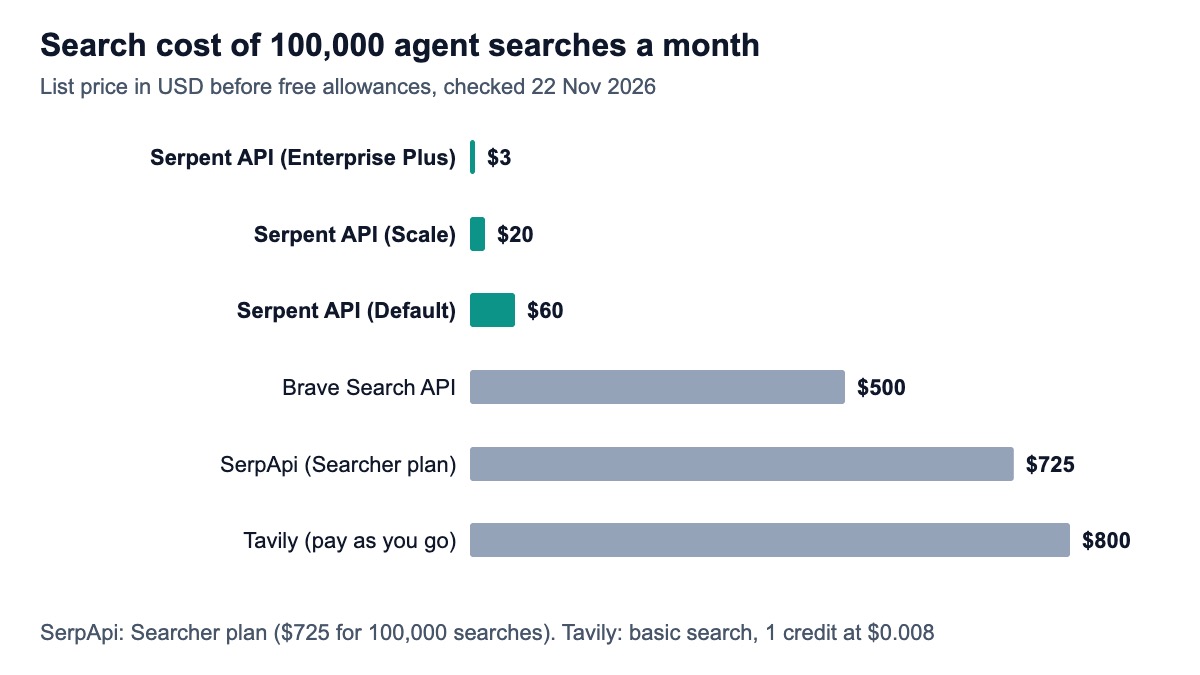
Every Serpent API tier costs less than the other options in this table, at every volume. The table prices 10,000, 100,000 and 1,000,000 searches a month at each provider's list rate, checked on 22 November 2026, using the smallest SerpApi plan that covers each volume.
| Search option | Billing | 10,000 / month | 100,000 / month | 1,000,000 / month |
|---|---|---|---|---|
| Serpent API, Default ($10 deposit) | $0.60 per 1,000 | $6 | $60 | $600 |
| Serpent API, Growth ($100 deposit) | $0.30 per 1,000 | $3 | $30 | $300 |
| Serpent API, Scale ($500 deposit) | $0.20 per 1,000 | $2 | $20 | $200 |
| Serpent API, Enterprise ($1,000 deposit) | $0.15 per 1,000 | $1.50 | $15 | $150 |
| Serpent API, Enterprise Plus ($1,250 deposit) | $0.03 per 1,000 | $0.30 | $3 | $30 |
| Brave Search API | $5 per 1,000 | $50 | $500 | $5,000 |
| Tavily, pay as you go (basic search) | $0.008 per credit | $80 | $800 | $8,000 |
| SerpApi monthly plan | Plan with that many searches | $150 (Production, 15,000) | $725 (Searcher, 100,000) | $3,750 (Cloud 1M) |
Sources: SerpApi pricing (free plan 250 searches a month), Tavily pricing with a basic search costing one credit per its credits page (1,000 free credits a month), and Brave Search API ($5 of free credit each month). A SearXNG instance has no per-search fee, but you run and maintain the server.
Our tier depends on deposit size, not volume, and there is no monthly plan to size; the pricing page lists every rate. The MCP route and the HTTP Request route cost the same per search. Model tokens come on top of all of these, which is why trimming the response to organic rows is worth the extra setting.
Which setup should you pick?
You already use SerpApi and like it: install SerpApi Official. It is n8n's recommended replacement, it is verified, and nothing else in your workflows has to change.
You want search plus other data, fast: the MCP Client Tool. One credential, one URL, and the agent can also reach news, maps or YouTube tools if you include them.
You want one tightly controlled search tool: the HTTP Request tool. You write the description, fix the engine, and trim the response to the fields the model needs. We would pick this for production agents, where token cost and predictable behaviour matter most.
You self-host everything and accept variable result quality: the SearXNG tool on your own instance. For a broader view of search APIs built for agents, see our comparison of web search APIs for agents and our web search MCP server comparison.
Why isn't the tool working?
The agent never searches. Strengthen the tool description and the System Message, as above. Turn on Return Intermediate Steps to confirm whether the model tried.
401 from the search API. The header name is wrong or the credential is not selected on the node. The Header Auth Name must be exactly X-API-Key; our authentication docs show both accepted forms.
"Target field not found in response". This error comes from Optimize Response when Field Containing Data names a key the response does not have at the top level. Use results, not results.organic; the nested part goes in Fields.
The model sends long sentences as queries. Put "Short keyword search query" in the $fromAI() description, as in the example; most engines handle keywords better than full questions.
The MCP node will not connect. Check the transport is HTTP Streamable, not Server Sent Events, and that the URL is api.apiserpent.com/mcp exactly. If you build agents in code as well, the same search tool pattern appears in our CrewAI web search tutorial.
How we checked this
This is a configuration guide, so n8n was not run. On 22 November 2026 we read n8n's documentation pages for the SerpApi, MCP Client Tool, HTTP Request, SearXNG and Tools Agent nodes and the $fromAI() guide, and the source of the MCP Client Tool, HTTP Request node and Header Auth credential at release n8n 2.48.7 (published 20 November 2026). Both node snippets were parsed, and every parameter and option name in them was checked against that source; the check and its output are logged with the article's evidence. The response shown is the documented example response from our docs.
Sources: 7 n8n documentation pages, n8n's integration page for SerpApi Official, n8n's GitHub source and releases, and 4 official pricing or credits pages. What we could not verify: the node snippets running in a live n8n editor, how a particular model chooses queries, result quality and latency, and whether older n8n versions show the same MCP fields.
Give your n8n agent live search
Serpent API returns Google, Bing, Yahoo, DuckDuckGo and Brave results as JSON, through REST or a hosted MCP server, from $0.03 per 1,000 — pay as you go, no subscription. New accounts get 10 free API calls.
Get Your Free API KeyExplore: SERP API · Playground · Docs · Pricing
FAQ
How do I add web search to an AI Agent in n8n?
Attach a search tool to the AI Agent node's Tool connector. The options are the verified SerpApi Official node, the MCP Client Tool connected to a search MCP server, the HTTP Request node used as a tool with $fromAI() filling the query, or the SearXNG tool if you run your own SearXNG instance. Then tell the agent in its System Message when to search and to cite the URLs it used.
Is the SerpApi node deprecated in n8n?
Yes. n8n's documentation says the SerpApi (Google Search) node is deprecated from n8n 2.35.0 and recommends the verified SerpApi Official community node instead. SerpApi builds and maintains that node, and n8n has verified it. An instance owner sets up a verified node once, and other users on the instance can then add it to their workflows.
Can the n8n MCP Client Tool connect to a Streamable HTTP server?
Yes. In n8n's source at release 2.48.7, current versions of the MCP Client Tool have an Endpoint field and a Server Transport setting with HTTP Streamable as the default, and Server Sent Events marked deprecated. The documentation page still calls the field SSE Endpoint, so if your editor shows only that field, update n8n. Authentication can be Bearer, Header Auth, multiple headers or OAuth2.
What does $fromAI() do in n8n?
It lets the AI model fill in a tool parameter. You write an expression such as $fromAI('query', 'Short keyword search query', 'string') in the field, and the model supplies the value when it calls the tool. The key must be 1 to 64 letters, digits, underscores or hyphens, and the description, type and default value are optional. It only works in tools attached to the AI Agent node.
Is there a free web search tool for n8n?
The SearXNG tool has no per-search fee, but you need to run your own SearXNG instance. Hosted search APIs usually include a small free allowance: SerpApi's free plan has 250 searches a month, Tavily gives 1,000 free credits a month, Brave gives $5 of monthly credit, and Serpent API gives new accounts 10 free calls. Beyond those, you pay per search or per plan.
Sources
n8n documentation and source (checked 22 November 2026):
- SerpApi (Google Search) node (deprecation notice)
- SerpApi Official integration page
- MCP Client Tool node
- HTTP Request node
- Let AI specify the tool parameters ($fromAI)
- AI Agent: Tools Agent
- SearXNG Tool node
- MCP Client Tool source at n8n 2.48.7
- n8n releases
Official pricing (checked 22 November 2026):