Make.com SERP API rank tracker: daily positions in Google Sheets

To track Google rankings in Make.com, build a daily scenario that reads keywords from Google Sheets, calls a SERP API with the HTTP module, finds your domain in the results and adds a row with its position. It takes five modules, one filter and no code. Each keyword costs about four Make credits and one API call a day.
Short answer: Use Make's HTTP "Make a request" module with a SERP API that can return up to 100 results in one call (a ceiling; Google calls often return 40 to 70); it works with any provider and lets you log "not found" rows. Use the SerpApi or DataForSEO apps only if you already pay for them. On Make's Free plan (1,000 credits a month) this tracks about 8 keywords daily; for more, budget about 4 credits per keyword per run. The API side costs from $0.03 per 1,000 checks — pay as you go, no subscription.
Why build a rank tracker in Make?
Because your keywords and reports probably already live in Google Sheets, and Make can join the two on a schedule without a server. A rank tracker is three steps: search each keyword, find your domain in the results, write down the position. Make has a module for each.
The pages that rank for this topic stop short of the middle step. SerpApi's own Make guide (October 2024) writes every result's title and link into a sheet, with manual "Run once" runs. Make's DataForSEO rank-drop template runs weekly on DataForSEO's ranking database and only flags keywords that left the top 10.
This scenario records one row per keyword per day: the date, the keyword, your position among the results returned (or "not found"), the ranking URL and how many results were checked. That is the table a rank chart or a client report needs.
If you prefer another automation tool, the same design exists for n8n and Zapier. If you want it inside the spreadsheet with no automation tool at all, see the Apps Script version for Google Sheets.
What goes in the Google Sheet?
Two tabs. Keywords holds the input and History collects the output.
| Tab | Columns | Example row |
|---|---|---|
| Keywords | keyword, domain, country | serp api pricing · example.com · us |
| History | date, keyword, domain, position, url, results checked | 2026-11-20 · serp api pricing · example.com · 7 · https://example.com/pricing · 64 |
Write the domain without https:// or www., so a plain "contains" match finds both the root and its subpages. Keep the header row and set "Table contains headers" to Yes in the Google Sheets modules (a field in both Search Rows and Add a Row, per Make's Google Sheets module docs), so the columns appear by name when you map them.
How is the scenario laid out?
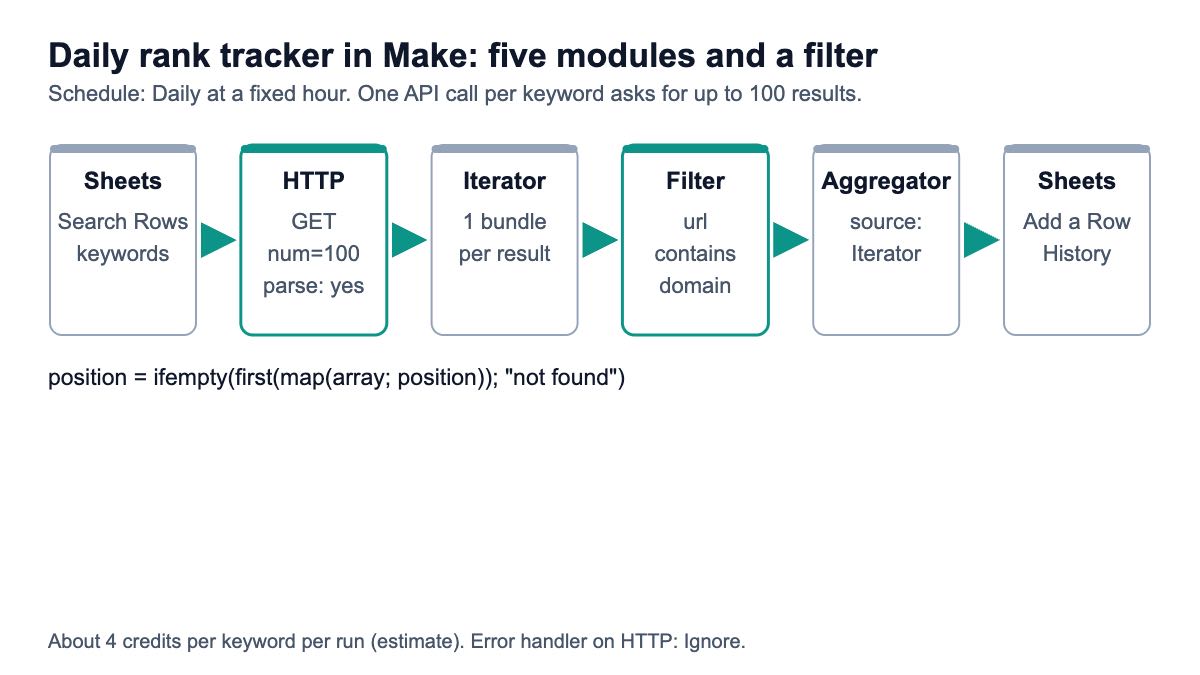
Five modules in a line, with one filter between the iterator and the aggregator:
- Google Sheets: Search Rows on the Keywords tab. One bundle per keyword comes out.
- HTTP: Make a request to the SERP API, once per keyword.
- Flow Control: Iterator over the organic results, one bundle per result.
- Filter on the line after the iterator: the result URL contains the keyword's domain.
- Flow Control: Array aggregator that collects whatever passed the filter back into one bundle per keyword.
- Google Sheets: Add a Row on the History tab.
The iterator-filter-aggregator trio is the important part. Make's array functions include map, first and contains, but map filters only on exact values and contains checks whole items, so none can say "the first result whose URL contains example.com". Splitting the array into bundles lets a normal filter do the matching.
How do you set up the HTTP module?
Add the HTTP app's "Make a request" module and fill in these fields, which are the names in Make's HTTP app documentation:
- URL:
https://apiserpent.com/api/search/quick - Method: GET
- Headers: name
X-API-Key, value your API key. Make's docs prefer authentication in the Credentials field over headers, so a stored key can be reused; if your API key credential lets you name the header, useX-API-Key, otherwise the Headers field works. - Query parameters:
q= the keyword from module 1,num=100,country= the country from module 1. - Parse response: Yes. Make's docs say this structures the output "so that it's easy to map", and the fields appear in the mapping panel after you run the module once.
- Return error if HTTP request fails: Yes, so a 4xx or 5xx is an error you can handle instead of a silent empty row.
- Timeout: 60 seconds is plenty; Make accepts 1 to 300.
That endpoint can be asked for up to 100 organic results for one keyword in a single call (a ceiling; Google calls often return 40 to 70), billed as one call whatever the depth, as the endpoint docs describe. The response shape is fixed: results.organic is a list where every item has position, title, url, displayedUrl and snippet, shown in the response format docs. Google stopped honouring &num=100 on its own pages in September 2025; this post explains what that did to rank tracking costs.
Right-click the HTTP module and add an error handler route with Ignore, so one failed keyword does not stop the run for the rest. Make's pricing FAQ lists error handler modules as not charged.
How do you find your domain's position?
With the iterator, the filter and the aggregator, configured like this:
- Iterator, Array: map
Data → results → organicfrom the HTTP module. Make's Iterator "converts an array into a series of bundles", one per result. - Filter: click the line between the iterator and the aggregator, name it "my domain", and set the condition to the iterator's
urlwith a text "contains" operator and thedomainfrom module 1 as the value. - Array aggregator, Source module: the Iterator. Aggregate the
positionandurlfields.
The aggregator is what makes "not ranking" visible. Make's aggregator docs say it outputs a bundle even when nothing reaches it, unless you switch on "Stop processing after an empty aggregation". Leave that off: an empty array then becomes a History row that says the domain was not found, instead of a missing day you might mistake for a broken scenario.
If the domain appears twice (a homepage and a blog post, say), the array holds both, in rank order, and the next step takes the first.
How do you log the result and schedule it?
Map the History columns in the Add a Row module with these formulas. Every function is from Make's function reference; replace the module numbers with yours.
date             {{formatDate(now; "YYYY-MM-DD")}}
keyword          {{1.keyword}}
domain           {{1.domain}}
position         {{ifempty(first(map(5.array; position)); "not found")}}
url              {{first(map(5.array; url))}}
results checked  {{length(2.data.results.organic)}}
map pulls one field out of the aggregated array, first takes the best-ranked match, and ifempty "returns value 1 if this value is not empty", otherwise value 2 (here the text "not found"), per the general functions page. formatDate(date; format; [timezone]) uses your organization's time zone unless you pass one.
"Results checked" keeps the log honest. num=100 is a ceiling, not a promise: Google calls often return 40 to 70 results. A "not found" next to 64 means the domain was not among the 64 results that came back; it does not prove the domain is outside the top 100. Read each row with its own count.
Then set the schedule. Make's scheduling options include At regular intervals, Daily, Weekdays, Weekly, Monthly and On demand, and a new scenario runs every 15 minutes by default. Change it to Daily at a fixed hour; rankings do not need a 15-minute check, and the default would use 96 times the credits.
How many Make credits does it use?
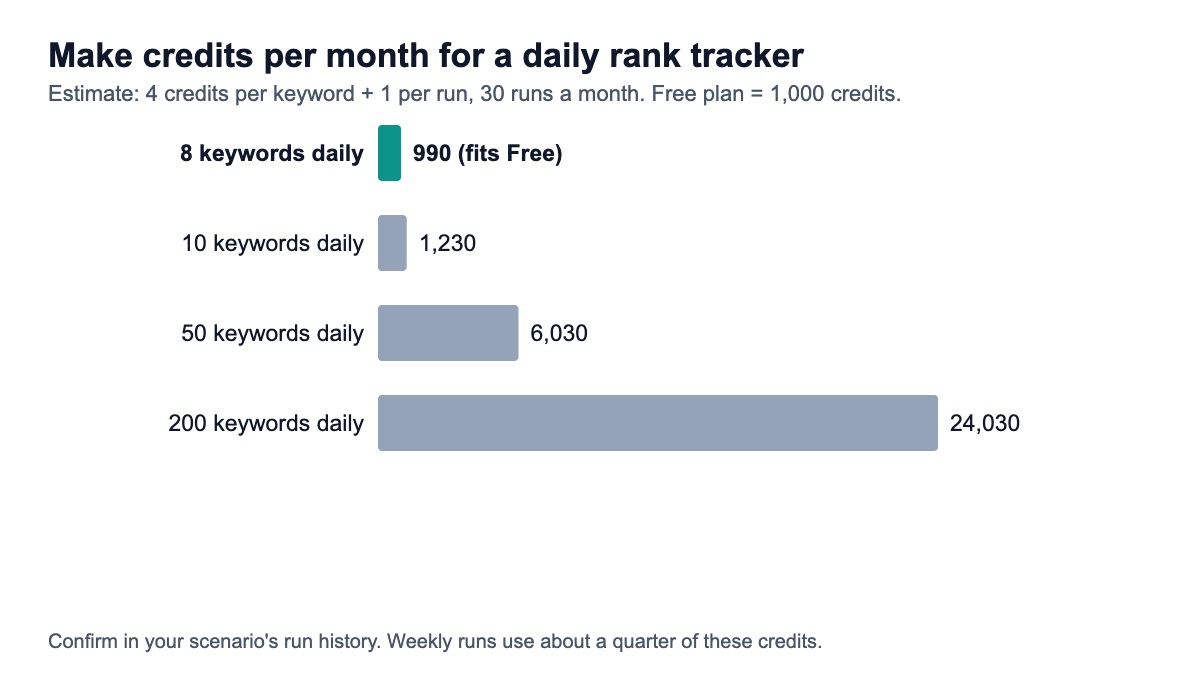
About four credits per keyword per run, plus one for reading the sheet. Make's credits help page says that for non-AI apps "1 operation equals 1 credit", and each module run is an operation: the HTTP call, the iterator, the aggregator and Add a Row each run once per keyword. This estimate counts nothing for the filter, which is not a module, and Make's pricing FAQ lists error handlers as not charged.
| Keywords tracked daily | Credits per run | Credits per month | Fits Make's Free plan (1,000 a month)? |
|---|---|---|---|
| 8 | 33 | 990 | Yes |
| 10 | 41 | 1,230 | No |
| 50 | 201 | 6,030 | No |
| 200 | 801 | 24,030 | No |
Treat the per-keyword number as an estimate and confirm it in the scenario's run history after the first day; the operations count per module is shown there. Make's pricing page confirmed the Free plan's 1,000 credits a month but did not show paid plan prices in a form I could read on 20 Nov 2026, so check the current plan that covers your monthly total.
To cut credits, track weekly instead of daily (about a seventh of the credits: roughly 4 runs a month instead of 30), or drop the iterator and aggregator and store the whole list of result URLs as text with join(map(2.data.results.organic; url); ", "), then find the position with a sheet formula. That is two credits per keyword instead of four, at the cost of a messier sheet.
What does the SERP API side cost?
Far less than the Make side at these volumes. Ten keywords a day is 300 checks a month, 50 is 1,500 and 200 is 6,000. The table uses each provider's list price on 20 Nov 2026 and the smallest self-serve plan or pack that covers the volume.
| Provider | 10 keywords (300 a month) | 50 keywords (1,500) | 200 keywords (6,000) | Rule used |
|---|---|---|---|---|
| SerpApi | $25.00 | $75.00 | $150.00 | Starter $25 (1,000), Developer $75 (5,000), Production $150 (15,000) |
| Serper | $8.33 | $8.33 | $8.33 | $50 pack of 50,000, valid 6 months, spread over 6 months |
| Serpent API, Default (pay as you go) | $0.18 | $0.90 | $3.60 | $0.60 per 1,000 calls |
| Serpent API, Growth ($100 deposit) | $0.09 | $0.45 | $1.80 | $0.30 per 1,000 calls |
| Serpent API, Scale ($500 deposit) | $0.03 | $0.15 | $0.60 | $0.10 per 1,000 calls |
| Serpent API, Enterprise ($1,000 deposit) | $0.015 | $0.075 | $0.30 | $0.05 per 1,000 calls |
| Serpent API, Enterprise Plus ($1,250 deposit) | $0.009 | $0.045 | $0.18 | $0.03 per 1,000 calls |
Two caveats on the comparison. The table assumes one search per keyword per day; if a provider needs several requests to cover the top 100, multiply its row by that number. And SerpApi and DataForSEO have native Make apps, which save you the HTTP setup; the HTTP module works with any provider, including those two.
For a wider look at rank-tracking APIs, including providers built only for SEO, read the rank tracking API comparison, or start from the rank tracking API page.
How do you add drop alerts?
Compare today's position with yesterday's and send a message when it falls. The simplest version keeps a "last position" column on the Keywords tab:
- Add last position to the Keywords tab.
- After Add a Row, add a Router (Make's pricing FAQ lists the Router as using no credits).
- Route 1: Update a Row on the Keywords tab to store today's position as the new last position.
- Route 2: a filter where today's position is greater than last position by 3 or more, or became "not found", then a Gmail or Slack module with the keyword, both positions and the ranking URL.
That adds one to two credits per keyword, depending on how often the alert route fires.
Which setup should you pick?
- Up to 8 keywords, on Make's Free plan: this scenario as written, daily.
- Dozens to hundreds of keywords: the same scenario on a paid Make plan, or switch to weekly, which uses about a seventh of the credits.
- You already pay for SerpApi or DataForSEO: use their Make app in place of the HTTP module; the iterator, filter and aggregator stay the same.
- Thousands of keywords: Make's per-module credits start to dominate; a script or a dedicated tracker is cheaper. The 100-line Python tracker uses the same API.
How we checked this
What this is: a scenario design built from Make's documentation, not a recording of a run. I did not build or run this scenario in a Make account. Module and field names come from Make's HTTP app and Google Sheets module docs and help pages (flow control, credits, scheduling, iterator, aggregator, filters, array, general and date functions), all opened 20 Nov 2026. Request parameters and response fields come from our API docs; our prices from the pricing page the same day.
Pages reviewed for this query: SerpApi's Make guide, Make's DataForSEO template and integration page, HasData's Sheets tracker, and Make's HTTP docs.
What we could not verify: Make's paid plan prices; the exact credit count of the aggregator per keyword (the 4-per-keyword figure is an estimate to confirm in run history); whether a filter uses credits (the credits and pricing pages we opened do not say); the exact label of the text "contains" operator in the filter panel.
Run your Make rank tracker on up to 100 results per call
Up to 100 organic results for one keyword in one call (a ceiling; Google calls often return 40 to 70), from $0.03 per 1,000 — pay as you go, no subscription. Start with 10 free API calls.
Get Your Free API KeyExplore: Rank Tracking API · Playground · Docs · Pricing
FAQ
Can Make.com get Google search results?
Yes, through a SERP API. Make has apps for some providers, such as SerpApi's "Search Google" module and DataForSEO's organic SERP modules, and its generic HTTP "Make a request" module can call any provider with a URL, query parameters and a key header. With "Parse response" set to Yes, the JSON fields become mappable in later modules after one run.
How do I find my website's position in the results in Make?
Split the organic results into bundles with an Iterator, add a filter where the result URL contains your domain, and collect the matches with an Array aggregator whose source module is the Iterator. Then map first(map(array; position)) into your sheet, wrapped in ifempty so a domain outside the results is written as "not found" instead of a blank.
How many operations or credits does a Make rank tracker use?
Make has billed in credits instead of operations since August 2025, and for non-AI apps one operation equals one credit. This design uses about four per keyword per run, plus one to read the sheet: 990 a month for 8 keywords checked daily, 6,030 for 50. Routers and error handlers are listed as not charged. Check the run history after the first day to confirm the count for your scenario.
How often should a Make rank tracker run?
Daily is enough for most sites, and weekly is fine for long-tail keywords or tight credit budgets. Make runs new scenarios every 15 minutes by default, which would use 96 times the credits of a daily run for no benefit, so set the schedule to Daily at a fixed hour. Positions move during the day, so a fixed hour also keeps day-to-day comparisons fair.
Is Make or n8n better for rank tracking?
Make is easier if your team already uses it and the keyword list is small, because everything is point-and-click and hosted. n8n can be self-hosted, which removes per-module charges, so it scales more cheaply to hundreds of keywords. The search side is identical in both; our n8n tutorial builds the same tracker with an HTTP Request node and a Code node.
Sources
Make documentation (checked 20 November 2026):
- Make: HTTP app (Make a request)
- Make: Credits
- Make: Credits replace operations (August 2025)
- Make: Google Sheets modules
- Make: Flow control (Iterator, Array aggregator)
- Make: Schedule a scenario
- Make: Iterator
- Make: Aggregators
- Make: Array functions
- Make: General functions
- Make: Date and time functions
- Make: Filtering
- Make: Pricing and credits FAQ
Other pages reviewed (opened 20 November 2026):