How to Track AI Referral Traffic in GA4

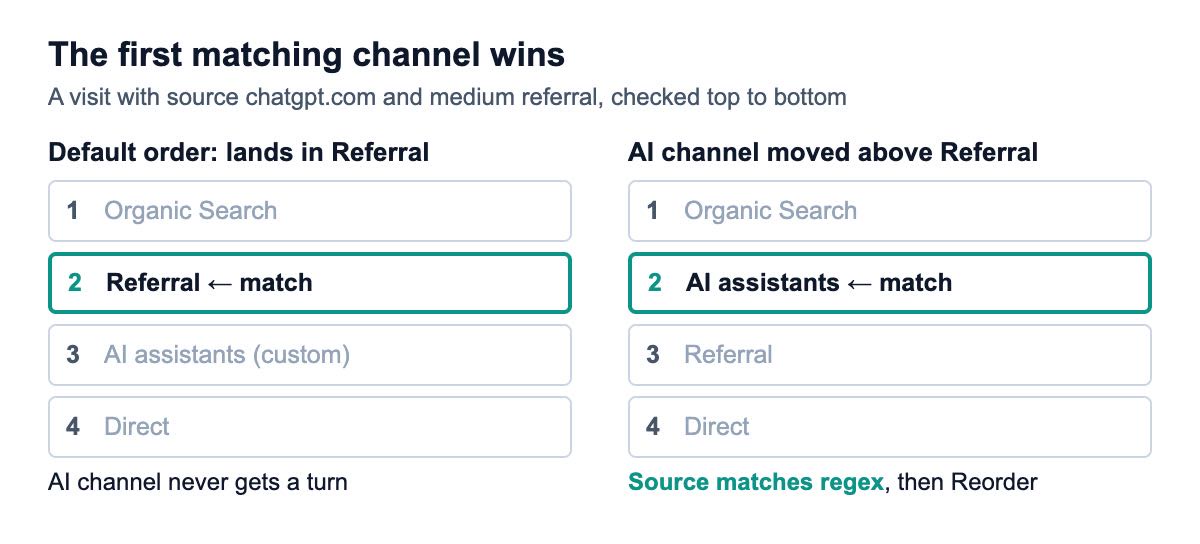
Create a GA4 custom channel group, add a channel whose Source matches a regex of AI assistant domains, and put it above Referral. GA4 files each visit under the first channel that matches, so the order decides the result. Visits that arrive without a referrer still land in Direct, and Google AI Overviews clicks stay in Organic Search.
Short answer: If you need a number in the next five minutes, use the Traffic acquisition filter described below: one minute, but it resets when you refresh. If you report every month, build the custom channel group: about ten minutes, and Google says it applies to past data too. If you rely on GA4’s built-in AI Assistant channel alone, expect gaps, because Google’s own pages list different assistants and the full list is not published.
Why do AI visits land in Referral or Direct?
GA4 sorts every session into a channel using the source and medium it recorded. A visitor who clicks a link inside a chat assistant’s web page usually arrives with that site as the referrer, so before an AI-specific rule exists the session falls into Referral, which Google defines as users who “arrive at your site via non-ad links on other sites/apps” (Default channel group help, checked 22 November 2026).
When no referrer is sent, GA4 has nothing to read. Google describes Direct as users arriving “via a saved link or by entering your URL”, and a link opened from an app, or a link someone copied and pasted, looks the same to GA4. Search Engine Journal lists in-app browsers, mobile apps and copied links as the usual ways AI visits end up in Direct (14 May 2026).
So there are two problems. AI visits with a referrer are buried in Referral and a rule can pull them out. AI visits without one are invisible to any rule. This guide fixes the first and is plain about the second.
Doesn’t GA4 already have an AI channel?
Yes, since 13 May 2026, but it is not a full answer. Google’s release notes say GA4 added an AI Assistant channel to the Default Channel Group, sets the medium to “ai-assistant” when the referrer matches a recognized assistant, and labels the campaign “(ai-assistant)” (Analytics release notes, checked 22 November 2026).
Three things limit it:
- The list is not published. Search Engine Journal reported that Google has not published the full recognized list. The default channel page gives ChatGPT, Gemini, Copilot and Grok among its examples; the release note names ChatGPT, Gemini and Claude. Neither mentions Perplexity.
- It starts at rollout. A July 2026 Search Engine Journal analysis says the native channel only tags traffic from its rollout date forward. A custom channel group, by contrast, “can be applied to your reports retroactively” per Google’s custom channel group page.
- The same source can split. The same July piece found one source landing in AI Assistant, Referral or Unassigned depending on its medium, and recommends matching on Source only.
The native channel still costs nothing and needs no setup, so it is a fair start if you only care about the assistants Google names. If you want a definition you control, build your own.
Which domains go in the regex?
The ones you can point to a source for. This 195-character pattern uses domains that appear in Google’s help pages, Search Engine Journal, or Julius Fedorovicius’s Analytics Mania guide (12 May 2026); the table below shows where each comes from. Google limits report-filter regexes to 250 characters, so the same pattern also fits the filter method described under Traffic acquisition.
(?:www\.)?perplexity(?:\.ai)?|chatgpt\.com|chat\.openai\.com|claude\.ai|gemini\.google\.com|copilot\.microsoft\.com|grok\.com|(?:\w+\.)?meta\.ai|you\.com|phind\.com|duck\.ai|(?:\w+\.)?mistral\.ai| Pattern | Source for it |
|---|---|
chatgpt.com, chat.openai.com | Analytics Mania list (12 May 2026); Google’s example regex contains .*chatgpt.* and .*\.openai.* |
perplexity(.ai) | Analytics Mania list; Google’s example contains .*perplexity.*; Search Engine Journal (15 July 2026) says Perplexity is not in the native channel |
claude.ai | Analytics Mania list; Search Engine Journal (14 May 2026) cites it as a former Referral source |
gemini.google.com | Analytics Mania list; Google’s example contains .*gemini.* |
copilot.microsoft.com | Analytics Mania list; Google’s example contains .*copilot.*; Google’s default channel page names Copilot |
grok.com | Analytics Mania list; Google’s default channel page names Grok |
meta.ai, you.com, phind.com, duck.ai, mistral.ai | Analytics Mania list only (a single attributed guide) |
One part is my addition, not from a source: the optional www. before Perplexity. Hostnames vary and I have not confirmed which form GA4 records, so look at your own Source column and trim the pattern to what you see.
Why not copy Google’s example? Google’s help page publishes this one: ^.*ai|.*\.openai.*|.*chatgpt.*|.*gemini.*|.*gpt.*|…. Google’s regex article says GA4 uses full regex by default, meaning the whole value must match. Read that way, the first alternative ^.*ai matches any source that merely ends in “ai”; a short Python check of that reading matched the string “thai”. That is my reading of Google’s text, not a run inside GA4.
Also avoid a bare google to catch Gemini: Search Engine Journal’s July piece warns that bare tokens such as “gpt” or “google” cause false positives.
How do I build the custom channel group?
These steps follow Google’s custom channel groups help page, checked 22 November 2026. I did not open a GA4 property for this, so menu labels are as Google documents them; yours may differ slightly.
- In Admin, under Data display, open Channel groups. You need Editor access or above, at property level.
- Create a new channel group. Google says you can copy the default group or an existing one, then add a name and optional description. Copying keeps Organic Search, Direct and the rest in place.
- Add a new channel and name it something plain such as “AI assistants”.
- Add a condition on the Source dimension, choose matches regex, and paste the pattern from the previous section. Analytics Mania suggests an empty result usually means “Contains” was chosen instead of “matches regex”.
- Save the channel, then reorder so it sits above Referral (next section).
- Click Save group.
Limits: Google allows two custom channel groups and 50 channels per group on a standard property, besides the default group. Analytics Mania says 25 channels; Google’s page says 50, so I trust Google. Deleting a group is irreversible.
Why does channel order matter?
Because GA4 stops at the first match. Google’s wording: “Traffic is included in the first channel whose definition it matches given the current order of channels in the group.” A visit from chatgpt.com with medium referral satisfies both your AI rule and the Referral rule. Whichever comes first wins.
Analytics Mania notes that a newly saved channel goes to the bottom of the list, which is the wrong place, and says Referral is a catch-all that should sit lower than specific channels. Google’s help page says to place “AI Assistants” above “Referrals”, and that you can also place it above others such as Organic Search if needed.
How do I read it in Traffic acquisition?
Open Acquisition, then Traffic acquisition, and pick your new channel group as the primary or secondary dimension. Google says you will see your “AI assistants” channel “provided there’s data matching your defined regex”. Change the dimension drop-down to your custom group, set a date range that covers a few weeks, and read the row.
The quick alternative is a report filter. Google documents that a report can be filtered with the match type “matches regex”, that regexes are case sensitive and limited to 250 characters, and that you add the filter while viewing a report with + Add filter (Google filter help). Analytics Mania suggests a Session source filter with a shortened regex for a fast answer, and warns that the filter resets when you refresh or leave the report. That is why it suits a one-off question and not a monthly report.
| Method | Setup | Persists | Use it for |
|---|---|---|---|
| Report filter (Source matches regex) | About 1 minute | No, resets on refresh | A quick one-off check |
| Custom channel group | 5 to 10 minutes | Yes, and Google says it applies retroactively | Monthly reporting |
| Saved report or Exploration | 10 to 15 minutes | Yes, shareable | Breakdowns by page or source |
Can I go deeper in an Exploration?
Yes, and it is where you find out which pages AI visitors land on. Google’s help says that in Explore you start a new exploration and select the Free form template. In that template, rows hold up to 5 dimensions, columns up to 2, and values up to 10 metrics (free-form exploration help).
A layout for this question: custom channel group and Session source in the rows, a landing-page dimension as a second row level, sessions and conversions as values, then a filter to the AI channel. Analytics Mania reaches the same place by opening the Traffic acquisition report as an exploration. If AI visitors cluster on a few URLs, those are the pages assistants link to, so keep them accurate.
What will this still miss?
Three things, and they are the reason AI traffic is always an undercount.
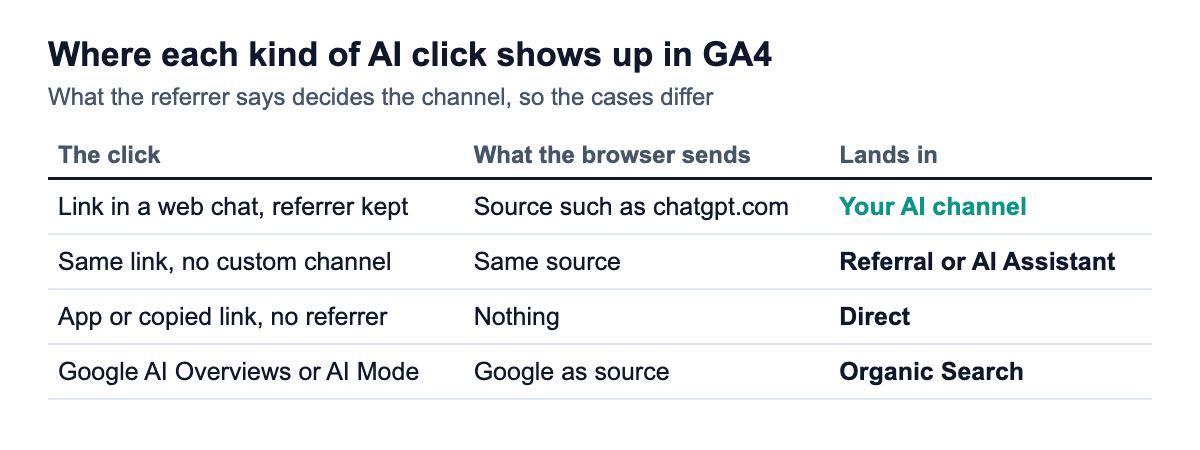
1. Visits with no referrer are Direct. A regex on Source cannot match a source that was never sent. Search Engine Journal’s July piece makes the same point: a custom channel fixes classification, not collection, and the result is a consistent number for the AI sources you can actually identify, not a measure of total AI influence. In-app browsers can also lose the medium and land in Unassigned according to that article.
2. Google AI Overviews and AI Mode are Organic Search. Google’s default channel page says the AI Assistant channel “excludes Google’s AI Overviews and AI Mode”, and that Organic Search includes them. Google’s Search Central documentation says AI features traffic “is included in the overall search traffic in Search Console” and reported in the Performance report.
Search Console also gained Search Generative AI performance reports on 3 June 2026, which Google’s announcement describes as impressions in AI features, not clicks. So there is no clean AI Overviews click count in GA4. For loss estimates, see our guide to measuring AI Overview traffic loss.
3. Referrer handling changes. In May 2025 Ahrefs found that AI Mode links carried a noreferrer attribute, so visits showed as Direct or Unknown; Google tracked it as a bug, and Ahrefs’ later update says it was fixed (Ahrefs, 21 May 2025 with updates). I found no later primary source on the current state, so check your own data.
Guides also claim ChatGPT adds utm_source=chatgpt.com to the links it shows, citing an OpenAI help article. That address now returns a different page, so I could not verify it. Look for the parameter in your own landing-page URLs before building on it.
Referrals are the end of the story. Where does it start?
A referral is a visit after someone clicked a citation. It tells you nothing about the times an assistant answered a question about your market and did not mention you, and nothing about how your brand ranks among the sources it names. A flat AI channel could mean no one is asking, or that you are never cited.
Serpent, the API this blog is published by, covers the other half. The AI Rank API tracks brand citations and positions across ChatGPT, Claude, Gemini and Perplexity as JSON, and the AI Visibility Score API takes a domain and returns the share of about 16 searches where the site appears in search results, as a number from 0 to 1. Read them together: citation checks say whether engines name you, and your GA4 channel says whether that turned into visits.
AI Rank starts from $0.70 per 1,000 single-engine queries (checked 22 November 2026), pay as you go, no subscription; see pricing. For how to read those scores, see AI Visibility Score: what the number means, and for why a citation is not the same as a recommendation, citations vs recommendations.
What I would report each month
Keep it small. Build the custom channel group once and store its regex in a text file with the date you last checked each domain. Report four numbers: sessions in the AI channel, conversions from it, the top five landing pages, and the AI share of all sessions. Add one line on Direct: if it grows faster than your brand searches, some of it is probably AI visits without a referrer. Review the regex every quarter, since assistants launch and change hostnames and a stale list undercounts quietly.
If you report AI visibility to clients, AI visibility reporting for agencies shows how to place referrals beside citation data, and AI search visibility metrics lists what else to track.
How we checked this
On 22 November 2026 I read eight Google pages (six Analytics Help articles, the Search Central AI features page and the Search Console announcement of 3 June 2026), one attributed guide (Analytics Mania, 12 May 2026), two Search Engine Journal articles (14 May and 15 July 2026) and one Ahrefs study (21 May 2025, updated). The regex length was counted by script and its behaviour on sample sources checked with a local regex engine, not inside GA4. Not verified: OpenAI’s own statement about utm_source=chatgpt.com; whether GA4 records Perplexity as perplexity.ai or www.perplexity.ai; the current state of AI Mode referrers; exact menu labels in a live GA4 property, which I did not open; and whether the 250-character limit Google states for report filters also applies to channel conditions.
See whether engines cite you before the clicks arrive
AI Rank from $0.70 per 1,000 single-engine queries, pay as you go, no subscription. 10 free API calls to try it.
Get Your Free API KeyExplore: AI Visibility Score API · Playground · Docs · Pricing
FAQ
Does GA4 have a built-in channel for AI traffic?
Yes. Google’s release notes dated 13 May 2026 describe an AI Assistant channel in the Default Channel Group, with medium “ai-assistant” and campaign “(ai-assistant)”. Google has not published the full list of assistants it recognizes. A custom channel group lets you define your own list and apply it to past data.
Why is my AI traffic showing as Direct?
Because Direct is what GA4 shows when it receives no referrer. Links opened from mobile apps, in-app browsers, copied links and some assistant interfaces can arrive without one. Google defines Direct as visits through a saved link or a typed URL, and no regex can classify a source that was never sent. You can only estimate this share, for example by watching Direct against brand search trends.
Will a custom channel group change my historical data?
In reports, yes. Google’s help page says custom channel groups “can be applied to your reports retroactively”, and edits to a group apply immediately to the underlying data in reports and explorations. In audiences, changes apply only going forward. The native AI Assistant channel behaves differently: Search Engine Journal reported in July 2026 that it tags traffic from its rollout date onward.
Why is my custom AI channel empty?
Check four things. The condition must be “matches regex”, not “contains” (Analytics Mania suggests an empty result usually means “Contains” was chosen instead). The channel must sit above Referral. The pattern is case sensitive and must match the whole Source value. And the dimension in your report must be your custom group, not the default one. If all four are right, you may simply have no AI referrals yet.
How do I track Google AI Overviews clicks in GA4?
You cannot separate them cleanly. Google’s default channel page files AI Overviews and AI Mode clicks under Organic Search, and Search Console counts them inside the overall Performance report. Search Console’s generative AI reports, announced 3 June 2026, describe impressions in AI features rather than clicks. Use Search Console impression and click trends on queries where an AI Overview appears, and treat the result as an estimate.
Can I tell whether AI engines cite my brand at all?
Not from GA4, which only records visits after a click. A citation that nobody clicks leaves no trace there. To see whether engines name your brand and in what position, use a citation check such as our AI Rank API (Serpent, the API this blog is published by), which tracks brand citations and positions across ChatGPT, Claude, Gemini and Perplexity as JSON. Read the two together: citations first, then referral visits.
Sources
Google Analytics and Search documentation (checked 22 November 2026):
- Google Analytics Help: custom channel groups (including the AI assistants example)
- Google Analytics Help: default channel group definitions
- Google Analytics Help: release notes (13 May 2026, AI Assistant channel)
- Google Analytics Help: report filters and regex match types
- Google Analytics Help: about regular expressions (full vs partial regex)
- Google Analytics Help: free-form exploration
- Google Search Central: AI features and your website
- Google Search Central blog: Search Generative AI performance reports (3 June 2026)
Guides, trade press and studies (checked 22 November 2026):
- Analytics Mania: how to track and report AI traffic in GA4 (12 May 2026)
- Search Engine Journal: Google Analytics adds AI Assistant as a default channel (14 May 2026)
- Search Engine Journal: GA4’s AI Assistant channel undercounts your AI traffic (15 July 2026)
- Ahrefs: Google AI Mode is here, but you can’t track it properly (21 May 2025, updated)