A 20-Line tool() That Gives Your Vercel AI SDK App Live Search Results

The Vercel AI SDK gives every provider's model the same tool() interface. Which means the fastest way to give your app live search results is not a vendor package, not a provider's hosted search — it's twenty lines of your own code.
This guide builds that tool on AI SDK 7 (the current major as of July 2026), runs it for real, and measures what nobody else publishes: where the seconds go in a search-augmented agent turn, what it costs in tokens, and the failure mode that ate 3 of our first 5 runs.
TL;DR: Write a tool() with a zod inputSchema whose execute calls a SERP API and returns trimmed JSON (position, title, url, snippet). Attach it with tools: { webSearch } and stopWhen: isStepCount(6). In our live runs the search itself took a median 4.5 s, a full agent turn 10.3 s, and a turn cost ~2,400 tokens. Provider-native search tools are model-locked and bill per search; the vendor tool packages don't declare AI SDK 7 support yet.
Your four options for search in the AI SDK (July 2026)
The AI SDK ecosystem has four ways to get web data into a model. Three of them have a catch.
1. Provider-native search tools. The SDK ships openai.tools.webSearch, anthropic.tools.webSearch_20250305 and google.tools.googleSearch. Each one runs only on its own provider's models, and each bills per search on top of tokens (pricing below). Swap providers and your search wiring goes with it.
2. Perplexity-style built-in search. Sonar models ground every answer automatically — but the AI SDK's own capability table shows they support no tool calling at all. Sonar can't be your agent's model if the agent needs any other tool.
3. Vendor tool packages. Exa and Tavily ship ready-made AI SDK tools — but as of July 21, 2026, @exalabs/ai-sdk declares a peer dependency of ai ^6.0.0 and @tavily/ai-sdk declares ai ^5.0.0 || ^6.0.0. Neither lists ai@7, the current major. We compared these services in depth in SERP API vs Tavily vs Exa for AI agents.
4. Your own tool(). Twenty lines, no peer-dependency coupling, works with every tool-calling model, and the search backend bills like an API call instead of a per-search premium. That's the rest of this post.
The 20-line tool()
Complete and runnable — imports, auth and trimming included. Tested against ai@7.0.32, @ai-sdk/google@4.0.19 and zod@4.4.3 on Node 24 (AI SDK 7 requires Node 22+ and is ESM-only):
// lib/tools.ts — npm install ai @ai-sdk/google zod   (tested Jul 21, 2026)
import { tool } from 'ai';
import { z } from 'zod';

export const webSearch = tool({
  description: 'Search the web for current information. Use for anything after your training cutoff.',
  inputSchema: z.object({
    query: z.string().describe('The search query'),
  }),
  execute: async ({ query }) => {
    const url = new URL('https://apiserpent.com/api/search/quick');
    url.searchParams.set('q', query);
    url.searchParams.set('engine', 'google');
    url.searchParams.set('country', 'us');
    const res = await fetch(url, {
      headers: { 'X-API-Key': process.env.SERPENT_API_KEY },
    });
    if (!res.ok) throw new Error(`Search failed: ${res.status}`);
    const { results } = await res.json();
    return results.organic.map(({ position, title, url, snippet }) =>
      ({ position, title, url, snippet }));
  },
});
Two decisions in there are doing the heavy lifting.
inputSchema, not parameters. The property was renamed back in v5 and old snippets with parameters fail on ai@7. The zod .describe() strings become the tool schema the model reads — write them for the model.
The return value is trimmed before it leaves execute. Whatever a tool returns is serialized into the conversation and re-sent to the model on every later step. Position, title, URL and snippet are what the model needs to answer and cite. When we measured the formats side by side, the raw HTML of one results page was 76,246 tokens; a trimmed top-10 JSON of the same query was 781.
Attach it and run: real output, measured latency
Attach the tool and give the loop a step budget. This is the whole agent:
import { generateText, isStepCount } from 'ai';
import { google } from '@ai-sdk/google';
import { webSearch } from './lib/tools';

const { text } = await generateText({
  model: google('gemini-3.5-flash'),
  prompt: 'Use the webSearch tool once to look up the current average 30-year fixed mortgage rate in the US, then answer in two sentences and cite the source URL.',
  tools: { webSearch },
  stopWhen: isStepCount(6),
});
console.log(text);
Real output from our July 21, 2026 run — the model searched once, read the trimmed results, and answered with this week's data:
As of July 16, 2026, the average 30-year fixed-rate mortgage in the U.S. rose
to 6.55%, up from 6.49% the previous week. [source URLs followed]
We then measured where the time goes. Method: 10 standalone executions of the tool (the SERP lookup alone), then full agent turns on gemini-3.5-flash, instrumented so tool time and model time separate cleanly. Medians, measured from a residential connection:
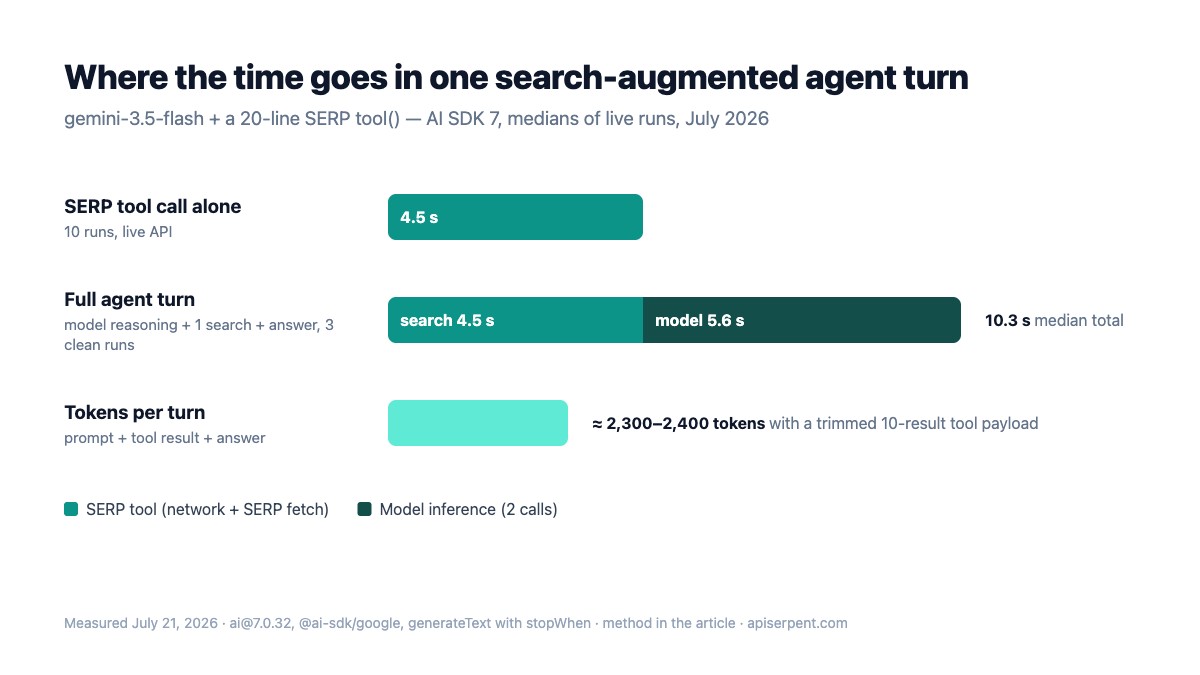
The numbers behind the chart: the SERP tool call alone returned in a median 4.5 s across 10 runs (range 3.8–8.2 s). Full agent turns with one search completed in 9.8 s, 10.3 s and 12.3 s — the two model calls (decide-to-search, then answer) cost about as much wall time as the search itself. Each clean turn totaled 2,264–2,401 tokens with the trimmed 10-result payload.
Latency planning rule from these runs: a search-augmented answer is a ~10-second experience, so stream it — which is exactly what the useChat section wires up. If you need the lookup faster, the quick endpoint is the low-latency variant of the SERP API and on Google returns a clean organic list — about 10 results by default, up to 100 best-effort in one call.
The step-budget trap that emptied 3 of 5 runs
Our first benchmark config used stopWhen: isStepCount(4) and a looser prompt ("What are the current mortgage rates? Search the web, then answer"). The result surprised us: 3 of 5 runs returned an empty string.
The trace shows why. The model issued a search, wasn't satisfied, issued another with a reworded query — four tool calls in a row — and the loop hit the step cap before any text step ran. Wall time ballooned to 28–38 s (four sequential searches) and result.text came back "".
Three fixes, all verified in the clean runs above:
Give the budget headroom. isStepCount(n) counts every step, tool calls and text alike. For a one-search task, 6 is a comfortable cap; 4 is a coin flip.
Tell the model its search budget in the prompt. "Use the webSearch tool once" made every subsequent run search exactly once. Models follow explicit tool budgets remarkably well.
Check result.steps in development. res.steps.flatMap(s => s.toolCalls) shows exactly how many searches a turn burned. If answers come back empty, look there first — it's the loop, not the tool.

Streaming it into useChat
The same tool drops into a chat route unchanged. This is the complete AI SDK 7 route handler — note it's createUIMessageStreamResponse composed with toUIMessageStream, not the older one-liner:
// app/api/chat/route.ts
import { streamText, convertToModelMessages, createUIMessageStreamResponse,
         toUIMessageStream, isStepCount } from 'ai';
import { google } from '@ai-sdk/google';
import { webSearch } from '@/lib/tools';

export async function POST(req: Request) {
  const { messages } = await req.json();
  const result = streamText({
    model: google('gemini-2.5-flash'),   // same tool, different model — that's the point
    messages: await convertToModelMessages(messages),
    tools: { webSearch },
    stopWhen: isStepCount(6),
  });
  return createUIMessageStreamResponse({
    stream: toUIMessageStream({ stream: result.stream }),
  });
}
We verified this handler by invoking it directly in Node (a route handler is just a function of Request to Response) and reading the SSE stream it produced. Status 200, content-type: text/event-stream, and this exact event sequence:
start -> start-step -> tool-input-start -> tool-input-delta -> tool-input-available
      -> tool-output-available -> finish-step -> start-step -> text-start
      -> text-delta -> text-end -> finish-step -> finish
That sequence is what useChat turns into message parts on the client. Your search tool arrives as a tool-webSearch part whose state walks through input-streaming → input-available → output-available — so you can render "Searching…" the moment the model decides to search, then the citations as soon as the tool returns, per the official tool-usage pattern:
{message.parts.map((part) => {
  if (part.type === 'tool-webSearch') {
    if (part.state !== 'output-available') return <p>Searching…</p>;
    return part.output.map((r) =>
      <a key={r.url} href={r.url}>[{r.position}] {r.title}</a>);
  }
  if (part.type === 'text') return <span>{part.text}</span>;
})}
One nuance worth knowing: parts of type source-url only appear with provider-native search tools. A custom tool's results live in the tool part's output — which is better anyway, because you control the shape (we kept position, title, url, snippet). For a deeper RAG treatment of the same pattern, see real-time search for RAG and our comparison of web search APIs for agents.
The AI SDK 7 renames that break old snippets
Most search-tool tutorials predate AI SDK 7 and fail on it. The renames that matter, from the official migration guide — each verified against the installed ai@7.0.32:
| Old (v4/v5/v6) | AI SDK 7 | Note |
|---|---|---|
parameters (v4) | inputSchema | renamed in v5; v4 snippets fail |
maxSteps (v4) | stopWhen: isStepCount(n) | stepCountIs still works as an alias in 7.0.32 |
system | instructions | system-role messages are rejected by default in v7 |
result.fullStream | result.stream | |
result.toUIMessageStreamResponse() | createUIMessageStreamResponse({ stream: toUIMessageStream(…) }) | the v7 docs' composition pattern |
CommonJS require('ai') | ESM only, Node ≥ 22 | build tooling must be ESM-aware |
If you're wiring search into a coding agent or IDE instead of an app, the same trimmed-JSON principle applies — we covered those flows in SERP data for AI coding agents and the MCP server tutorial.
What hosted search bills vs a direct SERP call
Provider-native search is convenient and completely valid — but it's priced as a premium feature, and it locks the search to the model vendor. Published rates as of July 21, 2026:
| Native tool | Runs on | Published price |
|---|---|---|
openai.tools.webSearch | OpenAI Responses models only | $10 per 1,000 calls + retrieved-content tokens |
anthropic.tools.webSearch_20250305 | Claude models only | $10 per 1,000 searches + tokens |
google.tools.googleSearch | Gemini models only | $14 per 1,000 queries after a free monthly allowance (Gemini 3 family; older families bill $35 per 1,000 grounded prompts) |
Two operational notes. First, Gemini's native grounding runs on its own quota: a standard API key can return 429 RESOURCE_EXHAUSTED on grounded requests while plain generation on the same key keeps working — a separate wall you don't hit with a plain HTTPS tool. Second, a direct SERP call is billed like any API request — typically a fraction of a cent, with live rates here and free calls to start; the grounding-cost teardown walks the full math, and the LangChain agent version shows it compounding over multi-step agents.
Try the exact endpoint from this post in the playground — the tool code above works with the response shape you'll see there, unchanged.
Give your agents live search
Serpent is a pay-as-you-go SERP API built for AI apps — Google, Bing, Yahoo, DuckDuckGo and Brave behind one JSON schema, up to 100 results per call. Free to start, then from $0.60 per 1,000 down to $0.10 at Scale. No subscription.
Get Your Free API KeyExplore: SERP API · Documentation · Pricing
FAQ
Does the Vercel AI SDK have a built-in web search tool?
Not a universal one. As of July 2026 the SDK exposes provider-native tools — openai.tools.webSearch, anthropic.tools.webSearch_20250305, google.tools.googleSearch — but each only runs on its own provider's models and bills per search. A custom tool() calling a SERP API works with every tool-calling model.
Do the Exa or Tavily AI SDK packages work with AI SDK 7?
Not officially, as of July 21, 2026. @exalabs/ai-sdk declares a peer dependency of ai ^6.0.0; @tavily/ai-sdk declares ai ^5.0.0 || ^6.0.0. Neither lists ai@7. A hand-rolled tool() has no peer-dependency problem because tool() ships in the ai package itself.
How slow is a web search tool call inside an agent turn?
In our July 2026 runs the SERP lookup took a median 4.5 seconds (10 runs), and a full agent turn — reasoning, one search, final answer on gemini-3.5-flash — took a median 10.3 seconds. Stream the response; a 10-second silent wait feels broken, a streamed one feels alive.
How many tokens does a search result add to the context?
With a trimmed payload (position, title, url, snippet, ~10 results) our measured turns totaled about 2,300–2,400 tokens. Untrimmed payloads are the silent budget killer — raw results-page HTML measured 76,246 tokens in our format comparison.
Why did my agent search four times and return an empty answer?
The model kept issuing tool calls until it hit the stopWhen budget, and the loop ended before any text step. We hit this in 3 of 5 unconstrained runs. Give the budget headroom (isStepCount(6) for one search) and state the search budget in the prompt.