How to Scrape Craigslist Listings with Python and Node

Craigslist no longer offers RSS feeds for searches, and it publishes no API for reading listings, so the practical way to get listings into Python or Node is one API call per search page. Each call returns the listings as JSON rows, and a few more lines write them to a CSV file.
This guide covers what happened to Craigslist's own feeds, how to use its listings responsibly, and then the code: a first call, the next page, a CSV file, and the shape of the answer.
Short answer: If you only want to look at a few listings yourself, use Craigslist's own website; no code is needed. If you were hoping for an RSS feed or an official API, neither exists for searches today. If your code needs listings as data, for a rent tracker, price research or a dashboard, make one API call per search page and save the rows. Whatever you pick, read Craigslist's terms of use first, and don't repost listings or message posters in bulk.
This post is for the developer who needs Craigslist listings, such as apartments in one area under a price cap, as rows in a program or a spreadsheet. The examples search San Francisco Bay Area apartments, and the sample row is a New York apartment from an answer saved on 24 November 2026, before launch. For prices against other services, see the cheapest Craigslist API comparison; for what to do with rental rows once you have them, see Craigslist data for rental price research.
Does Craigslist still have RSS feeds or an API?
No. For years every Craigslist search had an RSS feed, and that was how developers and feed readers followed new listings. Those search feeds stopped working in 2020, and Craigslist has not published a replacement. There is also no documented API for reading listings.
The record of the change is public, though Craigslist itself never announced it:
- October 2020. A Hacker News thread opened on 20 October 2020 reported that search feeds had begun to return "410 (Gone)" responses. The submitter wrote that Craigslist "has, since very early on, supported RSS feeds for searches", and a reply noted that there was no official statement.
- June 2022. SearchTempest, a site that searches many Craigslist areas at once, answered a user who asked where its feed alerts had gone: "Since craigslist discontinued their RSS support, there's nothing for us to link to."
- Today. Open RSS, which builds feeds for sites that lack them, says on its feeds page that "Craigslist once offered RSS feeds, but have since removed them", even though users asked for them back.
The feeds were unreliable even while they worked: a May 2019 thread on NewsBlur's support forum reports Craigslist feeds that would no longer load. A feed that could disappear without warning was never a solid base for a product.
Third-party feed builders have come and gone too. RSSHub, an open-source feed builder, removed its Craigslist route in December 2023 because the route no longer worked, according to the project's issue tracker, and added a new one in October 2026.
So there is no official, supported way to read Craigslist search results in code. The choice is between collecting pages yourself and calling an API that returns the listings.
Use the data responsibly, whatever route you pick. Read Craigslist's terms of use before you build anything on its listings. Don't repost listings as your own, don't message posters in bulk, and keep to public listing facts.
That is what the API used below returns: title, price, place, date, map point and a link back to the posting, with no contact details, no reply addresses and no description text. Serpent is not affiliated with Craigslist. None of this is legal advice.
How do you get listings with one API call in Python?
Send a GET request to https://apiserpent.com/api/craigslist/search with your key in the X-API-Key header. The area parameter is required and takes a Craigslist area name such as sfbay, newyork or losangeles; you can also paste a Craigslist search link and the area is read from it. This example code asks for two-bedroom-plus apartments in the Bay Area at $3,500 or less, newest first, and prints the first five rows:
import requests

resp = requests.get(
    'https://apiserpent.com/api/craigslist/search',
    headers={'X-API-Key': 'YOUR_API_KEY'},
    params={
        'area': 'sfbay',
        'category': 'apartments',
        'max_price': 3500,
        'min_bedrooms': 2,
        'sort': 'newest',
    },
    timeout=60,
)
resp.raise_for_status()
data = resp.json()
print(data['count'], 'listings on page', data['page'], 'of', data['area'], data['category'])
for row in data['listings'][:5]:
    price = f"${row['price']:,}" if row['price'] is not None else 'no price'
    print(row['posted_at'][:16], price, f"{row['bedrooms']} br", row['location'], '|', row['title'][:50])
The filters are plain parameters. category takes a name such as apartments, housing, cars, furniture, electronics, bikes, free, gigs or jobs, or a Craigslist code such as apa, and defaults to everything for sale. Add query for keywords, min_price and max_price for a price range, has_image or posted_today to narrow it, and sort as newest, price_asc, price_desc or relevance. The bedroom filters work on the two housing categories, apartments and housing.
A price can be missing, so the example prints "no price" rather than failing on a null. The next sections show why that and a few other gaps are normal.
How do you get the next page and save a CSV?
Each call returns one page of results, 100 rows by default, and page=2 asks for the next one. This example code fetches two pages and writes every row to a CSV file with Python's built-in csv module:
import csv

import requests

API = 'https://apiserpent.com/api/craigslist/search'
HEADERS = {'X-API-Key': 'YOUR_API_KEY'}
FIELDS = ['id', 'url', 'title', 'price', 'currency', 'compensation', 'location', 'posted_at',
          'latitude', 'longitude', 'image', 'image_count', 'bedrooms', 'sqft', 'odometer']
search = {'area': 'sfbay', 'category': 'apartments', 'max_price': 3500,
          'min_bedrooms': 2, 'sort': 'newest', 'limit': 100}

rows = {}
for page in (1, 2):
    resp = requests.get(API, headers=HEADERS, params={**search, 'page': page}, timeout=60)
    resp.raise_for_status()
    data = resp.json()
    for listing in data['listings']:
        rows[listing['id']] = listing  # same id on two pages = one row
    if data['count'] < search['limit']:
        break  # a short page is the last one

with open('sfbay-apartments.csv', 'w', newline='', encoding='utf-8') as f:
    writer = csv.DictWriter(f, fieldnames=FIELDS, extrasaction='ignore')
    writer.writeheader()
    writer.writerows(rows.values())
print(len(rows), 'rows written to sfbay-apartments.csv')
Two details matter. First, the rows are kept in a dictionary by id. With sort=newest, a posting that goes up between your two calls pushes everything down by one, so the last row of page 1 can show up again at the top of page 2; keying by id keeps one copy. Second, the loop stops at the first page that comes back short of the limit, because that page is the last one, so it makes no call it doesn't need.
The CSV leaves an empty cell where a field is null, which spreadsheet tools read as blank. Turn the loop's (1, 2) into a longer range for more pages, and keep the early stop.
And in Node?
Node 18 or later has fetch built in, so there is nothing to install. Save this example code as craigslist.mjs, so that the top-level await works, and run it with node craigslist.mjs. It does the same as the Python version: two pages, one copy per id, then a CSV file.
import { writeFile } from 'node:fs/promises';

const API = 'https://apiserpent.com/api/craigslist/search';
const FIELDS = ['id', 'url', 'title', 'price', 'currency', 'compensation', 'location', 'posted_at',
  'latitude', 'longitude', 'image', 'image_count', 'bedrooms', 'sqft', 'odometer'];
const search = { area: 'sfbay', category: 'apartments', max_price: '3500', min_bedrooms: '2', sort: 'newest', limit: '100' };

const rows = new Map();
for (const page of [1, 2]) {
  const params = new URLSearchParams({ ...search, page: String(page) });
  const res = await fetch(`${API}?${params}`, { headers: { 'X-API-Key': 'YOUR_API_KEY' } });
  if (!res.ok) throw new Error(`HTTP ${res.status}`);
  const data = await res.json();
  for (const listing of data.listings) rows.set(listing.id, listing);
  if (data.count < Number(search.limit)) break;
}

const cell = (v) => (v === null || v === undefined ? '' : `"${String(v).replaceAll('"', '""')}"`);
const lines = [FIELDS.join(','), ...[...rows.values()].map((r) => FIELDS.map((k) => cell(r[k])).join(','))];
await writeFile('sfbay-apartments.csv', lines.join('\n') + '\n', 'utf8');
console.log(`${rows.size} rows written to sfbay-apartments.csv`);
The cell function quotes every value and doubles any quote mark inside it, which is all the CSV format needs for titles with commas or quotes in them. A Map keeps the rows in the order they arrived, so the file stays newest first.
What does the answer look like?
The answer is one object with the search you asked for, two counts and a list of rows. The shape is the same on every call. Here it is with the sample row, a New York apartment from an answer saved on 24 November 2026 before launch, and the counts described rather than filled in:
{
  "success": true,
  "area": "newyork",
  "category": "apa",
  "query": "",
  "page": 1,
  "total": ...,   // matching postings in the area, or null when not known
  "count": ...,   // rows on this page, at most your limit
  "listings": [
    {
      "id": "uVxcE9cuWi5oCk5jgN916t",
      "url": "https://www.craigslist.org/view/d/mount-vernon-spacious-bedroom-in-mount/uVxcE9cuWi5oCk5jgN916t",
      "title": "Spacious 2-Bedroom in Mount Vernon with In-Unit Laundry",
      "price": 3950,
      "currency": "USD",
      "compensation": null,
      "location": "Mount Vernon",
      "posted_at": "2026-11-23T18:51:57.000Z",
      "latitude": 40.9086,
      "longitude": -73.8221,
      "image": "https://images.craigslist.org/00606_2ZvpEm8oUSt_0lM0t2_600x450.jpg",
      "image_count": 10,
      "bedrooms": 2,
      "sqft": 1300,
      "odometer": null
    }
    // ...more rows
  ]
}
Every row has the same 15 fields. A field the posting doesn't have is null, never missing, so a default per field is all your code needs. The figure maps each field of the sample row and marks which ones belong to particular categories.
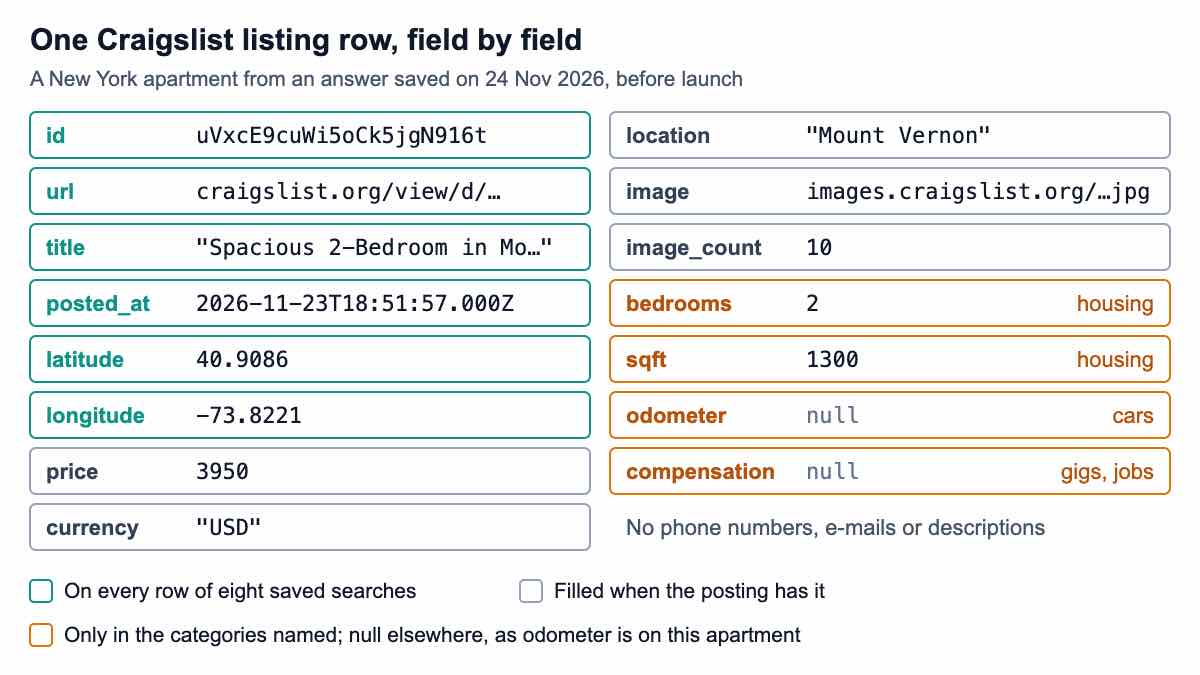
A few fields need a word. price is a number and currency its code, here 3,950 in USD. compensation is the pay line of a gig or job post, as the poster wrote it.
posted_at is the posting time in UTC, ISO 8601. image is the first photo's link on Craigslist's own image host, and image_count says how many photos the posting has, 10 here. url links back to the posting on Craigslist, which is where a reader goes to see the description or reply.
What should your code expect in the data?
What follows comes from answers saved before launch, not live calls: eight searches from 23 November 2026 and a few more from 24 November. It shows which fields you can count on and which your code should treat as optional.
Four fields were always there. Title, link, posting time and map point were on every row of all eight searches. The id comes from the link, so it is always there too, and it is the field to key on.
The rest depend on the posting. A field the poster didn't fill in, such as square feet, photos or the free-text location label, comes back as null. Write your code to allow a null in every field except the four above, and give each one a sensible default.
Categories bring their own fields. A Seattle cars search had an odometer reading on every row. Gigs carry their pay in compensation rather than price, so a gigs search leaves price null and fills the pay line instead. If you mix categories in one table, expect blocks of empty columns.
Zero bedrooms means what Craigslist says it means. bedrooms: 0 is "0 bedrooms" as Craigslist classifies the posting: mostly studios, plus a few posters who left the field unset. Treat it as a studio for a quick count, but check the title if the difference matters to your analysis.
Prices can be missing, even under a price cap. A listing without a price has price: null. In a saved Bay Area sofa search with a $200 cap, Craigslist's own results page listed the same unpriced postings, most of them "FREE" items, so drop null prices yourself if you need priced rows only.
Map points are the poster's own pin. In a saved New York answer, a Brooklyn loft was pinned in Santa Fe and another flat in Boston, because that is where the posters put them. Before you average rents by neighbourhood, drop rows that fall outside the area you searched.
Which route fits you?
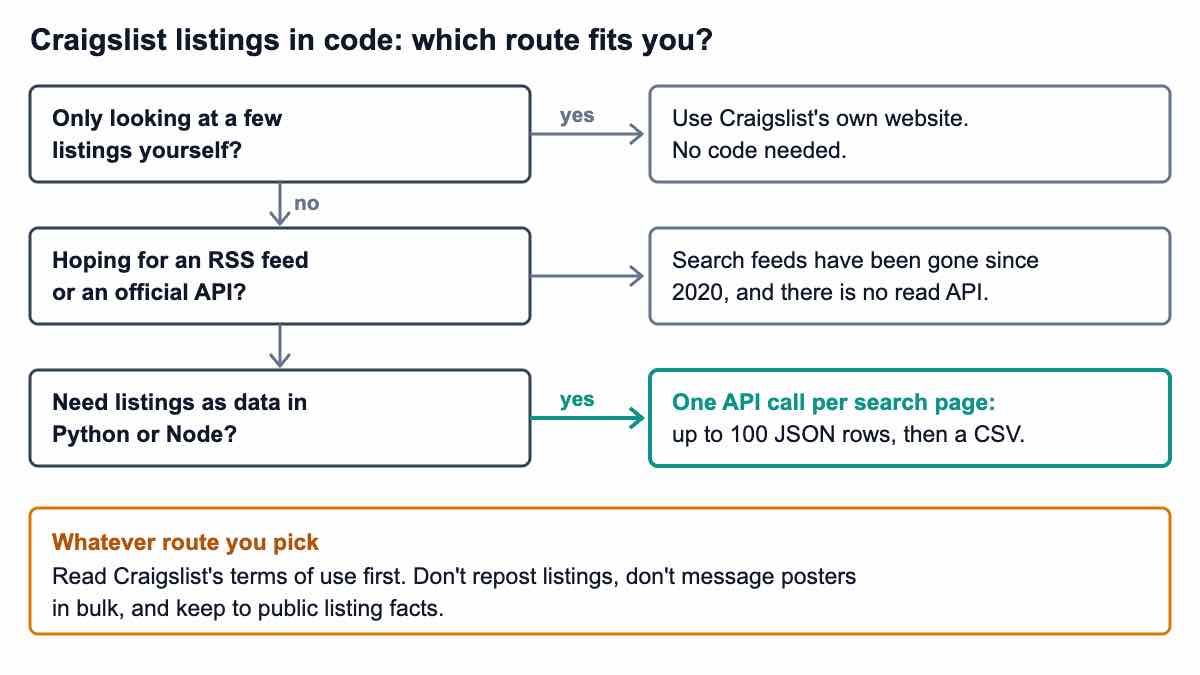
Pick by what you need the listings for. The figure walks through the questions, and the table puts the routes side by side, with the feed history as checked on 24 November 2026.
| Craigslist's website | Craigslist's RSS feeds | Your own page scraper | One API call per page | |
|---|---|---|---|---|
| Works today | Yes | No: search feeds have returned errors since 2020 | Until the pages change or your requests are refused | Yes |
| What you get | Pages to read by eye | Nothing for searches | Whatever your parser pulls out of the page | JSON rows with 15 fields, the same shape every call |
| What you look after | Nothing | Nothing to look after | Selectors, paging, failures and Craigslist's terms | A request function and an API key |
| Contact details | On the posting, when the poster includes them | None | Your choice, and the riskiest part | None returned: listing facts only |
| Best for | A few listings, by eye | History only | Personal experiments, after reading Craigslist's terms | Code that needs rows: trackers, research, dashboards |
- You are apartment hunting or shopping for yourself: Craigslist's own website. There is nothing to build.
- You want a rent or price tracker that runs every day: one API call per search page, stored with the date you read it, so your history grows with every run.
- You are researching prices across categories or cities: the API, because every row has the same fields and the nulls are predictable.
- You were going to write a scraper for a business: read Craigslist's terms of use first, and keep to the responsible-use points in the first section.
Craigslist search costs from $13 per 1,000 calls at the highest tier, priced per call, up to 100 listings in each. You pay as you go, with no subscription; the pricing page has every tier. The Craigslist Search API page lets you try a search before you write any code, and the documentation lists every parameter.
If you also follow short-term rentals, the same key reads Airbnb: see the Airbnb API and its Python and Node walkthrough, and for comparing long-term rents with nightly rates, Airbnb data for short-term rental pricing.
How we checked this
Sources. Ten public pages, all opened on 24 November 2026: five on the feeds (a Hacker News thread, SearchTempest's help forum, Open RSS, a NewsBlur forum thread and RSSHub's issue tracker) and the five top-ranking guides for this question, read to see what they cover. Craigslist's own pages, including its terms of use, were not opened for this post.
Code. The Python examples were checked on Python 3.15.2 and the Node example on Node 26.5.0, each run against a stand-in that returned the saved sample row in place of the live service. They are example code: no output is printed here because none was produced by a live call. The sample row comes from an answer saved on 24 November 2026, and what the data section says about fields comes from eight searches saved on 23 November 2026 and a few more on 24 November, all before launch.
What I could not verify:
- That no Craigslist search feed works anywhere today. I did not request one; the RSS history rests on the public reports linked above, which agree with each other, and none of them is an official Craigslist statement.
- Craigslist's current terms text. The terms page is linked but was not opened or quoted for this post, so read it yourself.
- Whether Craigslist offers data licensing privately. I found no public offer of one.
- How the field patterns above carry over to other areas and categories; eight searches is a small sample.
Get Craigslist listings as rows
One call returns a page of Craigslist listings as JSON, with price, place, posting time, map point and photo count, and no contact details. Try a search on the Craigslist Search API page, then copy the code above.
Get Your API KeyExplore: Craigslist Search API · Docs · Pricing · About
FAQ
Does Craigslist have an API?
Not for reading listings. Craigslist publishes no API that returns search results, and its RSS feeds for searches stopped working in 2020. To get listings as data in code, you either collect Craigslist's pages yourself, after reading its terms of use, or call an API that returns each search page as JSON rows with fields such as title, price, location, posting time and map point.
Does Craigslist still have RSS feeds?
Not for searches. A Hacker News thread from 20 October 2020 reported that search feeds had started returning "410 (Gone)", SearchTempest wrote in June 2022 that Craigslist had discontinued RSS support, and Open RSS says the feeds were removed. Craigslist never announced the change, and third-party feed builders that remain work by collecting its pages.
Can I use Craigslist data in my product?
This is not legal advice: start by reading Craigslist's terms of use, and if the data is central to a business, have a lawyer read them with you. Whatever you build, don't republish listings as your own and don't contact posters in bulk. Listing facts work well for analysis, such as price research, rent comparisons or tracking how many postings appear in an area. Serpent is not affiliated with Craigslist, and its API returns listing facts only, with no contact details.
Can I get a poster's phone number or e-mail?
Not from this API. It returns listing facts only: title, price, location, posting time, map point, photo link and count, and the housing, car or pay fields where they apply. There are no phone numbers, e-mail addresses, reply links or descriptions. Each row carries the posting's link, so a person can open it on Craigslist and reply there in the usual way.
How do I get more than one page of listings?
Pass page=2, page=3 and so on, with limit set to 100 for full pages. Keep rows in a dictionary or Map by id, because a new posting between calls can push a row from one page onto the next when you sort by newest. Stop at the first page that returns fewer rows than your limit, since it is the last one.
How do I filter Craigslist apartments by price and bedrooms?
Set category to apartments or housing, then add min_price, max_price, min_bedrooms and max_bedrooms as whole numbers; the bedroom filters work only on those two housing categories. A bedrooms value of 0 is "0 bedrooms" as Craigslist classifies the posting, mostly studios. Unpriced postings can still appear under a price cap, as they do on Craigslist itself, so drop null prices if you need them gone.
Sources
Craigslist's RSS feeds (opened 24 Nov 2026):
- Hacker News: "Tell HN: Craigslist seems to have removed its RSS feeds", 20 Oct 2020
- SearchTempest: "What happened to the Alert Feature via RSS?", 16 Jun 2022
- Open RSS: feeds page, Craigslist entry
- NewsBlur forum: "Can't add Craigslist feed?", 11 May 2019
- RSSHub issue 13702: "Craigslist route is empty"
Craigslist (not opened for this post):
Language documentation (not re-opened for this post):