How to Scrape Airbnb Listings with Python and Node

To get Airbnb listings in Python or Node, send one GET request with a place, dates and a guest count, and read the JSON that comes back. Each answer holds up to 18 stays, each with a price, rating, badges and coordinates. Doing it yourself means reading a large web page and keeping that reader working for as long as you need the data.
Short answer: For one look at one city, a browser and a spreadsheet are enough. For anything that runs on a schedule, feeds a product or covers many places, one API call is less code to own, from $0.087 per 1,000 calls — pay as you go, no subscription, with 10 free API calls to start. Every snippet below is complete: change the key and the place, and run it.
People who search for a way to scrape Airbnb usually want the same thing: for a place and a set of dates, the stays on offer with their prices, ratings and locations, as rows they can sort. The page shows exactly that. Getting it out of the page and into a script is where the work is.
This guide describes that work from the side of the person doing it, then shows the short route. The outputs printed under the one-call snippets come from three saved answers: Munich and Porto recorded on 23 November 2026, and Barcelona recorded on 20 November 2026.
What is on an Airbnb search page, and why is it hard to read?
A search page is a list of cards, one per stay. Each card shows a photo, a title, a line about the place, a star rating with a review count, sometimes a badge such as “Guest favorite”, and a price. Those are the fields most projects want, and the card has all of them.
The difficulty is that the page is made for a person using a browser, not for a program. Much of it is drawn by scripts after the page loads, and its markup is not offered as a data format, so nothing promises that it keeps its shape from one month to the next. A parser written against today’s page is a guess about tomorrow’s.
The price line shows the problem well. In the saved Porto answer, one stay’s price reads $128 for 2 nights, originally $183 and another reads $192 for 2 nights. Your reader has to turn each of those into a number, decide whether it covers one night or the whole stay, and keep the pre-discount amount when there is one.
What does the do-it-yourself route ask of you?
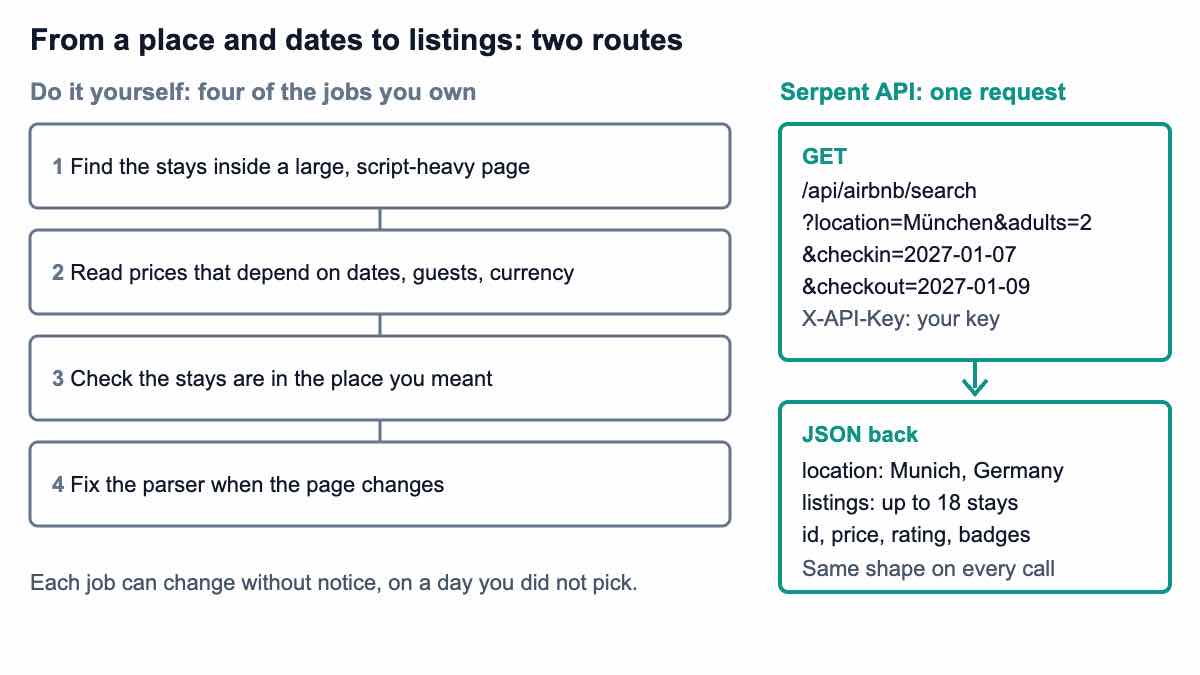
Five jobs, all of them yours. None is hard on its own, and together they are a small project that never quite finishes.
| Job | What it means | Where it bites |
|---|---|---|
| 1. Find the stays | Locate every card inside a large page and read its fields | The layout belongs to the site, which can change it on any day |
| 2. Read the price | Turn text such as “$128 for 2 nights, originally $183” into numbers | The amount is always the total for a stay, either for your dates or for a stay Airbnb picks when you give none, and you must know how many nights it covers |
| 3. Match the place | Type a name and let the site decide what it means | A name in another script, or one shared by several towns, can land on the wrong place, so you check the stays afterwards |
| 4. Stay served | Send many searches without being slowed, sent to another country’s version of the site, or handed a page with no results | Your code has to tell “no stays here” from “turned away”, and an empty list looks the same either way |
| 5. Keep prices comparable | Hold every price in one currency | A stay can show its price in the currency of the version of the site you landed on, and a table with two currencies in it misleads |
Driving a full browser instead of reading page text removes some of this and adds its own cost: a browser to install, update and keep running on every machine that fetches. It does not remove the fifth job or the need to check what came back.
The unglamorous part is the maintenance. A scraper that works on Friday and returns nothing on Monday costs you the data in between, and you learn about it from a gap in a chart. If you run one search a month for a school project, that is fine. If a pricing tool or a client report depends on it, it is a standing job.
How do you get the stays with one request in Python?
Send a GET request to https://apiserpent.com/api/airbnb/search with your key in the X-API-Key header. Only location is required. Put your key in place of the placeholder, install requests, and run this. It searches Munich by its German name over two nights, and prints the place Airbnb understood and the first three stays with a price per night:
from datetime import date

import requests

API_KEY = "sk_live_your_api_key"
URL = "https://apiserpent.com/api/airbnb/search"


def search_airbnb(location, checkin=None, checkout=None, **filters):
    """One GET request = one search = one charge. Leave both dates out for a flexible search."""
    params = {"location": location, **filters}
    if checkin and checkout:
        params["checkin"], params["checkout"] = checkin, checkout
    r = requests.get(URL, params=params, headers={"X-API-Key": API_KEY}, timeout=60)
    r.raise_for_status()
    return r.json()


if __name__ == "__main__":
    data = search_airbnb("München", "2027-01-07", "2027-01-09")

    if not data["listings"]:
        print("No stays came back for this search")
    else:
        nights = (date.fromisoformat(data["checkout"]) - date.fromisoformat(data["checkin"])).days  # for a flexible search, use each stay's stay_nights instead
        print(f'{data["location"]}: {len(data["listings"])} stays, {data["checkin"]} to {data["checkout"]} ({nights} nights)')
        for stay in data["listings"][:3]:
            rating = stay["rating"] if stay["rating"] is not None else "none yet"
            print(f'{stay["title"][:32]:<32} ${stay["price"]:>4} total, ${stay["price"] / (stay.get("stay_nights") or nights):6.2f} a night, rating: {rating}')
The output, from the saved answer of 23 November 2026:
Munich, Germany: 18 stays, 2027-01-07 to 2027-01-09 (2 nights)
Premier Inn München City Zentrum $ 196 total, $ 98.00 a night, rating: none yet
MIO by AMANO                     $ 251 total, $125.50 a night, rating: 4.77
B&B HOTEL München-Hbf            $ 161 total, $ 80.50 a night, rating: 4.76
Three things in that output are worth noticing. The location in the answer is the place that was searched, and here München came back as Munich, Germany. A dated search gives the price of the whole stay, so the code divides by the number of nights. And the first stay has no rating yet, which comes back as null and not as zero.
Here is a trimmed excerpt of the same answer. The photo link is left out to keep it short, and nothing else is changed:
{
  "success": true,
  "location": "Munich, Germany",
  "checkin": "2027-01-07",
  "checkout": "2027-01-09",
  "listings": [
    {
      "id": "1781346526481241534",
      "url": "https://www.airbnb.com/rooms/1781346526481241534",
      "name": "Premier Inn München City Zentrum",
      "title": "Premier Inn München City Zentrum",
      "subtitle": "Hotel in Altstadt München",
      "latitude": 48.1354,
      "longitude": 11.5659,
      "price_text": "$196 for 2 nights",
      "price": 196,
      "price_original": null,
      "price_qualifier": "for 2 nights",
      "stay_checkin": "2027-01-07",
      "stay_checkout": "2027-01-09",
      "stay_nights": 2,
      "rating": null,
      "reviews_count": null,
      "badges": ["Featured hotel"]
    }
  ]
}
Notice that the code checks listings and not the HTTP status. A search with nothing to show comes back in the same shape with an empty list, so the reliable test is whether you got rows. That answer is still an answer and is billed like any other search.
On a fixed set of 78 searches in 40 countries, the median call took 4.4 seconds and 9 in 10 finished within 5.8, so a 60-second timeout leaves plenty of room. You can try the same search without code in the playground, and the documentation describes each parameter.
What can you ask for?
A search takes ten parameters. One is required and the other nine narrow the search.
| Parameter | What it takes | What it does |
|---|---|---|
location | Text, up to 120 characters. Required | The place, as you would type it on Airbnb, in any language: a city, neighbourhood, region or landmark. Add the country when a name is ambiguous, for example Lagos, Nigeria |
checkin, checkout | Dates as YYYY-MM-DD | Prices then cover the whole stay. Leave both out for a flexible search, where Airbnb picks a stay for each listing and the price covers that stay |
adults | 1 to 16, default 1 | Number of adults |
children | 0 to 15, default 0 | Number of children aged 2 to 12 |
pets | 0 to 5, default 0 | When set, only pet-friendly stays come back |
room_type | any, entire_home or private_room, default any | The type of place |
price_min, price_max | Whole US dollars | Lowest and highest price per night |
min_bedrooms | 1 to 50 | Fewest bedrooms |
If you want to see how the place name is handled, send it in the language you would normally use. In the example above, München resolved to Munich, Germany, and in a larger check of 78 searches in 40 countries, names in other scripts such as 서울 resolved to Seoul, South Korea.
How do you filter by guests, bedrooms and budget in Node?
Node 18 and later includes fetch, so this needs no packages. Save it as filtered.mjs so top-level await works. It asks for a week in Barcelona for two adults, two children and a pet, in an entire home with at least two bedrooms, between $500 and $4,000 a night, and then looks at what came back:
const API_KEY = "sk_live_your_api_key";
const ENDPOINT = "https://apiserpent.com/api/airbnb/search";

async function searchAirbnb(params) {
  const res = await fetch(`${ENDPOINT}?${new URLSearchParams(params)}`, {
    headers: { "X-API-Key": API_KEY },
    signal: AbortSignal.timeout(60_000),
  });
  if (res.ok === false) throw new Error(`HTTP ${res.status}`);
  return res.json();
}

const data = await searchAirbnb({
  location: "Barcelona",
  checkin: "2027-07-10",
  checkout: "2027-07-17",
  adults: "2",
  children: "2",
  pets: "1",
  room_type: "entire_home",
  price_min: "500",
  price_max: "4000",
  min_bedrooms: "2",
});

if (data.listings.length === 0) {
  console.log("No stays came back for this search");
} else {
  // price is the total for the stay it covers; stay_nights is that stay's length (your dates for a dated search).
  // The nights named in price_qualifier are used when stay_nights is null.
  const nights = Number(data.listings[0].price_qualifier.match(/\d+/)[0]);
  const perNight = data.listings.map((s) => s.price / (s.stay_nights ?? nights)).sort((a, b) => a - b);
  console.log(`${data.location}: ${data.listings.length} stays for ${nights} nights`);
  console.log(`cheapest night $${perNight[0].toFixed(2)}, dearest $${perNight.at(-1).toFixed(2)}`);
  // ids come back as strings. Many are longer than a JavaScript number can hold exactly.
  const long = data.listings.find((s) => Number(s.id) > Number.MAX_SAFE_INTEGER);
  console.log(long.price_text, "|", long.title);
  console.log("id as string:", long.id, "| as Number:", Number(long.id));
}
The output, from the saved answer of 20 November 2026:
Barcelona, Spain: 18 stays for 7 nights
cheapest night $516.71, dearest $1018.43
$3,917 for 7 nights | Condo in Eixample
id as string: 649666729910518567 | as Number: 649666729910518500
Two details matter here. The budget parameters are per night, while price in the answer is the total for the stay, so the code divides by each stay’s stay_nights, or by the nights in price_qualifier when that is missing. In this answer the cheapest stay works out to $516.71 a night, inside the $500 floor, and the dearest to $1,018.43. And id is a string. The last line shows why: a JavaScript Number cannot hold 649666729910518567 exactly and prints 649666729910518500, so keep ids as text. MDN’s page on Number.MAX_SAFE_INTEGER explains the limit, and its page on AbortSignal.timeout() shows how the time limit on the request works.
What does each field in a listing mean?
Each stay in listings carries eighteen fields, in the order Airbnb shows the stays.
| Field | What it holds |
|---|---|
id | The listing id, as text |
url | The link to the stay |
name | The host’s own name for the listing |
title | Airbnb’s title: the type of place and the area, such as “Apartment in Munich” |
subtitle | The line under the title |
latitude, longitude | Where the stay is |
price_text | The price exactly as shown, for example “$196 for 2 nights” |
price | The amount in US dollars: the total for the stay it covers: your dates for a dated search, the stay Airbnb picked for a flexible one |
price_original | The amount before a discount, when the stay shows one |
price_qualifier | What price covers, such as “for 3 nights” |
stay_checkin, stay_checkout, stay_nights | The stay that price covers. For a dated search they are your dates; for a flexible search Airbnb picks a stay per listing, so they can differ from one listing to the next. Null where Airbnb does not say |
rating, reviews_count | The star rating and the number of reviews; null for a stay with none yet |
badges | A list of badges such as Guest favorite, Superhost or Featured hotel |
photo | The cover photo link |
Above the listings, the answer repeats the place that was searched, location, and the two dates. For a flexible search the dates come back as empty strings, so take the nights from each listing’s stay_nights instead.
How do you handle empty fields and very long ids?
Treat an empty field as information, not as a failure. Across the three saved answers, 54 listings in all, every listing had an id, link, name, title, subtitle, coordinates, price and photo. A rating and a review count were present on 49 of them, a badge on 47, and a price before a discount on 16.
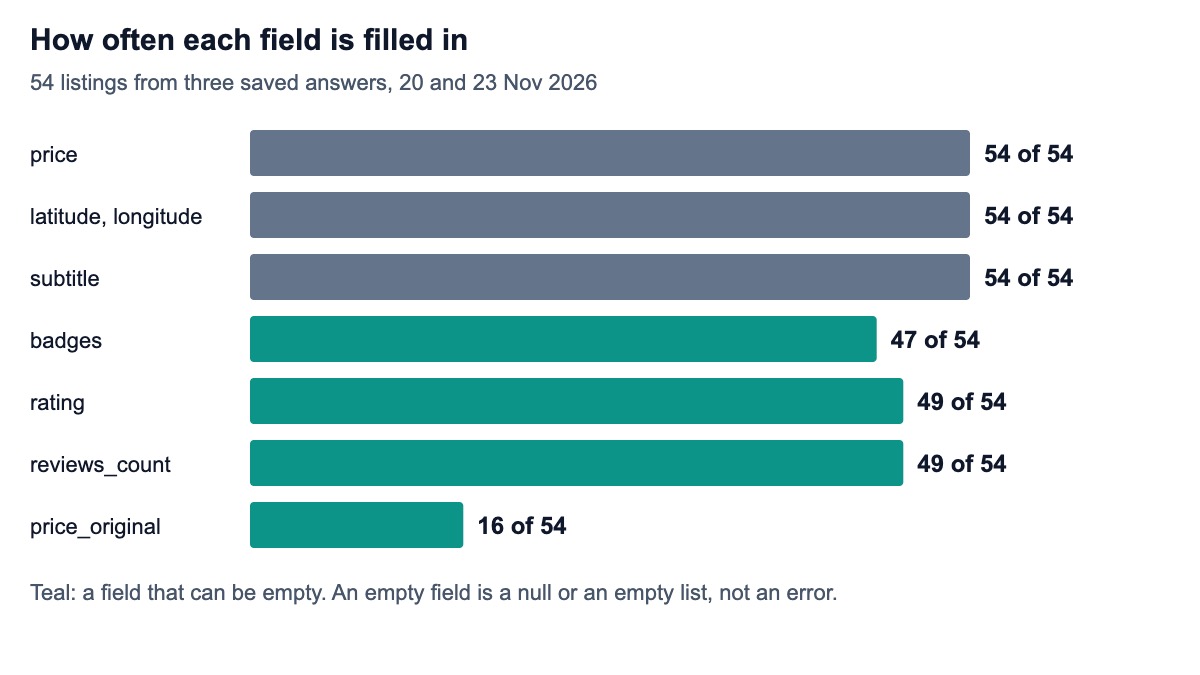
The five listings without a rating are all in the Munich answer, and each is a hotel. An empty rating is null, an empty price_original is null and an empty badges is an empty list, so test for those before you do arithmetic. This helper writes the stays to a CSV, with empty cells for the nulls, and keeps the id as text. Save the first Python snippet as one_call.py first, because this one imports it:
import csv

from one_call import search_airbnb

COLUMNS = ["id", "title", "price", "price_original", "price_qualifier", "rating", "reviews_count", "latitude", "longitude"]


def to_csv(data, path):
    """One row per stay. A null (no rating yet, no discount) becomes an empty cell, and the id stays text."""
    with open(path, "w", newline="") as f:
        w = csv.writer(f)
        w.writerow(COLUMNS)
        for stay in data["listings"]:
            w.writerow(["" if stay[c] is None else stay[c] for c in COLUMNS])


if __name__ == "__main__":
    to_csv(search_airbnb("Porto", adults=2), "porto.csv")
    lines = open("porto.csv").read().splitlines()
    print(len(lines) - 1, "rows")
    print(lines[0])
    print(lines[1])
    print(lines[8])
It prints the row count, the header, the first stay in a flexible Porto search and the eighth, which has no price before a discount, so that cell is empty:
18 rows
id,title,price,price_original,price_qualifier,rating,reviews_count,latitude,longitude
598251653443045279,Apartment in Porto,128,183,for 2 nights,4.93,306,41.1503,-8.6082
53340395,Condo in Porto,192,,for 2 nights,4.99,319,41.1466,-8.6122
The CSV opens in a spreadsheet or loads into pandas in one line. For the arithmetic that follows, such as the median price per night, see Airbnb data for short-term rental pricing.
Which route should you pick?
- A one-off look at one city: a browser and a spreadsheet. Nothing here needs code.
- A learning project, to see how a page is built: read one page yourself. It teaches you what the five jobs above feel like.
- A scheduled job or a pricing tool: one API call per search. The upkeep is not code you want to own.
- Many places and date ranges: the API, with a loop or a worker pool around the Python function above, and a check for an empty
listingson every response. - A product where a person waits for the answer: the API, with the 60-second timeout above, and a median of 4.4 seconds in mind.
Whichever route you take, read the site’s terms and the rules where you work before you collect data. For what each option costs per 1,000 searches, the Airbnb API price comparison works it out at three volumes, and the Airbnb API page lists every field. The same key also works for the Amazon Scraper API and the Google Maps API.
How we checked this
Code. Every snippet was executed on 21 November 2026 on Python 3.14.4 (with requests 2.34.2) and Node 26.5.0. The web address was swapped for a local stand-in server that answered with the saved responses, so the request address, the X-API-Key header and every parameter were checked without a live call, and the outputs shown are what each snippet printed. The Munich and Porto responses are real answers recorded on 23 November 2026 (Munich in German, and Porto without dates), and the Barcelona response is a real answer recorded on 20 November 2026 with all the filters; the Munich output, the excerpt and the Porto CSV rows shown here were then re-derived from the 23 November answers by the same arithmetic and column selection, not by re-running the snippets. I did not call the live endpoint while writing this post.
Measured numbers. The 4.4-second median and the 5.8-second figure for 9 in 10 calls come from a fixed list of 78 searches in 40 countries, drawn before any call was made. It is the vendor’s own result, so test it against your own list of places. The field counts are my own counts over the 54 listings in the three saved answers.
What I could not verify:
- The description of an Airbnb search page and of the do-it-yourself jobs comes from general knowledge of how such pages are built. I did not write or run a parser for this post.
- Whether your own place names, dates and guest counts return the same fields as the three saved answers. Try your own list in the playground.
- The tutorial does not explain why a given stay has no rating or discount; it only shows how to handle the empty field.
Package versions change often, so test before you rely on either.
Try one search before you write code
Serpent’s Airbnb Search API is from $0.087 per 1,000 calls — pay as you go, no subscription, with 10 free API calls to start. Paste a place into the playground and see the JSON.
Get Your Free API KeyExplore: Airbnb API · Playground · Docs · Pricing
FAQ
How do I scrape Airbnb listings with Python?
Send one GET request to the Airbnb search endpoint with a place, optional dates and guests, and your key in the X-API-Key header, then read the JSON. With the requests library that is a single call. The answer holds up to 18 stays with price, rating, badges and coordinates. Check that the listings list is not empty before you use the result.
Can I get Airbnb prices for exact dates and guest counts?
Yes. Pass checkin and checkout as YYYY-MM-DD with adults, children and pets, and the price on each stay covers the whole stay for those dates and guests. Leave the dates out for a flexible search, where Airbnb picks a stay for each listing and the price covers that stay. The price_qualifier field says what it covers, for example for 3 nights, and stay_nights gives the number.
Is an Airbnb listing price per night or for the whole stay?
It depends on whether you gave dates. With dates, the price field is the whole-stay total and price_qualifier names the nights. Without dates, Airbnb picks a stay for each listing, so the length can differ from one listing to the next, and the price field is the total for that stay. To compare stays, divide each price by its stay_nights, as the Python snippet above does (when stay_nights is missing, it uses the check-in and check-out dates instead).
Why is the rating empty for some Airbnb listings?
A stay with no reviews yet has no rating, so rating and reviews_count come back as null. In the three saved answers, 49 of 54 stays had a rating, and the five without one were all hotels in the Munich answer. Treat null as a value of its own, and never as a zero.
Can I search Airbnb by a place name in another language?
Yes. The location can be written in any language or script, and the answer tells you which place was searched. In the example above, München came back as Munich, Germany. Add the country when a name is shared by several places, such as Lagos, Nigeria, and check the location field in the answer.
How long does an Airbnb search call take?
On a fixed set of 78 searches in 40 countries, the median call took 4.4 seconds and 9 in 10 finished within 5.8. That is a vendor measurement, so test your own list of places. A 60-second client timeout is generous, and a call that returns no stays is billed like any other search.
Sources
Language and platform references: