Sales Navigator API alternatives, by the job you need

LinkedIn is not accepting new partners for the Sales Navigator API, so there is nothing to apply for. Microsoft Learn says so as of my 23 November 2026 check. What you buy instead depends on the job: finding leads by filter, enriching a list you already hold, or syncing to a CRM.
Short answer: To find new leads by filter, use a prospecting tool such as Sales Navigator itself or Apollo; I could not verify Sales Navigator’s price. To turn profile URLs you already have into public profile fields, Serpent does that from $0.25 per 1,000 lookups (names go through its beta search first), but it does not find leads by filter, keep saved lists or sync a CRM. For bulk datasets, look at People Data Labs or Coresignal.
Can you still get the official Sales Navigator API?
No. On the Sales Navigator Application Platform (SNAP) documentation, a note box says: “We are not currently accepting new partners for access to the LinkedIn Sales Navigator API. We periodically review our onboarding capacity and will update this page if availability changes.” (Microsoft Learn, checked 23 November 2026) The page shows no date, so I cannot tell you when the note was added.
Evaboot, which sells an alternative, describes the official route as “restricted, slow to approve, and capped with strict limits. Most developers never get access.” (Evaboot) “Slow to approve” implies a queue; the LinkedIn page says it is not accepting new partners at all.
SNAP was never a people-search data feed. The overview says customers can “engage with leads and prospects from directly within your application,” and it lists three service groups: Display Services, described as “UI modules for embedding within external applications via iframe or JavaScript SDK”; Analytics Services, “a set of APIs that enable customers to export activities performed in Sales Navigator for analysis and insights”; and Sync Services. I saw no people-search endpoint on that page.
A guide that tells you to apply for access is out of date for new applicants. For official LinkedIn APIs in general, see Official LinkedIn API vs scraping, Free LinkedIn API and LinkedIn API pricing.
Which job do you actually need done?
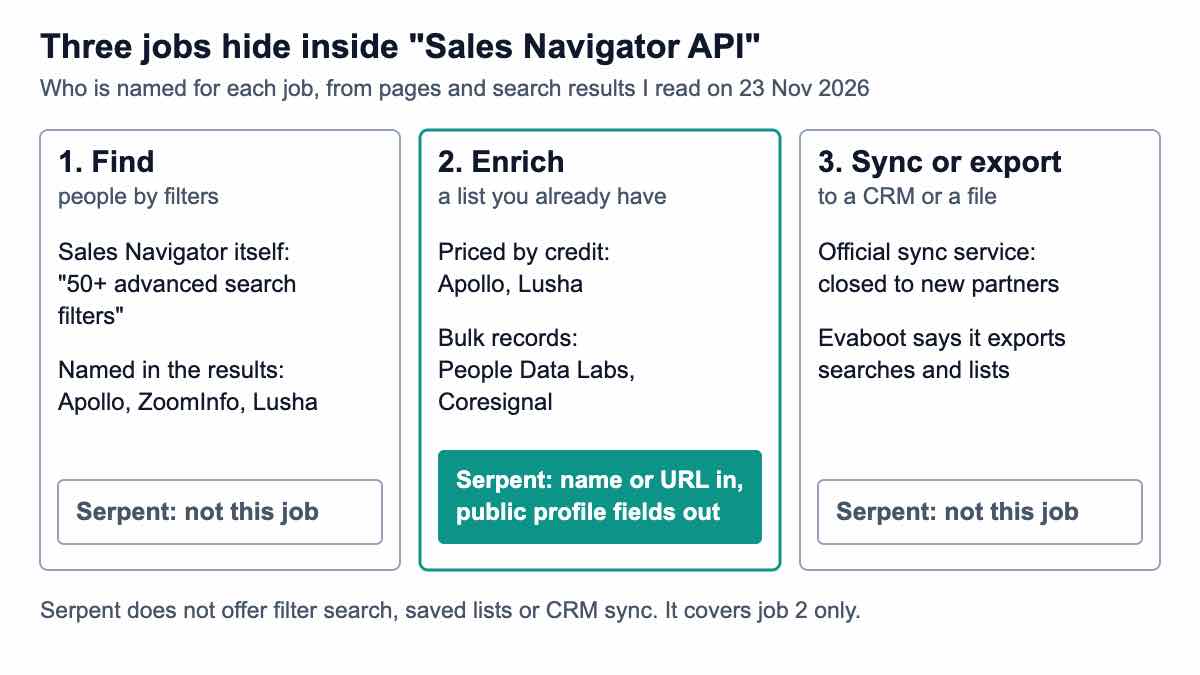
“Sales Navigator API” is shorthand for three different jobs, and each has different vendors. Of the top five Google results on 23 November, only Evaboot’s page was about an API; going by their snippets, the others are lists of Sales Navigator alternatives and a forum thread, written for people using a screen, not code.
- Find people or companies by filters such as title or industry.
- Enrich a list you already have: a name or profile URL goes in, profile or contact data comes out.
- Sync or export what you found into a CRM or a file.
Who finds leads by filter?
Sales Navigator itself, and the prospecting tools that sit next to it in search results. LinkedIn’s plan page says “Find the right leads faster with 50+ advanced search filters” and sells three plans: Core for “Individual sellers,” Advanced for “Sales teams,” and Advanced Plus for “Sales teams using integrated CRM.” (LinkedIn plans page, checked 23 November 2026) Advanced Plus says “Request demo for pricing.” Core and Advanced link to price pages I did not open, and the page text shows no dollar figure.
For alternatives, the result snippets I saw name the same tools. One lists “Apollo and ZoomInfo to free plans like Lusha and Clay”; another puts ZoomInfo, Apollo, Cognism, Lusha, RocketReach, Kaspr, UpLead, Lead411, LeadIQ and SalesIntel on one list. I read those as snippets only, and the ZoomInfo list is a vendor ranking itself first. I did not check ZoomInfo’s or the other vendors’ prices, and I did not run any filters. I could read two pricing pages:
- Apollo. Free is $0 with 900 credits per seat per year, granted monthly. Basic is $49 per seat per month billed annually with 30,000 credits per seat per year, granted upfront. Professional and Organization cost more and carry more credits. A credit buys: “Email 1 credit,” “Phone number 8 credits,” “Enrich data 1-8 credits.” The page adds: “Unused credits expire at the end of each billing cycle and do not carry over.” (Apollo pricing)
- Lusha. Free is $0 with 40 credits a month. Pro is $52.45 a month billed yearly with 7,200 credits a year; Premium is $299.95 with 40,800 credits a year. The page has a “Pay yearly (25% off)” toggle. (Lusha pricing)
Apollo’s page prices emails and phone numbers by the credit, which is a different product from a LinkedIn profile. I did not read Lusha’s credit rule. The licence section below matters if you want to call either from code.
Who enriches a list you already have?
Three groups. Credit-based prospecting tools such as Apollo and Lusha, where Apollo prices emails and phones. Bulk data vendors that sell records by the credit. And profile APIs, which is where Serpent sits, returning public profile fields from a name or URL.
Two bulk vendors publish prices. People Data Labs shows Free at “Up to 100 credits/mo” with “Contact data not included,” and Pro “Starting at $98/mo” with “as few as 350 credits/mo.” (People Data Labs pricing) Coresignal shows Mini at $49 a month for 2,500 credits with a 5 requests per second limit, and Premium at $1,500 a month at $0.0015 per credit for 1,000,000 monthly credits. A full employee record is 20 credits, a Core record 10, and each email found 10. (Coresignal pricing) I could not confirm whether either vendor’s records include LinkedIn-sourced profiles, so I make no claim about that.
Their full arithmetic is in People Data Labs pricing and Coresignal alternatives; I will not repeat it.
Evaboot sits between enrichment and export. Its page says “The Evaboot API is a fast, open alternative to the LinkedIn Sales Navigator API. It lets you export searches, enrich LinkedIn profiles, find professional emails, and verify deliverability—without waiting for LinkedIn’s approval process.” The key is free but “usage is credit-based,” and the page gives no price. It does not say whether you need your own Sales Navigator seat, and I cannot tell you whether the approach is allowed under LinkedIn’s terms; our legality post is the place to start.
If an older guide points you to Proxycurl, its old address now redirects to a page titled “Real-time B2B Data Enrichment For AI Agents | NinjaPear.” Our Proxycurl post covers replacements.
What does each one cost per 1,000?
Not on one scale, because each vendor sells a different unit. The table gives each price as quoted, then my arithmetic from that vendor’s own credit rule. For a wider cost ranking of LinkedIn data APIs, see Best LinkedIn data APIs.
| Tool | Price on its page | What a unit buys | Per 1,000 (my arithmetic) |
|---|---|---|---|
| Sales Navigator (Core, Advanced) | Unverified; Advanced Plus: “Request demo for pricing” | Seat on the LinkedIn product, not an API | Not calculated |
| Apollo Basic | $49 per seat per month, billed annually; 30,000 credits per seat per year | Email 1 credit; phone 8; enrich 1-8 | $588 a year ÷ 30,000 = $19.60 per 1,000 credits and per 1,000 emails; $19.60 to $156.80 per 1,000 enrichments |
| Lusha Pro | $52.45 a month billed yearly; 7,200 credits a year | Credits per record not read | $629.40 a year ÷ 7,200 = $87.42 per 1,000 credits |
| People Data Labs Pro | “Starting at $98/mo”; 350 credits a month | Not stated on the page | $280 per 1,000 records, only if $98 is monthly and a credit is a record; neither is confirmed |
| Coresignal Mini | $49 a month; 2,500 credits | Full employee record 20 credits; Core 10 | $392 per 1,000 full records; $196 per 1,000 Core records |
| Coresignal Premium | $1,500 a month; $0.0015 per credit | Full employee record 20 credits | $30 per 1,000 full records |
| Evaboot | No price on the page; credit-based | Not stated | Not calculated |
| Serpent API, profile lookup | Default $0.50, Growth $0.45, Scale $0.35, Enterprise $0.30, Enterprise Plus $0.25 per 1,000 lookups (deposits $10, $100, $500, $1,000, $1,250) | One profile by URL or username | $0.25 to $0.50 |
| Serpent API, full profile | Default $1.00, Growth $0.90, Scale $0.70, Enterprise $0.60, Enterprise Plus $0.49 per 1,000 lookups | One full profile by URL or username | $0.49 to $1.00 |
| Serpent API, name search (beta) | Default $1.00, Growth $0.90, Scale $0.70, Enterprise $0.60, Enterprise Plus $0.49 per 1,000 searches | One name to up to 10 candidate profiles | $0.49 to $1.00 |
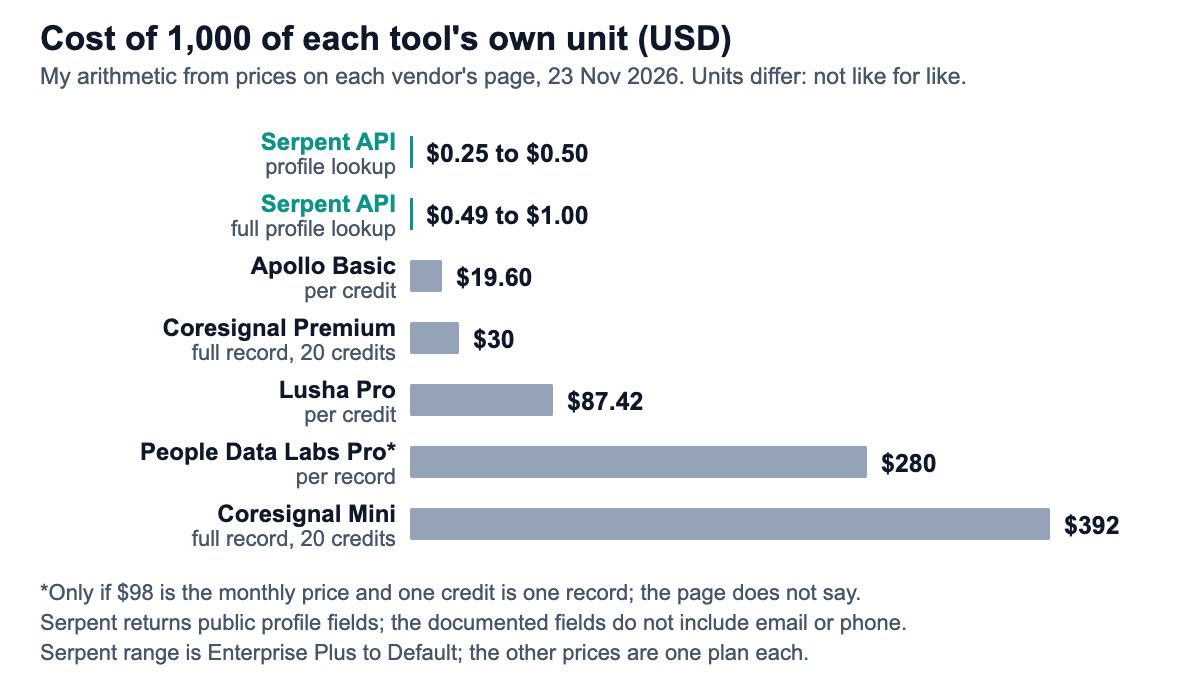
Do not rank the units against each other: an Apollo credit buys an email, a Coresignal credit counts toward a full record, and Apollo’s credits do not roll over. Where a cell says “not stated,” ask the vendor before you budget.
The /api/linkedin/search row is a beta endpoint. Resolving a name and fetching the profile is one search plus one profile lookup: at Enterprise Plus that is $0.49 plus $0.25, so $0.74 per 1,000 names (my arithmetic; if you already hold profile URLs, you skip the search). The full price list is on our pricing page.
Can you build a product on someone else’s lead data?
Not always, and Apollo says so in plain words. Its pricing page states: “The plans on this page are for internal business use only. Using Apollo data to power external products, share with customers, or resell is not permitted under standard terms — these use cases require a separate agreement with custom pricing.” (Apollo pricing) If you are building a product, ask for the custom agreement before you choose Apollo.
The API wording on the same page conflicts with itself. The plan cards list “API Enrichment” under Basic, Professional and Organization and “API Access” under Free, while the FAQ says “For more advanced or custom integrations, API access is available on Custom plans.” The page does not reconcile them, so confirm which plan includes the API you need.
Lusha lists “API Advanced” under Premium, but its API feature row mentions strict limits without a number. Get the number before you plan a batch job. I did not read any vendor’s full terms, so read them for the use you intend.
What about export and CRM sync?
The official sync route is the one that is closed. SNAP’s Sync Services and its analytics API for exporting activity sit under the same platform, and as far as the page shows, the same closure note covers them. What remains for a Sales Navigator customer is the product’s own CRM link: LinkedIn describes Advanced Plus as for “Sales teams using integrated CRM,” but the plan page does not give a price I can quote.
For a pipeline you control, enrich by API and write the result to your CRM yourself; Enrich leads with company firmographics in Python walks through that pattern. Serpent does not sync to a CRM; it returns JSON.
Where does Serpent fit, and where does it not?
I run Serpent, so take this section as a vendor describing its own product. Serpent fits one job: you have a name or a profile URL and want public profile data back as JSON. It does not do Sales Navigator-style lead discovery. There is no filtering by industry, seniority or headcount, no saved lists and no InMail. For that, use a filter tool from the find section.
What it does have, per our documentation:
/api/linkedin/search(beta): a name, plus optional company, title and location, returns up to 10 candidate profiles withprofile_url,public_identifier,nameandheadline. It resolves a name to its likely match; it is not an exhaustive people search. Docs./api/linkedin/profile: from a profile URL or username, best-effort public basics: name, headline, occupation, location, follower and connection counts, profile flags and current company. Docs./api/linkedin/profile/full: identity, summary, full experience history, education, photo and follower and connection counts. Depth varies by profile. Docs.
The documented fields do not include email addresses or phone numbers. If your workflow needs those, Apollo prices both by the credit, subject to its terms. For how the profile fields map to a lead record, see Get LinkedIn profile data via API.
Documented example requests from our docs, with a placeholder key:
curl "https://apiserpent.com/api/linkedin/search?name=Bill+Gates&company=Microsoft" \
  -H "X-API-Key: sk_live_your_api_key"

curl "https://apiserpent.com/api/linkedin/profile?username=williamhgates" \
  -H "X-API-Key: sk_live_your_api_key"
Pricing is pay as you go with no subscription, from $0.25 per 1,000 profile lookups, and a free account has 10 free calls to try the endpoints. Try a lookup in the playground; the LinkedIn API page has the rest, and recruiting and sourcing is the closer read if you hire rather than sell.
So which one should you pick?
- A person will search by filters in a screen: Sales Navigator, or a prospecting tool such as Apollo. Apollo’s Free plan ($0) lets you try it; I could not verify Sales Navigator’s price.
- You are building a product that shows lead data to your customers: read the licence first. Apollo’s standard terms bar it; get any vendor’s terms for external products in writing.
- You have names or profile URLs and need public profile fields in your app: Serpent, from $0.25 per 1,000 profile lookups.
- You need emails or phone numbers: Apollo prices both by the credit (1 credit an email, 8 a phone number). Serpent does not return them.
- You need a bulk people or company dataset: People Data Labs or Coresignal; confirm the credit rule first.
- You need an official Sales Navigator sync for a new product: there is no open route today; recheck Microsoft’s page, which LinkedIn says it will update.
How we checked this
On 23 November 2026 I opened eight pages: LinkedIn’s Sales Navigator documentation on Microsoft Learn, LinkedIn’s plans page, the pricing pages of Apollo, Lusha, People Data Labs and Coresignal, Evaboot’s API page, and the old Proxycurl address, which redirected. I also read the Google results page; its snippets are cited as snippets. That is fewer than the 12 sources a full decision post wants, so this is a shorter guide, not a ranking of every vendor. I used no vendor’s search or API.
What I could not verify: Sales Navigator Core and Advanced prices; when Microsoft added its “not currently accepting new partners” note; ZoomInfo, Cognism, RocketReach, Kaspr and UpLead prices; Evaboot’s price, whether it needs your own Sales Navigator seat, and whether its approach is allowed under LinkedIn’s terms; whether People Data Labs’ $98 is monthly or whether a credit is a record; Lusha’s credits per record; and whether the People Data Labs or Coresignal records include LinkedIn-sourced profiles. Per-1,000 figures are my arithmetic from each vendor’s quoted rule. I run Serpent and sell one of these options, so weigh the Serpent rows accordingly.
Need profile data for names you already have?
Serpent’s LinkedIn profile lookups start from $0.25 per 1,000 — pay as you go, no subscription. A free account includes 10 free calls.
Get Your Free API KeyExplore: LinkedIn API · Playground · Docs · Pricing
FAQ
Is there an official LinkedIn Sales Navigator API?
There is one, the Sales Navigator Application Platform, but it is closed to new partners. Microsoft Learn says: “We are not currently accepting new partners for access to the LinkedIn Sales Navigator API.” I read that on 23 November 2026. The page gives no date and says LinkedIn will update it if availability changes.
Is there a free Sales Navigator API alternative?
On the pages I read: Apollo Free is $0 with 900 credits per seat per year; Lusha Free is $0 with 40 credits a month; People Data Labs Free is up to 100 credits a month without contact data; Coresignal lists a 7 day free trial. Serpent gives 10 free calls. None is a free filter-based lead search.
Does Serpent replace Sales Navigator?
No. Serpent does not filter leads by industry, seniority or headcount, keep saved lists or send InMail. It takes a name or a public profile URL and returns public profile data as JSON. Use it for enrichment, after you have found the people.
Can I use Apollo data inside a product I sell?
Not under its standard terms. Apollo’s pricing page says its plans are “for internal business use only” and that using its data “to power external products, share with customers, or resell is not permitted under standard terms.” Those uses need a separate agreement. Ask any other vendor the same question.
How much does Sales Navigator cost?
I could not verify it. LinkedIn’s plans page lists Core for individual sellers, Advanced for sales teams and Advanced Plus for teams using an integrated CRM. Core and Advanced link to price pages I did not open, and Advanced Plus says “Request demo for pricing.” Check LinkedIn’s live price pages before you budget.
Sources
Official LinkedIn documentation and pages (checked 23 November 2026):
- Microsoft Learn: Sales Navigator Application Platform documentation
- LinkedIn: Sales Navigator compare plans
Vendor pricing and product pages (checked 23 November 2026):
- Apollo pricing
- Lusha pricing
- People Data Labs: person data pricing
- Coresignal pricing
- Evaboot: LinkedIn Sales Navigator API
- nubela.co/proxycurl (redirects to the NinjaPear page)
Search-result snippets, pages not opened (checked 23 November 2026):