How to Scrape Threads Profiles with Python and Node

There are two ways to get a public Threads profile and its latest posts from Python or Node: Meta's official Threads API, which needs a Meta app, a user token and Meta's approval before it reads other people's profiles, or one request to a profile API that returns the profile and its posts as JSON.
This guide explains what the official route asks of you, checked against Meta's developer documentation on 24 November 2026, then shows the one-request route with runnable code and the output it printed.
Short answer: For your own account's posts, insights and publishing, or if Meta approves your app to look up other profiles, use Meta's official Threads API. The app, the tokens, App Review and the daily limits are then yours to manage. For a monitor that has to keep working across hundreds of public accounts, a single API call is less code to own: the profile and its latest posts, about 20 on an active profile, in about 10 lines, from $0.49 per 1,000 calls.
This post is for the developer who needs the follower count and latest posts of public Threads profiles as JSON and is deciding between Meta's own API and a profile API. The examples use answers for @zuck, @nasa and @natgeo saved on 22 November 2026, which hold 17 posts between them. For prices, see the price comparison; for what to build with the numbers, see Threads data for social listening.
The first section below describes the official route in plain terms, without code. The rest of the guide is the second route, with Python and Node examples and the output they printed.
How do you do it yourself with Meta's official Threads API?
Meta publishes its own Threads API, which it describes as a way to "create and publish posts, retrieve media and profiles, moderate replies, and access insights." Its answers are JSON over HTTPS, so Python's requests or Node's built-in fetch can call it. The work is in getting access, and in what that access covers.
Getting started takes four steps, drawn from Meta's get-started guide:
- Create a Meta app with the Threads use case. You make the app in Meta's App Dashboard and pick Threads as what it is for.
- Get a user access token. A Threads user approves your app's permissions in Meta's authorization window, and Threads sends them back to your app with an authorization code that is valid for one hour. You exchange it for a token. A short-lived token lasts one hour; a long-lived one lasts 60 days and can be refreshed before it runs out.
- Test with invited profiles. While you build, you invite a Threads profile as a tester, and that profile has to accept the invitation.
- Pass App Review. Before the app works for everyone, "each permission must first be approved through the App Review process, and your app must be published."
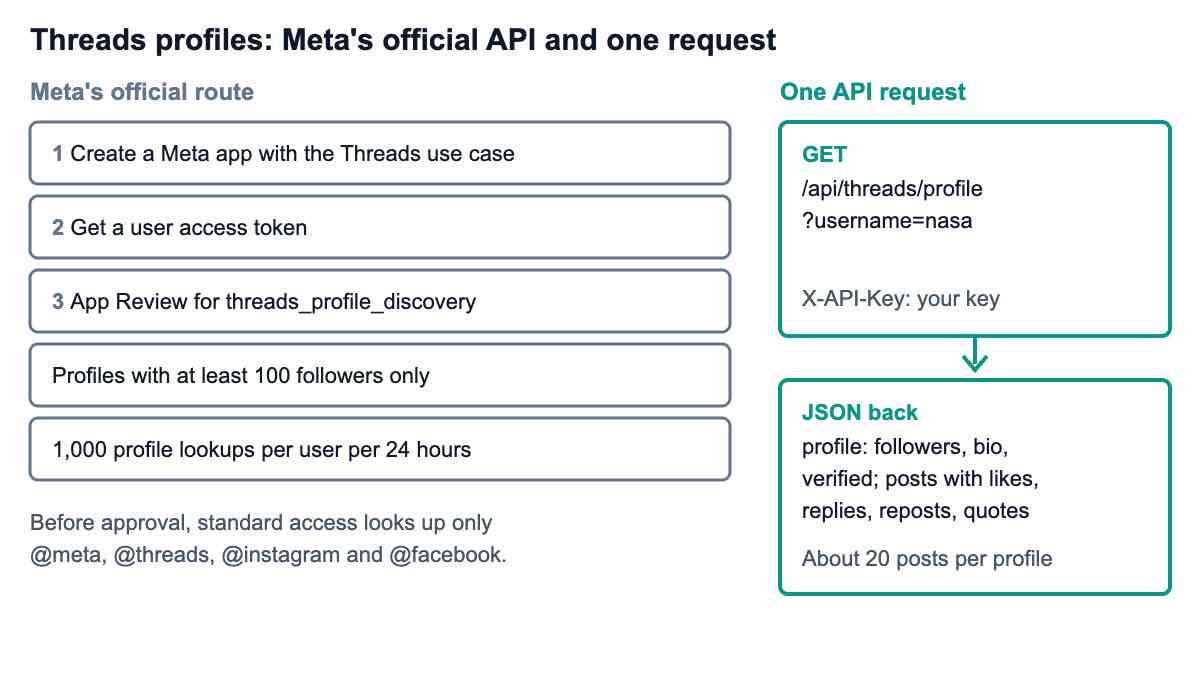
What you can read depends on the permission. Every call needs threads_basic, and with it you read the profile and posts of the user who granted the token, the "app-scoped user" in Meta's words. The page on Threads profiles is plain about it: "You can only fetch the profile of the app-scoped user."
Reading someone else's public profile needs a second permission, threads_profile_discovery, which unlocks Meta's Profile Discovery API. Its profile lookup takes an exact username and returns the name, bio, picture, verified flag and follower count. It adds totals of likes, quotes, reposts and views on that user's posts over the past seven days. A companion call returns a paginated list of the profile's posts, as Meta's page on retrieving posts shows.
Three limits apply to both of those calls, all from Meta's pages:
- Which accounts. "With standard access, only some of the official Meta accounts can be looked up": @meta, @threads, @instagram and @facebook. For anyone else, the permission goes through App Review like the rest.
- Which profiles. The lookup "only returns public profiles with at least 100 followers."
- How many. "A user can send a maximum of 1,000 requests within a rolling 24-hour period", and a query counts against that limit for 24 hours after it is sent.
Keyword search is a third door. With threads_keyword_search, Meta's keyword search finds public posts by keyword or topic tag, sorted by top or most recent, up to 100 a page, and it can be narrowed to one author's username. Until the permission is approved, it searches only the signed-in user's own posts. Each user can send up to 2,200 queries in a rolling 24 hours, and a query with no results does not count.
The upkeep is yours. You store each token and refresh it before its 60 days run out, and a user with a public profile grants your app permissions for 90 days at a time. Meta's overview also sets an overall call budget for each 24 hours of 4,800 times the number of impressions, with impressions counted as at least 10.
In return, the official route gives you what only an account's owner can get: insights on your own posts, publishing, reply moderation and webhooks, all under Meta's terms. If your job is your own account, it is the right tool.
How do you get a profile with one API call in Python?
Serpent's Threads Profile API takes a username and returns the profile and its latest posts as one JSON object. Send a GET request to https://apiserpent.com/api/threads/profile with your key in the X-API-Key header and the handle, without the @, in username. This Python example prints the profile line and one line per post:
import json

import requests

resp = requests.get(
    'https://apiserpent.com/api/threads/profile',
    headers={'X-API-Key': 'sk_live_your_api_key'},
    params={'username': 'nasa'},
    timeout=60,
)
data = resp.json()
print(data['full_name'], '|', format(data['followers'], ','), 'followers | verified', json.dumps(data['is_verified']))
for p in data['posts']:
    flags = ('pinned ' if p['is_pinned'] else '') + ('self-reply ' if p['is_reply'] else '')
    print(p['date'][:16], str(p['likes']).rjust(6), 'likes', str(p['replies']).rjust(4), 'replies', flags + json.dumps((p['text'] or '')[:40], ensure_ascii=False))
With the HTTP call replaced by a read of an answer for @nasa saved on 22 November 2026, which held six posts, it printed:
NASA | 12,802,370 followers | verified true
2026-11-07T20:03   2371 likes  171 replies pinned "Do you want to be an astronaut?\n\nApplica"
2026-11-07T20:03    543 likes   11 replies self-reply ""
2026-11-21T17:00    584 likes   21 replies "Our Curiosity Mars rover is in its rock "
2026-11-20T16:59  11779 likes  324 replies "Did you know you can listen to the unive"
2026-11-20T16:59   1977 likes   14 replies self-reply "A new album from NASA’s Chandra X-ray Ob"
2026-11-18T16:13  45059 likes  465 replies "As of 5:16 a.m. EST today, NASA's Voyage"
A call made today returns more posts than that saved answer: about 20 on an active profile, so the same loop prints a longer list. The six posts are in the order Threads shows them, which is not date order, and the section on the data explains why.
And in Node?
Node 18 or later has fetch built in, so there is nothing to install. This example finds the post with the most interactions on @natgeo, using the counts in the answer:
const params = new URLSearchParams({ username: 'natgeo' });
const res = await fetch('https://apiserpent.com/api/threads/profile?' + params, {
  headers: { 'X-API-Key': 'sk_live_your_api_key' },
});
const data = await res.json();
const score = (p) => p.likes + p.replies + p.reposts + p.quotes;
const top = [...data.posts].sort((a, b) => score(b) - score(a))[0];
console.log(`${data.full_name} | ${data.followers.toLocaleString('en-US')} followers`);
console.log(`most interactions: ${score(top).toLocaleString('en-US')} on ${top.url}`);
console.log(JSON.stringify((top.text || '').slice(0, 60)));
Run on Node 26.5.0 against the answer for @natgeo saved on 22 November 2026, it printed:
National Geographic | 18,467,271 followers
most interactions: 4,122 on https://www.threads.com/@natgeo/post/DgAZQdzkUnP
"Black leopards—commonly called black panthers—have spots but"
The score adds likes, replies, reposts and quotes. Weight them differently if replies matter more to you than likes, and compare a post with others of the same age, because counts keep growing after a post goes up.
What does the answer look like?
The answer is a flat object. Here is the real answer for @nasa, captured on 22 November 2026 and trimmed; each ... marks a cut, and the full set of fields is on the Threads Profile API page:
{
  "success": true,
  "username": "nasa",
  "full_name": "NASA",
  "biography": "Making the seemingly impossible, possible. ✨",
  "followers": 12802370,
  "is_verified": true,
  "profile_pic_url": "https://scontent.cdninstagram.com/v/t51...",
  "bio_links": [],
  "profile_url": "https://www.threads.com/@nasa",
  "posts": [
    {
      "id": "4025371820235557316",
      "code": "Dfc_lfaAgnE",
      "url": "https://www.threads.com/@nasa/post/Dfc_lfaAgnE",
      "date": "2026-11-07T20:03:13Z",
      "text": "Do you want to be an astronaut?\n\nApplications are now open to join NASA's astronaut corps. ...",
      "language": "en",
      "likes": 2371,
      "replies": 171,
      "reposts": 210,
      "quotes": 47,
      "is_reply": false,
      "is_pinned": true,
      "topic": "Space Threads",
      "images": [],
      "videos": [
        "https://scontent.cdninstagram.com/o1/v/..."
      ],
      "link": null,
      "author": "nasa"
    },
    {
      "id": "4025372343198139085",
      "code": "Dfc_tGdAcLN",
      "url": "https://www.threads.com/@nasa/post/Dfc_tGdAcLN",
      "date": "2026-11-07T20:03:18Z",
      "text": null,
      "language": null,
      "likes": 543,
      "replies": 11,
      "reposts": 30,
      "quotes": 0,
      "is_reply": true,
      "is_pinned": false,
      "topic": "Space Threads",
      "images": [],
      "videos": [],
      "link": {
        "url": "https://www.nasa.gov/news-release/nasa-seeks-next-generation-of-explorers-to-join-astronaut-corps/",
        "title": "NASA Seeks Next Generation of Explorers to Join Astronaut Corps - NASA"
      },
      "author": "nasa"
    },
    {
      "id": "4033228970241648886",
      "code": "Df46GElEWj2",
      "url": "https://www.threads.com/@nasa/post/Df46GElEWj2",
      "date": "2026-11-18T16:13:01Z",
      "text": "As of 5:16 a.m. EST today, NASA's Voyager 1 spacecraft reached one light-day from Earth, a ...",
      "language": "en",
      "likes": 45059,
      "replies": 465,
      "reposts": 2594,
      "quotes": 234,
      "is_reply": false,
      "is_pinned": false,
      "topic": "Space Threads",
      "images": [],
      "videos": [],
      "link": null,
      "author": "nasa"
    }
    // ...3 more posts
  ]
}
The shape is the same on every call. A post without text has text null, as the second post above shows, and a post without media has empty lists. A link preview arrives as an object with the address the post links to and its title, picture and video links arrive as Threads publishes them, and every date is ISO 8601 in UTC.
What should your code expect in the data?
Five things in the saved answers are worth handling from the first version of your code. None of them is an error, and each one changes your numbers silently if you assume tidier data.
Posts are not in date order. A pinned post comes first even when it is the oldest. In the saved @nasa answer the first post is the pinned one from 7 November, while the newest is from 21 November, so taking "the first post" as the latest is wrong. Keep the is_pinned flag and sort by date yourself if you need a timeline.
Follow-up posts are flagged as replies. When an account continues its own thread, the follow-up has is_reply true and sits after its first post. Five of the 17 posts in the three saved answers are follow-ups like this, which leaves 12 separate posts. Counting 17 announcements would overstate how active the accounts are.
Text can be null. One of the 17 posts, the @nasa follow-up that carries a link, has no text at all; its link object holds the title. Show the link title when the text is empty, and never treat a null as a missing post.
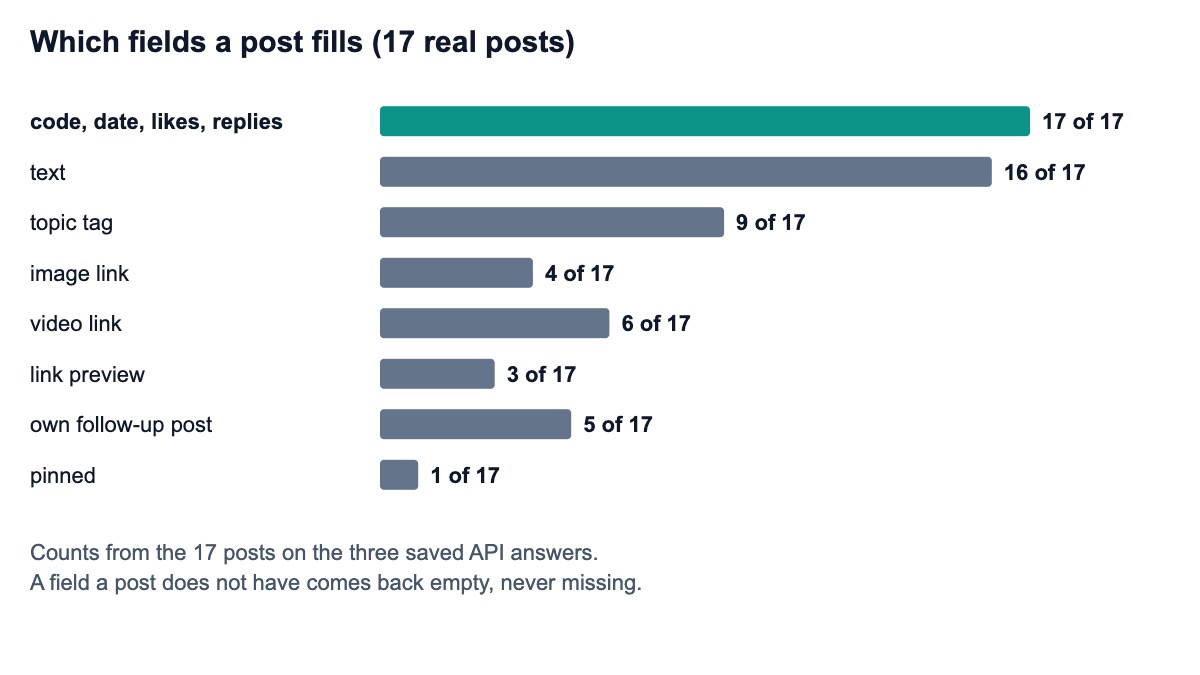
The chart shows why your code should treat most fields as optional. Only the code, date, likes and replies were filled on all 17 posts; a topic tag was on 9, and media on fewer still. In the answer an empty field is null or an empty list, never a missing key, so a default for each is enough.
Counts are live. On 22 November, the same profiles read about an hour apart showed 68 more followers on @zuck, 131 on @nasa and 165 on @natgeo, and the same post can show different likes on two reads. A number without the time of the read is not comparable, so store the time with every answer.
Media links are temporary. Picture and video links arrive as Threads publishes them, and they carry an expiry: the profile picture links in the three saved answers expired four days after they were saved. If you need the media, download it when you read the answer rather than storing the link for later.
Which route should you pick?
Pick by whose data you need and how many profiles you read. The table puts the two routes side by side, with the official facts from Meta's pages as checked on 24 November 2026.
| Meta's official Threads API | One API call | |
|---|---|---|
| What you need | A Meta app with the Threads use case, a user access token, and threads_profile_discovery approved in App Review for other people's profiles | An API key |
| Whose profiles | Your own; with standard access, only @meta, @threads, @instagram and @facebook as others; public profiles with at least 100 followers once approved | Public profiles, by username |
| Profile lookups | Up to 1,000 requests per user in a rolling 24 hours | One call per profile, with its latest posts in the same answer |
| What you look after | Tokens that expire after 60 days, permission grants that last 90 days, App Review and the call limits | A request function of about 10 lines |
| Extras | Publishing, insights, reply moderation and webhooks for your own account | Per-post counts, flags, media and link previews in one flat shape |
| Cost | Your time to build the app and pass review; the pages checked list no per-call price | From $0.49 per 1,000 calls; 10 free calls to start |
- Your own account, or publishing and insights: Meta's official API. It is the only route to data only the owner can see.
- A few of Meta's own accounts, to try the API out: the official API with standard access covers @meta, @threads, @instagram and @facebook.
- Many public profiles on a schedule, or output that feeds something that must not break: one API call per profile. There is no app review to wait for and no token to refresh.
- A product feature other people depend on: the API, which leaves no Meta app or user token for you to keep alive.
Pay as you go is $0.49 per 1,000 calls, and the playground lets you try a real profile before you sign up. Ten free API calls come with a new key from the sign-up page.
One call returns a profile and about 20 of its latest posts on an active profile, and fewer when the profile has posted less: on 23 November 2026, five active profiles returned 23, 29, 19, 20 and 19 posts. Store each answer with its time and your history grows with every poll. For the prices against other services, see the cheapest Threads API comparison. For other social data on the same key, see the Social Media API page, the X (Twitter) API and the YouTube transcripts walkthrough.
How we checked this
Code. The Python snippet was executed on Python 3.15.2 and 3.9.6, which printed identical output, and the Node snippet on Node 26.5.0. Each HTTP call was replaced by a stand-in that returns Serpent answers for @zuck, @nasa and @natgeo saved on 22 November 2026, 17 posts in all. The posts-per-call figure comes from five active profiles (@nasa, @barackobama, @openai, @mosseri and @instagram) read twice on 23 November 2026, which returned 23, 29, 19, 20 and 19 posts, a median of 20.
The official route. The section on Meta's Threads API was checked against Meta's developer documentation on 24 November 2026, and the pages are linked in the sources. It has no code and no output, because no code was run against Meta's API for this post.
What I could not verify:
- The API snippets were not run against the live service, so the numbers shown are as of 22 November 2026 and a call today returns different ones.
- Unverified: how answers look for private, deleted or non-existent handles, since none of the saved answers is one.
- That picture and video links expire is read from a date stamp in the links, not from a documented rule.
- I did not build a Meta app or apply for App Review, so the official route is described from Meta's documentation, not from a run of my own. How long review takes, and which apps Meta approves for profile discovery, is not stated on the pages checked.
Skip the app review
Serpent's Threads Profile API returns a profile and its latest posts as one JSON object, from $0.49 per 1,000 calls with 10 free API calls to start. Try a real profile in the playground first.
Get Your Free API KeyExplore: Threads Profile API · Playground · Docs · Pricing · About
FAQ
How do I scrape a Threads profile with Python?
There are two routes. Meta's official Threads API needs a Meta app, a user access token and the threads_profile_discovery permission approved in App Review before it looks up other people's profiles. The other route is one GET request to the Threads Profile API with your key in the X-API-Key header, which returns the profile and its latest posts as JSON in about 10 lines of Python.
Can I scrape Threads with Node.js?
Yes. Node 18 or later has fetch built in, so one request with your key in the X-API-Key header returns the profile and its posts as JSON with no packages to install. Meta's official Threads API is also plain HTTPS with JSON answers, so the same fetch works there once you hold an access token and the permissions your app needs.
Can Meta's official Threads API read any public profile?
Not by default. With standard access, its profile lookup works only on some official Meta accounts: @meta, @threads, @instagram and @facebook. With the threads_profile_discovery permission approved through App Review, it returns public profiles with at least 100 followers, and each user can send up to 1,000 requests in a rolling 24 hours.
Do I need an API key or a Threads account to read a public profile?
To call Serpent you send one API key in an X-API-Key header, and there is no Threads account to create. Meta's official API works through a Meta app and a user access token, which a Threads user grants to your app in Meta's authorization window, so that route does need a Threads profile behind it.
Why are Threads posts out of date order?
A pinned post comes first even when it is the oldest, and an account continuing its own thread has the follow-up flagged as a reply and placed after its first post. In the saved @nasa answer the first post was from 7 November and the newest from 21 November. Keep the flags and sort by date yourself if you need a timeline.
How many posts does one call return?
About 20 on an active profile: on 23 November 2026, five active profiles returned 23, 29, 19, 20 and 19 posts, a median of 20. A quiet or pinned-only profile can return fewer. Pinned posts and an account's own follow-up posts are included, each with its flag, so filter them out if you only want separate new posts.
Are the follower counts exact?
Yes. The answer holds an exact count, such as 5,781,202 for @zuck in the saved answer, while Threads shows a rounded 5.8M on the profile. The count moves between reads, 68 more followers about an hour later on @zuck, so store the time of every read and compare counts taken at known times.
Sources
Meta's Threads API documentation (checked 24 Nov 2026):
- Meta: Threads API documentation
- Meta: Threads API, get started (app, tokens, testers, App Review)
- Meta: Threads profiles and profile lookup
- Meta: retrieving Threads posts, including a public profile's posts
- Meta: Threads keyword search
- Meta: Threads API overview and rate limits
Language documentation (not re-opened for this post):