How to Scrape Google Ads Transparency with Python and Node

To get Google Ads Transparency data in Python or Node, either read the public Transparency Center page yourself and pull the ads out of it, or send one GET request with a domain and read the JSON that comes back. The first is a project that needs looking after for as long as you need the data. The second answers with up to 40 ads, each with its advertiser, format, and first and last date shown.
Short answer: For one look at one advertiser, the public page in a browser is enough. For anything that runs on a schedule, feeds a product or covers many domains, one API call is less code to own, from $0.16 per 1,000 calls — $0.30 pay as you go, no subscription, with 10 free API calls to start. Every snippet below is complete: change the key and the domain, and run it.
What does the public Transparency Center show, and why is it awkward to read?
The Google Ads Transparency Center is a public archive. You search for an advertiser or a website domain, pick a region, optionally narrow to text, image or video ads, and get a grid of ad cards. Each card carries a preview of the ad, the advertiser’s name and the dates the ad was shown, and it opens to a page of its own.
The awkward part is that the page is a JavaScript application. The document you download when you open an address is a frame, and the ads are filled in after it has drawn itself, as you scroll. A script that fetches the address and searches the text finds no ads, because at that moment there are none to find. Whatever you build has to wait for the page to finish, know when it has, and then read what is on the screen.
The cards are not uniform either. A text ad shows its words inside a picture, an image ad shows a banner, and a video ad shows a player that Google draws with its own script. Some of those previews are files you could save, and some are not. The page is made for a person with a browser, nothing promises that it keeps its shape, and a reader written against today’s page is a guess about next month’s.
What does the do-it-yourself route ask of you?
Four jobs, all of them yours. None is hard on its own, and together they are a small project that never quite finishes.
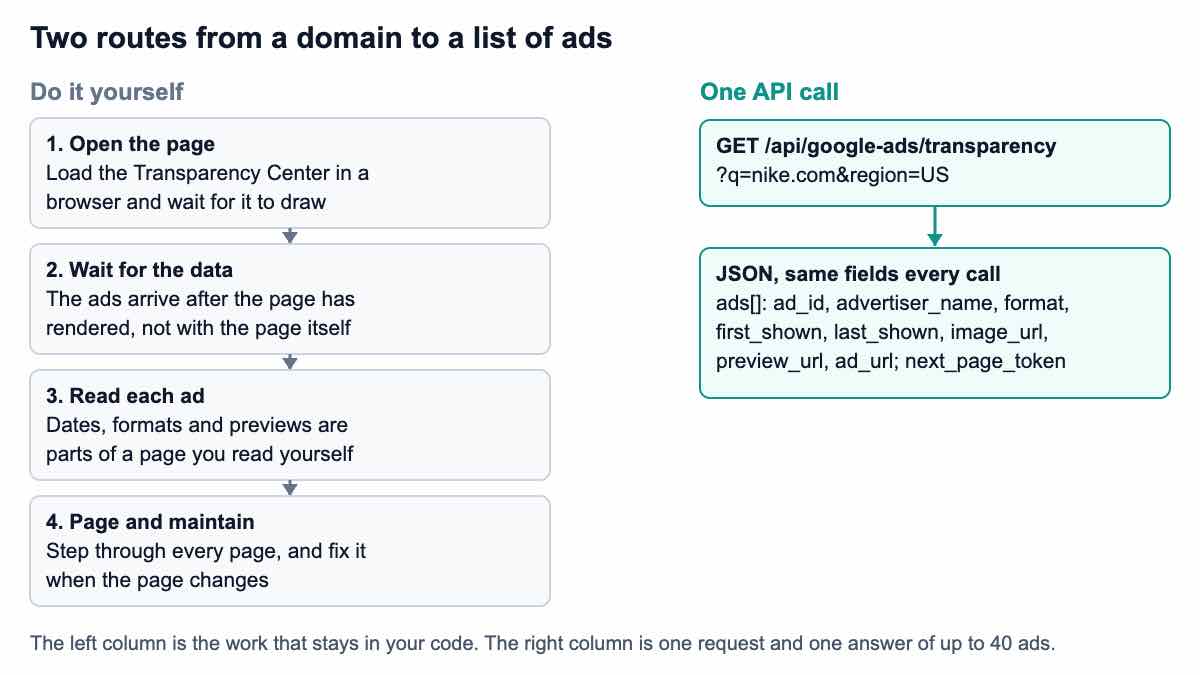
| Job | What it means | Where it bites |
|---|---|---|
| 1. Open the page | Drive a full browser to the Transparency Center with the domain, region and format you want | A browser to install, update and keep running on every machine that fetches, and a page that can load slowly |
| 2. Wait for the data | Know when the ads have arrived and the page has stopped changing | Read too early and you get an empty grid that looks like “no ads” |
| 3. Read each ad | Pull the advertiser, format, dates and preview out of each card on the screen | Dates arrive as display text, previews differ by format, and a card can be missing a part |
| 4. Page and maintain | Scroll or step through every page, stop at the end, and fix the reader when the page changes | A reader that fails quietly costs you the data in between, and you find out from a gap in a chart |
I have not published a page-reading script here, on purpose. The one I could write today would be a snapshot of a page that Google is free to change, and a tutorial that stops working in a month is worse than none. What follows is the other route, with code you can run now.
What breaks after it works?
Four things, in the order people meet them. They are caveats about any program that reads a page like this, not about one tool.
- The region and the format are part of what you ask for. A reader that ignores them reads the default view, and a table that mixes two regions misleads.
- The end of the list is not announced. A page that loads more as you go stops without a message, so your code has to decide when it has reached the last ad, and a wrong guess either misses ads or loops.
- Volume can change the answer. Public pages can slow down or ask for verification instead of showing results when they see many requests, and your code has to tell that from a search that has none. How the Transparency Center behaves at your volume is something you only learn by running it.
- The layout moves. A label is renamed, a card gets a new element, and a field you relied on is gone. Nothing announces it.
If you check one advertiser once for a school project, that is fine. If a pricing tool, an agency report or an alert depends on it, it is a standing job.
How do you get a domain’s ads with one request in Python?
Send a GET request to https://apiserpent.com/api/google-ads/transparency with your key in an X-API-Key header and the domain in q. Get a key and 10 free API calls at the sign-up page.
import requests

API_KEY = "sk_live_your_api_key"
URL = "https://apiserpent.com/api/google-ads/transparency"

resp = requests.get(
    URL,
    headers={"X-API-Key": API_KEY},
    params={"q": "nike.com", "region": "US"},
    timeout=60,
)
data = resp.json()

if not data["ads"]:
    print("No ads came back for this search")
else:
    print(data["query"], data["region"], "-", len(data["ads"]), "ads in this answer")
    for ad in data["ads"][:5]:
        print(f'{ad["format"]:<6} {ad["first_shown"]}  {ad["last_shown"]}  {ad["advertiser_name"]}')
Using the saved answer for nike.com, the script prints:
nike.com US - 40 ads in this answer
image  2026-05-05  2026-11-22  Nike, Inc.
text   2022-11-30  2026-11-22  Nike, Inc.
text   2022-11-30  2026-11-22  Nike, Inc.
text   2021-10-25  2026-11-22  WPP MEDIA MANAGEMENT
text   2022-11-30  2026-11-22  Nike, Inc.
Dates are ISO calendar dates, so they sort as text and compare with plain string comparison. The fourth row shows something the page does not make obvious: a media agency’s ad appears under nike.com because the ad points to that domain. Here is the first ad as the API returns it, with the long preview link cut for space:
{
  "ad_id": "CR05867015907196272641",
  "advertiser_id": "AR16735076323512287233",
  "advertiser_name": "Nike, Inc.",
  "format": "image",
  "first_shown": "2026-05-05",
  "last_shown": "2026-11-22",
  "image_url": null,
  "preview_url": "https://displayads-formats.googleusercontent.com/ads/preview/content.js?...",
  "ad_url": "https://adstransparency.google.com/advertiser/AR16735076323512287233/creative/CR05867015907196272641?region=US"
}
Every ad has the same nine fields. ad_url is the ad’s own page in the Transparency Center, so you can send a person to the original. image_url is null here and preview_url is set: this ad is an image ad, but Google gives a preview link for it, not a still picture. The third ad in the same answer is the other way round:
{
  "ad_id": "CR02113102262996828161",
  "advertiser_id": "AR16735076323512287233",
  "advertiser_name": "Nike, Inc.",
  "format": "text",
  "first_shown": "2022-11-30",
  "last_shown": "2026-11-22",
  "image_url": "https://tpc.googlesyndication.com/archive/simgad/5177504055698509260",
  "preview_url": null,
  "ad_url": "https://adstransparency.google.com/advertiser/AR16735076323512287233/creative/CR02113102262996828161?region=US"
}
What can you ask for?
Four parameters. q is required: a website domain such as nike.com, up to 253 characters, or a Google advertiser id, which is AR followed by 20 digits. region is a two-letter country code and defaults to US. ad_format is all (the default), text, image or video. page_token takes the next_page_token from the previous answer to get the next 40 ads.
A full web address pasted into q is cut down to its domain. An advertiser id returns that advertiser’s own ads; a domain returns ads from any advertiser that point to it. Here are the options in cURL:
# Only video ads for a domain, in Germany
curl -G "https://apiserpent.com/api/google-ads/transparency" \
  --data-urlencode "q=shopify.com" \
  --data-urlencode "region=DE" \
  --data-urlencode "ad_format=video" \
  -H "X-API-Key: sk_live_your_api_key"

# One advertiser's own ads, by advertiser id
curl -G "https://apiserpent.com/api/google-ads/transparency" \
  --data-urlencode "q=AR16735076323512287233" \
  -H "X-API-Key: sk_live_your_api_key"
Who is behind the ads you get back?
Not only the brand. This is the most common surprise, so it deserves its own script. A domain search returns the ads that point to the domain from any advertiser, which means agencies, partners, affiliates and sometimes a person can sit next to the brand’s own ads. This script counts the advertisers in an answer:
from collections import Counter

import requests

resp = requests.get(
    "https://apiserpent.com/api/google-ads/transparency",
    headers={"X-API-Key": "sk_live_your_api_key"},
    params={"q": "shopify.com"},
    timeout=60,
)
data = resp.json()

# A domain search returns ads that point to the domain from ANY advertiser.
by_advertiser = Counter(ad["advertiser_name"] for ad in data["ads"])
print(len(data["ads"]), "ads from", len(by_advertiser), "advertisers")
for name, n in by_advertiser.most_common(3):
    print(f"{n:>3}  {name}")
Using the saved answer for shopify.com, it prints:
40 ads from 9 advertisers
 31  Shopify Inc.
  2  Chargeflow Inc
  1  PayPal, Inc.
When you want only the brand’s own ads, take its advertiser_id from any row of a domain answer and call again with that id as q. The names are the advertiser names as Google publishes them, so they are shown as published and can be a company or a person.
How do you count formats in Node?
Because dates and formats are plain strings, summaries are a few lines. This script counts the ads by format and checks something worth knowing about videos before you build a gallery:
(async () => {
  const params = new URLSearchParams({ q: "shopify.com", region: "US" });
  const res = await fetch("https://apiserpent.com/api/google-ads/transparency?" + params, {
    headers: { "X-API-Key": "sk_live_your_api_key" },
  });
  const data = await res.json();
  if (data.ads.length === 0) return console.log("No ads came back for this search");

  const byFormat = new Map();
  for (const ad of data.ads) byFormat.set(ad.format, (byFormat.get(ad.format) || 0) + 1);
  console.log(data.query, "-", data.ads.length, "ads");
  for (const [format, n] of [...byFormat].sort((a, b) => b[1] - a[1])) {
    console.log(String(n).padStart(3), format);
  }

  const videos = data.ads.filter((ad) => ad.format === "video");
  const noImage = videos.filter((ad) => ad.image_url === null).length;
  console.log(noImage, "of", videos.length, "videos have no image_url; their preview_url is set on", videos.filter((ad) => ad.preview_url).length);
})();
Using the saved answer for shopify.com, it prints:
shopify.com - 40 ads
 21 video
 13 text
  6 image
21 of 21 videos have no image_url; their preview_url is set on 21
More than half of this answer is video, and none of the videos has an image_url. A page that shows a thumbnail for every ad needs a plan for those: show the preview_url as a link, or link to ad_url.
What does each field in an ad mean?
Nine fields, the same names on every ad. Two of them are sometimes empty.
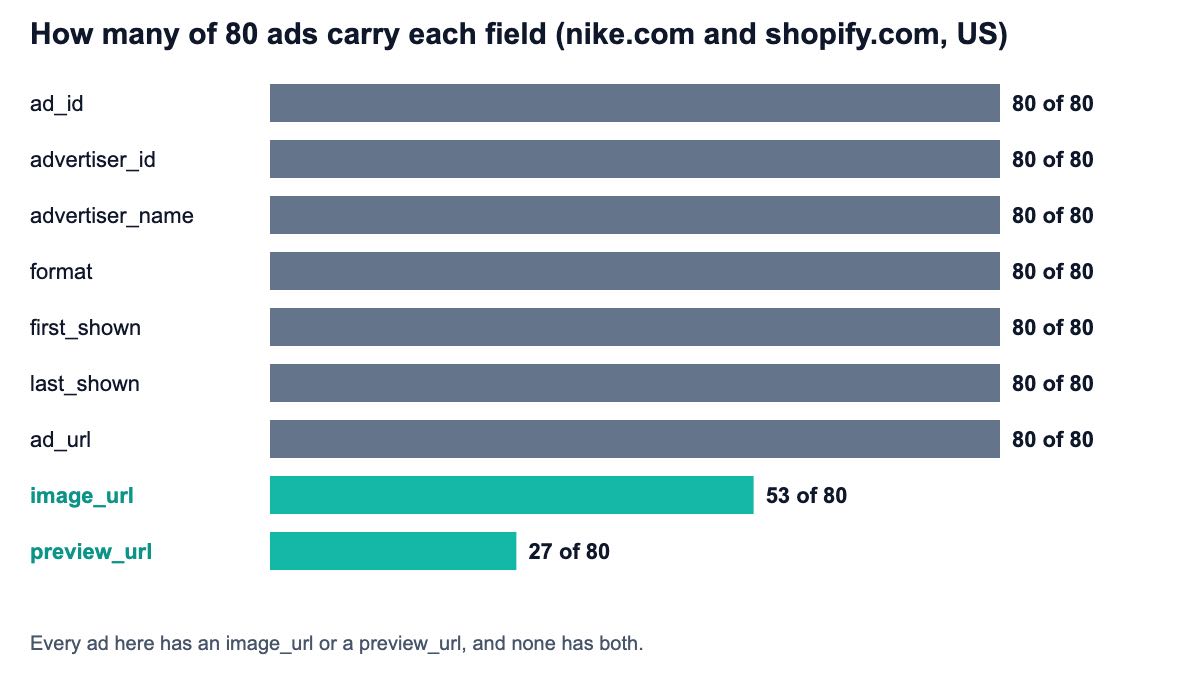
| Field | What it holds | When it is empty |
|---|---|---|
| ad_id | Google’s id for the ad, CR and 20 digits | Always present |
| advertiser_id, advertiser_name | The advertiser’s id (AR and 20 digits) and its name as Google publishes it | Always present in the saved answers |
| format | text, image or video | Always present in the saved answers |
| first_shown, last_shown | The first and last date the ad was shown, ISO dates | Always present in the saved answers |
| image_url | A still image of the ad, when Google publishes one | null for 27 of 80 ads, including every video |
| preview_url | A Google preview link, for ads Google does not publish as an image | null for 53 of 80 ads |
| ad_url | The ad’s own page in the Transparency Center, for the region you asked for | Always present in the saved answers |
preview_url is a link to open, not a picture to embed: it is not an image address, so do not put it in an img tag. In the 80 ads of the two saved answers, every ad had an image_url or a preview_url, and none had both. The shape never varies: a link the ad does not have is null, and a field is never missing from the row.
How do you handle ads without an image?
Treat null as “this ad has no such link”, never as an error. The order is the one Google shows, which is a ranking and not a promise of newest first, so keep it and sort yourself when you need to. This script writes one answer to a CSV file, leaves the empty cells empty and counts the two kinds of link:
import csv

import requests

resp = requests.get(
    "https://apiserpent.com/api/google-ads/transparency",
    headers={"X-API-Key": "sk_live_your_api_key"},
    params={"q": "nike.com"},
    timeout=60,
)
data = resp.json()

columns = ["ad_id", "advertiser_name", "format", "first_shown", "last_shown", "image_url", "preview_url"]
with open("nike-ads.csv", "w", newline="", encoding="utf-8") as f:
    writer = csv.writer(f)
    writer.writerow(columns)
    for ad in data["ads"]:
        # None (the ad has no such link) becomes an empty cell, never the text "None"
        writer.writerow([("" if ad[c] is None else ad[c]) for c in columns])

with_image = sum(1 for ad in data["ads"] if ad["image_url"])
preview_only = sum(1 for ad in data["ads"] if not ad["image_url"] and ad["preview_url"])
print(len(data["ads"]), "rows written;", with_image, "with an image_url,", preview_only, "with a preview_url only")
with open("nike-ads.csv", encoding="utf-8") as f:
    for line in list(f)[:3]:
        print(line.rstrip()[:96])
Using the saved answer for nike.com, it prints:
40 rows written; 36 with an image_url, 4 with a preview_url only
ad_id,advertiser_name,format,first_shown,last_shown,image_url,preview_url
CR05867015907196272641,"Nike, Inc.",image,2026-05-05,2026-11-22,,"https://displayads-formats.goo
CR00096988779679580161,"Nike, Inc.",text,2022-11-30,2026-11-22,,"https://displayads-formats.goog
The two empty cells before the preview link are the missing image_url, left empty instead of being written as text. Advertiser names such as Nike, Inc. contain commas, which is why a CSV writer, not string joining, is the right tool.
How do you page through more than 40 ads?
One call returns up to 40 ads. When there are more, the answer carries a next_page_token; pass it back as page_token with the same q, region and ad_format to get the next 40. When the token is an empty string, there are no more pages. Each page is one call and one charge.
import requests

URL = "https://apiserpent.com/api/google-ads/transparency"
HEADERS = {"X-API-Key": "sk_live_your_api_key"}

ads, token = [], None
for _ in range(3):  # three pages is up to 120 ads and three calls
    params = {"q": "nike.com", "region": "US"}
    if token:
        params["page_token"] = token
    data = requests.get(URL, headers=HEADERS, params=params, timeout=60).json()
    ads.extend(data["ads"])
    token = data["next_page_token"]
    if not token:  # an empty string means there are no more pages
        break

print(len(ads), "ads collected,", len({ad["ad_id"] for ad in ads}), "distinct")
I am not showing an output for this one, because the saved answers are first pages only and a replay would repeat the same page. Keep the set of ids as the script does: de-duplicating on ad_id is cheap insurance when you collect pages over time, because a ranking can move between calls.
Which route should you pick?
- One advertiser, once: the Transparency Center in a browser, and a spreadsheet.
- A weekly check on a handful of domains: the API. Ten domains a week is about 43 calls a month, which is about one cent at the pay-as-you-go rate.
- Anything a customer or a client sees: the API, so a changed page layout is not your emergency.
- Hundreds of domains, or page after page: the API, with each call one charge however many ads it returns. The cheapest Google Ads Transparency API comparison has the rates.
- A use case with real decisions in it: see Google Ads Transparency data for competitor ad research, which turns these fields into a watch on a rival’s creatives.
The playground lets you try a domain before you write a line, the Google Ads Transparency API page has the full parameter and field list, and the documentation has the same snippets in cURL. If you also read search results, the same key covers the Google SERP API, and the competitor analysis tool in Python guide shows what to do with data like this once you have it.
How we checked this
Code. Every snippet was executed on 22 November 2026 on Python 3.9.6 (with requests 2.32.3) and Node 26.5.0, except the paging snippet, which was run for syntax and not for output. The web address was swapped for a local stand-in server that answered with saved material, so the request address, the X-API-Key header and every parameter were checked without a live request. The stand-in served a recorded answer for nike.com and one for shopify.com. The outputs shown are what each snippet printed.
Counts. The field counts are counts over the 80 ads in the two saved answers, 40 each, region US, format all, first page. The two JSON examples are ads from the nike.com answer with the long preview link cut.
What I could not verify:
- That a script that reads the public page works on the day you run it. I did not write one, and the description of what breaks comes from how pages of this kind behave in general.
- Whether your own domains return the same mix of formats and links as the two saved answers. Try your own list in the playground.
- The
region,ad_formatandpage_tokenoptions were not run against saved answers, because the saved answers are first pages with the default region and format; their behaviour is as documented, not shown by an output above.
Package versions change often, so test before you rely on either.
Try one domain before you write code
Serpent’s Google Ads Transparency API is $0.30 per 1,000 calls pay as you go — no subscription, with 10 free API calls to start. Paste a domain into the playground and see the JSON.
Get Your Free API KeyExplore: Google Ads Transparency API · Playground · Docs · Pricing
FAQ
How do I get Google Ads Transparency Center data in Python?
Either read the public page yourself or call an API. Reading the page means driving a browser, waiting for the ads to load, reading each card and paging to the end, and keeping the reader working as the page changes. The API route is one GET request to /api/google-ads/transparency with a q parameter and an X-API-Key header, and the answer is up to 40 ads as flat JSON.
Can I filter Google ads by country or format?
Yes. The region parameter takes a two-letter country code and defaults to US. The ad_format parameter takes all (the default), text, image or video. Combine them with q, which is a website domain such as nike.com or a Google advertiser id that is AR followed by 20 digits.
Why is image_url sometimes null?
Google publishes some ads as a still image and others only as a preview that its own script draws, so image_url holds the picture when there is one and is null otherwise. In two saved answers of 40 ads each, image_url was null for 27 of 80 ads, including all 21 videos, and preview_url held a link for those.
How do I get the next page of ads?
Each call returns up to 40 ads and a next_page_token. Pass that token back as page_token, with the same q, region and ad_format, to get the next 40. An empty next_page_token means there are no more pages. Each page is one call and one charge, so collecting 120 ads takes three calls.
Why does a domain search return ads from other advertisers?
A domain search returns ads that point to the domain from any advertiser, so an agency or a partner can appear next to the brand's own ads. In the saved answer for shopify.com, 40 ads came from 9 advertisers. Search by advertiser id, the AR value on any row, to get one advertiser's own ads.
How long does a call take?
On a fixed set of 64 requests drawn before measuring, 58 returned ads, 56 of them a full 40, in answers saved on 22 November 2026. Set a client timeout of 60 seconds to be safe.