Google Ads Transparency Data for Competitor Ad Research

To watch a rival’s Google ads, call the Google Ads Transparency API once a week for their domain, keep the ad ids you have already seen, and read first_shown, format and advertiser_name on the ones you have not. Every call returns up to 40 ads, and the answers saved for this post show what that gives you: in the first 40 ads for shopify.com, 20 were first shown on or after 1 September 2026, and none of them is a text ad.
Short answer: Use a domain search to see everyone who advertises to a rival’s site, then switch to the advertiser id from the answer to follow the rival’s own ads. Sort by first_shown to find new creatives, count format to see where the money goes, and change region to see each market. A weekly watch on 50 domains is about 217 calls a month, which is about seven cents at the pay-as-you-go rate of $0.30 per 1,000 calls.
Most competitor research starts with the rival’s own site and ends with a guess about what they are paying to promote. The Google Ads Transparency Center closes part of that gap: it lists ads that ran on Google, with the advertiser, the format and the dates. It is built for one advertiser at a time, in a browser. This post is about the version you can schedule.
Every number below comes from two answers saved on 22 November 2026, one for nike.com and one for shopify.com, region US, all formats, first page of 40 ads each. They are small samples and I say so wherever it matters; the point is the method, which works the same on your own list of rivals.
What can the ads a rival runs tell you?
Four things, each one a field in the answer. What they run: the ad id, with a link to the ad’s page in the Transparency Center and, for many ads, an image link. Since when: first_shown and last_shown, as dates. In which form: format is text, image or video. For which market: the region you asked about, a two-letter country code.
A fifth thing comes free with a domain search: who. The answer holds every ad that points to the domain, whoever runs it, with the advertiser’s id and name on every row. For a brand, that is its own ads plus the ads of its agencies, resellers and affiliates, and sometimes parties it does not know about. The next sections work through each field on the saved answers.
How do you find a rival’s new creatives?
Read first_shown. It is the first date Google shows for the ad, as an ISO date, so a new creative is an ad whose first_shown is after your last look. In the saved shopify.com answer, the 40 ads split like this: 12 first shown before 2026, 8 in January to August 2026, 7 in September, 12 in October and 1 in November up to the 22nd.
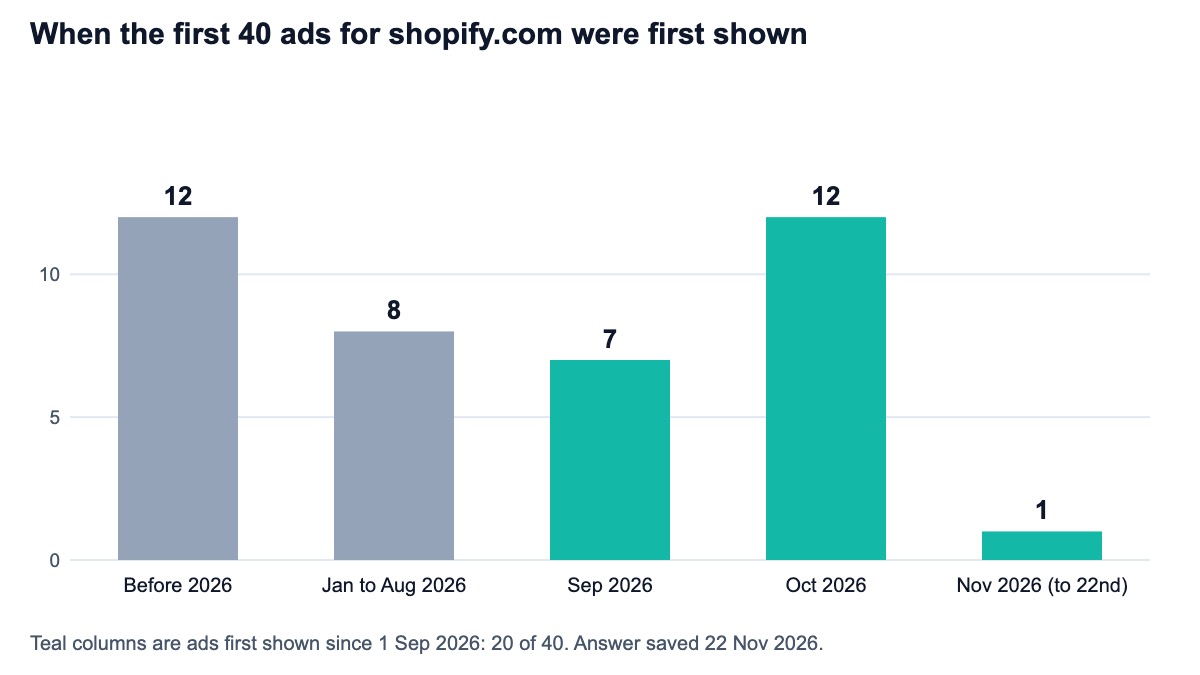
Half of the answer is new in the last three months. That is a signal, but read it with care: the order of an answer is a ranking and not a list by date, so the 40 you get are the first 40 Google shows, not the 40 newest. The script below filters on a cutoff date and summarises what it finds:
from collections import Counter

import requests

URL = "https://apiserpent.com/api/google-ads/transparency"
CUTOFF = "2026-09-01"  # ISO dates compare correctly as plain text

data = requests.get(
    URL,
    headers={"X-API-Key": "sk_live_your_api_key"},
    params={"q": "shopify.com", "region": "US"},
    timeout=60,
).json()

new = sorted(
    (ad for ad in data["ads"] if ad["first_shown"] >= CUTOFF),
    key=lambda ad: ad["first_shown"],
    reverse=True,
)
formats = Counter(ad["format"] for ad in new)
print(len(new), "of", len(data["ads"]), "ads first shown on or after", CUTOFF, dict(formats))
for ad in new[:4]:
    print(ad["first_shown"], f'{ad["format"]:<6}', ad["advertiser_name"])
Using the saved answer for shopify.com, it prints:
20 of 40 ads first shown on or after 2026-09-01 {'image': 5, 'video': 15}
2026-11-16 image  PayPal, Inc.
2026-10-23 video  Chargeflow Inc
2026-10-21 video  Chargeflow Inc
2026-10-19 video  Wholesale Gorilla Inc.
The newest ads in this answer are not Shopify’s own but a payments company’s and two other advertisers’, which is the domain-mode effect described below. The nike.com answer reads the other way: its newest first_shown is 5 May 2026, and 31 of its 40 ads share one date, 30 November 2022. A rival whose 40 first-shown ads are all old is running the same creatives for years, which is also a finding.
What does the format mix say?
Where a rival puts its effort. Count format across an answer and the picture is immediate: in the saved answers, nike.com is almost all text ads, 39 of 40, with 1 image and no video, while shopify.com is 21 video, 13 text and 6 image.
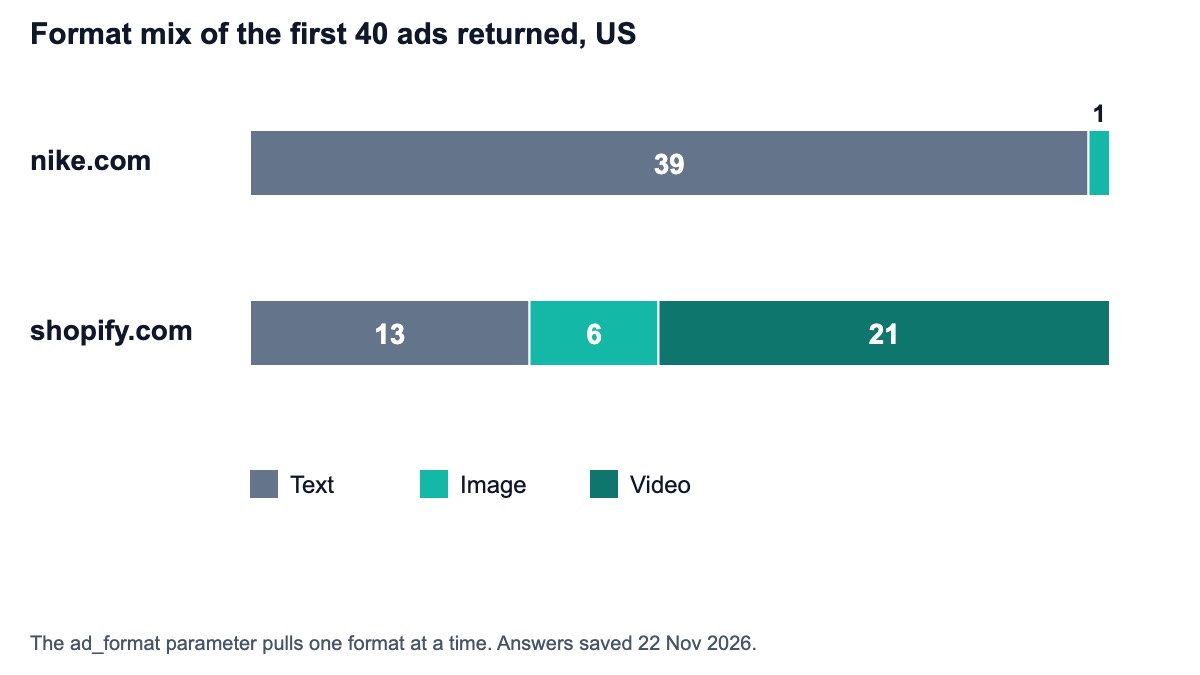
Cross the two views and a sharper reading appears. Of the 20 ads in the shopify.com answer first shown since 1 September, 15 are video and 5 are image; none is text. The older ads lean the other way, and 13 of the 20 that began before September are text. That is the shape of a shift in creative, from text toward video, visible in one call. It rests on 40 ads, so treat it as a lead to check by paging further, not as proof.
One practical note on video. Google does not publish a still image for a video ad, so image_url is null on every video in these answers and the preview_url link is how to look at one. If you build a gallery of a rival’s creatives, link to ad_url, the ad’s own page in the Transparency Center, and let people watch it there.
Domain mode or advertiser-id mode?
The API has two ways to ask, and the choice decides what you are watching. Send a domain in q and you get every ad that points to it, from any advertiser. Send a Google advertiser id, AR followed by 20 digits, and you get that advertiser’s own ads.
Domain mode (q=nike.com) | Advertiser-id mode (q=AR16735076323512287233) | |
|---|---|---|
| Returns | Ads that point to the domain, from any advertiser | That one advertiser’s ads |
| In the saved answer | nike.com: 3 advertisers, Nike, Inc. 33 ads, Nike Retail BV 6, WPP MEDIA MANAGEMENT 1 | The id on every Nike, Inc. row |
| shopify.com | 9 advertisers: Shopify Inc. 31 ads, Chargeflow Inc 2, PayPal, Inc. 1, and 6 more with 1 each | The id on every Shopify Inc. row |
| Best for | Brand protection, finding agencies and partners, who is advertising to a market | Following one rival’s own creatives |
| Watch out for | Counts mix the brand with everyone else | You need the id first, from a domain answer or from an ad_url |
A useful workflow uses both. Run a domain search once to see who advertises to a rival’s site and pick the advertiser id of the rival itself from the rows, then follow that id every week. The domain answer also answers a question that has nothing to do with competitors: who else is advertising to your own site? Run your own domain and read the advertiser names. The names are shown as Google publishes them.
How do you build a weekly watch?
Keep a file of the ad ids you have seen and show only the ones you have not. This Node script reads the file, calls the API, prints what is new and saves the ids:
const fs = require("fs");
const SEEN = "seen-shopify.json";

(async () => {
  const params = new URLSearchParams({ q: "shopify.com", region: "US" });
  const res = await fetch("https://apiserpent.com/api/google-ads/transparency?" + params, {
    headers: { "X-API-Key": "sk_live_your_api_key" },
  });
  const data = await res.json();

  const seen = new Set(fs.existsSync(SEEN) ? JSON.parse(fs.readFileSync(SEEN, "utf8")) : []);
  const fresh = data.ads.filter((ad) => !seen.has(ad.ad_id));
  console.log(data.query, "-", data.ads.length, "ads,", fresh.length, "not seen before");
  for (const ad of fresh) console.log(ad.first_shown, ad.format.padEnd(6), ad.advertiser_name);

  fs.writeFileSync(SEEN, JSON.stringify([...seen, ...fresh.map((ad) => ad.ad_id)]));
})();
To show an output, I started from a seen-file that held 36 of the 40 ads in the saved answer, leaving out the four with the newest distinct first_shown dates. This is what it printed on the first run, and on a second run straight after:
shopify.com - 40 ads, 4 not seen before
2026-11-16 image  PayPal, Inc.
2026-10-23 video  Chargeflow Inc
2026-10-21 video  Chargeflow Inc
2026-10-19 video  Wholesale Gorilla Inc.

shopify.com - 40 ads, 0 not seen before
Run it from a scheduler once a week and send the printed lines to a channel. Use the ad id, not the position, as the key: a ranking can move between calls, and the id is what stays. For more than 40 ads, pass next_page_token back as page_token; each page is one call. The Python and Node guide has the paging loop and the CSV export.
The cost is small at any watch size. A weekly call for each of 50 domains is about 217 calls a month, about $0.07 at the pay-as-you-go rate; even five pages each is about $0.33. The price comparison has the rates and the competing sellers.
How do you compare regions?
Change region. It is a two-letter country code and defaults to US, and the answer repeats it, so a table of several regions stays labelled. The same rival often runs different ads in different markets, and the difference is the finding.
for region in US GB DE; do
  curl -sG "https://apiserpent.com/api/google-ads/transparency" \
    --data-urlencode "q=shopify.com" \
    --data-urlencode "region=$region" \
    -H "X-API-Key: sk_live_your_api_key" -o "shopify-$region.json"
done
I am not showing the answers for other regions, because the saved ones are all for the US. On the fixed set of 64 requests drawn before measuring, ten were for other regions, one domain each in Germany, Britain, India, Brazil, Japan, Nigeria, France, the United Arab Emirates, Spain and Australia, and nine of them returned a full 40 ads.
What can you conclude, and what not?
You can conclude what an ad is, who runs it, what form it takes, in which region it ran and when it was first and last shown. That is enough to see a new creative, a shift in format and an unexpected advertiser. The data does not say how much was spent or how many people saw an ad, and it does not say whom the ad was aimed at, so it measures what a rival does and not how well it works.
Two more points keep the reading honest. The 40 ads in an answer are the first 40 in Google’s order, which is a ranking and not a promise of newest first, so for a full picture page through the answer. And last_shown is the most recent date, not an end date: in the two saved answers, 79 of the 80 ads were last shown on 22 November, the day they were saved, and the other on 19 November, so nearly every ad was still running when the answers were taken.
Who uses this?
- Agencies that pitch a new client with a one-page view of what its rivals run, by format and by market, before the first call.
- In-house marketing teams that want a weekly note when a competitor launches a new creative or changes format.
- Brand-protection teams that read the advertiser names under their own domain to find resellers and affiliates they did not know were advertising.
- Market researchers comparing how many advertisers and which formats appear for a set of domains in a category.
- SEO and SERP tools that add a paid view next to organic rankings; the Google SERP API and the rank tracking API sit on the same key.
If you are building a competitor tool end to end, the competitor analysis tool in Python guide covers the rest of the pipeline, and Google Shopping ads data covers the product-ads side. Try a rival’s domain in the playground first, or read the Google Ads Transparency API page for every parameter and field.
How we checked this
Data. The two answers are real data recorded on 22 November 2026, for nike.com and shopify.com with region US and all formats, first page of 40 ads each, in the same shape a live call returns. Every count, date and advertiser name in the post is read from those two answers. The scripts were executed on Python 3.9.6 and Node 26.5.0 against a local stand-in server that replays them, not against a live request.
The watch example. The seen-file for the Node script was built by leaving four ads out of the saved answer, as the post says; the printed lines are what the script printed.
What I could not verify:
- Whether the 40 ads in each answer are representative of the rival’s whole archive. They are the first 40 in Google’s order for one region on one day.
- The other regions: no answer for a region other than the US was saved, so the regional section describes the parameter and the fixed-set result, not an output.
- The reading that ads are shifting from text to video. It rests on 40 ads for one domain; page further and check on your own rivals.
- That
first_shownis the date an advertiser launched a creative; it is the first date Google shows for the ad.
Ad archives change daily, so run your own answers before you act on a pattern.
Watch a rival’s ads this week
Serpent’s Google Ads Transparency API is $0.30 per 1,000 calls pay as you go — no subscription, with 10 free API calls to start. Put a rival’s domain in the playground and read the answer.
Get Your Free API KeyExplore: Google Ads Transparency API · Playground · Docs · Pricing
FAQ
How do I track a competitor's Google ads?
Call the Google Ads Transparency API with the competitor's domain as q, keep the ad_id of every ad you have seen, and each week read first_shown, format and advertiser_name on the ads you have not seen. Each call returns up to 40 ads, and 50 domains a week is about 217 calls a month.
How can I tell which Google ads are new?
Compare first_shown with your last look. It is the first date Google shows for the ad, as an ISO date such as 2026-11-16, so a plain string comparison works. In the saved shopify.com answer, 20 of the 40 ads were first shown on or after 1 September 2026, but the order is a ranking, not newest first.
What is the difference between searching by domain and by advertiser id?
A domain search returns ads that point to the domain from any advertiser, so agencies and partners appear next to the brand. An advertiser id search, AR followed by 20 digits, returns only that advertiser's own ads. In the saved nike.com answer, 33 ads came from Nike, Inc., 6 from Nike Retail BV and 1 from an agency.
Can I see a competitor's ads in another country?
Yes. The region parameter takes a two-letter country code and defaults to US, and the answer repeats it. On a fixed set of 10 domains in other regions, 9 returned a full 40 ads. Compare the same domain across regions to see where a rival changes its creative.
Does the data show how much a competitor spends on ads?
No. Each ad has its id, advertiser, format, first and last date shown, an image link when Google publishes one, a preview link and the ad's page in the Transparency Center. There is no spend, impressions or targeting, so it shows what a rival runs and when, not how well it works.
How much does it cost to watch competitors' ads?
One call returns up to 40 ads and is one charge: $0.30 per 1,000 calls pay as you go, down to $0.16 on the highest tier. A weekly check of 50 domains is about 217 calls a month, which is about $0.07. Every account starts with 10 free API calls.