How to Scrape Amazon Offers with Python and Node

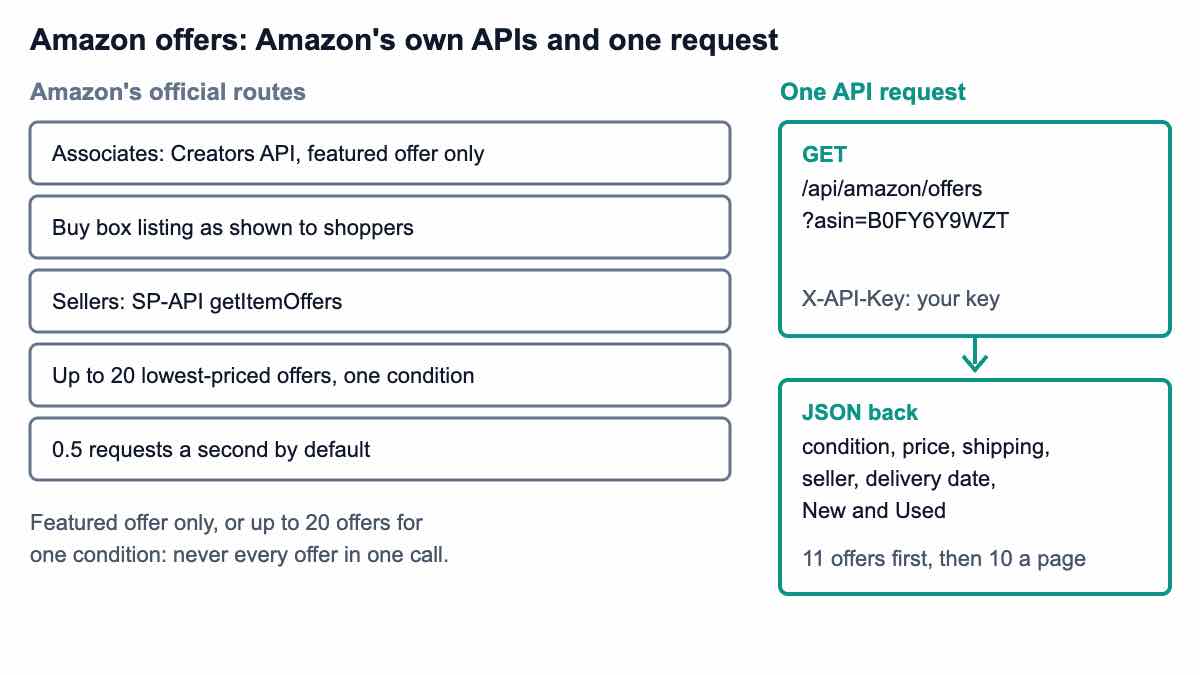
To get the offers on an Amazon product in Python or Node, send one GET request with the product’s ASIN and read the JSON that comes back. The offers come back 11 on the first page and 10 per page after, up to 20 pages, New and Used, each with its condition, price, shipping, seller and delivery date. Amazon’s own APIs are open to two groups only: Associates with recent referred sales, who get the featured offer, and sellers, who get up to 20 of the lowest-priced offers per item condition.
Short answer: To look at one product once, a browser tab is enough. If you sell on Amazon and need prices for your own pricing work, Amazon’s Selling Partner API is the official route, with a default rate of one offers call every two seconds. If you are an Associate building affiliate links, the Creators API gives you the featured offer, not the other sellers. For anything that runs on a schedule or feeds a product, one API call is less code to own, from $0.033 per 1,000 calls — pay as you go, no subscription, with 10 free API calls to start. Every snippet here is complete: change the key and the product, and run it. The one part not yet run is the paging loop; see how we checked this, below.
People who search for a way to scrape Amazon offers usually want the same thing: for one product, every seller’s price with its condition, as rows they can sort. On a product page, the featured offer sits in the buy box, and a link beneath it, something like “See all buying options”, opens the list of other sellers with their conditions, prices and delivery dates. Getting that list into a script is where the work is.
The first section below describes Amazon’s official routes in plain terms, without code, checked against Amazon’s developer documentation on 24 November 2026. The rest of the guide is the one-request route. Its Python and Node snippets were run against saved answers from 21 November 2026, so the numbers you see are real ones, not examples I made up.
How do you do it yourself with Amazon’s official APIs?
Amazon publishes two developer interfaces that return offer data, each built for a different group of people. Neither is a general feed of every seller’s price for any product, so the first question is which group you are in.
The Creators API, for Associates. Amazon’s Product Advertising API 5.0 documentation now opens on a deprecation notice: that API “has been deprecated and is being replaced by the Creators API”. The Creators API is for publishers, influencers and affiliate partners, and getting in takes four steps:
- Join the Associates program for the marketplace you want, and reach final acceptance.
- Make qualifying sales. Amazon’s introduction asks for at least 10 qualifying sales within the past 30 days, and only the primary owner of the Associates account can sign up, as the registration page says.
- Create an application in Associates Central and copy its credential id, secret and version. Requests carry an access token that, according to the migration guide, is valid for one hour.
- Ask for items. GetItems takes up to 10 ASINs per request with your partner tag, and you list the offer fields you want: price, condition, merchant, availability, deal details and whether the offer holds the buy box.
The catch for this guide is in the OffersV2 reference: it “provides only featured listings as shown to retail customers on Amazon Detail Page buybox”, and the summary that held an offer count is not available. You get the offer a shopper sees first, not the list behind “See all buying options”. The usage limits start at one request per second and 8,640 a day for the first 30 days, then follow your shipped-item revenue. Thirty days in a row without referred sales and the account loses access until new sales ship.
The Selling Partner API, for sellers. Its Product Pricing operation getItemOffers “returns the lowest priced offers for a single item based on ASIN”. This one is much closer to the full list:
- One condition per call. You name a marketplace and one condition: New, Used, Collectible, Refurbished or Club. New and used offers take two calls.
- Up to 20 offers. The API model says the list holds the total offer count or 20, whichever is less. Each offer has the seller id, sub-condition, condition notes, price, shipping, where it ships from, whether Amazon fulfils it, the seller’s feedback and whether it is in the buy box. A summary adds the number of offers and the lowest and buy box prices.
- A slow default rate. 0.5 requests per second with a burst of 1, so one call every two seconds; Amazon says some selling partners see higher limits. The batch version starts at 0.1 per second.
- A seller account first. You register as a developer from inside Seller Central, describe your use cases and security controls, pick the roles your app needs, and wait for Amazon’s review.
Both routes come straight from Amazon, under the terms of each program. If you already sell on Amazon and want to watch the offers on your own products, the Selling Partner API is the natural choice. If you are a buyer, an analyst or a tool maker with neither account, neither route is open to you, and the Creators API would not show the other sellers even if it were.
How do you get the offers with one request in Python?
Send a GET request to https://apiserpent.com/api/amazon/offers with your key in the X-API-Key header. Only asin is required; domain picks the marketplace and defaults to amazon.com, and page (1 to 20, default 1) picks the page of offers. Put your key in place of the placeholder, install requests, and run this. It looks up a PlayStation controller and prints the five cheapest offers by price plus shipping:
import requests

API_KEY = "sk_live_your_api_key"
URL = "https://apiserpent.com/api/amazon/offers"


def get_offers(asin, domain="amazon.com", page=1):
    """One GET request = one page of a product's offers = one charge."""
    r = requests.get(URL, params={"asin": asin, "domain": domain, "page": page}, headers={"X-API-Key": API_KEY}, timeout=60)
    r.raise_for_status()
    return r.json()


if __name__ == "__main__":
    data = get_offers("B0FY6Y9WZT")
    offers = data["offers"]

    if not offers:
        print("No offers came back for this product")
    else:
        print(f'{data["title"][:36]}: {len(offers)} of {data["total_offers"]} offers')
        # shipping is null when the listing does not show it, so treat null as 0 and keep the row
        by_landed = sorted(offers, key=lambda o: o["price"] + (o["shipping"] or 0))
        for o in by_landed[:5]:
            landed = o["price"] + (o["shipping"] or 0)
            tag = "  <- buy box" if o["buy_box"] else ""
            print(f'${landed:7.2f}  {o["condition_label"]:<17} {o["seller_name"][:22]:<22}{tag}')
The output, from the saved answer of 21 November 2026:
PlayStation DualSense™ Wireless Cont: 11 of 12 offers
$  51.30  Used - Like New   Amazon Resale
$  54.00  New               Amazon.com              <- buy box
$  63.95  Used - Very Good  Direct Distributor
$  63.95  Used - Very Good  Baby-Dragons-Den
$  63.99  Used - Very Good  TronixDirect
Three things in that output are worth noticing. The first line says 11 of 12: the product has 12 offers in all and page 1 returns the first 11. total_offers tells you more exist, and next_page points to page 2 for the rest. The code sorts by price plus shipping, because the second used offer, Baby-Dragons-Den, lists the item at $57.46 and charges $6.49 to ship it, which lands at $63.95, the same as the offer above it. And the featured offer, flagged by buy_box, is the second-cheapest here, not the cheapest.
To read every offer, loop over page until next_page is null. Each page is one call and one charge:
def all_offers(asin, domain="amazon.com"):
    offers, page = [], 1
    while page:
        data = get_offers(asin, domain, page)
        offers += data["offers"]
        page = data["next_page"]
    return offers
In Node, add page to the URLSearchParams and read next_page the same way.
Here is a trimmed excerpt of the same answer, with two of its offers shown and nothing else changed:
{
  "asin": "B0FY6Y9WZT",
  "domain": "amazon.com",
  "title": "PlayStation DualSense™ Wireless Controller – Midnight Black - For PS5, PC, MAC & Mobile",
  "image": "https://m.media-amazon.com/images/I/21Yld9DgTlL.jpg",
  "rating": 4.7,
  "ratings_count": 51810,
  "total_offers": 12,
  "offers": [
    {
      "position": 1,
      "buy_box": true,
      "condition": "new",
      "condition_label": "New",
      "condition_note": "",
      "price": 54,
      "shipping": 0,
      "shipping_condition": "",
      "currency": "USD",
      "delivery": "Friday, November 27",
      "ships_from": "Amazon.com",
      "seller_name": "Amazon.com",
      "seller_id": "",
      "sold_by_amazon": true,
      "fulfilled_by_amazon": true,
      "seller_rating": null,
      "seller_ratings_count": null,
      "seller_positive_percent": null,
      "max_quantity": 29
    },
    ...
  ]
}
Notice that the code checks offers and not the HTTP status. A product with nothing on offer comes back in the same shape with an empty list, so the reliable test is whether you got rows. That answer is still an answer and is billed like any other call. You can try the same lookup without code in the playground, and the documentation describes each parameter. For the price of a month of these calls, the Amazon offers API price comparison works it out at four volumes.
How do you compare conditions in Node?
This version needs no packages. Save it as offers.mjs so top-level await works. It looks up a graphics card and prints the lowest price in each condition, so a used offer is never compared with a new one:
const API_KEY = "sk_live_your_api_key";
const ENDPOINT = "https://apiserpent.com/api/amazon/offers";

async function getOffers(asin, domain = "amazon.com") {
  const res = await fetch(`${ENDPOINT}?${new URLSearchParams({ asin, domain })}`, {
    headers: { "X-API-Key": API_KEY },
    signal: AbortSignal.timeout(60_000),
  });
  if (res.ok === false) throw new Error(`HTTP ${res.status}`);
  return res.json();
}

const data = await getOffers("B0BZXMJMXZ");

if (data.offers.length === 0) {
  console.log("No offers came back for this product");
} else {
  console.log(`${data.title.slice(0, 36)}: ${data.offers.length} of ${data.total_offers} offers`);
  // The lowest price in each condition, so a used offer is never compared with a new one.
  const lowest = {};
  for (const o of data.offers) {
    if (lowest[o.condition] === undefined || o.price < lowest[o.condition].price) lowest[o.condition] = o;
  }
  for (const [condition, o] of Object.entries(lowest)) {
    console.log(`${condition.padEnd(16)} $${o.price.toFixed(2).padStart(8)}  ${o.seller_name}  (${o.seller_ratings_count ?? "no"} ratings)`);
  }
}
The output, from the saved answer of 21 November 2026:
ZOTAC Gaming GeForce RTX 4070 Twin E: 4 of 4 offers
used_very_good   $  722.22  Atomic Cellular  (940 ratings)
new              $ 1045.00  S V I  (298 ratings)
The card has four offers: two used and two new. The cheapest used offer is $722.22 and the cheapest new one is $1,045.00, a gap of $322.78. The code groups on condition, the code field, rather than on condition_label, because the label is the marketplace’s own words and follows its language, while the code is one of seven values on every marketplace. The seller’s rating count sits beside each price, which matters here: 940 ratings is a long record and 298 a shorter one.
What does each field in an offer mean?
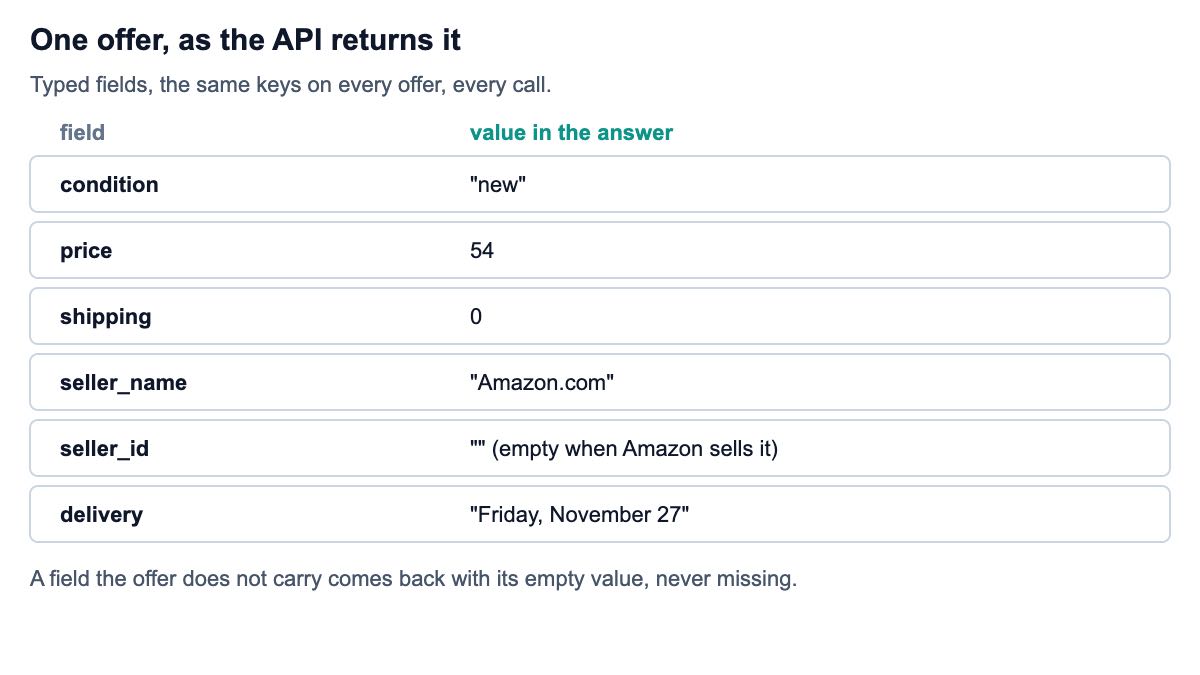
Each offer in offers carries nineteen fields, in the order Amazon lists the offers. Above the list, the answer repeats asin and domain and adds the product’s title, image, rating, ratings_count and total_offers. After the list comes next_page, the next page number or null on the last page.
| Field | What it holds |
|---|---|
position, buy_box | The place in the list, starting at 1, and whether this is the featured offer |
condition | One of seven codes: new, used_like_new, used_very_good, used_good, used_acceptable, collectible, renewed |
condition_label | The condition exactly as the marketplace shows it, in its language |
condition_note | The seller’s own words about the item, often empty |
price, shipping | Item price and shipping as numbers in the marketplace’s currency; shipping is 0 for free and null when not shown |
shipping_condition | What free or cheap shipping depends on, as shown, such as “on your first order”; empty when nothing |
currency | The currency code of the marketplace |
delivery | The delivery estimate as shown, such as “Friday, November 27” |
ships_from, seller_name, seller_id | Who ships it, who sells it, and the seller’s id; the id is empty when Amazon sells it |
sold_by_amazon, fulfilled_by_amazon | Whether Amazon itself sells the offer, and whether Amazon ships it |
seller_rating, seller_ratings_count, seller_positive_percent | The seller’s star rating, number of ratings and positive share; null when the seller has none |
max_quantity | The most units one order can take, null when not shown |
How do you handle empty fields?
Treat an empty field as information, not as a failure. Across the 243 offers in the recorded answers from 21 November 2026, every offer had a condition, a price, a seller name and a ships-from name. A delivery estimate and a shipping amount were present on 225 of them, a seller id on 211, a seller rating on 202 and a maximum order quantity on 202.
The offers without a seller id are the ones Amazon sells itself, and they have no seller rating either; the featured offer in the controller answer above is one. An empty seller_id is an empty string, a missing rating is null, and a missing shipping amount is null, so test for those before you do arithmetic. That is why the Python code above writes (o["shipping"] or 0) and the Node code uses ?? "no" for the rating count.
Amazon’s own words stay available when you need them. In the saved answer for the Guinness World Records 2027 annual on amazon.co.uk, the featured offer shows a shipping cost of 12.80 in shipping, while a used copy at 16.27 ships free; compare them by price + shipping and the order changes. And shipping_condition keeps text such as “on orders shipped by Amazon over $35”, which would otherwise live in a sentence you have to parse.
Which route should you pick?
| Creators API | Selling Partner API, getItemOffers | One API call per page | |
|---|---|---|---|
| Who can use it | Associates with at least 10 qualifying sales in the past 30 days | Sellers who register as developers in Seller Central | Anyone with an API key |
| Offers you get | The featured offer only, with no offer count | Up to 20 of the lowest-priced, one condition per call | The featured offer and 10 others on page 1, then 10 per page, New and Used together |
| How fast | Up to 1 request a second and 8,640 a day at first | 0.5 requests a second by default, one call every two seconds | A median of 3.8 seconds for an answered call |
| What it costs you | Keeping your referred sales up | A seller account and Amazon’s review | From $0.033 per 1,000 calls |
- A one-off look at one product: a browser tab. Nothing here needs code.
- Offers on products you sell, from your own seller account: the Selling Partner API. It is Amazon’s own data, and the two-second pace is enough for a short list of your own products.
- An affiliate site that shows a price beside a link: the Creators API, if your referred sales qualify. The featured offer is what a shopper sees first, and that is what it returns.
- A scheduled job or a pricing tool that watches other sellers: one API call per product, with New and Used offers in one answer and no Amazon account to keep in good standing.
- Many products and several marketplaces: the API, with a loop or a few parallel workers around the Python function above, and a check for an empty
offerslist on every response. - A product where a person waits for the answer: the API, with a 60-second timeout as above, and a median of 3.8 seconds for an answered call in mind.
Whichever route you take, read the site’s terms and the rules where you work before you collect data. For what each option costs per 1,000 lookups, the Amazon offers API price comparison works it out at four volumes, and the Amazon Offers API page lists every field. For a use of the data, see Amazon offers data for repricing. For one product’s full record rather than its sellers, there is the Amazon Scraper API and the older build an Amazon scraper in Python guide.
How we checked this
Code. The two API snippets were executed against a local stand-in server that answered with saved responses, so the request address, the X-API-Key header and the parameters were checked without a live call, and the outputs shown are what each snippet printed. The saved responses are real answers from 21 November 2026. I did not call the live endpoint while writing this post. The page parameter and the paging loop were added after that run and have not been executed; the outputs shown are for page 1.
The official route. The section on Amazon’s official APIs was checked against Amazon’s developer documentation on 24 November 2026, and the pages are linked in the sources. That section has no code and no output, because no code was run against either of Amazon’s APIs for this post.
Data. The fill counts come from 243 offers in the recorded answers of a fixed set of products, spread over PC parts, electronics and books in 10 marketplaces. The currency field is shown as USD for amazon.com, taken from the marketplace; confirm it in a live answer.
What I could not verify:
- That the paging loop returns every offer of a product with more than 11. It was not run; the outputs above are page 1 only.
- How many listings the Creators API returns per item in practice. Its reference says featured listings only and its sample shows one; I did not call it.
- The rate your own seller account gets from the Selling Partner API. Amazon gives the default and says some selling partners see higher limits.
- The legal position of scraping in your country. This is not legal advice.
Get the offers without owning a parser
Serpent’s Amazon Offers API is from $0.033 per 1,000 calls — pay as you go, no subscription, with 10 free API calls to start. Try a real product in the playground before you write any code.
Get Your Free API KeyExplore: Amazon Offers API · Playground · Docs · Pricing
FAQ
Can I scrape Amazon offers with Python?
Yes, with a few lines that call an API and read JSON, as the code in this guide shows. Amazon's own APIs are another route if you qualify: the Creators API, for Associates with recent referred sales, returns the featured offer, and the Selling Partner API's getItemOffers, for sellers, returns up to 20 of the lowest-priced offers for one condition per call. One GET request to the Amazon offers endpoint returns New and Used offers together as JSON.
Does Amazon's official API return every seller's offer?
Not for everyone. According to Amazon's documentation, the Creators API that replaces the Product Advertising API returns only the featured listings shown in a product page's buy box, with no offer count. The Selling Partner API's getItemOffers returns up to 20 of the lowest-priced offers for one item condition per call, at a default rate of one call every two seconds, and you register for it from a seller account.
How many offers does one call return?
One call returns one page from the Serpent API: the featured offer and the first 10 others on page 1, then 10 per page after, up to 20 pages, in the order Amazon lists them, New and Used. The total_offers field says how many the product has in all conditions, and next_page gives the next page number, or null on the last page. A product with 12 offers returns 11 on page 1 and the last one on page 2. Each page is one charge. Many products have far fewer; the saved examples in this guide have between 4 and 12.
Why does the same product show different prices for new and used offers?
Because the featured offer is not always the cheapest and not always new. In the saved answer for a PlayStation controller, the cheapest offer is a Used - Like New one at $51.30, the featured offer is New at $54.00, and some used offers cost more once shipping is added. Compare offers by condition, and by price plus shipping, not by item price alone.
Do I need an Amazon account or a separate key for the API?
Not for the Serpent API. You send one Serpent API key in an X-API-Key header. There is no Amazon account to link and no separate allowance to track; the same key works on every Serpent endpoint, and new accounts start with 10 free API calls. Amazon's own APIs do need one: an Associates account with qualifying sales for the Creators API, or a seller account for the Selling Partner API.
Is it legal to scrape Amazon?
I am not a lawyer, and the answer depends on where you are and how you use the data. Read Amazon's Conditions of Use and the rules in your own jurisdiction before you collect anything, and avoid personal data. The API route does not change those obligations. It does mean you are not writing and running the page reader yourself.
Sources
Libraries and references:
- requests documentation
- MDN: fetch()
- MDN: AbortSignal.timeout()
- MDN: URLSearchParams
- Python: str.format mini-language
Amazon’s official APIs (checked 24 November 2026):
- Product Advertising API 5.0 deprecation notice
- Creators API: introduction and prerequisites
- Creators API: register for access
- Creators API: migrating from PA-API
- Creators API: GetItems
- Creators API: OffersV2
- Creators API: rate limits
- Selling Partner API: getItemOffers
- Selling Partner API: Product Pricing v0 model
- Selling Partner API: register as a private developer
- Selling Partner API: roles
Amazon (read before you automate anything):