Amazon Offers Data for Repricing and PC Parts Pricing

To reprice against Amazon offers, read each product’s featured offer and its cheapest competing offers on a schedule, add shipping to every price, compare new with new and used with used, and act on the gap. One call returns one page of a product’s offers: 11 on the first page and 10 per page after, up to 20 pages, so you can read every offer on it. The numbers in this post come from saved answers for real products, including two graphics cards, so you can see where the featured offer is not the cheapest.
Short answer: If you sell on Amazon, check your own listing against the cheapest new offer by price plus shipping, and watch the used floor separately. If you run a PC parts comparison site, list every new offer by landed price with the seller’s rating beside it and show used offers in their own group. Either way, a watch list of 5,000 products checked four times a day is 600,000 calls a month: $34.80 on Serpent’s pay-as-you-go rate of $0.058 per 1,000 calls, with 10 free API calls to start.
A price on Amazon is not one number. The same graphics card is on sale at once from Amazon itself, from sellers who ship it themselves, from sellers who send it from an Amazon warehouse, and from sellers who list it used. Each has its own price, its own shipping and its own rating, and a shopper sees them one click apart. A seller or a price comparison site that wants to act on that needs all of them in rows.
This post uses the Amazon Offers API for that, and every example is a saved answer from 21 November 2026 for a real product on amazon.com unless it says otherwise. It is the use-case companion to how to scrape Amazon offers with Python and Node and the Amazon offers API price comparison.
Which three numbers decide a price?
Three. The featured offer’s price, the cheapest competing new offer including shipping, and the cheapest used offer. Everything else is detail around those.
The featured offer, the one in the buy box, is the price most shoppers meet first, and the buy_box flag marks it. The cheapest competing new offer is the price a shopper who looks further will find. The used floor is the price a shopper who does not need new will pay, and it sets a ceiling on how far above it a new price can sit before some buyers leave. Seller quality matters beside all three: each offer carries the seller’s star rating, number of ratings and positive share, so you can tell a cheap offer from an established seller from a cheap offer from a new one.
Because the answer is a flat list, each of the three is one line of code. The rest of this post shows what they look like on real products and where a naive reading goes wrong.
Is the featured offer the cheapest?
Often not. In the saved answer for a Gigabyte Radeon RX 9070 GRE 12 GB graphics card, the featured offer is Amazon.com at $729.99, and a third-party seller, electrolert, lists the same card new at $729.00. That is a gap of 99 cents, and the other four sellers are far apart from both: $934.00, $957.32, $999.99 and $1,167.50.
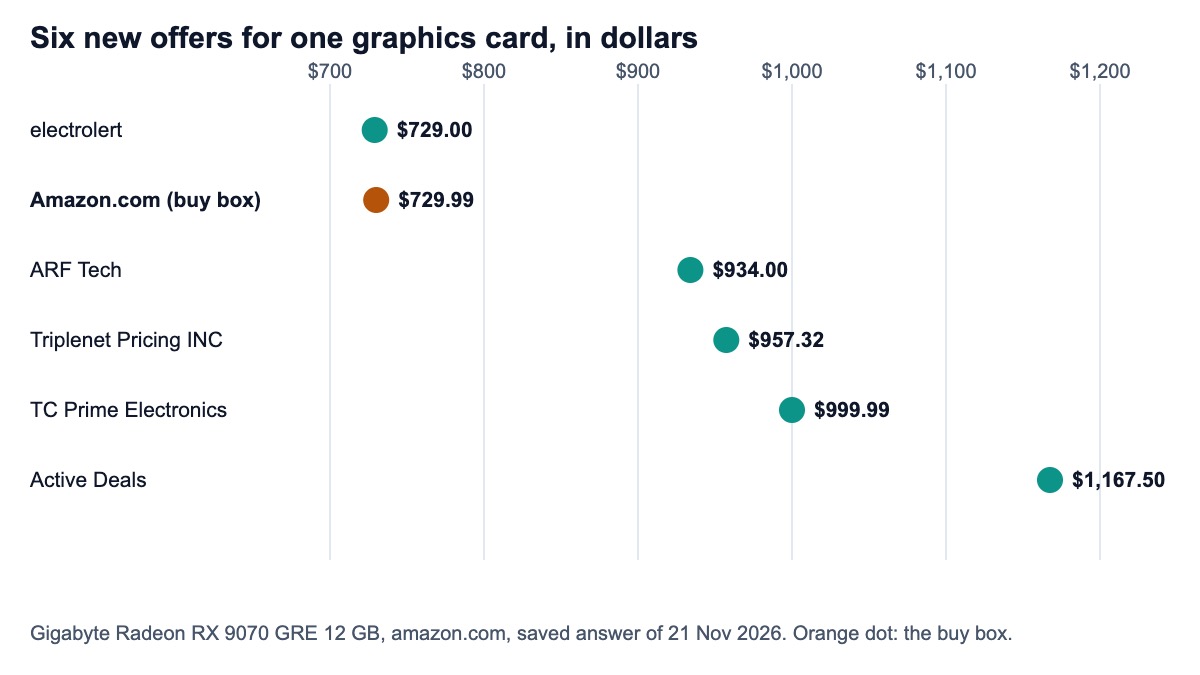
Read the chart as a seller would. The market has two clusters: two offers at about $729 and four between $934 and $1,167.50. A seller listed at $749.00 is $20 above the two cheapest offers and $185 below the next one, so the price that matters to them is $729, not the median of the six, which is $945.66. A repricer that follows the middle of the six would move a $749.00 listing up by nearly $200, to a price only the dearer cluster accepts. A repricer that follows the cheapest competing new offer would move it down by $20.
Look at who holds the top of the market, too. The featured offer is sold and shipped by Amazon, with no seller rating, and the cheapest third party has 162 ratings and a 93 percent positive share. The four sellers above $900 include one with 11,562 ratings at 97 percent and one with 90,763 ratings at 61 percent. Neither price nor rating alone tells you who your shopper will choose, and having both in the same row is what makes the question answerable.
Why does the price have to include shipping?
Because the item price can be the lowest and the total the highest. In a saved answer from amazon.de for a pack of two HP 305 ink cartridges, five new offers have item prices from 28.04 to 35.90 euros. The seller with the lowest item price, 28.04, charges 99.99 euros to ship it. Added up, that offer costs 128.03 euros, the most expensive of the five.
| Seller | Item price | Shipping | Price plus shipping | Rank by item price | Rank by total |
|---|---|---|---|---|---|
| Druck- und Handelsshop | 30.99 | 14.80 | 45.79 | 2 | 1 |
| Druck- und Handelsshop (second offer) | 32.99 | 14.80 | 47.79 | 4 | 2 |
| Tintenwunsch | 35.90 | 25.00 | 60.90 | 5 | 3 |
| druckdichaus (second offer) | 32.63 | 64.90 | 97.53 | 3 | 4 |
| druckdichaus | 28.04 | 99.99 | 128.03 | 1 | 5 |
Rank by item price and you would put the dearest offer first, and the offer that is first by item price is last by total. The fix is one addition per offer, and the shipping field exists as a number so you can do it. When shipping is null, the listing did not show it, so count it as unknown, not as zero, and flag the row. When the field shipping_condition is not empty, free shipping depends on something, such as “on orders shipped by Amazon over $35” in the saved .com book answers or “on your first order” in the saved .ca answers. Decide whether that condition applies to your shopper before you count the shipping as free.
How far below new does the used market sit?
For a ZOTAC GeForce RTX 4070 Twin Edge OC 12 GB, the saved answer has four offers: two used and two new. The cheapest used offer is $722.22 and the cheapest new offer is $1,045.00. The used price is $322.78 lower, which is about 31 percent below new.
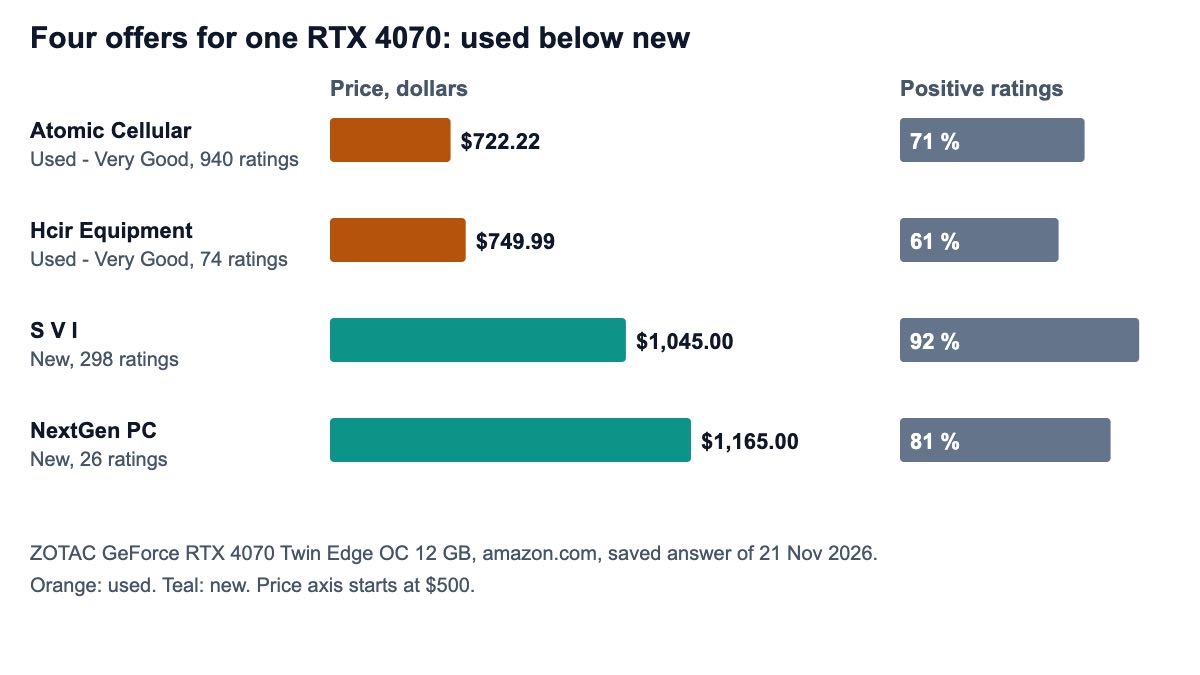
Two more facts in this answer are worth a pause. The featured offer is the used one, so a shopper who follows the buy box lands on a used card at $722.22 from a seller with 940 ratings and a 71 percent positive share, and a tool that reads only the featured offer would record $722.22 as the market price of a new card. The condition field is what stops that. And the sellers differ in standing: the cheapest used seller has 71 percent positive over 940 ratings, the other used seller 61 percent over 74, the cheapest new seller 92 percent over 298 and the dearest new seller 81 percent over 26. The ratings are the seller’s, not the item’s, and the seller’s own words about the item are in condition_note.
For a seller, the practical reading is that a new price much above the used floor needs a reason a buyer can see, such as a warranty or faster delivery. For a PC parts site, it is a reason to show used offers in their own group, with their condition note, and never mix them into the new ranking.
What does a repricing check look like in code?
This script takes a product and your current price, fetches the offers, leaves your own offer out when you give your seller id, and prints the three numbers: the featured offer, the cheapest competing new offer by price plus shipping, and the cheapest used offer. Put your key in place of the placeholder and install requests. The two calls at the bottom are the two graphics cards above, with $749.00 and $1,100.00 as made-up prices for your listing:
import requests

API_KEY = "sk_live_your_api_key"
URL = "https://apiserpent.com/api/amazon/offers"


def get_offers(asin, domain="amazon.com"):
    r = requests.get(URL, params={"asin": asin, "domain": domain}, headers={"X-API-Key": API_KEY}, timeout=60)
    r.raise_for_status()
    return r.json()


def landed(offer):
    """Item price plus shipping. A null shipping means the listing did not show it, so count it as 0."""
    return offer["price"] + (offer["shipping"] or 0)


def check(asin, my_price, my_seller_id=None):
    data = get_offers(asin)
    # Leave your own offer out, so you are compared with the rest of the market.
    offers = [o for o in data["offers"] if my_seller_id is None or o["seller_id"] != my_seller_id]
    new = [o for o in offers if o["condition"] == "new"]
    used = [o for o in offers if o["condition"].startswith("used")]
    print(f'{data["title"][:44]}  ({len(data["offers"])} of {data["total_offers"]} offers)')
    featured = next((o for o in offers if o["buy_box"]), None)
    if featured:
        print(f'  featured: {featured["seller_name"]}, {featured["condition_label"]}, ${landed(featured):.2f}')
    if new:
        rival = min(new, key=landed)
        cheaper = sum(1 for o in new if landed(o) < my_price)
        gap = my_price - landed(rival)
        print(f'  cheapest new: {rival["seller_name"]}, ${landed(rival):.2f}; you are ${abs(gap):.2f} {"above" if gap > 0 else "below"}')
        print(f'  new offers below your ${my_price:.2f}: {cheaper} of {len(new)}')
    if used:
        floor = min(used, key=landed)
        print(f'  cheapest used: {floor["seller_name"]}, {floor["condition_label"]}, ${landed(floor):.2f}')


if __name__ == "__main__":
    check("B0H2X24HGM", my_price=749.00)
    check("B0BZXMJMXZ", my_price=1100.00)
The output, from the saved answers of 21 November 2026:
GIGABYTE Gaming Radeon RX 9070 GRE 12GB GDDR  (6 of 6 offers)
  featured: Amazon.com, New, $729.99
  cheapest new: electrolert, $729.00; you are $20.00 above
  new offers below your $749.00: 2 of 6
ZOTAC Gaming GeForce RTX 4070 Twin Edge OC D  (4 of 4 offers)
  featured: Atomic Cellular, Used - Very Good, $722.22
  cheapest new: S V I, $1045.00; you are $55.00 above
  new offers below your $1100.00: 1 of 2
  cheapest used: Atomic Cellular, Used - Very Good, $722.22
The script prints and decides nothing, on purpose. Whether to move a price to $729.00, hold it, or match the featured offer depends on your margin, your stock and the rules of the marketplace, and none of that is in the offers. Feed the three numbers into whatever rule you already trust. If your product has more offers than the first page holds, the total_offers in the first line tells you: the first number is how many you got, the second how many exist. Ask for page=2 and on, up to page 20, and stop when next_page is null. Each page is one call.
How do you build a PC parts price comparison?
List the new offers by landed price, put the seller’s positive share and the delivery date beside each, and show used offers in a separate group. The Node script below does the first part for the Radeon card: it keeps the new offers, adds shipping to each price, sorts and prints the five cheapest. It needs no packages; save it as compare.mjs.
const API_KEY = "sk_live_your_api_key";
const ENDPOINT = "https://apiserpent.com/api/amazon/offers";

const res = await fetch(`${ENDPOINT}?${new URLSearchParams({ asin: "B0H2X24HGM", domain: "amazon.com" })}`, {
  headers: { "X-API-Key": API_KEY },
  signal: AbortSignal.timeout(60_000),
});
if (res.ok === false) throw new Error(`HTTP ${res.status}`);
const data = await res.json();

// New offers only, cheapest landed price first, with the seller's positive share beside each one.
// slice(0, 5) keeps the five cheapest.
const rows = data.offers
  .filter((o) => o.condition === "new")
  .map((o) => ({ seller: o.seller_name, landed: o.price + (o.shipping ?? 0), positive: o.seller_positive_percent, delivery: o.delivery }))
  .sort((a, b) => a.landed - b.landed);

console.log(`${data.title.slice(0, 40)}: ${rows.length} new offers`);
for (const r of rows.slice(0, 5)) {
  const share = r.positive === null ? "no rating" : `${r.positive}% positive`;
  console.log(`$${r.landed.toFixed(2).padStart(8)}  ${r.seller.padEnd(22)} ${share.padEnd(14)} ${r.delivery}`);
}
The output, from the saved answer of 21 November 2026:
GIGABYTE Gaming Radeon RX 9070 GRE 12GB : 6 new offers
$  729.00  electrolert            93% positive   Tuesday, December 1
$  729.99  Amazon.com             no rating      November 28 - December 1
$  934.00  ARF Tech               97% positive   November 27 - December 1
$  957.32  Triplenet Pricing INC  61% positive   Friday, December 11
$  999.99  TC Prime Electronics   100% positive  Wednesday, December 2
Three choices in that output are worth copying. Amazon.com shows “no rating” because an offer Amazon sells itself has a null rating, and the code says so instead of printing a zero. Delivery stays as the text Amazon shows, because “November 28 - December 1” is a range and a date parser would lose it. And the list is only new offers; run the same code with condition.startsWith("used") for the used group. A shopper comparing five prices cares about the delivery date and the seller as much as the dollar amount, and the rows have all three.
Because the endpoint covers 10 marketplaces with the same fields, the same code runs on domain=amazon.de or amazon.co.uk and compares the same ASIN across countries, where the product is sold. Prices come back in each marketplace’s currency, with the currency on every offer, so convert before you rank across markets. Cache every answer in your own table with its time, so a comparison page never waits on a live call. For general price-monitoring design, see ecommerce price intelligence and Amazon product price and availability monitoring.
What does it cost to watch a catalogue?
One call is one page of one product’s offers, however many offers it returns, so a first-page check costs the number of products times the number of checks. A product with more offers than the first page holds takes one more call for each extra page. At Serpent’s pay-as-you-go rate of $0.058 per 1,000 calls, a catalogue of 1,000 products checked once a day is $1.74 a month. A watch list of 20,000 products checked every hour is a very different job, and the table shows how the tiers change it.
| Watch list | Calls a month | Pay as you go, $0.058 per 1,000 | Enterprise Plus, $0.033 per 1,000 |
|---|---|---|---|
| 1,000 products, once a day | 30,000 | $1.74 | $0.99 |
| 5,000 products, once a day | 150,000 | $8.70 | $4.95 |
| 5,000 products, four times a day | 600,000 | $34.80 | $19.80 |
| 20,000 products, every hour | 14,400,000 | $835.20 | $475.20 |
The deposit tiers are $0.05 on Growth after a $100 deposit, $0.044 on Scale after $500 and $0.038 on Enterprise after $1,000, and Enterprise Plus after $1,250. The deposit is spendable balance, not a fee, so a catalogue that spends $34.80 a month would take a long time to use a $1,250 deposit; pay as you go is the honest row for the first two lines. See the pricing page for how tiers work, and the price comparison for what the same volume costs elsewhere.
Spend your calls where the gap moves. A product whose cheapest offer has not changed in a week does not need four checks a day; a product with a crowded list does. Start daily for everything, find the products where today’s cheapest offer differs from yesterday’s, and give those the extra checks.
Which workflow should you pick?
- You sell a few hundred products on Amazon: one check a day per product with the script above, and a rule on the gap to the cheapest competing new offer by price plus shipping.
- You sell used or refurbished stock: track the used floor by condition, not the new price, and keep each seller’s condition note next to the price you compare with.
- You run a PC parts or electronics comparison site: store each answer with its time, show new offers by landed price with seller rating and delivery date, and keep used offers in their own group.
- You compare across countries: send the same ASIN to each marketplace, convert currencies yourself and expect that a product is not sold in every one.
- You need price history rather than today’s offers: store the answers yourself as you go, or look at a service that sells history, since a single answer is a snapshot.
If you want the full product record beside the offers, the Amazon Scraper API returns title, bullets and images, and the Amazon Offers API page lists every offer field. To try a product without writing code, use the playground, and for the code on its own see the Python and Node guide.
How we checked this
Data. Every offer, price and seller figure in this post is read from recorded answers of 21 November 2026 for the products named: Gigabyte Radeon RX 9070 GRE 12 GB (ASIN B0H2X24HGM), ZOTAC RTX 4070 Twin Edge OC (B0BZXMJMXZ) and HP 305 ink cartridges on amazon.de (B08T1HR5CS), with the book and Canada examples of shipping_condition from other recorded answers of the same day. The sums (the spread, the median of six, the 31 percent, the totals with shipping, the monthly costs) are my own arithmetic from those values and from the published rates, shown above. The Python and Node scripts were executed on 22 November 2026 on Python 3.15.2 (requests 2.34.2) and Node 26.5.0 against a local stand-in server that replayed the recorded answers, and the outputs shown are what they printed. The currency field is shown as USD for amazon.com, taken from the marketplace; confirm it in a live answer. I did not call the live endpoint while writing this post.
What I could not verify:
- How often these prices change. Each product was recorded once, so nothing here is a price history and nothing says how long a gap between two offers lasts.
- How Amazon chooses the featured offer, and whether a lower price would win it. The post only reports which offer was flagged featured.
- That a seller can match a rival’s price at a profit, and the rules that apply to your account on the marketplace. Those depend on you, not on the data.
- That the products named are still listed or priced the same today, and the euro amounts have not been converted.
Serpent is not affiliated with or endorsed by Amazon.
Watch your own products
Serpent’s Amazon Offers API is from $0.033 per 1,000 calls — pay as you go, no subscription, with 10 free API calls to start. Try one of your own ASINs in the playground before you write any code.
Get Your Free API KeyExplore: Amazon Offers API · Playground · Docs · Pricing
FAQ
How do I see the competing offers on an Amazon product in code?
Call an offers endpoint with the product's ASIN and read the list. With the Serpent Amazon Offers API, one GET request to /api/amazon/offers returns one page of offers, 11 on the first page with the featured buy-box offer first, then 10 per page after, up to 20 pages, each offer with its condition, price, shipping, delivery estimate and seller. The total_offers field tells you how many the product has in all, and next_page gives the next page number until the last page, where it is null.
Is the featured offer always the lowest price?
No. In the saved answer for a Gigabyte Radeon RX 9070 GRE on amazon.com, the featured offer was Amazon.com at $729.99, while a third-party seller listed the same card new at $729.00. In the saved answer for a ZOTAC RTX 4070, the featured offer was a used one at $722.22 and the cheapest new offer was $1,045.00. Read the buy_box flag to find the featured offer and compare the rest yourself.
Should I add shipping when I compare prices?
Yes. In a saved answer from amazon.de, one seller listed an ink cartridge pack at 28.04 euros, the lowest item price of the five offers, and charged 99.99 euros to ship it, which makes it the most expensive at 128.03. Compare price plus shipping, and treat a null shipping as unknown rather than free. The shipping_condition field says when free shipping depends on something, such as a first order.
How do I compare used and new offers fairly?
Group the offers by the condition field, which is one of seven codes, and compare the cheapest of each group with the matching group in your own catalogue. In the saved RTX 4070 answer, the cheapest used offer was $322.78 below the cheapest new one, about 31 percent. Keep the seller's own note in condition_note beside the price, because a used price means little without the description.
How often should I check offers?
Match the check to how fast your market moves. Start with one check a day per product and move to more frequent checks only for the products where the cheapest offer is different each time you look. The saved answers in this post are single snapshots, so they cannot tell you how often a price changes. At the pay-as-you-go rate, 5,000 products checked four times a day is 600,000 calls a month, which costs $34.80.
How much does it cost to watch 5,000 products?
At $0.058 per 1,000 calls on pay as you go, 5,000 products checked once a day is 150,000 calls a month, or $8.70. Checked four times a day it is 600,000 calls and $34.80, and on the Enterprise Plus tier at $0.033 per 1,000 calls it is $19.80. One call is one page of a product's offers however many offers it returns, and new accounts start with 10 free API calls.
Sources
Marketplace rules and references (read before you automate pricing):