How to Scrape AliExpress with Python and Node

To get AliExpress products in Python or Node, either use AliExpress’s official affiliate API, which needs an approved affiliate developer account and signed requests, or send one GET request with a search term and read the JSON that comes back. The first is built for affiliate publishers and returns products with promotion links and commission rates. The second answers with up to 60 products, each with a price, rating, units sold and shipping.
Short answer: If you publish AliExpress affiliate links and want commission data, apply for AliExpress’s official affiliate API. For a search that runs on a schedule, feeds a product or covers many keywords, with no affiliate account to set up, one API call is less to own, from $0.24 per 1,000 calls — pay as you go, no subscription, with 10 free API calls to start. Every snippet below is complete: change the key and the search, and run it.
What is on an AliExpress search page?
A search page is a grid of product cards. Each card shows a photo, a title, a price, sometimes a struck-through price with a discount, a star rating, a line such as “1,000+ sold”, tags such as “Free shipping” or “Top selling”, and a delivery estimate. Those are the fields most projects want, and the page carries all of them.
The page is made for a person with a browser. It changes without notice, so a reader you write for it needs upkeep for as long as you need the data.
Everything on a card is text first. A price is US $18.39, sales are 1,000+ sold or 20K+ sold, and a delivery estimate is a sentence. To use them in a table you need each one as a number, a rule for what a missing one means, and a way to tell a sponsored card from an ordinary one.
How do you do it yourself with AliExpress’s official API?
AliExpress runs its own developer site, the AliExpress Open Platform. Its affiliate section, listed as AE-Affiliate in the API reference, has 15 methods for affiliate publishers. Two of them search for products: aliexpress.affiliate.product.query (“get products”) and aliexpress.affiliate.hotproduct.query (“get hotproducts”). Others return one product’s details, categories, promotion links and your affiliate orders.
Getting started takes five steps, as the quick start for new users describes:
- Join the affiliate program. You need an AliExpress Portals account, which is AliExpress’s affiliate program, before you register as a developer.
- Create a developer account. Sign up on the Open Platform with your email, confirm the verification email, and accept the Open Platform Developer Agreement.
- Complete your profile and wait for approval. You choose a developer type, which for this work is Affiliate (corporation) or Affiliate (individual), fill in the fields and upload the documents it asks for. The console opens once the profile is approved.
- Create an app. In the console you pick an app category, give the app a name and a callback address, and submit it. An App Key and an App Secret are assigned to it automatically.
- Put the app online. When your code is ready, you apply online for the app from the console.
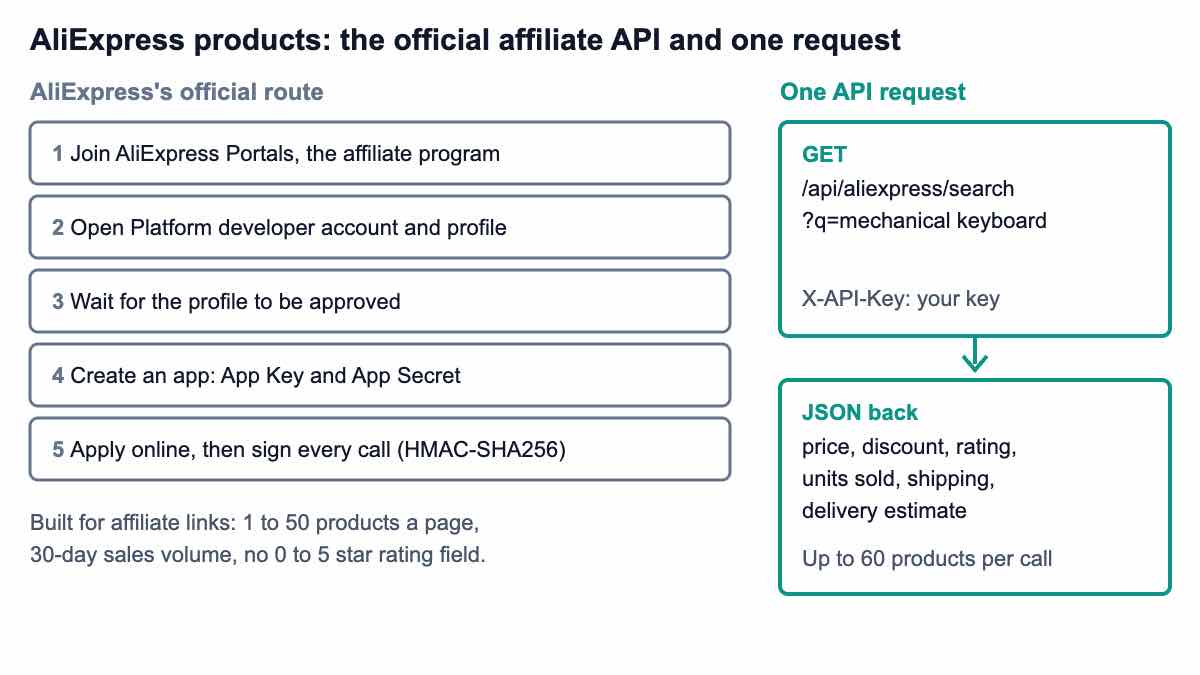
Every call carries your App Key, a timestamp that must be within 7,200 seconds of UTC, and a signature. According to the signature guide, you sort the request parameters by name, join them into one string and sign it with HMAC-SHA256 using the App Secret, which must be kept strictly confidential. AliExpress generates an official SDK for each app in Java, .NET, PHP and Python. There is no Node SDK in that list, so in Node you build and sign the request yourself.
The product query filters by keywords, category, a price range given in cents, the country you ship to and a delivery time of 3, 5, 7 or 10 days. It sorts by price or by sales volume, returns 1 to 50 products a page, and takes a target currency and a target language, each from a fixed list. Each product comes back with its title, id, images and video, the sale price, original price and app price, a discount, a figure the docs call the evaluate rate, sales volume in the last 30 days, its categories, the shop, a promotion link and commission rates, plus the total number of matches.
Three things to know before you choose it. It is built around affiliate links: you pass your tracking id and get promotion links and commission rates back. The documented product fields have no flag for sponsored rows and no star rating out of 5, and sales are a 30-day volume rather than the “1,000+ sold” line on a card. And the endpoint page says calls in production are limited, but the affiliate pages I read give no number, and they list no per-call price.
How do you get the products with one request in Python?
Send a GET request to https://apiserpent.com/api/aliexpress/search with your key in an X-API-Key header and the search in q. Get a key and 10 free API calls at the sign-up page.
import requests

API_KEY = "sk_live_your_api_key"
URL = "https://apiserpent.com/api/aliexpress/search"

resp = requests.get(
    URL,
    headers={"X-API-Key": API_KEY},
    params={"q": "mechanical keyboard"},
    timeout=60,
)
data = resp.json()

print(data["total_results"], "results on AliExpress,", len(data["products"]), "products in this answer,", data["currency"])
for p in data["products"][:3]:
    print(f'{p["position"]:>2}  {p["price_text"] or "no price":<10} {p["sold_text"] or "-":<13} {p["title"][:48]}')
Using the saved answer for “mechanical keyboard”, the script prints:
35273 results on AliExpress, 60 products in this answer, USD
 1  US $18.39  1,000+ sold   APAYADO K61 Keyboard 60% Portable Wired Mechanic
 2  US $8.45   80 sold       FocusOnPC 61 Keys Ultra Mini Gaming Keyboard TS9
 3  US $34.02  72 sold       ATTACK SHARK X66 65% Wireless Mechanical Keyboar
The price is already a number in price and the text AliExpress shows is in price_text; units sold are a number in sold and the text is in sold_text. Here is the first product, trimmed to the fields that matter (the photo gallery is left out):
{
  "position": 1,
  "id": "3256808473935772",
  "url": "https://www.aliexpress.com/item/3256808473935772.html",
  "title": "APAYADO K61 Keyboard 60% Portable Wired Mechanical Keyboard Wired 61 Keys Phantom RGB",
  "price_text": "US $18.39",
  "price": 18.39,
  "original_price": 45.7,
  "discount_percent": 59,
  "promo_label": null,
  "rating": 4.9,
  "sold_text": "1,000+ sold",
  "sold": 1000,
  "free_shipping": false,
  "delivery_text": "Delivery: Nov. 30 - Dec. 05",
  "badges": ["Save $27.31"],
  "sponsored": false
}
What can you ask for?
Three parameters. q is required: the search as you would type it on AliExpress, in any language, up to 200 characters. page runs from 1 to 60 and defaults to 1. sort is best_match (the default), orders for the most sold first, price_asc or price_desc.
Sorted pages carry no sponsored rows, which is handy when you only want organic products. Pages after the first can reorder between calls, as they do on the site, so store the id of what you saw rather than assuming page 2 repeats. A search typed in another language works the same way:
curl -G "https://apiserpent.com/api/aliexpress/search" \
  --data-urlencode "q=LED Streifen 5m" \
  --data-urlencode "page=2" \
  --data-urlencode "sort=orders" \
  -H "X-API-Key: sk_live_your_api_key"
How do you find the best sellers in Node?
Because the numbers are numbers, ranking is a filter and a sort. This script keeps the organic products that show both sales and a rating, sorts them by units sold and prints the top three:
(async () => {
  const params = new URLSearchParams({ q: "led strip lights" });
  const res = await fetch("https://apiserpent.com/api/aliexpress/search?" + params, {
    headers: { "X-API-Key": "sk_live_your_api_key" },
  });
  const data = await res.json();
  if (data.products.length === 0) return console.log("No products came back for this search");

  // Organic rows only, with sales and a rating. sold is a number (the lower bound of "5,000+ sold").
  const proven = data.products
    .filter((p) => !p.sponsored && p.sold !== null && p.rating !== null)
    .sort((a, b) => b.sold - a.sold);

  console.log(data.query, "-", data.products.length, "products,", proven.length, "with sales and a rating");
  for (const p of proven.slice(0, 3)) {
    console.log(`${p.sold_text.padEnd(14)} ${p.price_text.padEnd(9)} ${String(p.rating).padEnd(4)} ${p.title.slice(0, 44)}`);
  }
})();
Using the saved answer for “led strip lights”, it prints:
led strip lights - 60 products, 40 with sales and a rating
100K+ sold     US $1.09  4.5  RGB Led Strip Lights 5m 10m 20m 30m Led Room
3,000+ sold    US $8.19  4.9  5M 10M Per Roll COB LED Strip DC12V 24V 8mm
2,000+ sold    US $32.77 4.9  Neon Rope Light, Flexible Led Lights Control
The first row is 100K+ sold, which sold holds as 100000. The text is a floor, not a count: a product that shows “5,000+ sold” has sold at least 5,000. Compare products by the number and expect ties.
What does each field in a product mean?
Eighteen fields, the same names on every product. Three behave in ways worth knowing.
| Field | What it holds | When it is empty |
|---|---|---|
| position, id, url, title, image, images | Order on the page, product id as a string, link, title, main photo and gallery | Always present |
| price_text, price | The price as shown, and as a number in US dollars | null when the card shows no price |
| original_price, discount_percent | The struck-through price and its percentage off | null unless the card shows a struck-through price |
| promo_label | The new-shopper deal text, such as New shoppers - $4.41 | null when there is no deal |
| rating | Star rating, 0 to 5 | null when the card shows none |
| sold_text, sold | Units sold as shown, and the number it stands for | null when no sales are shown |
| free_shipping, delivery_text | A flag, and the estimate as shown | false and null |
| badges | Other labels, such as Top selling on AliExpress | An empty list |
| sponsored | Whether the row is an ad | false for ordinary rows |
Prices are in US dollars and match what a first-time shopper in the United States sees on the search page, new-shopper deals included. The deal is the reason promo_label exists: filter on it when you want standing prices only. And discount_percent is filled only when original_price is, because AliExpress shows a percentage only beside a struck-through price.
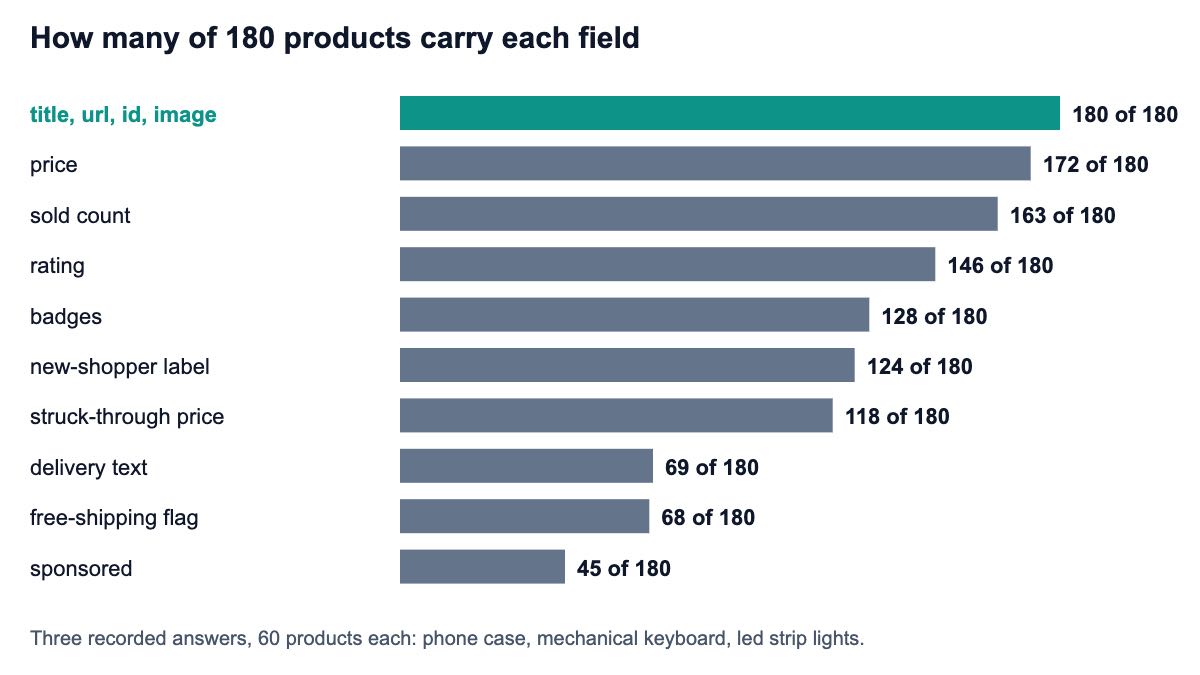
Across the three saved answers, 180 products in all, every product has an id, link, title and image; 172 have a price, 163 a sales line, 146 a rating, 124 a new-shopper label and 45 are sponsored. In the “phone case” answer none of the 60 cards shows a struck-through price, so original_price is null on all of them.
How do you handle empty fields and very long ids?
Treat null as “the card did not show it”, never as zero. A product with no sold is not a product that sold nothing, and a missing price is not a free product; in the saved “phone case” answer, 8 of 60 products show no price at all. The shape never varies, so the same code handles every answer.
Ids are 16-digit numbers sent as JSON strings. Keep them as strings. A 16-digit number is above the largest integer JavaScript can hold exactly (Number.MAX_SAFE_INTEGER), so a parser that turns an id into a number can change its last digits. This script writes one answer to a CSV file and leaves the ids alone:
import csv
import requests

resp = requests.get(
    "https://apiserpent.com/api/aliexpress/search",
    headers={"X-API-Key": "sk_live_your_api_key"},
    params={"q": "phone case"},
    timeout=60,
)
data = resp.json()

columns = ["position", "id", "price", "original_price", "discount_percent", "rating", "sold", "free_shipping", "sponsored", "title"]
with open("phone-case.csv", "w", newline="", encoding="utf-8") as f:
    writer = csv.writer(f)
    writer.writerow(columns)
    for p in data["products"]:
        # id stays a string; None becomes an empty cell
        writer.writerow([("" if p[c] is None else p[c]) for c in columns])

print(len(data["products"]), "rows written, currency", data["currency"])
with open("phone-case.csv", encoding="utf-8") as f:
    for line in list(f)[:4]:
        print(line.rstrip()[:110])
Using the saved “phone case” answer, it prints:
60 rows written, currency USD
position,id,price,original_price,discount_percent,rating,sold,free_shipping,sponsored,title
1,3256811863444319,0.33,,,4.9,20000,False,False,Korean Ins Pink White and Blue Bulge Leather Phone Case For iP
2,3256807290678337,1.09,,,4.9,7000,True,False,Luxury Liquid Silicone Phone Case for iphone 13 mini 14 15 Pro M
3,3256812407941674,1.09,,,4.9,5000,True,False,INS Korean Polka Dots Dopamine Soft TPU Phone Case for iPhone 18
The empty cells in the third and fourth columns are the missing struck-through prices, left empty instead of being written as zero.
Which route should you pick?
- One keyword, once: a browser and a spreadsheet.
- You publish AliExpress affiliate links and earn commission: AliExpress’s official affiliate API, which is built for that and returns a promotion link and commission rates with each product. Plan for the account approval and for signing every request.
- A weekly report on a handful of keywords: the API. Eight keywords a week is about 32 calls a month, which is about one cent at the pay-as-you-go rate.
- Anything a customer or a client sees: the API, which returns the same fields in the same shape on every call.
- Hundreds of keywords or page after page: the API, with each call one charge however many products it returns. The cheapest AliExpress API comparison has the rates at every volume.
- A use case with real decisions in it: see AliExpress data for dropshipping product research, which turns these fields into a shortlist.
The playground lets you try a search before you write a line, the AliExpress API page has the full parameter and field list, and the documentation has the same snippets in cURL. If you also read marketplaces other than AliExpress, the same key covers the Amazon Scraper API and the eBay Data API, and the Amazon scraper in Python guide takes the same approach.
How we checked this
Code. Every snippet was executed on 22 November 2026 on Python 3.15.2 (with requests 2.34.2) and Node 26.5.0. The web address was swapped for a local stand-in server that answered with a recorded answer for each of the three searches, so the request address, the X-API-Key header and every parameter were checked without a live request. The outputs shown are what each snippet printed.
Counts. The field counts are counts over the 180 products in the three saved answers.
The official route. The section on AliExpress’s official affiliate API was checked against the AliExpress Open Platform documentation on 24 November 2026, and the pages are linked in the sources. That section has no code and no output, because no code was run against AliExpress’s API for this post.
What I could not verify:
- I did not apply for an affiliate developer account, so the official route is described from AliExpress’s documentation, not from a run of my own. How long approval takes and what call limit an app gets are not stated in the pages I read.
- Whether your own searches return the same fields as the three saved answers. Try your own list in the playground.
- The sort and page options were not run against saved answers, because the saved answers are all page 1 in the default order; their behaviour is as documented, not shown by an output above.
Package versions change often, so test before you rely on either.
Try one search before you write code
Serpent’s AliExpress Search API is from $0.24 per 1,000 calls — pay as you go, no subscription, with 10 free API calls to start. Paste a keyword into the playground and see the JSON.
Get Your Free API KeyExplore: AliExpress API · Playground · Docs · Pricing
FAQ
How do I scrape AliExpress with Python?
There are two routes. AliExpress’s official affiliate API needs an AliExpress Portals affiliate account, an approved developer profile and an app with its own key and secret, and every call is signed; its product query returns up to 50 products a page with promotion links. The other route is one GET request to /api/aliexpress/search with a q parameter and an X-API-Key header, and the answer is up to 60 products as flat JSON.
Can I get AliExpress products sorted by sales or price?
Yes. The sort parameter takes best_match (the default), orders for the most sold first, price_asc and price_desc. Sorted pages carry no sponsored rows. Add page, from 1 to 60, to go deeper, and keep in mind that pages after the first can reorder between calls.
Is the AliExpress price in the answer the regular price?
It is the price a first-time shopper in the United States sees on the search page, in US dollars, and that can include a new-shopper deal. When a card shows a deal, promo_label carries its text, so you can filter deal prices out. original_price is the struck-through price when the card shows one and null otherwise.
Why is the sold count a number and a text?
AliExpress shows sales as text, often rounded down to a floor such as 1,000+ sold or 100K+ sold. sold_text keeps that text and sold holds the number it stands for, 1000 or 100000, so you can sort and filter. It is a lower bound, not an exact count, and it is null when the card shows no sales.
Can I search AliExpress in another language?
Yes. Send q as you would type it on AliExpress, in any language, up to 200 characters. The fixed check of 75 searches included German, Portuguese, Japanese, French, Spanish and Arabic searches; 29 of those 30 returned products and the other did not complete. Prices stay in US dollars.
How long does an AliExpress search call take?
On a fixed set of 75 searches the median call took about 3.0 seconds and 9 in 10 finished within 3.7 seconds. A typical answer carried 60 products, and 68 of the 75 searches returned a full 60. Set a client timeout of 60 seconds to be safe.
Sources
AliExpress Open Platform documentation (checked 24 Nov 2026):
- AliExpress Open Platform: quick start for new users (affiliate developers)
- AliExpress Open Platform: developers notice, including affiliate developer types
- AliExpress Open Platform: aliexpress.affiliate.product.query (get products)
- AliExpress Open Platform: aliexpress.affiliate.hotproduct.query (get hotproducts)
- AliExpress Open Platform: signature algorithm
- AliExpress Open Platform: call API with official SDK
- AliExpress Open Platform: API endpoint URLs
Request libraries and platform references: