AliExpress Data for Dropshipping Product Research

To research dropshipping products on AliExpress, search a niche keyword, set the sponsored rows aside, and keep the products that show real sales, a good rating and a price that leaves room for a margin. One search returns 60 products with each of those signals as a field, so the shortlist is a filter, not a week of browser tabs.
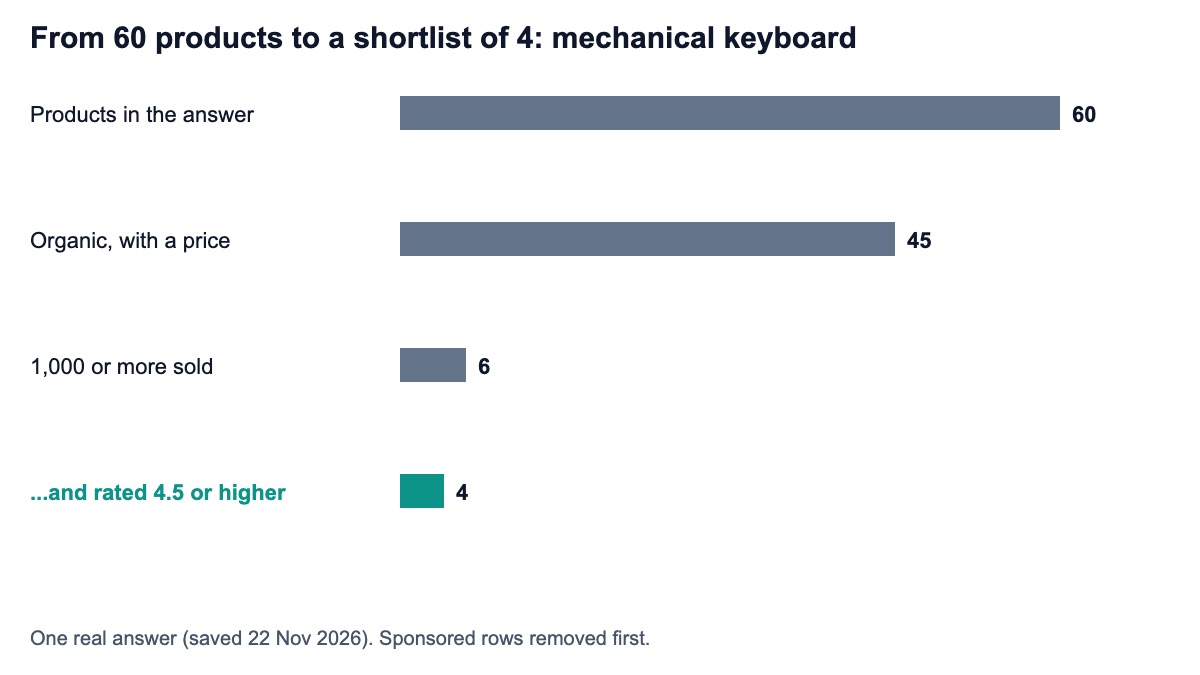
Short answer: Search the keyword, drop the sponsored rows, keep products with 1,000 or more units sold and a rating of 4.5 or higher, then judge the price. On one recorded answer for “mechanical keyboard” that took 60 products to a shortlist of 4. Read the price with care: on two of the three recorded searches, most prices were a new-shopper deal price of exactly $1.09, which says little about what a product sells for. Each call is from $0.24 per 1,000 calls, with 10 free API calls to start.
Product research is mostly one question asked many times: is anyone buying this, and at what price? AliExpress answers it in public, on every search page, in the line under each product. The trouble is reading it at scale. Sixty cards a page, a few hundred keywords, and a spreadsheet you retype by hand is not research, it is data entry.
This post uses recorded answers for three keywords, “phone case”, “mechanical keyboard” and “led strip lights”, captured on 22 November 2026, so every number below can be reproduced from the same answers. Your own searches will differ as prices and sales move.
Which fields say a product is selling?
Five fields carry most of the signal. None proves a product will sell for you, and each has a trap that the table spells out.
| Signal | Field | How to read it | The trap |
|---|---|---|---|
| Units sold | sold (number), sold_text | A floor: “5,000+ sold” is at least 5,000 | Many products show no sales line at all, and a new product can be strong with a small number |
| Rating | rating | 4.5 or higher is a reasonable bar | null on products with no reviews; a 5.0 from 3 buyers is not a signal |
| Price | price, original_price, promo_label | The shown price, the struck-through price and the new-shopper deal text | A deal price can be far below the standing price |
| Shipping | free_shipping, delivery_text | Whether the card promises free shipping and a date range | Absent on many cards; absent is not the same as slow |
| Standing | position, badges, sponsored | Where it sits, labels such as Top selling, and whether it is an ad | Position changes with the sort order |
What do the sales on one page of results look like?
Skewed, and quickly. Most of the 60 products on a page have sold little or show nothing, and a handful carry the page. On the “mechanical keyboard” answer, 3 products show no sales line, 30 show fewer than 100 sold, 17 show 100 to 999, 9 show 1,000 to 9,999 and 1 shows 10,000 or more.
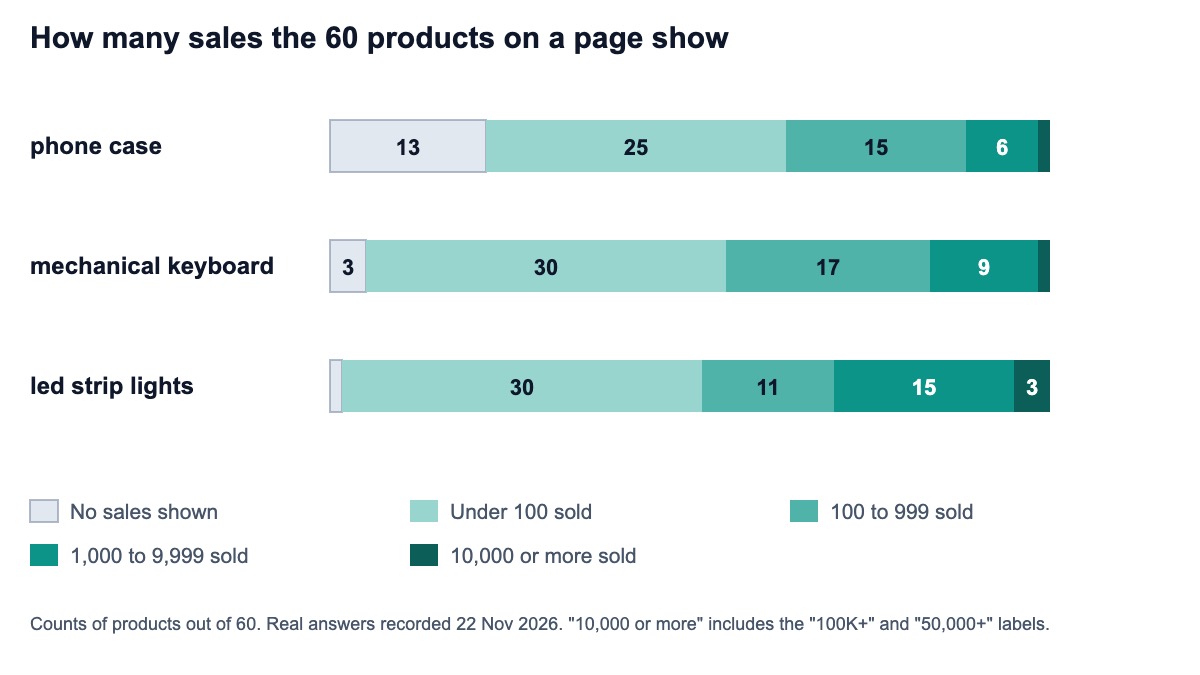
That shape is the argument for filtering by number. The “led strip lights” page has 18 products at 1,000 sold or more, the keyboard page 10 and the phone case page 7, and the rest of each page is the long tail. A browser scroll gives every card the same weight; a filter on sold does not.
How do you get from 60 products to a shortlist?
Three steps: drop the sponsored rows and the rows with no price, keep the products with 1,000 or more units sold, then keep those rated 4.5 or higher. This script does it for one keyword and prints the survivors with their price, discount and shipping. It uses the requests package (pip install requests) and a key from the sign-up page.
import statistics
import requests

resp = requests.get(
    "https://apiserpent.com/api/aliexpress/search",
    headers={"X-API-Key": "sk_live_your_api_key"},
    params={"q": "mechanical keyboard"},
    timeout=60,
)
products = resp.json()["products"]

organic = [p for p in products if not p["sponsored"] and p["price"] is not None]
sellers = [p for p in organic if (p["sold"] or 0) >= 1000]
proven = [p for p in sellers if (p["rating"] or 0) >= 4.5]

print(f"{len(products)} products, {len(organic)} organic with a price")
print(f"{len(sellers)} sold 1,000 or more, {len(proven)} of those rated 4.5 or higher")
print(f"median price, whole page:   ${statistics.median(p['price'] for p in organic):.2f}")
print(f"median price, 1,000+ sold: ${statistics.median(p['price'] for p in sellers):.2f}")
for p in sorted(proven, key=lambda p: -p["sold"]):
    off = f'{p["discount_percent"]}% off' if p["discount_percent"] else "no struck price"
    ship = "free shipping" if p["free_shipping"] else "-"
    print(f'{p["sold_text"]:<13} {p["price_text"]:<9} {off:<16} {p["rating"]}  {ship}  {p["title"][:36]}')
Using the recorded answer for “mechanical keyboard”, it prints:
60 products, 45 organic with a price
6 sold 1,000 or more, 4 of those rated 4.5 or higher
median price, whole page:   $20.70
median price, 1,000+ sold: $13.91
5,000+ sold   US $28.53 65% off          4.9  -  MACHENIKE K500 Mechanical Keyboard W
5,000+ sold   US $9.42  65% off          4.9  -  60% K61 Wired Mini Mechanical Keyboa
3,000+ sold   US $41.63 60% off          4.9  -  ATTACK SHARK X68HE/X68PRO Magnetic M
1,000+ sold   US $18.39 59% off          4.9  -  APAYADO K61 Keyboard 60% Portable Wi
Four products survive out of 60. The median price of the products with 1,000 or more sold is $13.91, against $20.70 for the whole page, so on this page the sellers sit below the middle of the market. Two of the four, at 65% off, show the same percentage, which is worth a look: read a struck-through price as AliExpress’s list price, not as what buyers paid.
Why can the price column mislead you?
Because the price on the search page is the price a first-time shopper in the United States sees, and that shopper is offered a new-shopper deal on most cards. The deal is labelled, and it is in the answer: promo_label reads something like New shoppers - $4.41. Across the three recorded answers, 124 of the 180 products carry such a label.
The effect on a median is large. In the “phone case” answer, 32 of the 37 organic products with a price show exactly $1.09, and in the “led strip lights” answer 29 of 45 do. A median of $1.09 describes the deal, not the market. Filtering the labelled products out leaves few: the phone case page has 5 unlabelled organic products with a median of $3.39, the strip lights page has 10 with a median of $6.44, and the keyboard page has 6 with a median of $14.92. Those samples are small, so treat the numbers as a direction.
Two habits keep you honest. Report the price band next to the share of products that carry a deal label, and keep price_text beside price so a reader of your sheet sees the wording AliExpress used. And never price your own product off the deal figure alone: check what the seller’s own listing asks before you trust a margin.
How do you compare niches before you pick one?
Run the same screen over a list of keywords and put the results side by side. total_results says how many products AliExpress lists for the keyword, the other columns say how crowded the top of the page is. This script does it for three:
import statistics
import requests

URL = "https://apiserpent.com/api/aliexpress/search"
HEADERS = {"X-API-Key": "sk_live_your_api_key"}


def look(query):
    data = requests.get(URL, headers=HEADERS, params={"q": query}, timeout=60).json()
    organic = [p for p in data["products"] if not p["sponsored"] and p["price"] is not None]
    return {
        "query": query,
        "total": data["total_results"],
        "organic": len(organic),
        "deals": sum(1 for p in organic if p["promo_label"]),
        "sellers": sum(1 for p in organic if (p["sold"] or 0) >= 1000 and (p["rating"] or 0) >= 4.5),
        "free": sum(1 for p in organic if p["free_shipping"]),
        "median": statistics.median(p["price"] for p in organic),
    }


print(f'{"query":<20}{"results":>8} {"organic":>8} {"deal":>5} {"1000+/4.5+":>11} {"free ship":>10} {"median":>8}')
for q in ["phone case", "mechanical keyboard", "led strip lights"]:
    r = look(q)
    print(f'{r["query"]:<20}{r["total"]:>8,} {r["organic"]:>8} {r["deals"]:>5} {r["sellers"]:>11} {r["free"]:>10} {"$" + format(r["median"], ".2f"):>8}')
Using the three recorded answers, it prints:
query                results  organic  deal  1000+/4.5+  free ship   median
phone case            84,691       37    32           4         35    $1.09
mechanical keyboard   35,273       45    39           4          3   $20.70
led strip lights      51,941       45    35           8          8    $1.09
Read across a row. Phone cases have the most results, 84,691, but the page is almost entirely deal-priced (32 of 37) and nearly all of it ships free, so the price tells you little and the shipping line does not separate products. Keyboards show the opposite: a real price spread with a $20.70 median, only 3 of 45 with free shipping, and 4 products over the bar. Strip lights have the most proven sellers on the page, 8.
None of that picks a niche for you. It tells you where to look first, and where a call is cheap enough to repeat: at 60 products a call, a hundred keywords is a hundred calls, which at the pay-as-you-go rate of $0.37 per 1,000 calls is under four cents.
Should you throw out the sponsored rows?
For a first pass, yes, but know what you are dropping. In the default order, sponsored rows fill every fourth slot, positions 4, 8, 12 and on to 60, so a quarter of every page is advertising, 15 of 60 on each of the three recorded answers. They are not weak products. On the strip lights page, 10 of the 15 sponsored rows show 1,000 or more sold, and on the keyboard page 4 do.
There is a cleaner route when you want the best sellers. Ask for sort=orders and the products come back most sold first, and sorted pages carry no sponsored rows. Use the default order to see what a shopper sees first, and sort=orders to see who actually sells. Pages after the first can reorder between calls, so key anything you store on the product id, not on its position.
curl -G "https://apiserpent.com/api/aliexpress/search" \
  --data-urlencode "q=mechanical keyboard" \
  --data-urlencode "sort=orders" \
  -H "X-API-Key: sk_live_your_api_key"
What do free shipping and delivery estimates add?
They separate products that look the same on price. free_shipping is a flag, and delivery_text holds the estimate as AliExpress shows it, such as Delivery: Nov. 30 - Dec. 05. A product that carries both gives you more to put in your own listing than one that carries neither.
Keep the limits in view. Across the three answers, 68 of 180 products carry the free-shipping flag and 69 carry a delivery estimate, so most cards show neither. A missing flag means the card did not promise it, not that shipping is slow or paid. Use it to rank two otherwise equal products, never to rule one out. Delivery dates also follow the shopper’s location, and the answers here reflect a United States shopper.
How do you watch a product over time?
Snapshot the same keyword on a schedule, once a week is enough, and store each product’s id, price, original_price, sold and position with the date. The id is a 16-digit number in a JSON string; keep it as a string. The change between two snapshots is the signal: a sold floor that jumps a tier, a price that drops, a product that climbs the order.
Because sold is a floor in steps, expect it to stay flat for weeks and then jump. A product that moves from 1,000+ to 2,000+ in a month is gaining, and one that has sat at 100K+ is mature. Watch for products that appear in the top 10 for the first time with a low sales line, which is how a new winner looks before the numbers catch up. For price-tracking on other marketplaces, see ecommerce price intelligence and Amazon price and availability monitoring.
What can this data not tell you?
A lot, and it is better to know before you spend on stock. The search page does not show what the product costs you, which seller ships it, how reliable that seller is, or what the return rate is. It does not show reviews, which are on the product page, and it shows sales as a floor, not an exact count.
- Margin. You need your own cost and your own selling price. The shown price is a shopper’s price, often a deal.
- Demand outside AliExpress. Units sold on AliExpress say what AliExpress shoppers bought, not what your audience will.
- Trend direction. One snapshot is a photograph. Direction comes from repeating the search, as above.
- Product quality. A 4.9 rating is a good sign and a reason to order a sample, not a guarantee.
What the data does well is cut a haystack down. If you want the code-level view of getting these fields, see how to scrape AliExpress with Python and Node. For the rates at every volume see the cheapest AliExpress API comparison, and for every parameter and field the AliExpress API page and the documentation. The playground runs a search with no setup, and the same key covers the Amazon Scraper API and the eBay Data API if you compare marketplaces.
How we checked this
Code and numbers. Every snippet was executed on 22 November 2026 on Python 3.15.2 (with requests 2.34.2). The web address was swapped for a local stand-in server that answered with a recorded answer for each of the three searches, so the request address, the X-API-Key header and every parameter were checked without a live request, and the outputs shown are what each script printed. The counts in the text are my own counts over the 60 products in each of the three recorded answers.
What I could not verify:
- Whether your own keywords show the same shape. Three keywords on one day are a sample, and AliExpress shows different products to different shoppers and on different days.
- The
sort=ordersrequest is shown without output, because the recorded answers are all in the default order. That sorted pages carry no sponsored rows is as documented, not shown above. - That a high units-sold floor means a product will sell for you, and what the seller’s standing price is behind a new-shopper deal price.
- The small unlabelled samples (5, 6 and 10 products) behind the median prices in the prices section; they show a direction only.
Python and package versions change often, so run the scripts yourself before you rely on them.
Search your own niche
Serpent’s AliExpress Search API is from $0.24 per 1,000 calls — pay as you go, no subscription, with 10 free API calls to start. Search your own niche in the playground and read the sales line for yourself.
Get Your Free API KeyExplore: AliExpress API · Playground · Docs · Pricing
FAQ
How do I find winning dropshipping products on AliExpress?
Search a niche keyword, set aside the sponsored rows, and keep the products with a high units-sold number and a rating of 4.5 or higher, then check the price band and shipping. The API returns 60 products per call with sold, rating, price and free_shipping as fields, so that filter is a few lines of code. It gives you a shortlist to check by hand, not a verdict.
What does units sold mean on AliExpress?
It is the sales count AliExpress shows on the card, usually rounded down to a floor such as 5,000+ sold or 100K+ sold. sold_text keeps that text and sold holds the number, 5000 or 100000, so you can sort and filter. It is a lower bound, and it is null when the card shows no sales.
Why are so many AliExpress prices $1.09?
The search page shows a first-time shopper in the United States a new-shopper deal on most cards, and on some searches the deal price is $1.09. On the recorded phone case answer, 32 of 37 organic products with a price showed exactly that. The deal is labelled in promo_label, so filter on it when you want standing prices, and do not price your own product from the deal figure.
Can I get the best sellers for a keyword in one call?
Yes. Send q with the keyword and sort=orders, and the 60 products come back most sold first with no sponsored rows. Add page, from 1 to 60, to go deeper, and note that pages after the first can reorder between calls. The default order, best_match, shows what a shopper sees first, including sponsored rows.
Can I track the same products every week?
Yes. Run the same search weekly and store each product's id, price, original_price, sold and position with the date; the id is stable and should be kept as a string. Sold moves in steps because it is a floor, so look for jumps between snapshots rather than small changes.
How much does AliExpress product research cost with the API?
One call is one charge however many products it returns: $0.37 per 1,000 calls pay as you go, down to $0.24 on Enterprise Plus, with 10 free API calls to start. Researching 100 keywords at 60 products each is 100 calls, under four cents at the pay-as-you-go rate, and a call that returns no products is not billed.