YouTube Transcripts for AI and RAG Pipelines

To use YouTube videos in a RAG pipeline, fetch each transcript as timed segments, group them into chunks that keep their start and end seconds, and store those seconds beside every vector. Retrieval then returns a passage and the moment it was spoken, so an answer can link to the exact second.
Short answer: For question answering with citations, fetch output=segments and chunk by timestamp at about 600 to 900 characters. To summarise a single video, fetch output=text and split it only if it exceeds your model's context. For a multilingual archive, fetch one track per language with lang, and store the language and the automatic-or-human flag on every chunk. Transcripts are from $0.016 per 1,000 — pay as you go, no subscription.
A lot of expert knowledge lives in video: conference talks, university lectures, product demos and support walk-throughs. None of it is searchable until it is text, and a retrieval pipeline cannot cite a video it cannot read. Transcripts fix the first problem, and their timestamps fix the second.
This guide builds the pipeline end to end in Python. The code runs as printed against a recorded response for a 12-minute TED talk dated 20 November 2026, and the retriever is a deliberately plain keyword scorer so you can replace it with your own embedding model and vector store. The idea of answering from retrieved text goes back to the 2020 paper that introduced retrieval-augmented generation. The new part here is the timestamp.
Why index YouTube transcripts, and what is the catch?
Because a transcript is small, text and timed. The recorded TED talk is 12,360 characters, and a 63-minute MIT lecture is 52,276 characters. That is cheap to store, embed and search compared with the video itself.
The catch is that spoken language is untidy. Transcripts include sound cues such as (Laughter) and [INAUDIBLE], sentences that break across caption lines, and, in automatic tracks, mistakes with names and jargon. A speaker may also simply be wrong, so a good pipeline cites its source at the second, which lets the reader check.
That is why each chunk below keeps its start second, its end second, the language and a flag for automatic or human-written captions.
What does the whole pipeline look like?
Seven stages, and only the first needs a network call to a transcript service. The rest run in your own code, so you can swap any of them without touching the others.
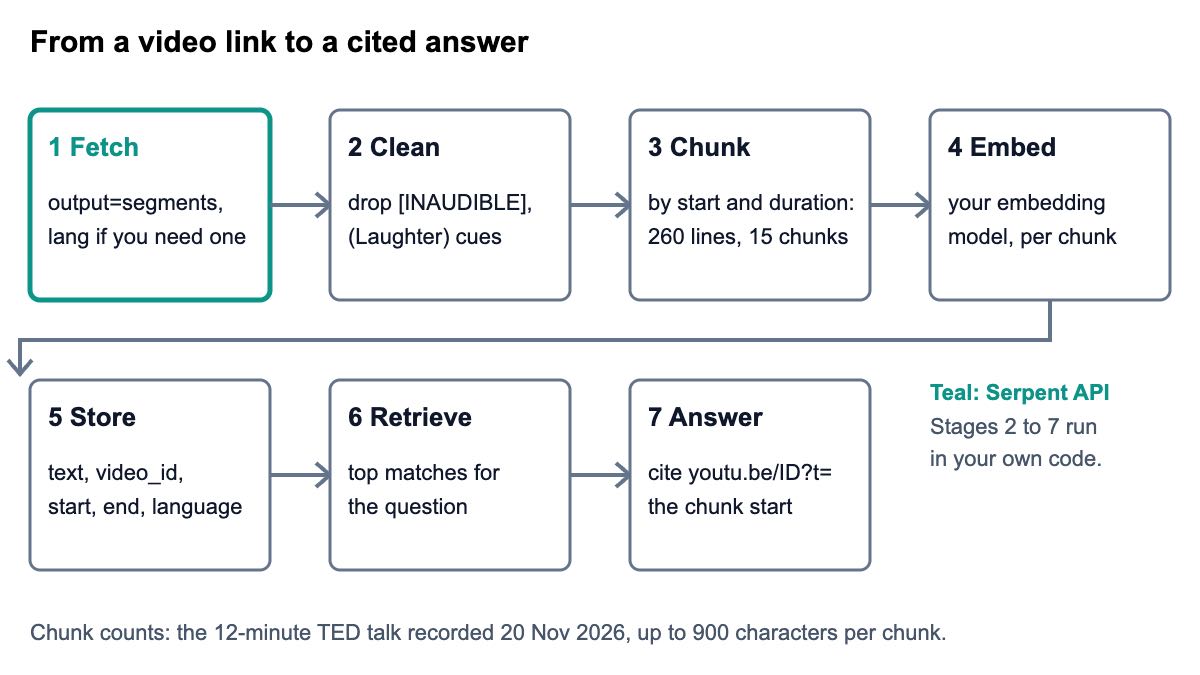
- Fetch the transcript as segments, with
langif you need a particular language. - Clean out sound cues and empty lines.
- Chunk by start time and length, never splitting one timed line in two.
- Embed each chunk with the model you already use.
- Store the vector with the text, video id, start, end and language.
- Retrieve the best chunks for a question.
- Answer with the chunk text and a link to its start second.
If your pipeline also searches the live web, the real-time search tutorial for RAG shows that side, and the guide to search APIs for AI agents and RAG compares options. Video transcripts are the other half of a knowledge base that is mostly spoken.
How do you fetch and clean a transcript?
Call the transcript endpoint once per video. Send your key in the X-API-Key header and the link, or just the 11-character id, as video. The response carries segments (start, duration and text for each line), the whole text, the language, is_auto_generated and the available_languages list. The docs describe each field.
Cleaning is a single regular expression, using Python's re module. The recorded TED talk has five sound cues, four (Laughter) and one (Applause). The recorded MIT lecture has seven bracketed markers: [SQUEAKING], [RUSTLING], [CLICKING] and four [INAUDIBLE]. Left in, they pollute embeddings with words that mean nothing to a question.
Here is the whole script, which fetches, cleans, chunks, retrieves and cites. The next three sections walk through its parts:
import math
import re
from collections import Counter

import requests

API_KEY = "sk_live_your_api_key"
URL = "https://apiserpent.com/api/social/youtube/transcript"
NOISE = re.compile(r"\[[^\]]*\]|\((?:Applause|Laughter|Music)\)", re.I)


def get_transcript(video, lang=None, output="segments"):
    params = {"video": video, "output": output}
    if lang:
        params["lang"] = lang
    r = requests.get(URL, params=params, headers={"X-API-Key": API_KEY}, timeout=60)
    r.raise_for_status()
    return r.json()


def chunk_segments(segments, max_chars=900, overlap=1):
    """Group timed lines into chunks; every chunk keeps its start and end second."""
    chunks, cur, size = [], [], 0
    for seg in segments:
        text = NOISE.sub("", seg["text"]).strip()
        if not text:
            continue
        seg = {**seg, "text": text}
        if cur and size + len(text) + 1 > max_chars:
            chunks.append(cur)
            cur = cur[-overlap:] if overlap else []
            size = sum(len(s["text"]) + 1 for s in cur)
        cur.append(seg)
        size += len(text) + 1
    if cur:
        chunks.append(cur)
    return [
        {
            "start": c[0]["start"],
            "end": round(c[-1]["start"] + c[-1]["duration"], 3),
            "text": " ".join(s["text"] for s in c),
        }
        for c in chunks
    ]


def link(video_id, seconds):
    return f"https://youtu.be/{video_id}?t={int(seconds)}"


def to_rows(data, max_chars=900):
    """Chunks plus the metadata you store next to each vector."""
    return [
        {
            **c,
            "video_id": data["video_id"],
            "language": data["language"],
            "auto_generated": data["is_auto_generated"],
            "url": link(data["video_id"], c["start"]),
        }
        for c in chunk_segments(data["segments"], max_chars)
    ]


def tokens(text):
    return re.findall(r"[a-z']+", text.lower())


def search(chunks, question, k=2):
    """Toy keyword retriever so the script runs with no other service.
    Swap this for your embedding model and vector store."""
    docs = [Counter(tokens(c["text"])) for c in chunks]
    df = Counter(t for d in docs for t in d)
    q = set(tokens(question))
    def score(d):
        return sum((1 + math.log(d[t])) * math.log(1 + len(docs) / df[t]) for t in q if t in d)
    ranked = sorted(range(len(chunks)), key=lambda i: score(docs[i]), reverse=True)
    return [chunks[i] for i in ranked[:k]]


if __name__ == "__main__":
    data = get_transcript("https://www.youtube.com/watch?v=8jPQjjsBbIc")
    cues = [s["text"] for s in data["segments"] if NOISE.search(s["text"])]
    rows = to_rows(data)
    print(f'{len(data["segments"])} segments -> {len(rows)} chunks; {len(cues)} sound cues: {sorted(set(cues))}')
    print({k: rows[0][k] for k in ("start", "end", "video_id", "language", "auto_generated", "url")})
    for hit in search(rows, "what is a pre-mortem", k=2):
        print()
        print(f'{hit["start"]:.0f}s-{hit["end"]:.0f}s  {hit["url"]}')
        print(hit["text"][:240] + "...")
Its output for the TED talk:
260 segments -> 15 chunks; 5 sound cues: ['(Applause)', '(Laughter)']
{'start': 13.24, 'end': 63.136, 'video_id': '8jPQjjsBbIc', 'language': 'en', 'auto_generated': False, 'url': 'https://youtu.be/8jPQjjsBbIc?t=13'}

212s-265s  https://youtu.be/8jPQjjsBbIc?t=211
a team of experts come in and they try to figure out what went wrong, right? Well, in the pre-mortem, Danny explained, you look ahead and you try to figure out all the things that could go wrong, and then you try to figure out what you can ...

310s-362s  https://youtu.be/8jPQjjsBbIc?t=310
a hook by the door, maybe a decorative bowl. For your passport, a particular drawer. For your reading glasses, a particular table. If you designate a spot and you're scrupulous about it, your things will always be there when you look for th...
The first line shows 260 segments becoming 15 chunks, with the five cues dropped. The second line is the metadata that goes into your vector store beside the first chunk's text. The two hits are the top matches for “what is a pre-mortem”, each with the second it starts at and a link to it.
How should you chunk a transcript so you can cite the second?
Chunk on the timed lines, not on raw characters. Grow a chunk one segment at a time until the next line would push it past your size limit, then start a new chunk and carry the last line over as overlap. Each chunk's start is its first segment's start, and its end is the last segment's start plus duration, so the timestamps stay exact.
A fixed window of characters or tokens, the approach common in general-purpose text splitters such as the ones in LangChain's documentation, loses this property. A window can start mid-sentence, and then there is no honest second to cite.
Chunk size is the main trade-off. Small chunks make citations precise but give the retriever little context. Large chunks give context but a citation covers minutes. This is what the same talk produces at five limits:
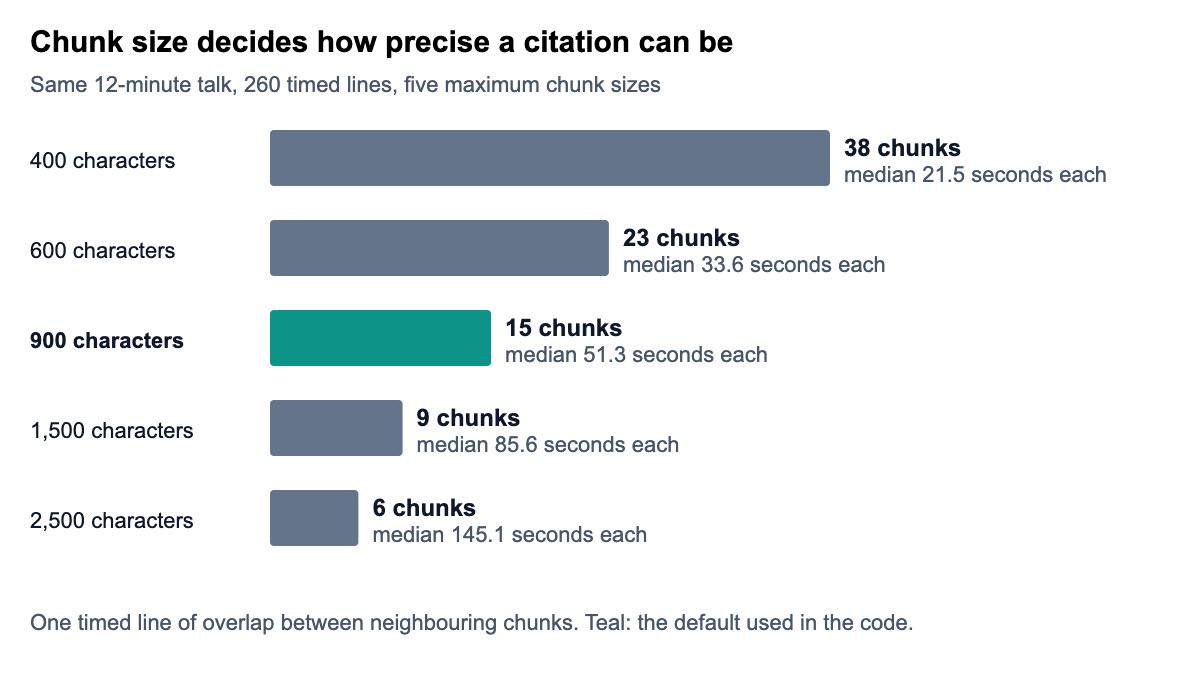
| Maximum characters per chunk | Chunks | Median seconds per chunk |
|---|---|---|
| 400 | 38 | 21.5 |
| 600 | 23 | 33.6 |
| 900 | 15 | 51.3 |
| 1,500 | 9 | 85.6 |
| 2,500 | 6 | 145.1 |
I would start at 600 to 900 characters. At 900 the median chunk covers about 51 seconds, short enough that a reader who clicks the link lands near what they need. At 2,500 characters the median is 145.1 seconds, and the link points to the start of a two-and-a-half-minute stretch. Tune the number against your own questions, because the right size depends on how dense the speaker is and how your model reads context.
How do you cite the exact second in an answer?
Link to the chunk's start. A youtu.be link with a t parameter, such as ?t=211, opens the video at that many seconds. The link function in the script builds it, and each stored row carries the finished URL.
In the output above, the pre-mortem explanation starts just under 212 seconds, and its link is https://youtu.be/8jPQjjsBbIc?t=211. The function truncates to whole seconds, so the link lands up to a second before the first word, which is the safer side to err on. If you embed the video in your own page instead, the YouTube player parameters include a start setting for the same purpose.
When your model writes the final answer, give it the chunk text and the link, and instruct it to cite the link beside each claim. Show the end second as well, so readers know how much of the video the passage covers. The check is simple: click a few citations and listen at the second.
How do you handle several languages?
Fetch one track per language with lang, and tag every chunk with the language field from the response. Call get_transcript(video, lang="de") for German, for example. The video's own main language is the default, with a human-written transcript preferred over an automatic one.
Look at available_languages before you ask. The recorded TED talk offers 41 tracks across 40 language codes, including zh-CN, fr-CA, pt-BR and iw for Hebrew, the older code, so use the codes exactly as listed. The recorded MIT lecture offers three: automatic English, human-written English and human-written Spanish.
You then have three sensible designs:
- Index the original language only and use a multilingual embedding model, so a question in one language finds passages in another. The Sentence Transformers model list includes multilingual models. It is the cheapest design, and the best one when your users read the original anyway.
- Index one track per language and filter by
languageat query time. It costs one transcript per language per video, and gives answers in the reader's language with a link to the matching track. - Index the original and translate the answer with your language model. It is cheap in transcripts, but the citation then points at text in a different language from the answer.
Whichever you choose, keep the auto_generated flag on every row. Automatic tracks are a lower-quality source on proper nouns and technical terms. Boosting human-written chunks, or showing a small “automatic captions” label beside a citation, is an honest way to use that flag.
When is output=text the better choice?
When you want the whole video as one string, for summarising, tagging or classifying. Set output to text and the response carries the full transcript in text, with segments returned as an empty list.
The recorded MIT lecture is 63.5 minutes long and comes back as 52,276 characters and 9,903 words in one string. Whether that fits one prompt depends on your model's context window, so check it before you send. If it does not fit, split the text into parts, summarise each part, and then summarise the summaries.
Text mode loses timestamps, which means no exact-second citation. If you need to say “this is discussed at 41:20”, use segments. A common pattern is to fetch segments once, build the text yourself by joining them, and keep both. Strip the bracketed cues before you summarise, or the summary may mention squeaking.
What does it cost to index an archive?
One video is one transcript, so the cost is the number of videos times the rate. Serpent's YouTube Transcript API is from $0.016 per 1,000 transcripts — pay as you go, no subscription, with 10 free API calls to start. A 10,000-video archive is 10,000 transcripts, which is $0.50 at the pay-as-you-go rate of $0.05 per 1,000 and $0.16 at the highest tier. The pricing page shows how deposit size sets the rate, and the price comparison sets it beside other providers.
Embedding and storage are separate costs that depend on your provider, so price them before you plan the archive. Time matters too. At the median call of about 2.4 seconds, 10,000 videos in a single loop take about 6.7 hours, and ten parallel workers bring that to about 40 minutes.
Keep a list of the videos that came back with no transcript. Private, removed and caption-less videos return nothing to index, and you will want to revisit or skip them knowingly, not discover them as blanks in your search results.
Which setup should you pick?
- A support or docs assistant that must show its sources: segments, 600 to 900 characters, links to the second on every answer.
- A summary or digest for one video at a time:
output=text, split only when the text exceeds your context. - A research archive of lectures in several languages: one track per language, tagged with language and automatic-or-human flags, with a multilingual embedding model.
- A first prototype this afternoon: the script above with its keyword scorer, then swap in an embedding model. Try a video in the playground first to see the shape.
- Broader YouTube data around the transcript, such as channel and playlist listings to find videos: the YouTube API and the YouTube API guide. For agents that also search the web, SERP APIs for AI agents covers that side.
The code-level basics, including SRT export and the Node version of the call, are in how to get YouTube transcripts with Python and Node. The YouTube Transcript API page lists the fields, and the Social Media API page covers the other platforms.
How we checked this
Code and numbers. The script was executed on 20 November 2026 on Python 3.15.2 against a recorded response for the TED talk, with the HTTP call replaced by a stand-in because requests was not installed on the machine. The URL, header and parameters were checked, and no live call was made.
Every count in this guide, including the 260 segments, 15 chunks and the five chunk sizes, is output from that run. The MIT figures come from a second recorded response.
The 54-video check. The median of about 2.4 seconds comes from a fixed list of 54 real videos drawn before any call was made. Every video that anyone can watch without signing in, and that has captions, returned its transcript.
Serpent ran this check on its own product, so try your own list before you rely on it.
What I could not verify:
- I did not record a German or other non-English response, so the multilingual section describes the
langparameter and the language list without showing a translated sample. - The keyword scorer is a stand-in, so no retrieval quality was assessed.
- On 20 November 2026 I re-opened the arXiv paper page, the Sentence Transformers model list, the LangChain splitters page (the older address now redirects, so the link points to the current page) and the YouTube player parameters page, which documents the
startparameter in seconds. YouTube Help documents the Share panel's “Start at” option, but I did not test a liveyoutu.belink with?t=, so try one before you ship citations.
Index your first video
Serpent's YouTube Transcript API is from $0.016 per 1,000 transcripts — pay as you go, no subscription, with 10 free API calls to start. Fetch a talk, chunk it and cite the second.
Get Your Free API KeyExplore: YouTube Transcript API · Playground · Docs · Pricing
FAQ
How do I use YouTube transcripts in a RAG pipeline?
Fetch each transcript as timed segments, remove sound cues, and group the segments into chunks of 600 to 900 characters that keep their start and end seconds. Embed each chunk, store the vector with the video id and timestamps, and retrieve as usual. When the model answers, it cites a link to the chunk's start second so readers can verify.
What is the best chunk size for YouTube transcripts?
There is no universal best size, but 600 to 900 characters is a good starting range. In the recorded 12-minute talk, 900 characters gave 15 chunks with a median of 51.3 seconds each, and 2,500 characters gave 6 chunks of 145.1 seconds. Smaller chunks give tighter citations, larger ones more context, so test against your own questions.
How do I link to a specific moment in a YouTube video?
Use a youtu.be link with a t parameter in seconds, for example https://youtu.be/8jPQjjsBbIc?t=211, which opens the video at 211 seconds. Store each chunk's start second in your index and build the link when you answer. For an embedded player, the start player parameter does the same job. Rounding down to whole seconds lands you just before the first word.
Can I build a multilingual knowledge base from YouTube videos?
Yes. Request each track with the lang parameter, tag chunks with the language field from the response, and either filter by language at query time or use a multilingual embedding model. Check available_languages first: the recorded TED talk lists 41 tracks. Keep the flag for automatic captions, because they are less reliable on names and technical terms.
Should I use the segments or the text output for summarisation?
Use output=text when you only need a summary of one video, since you get the whole transcript as one string. In the recorded MIT lecture that was 9,903 words. Use segments when you need timestamps for citations or navigation. Text mode returns an empty segments list, so you cannot rebuild exact seconds from it afterwards.
How much does it cost to index YouTube videos for AI?
Transcripts are from $0.016 per 1,000 videos, pay as you go, so 10,000 videos is $0.50 at the pay-as-you-go rate of $0.05 per 1,000 and $0.16 at the highest tier. Embedding and vector storage are billed separately by your own providers. Allow time too: at a median of about 2.4 seconds per call, 10,000 videos take roughly 40 minutes with ten parallel workers.
Sources
Research and tooling references (links checked when this post was drafted, 20 Nov 2026):
- Lewis et al., Retrieval-Augmented Generation for Knowledge-Intensive NLP Tasks (2020)
- LangChain: text splitters
- Sentence Transformers: pretrained models
Platform and language references: