TikTok sound API: how to track trending audio by music id

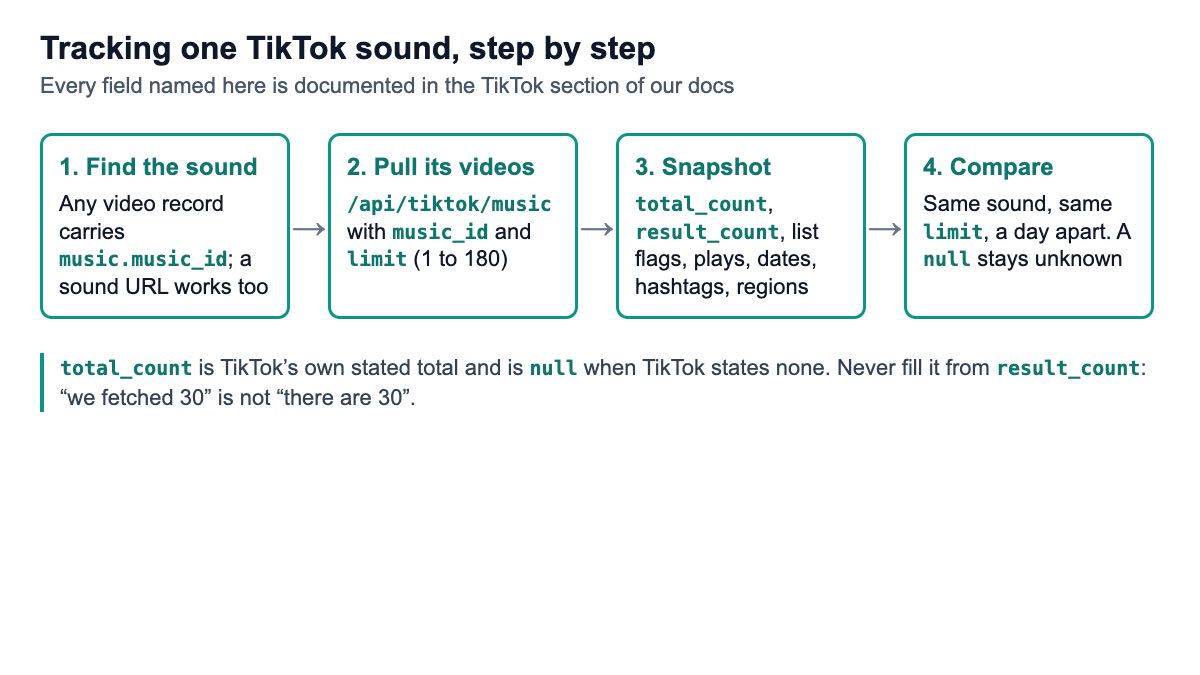
A TikTok sound API takes a sound’s id and returns the videos that use it, with their play counts, dates, hashtags and regions. To track trending audio, you snapshot the same sound on a schedule and compare TikTok’s stated total and the fresh videos between snapshots, treating any missing number as unknown, never zero.
Short answer: If you already know which sounds to watch, call a videos-by-sound endpoint daily and compare snapshots: Serpent API’s /api/tiktok/music from $1.47 per 1,000 calls, or EnsembleData if a daily unit plan suits you. If you need a ready-made chart of what is trending in a country, buy a trending-sounds list, such as Apify’s TikTok Trending Sounds actor (from $5.00 per 1,000 results) or Virlo’s trending and breakout endpoints. Many teams use one list to pick sounds and one API to track them.
What does a TikTok sound API return?
Two kinds of thing, and vendors mix them up. A sound record describes the audio itself: id, title, artist, duration, cover art and whether it is an original sound. A videos-by-sound list returns the videos that use that audio, each with its own counts.
For tracking, the list matters most. The sound’s title does not change from day to day. The videos using it, and how many TikTok says there are, are what move when a sound takes off.
On Serpent API, /api/tiktok/music returns that list. You send music_id (the numeric sound id, or a full sound URL to read it from), an optional limit from 1 to 180 (default 30) and an optional two-letter country. The response is the same list envelope our hashtag and search endpoints use, documented under TikTok hashtag, search and music:
items[]: full video records, the same shape a single video call returns.result_count: how many came back.total_count: TikTok’s own stated total, ornullwhen TikTok states none. It is never filled in fromresult_count.has_moreandnext_cursor: what TikTok said about further pages.truncated,restricted,complete: whether TikTok cut the list short, the list is not public, or you reached its natural end.
Each video record carries a music object (music_id, title, author_name, original, duration, cover), exact stats (plays, likes, comments, shares, saves, reposts, each null when unknown), created_at, created_region, hashtags and the author’s identity. Videos fetched inside a list carry no playback links.
Where do trending sound lists come from?
A “trending sounds” list is a ranking someone has computed, and each vendor computes it differently. Before you buy one, find out what the rank measures.
Apify’s TikTok Trending Sounds actor (by burbn) returns ranked sounds for 24 countries, typically up to about 100 per country, over 7, 30 or 120 days, with fields such as rank, rank_diff, a trend series and an is_commercial flag. It is priced from $5.00 per 1,000 results.
Virlo publishes its definitions, which is rare. Its trending endpoint ranks sounds by how many new videos use them, over 7 days by default. Its breakout endpoint ranks by acceleration, (videos_7d + 1) / (prior_weekly + 1), where the baseline is the weekly average from 8 to 35 days ago, and a sound needs an acceleration of 2 or more to qualify. Each trending or breakout call costs $0.25.
Scheduling tools such as bundle.social list trending tracks from TikTok’s Commercial Music Library, the catalogue of tracks cleared for business accounts, so brands can attach a sound to a scheduled post. That is a different job from measuring a trend.
TikTok itself shows popular songs in its Creative Center, which many lists have drawn on. SociaVault wrote in January 2026 that its popular-sounds ranking was unavailable because TikTok took down the Creative Center data it came from. TikTok’s Creative Center pages did not load when I checked on 20 November 2026, so I could not confirm the current state, so treat any list that depends on that source with care.
How do you get a sound’s id?
From any video that uses it. Every TikTok video record includes the sound in its music object, so a single /api/tiktok/video call on a video you have seen gives you music.music_id, which plugs straight into the music endpoint. The video endpoint docs list every field.
If you have the sound page open in a browser, you can pass the full sound URL as music_id instead, and the id is read from it. Store the numeric id either way: titles repeat and change, ids do not.
curl "https://apiserpent.com/api/tiktok/music?music_id=7300000000000000001&limit=30" \
  -H "X-API-Key: sk_live_your_api_key"
How do you snapshot a sound in Python?
Call the endpoint, reduce the response to the numbers worth keeping, and store one row per sound per check. The script below does exactly that and nothing more. It runs on Python 3.15.2 with requests 2.34.2 (20 November 2026); for the run, only the HTTP call was replaced by a stub returning the documented response shape, and the log is kept with this article.
import json
import os
from collections import Counter
from datetime import datetime, timedelta, timezone
from statistics import median

import requests

API = "https://apiserpent.com/api/tiktok/music"
KEY = os.environ.get("SERPENT_API_KEY", "sk_live_your_api_key")


def fetch_sound(music_id, limit=30, country=None):
    """One call: videos using one sound, as full video records."""
    params = {"music_id": music_id, "limit": limit}
    if country:
        params["country"] = country
    r = requests.get(API, params=params, headers={"X-API-Key": KEY}, timeout=90)
    r.raise_for_status()
    return r.json()


def parse_time(value):
    return datetime.fromisoformat(value.replace("Z", "+00:00")) if value else None


def snapshot(resp, taken_at):
    """Reduce one response to the numbers worth keeping, without inventing any."""
    items = resp.get("items") or []
    plays = [i["stats"]["play_count"] for i in items
             if (i.get("stats") or {}).get("play_count") is not None]
    created = [parse_time(i.get("created_at")) for i in items]
    created = [c for c in created if c]
    fresh = sum(1 for c in created if taken_at - c <= timedelta(days=1))
    tags = Counter(t.lower() for i in items for t in (i.get("hashtags") or []))
    regions = Counter(i["created_region"] for i in items if i.get("created_region"))
    sound = (items[0].get("music") or {}) if items else {}
    return {
        "taken_at": taken_at.isoformat(),
        "music_id": sound.get("music_id"),
        "title": sound.get("title"),
        "total_count": resp.get("total_count"),      # TikTok's stated total, or None
        "result_count": resp.get("result_count"),
        "list_state": {k: resp.get(k) for k in ("truncated", "restricted", "complete")},
        "sample_median_plays": median(plays) if plays else None,
        "sample_posted_last_24h": fresh,
        "top_hashtags": tags.most_common(3),
        "regions": dict(regions),
    }


def compare(old, new):
    """Day-over-day change, only where both snapshots state a value."""
    out = {}
    if old["total_count"] is not None and new["total_count"] is not None:
        out["total_count_change"] = new["total_count"] - old["total_count"]
    else:
        out["total_count_change"] = None   # unknown, not zero
    out["fresh_share"] = (round(new["sample_posted_last_24h"] / new["result_count"], 2)
                          if new["result_count"] else None)
    return out


def candidate_sounds(list_resp, top=5):
    """Which sounds recur in a hashtag or keyword sample? Count music_id across its videos."""
    counts, titles = Counter(), {}
    for item in list_resp.get("items") or []:
        music = item.get("music") or {}
        if music.get("music_id"):
            counts[music["music_id"]] += 1
            titles[music["music_id"]] = music.get("title")
    return [(mid, titles[mid], n) for mid, n in counts.most_common(top)]


if __name__ == "__main__":
    now = datetime.now(timezone.utc)
    snap = snapshot(fetch_sound("7300000000000000001", limit=30), now)
    print(json.dumps(snap, indent=2))
Set your key in SERPENT_API_KEY and replace the example id with a real one. With the documented response shape and three illustrative videos, one of them with no play count, the snapshot comes out like this (abridged):
{
  "music_id": "7300000000000000001",
  "title": "example sound",
  "total_count": 51200,
  "result_count": 3,
  "list_state": {"truncated": false, "restricted": false, "complete": false},
  "sample_median_plays": 8050.0,
  "sample_posted_last_24h": 2,
  "top_hashtags": [["dance", 2], ["fyp", 1], ["outfit", 1]],
  "regions": {"US": 2, "GB": 1}
}
compare a->b: {'total_count_change': 2700, 'fresh_share': 0.67}
compare b->c: {'total_count_change': None, 'fresh_share': 0.67}
The last line is the point of the exercise. When the third snapshot had no stated total, the change came back as None, not as a fall of 53,900. A tracker that wrote zero there would report a collapse that never happened.
How should you read a snapshot?
Read the stated total as TikTok’s number, not yours. total_count is the total TikTok states for the list, so compare it only with itself, snapshot to snapshot, and only when both are present. A rising stated total is the cleanest single signal that a sound is spreading.
Read the sample as a sample. The items you fetched are a slice of the list, not all of it. Statistics such as median plays or the share of videos posted in the last 24 hours describe that slice, so keep limit fixed across snapshots and say “in a sample of 30” in any report.
Read the flags before you read the counts. restricted: true means the list is not public; truncated: true means TikTok cut it short; complete: true means you reached the end. A short list with complete: true is a small sound, while a short list with a partialResults block is a shortfall worth a second look later.
Keep unknowns unknown. Play and like counts come back null when they are not known. The script drops them from the median rather than counting them as zero, and you should do the same in any average.
Use the regions and hashtags for context. created_region shows where the sampled videos were posted, which is useful for spotting a sound that is spreading from one market to another. The top hashtags tell you what people are using the sound for, which is often more useful to a brand than the raw count. For the hashtag side of the same question, see tracking a TikTok hashtag without inventing a trend.
How do you find sounds worth tracking?
Start from where your audience already is. Pull a sample of videos for a hashtag or keyword you care about with /api/tiktok/hashtag or /api/tiktok/search, then count which music_id values recur. A sound that shows up across many videos in your niche is a candidate, whatever any global chart says.
The candidate_sounds() function in the script does that count. In the logged run, on an illustrative three-video sample where two videos shared a sound, it returned:
candidate_sounds: [('7300000000000000001', 'example sound', 2), ('7300000000000000002', 'other sound', 1)]Run it weekly on a few niche hashtags, add any new recurring sound to your watch list, and drop sounds whose stated total stops moving. You can also seed the list from a bought trending chart and keep only the sounds that appear in your own niche samples.
Each video’s music object also says whether the sound is original. Original sounds are often a creator’s own audio being reused, which is a different story from a label’s track gaining traction, so keep the flag in your reports.
What does sound tracking cost?
Very little at watch-list scale. On Serpent API every music call bills on the enriched TikTok band, and the price depends on limit: the list price is the limit=30 price times 0.7 + 0.01 × limit, so limit=100 costs 1.7 times as much and limit=180 2.5 times. One call is one charge, however many videos it returns.
A worked example, computed in the logged run: 20 sounds snapshotted once a day at limit=30 is 600 calls a month, which is $0.88 at our lowest rate of $1.47 per 1,000. Hourly snapshots of the same 20 sounds are 14,400 calls, or $21.17. Most teams find daily is enough; trends on TikTok are visible over days, not minutes.
| Option | What one unit returns | At 1K a month | At 100K a month | At 1M a month |
|---|---|---|---|---|
| Virlo, videos for a sound | One call, 20 videos by default, up to 100 ($0.25, prepaid balance) | $250.00 | $250.00 | $250.00 |
| EnsembleData, music posts | One unit, 10 posts | $100.00 (Wood) | $2.00 (Bronze) | $1.40 (Platinum) |
| Apify TikTok Trending Sounds | One ranked sound (a chart, not videos) | from $5.00 | from $5.00 | from $5.00 |
| Serpent API — /api/tiktok/music | One call, up to 30 videos at limit=30 | Default $3.00 · Growth $2.70 · Scale $2.10 · Enterprise $1.79 · Enterprise Plus $1.47, at every volume (times 0.7 + 0.01 × limit). Per 1,000 videos at full yield: $0.10 (limit=30, Default), $0.042 (limit=180, Default), $0.020 (limit=180, Enterprise Plus) | ||
Units differ, so the fairest comparison is cost per 1,000 videos read. EnsembleData’s plans are daily allowances: at full use, the $100 Wood plan (1,500 units a day) works out to $0.22 per 1,000 posts and the $1,400 Platinum plan (50,000 a day) to $0.09. The mapping of its endpoint table to TikTok is my reading of the pricing page.
Virlo’s sound-videos call returns 20 videos by default and up to 100 with limit, so at $0.25 a call it works out to $2.50 per 1,000 videos at full yield, or $12.50 at the default 20. EnsembleData also lists a free trial of 50 units a day.
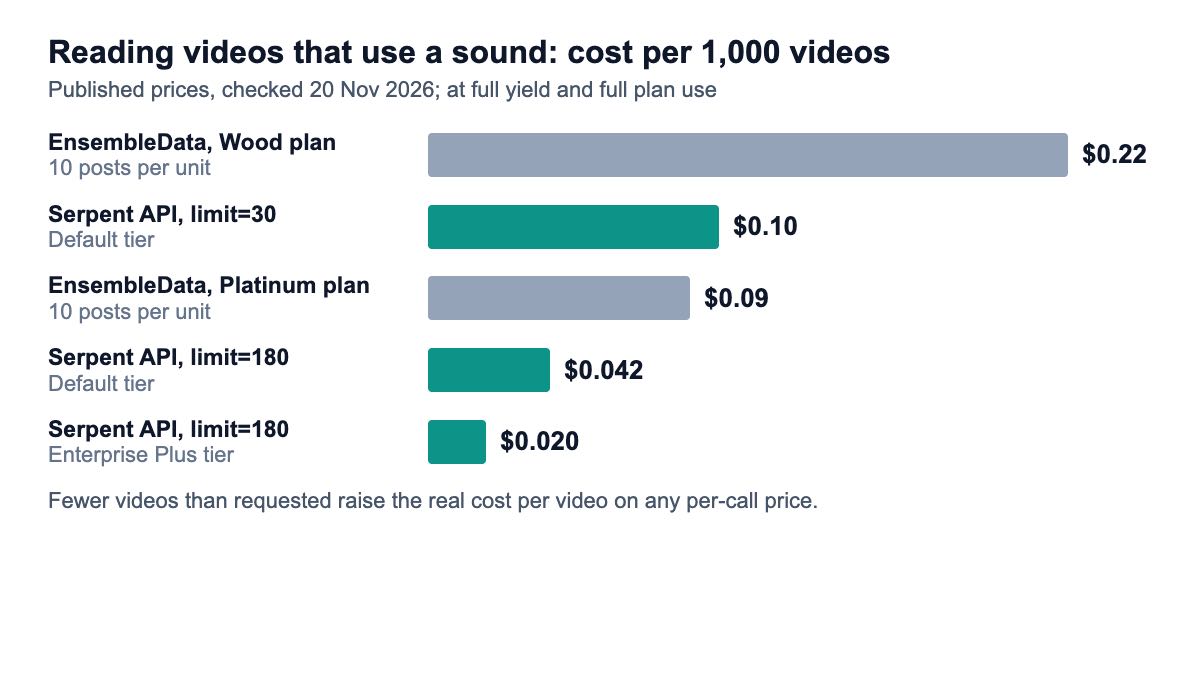
Those per-video figures assume every call returns the full limit. A sound with only a few videos returns a short list, and a short list costs more per video, so judge cost on your real sounds. The full rules, including how deposit size sets your tier, are on the pricing page.
Which approach should you pick?
- You know which sounds matter (your label’s releases, a campaign sound, competitors’ audio): snapshot them daily with a videos-by-sound endpoint. Serpent API’s music endpoint fits if you want per-call billing from $1.47 per 1,000 calls; EnsembleData fits if your volume is steady enough to use a daily allowance.
- You need to know what is trending in a country right now: buy a chart. Apify’s actor covers 24 countries; Virlo’s breakout endpoint is the most transparent about its maths.
- You want sounds that matter to your niche: count recurring
music_idvalues in hashtag and keyword samples, then track the winners. - You only need cleared music for a brand post: use your scheduling tool’s Commercial Music Library feature; you do not need trend data at all.
For a broader comparison of TikTok data providers at different depths, see the best TikTok scraping APIs by real cost, and for a field-by-field look at what a video record can tell you, see the TikTok video API fields worth saving.
How we checked this
On 20 November 2026 I read the results for “tiktok trending sounds api” and opened the pages of Apify (burbn’s actor), SociaVault, bundle.social and Virlo, plus EnsembleData’s pricing page: five vendor sources, plus the package page for requests. Serpent API fields and prices come from our public documentation and pricing page, read the same day. The Python script ran on Python 3.15.2 with requests 2.34.2, with only the HTTP call stubbed by a response in the documented shape; the stub’s numbers are illustrative, not real TikTok data. The cost figures were computed by a script in the same run, and no live API calls were made.
What I could not verify: TikTok’s Creative Center and Commercial Music Library pages did not load when I checked, so the state of TikTok’s own popular-music data is unverified, including SociaVault’s statement that it was taken down. EnsembleData’s per-endpoint unit costs are not labelled by platform, so its TikTok mapping is my reading.
Track a TikTok sound from its first video
Videos using a public TikTok sound, with exact counts, dates, hashtags and regions, from $1.47 per 1,000 calls — pay as you go, no subscription. Start with 10 free API calls.
Get Your Free API KeyExplore: TikTok API · Playground · Docs · Pricing
FAQ
Is there an official TikTok API for trending sounds?
Not one that a business can call for trend data, as far as I could find. TikTok’s Research API is limited to qualifying non-commercial researchers, and the trending-sound lists sold today come from third parties, each with its own ranking method. Scheduling tools expose TikTok’s Commercial Music Library for attaching cleared tracks to posts, which is a catalogue rather than a trend measure. For tracking, most teams call a videos-by-sound endpoint and build their own trend line.
How do I find the music id of a TikTok sound?
Take any video that uses the sound and read its music.music_id field; on Serpent API a single /api/tiktok/video call returns it. If you have the sound’s page open, you can pass its full URL to /api/tiktok/music as music_id and the id is read from it. Store the numeric id rather than the title, because many sounds share titles such as “original sound”.
How many videos use a TikTok sound?
Use the total TikTok itself states. On Serpent API that is total_count on the music response, and it is null when TikTok states no total; it is never filled in from the number of videos fetched. Compare it across snapshots only when both values are present. Some vendors expose a similar figure under other names, such as SociaVault’s user_count or Virlo’s usage_count, so check each vendor’s definition before mixing sources.
How often should I check a sound?
Daily is enough for most brand and label work, because a sound’s growth shows over days. Hourly checks make sense during a launch or a campaign you are actively steering. Keep limit fixed between checks so your samples compare. At watch-list scale the cost is small either way: 20 sounds checked daily at limit=30 is 600 calls a month, $0.88 at the lowest Serpent API rate.
Can I download the audio of a TikTok sound through the API?
The music endpoint returns the sound’s metadata and the videos that use it, not an audio file. Each video record carries the sound’s id, title, artist name, duration, cover art and whether it is original. Music on TikTok is usually copyrighted, and reusing it outside TikTok needs a licence from the rights holder, so for brand content use TikTok’s own cleared catalogue rather than copying audio.
Sources
Vendor pages and documentation (checked 20 November 2026):
- Apify: TikTok Trending Sounds actor (burbn)
- Virlo: sounds endpoints and pricing
- EnsembleData pricing
- SociaVault: TikTok music API (29 Jan 2026)
- bundle.social: TikTok music API
Software (versions used on 20 November 2026):