I Tried Scraping Google in Rust. Here's the Honest 2026 State

Rust is a fantastic language to scrape Google with, right up until the moment you look at what came back. The HTTP client is fast, the parser is clean, the whole thing compiles in about 24 seconds. Then you print the results and there are none. Not because you were blocked — the response is a clean 200 — but because the results simply aren't in the HTML.
I wanted the honest 2026 state of scraping Google in Rust, so I built the obvious thing: a reqwest client, a scraper parse pass, a Chrome User-Agent. Then I built the thing that actually returns results and put them side by side. This is what I measured on July 22, 2026, from a normal residential IP — real bytes, real timings, real result counts.
TL;DR: reqwest + scraper fetched google.com/search in Rust perfectly — HTTP 200, 91 KB, 0.69s — but the raw HTML held 0 organic results (Google renders them with JavaScript). A perfect TLS fingerprint via rquest wouldn't change that; you'd need a headless browser. The Rust that did return 10 real Google results was a reqwest call to a SERP API, deserialized with serde_json. Scraping Google in Rust is a rendering problem, not a language problem.
The setup (reqwest + scraper)
Nothing exotic. The two crates every Rust scraping tutorial reaches for — reqwest for the HTTP request and scraper for CSS-selector parsing — plus serde_json for the second half of the test. Here's the whole Cargo.toml:
[dependencies]
reqwest = { version = "0.12", features = ["blocking", "json", "gzip", "brotli"] }
scraper = "0.20"
serde_json = "1"
The release build compiled in 23.5 seconds from cold (reqwest 0.12.28, scraper 0.20.0, rustc 1.94.1). No fighting the borrow checker, no async runtime to wire up — the blocking feature keeps a one-file script genuinely simple.

Part 1: the direct scrape
The plan is the plan every scraper starts with: set a real browser User-Agent, GET the search page, count the organic result headings. Google wraps each organic title in an <h3>, so counting <h3> tells us how many results we actually parsed.
use std::time::Instant;

const UA: &str = "Mozilla/5.0 (Windows NT 10.0; Win64; x64) AppleWebKit/537.36 \
                  (KHTML, like Gecko) Chrome/126.0.0.0 Safari/537.36";

fn main() {
    let client = reqwest::blocking::Client::builder()
        .user_agent(UA)
        .timeout(std::time::Duration::from_secs(25))
        .build()
        .unwrap();

    let t0 = Instant::now();
    let resp = client
        .get("https://www.google.com/search?q=best+serp+api&num=20&hl=en&gl=us")
        .send()
        .unwrap();

    let status = resp.status();
    let body = resp.text().unwrap_or_default();

    // parse the HTML and count organic result titles
    let doc = scraper::Html::parse_document(&body);
    let h3 = scraper::Selector::parse("h3").unwrap();
    let n_h3 = doc.select(&h3).count();

    println!("HTTP {} | {} bytes | {:.2}s | <h3>={}",
             status, body.len(), t0.elapsed().as_secs_f32(), n_h3);
}
It runs. It's fast. And the output is a gut-punch:
HTTP 200 OK | 91299 bytes | 0.69s | <h3>=0A clean 200. A full 91,299-byte page, fetched in 0.69 seconds. And zero organic result titles in it. For completeness I also counted every <a> tag in the document: there were 2. A real Google results page has dozens of links; this one had two. The page is real, but it's an empty shell.
Why the page came back empty
This is the part the "scrape Google in 20 lines" posts skip. Google no longer ships organic results in the initial HTML. It sends a lightweight document and paints the results in afterward with JavaScript. reqwest is an HTTP client, not a browser — it downloads that first document and stops. There is no JavaScript engine to run the scripts that would fill in the results, so the <h3> blocks never get created.
We wrote up the shift in detail in Google Search now requires JavaScript, and its consequence for Rust is blunt: you cannot parse results that were never written to the HTML. The scraper crate did its job perfectly — it found every <h3> in the document, and there were none. No selector, no crate, no amount of Rust performance changes that. The same wall hits Python; I found the identical empty response when I tested three ways to scrape Google in Python.
It's worth being precise about what this is not. It is not a CAPTCHA. It is not an "unusual traffic" 429. It is not your IP being flagged. The request succeeded. The results just live behind a JavaScript render that a plain HTTP client will never trigger.
What about TLS impersonation in Rust?
If you've scraped in Python, your next thought is curl_cffi — impersonate a browser's TLS fingerprint so the server can't tell you apart from Chrome. Rust has an equivalent: rquest, a reqwest fork that adds browser TLS and HTTP/2 impersonation.
I want to be honest about scope here: I did not benchmark rquest in this run, so I won't quote numbers for it. But the reasoning is straightforward and worth stating. A matching TLS fingerprint helps when a server rejects you at the handshake. That is a real problem on some targets, and rquest is the right tool for it. It does nothing for the problem in front of us, because our request already succeeded with a plain 200. The results are missing because they're rendered client-side, not because our handshake looked wrong.
To get JavaScript-rendered results in Rust you'd drive a real browser — a crate like chromiumoxide or headless_chrome, controlling a headless Chromium. That works, but now you're shipping a browser, managing its memory, and eating seconds per page. It's the heavy path, and it's why so many teams stop scraping Google directly and read the results from an API instead. If you want the full cost picture of running that infrastructure yourself, we broke it down in the true cost of running your own Google scraper.
Part 2: the Rust that returns results
Same reqwest client, different endpoint. Instead of scraping the search page, this calls a SERP API that returns the organic results as JSON, and deserializes them with serde_json. The API key goes in an X-API-Key header — masked as YOUR_API_KEY here; in the real run I passed it from an environment variable.
let api_key = "YOUR_API_KEY"; // real run read this from std::env::var

let resp = client
    .get("https://apiserpent.com/api/search/quick?q=best+serp+api&country=us")
    .header("X-API-Key", api_key)
    .send()
    .unwrap();

let status = resp.status();
let json: serde_json::Value = resp.json().unwrap();

let engine  = json["engine"].as_str().unwrap_or("?");
let organic = json["results"]["organic"].as_array().unwrap();

println!("HTTP {} | engine={} | results={}", status, engine, organic.len());
for (i, item) in organic.iter().take(3).enumerate() {
    println!("  {}. {}  [{}]",
             i + 1,
             item["title"].as_str().unwrap_or(""),
             item["url"].as_str().unwrap_or(""));
}
This one prints what you actually wanted:
HTTP 200 OK | 6.67s | engine=google | organic results=10
  1. Best SERP API 2026 — Independent Comparison of 21 Google Search APIs  [https://serpapi.cc/]
  2. Best SERP APIs 2026: 12 Tested, Ranked by Real Cost  [https://cloro.dev/blog/best_serp_apis/]
  3. 8 Best SERP APIs in 2026  [https://www.scrapingbee.com/blog/best-serp-apis/]
10 organic results, each with a title, URL and position, in a single 6.67-second call. No HTML to parse, no <h3> selectors to maintain, nothing to break the next time Google reshuffles its markup. serde_json walks the response and you're done. That's the whole difference: in Part 1 the parsing was flawless and there was nothing to parse; in Part 2 there's no parsing at all.
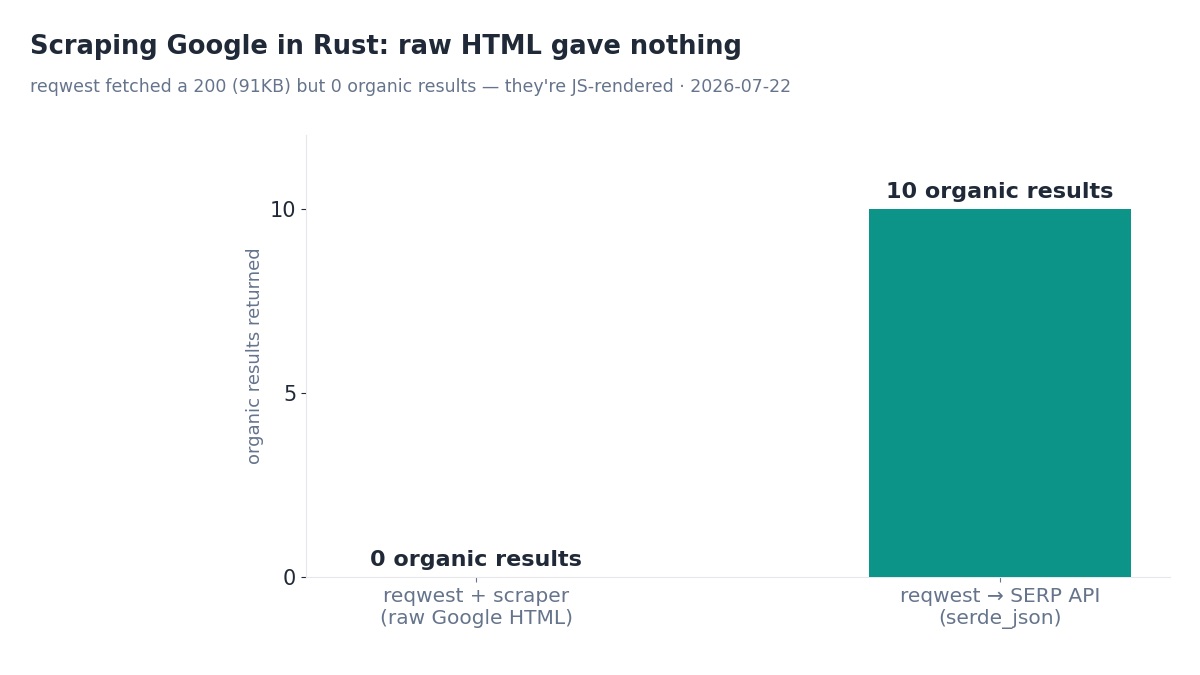
Raw scrape vs SERP API
The two halves of the test, side by side. Same machine, same query (best serp api), same reqwest client — the only thing that changed was whether I asked Google for HTML or asked an API for JSON.
| reqwest + scraper (direct) | reqwest + serde_json (SERP API) | |
|---|---|---|
| HTTP status | 200 OK | 200 OK |
| Time | 0.69s | 6.67s |
| Payload | 91,299 bytes of HTML | Structured JSON |
| Organic results | 0 | 10 |
| Parsing needed | CSS selectors (found nothing) | None — already structured |
| Breaks when Google changes markup? | Yes | No |
The direct scrape is faster on paper — 0.69s versus 6.67s — but that's a meaningless win. Fetching an empty page quickly is still fetching an empty page. The slower call is the one that returned data.
Should you scrape Google in Rust?
Rust is genuinely great for this kind of work. reqwest and scraper are fast, memory-lean and pleasant to write. If your target ships its content server-side — plenty of sites still do — a Rust scraper is a superb choice, and everything in Part 1 works exactly as you'd hope.
Google specifically is a different question, and the honest answer is: not by scraping the HTML. The results aren't there. Your options are a headless-browser crate (real, but heavy: you're running Chromium, paying seconds and memory per page, and still maintaining selectors), or a SERP API that hands you parsed JSON. For a production Rust service that needs Google results, the API path is the one that stays up. Newer to the space? Start with what a SERP API is, and if you liked this format, the Go SERP API tutorial is the sibling guide.
Get Google results in Rust with one HTTP call
Serpent's Google SERP API returns organic results, People Also Ask, AI Overviews and more as structured JSON — a single reqwest call and serde_json, up to 100 results per query across Google, Bing, Yahoo, DuckDuckGo and Brave. No selector drift, no empty pages. Free to start, then from $0.60 per 1,000.
Explore: Google SERP API · Docs · Playground
FAQ
Can you scrape Google with Rust?
You can fetch google.com/search easily — reqwest returned HTTP 200 and a 91 KB page in 0.69s. But parsing it with the scraper crate found zero organic result titles, because Google renders results with JavaScript. Rust downloads the page fine; there are just no results in the raw HTML to extract.
What is the best Rust crate for web scraping?
reqwest for HTTP and scraper for CSS-selector parsing are the standard, reliable pair. If a site fingerprints your TLS handshake, rquest impersonates a browser. For JavaScript-rendered pages like Google results you need a headless-browser crate such as chromiumoxide — heavier to run.
Why does reqwest return an empty Google results page?
reqwest doesn't execute JavaScript, and Google paints its organic results in after the initial HTML loads. So the document reqwest receives is the pre-render shell with no result blocks. It's a normal 200, not a block — the results just aren't in the markup.
Is scraping Google faster in Rust than Python?
The fetch and parse are fast in Rust (0.69s here), but that doesn't matter when the raw HTML has no results. The bottleneck is JavaScript rendering, not the language. A fast Rust scraper returning zero results is no better than a slow one returning zero results.
How do I get Google search results in Rust?
Call a SERP API that returns JSON and deserialize it with serde_json. In this test a reqwest GET with the key in an X-API-Key header returned 10 real Google organic results — titles, URLs and positions — in 6.67s, with no HTML parsing at all.