I Tested 8 "Free Google Search" Python Libraries. Most Are Dead (2026)

Search PyPI for "google search" and you'll find a dozen promising packages, most with a five-line example that ends in a tidy list of URLs. Copy one into your project in 2026 and you'll usually get one of three things: an empty list, a stack trace, or an "invalid API key" error. I know because I installed and ran eight of them, one at a time, on July 22, 2026.
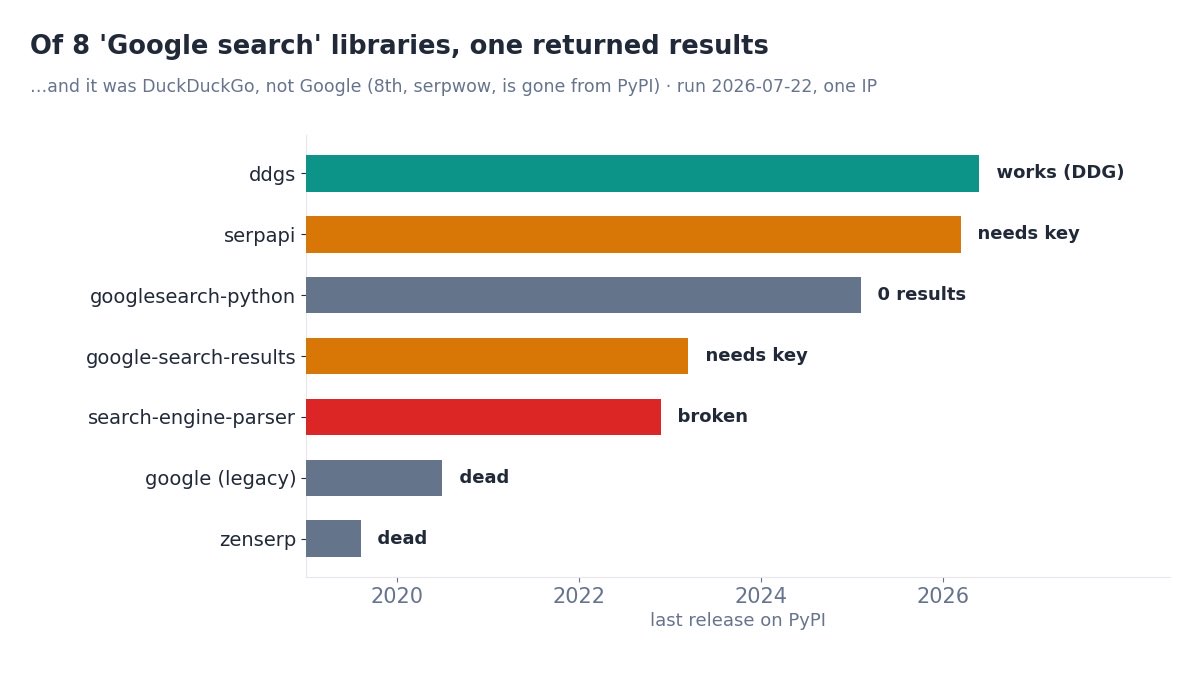
The short version: of eight, exactly one returned live results — and it searches DuckDuckGo, not Google. The rest have quietly rotted, moved behind a paywall, or been deleted from PyPI entirely. If you're picking a Python Google search library, here's what actually happens when you run each one, so you don't have to find out in production.
TL;DR: I tested 8 PyPI "Google search" libraries in isolated virtualenvs. ddgs worked but returns DuckDuckGo results. googlesearch-python and the legacy google package installed but returned zero results (Google is JavaScript-rendered now). search-engine-parser crashed. google-search-results and serpapi are SerpApi's own clients and need a paid key. serpwow is gone from PyPI. zenserp is from 2019. For dependable Google results from Python, you end up on a maintained SERP API.
The scoreboard
Every library got the same query — serp api — and the same job: return some search results. Here's what each one did, with its installed version and last PyPI release so you can see how stale it is.
| Library | Version | Last release | What happened |
|---|---|---|---|
ddgs | 9.14.4 | 2026-05-15 | Worked — 5 results (DuckDuckGo, not Google) |
googlesearch-python | 1.3.0 | 2025-01-21 | Ran, returned 0 results |
google (legacy) | 3.0.0 | 2020-07-11 | Ran, returned 0 results |
search-engine-parser | 0.6.8 | 2022-11-21 | Broken — traceback on current Google HTML |
google-search-results | 2.4.2 | 2023-03-10 | SerpApi client — needs a paid key |
serpapi | 1.0.2 | 2026-03-18 | SerpApi client — needs a paid key (401) |
serpwow | — | — | Install failed — gone from PyPI |
zenserp | 0.2 | 2019-07-24 | Throws; needs a key anyway |
One green row out of eight. And the one that works isn't even a Google library. Let's walk the failures, because how each one fails tells you what to reach for instead.
How I tested (one venv each)
Nothing exotic. Each library was installed into its own fresh virtualenv (more on why in a moment), then run with its documented example against the query serp api, on Python 3.12 in a clean Docker image, from a residential IP on July 22, 2026. I recorded the installed version, the last release date pulled from the PyPI JSON API, and exactly what the call returned or raised.
One honesty note up front: these are literal per-library outcomes from one run on one IP, not a block-rate study. A scraper's result can vary with the IP and the day. What doesn't vary is whether a package installs, whether it's been updated this decade, and whether it needs a paid key — and those are most of the story here.
The free scrapers: empty or broken
The libraries people actually want are the free ones that scrape Google directly. All three let me down, in different ways.
googlesearch-python (1.3.0) is the most-starred of the bunch and installs cleanly. It also returned nothing:
# pip install googlesearch-python
from googlesearch import search
results = list(search("serp api", num_results=5))
print(len(results))
# 0
No error, no results — the worst combination. Your code runs green and hands you an empty list. The legacy google package (3.0.0, last touched in 2020) did the same thing with a different, older API signature. Both are scraping a Google results page that no longer contains results in its raw HTML.
search-engine-parser (0.6.8) at least fails loudly. It tries to parse Google's current markup and throws partway through:
# pip install search-engine-parser
from search_engine_parser.core.engines.google import Search
Search().search("serp api")
# Traceback (most recent call last):
#   ...
#   File ".../search_engine_parser/core/base.py", line 247, in get_results
# raise ... (parse failure on current Google HTML)
Its last release was November 2022. Google's SERP markup has changed many times since; the selectors it depends on are gone. The one library that did return results was ddgs (9.14.4) — the actively maintained successor to duckduckgo-search — which pulled five clean results:
# pip install ddgs
from ddgs import DDGS
results = list(DDGS().text("serp api", max_results=5))
print(results[0]["href"])
# https://en.wikipedia.org/wiki/Serpa_Pinto_incident
It works because it targets DuckDuckGo, which still serves results to a normal request. If DuckDuckGo data is fine for your use case, ddgs is a genuinely good, maintained pick. If you specifically need Google, it's the wrong engine — and every free Google option above is either empty or broken.
The "clients" that need a paid key
Three of the eight aren't scrapers at all — they're thin wrappers around a paid API, and the package name doesn't make that obvious. google-search-results (2.4.2) sounds like a free scraper. It's SerpApi's official client:
# pip install google-search-results
from serpapi import GoogleSearch    # note: imports as "serpapi"
GoogleSearch({"q": "serp api", "api_key": "..."}).get_dict()
# {'error': 'Invalid API key. Your API key should be here: ...'}
The newer serpapi (1.0.2) package is also SerpApi's, and returns a 401 Unauthorized without a key. Both are perfectly fine libraries — if you're paying SerpApi. They're just not "free Google search," and naming a competitor's client here is fair game. zenserp (0.2) is another paid-API client, last released in 2019, that throws on a basic call. And serpwow wouldn't install at all — pip reports no matching distribution, because it's been pulled from PyPI. A dependency that 404s on install is the clearest "do not build on this" signal there is.
The import-name collision nobody warns you about
Here's the trap that made me test each library in its own environment. Two pairs of these packages fight over the same import name:
googlesearch-pythonand the legacygoogleboth install a module calledgooglesearch.google-search-resultsandserpapiboth import asserpapi.
Install two of a colliding pair into the same virtualenv and the second silently shadows the first. Your from googlesearch import search might resolve to the 2020 package or the 2025 one depending on install order, and you'd never get a warning. If you've ever had a search library "randomly" change behavior after an unrelated pip install, this is why. The only honest way to benchmark them is one clean venv per library, which is exactly what this test did.
Why the whole category broke at once
It's tempting to blame each library's maintainer, but the free Google scrapers didn't fail one by one for unrelated reasons. They failed together, for one reason: Google renders organic results with JavaScript now. The HTML a plain Python request receives is a shell; the results are painted in afterward by scripts your library never runs. We measured the raw page separately — a 92KB Google response with zero organic results in it — and documented the shift in Google Search now requires JavaScript.
That single change guts every library that does "fetch google.com/search, parse the HTML." It's the same reason the classic pytrends library rotted: the endpoint moved, the unmaintained wrapper didn't. No amount of updating the parser helps when the results aren't in the HTML to begin with. You either render the page in a real browser, or you get the results from something that already did.
What to actually use
Boiled down:
- Need DuckDuckGo results? Use
ddgs. It's maintained and it works. Just know it's DuckDuckGo, not Google. - Already paying SerpApi? Their
serpapiclient is fine — but see our SerpApi alternatives if the pricing stings. - Need free, reliable Google results from raw scraping? That option no longer exists in this list. The libraries are empty, broken, or paywalled.
- Need dependable Google results from Python, period? Call a SERP API that returns structured JSON — no HTML parsing, no dead dependency to babysit.
That last path is one function call. Here's a live response from Serpent's Google SERP API, which does the rendering and parsing server-side and hands back JSON:
import requests

r = requests.get(
    "https://apiserpent.com/api/search/quick",
    params={"q": "best serp api", "country": "us"},
    headers={"X-API-Key": "YOUR_API_KEY"},
    timeout=40,
)
for row in r.json()["results"]["organic"]:
    print(row["position"], row["title"], row["url"])
# 1 Best SERP API 2026 — Independent Comparison ...   https://serpapi.cc/
# 2 Best SERP APIs 2026: 12 Tested, Ranked by Real Cost  https://cloro.dev/...
# 3 8 Best SERP APIs in 2026                          https://www.scrapingbee.com/...
No import-name roulette, no empty lists, no "invalid API key" surprise. If you're weighing the free-scraper route against a paid API more broadly, we lay out the numbers in the true cost of running your own Google scraper and the honest free-tier landscape in 7 free Google search APIs, tested.
Skip the dead-library graveyard
Serpent's Google SERP API returns organic results, People Also Ask, AI Overviews and more as structured JSON — up to 100 results per call across Google, Bing, Yahoo, DuckDuckGo and Brave. One maintained endpoint instead of eight abandoned packages. Free to start, then from $0.60 per 1,000.
Get Your Free API KeyExplore: Google SERP API · 3 ways to scrape Google in Python · Playground · Docs
FAQ
What is the best Python library for Google search in 2026?
None of the free scrapers are reliable anymore. Of eight tested, only ddgs returned live results — and those are DuckDuckGo, not Google. For dependable Google results from Python, use a maintained SERP API that returns JSON instead of scraping raw HTML.
Does googlesearch-python still work?
It installs and runs (1.3.0, January 2025) but returned zero results in this test from a residential IP. It doesn't error — it silently yields nothing, because Google no longer serves parseable results to a plain request.
Why do so many Python Google search libraries return no results?
They scrape google.com/search, and Google renders organic results with JavaScript now. A plain request gets an HTML shell with no results in it, so the library parses nothing. The whole category of raw-HTML Google scrapers broke at once.
Is google-search-results the same as SerpApi?
Yes — it's SerpApi's official client, and the newer serpapi package is also theirs. Both need a paid key; without one they return an authentication error. They aren't free Google scrapers despite the name.
Why test each library in its own virtualenv?
Because several collide on import names — googlesearch-python and legacy google both install googlesearch, and google-search-results and serpapi both import as serpapi. Installing two of a pair makes one silently shadow the other, so isolation is the only honest way to test them.