I Measured 6 Python HTTP Clients' TLS Fingerprints. Only 3 Pass as Chrome
You set a Chrome User-Agent, you send perfect headers, and the site blocks you anyway. The reason is usually one you can't see in your code: your Python TLS fingerprint. Before a single HTTP header is read, the server already hashed the exact way your client opened the HTTPS connection — its ciphers, extensions and their order — and decided you're not a browser.
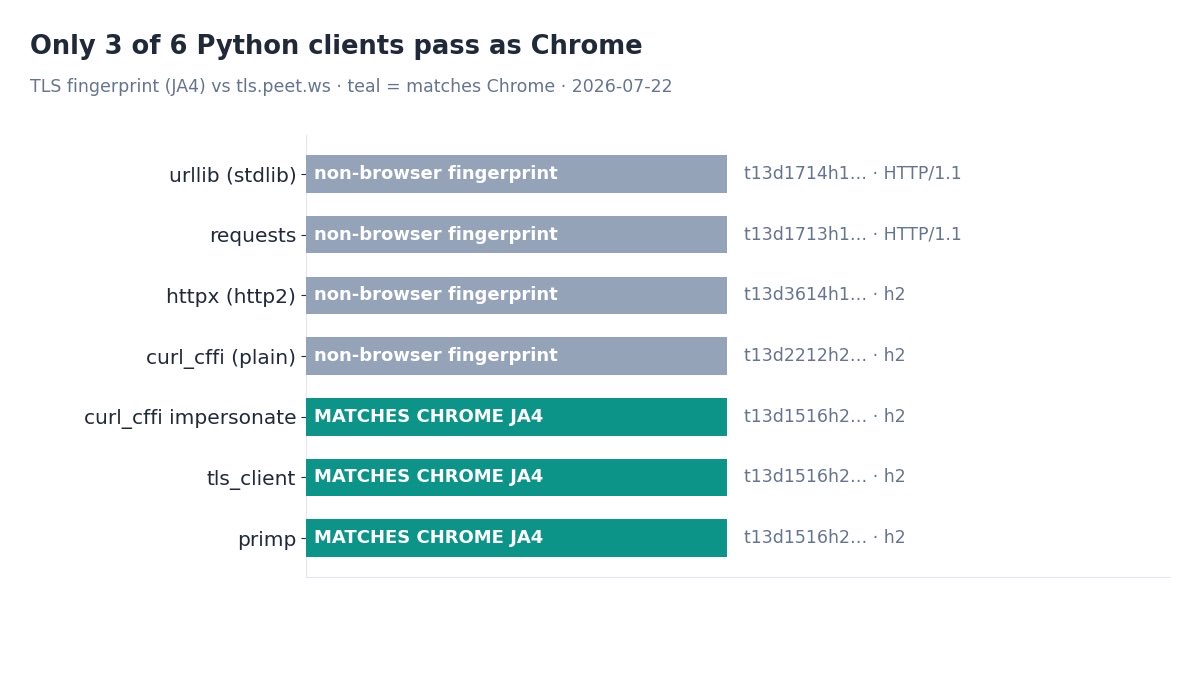
I wanted to know which Python HTTP clients actually pass that check, so I sent six of them — urllib, requests, httpx, curl_cffi, tls-client and primp — through a live JA3/JA4 echo and compared each fingerprint to a real Chrome. Three of them produced the identical Chrome JA4. The other three weren't close, and two couldn't even negotiate HTTP/2.
One thing up front, because it matters: this is about plain HTTP-client scraping. A real headless browser is a different story — it can be blocked for reasons that have nothing to do with TLS (IP reputation, behavior), and, as you'll see at the end, Google in particular won't hand results to any raw client at all. TLS fingerprinting is one gate, not the whole wall.
TL;DR: Against a live JA3/JA4 echo, curl_cffi (impersonate), tls-client and primp all produced the same real Chrome JA4 (t13d1516h2_8daaf6152771_02713d6af862) over HTTP/2. Plain requests and urllib were stuck on HTTP/1.1 with a non-browser JA4; httpx did HTTP/2 but still looked nothing like Chrome. Their JA3 hashes differed while the JA4 matched — because JA4 sorts extensions. Impersonation works, but it's a maintenance treadmill: Chrome's fingerprint shifts every release. For production Google data, a SERP API takes the treadmill off your plate.
What a TLS fingerprint actually is
When your client opens an HTTPS connection, the very first thing it sends — the TLS ClientHello — lists the TLS versions it supports, its cipher suites, a set of extensions in a particular order, and the protocols it offers via ALPN (HTTP/1.1, h2). That list is remarkably specific to the software sending it. Chrome's ClientHello looks different from Firefox's, which looks different from Python's OpenSSL.
JA3 hashes that list in the order it was sent. JA4, the newer scheme from FoxIO, sorts the extension list first and encodes the TLS version, cipher count, extension count and ALPN into a readable prefix — so a Chrome JA4 starts with t13d1516h2 (TLS 1.3, 15 ciphers, 16 extensions, ALPN h2). The key property for scrapers: this is computed before your HTTP request. Your User-Agent is a header; the fingerprint is set during the handshake. You cannot header your way out of it.
The results: 6 clients, measured
I sent each client to https://tls.peet.ws/api/all, a public JA3/JA4 echo that reports back the fingerprint it saw. Same machine, Python 3.12 in Docker, on July 22, 2026. The echo is IP-independent — it reports your handshake, not where you came from — so these results reproduce anywhere. The Chrome reference JA4 is t13d1516h2_8daaf6152771_02713d6af862.
| Client | HTTP | JA4 fingerprint | Looks like Chrome? |
|---|---|---|---|
urllib (stdlib) | HTTP/1.1 | t13d1714h1_ab0a1bf427ad_5ae85263eb3b | No |
requests 2.32.3 | HTTP/1.1 | t13d1713h1_ab0a1bf427ad_8537cf56674e | No |
httpx 0.27.2 (http2) | h2 | t13d3614h1_bcee18a5b459_5ae85263eb3b | No |
curl_cffi (no impersonate) | h2 | t13d2212h2_0ba30522257d_9ced094328c9 | No |
curl_cffi impersonate=chrome | h2 | t13d1516h2_8daaf6152771_02713d6af862 | Yes |
tls-client (chrome_120) | h2 | t13d1516h2_8daaf6152771_02713d6af862 | Yes |
primp (chrome_126) | h2 | t13d1516h2_8daaf6152771_02713d6af862 | Yes |
The split is clean. Three clients produced a fingerprint no browser would; three produced the exact Chrome JA4, byte-for-byte identical to each other. Nothing in between.
Why requests, httpx and urllib fail
Look at the top three rows. urllib and requests didn't just get a different fingerprint — they negotiated HTTP/1.1. A real Chrome speaks HTTP/2 to any modern site. That alone is a tell: an anti-bot system doesn't need to parse your ciphers when your protocol version is a decade behind the browser you claim to be.
The code that produced those rows is the code everyone writes:
import requests
r = requests.get("https://tls.peet.ws/api/all",
                 headers={"User-Agent": "Mozilla/5.0 ... Chrome/126.0.0.0 ..."})
print(r.json()["tls"]["ja4"])
# t13d1713h1_ab0a1bf427ad_8537cf56674e   <- HTTP/1.1, not Chrome
# The Chrome User-Agent made zero difference to the fingerprint.
httpx with http2=True is more interesting: it did negotiate HTTP/2, but its JA4 (t13d3614h1) advertises 36 ciphers where Chrome sends 15. Different cipher list, different extension set — still obviously not a browser. And plain curl_cffi without an impersonation profile behaves like a generic curl: HTTP/2, but its own fingerprint, not Chrome's. The lesson: HTTP/2 support is necessary but nowhere near sufficient. You need the whole ClientHello to match.
This is exactly why a scraper that "works on my machine" gets a wall of 429s in production against a protected target — the same failure mode we walk through in fixing Google's "unusual traffic" 429s and why your proxies keep getting banned. A fresh proxy IP won't save a client whose handshake screams "Python."
The three that pass as Chrome
Now the bottom three rows. curl_cffi with impersonate="chrome", tls-client with a Chrome profile, and primp with chrome_126 each produced t13d1516h2_8daaf6152771_02713d6af862 — the real Chrome JA4, over HTTP/2. At the TLS layer they are indistinguishable from a browser.
from curl_cffi import requests as creq
r = creq.get("https://tls.peet.ws/api/all", impersonate="chrome")
print(r.json()["tls"]["ja4"])
# t13d1516h2_8daaf6152771_02713d6af862   <- the real Chrome JA4
How each one does it differs internally — curl_cffi binds a patched libcurl, primp is Rust-based, tls-client wraps a Go engine — but the observable result was the same fingerprint. For choosing between them, correctness isn't the differentiator here; ergonomics and upkeep are.
One quiet gotcha worth flagging: the impersonators set their own Chrome User-Agent to match the TLS profile. In my run, curl_cffi and primp reported a macOS Chrome UA I never asked for. That's usually what you want — a matched UA and fingerprint — but if you override the UA with a mismatched one (say, a Windows string on a client impersonating Mac Chrome), you hand the server a fresh inconsistency to catch. Let the library keep them aligned. For the deeper end-to-end playbook on beating TLS and anti-bot systems, our guide on bypassing Cloudflare and DataDome with TLS fingerprints goes further than this measurement does.
JA3 differed, JA4 matched — why
Here's a detail that trips people up. The three impersonators produced the same JA4 but three different JA3 hashes. If JA3 and JA4 both describe the handshake, how can one match and the other not?
Because they hash different things. JA3 preserves the exact order of TLS extensions, and modern clients (Chrome included) deliberately shuffle certain extensions per connection. JA4 sorts the extension list before hashing, so that per-session shuffling collapses to one stable value. Two connections from the same real Chrome can have different JA3s and the same JA4.
The practical takeaway: JA4 is the signal that matters now. An older tool matching only JA3 can be fooled by ordering tricks or trip on Chrome's own randomization; JA4 is why anti-bot vendors moved to it, and it's the number you should compare when you evaluate an impersonation library. All three here got JA4 right, which is the hard part.
The catch: impersonation is a treadmill
So you pin curl_cffi, you match Chrome's JA4, you ship. Then Chrome 127 lands, its ClientHello shifts, and the t13d1516h2 profile you pinned is now last quarter's browser. Not broken — just stale, and a fingerprint that says "Chrome 126, three versions behind" is its own weak signal on a site that tracks version distribution.
This is the real cost of the impersonation route, and it's not a one-time cost. You are signing up to track Chrome's release cadence and bump your impersonation profile every few weeks, across whichever library you chose, forever. It works — the measurements above are proof it works — but "it works today" and "it keeps working untended" are different promises. TLS is also just the first gate; behavioral and IP signals sit behind it, which is where headless-browser detection lives (beating headless Chrome detection) and why puppeteer-stealth is a moving target too.
And the bigger catch: Google
All of this earns you a browser-shaped handshake. It does not earn you Google's results. I pointed a perfectly-impersonated client at google.com/search and got HTTP 200 with a page that contained zero organic results — because Google renders its results with JavaScript that a raw HTTP client never executes. A flawless JA4 gets you the shell, not the data. (We dug into that shift in Google Search now requires JavaScript.)
So the honest map for scraping Google specifically: TLS impersonation is necessary for some protected sites and irrelevant for Google, where the wall is JavaScript rendering plus IP reputation, not your cipher list. Your two real options are to drive a full headless browser (heavy, and still detectable) or to call an API that returns the results already parsed as JSON. Here's the second one, in the same few lines as a requests call — and it just returns the data:
import requests

r = requests.get(
    "https://apiserpent.com/api/search/quick",
    params={"q": "best serp api", "country": "us"},
    headers={"X-API-Key": "YOUR_API_KEY"},
    timeout=40,
)
for row in r.json()["results"]["organic"]:
    print(row["position"], row["title"], row["url"])
# 1 Best SERP API 2026 — Independent Comparison ...  https://serpapi.cc/
# 2 Best SERP APIs 2026: 12 Tested, Ranked by Real Cost  https://cloro.dev/...
# engine: google
No impersonation profile to pin, no Chrome release to chase, no JavaScript to render. If your handshake needs to look like Chrome because you're scraping a site that checks JA4, the three impersonators above are your tools — and you own the treadmill. If what you actually need is Google search results at scale, buying the parsed JSON is the path that doesn't decay. We put real numbers on that trade-off in the true cost of running your own Google scraper and scraping Google without getting blocked.
Stop chasing Chrome's fingerprint
Serpent's Google SERP API returns organic results, People Also Ask and more as structured JSON — nothing on your side to keep working when Chrome ships its next release. Up to 100 results per call across Google, Bing, Yahoo, DuckDuckGo and Brave. Free to start, then from $0.60 per 1,000.
Get Your Free API KeyExplore: Google SERP API · Pricing · Docs
FAQ
What is a TLS fingerprint (JA3 / JA4)?
A hash of how a client opens an HTTPS connection — its TLS version, ciphers, extensions and ALPN. JA3 hashes them in order; JA4 sorts the extensions first, so it's more stable. A server computes it during the handshake, before reading any header, so it can tell a Python script from a real Chrome no matter what User-Agent you set.
Does curl_cffi beat TLS fingerprinting?
In this test, yes — curl_cffi with impersonate="chrome" produced the exact Chrome JA4 over HTTP/2. So did tls-client and primp. Plain requests, httpx and urllib did not.
Why does requests get a different fingerprint than Chrome?
It uses Python's OpenSSL handshake, which negotiated HTTP/1.1 and a JA4 of t13d1713h1... here — a different cipher and extension profile from Chrome's t13d1516h2. A Chrome User-Agent header can't change it; the fingerprint is set before headers are sent.
JA3 vs JA4 — why did the fingerprints differ but the JA4 match?
JA3 preserves TLS extension order (which Chrome randomizes per session); JA4 sorts extensions before hashing, so ordering differences collapse to the same value. That's why the impersonators shared a JA4 but had different JA3s — and why JA4 is the more reliable signal.
Is a TLS fingerprint enough to scrape Google?
No. It passes TLS-layer checks only. A real browser can still be blocked on IP reputation or behavior, and Google renders results with JavaScript a raw client never runs — a perfect JA4 returned a page with zero organic results here. TLS impersonation is one tool, not a solution.
Which Python TLS impersonation library is best?
All three — curl_cffi, tls-client, primp — produced the same correct Chrome JA4, so choose on API ergonomics and maintenance. The real caveat is upkeep: Chrome's fingerprint shifts with releases, so whichever you pin will drift and need bumping.