LinkedIn posts API: how to read and track a creator's posts

To read someone’s LinkedIn posts through an API, you need either LinkedIn’s official Posts API, which only reads pages you manage unless you are an approved partner, or a public-data API that takes a profile and returns recent public posts. For tracking creators, executives or prospects, the second route is the practical one.
Short answer: To publish posts or read your own company page, use LinkedIn’s official Posts API. To read a person’s recent public posts (a creator, an executive, a prospect), use a public-data API: Serpent API’s /api/linkedin/posts from $0.49 per 1,000 calls of up to 10 posts — pay as you go, no subscription — with up to 50 posts per call at a depth-based price. If you also need company-page posts or one large export, Bright Data and the Apify LinkedIn Profile Posts actor price per post, from $1.30 to $1.50 per 1,000.
Can LinkedIn’s official API read other people’s posts?
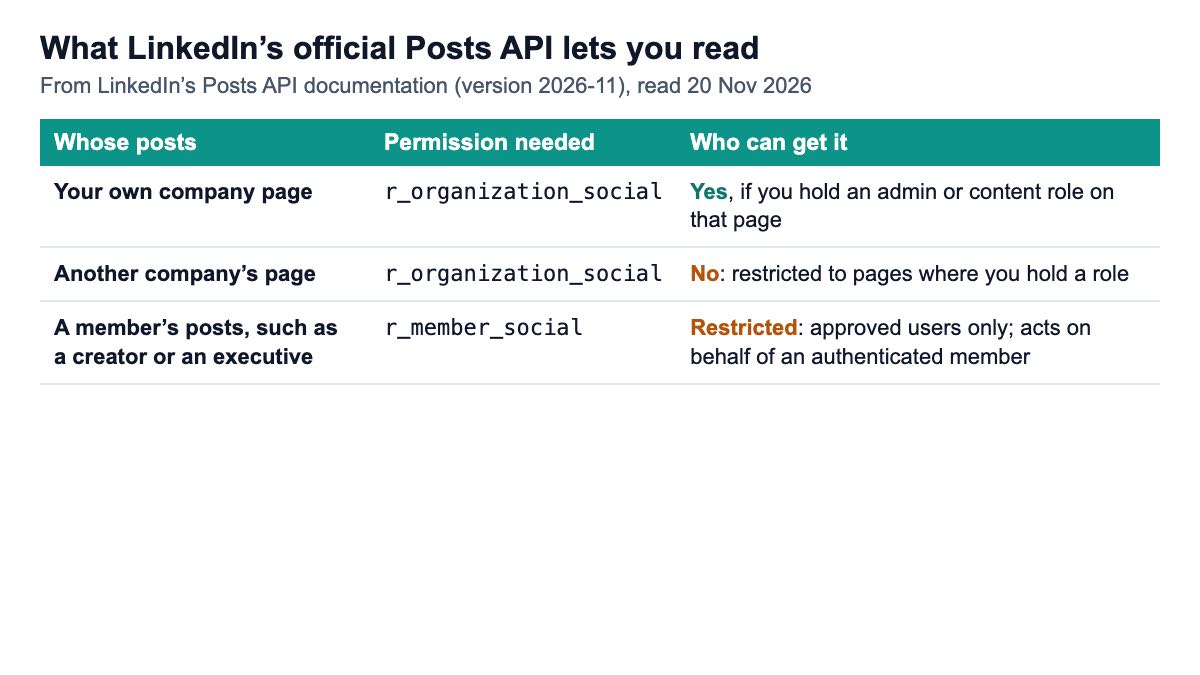
Mostly no. LinkedIn’s Posts API, documented on Microsoft Learn (version 2026-11, read on 20 November 2026), is built to create and manage posts, and its read permissions are tightly scoped.
Reading a company page’s posts needs r_organization_social, which LinkedIn restricts to organisations where the signed-in member holds an administrator, content admin or sponsored-content poster role. So you can read your own page, not a competitor’s.
Reading a member’s posts needs r_member_social, which acts on behalf of an authenticated member. LinkedIn marks it as “restricted” and “available to approved users only”. A typical sales-intelligence or analytics product does not have it.
Where you do have access, the API is solid. The “find posts by author” call returns up to 100 posts a page, sorted by last-modified or created time, and the Posts API replaces the older ugcPosts API. Keep an eye on versions too: LinkedIn’s notice says Marketing version 202601 will be sunset on 15 January 2027, so integrations pinned to it need an update.
Our comparison of the official LinkedIn API and public-data APIs covers the wider official product catalogue. This page is only about posts.
What are the ways to read LinkedIn posts by API?
There are four, and they differ in what they need from you more than in what they return.
1. The official Posts API
Best when you manage the page or are an approved partner. It is the only route for drafts, sponsored posts and your own page’s full history, and it is what scheduling tools use to publish.
2. A public-data API by profile
You send a person’s profile URL, username or name and get their recent public posts back as JSON; you do not need a LinkedIn account or login. This is the usual route for tracking creators, executives and prospects at scale. Serpent API’s posts endpoint works this way.
3. A scraper marketplace or dataset vendor
Apify actors and Bright Data’s LinkedIn scraper take profile or company URLs and bill per post returned. Apify’s LinkedIn Profile Posts actor (by harvestapi) also has filters for posting date, reposts and quote posts, and counts each scraped reaction or comment as a separate post for billing. These suit large one-off exports and company-page pulls.
4. A connected-account API
Services such as Unipile read posts through a LinkedIn account that you or your user connects, using a post id and an account id. That suits products acting on behalf of their users, such as inbox and outreach tools, because each request runs under the connected account.
For the full field of LinkedIn data vendors beyond posts, see the best LinkedIn data APIs by real cost.
What does a LinkedIn posts endpoint return?
A useful posts endpoint returns, for each post, the text, the publish date, the engagement counts, the media and the author, and lets you choose how many posts you want. Here is what Serpent’s documented LinkedIn Posts API takes and returns.
| Parameter or field | What it is |
|---|---|
username, url or name | Who to read: a profile slug, a full profile URL or a person’s full name |
limit | How many recent posts, 1 to 50 (default 10); priced by depth |
include_comments | Adds each post’s public comment thread (text, author, avatar, likes); +20% |
include_transcript | Adds a video post’s transcript when LinkedIn publishes one; +20% |
| Content and publish date | The post text and when it was published |
| Engagement | Reactions, comments and reposts; null when not available, never invented |
media_type | text, video or article |
image_url, video_url, duration, embed_url | Media links; the video fields are filled on video posts |
author.followers | The author’s follower count, when available |
curl "https://apiserpent.com/api/linkedin/posts?username=williamhgates" \
  -H "X-API-Key: sk_live_your_api_key"
Two details matter when you build on it. Engagement counts, image_url and author.followers are best-effort: when one is missing it comes back as null, so store null as unknown and never as zero. And the posts returned are the person’s publicly visible ones, so how many you get depends on the profile.
If you also need the person’s profile itself (headline, role, company), that is a separate call; see getting LinkedIn profile data by API.
How do you track a creator’s posts over time?
Poll each person on a schedule, store every post once, and keep a time series of its engagement. That one pattern covers social selling, influencer vetting, executive monitoring and competitor content analysis.
- Build a watch list of profile URLs or usernames. Store the username, not the display name, because names change and collide; the
nameparameter is handy for a first lookup. - Pick a depth. For a daily check,
limit=10covers anyone who posts less than ten times between checks. Use a deeperlimitonce, when you first add a person, to backfill their recent history. - Store each post once. Key it on the post’s link or on author plus publish date plus the first characters of its text, so a post seen on Monday and again on Tuesday stays one row.
- Snapshot engagement. Each check, append reactions, comments and reposts with a timestamp, so the snapshots show which posts took off and how fast.
- Alert on what matters to you. A new post from a prospect is a reason for a sales rep to engage; a creator’s post passing a reaction threshold is a signal for an agency; an executive mentioning a competitor is a PR flag.
- Add comments only when you need them.
include_comments=truecosts 20% more per call, so turn it on for the posts you are analysing, not for every daily check.
Daily checks on 500 people at limit=10 come to about 15,000 calls a month, which is under $7.50 at our lowest rate of $0.49 per 1,000.
What does it cost to read LinkedIn posts per 1,000?
Vendors bill posts in different units, so I converted each to the cost of reading 1,000 posts, from the live pricing pages on 20 November 2026, at three monthly volumes.
| Option | Billing unit | At 1K a month | At 100K a month | At 1M a month |
|---|---|---|---|---|
| LinkedIn Posts API | No fee | No published fee; reading is limited to pages you manage or approved partners | ||
| Bright Data LinkedIn scraper | Record | $0 (5K free records a month) | $1.43 ($1.50 pay as you go, after 5K free) | $1.30 ($499 Scale for 384K, then $1.30 per 1,000) |
| Apify LinkedIn Profile Posts | Post (reactions and comments count as posts) | from $1.50 | from $1.50 | from $1.50 |
| ScrapeCreators | Credit per request | Unverified: per-request price not shown on the endpoint page (100 free credits) | ||
| Serpent API — /api/linkedin/posts | Call (at limit=10) | Default $1.00 · Growth $0.90 · Scale $0.70 · Enterprise $0.60 · Enterprise Plus $0.49 per 1,000 calls, at every volume. Per 1,000 posts at full yield: $0.10 (limit=10, Default), $0.068 (limit=50, Default), $0.033 (limit=50, Enterprise Plus) | ||
How our depth pricing works: the call price is the limit=10 price times 0.4 + 0.06 × limit, so 10 posts is the base price and 50 posts is 3.4 times it, as set out on our LinkedIn API page. Because a deeper call costs less than proportionally more, the price per post falls as limit rises.
The Bright Data figure at 1 million posts is the $499 Scale plan for 384,000 records plus 616,000 more at $1.30 per 1,000, which is about $1,300 in all. Apify’s actor lists “from $1.50 per 1,000 posts” while its README says $2, and higher Apify plans get lower prices.
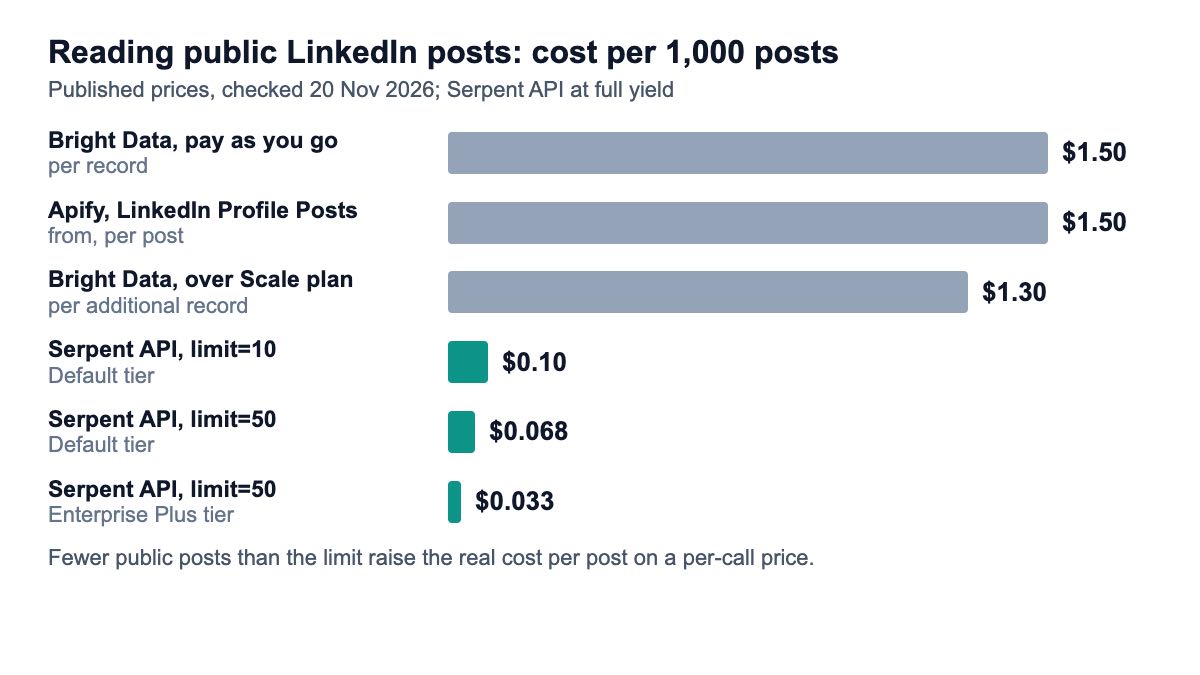
The caveat runs both ways. A per-call price is cheapest when people post often enough to fill the limit; for someone who posts twice a month, a limit=50 call returns far fewer than 50 posts, and the cost per post rises. Use the smallest limit that covers the gap between your checks. For a deeper look at per-post billing on Apify, see Apify’s LinkedIn scraper pricing explained.
What about LinkedIn’s rules?
Reading public posts through a third-party API is a different legal question from using LinkedIn’s own API under its terms. The case law and LinkedIn’s user agreement are covered in our guide to whether scraping LinkedIn is legal in 2026, so here are only the practical rules for a posts project.
- Public posts only. Work with what anyone can see without signing in, and drop anything you cannot explain needing.
- Personal data is still personal data. Names, comments and engagement tied to people fall under privacy law such as GDPR. Keep a purpose, a retention period and a way to delete a person on request.
- Do not bulk-message people based on post data. Use post tracking to decide whom to engage and when, then engage like a person.
- Prefer the official API for anything you own. Your own company page’s posts and analytics belong in the official Posts API.
Which option should you pick?
- You publish posts or report on your own company page: LinkedIn’s official Posts API, with
r_organization_socialthrough a page role. - You track people (creators, executives, prospects) on a schedule: a per-call public-data API. Serpent API’s posts endpoint, from $0.49 per 1,000 calls at
limit=10, fits a daily loop over hundreds or thousands of profiles. - You need company-page posts from pages you do not manage, or one big export: Bright Data or the Apify LinkedIn Profile Posts actor, both of which take company URLs and price per post.
- Your product acts on behalf of its own users’ LinkedIn accounts: a connected-account API such as Unipile.
How we checked this
On 20 November 2026 I read LinkedIn’s Posts API documentation on Microsoft Learn (version 2026-11), the results for “linkedin posts api”, and the pages of Apify (harvestapi’s LinkedIn Profile Posts actor), Bright Data, ScrapeCreators, Unipile and Ayrshare: 6 external sources. Serpent API parameters, fields and prices come from our public documentation, pricing page and LinkedIn API page, read the same day. No API calls were made for this article.
What I could not verify: ScrapeCreators’ per-request price and Unipile’s price, neither of which is on the pages I read; and how many public posts any given profile exposes, which varies by person.
Read a creator’s public LinkedIn posts as JSON
Recent public posts with text, date, engagement and media, from $0.49 per 1,000 calls of up to 10 posts (up to 50 per call, priced by depth) — pay as you go, no subscription. Start with 10 free API calls.
Get Your Free API KeyExplore: LinkedIn API · Playground · Docs · Pricing
FAQ
Does LinkedIn have an API to get posts?
Yes, the Posts API, but reading is restricted. It can read your own company page’s posts if you hold an admin or content role on the page (r_organization_social). Reading a member’s posts needs r_member_social, which LinkedIn lists as restricted and available to approved users only. For other people’s public posts, developers use public-data APIs that take a profile URL or username and return recent posts as JSON.
How do I get a LinkedIn user’s recent posts?
Send their profile URL, username or full name to a posts endpoint. With Serpent API that is GET /api/linkedin/posts?username=williamhgates, which returns their recent public posts with text, publish date, reactions, comments, reposts and media, 10 by default and up to 50 with limit. Add include_comments=true for each post’s public comment thread. You do not need a LinkedIn account or login.
Can I get LinkedIn post comments and reactions through an API?
Counts, yes: reactions, comments and reposts come with each post on most posts APIs, as null when a value is not available on Serpent API. Full comment threads are usually an option. On Serpent API, include_comments=true adds each post’s public comments with text, author, avatar and likes, at 20% more per call. Apify’s actor can also scrape reactions and comments, but bills each one as a separate post.
How much does a LinkedIn posts API cost?
LinkedIn’s own Posts API has no published fee, but read access is gated. Third-party options checked on 20 November 2026: Bright Data from $1.30 to $1.50 per 1,000 records with 5,000 free a month, Apify’s LinkedIn Profile Posts actor from $1.50 per 1,000 posts, and Serpent API from $0.49 per 1,000 calls of up to 10 posts, with deeper calls priced by depth. Per post, per-call pricing is usually cheapest for regular tracking.
Can I post to LinkedIn with this kind of API?
No. Public-data posts APIs read posts; they do not publish. To create posts on a profile or company page, use LinkedIn’s official Posts API with w_member_social or w_organization_social, or a scheduling tool built on it. Publishing always happens on behalf of a signed-in member or a page they manage, which is exactly the job the official API is designed for.
Sources
Official documentation (checked 20 November 2026):
Vendor pages (checked 20 November 2026):