How to Scrape Substack Posts with Python and Node

To get the posts of a Substack publication in Python or Node, you can either read what the publication gives away yourself, or send one GET request with its name and read the JSON that comes back. The first is a small project that you keep looking after. The second answers with up to 25 posts, each with its title, date, likes, comments, restacks, audience and public excerpt. Both are shown below, with code that runs.
Short answer: If you only need the latest titles and links of a few newsletters, their free feeds are enough and cost you nothing but a parser. If you need counts, paid-or-free flags, authors or older posts, or you track many publications, one API call is less code to own, from $0.70 per 1,000 calls — $3.70 pay as you go, no subscription, with 10 free API calls to start. Every snippet below is complete: change the key and the publication, and it runs.
What can you read from a publication without any code?
More than most people expect. A public Substack publication has a home page with its newest posts, an archive page that lists every post and loads more as you scroll, and on each post a count of likes and comments. A paid post shows a preview and a prompt to subscribe, and the rest of it stays behind the paywall.
That split matters for any code you write. A post has a public part (its title, date, preview and counts) and a paid part. Whatever route you take, you are working with the public part, and a good habit is to build for it from the start: store what you can see, link back to the post, and leave the rest to the author.
The other thing to know is the address. A publication can live on a name.substack.com address or on its own domain, such as www.astralcodexten.com, and the same newsletter answers on both. Your first job, by hand or in code, is to settle on one address per publication and stick to it.
What does the free feed give you?
Substack publications offer a free feed in the RSS format, though one source notes that a publication can turn it off. Feedly’s help page gives the address as https://{newsletter-name}.substack.com/feed, and a feed is a plain XML file that Python can read with nothing but its standard library. For a reading list of recent titles and links it is hard to beat, because it costs nothing and it is the format built for the job.
import urllib.request
import xml.etree.ElementTree as ET
from email.utils import parsedate_to_datetime

FEED = "https://astralcodexten.substack.com/feed"

req = urllib.request.Request(FEED, headers={"User-Agent": "my-newsletter-reader/1.0"})
with urllib.request.urlopen(req, timeout=30) as resp:
    root = ET.fromstring(resp.read())

for item in root.findall("./channel/item")[:4]:
    published = parsedate_to_datetime(item.findtext("pubDate"))
    print(published.date(), item.findtext("title"))
    print("   ", item.findtext("link"))
Here is what the script prints when the feed is a stand-in file built from the saved Astral Codex Ten posts of 22 November 2026:
2026-11-21 Suggest Questions For The 2027 ACX/Metaculus Prediction Contest
    https://www.astralcodexten.com/p/suggest-questions-for-the-2027-acxmetaculus
2026-11-19 The AI Forecasting Agenda
    https://www.astralcodexten.com/p/the-ai-forecasting-agenda
2026-11-18 Varieties Of Discourseposting
    https://www.astralcodexten.com/p/varieties-of-discourseposting
2026-11-17 Open Thread 460
    https://www.astralcodexten.com/p/open-thread-460
The limits are what I would plan around. I did not open a live feed for this guide, so these come from what others report in the search results I read. One aggregator says a feed holds roughly the 20 newest posts and has no paging, so older posts are out of reach. Several sources say paid posts appear as a short preview with a subscribe link, which matches how the site itself treats them. I found no source saying a feed carries like, comment or restack counts, and the RSS format has no standard place for them.
So the feed answers “what was published lately?” and stops there. If your question is “which of the last 25 posts did readers react to?”, you need the numbers, and the numbers live on the pages and in whatever feeds those pages.
What does the do-it-yourself route ask of you beyond the feed?
Four jobs, all of them yours. None is hard on its own, and together they are a small project that never quite finishes.
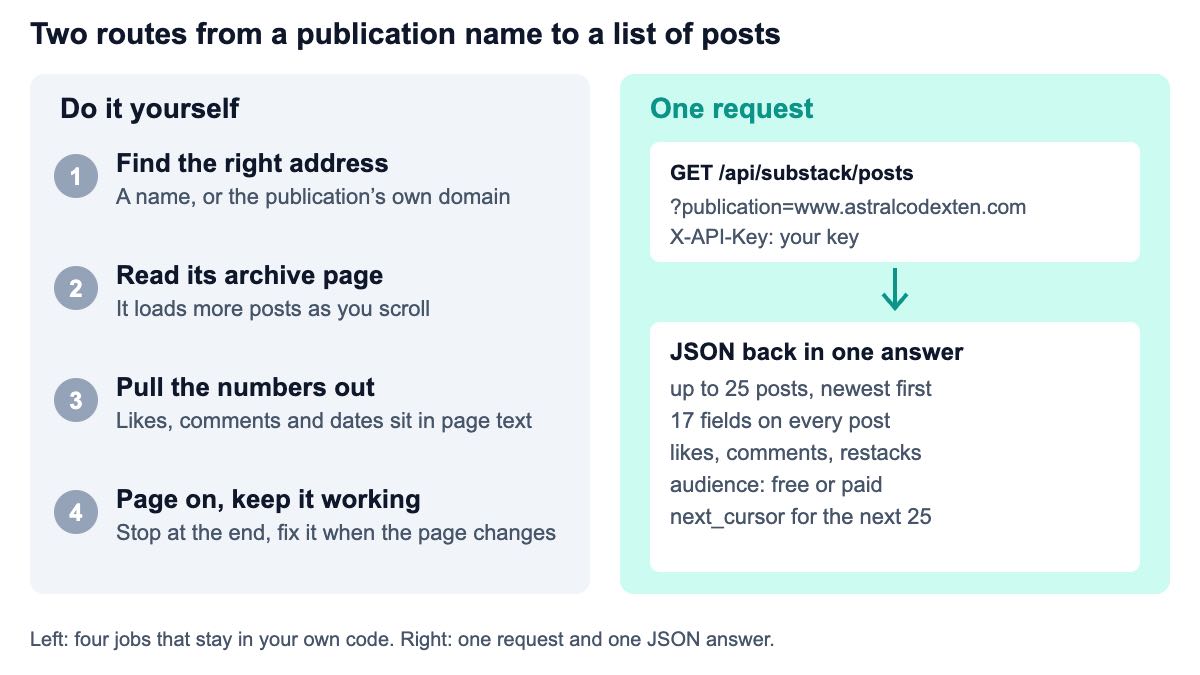
| Job | What it means | Where it bites |
|---|---|---|
| 1. Find the right address | Turn a name or a link into the one address your code will use | A name, a substack.com address and a custom domain all point to the same newsletter, and a typo looks like a publication with no posts |
| 2. Read its archive page | Walk the list of posts, newest first, as the page loads more of them | The page is built for a person scrolling, not for code, and what it shows first is the page’s choice |
| 3. Pull the numbers out | Get likes, comments, restacks, the date and the paid flag out of the page | Counts sit in the page’s text, not in fields, and a changed layout breaks the reader without a warning |
| 4. Page on, keep it working | Stop at the end of the archive, then do it again tomorrow for every publication | A reader that fails quietly costs you the posts in between, and you find out from a gap in a chart |
Where it bites in practice:
- The unit is the publication. Ten newsletters are ten addresses, ten layouts to keep in step and ten places for something to go wrong.
- A paid post is half a post. Your reader has to tell a preview from a full article, and decide what to store for each.
- Empty has many causes. A wrong address, a publication that moved to its own domain, and a quiet week all look like “no posts”, and your code cannot always tell them apart.
- Formats move. A class name changes and a column you relied on is gone. Nothing announces it.
If you read one newsletter once for a school project, that is fine. If a dashboard, a weekly report or an alert depends on it, it is a standing job.
How do you get a publication’s posts with one request in Python?
Send a GET request to https://apiserpent.com/api/substack/posts with your key in an X-API-Key header and the publication in publication. Get a key and 10 free API calls at the sign-up page. The helper below uses only the standard library, so there is nothing to install.
import json
import urllib.parse
import urllib.request

API_KEY = "sk_live_your_api_key"
BASE = "https://apiserpent.com/api/substack/posts"


def get_posts(publication, sort="new", cursor=None):
    params = {"publication": publication, "sort": sort}
    if cursor:
        params["cursor"] = cursor
    req = urllib.request.Request(
        BASE + "?" + urllib.parse.urlencode(params),
        headers={"X-API-Key": API_KEY},
    )
    with urllib.request.urlopen(req, timeout=60) as resp:
        return json.load(resp)


data = get_posts("www.astralcodexten.com")

if not data["posts"]:
    print("No posts came back for this publication")
else:
    print(data["publication"], data["sort"], "-", len(data["posts"]), "posts in this answer")
    for p in data["posts"][:4]:
        print(p["published_at"][:10], f'{p["likes"]:>4} likes {p["comments"]:>4} comments', p["title"])
With the saved answer for Astral Codex Ten, the script prints:
www.astralcodexten.com new - 25 posts in this answer
2026-11-21   31 likes   39 comments Suggest Questions For The 2027 ACX/Metaculus Prediction Contest
2026-11-19  162 likes  189 comments The AI Forecasting Agenda
2026-11-18  279 likes  204 comments Varieties Of Discourseposting
2026-11-17   64 likes  503 comments Open Thread 460
Dates are ISO timestamps in UTC, so they sort as text. Here is the third post of a saved answer for Slow Boring, as the API returns it:
{
  "id": 225727492,
  "title": "Live podcast — and a discount!",
  "subtitle": "Jerusalem and I are doing our very first live edition of The Argument, and we’re offering paid subscribers a discount on tickets.",
  "url": "https://www.slowboring.com/p/live-podcast-and-a-discount",
  "published_at": "2026-11-20T16:03:07.906Z",
  "audience": "only_paid",
  "type": "newsletter",
  "word_count": 170,
  "likes": 26,
  "comments": 7,
  "restacks": 3,
  "reactions": [
    {
      "emoji": "❤",
      "count": 26
    }
  ],
  "cover_image": "https://substackcdn.com/image/fetch/$s_!GD2G!,f_auto,q_auto:good,fl_progressive:steep/https%3A%2F%2Fsubstack-post-media.s3.amazonaws.com%2Fpublic%2Fimages%2F175e5585-45a0-4de2-9021-523a78e65148_1456x971.png",
  "authors": [
    {
      "name": "Matthew Yglesias",
      "handle": "matthewyglesias"
    }
  ],
  "excerpt": "Join me and my co-host Jerusalem Demsas for the very first live edition of our podcast!",
  "section": null,
  "tags": []
}
The whole answer wraps up to 25 of those posts in four fields that are the same on every call, with next_cursor holding the key to the next page:
{
  "success": true,
  "publication": "www.slowboring.com",
  "sort": "new",
  "posts": [
    "... up to 25 posts ..."
  ],
  "next_cursor": "..."
}
What can you ask for?
Three parameters, one of them required. The answer repeats publication and sort as they were applied.
| Parameter | Values | Default |
|---|---|---|
publication (required) | The Substack name, such as astralcodexten, its substack.com address, or its own domain, such as www.astralcodexten.com | None |
sort | new (newest first) or top (the publication’s most popular posts first) | new |
cursor | The next_cursor of the previous answer, with the same sort, for the next 25 posts | None, which gives the first 25 |
A value that is not a valid address gets a plain message naming the parameter, so a typo does not look like a newsletter with no posts. The cursor is a string you pass back untouched: do not build one yourself, and do not reuse one with a different sort.
How do you see what a paid post looks like in Node?
Ask for a publication that has paid posts and read one. Node 18 and later has fetch built in, so no package is needed. Slow Boring is mostly paid, which makes it a good test of what you get for a post behind the paywall.
(async () => {
  const base = 'https://apiserpent.com/api/substack/posts';
  const headers = { 'X-API-Key': 'sk_live_your_api_key' };
  const params = new URLSearchParams({ publication: 'www.slowboring.com', sort: 'new' });
  const data = await (await fetch(`${base}?${params}`, { headers })).json();

  const paid = data.posts.filter((p) => p.audience !== 'everyone');
  console.log(data.publication, '-', data.posts.length, 'posts,', paid.length, 'not open to everyone');

  const p = paid[0];
  if (!p) return;
  console.log(p.title);
  console.log('  audience:', p.audience, '| words:', p.word_count, '| likes:', p.likes, '| comments:', p.comments);
  console.log('  excerpt :', p.excerpt.length, 'characters -', p.excerpt.slice(0, 90) + '...');
  console.log('  authors :', p.authors.map((a) => `${a.name} (@${a.handle})`).join(', '));
})();
On the saved answer for Slow Boring it prints:
www.slowboring.com - 25 posts, 21 not open to everyone
Find the levers, and pull
  audience: only_paid | words: 1514 | likes: 58 | comments: 109
  excerpt : 175 characters - Everyone has a list of daily annoyances, recurring irritations that we mostly accept as th...
  authors : Halina Bennet (@halinabennet)
The numbers are the whole point of the exercise. The post is paid and 1,514 words long, and the answer carries its 58 likes and 109 comments, who wrote it and a 175-character public excerpt. It does not carry the paid text, and there is nothing to switch on that would add it. Of the 25 posts in that answer, 21 are not open to everyone.
What does each field in a post mean?
Seventeen fields, named the same on every call, in four groups.
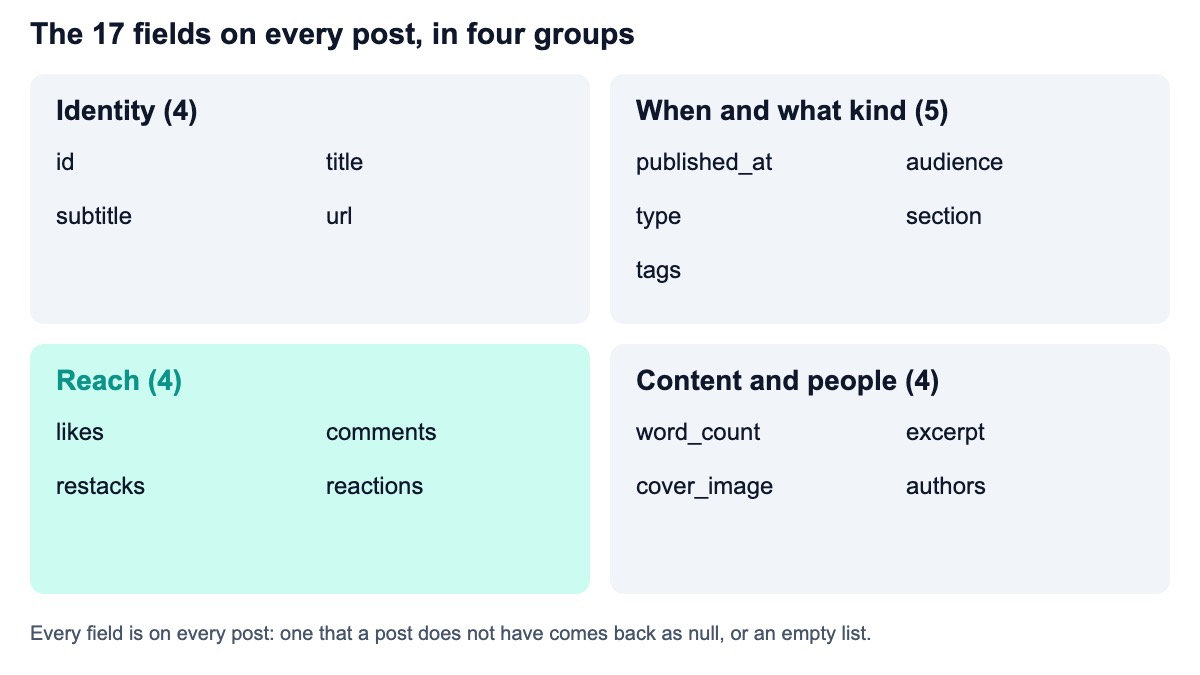
| Field | What it holds |
|---|---|
id, url | The post’s own id and its address. Keep the id: it is the key for removing duplicates between pages and between runs |
title, subtitle | What the author wrote. A subtitle the post does not have is null |
published_at | When it went out, as an ISO timestamp in UTC |
audience | Who can read it: everyone, only_paid, only_subscribers or founding |
type | newsletter, podcast, thread or restack |
section, tags | The publication’s own section name and tags, null and an empty list when it uses none |
likes, comments, restacks | The counts at the moment of the call |
reactions | A list of emoji and counts, for example a heart and 58 |
word_count | The length of the post in words. It is 0 on some posts, so check before you divide by it |
excerpt, cover_image | The public excerpt the publication shows, and the address of the cover picture |
authors | A list of names and handles, one entry per author, empty when a post shows none |
Likes, comments and restacks are a snapshot. They move for days after a post goes out, so compare posts of similar age, and store the time you read them if you plan to look at growth.
How do you page back and save the posts?
Pass next_cursor back as cursor until it is empty, or stop at the number of pages you want. This script reads pages of one publication, counts the span in days and writes a CSV file. The saved material for this guide holds the first page of each publication, so the script is set to one page; raise MAX_PAGES to read further back.
import csv
import json
import urllib.parse
import urllib.request

API_KEY = "sk_live_your_api_key"
BASE = "https://apiserpent.com/api/substack/posts"
PUBLICATION = "www.astralcodexten.com"
MAX_PAGES = 1  # each page is up to 25 posts; raise this to read further back

posts, cursor, pages = [], None, 0
while pages < MAX_PAGES:
    params = {"publication": PUBLICATION, "sort": "new"}
    if cursor:
        params["cursor"] = cursor  # next_cursor from the last answer, same sort
    req = urllib.request.Request(
        BASE + "?" + urllib.parse.urlencode(params), headers={"X-API-Key": API_KEY}
    )
    with urllib.request.urlopen(req, timeout=60) as resp:
        data = json.load(resp)
    posts += data["posts"]
    pages += 1
    cursor = data["next_cursor"]  # empty on the last page
    if not cursor:
        break

print(len(posts), "posts,", min(p["published_at"] for p in posts)[:10], "to", max(p["published_at"] for p in posts)[:10])
print("more pages available:", bool(cursor))

fields = ["id", "published_at", "title", "url", "audience", "type", "word_count", "likes", "comments", "restacks"]
with open("posts.csv", "w", newline="", encoding="utf-8") as f:
    writer = csv.DictWriter(f, fieldnames=fields, extrasaction="ignore")
    writer.writeheader()
    writer.writerows(posts)
print(len(posts), "rows written to posts.csv")
On the saved answer for Astral Codex Ten it prints:
25 posts, 2026-10-10 to 2026-11-21
more pages available: True
25 rows written to posts.csv
Twenty-five posts cover 10 October to 21 November for this publication, six weeks, so a daily job that collects new pages and removes duplicates by id is how you keep the whole history. A busier newsletter fills a page much faster: the 25 posts in the Slow Boring answer span 12 days.
What do you do with an empty answer or a missing value?
Treat both as ordinary data. The shape never changes: a field a post does not have comes back as null or an empty list, so a script needs no special case for the rest of the batch. A small German newsletter in the saved material has one post, with no subtitle, no section and no tags:
{
  "id": 163190719,
  "title": "Plattformwechsel",
  "subtitle": null,
  "url": "https://uedio.substack.com/p/umzug-auf-steady",
  "published_at": "2025-05-09T06:58:10.178Z",
  "audience": "everyone",
  "type": "newsletter",
  "word_count": 13,
  "likes": 1,
  "comments": 0,
  "restacks": 0,
  "reactions": [
    {
      "emoji": "❤",
      "count": 1
    }
  ],
  "cover_image": "https://substackcdn.com/image/fetch/f_auto,q_auto:good,fl_progressive:steep/https%3A%2F%2Fsubstack-post-media.s3.amazonaws.com%2Fpublic%2Fimages%2F3b97e5d3-ad15-49c9-b3f4-8faa1a2cbf75_500x500.png",
  "authors": [
    {
      "name": "uedio",
      "handle": "uedio"
    }
  ],
  "excerpt": "Lieber Nutzer:innen, dieses Projekt ist im Mai 2025 zu Steady umgezogen.",
  "section": null,
  "tags": []
}
Three things to plan for. A publication with an empty archive gives you an empty posts list, so guard the list before you index into it, as the first Python snippet does with a plain if. A publication the API cannot find may answer with an error status instead, and urllib raises an error on a 4xx or 5xx status, so wrap the call in try and except for a long job. And a subtitle can be a placeholder rather than empty: the Astral Codex Ten posts use three dots, so filter those out before you show them.
Which route should you pick?
- A reading list of recent titles: the free feed. It is free, built for the job and fine for a handful of newsletters.
- One look at one newsletter: the publication’s own archive page in a browser. Reading the counts by eye takes a minute.
- Counts, audience flags, authors or older posts, for many publications or on a schedule: one API call. It takes a name or a domain, keeps one shape and costs $3.70 per 1,000 calls of up to 25 posts, $0.70 at the top tier. Compare prices in the cheapest Substack API guide.
- A research question about what the numbers say: the API plus a short script, as in Substack data for newsletter research.
The Substack API page lists every parameter and field, and the playground lets you try a publication with no code. If you read other social sources too, the LinkedIn jobs guide follows the same shape for postings, and the social media APIs and SERP APIs cover the rest.
How we checked this
Code. Every snippet was executed on 23 November 2026 on Python 3.15.2 (standard library only) and Node 26.5.0. The web address was swapped for a local stand-in server that answered with saved material, so the request address, the X-API-Key header and every parameter were checked without a live request. The stand-in served saved first pages for Astral Codex Ten, Slow Boring and one small German newsletter, recorded on 22 November 2026. The RSS snippet read a feed file that the stand-in built from the same Astral Codex Ten posts; it shows that the code works, not what a real feed contains. The outputs shown are what each snippet printed.
Counts. The counts are over the 25 posts of each saved answer. The two JSON examples are the third post of the Slow Boring answer and the only post of the small German one. The feed address pattern comes from Feedly’s help page, read on 23 November 2026.
What I could not verify:
- What a live feed holds. I did not request one. The 20-post figure and the paid-post preview come from third-party reports, not from Substack’s own documentation.
- That a feed has no counts. That is my reading of the format and of the sources, not something I confirmed on a feed.
- The
sort=topparameter and a second page were not run for output, because the saved answers are first pages ofsort=new; their behaviour is as documented, not shown by an output above. - How Substack’s terms apply to your use. I did not read them for this guide; read them before you build a product on any source.
Package versions change often, so test before you rely on either.
Run it on your own newsletters
Serpent’s Substack API is $3.70 per 1,000 calls pay as you go, no subscription, with 10 free API calls to start. Try a publication in the playground before you write any code.
Get Your Free API KeyExplore: Substack API · Playground · Docs · Pricing
FAQ
How do I get Substack posts with Python?
Send a GET request to the Serpent endpoint /api/substack/posts with your key in an X-API-Key header and the publication in the publication parameter, as its Substack name, its substack.com address or its own domain. The answer is JSON with up to 25 posts, each with title, date, likes, comments, restacks, audience and public excerpt, and a next_cursor for the next page. With the standard library it is one request and a loop over the posts list.
Does a Substack publication have a feed?
Generally yes. Feedly's help page gives the address as the publication address followed by /feed. Third-party reports say a feed holds only the latest posts, about 20, shows paid posts as previews and can be switched off by the publication. I did not open a live feed, so check one before you build on it. I found no source saying a feed carries like or comment counts.
Can I get the text of paid Substack posts?
No. For a paid post you get its public details: the title, date, audience flag, counts, authors and the public excerpt the publication shows, which was 175 characters for one Slow Boring post in the saved material. The paid text itself is not returned, and the API has no way to ask for it.
How many posts can I get from one publication?
Up to 25 per call. Pass next_cursor back as the cursor parameter, with the same sort, to get the next 25, until next_cursor is empty. The sort parameter is new for newest first or top for the most popular posts first, and a cursor from one sort does not work with the other. In the saved answers, 25 posts covered six weeks of one newsletter and 12 days of another.
What does a post with missing data look like?
The shape never changes. A subtitle, section or cover picture a post does not have is null, tags and authors are empty lists when there are none, and a publication with an empty archive gives an empty posts list. A small German newsletter in the saved material has one post with no subtitle, no section and no tags.
Which publication addresses work?
A Substack name such as astralcodexten, its substack.com address, or the publication's own domain such as www.astralcodexten.com. The same newsletter answers on its substack.com address and on its own domain. Pick one form per publication and keep to it, so that your records do not split in two.
Sources
Substack feeds (read 23 Nov 2026):
Libraries used in the snippets: