How to Scrape Job Listings with Python and Node

You can get job listings into Python or Node in two ways: call the free job-board API that each employer's hiring software publishes, one company at a time, or send one search to a jobs API that covers many companies and returns every job in the same JSON shape.
This guide shows both. The first route is checked against the vendors' own documentation on 24 November 2026. The second is one search call, one detail call, paging and a CSV file, in Python and in Node.
Short answer: If you need the open roles of a few employers you already know, use their hiring software's public job-board API: no key, no cost, one request per company. If you need to search by role, place or date across many companies, one call to a jobs search API is less code to own: about 200,000 open jobs from more than 600 companies in one shape. For LinkedIn or Indeed, neither offers an open job-search API.
This post is for the developer who needs open jobs as JSON, for a niche job board, a hiring-signal feed or a recruiting tool, and is choosing between building it company by company and calling one search. For prices against other jobs data services, see the cheapest jobs API comparison. For what to build with the data, see job data for recruiting and hiring trends.
Is there an official API for job listings?
Not one for all jobs. The two biggest job sites do not offer an open job-search API, but many employers publish their own openings through a public API that comes with their hiring software.
LinkedIn. LinkedIn's job API is for posting jobs onto LinkedIn, not for reading them. Its Job Posting API overview says it lets "authorized third parties such as clients, ATS systems, and job distributors" post jobs on behalf of customers, that its use "is restricted to those developers approved by LinkedIn", and, at the top of the page, "We are currently not accepting new partnerships for LinkedIn's Job Posting API."
Indeed. Indeed's developer documentation describes APIs for partners that manage postings. Its Job Sync API is how "ATS partners" "create, upsert, expire, and check the status of job postings on Indeed." The pages I checked describe no public way to search Indeed's listings.
Employers' hiring software. This is the open door. Applicant tracking systems, the software companies use to post roles and take applications, often give each customer a public job board with a JSON API behind it, so the company can build its own careers page. Two widely used ones document theirs in public, and neither needs a key to read published jobs.
How do you read one company's job board yourself?
You call that company's board on the vendor's API, using the name or token that identifies the company. Here are the two documented examples, as example code that was not run for this post.
Greenhouse Job Board API (Python)
The Greenhouse Job Board API lists a company's published jobs at GET https://boards-api.greenhouse.io/v1/boards/{board_token}/jobs. The docs call board_token the "Job Board URL token", and adding content=true includes "the full post description, department, and office of each job post." Only application submission needs authentication.
import requests

board = 'examplecompany'  # the company's Job Board URL token
resp = requests.get(
    f'https://boards-api.greenhouse.io/v1/boards/{board}/jobs',
    params={'content': 'true'},
    timeout=60,
)
for job in resp.json()['jobs']:
    print(job['title'], '|', job['location']['name'], '|', job['absolute_url'])
Each job carries an id, a title, an updated_at date, a location object with a name, and an absolute_url to the posting, and the answer has a meta.total count. The docs list no paging parameters for this call and warn that "Requests may be rate limited for security and traffic reasons."
Lever Postings API (Node)
The Lever Postings API lists postings at GET /v0/postings/SITE on api.lever.co, or api.eu.lever.co for EU accounts, with mode=json for JSON and skip and limit for paging. The docs say "all job postings in the published state are publicly viewable", and an API key is needed only to apply.
const site = 'examplecompany'; // the company's Lever site name
const res = await fetch(`https://api.lever.co/v0/postings/${site}?mode=json&limit=50`);
const postings = await res.json();
for (const p of postings) {
  console.log(p.text, '|', p.categories?.location, '|', p.hostedUrl);
}
Here the title is text, the place sits inside categories with the commitment, team and department, and the link to the posting is hostedUrl. Lever's docs say "Each company currently only has one site (usually your company name with no spaces)."
What does the do-it-yourself route cost you?
No money, but work that grows with every company you add. The two examples above already show most of it.
- A token per company. You need each employer's board token or site name before you can call anything, and you have to know which hiring software that employer uses.
- One call per company. To cover 300 employers you make at least 300 requests, then filter the results yourself.
- A parser per vendor. Greenhouse names the title
titleand Lever names ittext; one nests the place inlocation.name, the other incategories. Every other vendor you add brings its own shape. - No search across companies. Neither API answers "data engineer jobs posted this week in New York." Each returns one company's board, so the search, the de-duplication and the record of which jobs closed are yours to build.
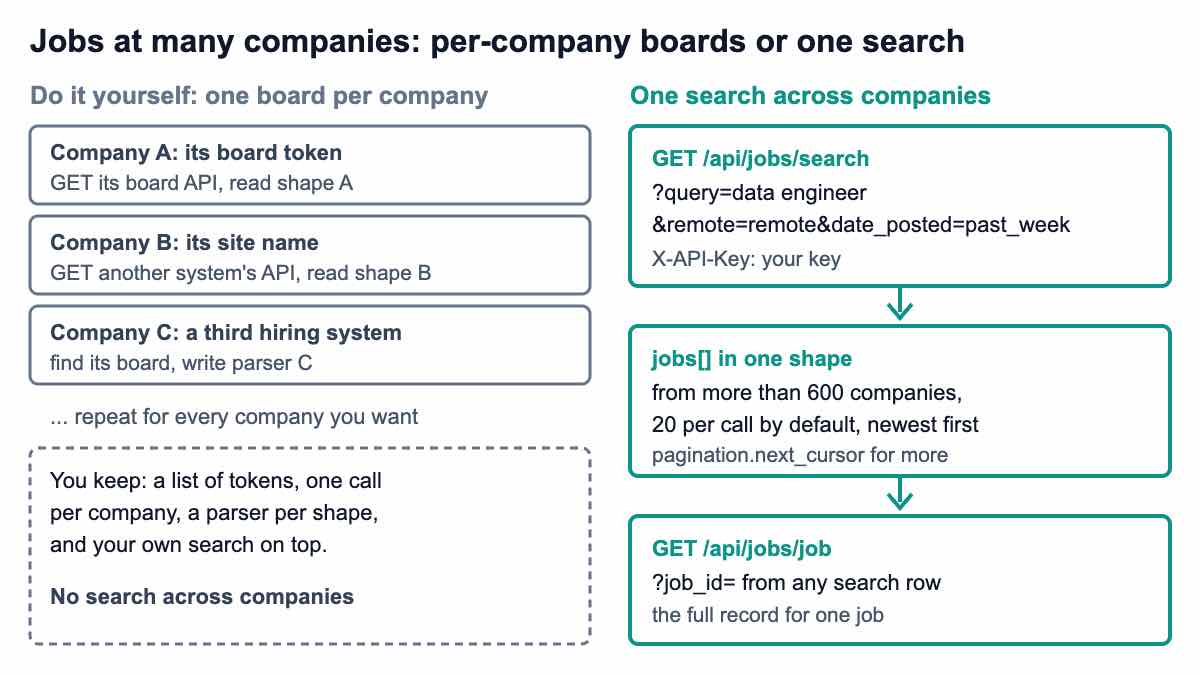
For a careers widget on one company's site, none of this matters, and the board API is the right tool. For anything that starts with a role or a city rather than a company name, the list of tokens and parsers becomes the project.
How do you search jobs across companies in Python?
Send one GET request to https://apiserpent.com/api/jobs/search with your key in the X-API-Key header. The query parameter is required; location, remote (remote, on_site or hybrid) and date_posted (past_day, past_3days, past_week, past_month or all) narrow it. One call returns up to 20 jobs by default, newest first.
This example code searches hybrid data engineer roles in New York posted in the past week, prints one line per job, then reads the first job again by its id:
import requests

API_KEY = 'sk_live_your_api_key'
BASE = 'https://apiserpent.com/api/jobs'
HEADERS = {'X-API-Key': API_KEY}

body = requests.get(f'{BASE}/search', headers=HEADERS, timeout=60, params={
    'query': 'data engineer',
    'location': 'New York',
    'remote': 'hybrid',
    'date_posted': 'past_week',
}).json()
if not body.get('success'):
    raise SystemExit(body)

data = body['data']
print(data['pagination']['total'], 'jobs match')
for job in data['jobs']:
    print(job['job_title'], '|', job['employer_name'], '|', job['job_location'])

# Read one job again by the job_id the search returned.
if data['jobs']:
    detail = requests.get(f'{BASE}/job', headers=HEADERS, timeout=60,
                          params={'job_id': data['jobs'][0]['job_id']}).json()
    job = detail['data']
    print(job['job_title'], '|', job['job_status'], '|', job['job_apply_link'])
    print((job['job_description'] or '')[:300])
The detail call, GET /api/jobs/job, takes the job_id from any search row and returns that job's full record directly under data. Treat the id as an opaque string: copy it from a search answer and pass it back unchanged.
To save a few pages to a spreadsheet, page with page and let Python's csv module keep the columns you want. extrasaction='ignore' drops the keys you did not list:
import csv

import requests

FIELDS = ['job_id', 'job_title', 'employer_name', 'job_location', 'job_is_remote',
          'job_min_salary', 'job_max_salary', 'job_salary_currency', 'job_posted_at', 'job_apply_link']

with open('jobs.csv', 'w', newline='', encoding='utf-8') as f:
    writer = csv.DictWriter(f, fieldnames=FIELDS, extrasaction='ignore')
    writer.writeheader()
    for page in range(1, 4):  # pages 1, 2 and 3 of the same search
        body = requests.get('https://apiserpent.com/api/jobs/search',
                            headers={'X-API-Key': 'sk_live_your_api_key'}, timeout=60,
                            params={'query': 'data engineer', 'country': 'us', 'page': page}).json()
        data = body['data']
        writer.writerows(data['jobs'])
        if not data['pagination']['has_more']:
            break
And in Node, with paging and a CSV file?
Node 18 or later has fetch built in, so there is nothing to install. This example code reads up to five pages of remote product designer jobs from the past week by passing pagination.next_cursor back as cursor, keeps each job once by its job_fingerprint, and writes a CSV file. Save it as jobs.mjs so the top-level await works:
import { writeFile } from 'node:fs/promises';

const KEY = 'sk_live_your_api_key';
const search = { query: 'product designer', remote: 'remote', date_posted: 'past_week' };
const rows = [];
const seen = new Set();
let cursor = null;

for (let i = 0; i < 5; i++) {
  const params = new URLSearchParams(cursor ? { ...search, cursor } : search);
  const res = await fetch('https://apiserpent.com/api/jobs/search?' + params, {
    headers: { 'X-API-Key': KEY },
  });
  const body = await res.json();
  if (body.success === false) { console.error(body); break; }
  for (const job of body.data.jobs) {
    const key = job.job_fingerprint || job.job_id;
    if (seen.has(key)) continue;
    seen.add(key);
    rows.push(job);
  }
  cursor = body.data.pagination.next_cursor;
  if (cursor == null || body.data.pagination.has_more === false) break;
}

const cols = ['job_id', 'job_title', 'employer_name', 'job_location', 'job_workplace_type',
  'job_min_salary', 'job_max_salary', 'job_salary_currency', 'job_posted_at', 'job_apply_link'];
const cell = (v) => (v == null ? '' : `"${String(v).replace(/"/g, '""')}"`);
const csv = [cols.join(','), ...rows.map((r) => cols.map((c) => cell(r[c])).join(','))].join('\n');
await writeFile('jobs.csv', csv + '\n');
console.log(`${rows.length} jobs written to jobs.csv`);
Pass the cursor with the same filters you started with; it continues that search. The page parameter works too, for pages 1 to 100, and pagination.total tells you how many jobs match the whole search before you decide how deep to go.
What does a job row look like?
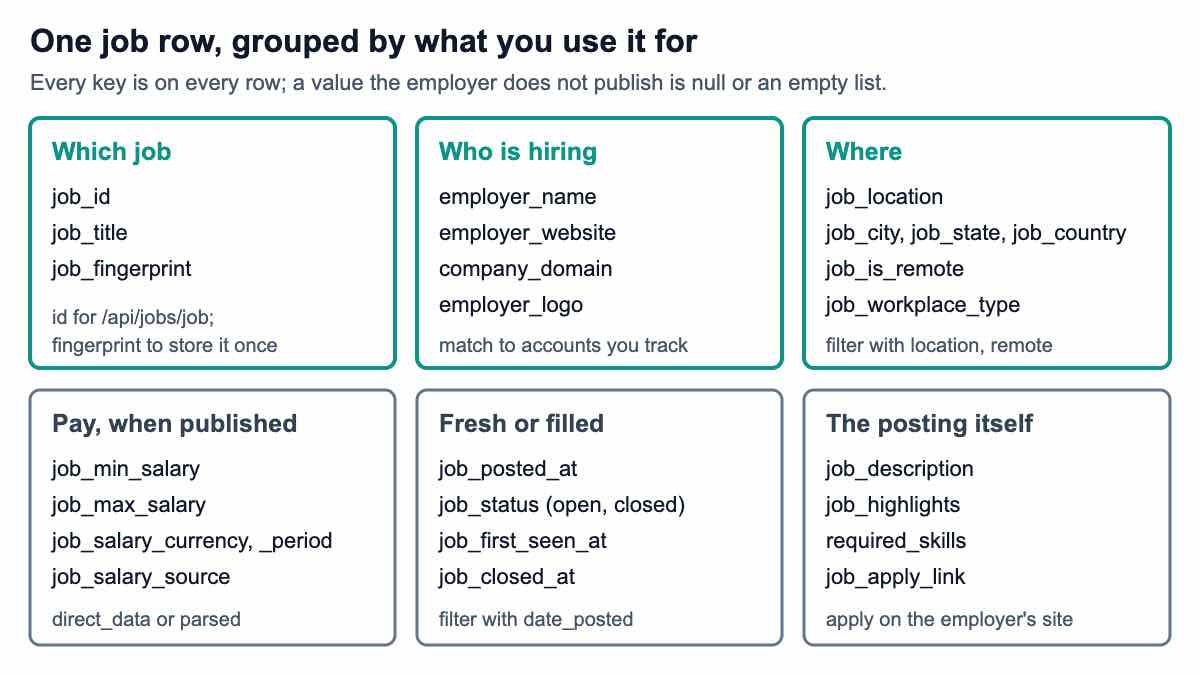
Every search answer has the same three parts: jobs, pagination and filters, inside data. Here is the full shape of one row, with example values written for this post; the field list matches the Jobs API page and the docs:
{
  "success": true,
  "data": {
    "jobs": [
      {
        "job_id": "JY3zQPw98t1enzW6_imFxdmdaBblCffnC5KjcEVJ",
        "job_title": "Senior Data Engineer",
        "employer_name": "Example Corp",
        "employer_logo": null,
        "employer_website": "https://www.example.com",
        "source": "company_site",
        "job_apply_link": "https://www.example.com/careers/1234",
        "apply_options": [
          { "title": "Apply", "link": "https://www.example.com/careers/1234", "is_direct": true }
        ],
        "job_publisher": "Company career site",
        "job_employment_type": "FULLTIME",
        "job_is_remote": false,
        "job_workplace_type": "hybrid",
        "job_location": "New York, NY, United States",
        "job_city": "New York",
        "job_state": "NY",
        "job_country": "US",
        "job_min_salary": 150000,
        "job_max_salary": 185000,
        "job_salary_currency": "USD",
        "job_salary_period": "YEAR",
        "job_salary_source": "direct_data",
        "job_posted_at": "2026-11-20T15:00:00.000Z",
        "job_posted_at_timestamp": 1795186800000,
        "job_observed_at": "2026-11-24T06:00:00.000Z",
        "valid_through": null,
        "seniority_level": "senior",
        "required_experience_years": 5,
        "job_description": "You will build and run the pipelines that ...",
        "job_description_html": "<p>You will build and run the pipelines that ...</p>",
        "job_highlights": { "qualifications": ["..."], "responsibilities": ["..."], "benefits": [] },
        "job_benefits": [],
        "required_skills": ["Python", "SQL"],
        "job_status": "open",
        "job_first_seen_at": "2026-11-20T18:00:00.000Z",
        "job_last_seen_at": "2026-11-24T06:00:00.000Z",
        "job_closed_at": null,
        "also_listed_on": [],
        "company_domain": "example.com",
        "job_fingerprint": "..."
      }
      // ...up to 20 jobs on a default page
    ],
    "pagination": { "page": 1, "per_page": 20, "total": 2386, "has_more": true, "next_cursor": "eyJ2IjoyLCJ0Ijox..." },
    "filters": { "...": "an echo of the filters that were applied" }
  }
}
The detail answer is one of these records directly under data, with one extra key, job_onet_soc, the O*NET-SOC occupation code when it can be worked out. The figure groups the fields by what you would use them for.
What should your code expect in the data?
Four things are worth handling in the first version of your code. None of them is an error, and each one changes your numbers if you assume tidier data.
Many fields are often empty. Every key is present on every row, but a value the employer does not publish is null or an empty list. Salary is the usual gap: it comes back when the employer publishes it. Give each field a default and never test for a missing key.
Know where a salary came from. job_salary_source is direct_data when the employer published the pay and parsed when it was worked out from the description text. Pay is in the job's own currency and period, so a salary study should group by job_salary_currency and job_salary_period before comparing numbers.
Jobs close. A job that has been filled can still come back from the detail call, with job_status set to closed and the date in job_closed_at. Check the status before you show a role to a job seeker, and use job_fingerprint as your key so one job is stored once across polls.
Check the filters echo. An unknown value in employment_type or seniority is dropped rather than rejected, so a typo returns the search without that filter. The filters object in each answer shows exactly what was applied; compare it with what you sent.
Which route should you pick?
Pick by whether you start from a company or from a role. The table puts the two side by side, with the board API facts from the Greenhouse and Lever documentation as checked on 24 November 2026.
| Employer job-board APIs | One jobs search | |
|---|---|---|
| What you need | Each company's board token or site name, and which hiring software it uses | An API key |
| Which jobs | One company per request | About 200,000 open jobs from more than 600 companies |
| Search by role, place, date | No; you filter after downloading each board | query, location, remote, date_posted and more |
| Shape of a job | Different per vendor (title or text, location.name or categories) | The same keys on every row |
| Paging | Greenhouse lists none; Lever uses skip and limit | page or cursor, with total and has_more |
| Cost | Free to read; your time to collect tokens and keep parsers working | Per call; 10 free API calls to start |
- A careers page or widget for one employer: that employer's board API. It is free, official and exactly scoped.
- A short, fixed list of companies you already track: board APIs still work, if you accept a parser per vendor and a call per company.
- A search by role, place or date across many employers: one call to the jobs search. There is no token list to keep and one shape to parse.
- A niche board or an alert feed: the jobs search with
date_posted=past_day, keyed onjob_fingerprint, withjob_statusto take filled roles down.
The Jobs API costs from $0.08 per 1,000 calls, pay as you go with no subscription; search and job detail cost the same, and every tier is on the pricing page. Try a search on the Jobs API page before you sign up, and get 10 free API calls with a new key from the sign-up page.
Google for Jobs is a different source with its own route; the Google Jobs walkthrough covers it. For LinkedIn job pages, see building a job board on LinkedIn jobs data.
How we checked this
Official routes. The Greenhouse, Lever, LinkedIn and Indeed sections were checked against each vendor's developer documentation on 24 November 2026; the pages are linked in the sources. Quotes are copied from those pages.
Jobs API. The parameters, the field names and the shape come from the Jobs API page and its documentation as of 24 November 2026, and the coverage figure, about 200,000 open jobs from more than 600 companies, is the one that page states. The example values in the shape were written for this post and do not describe a real posting.
What I could not verify:
- The code in this post is example code. It was not run against the live services for this post, so no output is printed.
- Lever's documentation does not spell out the outer shape of the list answer or the type of
categories.location, so the Lever example reads them defensively. - Greenhouse says requests "may be rate limited" without giving numbers, and neither vendor states how many companies use its public board.
- I did not find an official notice from Indeed about any former public search API, so this post says only what Indeed's current documentation describes.
Search jobs across companies in one call
Serpent's Jobs API returns open jobs as JSON, with filters, full descriptions, salaries when published and apply links to the employer's own site. Every account starts with 10 free API calls.
Get Your Free API KeyExplore: Jobs API · Search docs · Job detail docs · Pricing · About
FAQ
Is there a free API for job listings?
For one company at a time, yes. Many employers' hiring software publishes a public job-board API: the Greenhouse Job Board API needs authentication only to submit applications, and Lever says its published postings are publicly viewable. Each returns one company's board, so you need that company's token and a call per company. A search across many companies is a paid API; Serpent's Jobs API starts every account with 10 free API calls.
Does LinkedIn or Indeed have a job search API?
Not an open one. LinkedIn's Job Posting API is for approved partners to post jobs onto LinkedIn, and its documentation says it is not accepting new partnerships. Indeed's documented Job Sync API is for ATS partners to create, update, expire and check their own postings on Indeed. Neither describes a public endpoint for searching all of its job listings.
How do I get the full description of one job?
Take the job_id from any search row and pass it to GET /api/jobs/job. The answer is that job's full record under data, with the description as plain text and as HTML, qualifications, responsibilities and benefits, and the O*NET-SOC occupation code when it can be worked out. A search row already carries the description, so you only need the detail call to read a job again later.
How do I page through job search results?
Every answer has a pagination object with page, per_page, total, has_more and next_cursor. Either set page for pages 1 to 100, or pass next_cursor back as cursor, with the same filters, to keep reading the same search. Stop when has_more is false or next_cursor is empty. A default page holds up to 20 jobs, newest first.
Why are the salary fields empty on some jobs?
Salary comes back only when the employer publishes it, and many postings do not. When there is a figure you get a minimum, a maximum, a currency and a pay period, and job_salary_source says whether the employer published it (direct_data) or it was worked out from the description text (parsed). When there is none, the fields are null rather than missing, so one parser handles both.
Can I limit a search to one company?
Yes. Add the company parameter to a search and the results come from that employer only, with the same filters and paging as any other search. Combine it with query, location or date_posted to see, for example, which data roles one company opened this week, and read pagination.total to count them. For a single employer you could also read its own public job board, as shown in the do-it-yourself section.
Sources
Vendor developer documentation (checked 24 Nov 2026):
- Greenhouse: Job Board API (list jobs, board_token, content parameter)
- Lever: Postings API documentation on GitHub (site name, mode, skip and limit)
- LinkedIn: Job Posting API overview (partners only, not accepting new partnerships)
- Indeed: Job Sync API for ATS partners
Language documentation (not re-opened for this post):