Clay Google search enrichment with the HTTP API column

To add Google search results to a Clay table, add an HTTP API enrichment column that sends a GET request to a SERP API, with a column such as Company Name in the query and your key in a header. Clay then writes the fields you pick, such as the first result's URL, into new columns. It needs Clay's Growth plan or above.
Short answer: On Clay's Free or Launch plan, use Clay's own Google search action, because the HTTP API column is not included. On Growth or Enterprise, call a SERP API with your own key: Clay counts each run as one Action and no Data Credits, and the search itself costs from $0.03 per 1,000 rows on our API — pay as you go, no subscription (pricing). If you need a Google result per row across tens of thousands of rows, the HTTP route is the one to price out first.
Clay's Google search or your own SERP API?
It depends first on your plan, then on volume. Clay's pricing page (checked 20 Nov 2026) lists "HTTP API integrations" as included on Growth and Enterprise and not included on Free or Launch. So on the two lower plans, Clay's own Perform Search with Google action, listed for "All Plans", is the only built-in way to get Google results.
That action runs on Clay credits. Its page says "Clay Credits Only" and does not state how many credits one run uses. The pricing page says Data Credits "are used when you purchase data from Clay's marketplace" and start at $0.05 each.
Your own key changes the billing. Clay's pricing FAQ says customers can "use their own API keys for data enrichment or AI in Clay", and that "Each run will count as one Action, but no Data Credit will be used." Clay lists Actions as starting at less than $0.01 each, and the search fee goes to whichever SERP API you call.
This is also what Clay's own SEO-report Claybook does: it calls Serper through an HTTP API column to find businesses, then enriches them. That template still names the "Explorer" plan, which no longer appears on the pricing page, so check your plan against today's table rather than the template.
| Clay "Perform Search with Google" | HTTP API column + your SERP API key | |
|---|---|---|
| Clay plans | All plans | Growth and Enterprise |
| Clay billing per run | Clay credits (amount not listed) | 1 Action, 0 Data Credits |
| Search fee | Included in the credits | Your SERP API's price |
| Fields you get | Search link, snippet, logo and contact fields | Any field in the API response |
| Country, freshness, depth | Language and country inputs | Every parameter the API documents |
| Setup effort | Pick the action | About 10 minutes the first time |
The Clay plan prices are worth reading twice. The plan cards showed Launch at $167 a month and Growth at $446, while the FAQ on the same page said "(starting at $185/mo)" next to Launch and "(starting at $495/mo)" next to Growth. The cards sit under a Monthly / Annual toggle that says annual billing saves 10%, and $167 is about 10% below $185, so the cards probably show the annual rate; the page does not label which price is which.
How do you set up the HTTP API column?
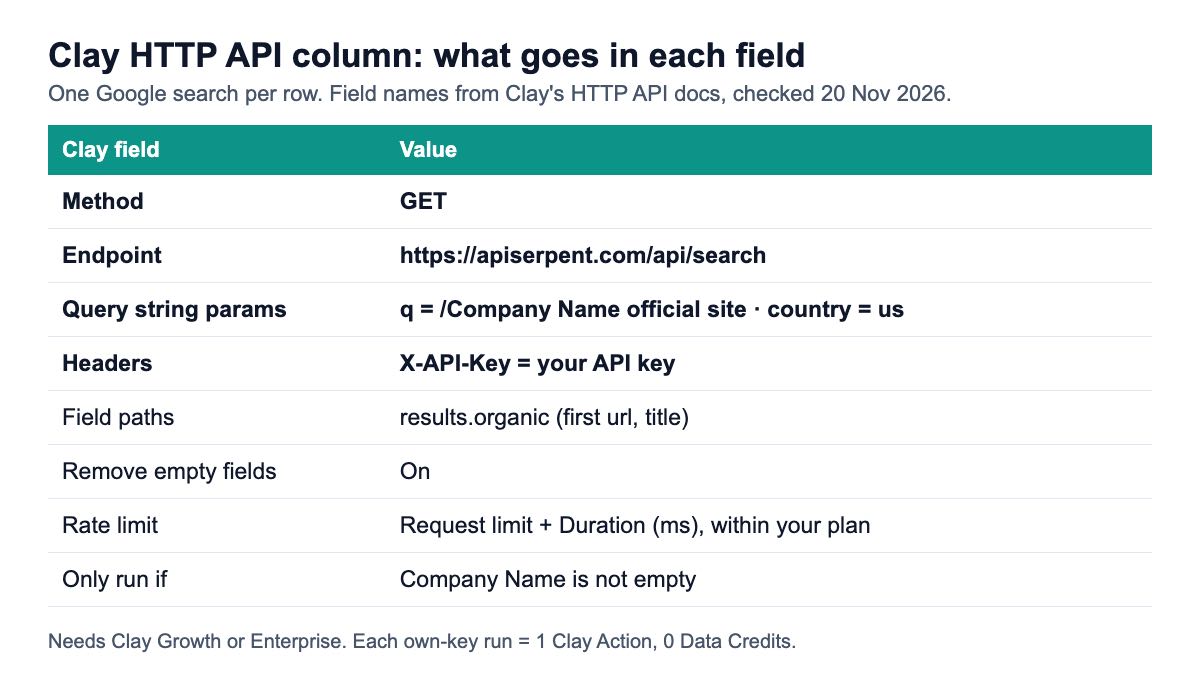
Add an enrichment, choose HTTP API, and fill in the fields Clay's HTTP API documentation lists. Here is each field with the value for a Google search on Serpent's search endpoint. The setup is described from Clay's docs and ours; I did not run a Clay table for this article.
- Method:
GET. Clay offers GET, POST, PUT and DELETE, and a search only reads data. With GET there is no body to write. - Endpoint:
https://apiserpent.com/api/search. Clay asks for "the complete URL where your request will be sent." - Query string params: add
qwith a column reference, for example/Company Namefollowed by the wordsofficial site, andcountrywith a fixed value such asus. Clay's docs show exactly this mix of a column reference and a fixed value. - Headers: key
X-API-Key, value your API key. Clay's docs useX-API-Keyas one of their own header examples and note thatContent-Typeis set automatically. - Field paths to return: leave it empty for the first test run so you can see the whole response, then narrow it (see the field paths section below).
- Remove empty fields from request: turn it on. Clay then leaves empty, null or undefined values out of the request instead of sending them blank. Because
qhere also holds fixed words, the “Only run if” condition below is what stops rows with no company name. - Rate limit: set "Request limit" and "Duration (ms)"; Clay's example of 10 and 1000 means 10 requests per second.
- Only run if: add a condition such as "Company Name is not empty", so rows without the input never spend a run.
Run it on one row first. The response is JSON with the same shape every time: results.organic is a list of results, each with title, url, snippet, displayedUrl and position, as shown in the response format docs.
Which enrichments can you build from search results?
Most useful ones come from four requests. Each is one HTTP API column; the column reference goes in q, and everything else is fixed.
1. Find a company's website from its name
GET https://apiserpent.com/api/search?q={Company Name} official site&country=us
X-API-Key: YOUR_KEY
→ results.organic[0].url, results.organic[0].title
The first organic URL is usually the company's site. Add a formula or Claygent check that the domain is not a directory such as LinkedIn, Crunchbase or Wikipedia before you trust it, because for small companies those sometimes outrank the real site.
2. Find the LinkedIn company page, then its firmographics
GET https://apiserpent.com/api/search?q=site:linkedin.com/company {Company Name}&country=us
→ results.organic[0].url

GET https://apiserpent.com/api/linkedin/company?url={LinkedIn URL}
→ company name, industry, size, headcount, headquarters
The first call finds the page; a second HTTP API column passes that URL to the LinkedIn company endpoint, which returns public firmographics from a company's LinkedIn URL. If you would rather do this in a script, the Python firmographics guide builds the same chain with a confidence check.
3. Flag accounts with recent news
GET https://apiserpent.com/api/news?q="{Company Name}"&freshness=m&num=5&country=us
→ results.articles[].title, .source, .publishedTime, .url
The news endpoint returns articles with title, source, publish time and snippet. Count the articles for a simple "in the news this month" flag, or pass the titles to an AI column to write the first line of an outreach email. Quote the company name so a common word does not match unrelated stories.
4. Check whether a prospect ranks for its main keyword
GET https://apiserpent.com/api/search/quick?q={Main Keyword}&num=100&country=us
→ results.organic[].url, results.organic[].position
num=100 asks this endpoint for up to the top 100 organic results in a single call, and the call is billed once whatever the depth, so one row is one search. A formula column that looks for the prospect's domain in the returned URLs gives you its position, or "not found" if it is not among them. That number is the hook of an SEO agency's cold email: "you are at position 34 for the term your customers search."
How do you pull fields out of the response?
Use field paths for single values and let arrays come through as lists. Clay's docs describe field paths as the way to "specify which parts of the API response you want to retrieve", with a dot-separated example, data.user.email.
For a search response, results.organic is an array. Clay's docs do not show the syntax for picking one item of an array (whether the first URL is written with a 0 segment or with brackets), so the reliable way is to run one row, open the result, and add the field you want as a column from the response view. That is the same approach Linkup's Clay guide uses: run the column, then make a new column from the one field you need.
Keep the paths few. A table with fifty half-used columns is harder to audit than one with the three you need, and every downstream formula has to know which one to read.
Two fields are worth keeping on every search column: the first result's url, and metadata.totalOrganicResults or the length of results.organic, so you can tell a row with no matches from one where the column never ran.
How do you avoid wasted runs and rate limits?
Use Clay's run conditions, and pace requests to your account's limits. Every run is an Action on Clay's side and a search on the API side, so a run you did not need costs twice.
- Only run if: skip rows missing the input, and rows where the output column already has a value.
- Remove empty fields: keeps an empty optional parameter from changing the query.
- Rate limit: set Clay's "Request limit" and "Duration (ms)" at or below your per-minute and concurrency limits in the rate limits table, which grow with your balance.
- Test on 10 rows: check the output columns before running a 10,000-row table.
Clay's docs include an error table for 400, 401, 402, 403, 404, 409 and 429 responses. Our error codes use the same HTTP statuses, and each error body carries a stable code, such as invalid_api_key or insufficient_credits, that you can surface in a column when a row fails.
What does enriching 10,000 rows cost?
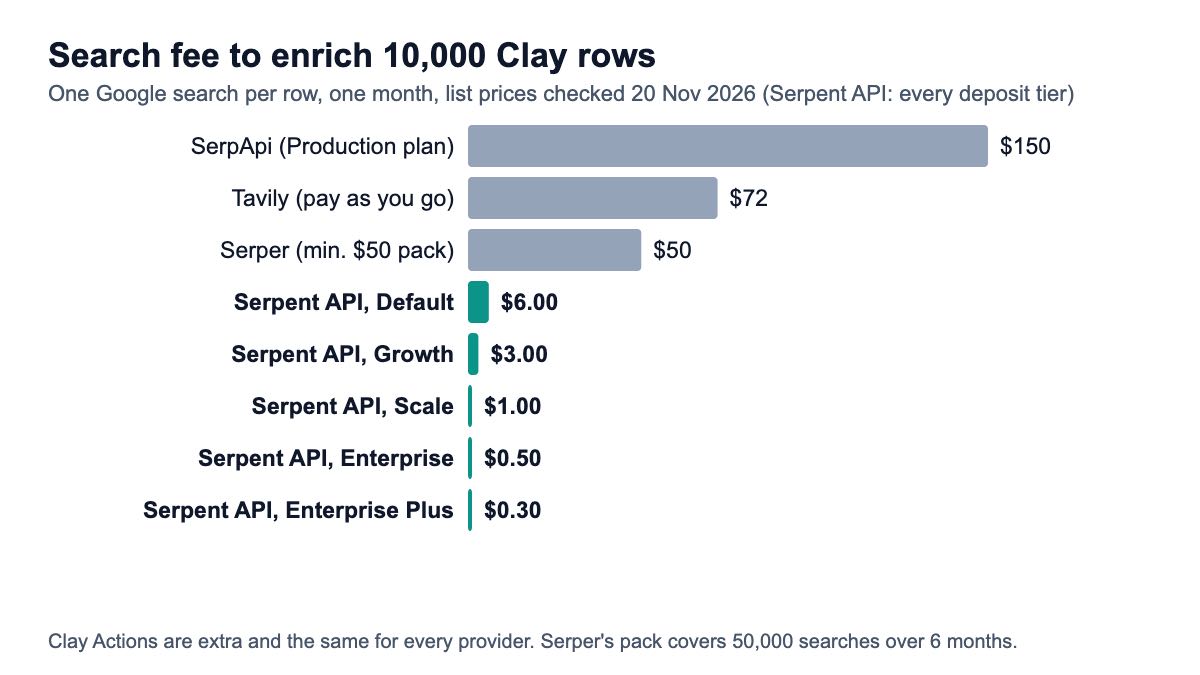
On the search side, $50 to $150 on the other providers' smallest fitting plans, while our API starts from $0.03 per 1,000 — pay as you go, no subscription (pricing); every tier is in the table. The Clay side is 10,000 Actions with your own key, the same for every provider, so it does not change the ranking.
| Provider | Plan or pack used | Cost for 10,000 searches | Price per 1,000 | Notes |
|---|---|---|---|---|
| SerpApi | Production, $150 a month for 15,000 | $150.00 | $15.00 (effective) | Only successful searches count |
| Tavily | Pay as you go | $72.00 | $7.20 (effective) | 1,000 free credits, then $0.008 each |
| Serper | Starter pack, $50 for 50,000 | $50.00 up front | $1.00 list | Credits valid 6 months; these 10,000 searches use $10 of the pack |
| Serpent API, Default | Pay as you go | $6.00 | $0.60 | No subscription |
| Serpent API, Growth | After a $100 deposit | $3.00 | $0.30 | No subscription |
| Serpent API, Scale | After a $500 deposit | $1.00 | $0.10 | No subscription |
| Serpent API, Enterprise | After a $1,000 deposit | $0.50 | $0.05 | No subscription |
| Serpent API, Enterprise Plus | After a $1,250 deposit | $0.30 | $0.03 | No subscription |
Clay's built-in Google action is missing from the table because its per-run credit cost is not published. For scale: at Data Credits from $0.05 each, every credit a row uses adds $500 per 10,000 rows. If Clay shows you the credit cost per run when you add the action, multiply it out before you choose.
The LinkedIn company lookup in recipe 2 is a second call, priced per 1,000 lookups on the pricing page. News searches have their own lower rate there too.
Which setup should you pick?
- Free or Launch plan: Clay's Perform Search with Google. The HTTP API column is not on these plans. If you need raw results outside Clay, a Google Sheets function can fetch them and you can import the sheet.
- Growth plan, a few hundred rows: either works; the HTTP route gives you more fields, plus freshness and depth control, for little setup.
- Growth plan, thousands of rows or more: HTTP API with your own SERP key. One Action per row on Clay's side, and the search costs from $0.03 per 1,000.
- You need firmographics, not search results: chain recipe 2, or skip search entirely if you already have LinkedIn URLs.
- Local businesses: Maps data fits better than web search; see finding businesses without websites.
For more ways to turn search results into pipeline, read using SERP data for B2B lead generation.
How we checked this
What this is: a configuration guide built from documentation, not a test of a Clay table. I read eight external pages, all on 20 Nov 2026: four from Clay (HTTP API documentation, pricing page, Google search action page, SEO Claybook), one vendor's Clay guide (Linkup), the pricing pages of Serper and SerpApi, and Tavily's credits documentation. Request formats and response fields come from our own API docs; Serpent prices come from the pricing page the same day.
Cost rule: one search per row, 10,000 rows in one month, the smallest self-serve plan or pack that covers it, list prices before tax.
What we could not verify: how many credits Clay's Google action uses per run; the exact syntax Clay uses for array items in field paths; how Clay's plan prices combine with its Action bundles; which billing period the plan-card prices assume. Two Clay community threads that rank for this query render only in a browser, so we could not read them.
Add Google results to your Clay table
One GET request per row, with country targeting, from $0.03 per 1,000 searches — pay as you go, no subscription. Start with 10 free API calls.
Get Your Free API KeyExplore: SERP API · Playground · Docs · Pricing
FAQ
Which Clay plan do I need for the HTTP API column?
Growth or Enterprise. On Clay's pricing page checked on 20 Nov 2026, "HTTP API integrations" were marked not included on Free and Launch and included on Growth and Enterprise. Older guides and Clay's own SEO Claybook mention the Explorer plan, which no longer appears in the plan list. If you are on Launch, Clay's built-in Google search action is the in-app option.
Does using my own API key in Clay save credits?
It moves the cost. Clay's FAQ says a run with your own API key "will count as one Action, but no Data Credit will be used." You then pay your search provider directly for the search. Actions are listed as starting under $0.01 each and Data Credits from $0.05 each, so for search-heavy tables your own key is usually the cheaper route, but check the per-run credit cost Clay shows for its own action.
Can I use Serper or SerpApi in Clay?
Yes, through the HTTP API column, the same way as in this guide: enter the method, endpoint, parameters and key header that provider documents. Clay's own SEO Claybook calls Serper this way. On 20 Nov 2026, Serper's smallest pack was $50 for 50,000 searches, and SerpApi's paid plans started at $25 a month for 1,000 searches, with a free plan of 250 a month.
How do I get the first search result's URL into its own Clay column?
Run the HTTP API column on one row, open the cell to see the JSON, and add url from the first item of results.organic as a new column. Clay's docs show dot-separated field paths but not the syntax for array items, so picking the field from the response view is the safest route. Repeat for title or snippet if you need them.
Why does my Clay HTTP API column return errors on some rows?
Usually a missing input or a rate limit. Rows with an empty company name still send the fixed words of the query unless an "Only run if" condition skips them, and "Remove empty fields from request" keeps blank parameters out of the call. A 429 means automated overuse or server load; lower Clay's request limit and wait a minute before rerunning. A 401 means the key header is wrong, and a 402 means the account has no credit left.
Sources
Clay (checked 20 November 2026):
- Clay University: HTTP API integration overview
- Clay pricing, plan table and FAQ
- Clay: Perform Search with Google action
- Clay Claybook: custom SEO reports with Serper
Search API pricing and docs (checked 20 November 2026):