Track Amazon Keyword Rank by API, Organic vs Sponsored

Amazon has no official API that tells you where an ASIN ranks for a keyword. To track it, you read Amazon’s search results page by page through a search API, then count: every card for absolute rank, only non-sponsored cards for organic rank. A daily check of 100 keywords costs from cents to hundreds of dollars a month.
Short answer: If you sell on Amazon and want a dashboard, use a seller tool such as Helium 10’s Keyword Tracker. If you want rank data in your own code, a search API is cheaper: Serpent API’s Amazon Search endpoint returns each card’s position, asin and is_sponsored flag, from $0.010 per 1,000 pages — pay as you go, no subscription. If you need deep results in one call, DataForSEO returns up to 100 products per task. If you want a ready-made tracker with share of shelf and no code, the Apify rank-tracker actor does it for amazon.com.
Can Amazon’s own APIs give you keyword rank?
No. None of Amazon’s developer APIs returns an ASIN’s organic search position for a keyword, and the one product-catalogue API that developers used for search has been deprecated.
The closest official data is Brand Analytics in the Selling Partner API. Its report documentation lists two relevant reports, both limited to brand owners in Amazon Brand Registry:
- Search Query Performance: per ASIN and search query, the impressions, clicks, cart adds and purchases, with your share of each. It tells you how much a keyword sends you, not where you sit.
- Search Terms: for each search term, its
searchFrequencyRankand the most-clicked ASINs withclickShareRank,clickShareandconversionShare. That ranks clicks, not positions.
Both are useful for deciding which keywords matter. Neither has a position field, so neither can tell you that your ASIN moved from organic 14 to organic 6 this week.
The Product Advertising API (PA-API 5), which affiliates used to search the catalogue, is gone. Amazon’s deprecation notice says it “has been deprecated and is being replaced by the Creators API”, and calls to the old endpoint get a 403 error. It never reported organic position either.
So every keyword rank tracker, from Helium 10 to a script you write, works from the same source: Amazon’s search results for the keyword, with the ASIN located in them.
What is organic rank versus sponsored rank?
Amazon mixes paid placements into its search results, so “rank” can mean two things. Pick one definition per report and never mix them in one chart.
- Absolute rank: the ASIN’s place counting every card on the page, ads included. It is what a shopper scrolls past.
- Organic rank: the place counting only non-sponsored cards. It is the number sellers usually mean, because it reflects relevance and sales history rather than ad spend.
- Sponsored placements: the slots where your ASIN appears as an ad. A product can be both: an ad at absolute 3 and an organic listing further down.
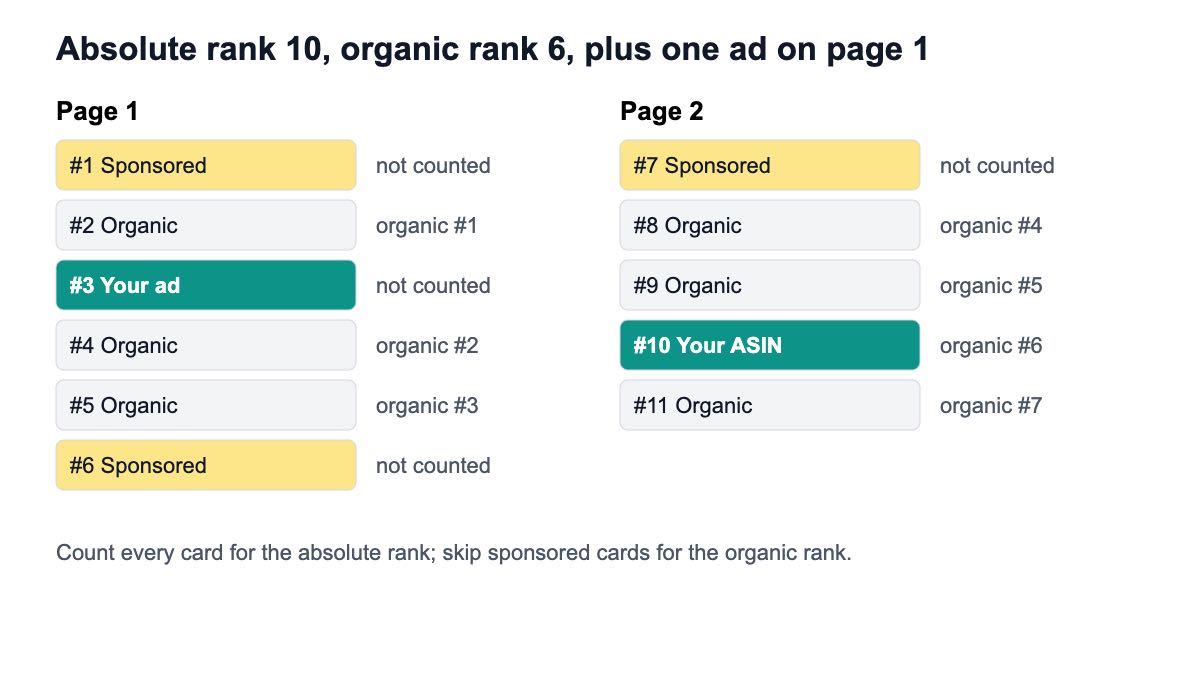
The example above is the one the code below works through. Your ASIN shows as an ad at absolute 3 on page 1, and as an organic result on page 2. Counting every card, the organic listing is the 10th card. Counting only organic cards, it is the 6th.
SerpApi’s Amazon search docs show why you must check the flag rather than the array: sponsored items appear inside its organic_results array with "sponsored": true. Any API you use, test how it marks ads before you trust a rank.
How do you compute rank from an API response?
Walk the result pages in order, keep two counters, and stop once you find the ASIN. With Serpent API, each GET /api/amazon/search call returns one results page as results[], and the docs list these fields on every card: position, asin, url, title, price, rating, is_sponsored, is_amazons_choice, is_best_seller and more. The response also carries current_page and results_count.
The function below does not rely on how position is numbered. It sorts each page by position and counts the ranks itself, so the result means the same thing on every marketplace.
import os
import requests

API = "https://apiserpent.com/api/amazon/search"
KEY = os.environ.get("SERPENT_API_KEY", "YOUR_API_KEY")


def fetch_page(keyword, page, domain="amazon.com"):
    """One request = one Amazon results page (16-48 cards by marketplace)."""
    r = requests.get(
        API,
        params={"q": keyword, "domain": domain, "page": page},
        headers={"X-API-Key": KEY},
        timeout=60,
    )
    r.raise_for_status()
    return r.json()


def rank_asin(asin, keyword, max_pages=3, domain="amazon.com"):
    """Walk pages in order; count organic cards and all cards separately."""
    seen_all = seen_organic = 0
    out = {"asin": asin, "keyword": keyword, "organic_rank": None,
           "absolute_rank": None, "page": None, "sponsored_slots": [],
           "pages_paid": 0}
    for page in range(1, max_pages + 1):
        data = fetch_page(keyword, page, domain)
        out["pages_paid"] += 1
        cards = sorted(data.get("results") or [], key=lambda c: c.get("position") or 0)
        for card in cards:
            seen_all += 1
            mine = card.get("asin") == asin
            if card.get("is_sponsored"):
                if mine:
                    out["sponsored_slots"].append({"page": page, "absolute_rank": seen_all})
                continue
            seen_organic += 1
            if mine and out["organic_rank"] is None:
                out.update(organic_rank=seen_organic, absolute_rank=seen_all, page=page)
        if out["organic_rank"] is not None or not data.get("results_count"):
            break  # stop paying for pages once the ASIN is found, or the list ends
    return out
Run against the two pages in the figure, it prints:
{
  "asin": "B0EXAMPLE2",
  "keyword": "laptop stand",
  "organic_rank": 6,
  "absolute_rank": 10,
  "page": 2,
  "sponsored_slots": [
    {
      "page": 1,
      "absolute_rank": 3
    }
  ],
  "pages_paid": 2
}
About that output: the code runs on Python 3.15.2 with requests 2.34.2 (20 November 2026). For the run, only the HTTP call was swapped for a stub that returns cards built from the documented field names, with made-up ASINs and values, because the docs list the fields without a sample body. The run log and both files are kept with this post’s evidence. Before you rely on it, call it once with your key on a keyword you can check by eye.
Store each result with the date, keyword, marketplace and pages_paid. When the ASIN is not found, store null and the depth you searched, not a fake rank such as 999, so a chart never mistakes “not in the top 3 pages” for a real position. If you track Google rankings too, the same storage pattern is in our keyword rank tracker guide.
How many pages do you need to check?
Check as many pages as it takes to see your ASIN on a normal day, and no more, because each page is a billed request. For most sellers that is one to three pages.
Page size changes by marketplace, which changes what “three pages” means. Serpent’s docs record 16 cards per page on amazon.com and amazon.co.uk and 48 on amazon.de and amazon.co.jp. Three pages is therefore about 48 cards in the US and about 144 in Germany. Set max_pages per marketplace, not globally.
The endpoint takes page from 1 to 20 and serves pages 1 to 5 directly, plus domain (or country) for the marketplace and language for a locale the marketplace supports. You are billed for the page you asked for, and a page that genuinely has no results is still an answer.
A good habit: track every keyword at one page daily, and run a deeper weekly sweep for keywords where the ASIN is not on page 1. That keeps a 100-keyword tracker close to 3,000 page requests a month instead of 9,000.
What does a daily tracker cost?
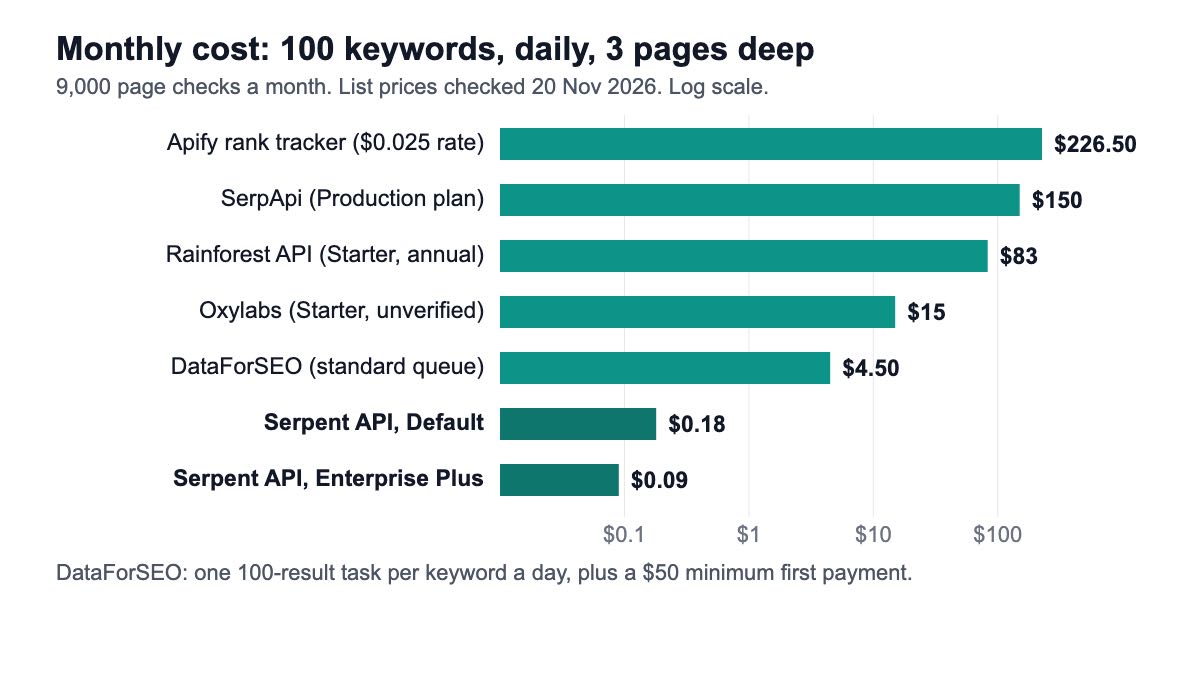
For a typical setup — 100 keywords, checked daily, up to three pages each — the bill ranges from under $1 a month to over $200, depending on the billing unit. That schedule is 9,000 page checks a month if every check goes three pages deep.
| Option (unit) | 1,000 / month | 100,000 / month | 1,000,000 / month | Model |
|---|---|---|---|---|
| Apify Amazon rank tracker (keyword per page) | $25 (FREE Store tier) | $15–$25 by Apify Store tier | $15–$25 by Apify Store tier | Pay per event, plus $0.05 per run; amazon.com only |
| SerpApi Amazon search (search) | $25 (Starter, $25) | $7.25 (Searcher, $725) | $3.75 (Cloud 1M, $3,750) | Monthly plan |
| Rainforest API (credit; one per request assumed) | $83 (Starter, 10,000 credits) | $3.75 (Production, $375 for 250,000) | $1.00 (BigData, $1,000) | Plan, billed annually |
| Oxylabs Amazon (result) | from $0.50 | from $0.45 | from $0.35 | Plan from $15 a month |
| DataForSEO Amazon Products (task of up to 100 products) | $1.50 | $1.50 | $1.50 | Prepaid, $50 minimum payment |
| Serpent API — Amazon Search (one results page) | $0.020 / $0.018 / $0.014 / $0.012 / $0.010 per 1,000 pages (Default / Growth / Scale / Enterprise / Enterprise Plus), at any volume | Pay as you go, no subscription | ||
Sources: Apify actor page, SerpApi pricing, Rainforest API pricing, Oxylabs Amazon scraper, DataForSEO Amazon API pricing and its minimum payment, and our pricing page. Serpent API tiers follow deposit size ($100 Growth, $500 Scale, $1,000 Enterprise, $1,250 Enterprise Plus).
Units differ, so compare carefully. Apify charges per keyword per page but also computes organic rank, share of shelf and deltas for you. DataForSEO’s task can cover 100 products in one call, which may replace two to six Amazon pages, but its standard queue can take up to 45 minutes. Oxylabs does not map its volume bands to plans on the page, so its row is a floor.
For the 9,000-check schedule, the monthly totals are: Apify about $226.50 at its FREE Store-tier rate (9,000 × $0.025 plus 30 runs at $0.05; about $136.50 at the GOLD rate), SerpApi $150 on its Production plan, Rainforest $83 on Starter, DataForSEO about $4.50 (3,000 tasks), and Serpent API $0.18 on Default or $0.09 on Enterprise Plus.
Which tools and APIs can do it?
Seller tools: Helium 10 and Jungle Scout
Helium 10’s Keyword Tracker promises to “Track your position for every target keyword, organic and sponsored.” Its plans list Platinum at $99 a month, Diamond at $279 and Enterprise from $1,499. The page mentions an MCP connection on Diamond but no public API, so it suits sellers who want a dashboard, not developers who want rows in a database.
Jungle Scout does sell an API, with endpoints for keywords by ASIN, keyword search volume, sales estimates and share of voice. Add-on tiers run from $29 for 1,000 requests to $199 for 10,000, with $0.05 per extra request, on top of a qualifying Jungle Scout plan. The page does not list a rank-tracking endpoint, so pair it with a search API if you need positions.
Ready-made rank trackers
The Apify actor amazon-rank-tracker is the closest thing to a rank-tracking API. You give it up to 20 ASINs and 100 keywords; it returns position_organic, position_absolute, a sponsored flag, the page (1 to 3), share of shelf and changes since the last run. It covers amazon.com only and accepts a ZIP code for consistent location.
Pricing is $0.025 per keyword per page at Apify’s FREE Store tier, down to $0.015 at its GOLD tier, plus $0.05 per run. On Apify’s free plan the actor runs a 10-keyword preview per run.
Search APIs you compute rank from
- Serpent API Amazon Search: one page per call with
position,asinandis_sponsoredon each card, across many Amazon marketplaces set bydomain, from $0.010 per 1,000 pages. Pair it with the Product endpoint when you also want price, availability, seller and a review sample for the ASINs you track. - SerpApi: Amazon search with
position, asponsoredflag,pageand delivery-location parameters such asdelivery_zip, on monthly plans. - DataForSEO: up to 100 products per task (depth up to 700), queued or live.
- Rainforest API and Oxylabs: general Amazon data APIs on plans; check how each marks sponsored results before you build on them.
For a broader field-by-field comparison of Amazon APIs, see our best Amazon scraping APIs guide.
Why does my rank differ from what I see on Amazon?
Because Amazon’s results are not one fixed list. Four things move them, and a tracker should control for each.
- Delivery location. Results vary with the delivery address. That is why SerpApi accepts
delivery_zipand the Apify actor recommends a fixed ZIP code. Whatever you use, keep the marketplace and settings identical between runs. - Your own browser. When you search signed in, Amazon may show you a personalised page. Compare a tracker with a private window, not your seller account.
- Ad rotation. Sponsored slots change from one load to the next, which moves absolute rank even when organic rank stays still. This is the main reason to chart organic rank.
- Page size. “Page 2” on amazon.com starts after 16 cards, on amazon.de after 48. Compare ranks, not page numbers, across marketplaces.
Treat a one-day jump of a few places as noise. Track a 7-day median for each keyword, and alert only when that moves.
Which one should you pick?
- A seller who wants a dashboard and alerts: Helium 10’s Keyword Tracker.
- A developer or agency building rank tracking into a product, across marketplaces: a per-page search API with a sponsored flag, such as Serpent API, and the code above.
- A team that wants organic rank and share of shelf computed for it on amazon.com: the Apify rank-tracker actor.
- Deep checks where speed does not matter: DataForSEO’s standard queue, up to 100 products per task.
- Brand owners deciding which keywords matter: Brand Analytics reports first, then track positions for the keywords they flag.
If you also follow category charts, our guide to tracking Amazon Best Sellers covers the chart side, and price and availability monitoring covers the listing side.
How we checked this
On 20 November 2026 I read Amazon’s Brand Analytics report documentation and its PA-API deprecation notice; the live pages of Helium 10, Jungle Scout, the Apify rank-tracker actor, SerpApi (Amazon docs and pricing), Rainforest API, Oxylabs and DataForSEO; and our own docs and pricing page for the Amazon Search endpoint. Sources: 2 Amazon documentation pages, 10 vendor pages. I could not run a fresh web search for the current top-ranking pages, so the comparison covers the tools I could identify and open.
The Python code ran locally on 20 November 2026 against a stub of the HTTP call, as described under the code; no paid API was called. Monthly costs are list-price arithmetic for 100 keywords × 30 days × 3 pages.
What we could not verify: how many Rainforest credits one search request uses (assumed one); which Oxylabs plan unlocks each volume band; whether Serpent API’s position counts sponsored cards (the code does not depend on it); and whether Helium 10 offers API access beyond its MCP note.
Build your own Amazon rank tracker
Serpent API’s Amazon Search returns a full results page with a sponsored flag on every card, from $0.010 per 1,000 pages — pay as you go, no subscription. Sign up for 10 free API calls and check your own ASIN on your own keywords.
Get Your Free API KeyExplore: Amazon Scraper API · Playground · Docs · Pricing
FAQ
Does Amazon have an API for keyword rank?
No. Amazon’s Brand Analytics reports in the Selling Partner API give brand owners impressions, clicks, cart adds and purchases per search query, plus click-share ranks for the most-clicked ASINs, but no organic position. The Product Advertising API has been deprecated in favour of the Creators API and did not report search position either. Rank trackers work from Amazon’s search results for each keyword instead.
What is the difference between organic and sponsored rank on Amazon?
Organic rank counts only the non-sponsored results above and including your listing; sponsored placements are the slots where your ASIN appears as a paid ad. Absolute rank counts every card, ads included. A product can hold a sponsored slot near the top and an organic listing lower down at the same time, so a good tracker reports the organic rank and the sponsored slots as separate facts.
How do I track ASIN keyword position with Python?
Request the Amazon search results page for the keyword, page by page, through a search API that flags sponsored cards. Sort each page’s cards by position, keep one counter for all cards and one for non-sponsored cards, and stop when you find the ASIN. The code in this guide does exactly that against Serpent API’s /api/amazon/search endpoint, using the documented position, asin and is_sponsored fields.
Does Helium 10 have an API?
Helium 10’s Keyword Tracker page does not mention a public API. It lists plans from $99 a month (Platinum) and says the Diamond plan can connect to AI tools through MCP. If you need rank data in your own database, use a search API and compute the rank yourself, or an API-first tracker such as the Apify actor, which returns organic and absolute positions as rows.
How often should I check Amazon keyword rankings?
Daily is enough for most sellers, because organic rank moves with sales history and relevance over days, not minutes. Check one page daily for every keyword and run a deeper weekly sweep for keywords where you are not on page 1. Chart a 7-day median to smooth out ad rotation and location effects, and alert on that rather than on one-day jumps.
How much does an Amazon rank tracking API cost?
It depends on the unit. For 100 keywords checked daily three pages deep (9,000 page checks a month), list prices on 20 November 2026 put the Apify rank-tracker actor at about $226.50 at its FREE Store-tier rate, SerpApi at $150, Rainforest API at $83, DataForSEO at about $4.50 plus a $50 minimum payment, and Serpent API at $0.18 on Default or $0.09 on Enterprise Plus.
Sources
Amazon documentation (checked 20 November 2026):
Vendor pricing and docs (checked 20 November 2026):