YouTube Rank Tracker API: Track Search Positions Daily

A YouTube rank tracker searches YouTube for each of your keywords on a schedule and records where your videos, and your competitors', appear. With a YouTube search API that returns positions and channel IDs, it is a short Python script: one call per keyword per day, history in SQLite, and alerts when a position moves.
Short answer: for one channel and up to 200 keywords with weekly updates, Semrush's $19-a-month YouTube app is the least work. For about 100 keywords a day and no budget, the official YouTube Data API's default quota of 100 searches a day fits. For daily tracking of hundreds or thousands of keywords across your channel and competitors, run the tracker below on a YouTube search API: it costs $6 a month for 1,000 keywords at our Default rate.
How can you track YouTube search rankings?
Four ways, and they trade money against effort and control. Each one gives you positions for your keywords; they differ in cost, how many keywords they handle, how often they refresh and who keeps the history.
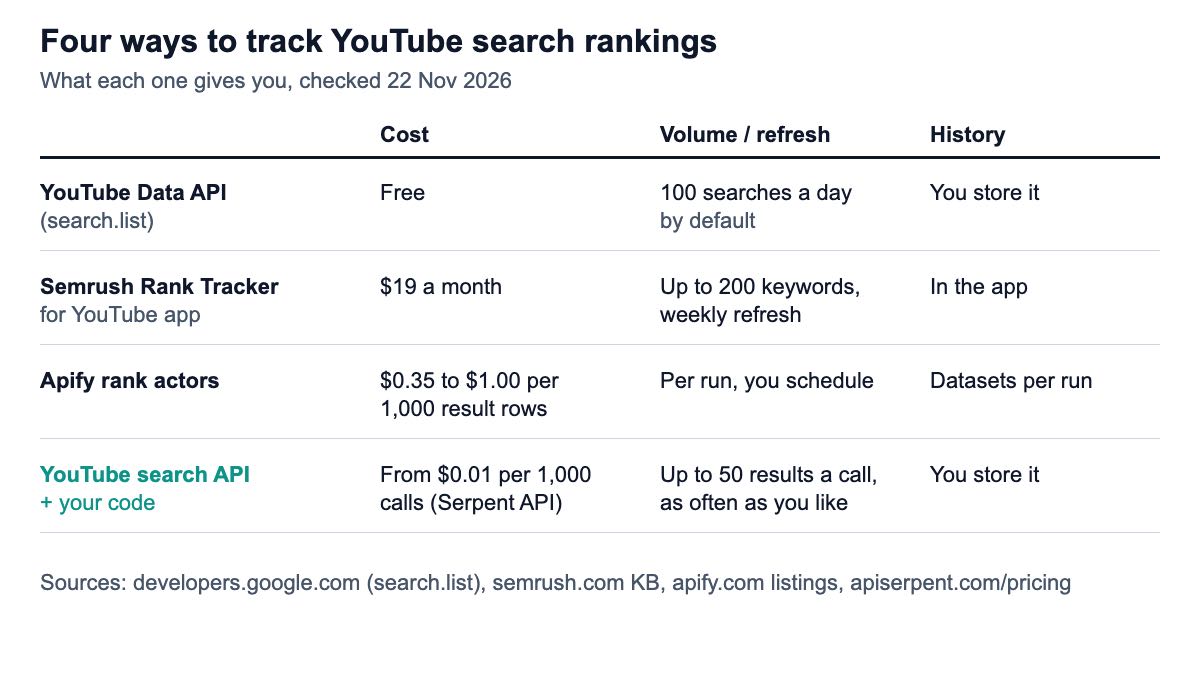
- The YouTube Data API. Free, official, and its
search.listmethod returns up to 50 results a call with aregionCodeandorder. Google's getting-started page gives projects a default of 100search.listcalls a day; more needs a quota extension request. - Semrush Rank Tracker for YouTube. An app at $19 a month that tracks your channels and competitors, up to 200 keywords, refreshed weekly, according to Semrush's knowledge base.
- Apify actors. Several community actors track YouTube positions, priced from $0.35 to $1.00 per 1,000 result rows. You run them on a schedule and keep the datasets.
- A YouTube search API and your own code. One call per keyword returns up to 50 results with positions and channel IDs; you store and compare them. This guide builds that version.
What does one rank check return?
One call to the YouTube search endpoint returns a ranked list of videos, each with its position, video id, channelId, channelTitle, title and publish date.
curl -G "https://apiserpent.com/api/social/youtube/search" \
  --data-urlencode "q=how to solve a rubiks cube" \
  -d type=video -d order=relevance -d num=50 -d country=us \
  -H "X-API-Key: $SERPENT_API_KEY"
The documented example response from our docs, captured from a call with num=3 and shortened here to the first row and the fields a tracker uses:
{
  "success": true,
  "query": "how to solve a rubiks cube",
  "type": "video",
  "results": [
    {
      "position": 1,
      "id": "7Ron6MN45LY",
      "type": "video",
      "title": "Learn How to Solve a Rubik's Cube in 10 Minutes (Beginner Tutorial)",
      "channelId": "UCqTVfT9JQqhA6_Hi_h_h97Q",
      "channelTitle": "J Perm",
      "publishedAt": "2018-09-19T16:36:25Z",
      "url": "https://www.youtube.com/watch?v=7Ron6MN45LY"
    }
  ],
  "nextPageToken": "CAMQAA",
  "meta": { "elapsed": "2535ms", "timestamp": "2026-09-02T10:14:15.354Z" }
}
Parameters that matter for rank tracking:
order=relevance, the default. The other orders (date, viewCount, rating, title) answer different questions; relevance is the one a searcher gets unless they change the sort.numfrom 1 to 50. One call covers the top 50, which is deeper than most people scroll.page_tokentakes thenextPageTokenfrom a previous response for the next page.country, a two-letter code, because results differ by country.type=video, so channels and playlists do not take positions in your list.
When you ask for a number of results with num and fewer come back, the response carries a delivery block saying how many arrived. The tracker below stores that count with every row, so "not found" always means "not in the results we have".
How do you decide which result is yours?
Match on channelId, not on the channel name or the video title. Channel names change and two channels can share one; the ID is stable and unique. If you track specific videos instead, match on the video id.
A channel can hold several positions for one keyword. Keep all of them: the best position is the headline, but holding positions 4 and 19 is a different story from holding only 4. The tracker stores both.
Track competitors the same way. Put their channel IDs in the list beside yours and every keyword check shows where each of them stands, at no extra cost, because they are in the same response.
How do you build the tracker?
Three functions: one call per keyword, a matcher that turns rows into positions per tracked channel, and a loop that writes one row per keyword and channel per day.
pip install requests
export SERPENT_API_KEY=sk_live_your_api_key
"""YouTube keyword rank tracker: one search call per keyword, positions per channel kept in SQLite."""
import datetime
import json
import os
import sqlite3
from collections import Counter
import requests
API = "https://apiserpent.com/api/social/youtube/search"
KEY = os.environ.get("SERPENT_API_KEY", "")
SCHEMA = """CREATE TABLE IF NOT EXISTS yt_ranks (
day TEXT, keyword TEXT, country TEXT, channel_id TEXT,
best_position INTEGER, video_id TEXT, positions TEXT, rows_returned INTEGER,
PRIMARY KEY (day, keyword, country, channel_id))"""
def search(session, keyword, country="us", num=50):
r = session.get(API, params={"q": keyword, "type": "video", "order": "relevance",
"num": num, "country": country},
headers={"X-API-Key": KEY}, timeout=60)
r.raise_for_status()
return r.json().get("results", [])
def ranks_for(rows, channel_ids):
"""Best position, its video and every position for each tracked channel."""
out = {}
for ch in channel_ids:
hits = [row for row in rows if row.get("channelId") == ch]
out[ch] = {
"best_position": hits[0]["position"] if hits else None,
"video_id": hits[0]["id"] if hits else None,
"positions": [h["position"] for h in hits],
}
return out
def top10_share(rows):
"""Which channels hold the first 10 slots, and how many each."""
return Counter(row.get("channelTitle") for row in rows if row.get("position", 99) <= 10)
def run(db_path, keywords, channel_ids, country="us", day=None, session=None):
day = day or datetime.date.today().isoformat()
session = session or requests.Session()
con = sqlite3.connect(db_path)
con.execute(SCHEMA)
for kw in keywords:
try:
rows = search(session, kw, country)
except requests.RequestException as exc:
print(f"skipped {kw!r}: {exc}") # no rows: a failed call never reads as "dropped out"
continue
for ch, r in ranks_for(rows, channel_ids).items():
con.execute("INSERT OR REPLACE INTO yt_ranks VALUES (?,?,?,?,?,?,?,?)",
(day, kw, country, ch, r["best_position"], r["video_id"],
json.dumps(r["positions"]), len(rows)))
con.commit()
return conRun it once a day with your keyword list and the channel IDs you care about, yours first:
run("yt_ranks.db", ["crm tutorial", "crm for beginners", "best crm 2026"],
    ["UC_your_channel_id", "UC_rival_channel_id"])
Two rules in that loop protect the history. A call that fails (a network error or a 5xx) writes nothing for that keyword, so the next report shows a gap instead of a fake drop. And INSERT OR REPLACE keeps one row per keyword, channel and day, so a second run on the same day overwrites rather than duplicates.
For thousands of keywords a night, run the same function from a scheduled job and spread the calls across the night. Each call is billed on its own, so the cost grows in a straight line with the number of keywords.
How do you report what moved?
Join today's rows to yesterday's per keyword and channel and print the differences. When a channel is missing today, say how deep the check went instead of calling it a drop.
def movers(con, today, yesterday, country="us"):
    q = """SELECT t.keyword, t.channel_id, y.best_position, t.best_position, t.rows_returned
           FROM yt_ranks t LEFT JOIN yt_ranks y
             ON y.keyword = t.keyword AND y.channel_id = t.channel_id
            AND y.country = t.country AND y.day = ?
           WHERE t.day = ? AND t.country = ? ORDER BY t.keyword, t.channel_id"""
    for kw, ch, before, now, n in con.execute(q, (yesterday, today, country)):
        if now is None and before is None:
            continue
        if now is None:
            print(f"{kw} | {ch}: {before} -> not in the {n} results returned")
        elif before is None:
            print(f"{kw} | {ch}: new at {now}")
        elif now != before:
            print(f"{kw} | {ch}: {before} -> {now} ({'up' if now < before else 'down'} {abs(before - now)})")
        else:
            print(f"{kw} | {ch}: steady at {now}")
To test the logic without spending anything, the run log replaces only the HTTP call. First it feeds the documented example response from our docs through ranks_for(); then it runs two tracker days on 50-row fixtures in the same documented shape, with invented channels and positions, and makes one keyword answer 503 on day two. Output on Python 3.15.2 and requests 2.34.2:
request sent: https://apiserpent.com/api/social/youtube/search?q=how+to+solve+a+rubiks+cube&type=video&order=relevance&num=50&country=us
ranks: {'UC9wvQsn9VGQsX9uFWEuQW4A': {'best_position': 2, 'video_id': 'PW2J8IblczM', 'positions': [2]},
        'UCpp1GoykvTBuPiZt3FiFHjg': {'best_position': 3, 'video_id': 'iAa7_mDgjTw', 'positions': [3]},
        'UC_not_present': {'best_position': None, 'video_id': None, 'positions': []}}
top-10 share: {'J Perm': 1, 'CubeHead': 1, 'SoupTimmy': 1}
skipped 'best crm 2026': 503 Server Error: None for url: https://apiserpent.com/api/social/youtube/search?q=best+crm+2026&type=video&order=relevance&num=50&country=us
--- movers 2026-11-23 -> 2026-11-24
crm for beginners | UC_rival_channel_id: steady at 1
crm for beginners | UC_your_channel_id: 12 -> not in the 50 results returned
crm tutorial | UC_rival_channel_id: steady at 2
crm tutorial | UC_your_channel_id: 7 -> 4 (up 3)
--- top-10 slots, 'crm tutorial' day 2: {'Your Channel': 1, 'Rival Channel': 1} of 10
Read it like this. Your video moved from 7 to 4 for "crm tutorial" while the rival held 2. For "crm for beginners" you were 12 yesterday and are missing from the 50 results returned on day two, which the report says in exactly those words.
"best crm 2026" failed on day two, so it has no row and no false alarm. The ranks line on the documented response shows the matcher finding CubeHead at 2 and SoupTimmy at 3, and returning empty for a channel that is not in the list.
Hook the movers() output to whatever you already read: a Slack message, an email or a daily CSV. Our competitor channel tracking guide adds subscriber and view counts per channel if you want both in one report.
How should you read a YouTube position?
As a trend, not a fixed fact. YouTube search results change with country, language, time and the viewer; the getdataforu actor's README notes that YouTube personalises results for signed-in users. A position from any tracker is one sample of that list at one moment.
So keep three habits. Compare the same keyword in the same country at the same time of day. Judge a move over several days rather than one.
Then watch the share of the top 10 your channel holds across all keywords, which is steadier than any single position. A channel that goes from 3 of 40 top-10 slots to 9 of 40 is growing, even if one keyword wobbles.
Fresh uploads deserve their own view. published_after limits a search to videos newer than a date, which shows how new videos on a topic are ranking without older ones crowding the list.
What does daily tracking cost?
For 1,000 keywords checked daily (30,000 checks a month), the search fees run from $0.30 to $6 on our endpoint depending on tier, and from $30 to $1,200 on the Apify actors. I read each price on 22 November 2026; one check means the top 50 results for one keyword.
| Option and plan | 100 keywords | 1,000 keywords | 10,000 keywords |
|---|---|---|---|
| Serpent API — Default ($10 deposit) | $0.60 | $6 | $60 |
| Serpent API — Growth ($100 deposit) | $0.30 | $3 | $30 |
| Serpent API — Scale ($500 deposit) | $0.21 | $2.10 | $21 |
| Serpent API — Enterprise ($1,000 deposit) | $0.15 | $1.50 | $15 |
| Serpent API — Enterprise Plus ($1,250 deposit) | $0.03 | $0.30 | $3 |
| YouTube Data API (default quota, 100 searches a day) | $0 | Needs a quota extension | Needs a quota extension |
| Apify searchshark ($1.00 per 1,000 rows; one row per keyword and tracked video) | $3 | $30 | $300 |
| Apify getdataforu ($0.35 per 1,000 results; 50 per keyword) | $52.50 | $525 | $5,250 |
| Apify coregent ($0.80 per 1,000 rank results; 50 per keyword) | $120 | $1,200 | $12,000 |
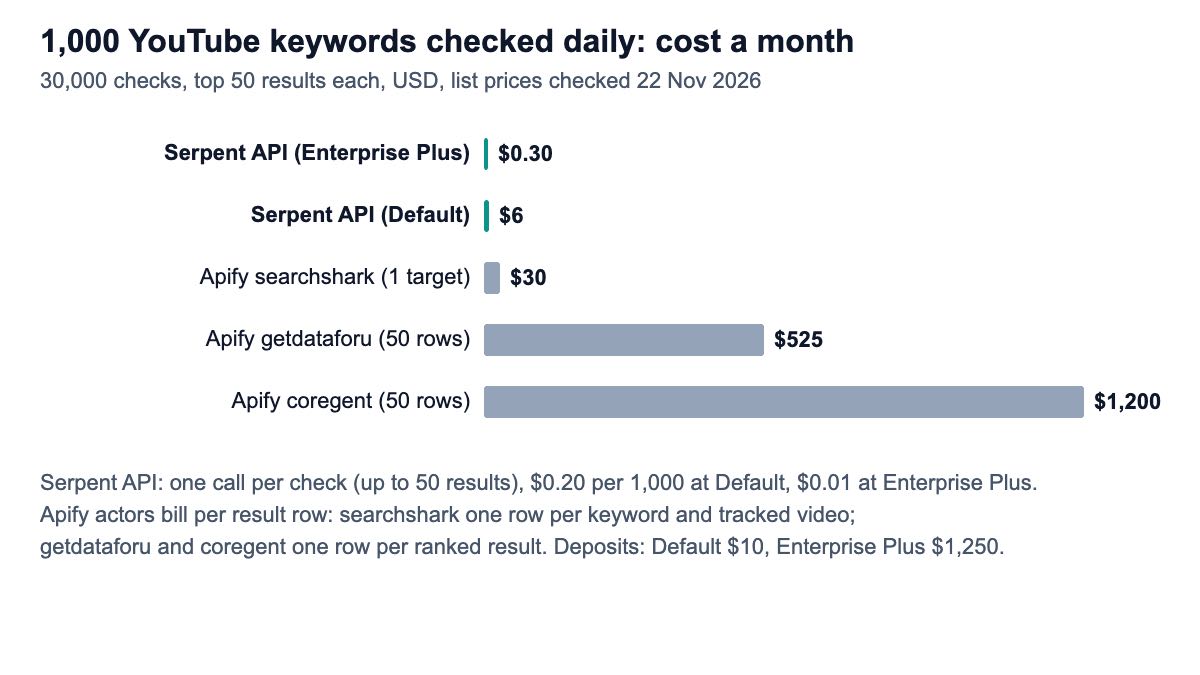
The difference comes from the billing unit. On our endpoint you pay per call, from $0.01 per 1,000 — pay as you go, no subscription (pricing), and one call returns up to 50 rows. Two of the actors bill per result row, so reading 50 results costs 50 units. The searchshark actor bills one row per keyword and tracked video, which is cheap for a single target but grows with every video you add.
The official Data API is the right answer if 100 keywords a day is enough; past that, Google's quota extension form decides how far you can go. Semrush's $19 plan buys a ready dashboard rather than raw data, and it stops at 200 keywords per its knowledge base.
Which option should you pick?
- One channel, up to 200 keywords, weekly is fine: Semrush's Rank Tracker for YouTube app.
- Up to about 100 keywords a day, no budget: the YouTube Data API with the same storage code as above.
- A one-off audit of a few keywords: an Apify actor run, or a few calls in our playground.
- Daily tracking of hundreds or thousands of keywords, several channels, or client reports: the tracker above on a YouTube search API.
Want to see video results in Google and Bing too? Video SERP monitoring covers the video tabs of the web engines. For quota maths on the official API, see free YouTube search API options, and for a provider comparison, the best YouTube API providers. The YouTube API guide covers the video, channel and playlist endpoints.
How we checked this
Sources: 6 external pages read on 22 November 2026: Google's YouTube Data API getting-started and search.list reference, Semrush's knowledge-base article on its YouTube app, and three Apify actor listings. Plus our own docs, YouTube API page and pricing page.
Code: the tracker ran locally on Python 3.15.2 with requests 2.34.2. No call went to our API or any paid API; only the HTTP call was replaced, first by the documented example response from our docs and then by 50-row fixtures in that shape with invented channels and positions. The output shows the logic, not any real ranking. Costs are list prices times volume, from a small script kept with the run log.
What we could not verify: how closely any tool's order matches what a particular viewer sees, which none of the vendors promise either; and the Apify actors' cost per check, which depends on how many rows each run writes (we assumed 50 per keyword for the two per-result actors).
Track your YouTube positions every day
YouTube search results with positions and channel IDs, up to 50 per call, from $0.01 per 1,000 — pay as you go, no subscription. Try it with 10 free calls.
Get Your Free API KeyExplore: YouTube API · Playground · Docs · Pricing
FAQ
Is there an API to check YouTube search rankings?
Not as a single "rank" endpoint. You search for the keyword and find your video or channel in the returned list. The official YouTube Data API's search.list does this with up to 50 results a call and a default of 100 search calls a day. Third-party YouTube search APIs, including ours, return the same kind of ranked list with positions and channel IDs, and Apify actors wrap the whole job.
How do I track where my video ranks on YouTube for a keyword?
Search the keyword on a schedule with order=relevance and the country you care about, then find your video's ID or your channel's ID in the results and save its position with the date. Compare each day's position with the last one. Store how many results you checked, so a video outside that range is recorded as "not found in the top N", not as a drop to zero.
How many YouTube searches can I run for free?
On the official YouTube Data API, Google's getting-started page gives projects a default of 100 search.list calls a day, separate from the 10,000 units for other endpoints; more needs a quota extension request. Semrush and the Apify actors are paid. On our API you get 10 free calls to try the endpoints, then pay per call from $0.01 per 1,000.
Should I match my videos by title or by ID?
By ID. Titles change, and different videos can share one. Match a specific video on its video ID, or all your videos on your channel ID, which never changes even when the channel is renamed. Keep competitors' channel IDs in the same list; the same search response shows where each of them ranks at no extra cost.
How often should I check YouTube rankings?
Daily for keywords you are actively working on, weekly for the rest. Positions on YouTube move with country, time and viewer, so a daily series shows a trend and lets you average out noise, while a weekly check is enough to spot slow gains or losses. Check at the same hour each day so the comparison is fair.
Sources
Official docs (checked 22 November 2026):
Rank tracking tools (checked 22 November 2026):
- Semrush: Rank Tracker for YouTube app
- Apify: YouTube Rank Tracker (searchshark)
- Apify: Youtube Search Rank Tracker (coregent)
- Apify: YouTube Search & Rank Tracker (getdataforu)
Our docs (checked 22 November 2026): YouTube search endpoint, YouTube field availability, pricing.