Self-Hosted Rank Tracking in 2026: SerpBear Without the Dead Providers

SerpBear is still the default answer to "how do I self-host rank tracking" — and almost every tutorial about it is now a trap. The setup guides from 2023–24 point you at ScrapingRobot's free tier, ScrapingAnt, or SpaceSerp. All three are flagged "Doesn't work Anymore" in SerpBear's own README today. One of them is so dead its domain serves a gambling site.
So we did what the old tutorials can't: read the scraper interface in SerpBear's source, wrote a 40-line custom provider adapter, rebuilt the Docker image, and tracked real keywords through it end to end. Everything below was run on July 21, 2026, and the adapter file is printed in full.
TL;DR: SerpBear v3.1.0 is alive but its free-tier-era providers are gone — the maintainer's README marks 3 of 10 APIs dead or broken. There's no plugin system, so a custom provider means fork → add one ~40-line ScraperSettings file → register it → docker build. Our adapter uses nativePagination to pull up to 100 positions in one call (median 31.5 s), and tracked 3 test keywords to their exact URLs on the first refresh.
The state of SerpBear, July 2026
SerpBear sits at about 2,000 stars with 57 open issues, one maintainer, and a heartbeat: after a year-long gap, v3.0.0 landed in March 2026 — a substantial rework forced by Google removing the num=100 parameter (the same change that broke half the rank-tracking industry; we covered it here). v3.1.0 followed on March 27, 2026.
That rework matters for anyone picking a provider today. Since v3.0.0, SerpBear scrapes page by page (10 results at a time, up to 10 pages) unless the provider declares nativePagination: true — in which case one API call returns the full result set. Only three built-in providers do; our adapter below makes a fourth.
The old alternative, serposcope, is not an alternative: the repo is formally archived, describes itself as "LEGACY CODE", and last saw a commit in January 2022.
The provider graveyard (with receipts)
On May 13, 2026 the maintainer revised the README's provider table and added a performance column. Three of the ten API providers are marked "Doesn't work Anymore" — his words, not ours:
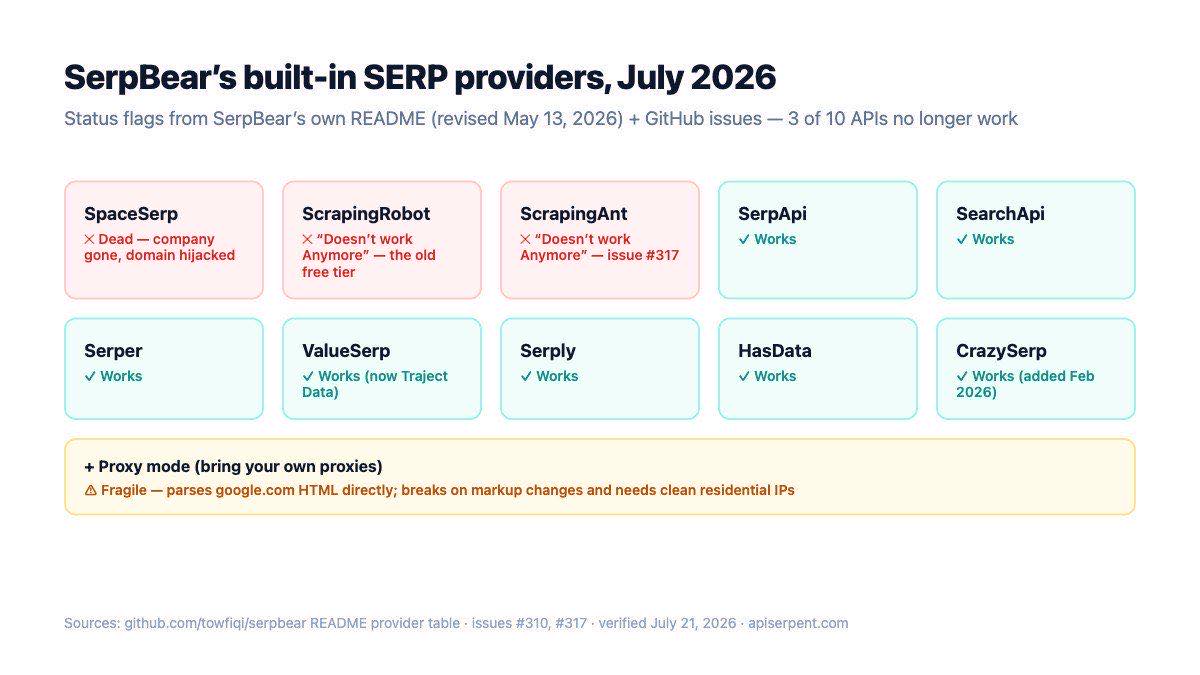
SpaceSerp — dead, company gone. The lifetime-deal SERP API that 2023 tutorials loved. Its domain stopped serving the product in late 2025 and now hosts unrelated gambling content; integration failures were reported as far back as issue #121.
ScrapingRobot — the free tier every old tutorial recommended, broken. After Google dropped num=100, ScrapingRobot returns only ~9–13 results per call through SerpBear, so anything ranking past position ~10 reports as unranked (issue #310). The company itself is alive — it's the integration that no longer works.
ScrapingAnt — broken. Issue #317: a paid account, credits consumed, every keyword erroring. Also README-flagged.
And one false alarm: ValueSerp works. Its site now redirects to Traject Data (the brand was absorbed), which trips people into thinking it shut down — but the product actively sells and its status page shows current engineering activity. Fairness matters in a post like this: 7 of the 10 APIs still work, including SerpApi, SearchApi, Serper, HasData, Serply and the newest addition, CrazySerp (merged via community PR in February 2026 — which is also the proof that new providers only land by pull request).
The remaining option, proxy mode, fetches google.com/search directly through your own proxies and parses the HTML with cheerio. It breaks whenever Google changes markup, and needs clean residential IPs — the exact arms race that makes DIY scraping expensive.
How SerpBear scrapers actually work
Every provider is one TypeScript object implementing ScraperSettings, defined in types.d.ts. The fields that matter:
interface ScraperSettings {
   id: string,          // unique ID, e.g. 'serpent'
   name: string,        // label shown in the Settings dropdown
   website: string,
   resultObjectKey: string,        // key in the JSON response that holds results
   allowsCity?: boolean,           // city-level scraping supported?
   nativePagination?: boolean,     // provider returns 100 results in one call
   headers?(keyword, settings): Object,
   scrapeURL?(keyword, settings, countries, pagination?): string,
   serpExtractor?(content): { title, url, position }[],
}
The flow (in utils/scraper.ts): SerpBear calls your scrapeURL() to build the request, merges your headers(), fetches, plucks response[resultObjectKey], and hands it to your serpExtractor(), which must return an array of { title, url, position }. Position matching against the tracked domain is SerpBear's job, not yours.
Two things we learned from the source that no tutorial mentions:
The API-key field is misspelled in SerpBear's own types — and your adapter must use the typo. The settings object stores the provider key as settings.scaping_api (not scraping_api). Every built-in scraper reads the misspelled field; spell it "correctly" in your adapter and you get an empty key.
There is no plugin mechanism. Scrapers are statically imported in scrapers/index.ts and compiled into the Next.js build. No custom-scrapers folder, no dynamic loading — we checked the tree, the issues and the docs. The published Docker image ships compiled output, so mounting a source file over it does nothing. Custom provider = fork + rebuild. The repo's own docker-compose.yml ships a commented-out build: . line for exactly this purpose.
The 40-line custom adapter
Here is the complete adapter we built and ran — scrapers/services/serpent.ts. It uses format=simple, which returns a flat results array of { position, title, url } — almost exactly SerpBear's extractor contract:
interface SerpentResult {
   title: string,
   url: string,
   position: number,
}

const serpent:ScraperSettings = {
   id: 'serpent',
   name: 'Serpent API',
   website: 'apiserpent.com',
   allowsCity: false,
   nativePagination: true,
   headers: (keyword, settings) => {
      return {
         'Content-Type': 'application/json',
         'X-API-Key': settings.scaping_api,   // yes, the typo — see above
      };
   },
   scrapeURL: (keyword) => {
      const country = (keyword.country || 'US').toLowerCase();
      return `https://apiserpent.com/api/search?q=${encodeURIComponent(keyword.keyword)}&engine=google&country=${country}&num=100&format=simple`;
   },
   resultObjectKey: 'results',
   serpExtractor: (content) => {
      const extractedResult = [];
      const results: SerpentResult[] = (typeof content === 'string') ? JSON.parse(content) : content as SerpentResult[];

      for (const { url, title, position } of results) {
         if (title && url) {
            extractedResult.push({ title, url, position });
         }
      }
      return extractedResult;
   },
};

export default serpent;
Register it in scrapers/index.ts — one import, one array entry:
import serpent from './services/serpent';

export default [
   scrapingRobot,
   // … the existing ten …
   serpent,
];
nativePagination: true is the important line: with num=100, the /api/search endpoint pages internally and returns up to 100 positions in a single response — so SerpBear skips its own 10-page walk entirely, and a keyword ranking at position 47 is found in one call. Honest scope notes: this adapter reports desktop positions, ignores SerpBear's device field, and sets allowsCity: false (country-level targeting; for city-grid tracking see our geo-grid tutorial).
Fork, build, run, verify
The full sequence we ran, start to finish:
git clone https://github.com/towfiqi/serpbear
cd serpbear
# add scrapers/services/serpent.ts, register in scrapers/index.ts
docker build -t serpbear-custom .

docker run -d --name serpbear -p 3000:3000 \
  -v serpbear_data:/app/data \
  -e USER_NAME=admin -e PASSWORD=change_me \
  -e SECRET=a_32char_random_string -e APIKEY=another_random_string \
  -e NEXT_PUBLIC_APP_URL=http://localhost:3000 \
  serpbear-custom           # your rebuilt image, not towfiqi/serpbear:latest
After login, the new provider appears in Settings → Scraper automatically (the dropdown is built from the scraper registry — no extra wiring):
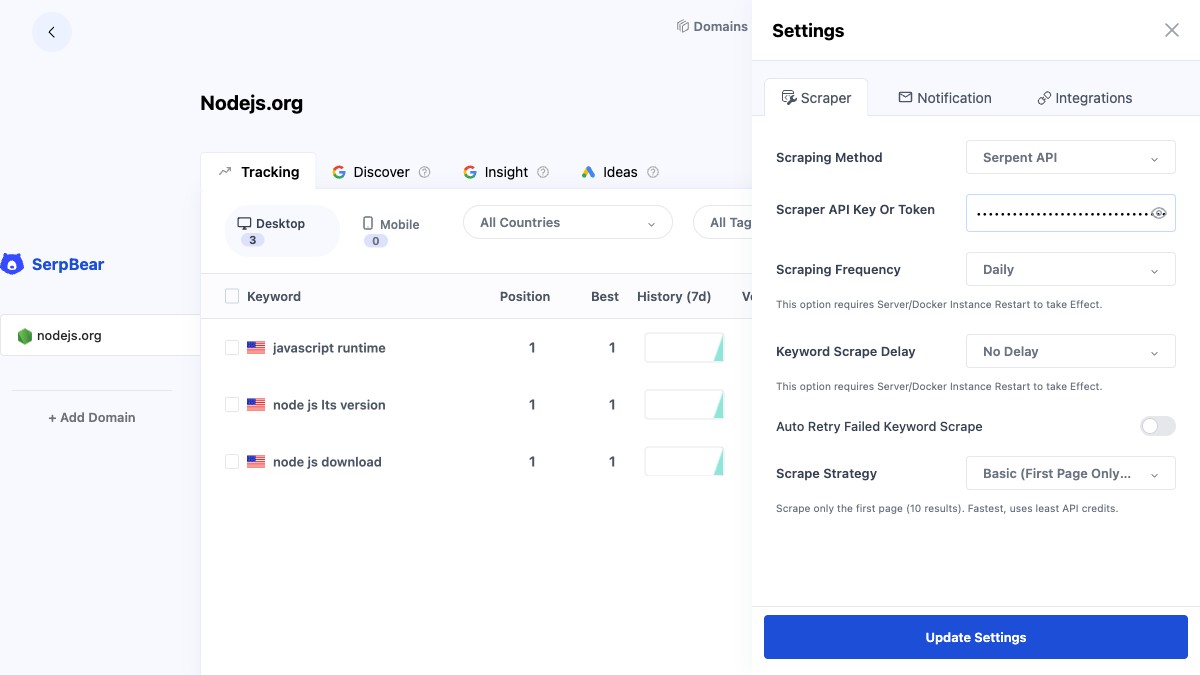
We added nodejs.org as a test domain with three desktop keywords. First refresh, all three resolved — position 1 each, with the exact ranking URL captured:
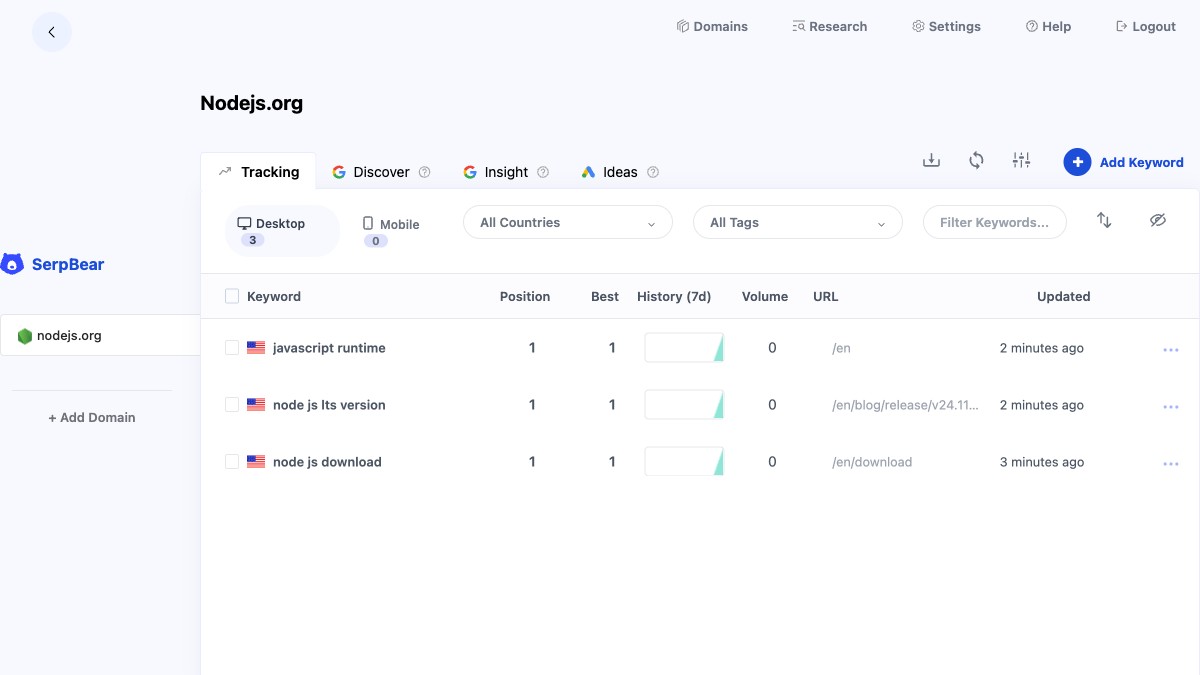
"node js download" matched /en/download, "node js lts version" matched the v24.11.0 release post, "javascript runtime" matched the homepage. The whole pipeline — SerpBear cron → adapter → API → extractor → position match — worked on the first build. (We picked obvious keywords deliberately: position 1 results make a correct integration visible at a glance.)
What a refresh really costs in time
Numbers you can plan capacity with, measured July 21, 2026:
| Operation | Measured | Notes |
|---|---|---|
Full 100-result call (num=100) | median 31.5 s, range 21–48 s | 10 runs; this is what the adapter uses |
| Quick 10-result call | ~3–10 s | single page; fine if you only track top-10 |
| 3-keyword SerpBear refresh | ≈ 90 s | SerpBear refreshes keywords sequentially |
A 100-keyword daily refresh at ~30 s per keyword is under an hour of sequential runtime — fine for a nightly cron, and each keyword is one API call instead of up to ten page-walk calls, which is what keeps the per-keyword cost math flat. If you're tracking at bigger scale, the batching patterns in our bulk rank-checking architecture post apply unchanged.
If not SerpBear, then what?
Build the tracker yourself. If all you need is positions in a database, SerpBear is arguably overkill — a 100-line Python tracker or the full build-your-own guide gets you there without Docker, and the n8n version does it with no code at all.
OpenSERP (karust/openserp, ~1.1k stars, active) self-hosts the scraping side with a local browser — pair it with SerpBear's proxy-style limits in mind: you inherit the block-management problem yourself.
SEO Panel is the veteran PHP suite with a rank module — alive (last pushed June 2026) but dated, and its checker fights the same Google defenses.
Whatever frontend you choose, the failure mode of the last three years is clear from the graveyard above: the tracker outlives its data source. Pick the SERP backend for durability — and if a keyword seems to move when nothing changed, read why trackers and Search Console disagree and why results differ between fetches before blaming the tool. For tracking beyond one country, the 40-country guide covers the country parameter this adapter already passes through. The backend behind this post is our rank-tracking API — try the exact call from the adapter in the playground.
A rank-tracking backend that stays up
Serpent is a pay-as-you-go SERP API — Google, Bing, Yahoo, DuckDuckGo and Brave behind one JSON schema, up to 100 results per call with format=simple built for extractors. Free to start, then from $0.60 per 1,000 down to $0.10 at Scale. No subscription.
Explore: Rank Tracking API · Documentation · Pricing
FAQ
Is SerpBear still maintained in 2026?
Yes — slowly, by one maintainer. v3.0.0 (March 2026) reworked pagination after Google removed num=100; v3.1.0 followed within the month. ~2,000 stars, 57 open issues as of July 2026. Its old rival serposcope is formally archived.
Which SerpBear scraping providers no longer work?
Per SerpBear's own README (May 2026 revision): SpaceSerp (company gone, domain hijacked), ScrapingRobot (the old free-tier default — broken since the num=100 change) and ScrapingAnt (paid accounts erroring, issue #317). ValueSerp still works under the Traject Data brand.
Can I add a custom scraper without forking SerpBear?
No. Scrapers are statically imported and compiled in; the stock Docker image can't load new providers. Fork, add one ScraperSettings file, register it in scrapers/index.ts, and docker build. Ours is 40 lines and printed above.
How long does a keyword refresh take with a 100-result call?
Median 31.5 seconds in our 10-run measurement (range 21–48 s). SerpBear runs keywords sequentially, so budget ~30 s per keyword for full-depth tracking — or use the quick endpoint if top-10 depth is enough.
Does the adapter track mobile or city-level positions?
No — it reports desktop, country-level positions and deliberately sets allowsCity: false. Keep a location-capable provider for city keywords, or extend the adapter.