Google Maps to Website to Verified Email: A Lead Pipeline That Completes

Every guide to scraping Google Maps for leads stops at the same wall: "Google Maps doesn't give you emails." True. It gives you a name, a website and a phone number, and then the tutorial ends.
That's the wall this post walks through. The email isn't in Maps — it's on the website Maps hands you. So the real pipeline has three stages: Maps → website → verified email. Below is the complete, runnable version, run for real on 60 live businesses across three verticals on July 21, 2026, with the yield and the cost measured at every step.
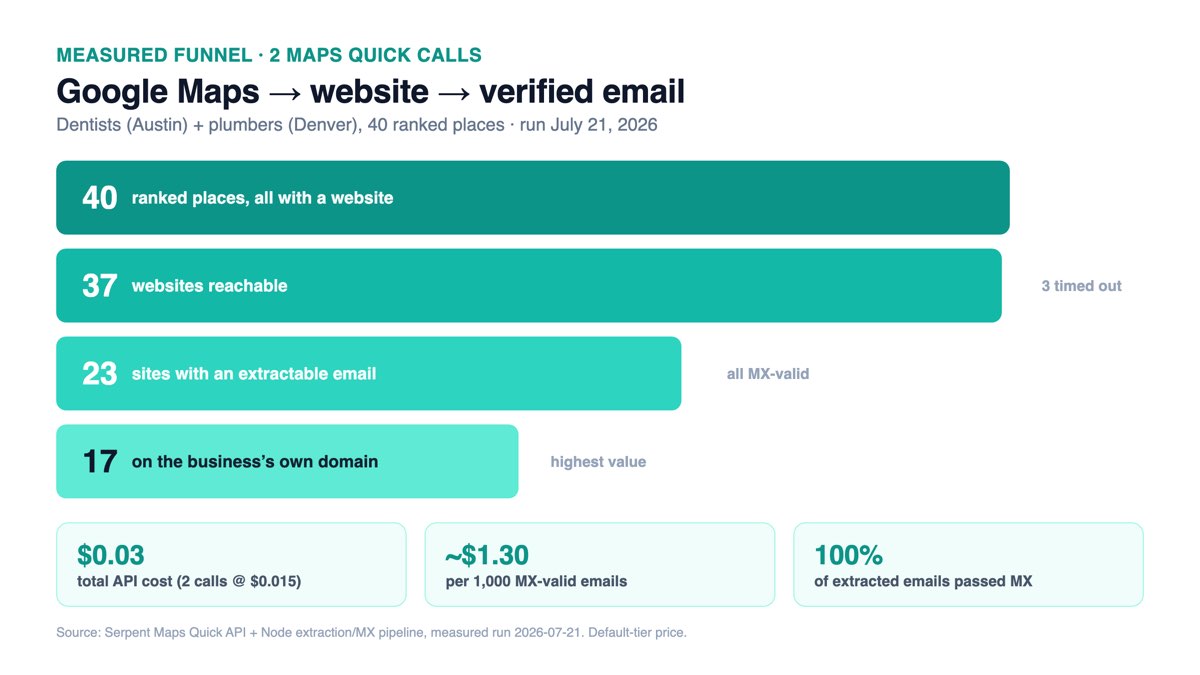
TL;DR: One Maps Quick call returns 20 places, all with a website. Fetch each site's homepage and /contact, extract emails with mailto: + regex, filter junk, then MX-verify. Measured: 40 places → 37 sites reachable → 23 with an extractable email → 23 MX-valid (dentists + plumbers). Cost: $0.03 in API calls, about $1.30 per 1,000 qualified emails. The one thing that doesn't work: an SMTP probe on port 25 — both providers we tested said "250 OK" to a made-up address.
Why the email isn't in Maps (and where it actually is)
Google never asks a business for a contact email when it builds a Maps profile, so there is no email field to return — not from Google's own Places API, and not from any Maps data API. Anyone who claims a Maps endpoint hands you emails is either wrong or reading them off the website after the fact. That second part is exactly the move: the website is the email source, and Maps is what gives you the website.
This is the inverse of a related question we've covered — finding businesses without a website (a different audience: prospects for web-design and listing services). This post is for the businesses that do have a site, which is where the reachable email lives. It's also more end-to-end than our SERP-based B2B lead generation walkthrough, which discovers companies from organic rankings rather than a local map.
Here's the whole thing on one page, then the code for each stage.
Stage 1: Maps → name, website, phone
One call to the Google Maps API quick endpoint returns up to 20 ranked local places. This is a live response — dentists in Austin, trimmed to the fields the pipeline uses:
GET https://apiserpent.com/api/maps/search/quick?q=dentist&location=Austin,+TX&country=us
X-API-Key: YOUR_API_KEY
{
"success": true,
"query": "dentist",
"type": "quick",
"endpoint": "/api/maps/search/quick",
"places": [
{
"rank": 1,
"name": "Austin Dental Works",
"website": "https://www.austindentalworks.com/",
"phone": "(512) 877-9822",
"rating": 4.9,
"review_count": 812,
"address": "…",
"categories": ["Dentist"],
"detail_status": "core_only"
}
// … 19 more ranked places
],
"counts": { "requested": 20, "discovered": 20, "returned": 20 },
"meta": { "elapsed_ms": 8227, "timestamp": "2026-07-21T15:59:19Z", "partial": true }
}Two things to note from real runs. First, coverage: across three 20-place searches — dentists (Austin), plumbers (Denver) and real-estate agents (Nashville) — all 60 places came back with both a website and a phone. Local service businesses almost always list a site on their profile. Second, the response is a flat places[] array with a counts summary and a meta block; each place also carries rating, review count, address, categories and hours if you want to score or segment leads before you ever fetch a page. The full field list is in the API docs, and you can watch the shape live in the playground.
For this pipeline we only need three fields: name, website, phone. Pull the array and move to Stage 2.
Stage 2: website → email (the extractor)
This is the centerpiece. For each place, fetch the homepage and a few common contact paths, pull emails from mailto: links and raw text, strip the junk, dedupe, and flag the ones that sit on the business's own domain. Standard library only — Node 18+ has global fetch:
// pipeline.js — Stage 2 + 3. Run: node pipeline.js places.json
const dns = require('dns').promises;

const CONTACT_PATHS = ['', '/contact', '/contact-us', '/about', '/about-us'];
const EMAIL_RE = /[A-Za-z0-9._%+-]+@[A-Za-z0-9.-]+\.[A-Za-z]{2,}/g;
// transactional, tracking, placeholder and common theme/plugin vendor addresses
const JUNK = /(no-?reply|do-?not-?reply|sentry|wixpress|example\.(com|org)|you@email|
  \.png$|\.jpg$|\.svg$|user@|name@|test@|yourname)/i;

async function getPage(url) {
  const ctrl = new AbortController();
  const t = setTimeout(() => ctrl.abort(), 12000);          // a slow site is not a lead
  try {
    const res = await fetch(url, { redirect: 'follow', signal: ctrl.signal,
      headers: { 'User-Agent': 'Mozilla/5.0 … Chrome/126.0 Safari/537.36' } });
    if (!res.ok || !/html/.test(res.headers.get('content-type') || '')) return '';
    return (await res.text()).slice(0, 800000);
  } catch { return ''; }                                     // timeout / DNS / TLS — skip
  finally { clearTimeout(t); }
}

function extractEmails(html) {
  const found = new Set();
  for (const m of html.matchAll(/mailto:([^"'?>\s]+)/gi))  // highest-confidence source
    found.add(decodeURIComponent(m[1]).toLowerCase());
  for (const m of html.matchAll(EMAIL_RE)) found.add(m[0].toLowerCase());
  return [...found]
    .map(e => e.replace(/[\\."']+$/, ''))                    // trim escaped-string artifacts
    .filter(e => /^[a-z0-9._%+-]+@[a-z0-9.-]+\.[a-z]{2,}$/.test(e) && !JUNK.test(e));
}

async function emailsForSite(website) {
  const origin = new URL(website).origin;                    // drop tracking query strings
  const out = new Set();
  for (const path of CONTACT_PATHS) {
    const html = await getPage(origin + path);
    if (html) for (const e of extractEmails(html)) out.add(e);
  }
  return [...out];
}
Three decisions in there earn their keep:
The 12-second timeout is a feature. A homepage that can't answer in twelve seconds is not a lead you want to chase. In the plumber run, three sites timed out and we let them — that's honest funnel loss, not a bug to paper over.
mailto: first, regex second. A mailto: link is a human deliberately publishing an address. The raw regex catches the rest (footer text, JSON-LD, schema blocks), but it also catches noise, which is why the junk filter exists.
Filter the vendor noise. Real pages leak theme-author addresses, analytics stubs and placeholder strings like you@email.com. Without the JUNK filter, one real-estate site handed us a font designer's Gmail and two SaaS-platform support inboxes. Filtering by "does the email's domain match the site's domain?" is the strongest single quality signal — those are the addresses that actually reach the business.

Measured yield across three verticals
We ran the exact script above on three live 20-place searches. Numbers are from the July 21, 2026 run — no rounding, no cherry-picking:
| Vertical | Places | Sites reachable | Sites with email | Unique emails | On own domain |
|---|---|---|---|---|---|
| Dentists — Austin, TX | 20 | 20 | 12 | 12 | 9 |
| Plumbers — Denver, CO | 20 | 17 | 11 | 11 | 8 |
| Real-estate agents — Nashville, TN | 20 | 15 | 8 | 54* | 31* |
The single-location trades tell a consistent story: roughly 55–60% of businesses expose an extractable email, and about three-quarters of those are on the business's own domain (info@, service@, office@, scheduling@). The dentist emails were almost all clean info@ boxes; the plumbers skewed toward service@ and dispatch@-style inboxes plus a few owner Gmails.
*The real-estate outlier is worth understanding, not hiding. Fewer sites answered (15/20), yet they produced 54 emails — because two of them were brokerage and team sites with a full agent roster. One site alone listed 35 addresses. If your target is "one decision-maker per business," de-duplicate to a single best address per domain (prefer an on-domain info@ or the owner). If your target is "every agent," those roster pages are a goldmine. Same pipeline, different GROUP BY.
Stage 3: MX verification, and the SMTP trap
An extracted string that looks like an email isn't necessarily a real, deliverable one. The cheapest real check is a DNS MX lookup: does the email's domain actually accept mail? Node does it in one call:
async function mxValid(email) {
  const domain = email.split('@')[1];
  try { return (await dns.resolveMx(domain)).length > 0; }
  catch { return false; }                       // NXDOMAIN / no mail server
}

// dedupe to unique domains first — one lookup per domain, not per email
const domains = [...new Set(emails.map(e => e.split('@')[1]))];
const ok = Object.fromEntries(await Promise.all(
  domains.map(async d => [d, await mxValid('x@' + d)])));
const verified = emails.filter(e => ok[e.split('@')[1]]);
MX pass rate in our runs was 100% — every filtered email sat on a domain with a live mail server. That's expected here, because the addresses came straight off working business websites; MX mainly catches typos, dead domains and parked pages, which the earlier filtering had already removed. It runs everywhere, costs nothing, and it's the right first gate.
Now the part every "just verify with SMTP" tutorial gets wrong. The next level up is an SMTP RCPT probe: connect to the domain's mail server on port 25 and ask RCPT TO:<address> without ever sending a message. We built it and ran it. Two findings, both honest:
1. Port 25 may be open — but the answer lies. On our test network the connection went through: a full handshake to Google Workspace (138 ms) and to a Barracuda-hosted server (613 ms), both returning 250 OK for our real addresses. Then we probed a deliberately fake address — zzznonexistent99xyz@… — at the same two domains, and both returned the identical 250 OK. They are "accept-all" (catch-all) servers: they accept every RCPT and bounce later, so the probe cannot tell a real mailbox from a fabricated one. A large share of business domains behave this way.
2. On real infrastructure, port 25 is usually blocked anyway. Most residential ISPs block outbound 25, and AWS, GCP and Azure block it by default on new accounts. The probe that happened to run from our laptop simply won't connect from the cloud box you'd deploy on.
So what do production teams do for a true deliverability verdict? Two paths:
- A self-hosted verifier on a VPS with a clean, warmed IP and reverse-DNS set up — and even then, accept-all domains stay ambiguous.
- A dedicated email-verification API. This is a whole product category that combines MX, SMTP, catch-all detection and historical bounce data into one verdict. Named neutrally as examples of the category, not endorsements: ZeroBounce, NeverBounce and Kickbox all expose an API that takes an address and returns valid / invalid / catch-all / risky. Check current pricing on each vendor's own page.
Our recommendation from the data: use MX as the free first gate inside the pipeline (it removes the genuinely dead domains), then send the survivors to a verification API before a real send if bounce rate matters to your sending reputation. Skip the DIY SMTP probe — it's the step that looks clever and delivers false confidence.
Cost per qualified lead (vs Google Places)
The honest accounting: only Stage 1 costs money. Stages 2 and 3 are HTTP fetches and DNS lookups on your own machine. So the whole cost of a qualified lead is the Maps call divided by how many verified emails it produced.
Serpent's live Maps Quick price is $0.015 per call at the default tier (verified July 2026 via the pricing page and GET /api/pricing), and new accounts get 10 of these calls free. From the representative single-location funnel (dentists + plumbers, 2 calls, $0.03):
| Metric | Value |
|---|---|
| API calls | 2 × $0.015 = $0.03 |
| Places returned | 40 (all with website + phone) |
| MX-valid emails | 23 |
| Cost per MX-valid email | $0.0013 (~$1.30 / 1,000) |
| Cost per on-domain email (17) | $0.00176 (~$1.76 / 1,000) |
| At Growth tier ($0.0075/call) | ~$0.65 / 1,000 MX-valid |
| At Scale tier ($0.00375/call) | ~$0.33 / 1,000 MX-valid |
Now the comparison people actually want: could you do this on Google's own Places API instead? You can — but the fields you need are the expensive ones. In the Places API (New), websiteUri and the phone-number fields are billed at the Enterprise tier (Google's data-fields doc, verified July 2026). That leaves two Google paths for "20 businesses with a website + phone":
| Path | What it bills | Cost for 20 places |
|---|---|---|
| Serpent Maps Quick | 1 call, website + phone included | $0.015 |
| Google Text Search Enterprise | 1 request with contact fields in the field mask ($35/1,000) | ~$0.035 |
| Google discover-then-detail | Search + 20 × Place Details Enterprise ($20/1,000) | ~$0.40+ |
The Google figures (Text Search Enterprise $35/1,000, Place Details Enterprise $20/1,000) are from a June 2026 Places pricing teardown corroborated by Woosmap's June 25, 2026 breakdown; confirm current numbers on Google's own pricing page. One more gotcha the same sources flag: the flat $200/month Maps credit was retired on March 1, 2025 and replaced with smaller per-SKU free allowances, so the old "the first $200 is free" budgeting no longer holds. The cost gap is widest on the discover-then-detail path most people actually build — roughly 27× the single-call price. For the deeper economics of Maps billing units, see our tested comparison of Maps business-data APIs.
Build the pipeline on real Maps data
Serpent's Google Maps API returns ranked places with website and phone in one JSON call — Free to start, shared across every endpoint, then $0.015 per call down to $0.0105 at Scale. No subscription, pay only for calls.
Get Your Free API KeyExplore: Maps API · Documentation · Pricing
Compliance: don't skip this part
This is general information, not legal advice — check your own rules before you send. But the practical shape of B2B email outreach is well understood:
United States (CAN-SPAM). Cold B2B email is legal if you play it straight: accurate From and subject lines, no deceptive routing, a real physical postal address in the footer, and a working opt-out that you honor within 10 business days. Keep a suppression list and never re-add someone who opted out.
EU & UK (GDPR / PECR). Stricter. A business email is still personal data, and you generally need a lawful basis — usually legitimate interest for B2B — plus a genuinely easy opt-out and honest disclosure of where you got the address. When in doubt about EU recipients, be conservative.
Universal common sense. Target role addresses (info@, sales@, service@) over obviously personal ones. Don't blast the whole 54-email roster from a single brokerage. Relevance is both the ethical and the effective move — a targeted note to a business about its business is a different thing from spraying a scraped list. Enrich before you send: if you also want firmographics on the company behind the address, our firmographic enrichment tutorial takes the same lead list further.
FAQ
Does the Google Maps API return business email addresses?
No. Google doesn't collect a verified business email, so neither its Places API nor a Maps data API has an email field to return. You get the website and phone; the email lives on the website. In our July 2026 runs, all 60 places across three verticals returned both a website and a phone, which is what makes the Maps → website → email pipeline work.
How many emails can you extract from a Google Maps search?
In our measured runs, a 20-place Maps Quick call for dentists in Austin produced 12 unique MX-valid emails and plumbers in Denver produced 11 — roughly 55–60% of listed businesses. Team and brokerage sites yield far more because they publish every staff member's address.
Can I verify a business email with an SMTP probe on port 25?
Unreliably. In our test, both a Google Workspace domain and a Barracuda-hosted domain returned 250 OK for a made-up address that doesn't exist, because they're accept-all at RCPT time. Port 25 is also blocked on most residential ISPs and default-blocked on AWS, GCP and Azure. Use MX as a free first filter and a verification API for a real verdict.
What does a verified lead from Google Maps cost?
Only Stage 1 has an API cost. At Serpent's default $0.015 per Maps Quick call, two calls returning 40 places produced 23 MX-valid emails — about $0.0013 each, or roughly $1.30 per 1,000. Extraction and MX checks run on your own compute. Growth and Scale tiers drop the per-lead cost to about $1.17 and $0.91 per 1,000.
Is scraping business emails for cold outreach legal?
General information, not legal advice. In the US, CAN-SPAM permits B2B cold email with accurate headers, a real subject, a physical address and an honored opt-out. In the EU and UK, GDPR and PECR are stricter and generally expect a legitimate-interest basis and easy opt-out. Avoid emailing obviously personal addresses harvested at scale, and always keep a suppression list.