Is there a knowledge panel API? What Google offers and what to use instead

There is no official Google API that returns a knowledge panel as it appears on the results page. Google's Knowledge Graph Search API returns entity records, and Google calls it unsuitable for production-critical use. To get the panel people actually see, use a SERP API's knowledge panel block, or Wikidata for free background facts.
Short answer: For entity IDs and disambiguation, use the Knowledge Graph Search API (or its successor, Cloud Enterprise Knowledge Graph). For free structured facts in bulk, Wikidata. For what a brand's panel shows today and whether it changed, a SERP API that returns the panel as JSON, such as Serpent API's knowledgePanel block (from $0.03 per 1,000 result pages — pay as you go, no subscription). In 2026, also watch whether an AI Overview has taken the panel's place.
What is a knowledge panel, and where does its data come from?
A knowledge panel is the information box Google shows for people, places, organisations and things. Google's Knowledge Panel Help calls them "information boxes that appear on Google when you search for entities" in its Knowledge Graph.
The same page says panels are generated automatically from "various sources across the web", with some data from partners who supply authoritative information on topics such as films and music. It adds that "knowledge panels are updated automatically as information changes on the web". That is the root of the API question: the panel is assembled for the results page, and no Google API hands you that assembled box.
What does Google's Knowledge Graph Search API return?
It returns matching entities from the Knowledge Graph, one record each. Google's overview says it "lets you find entities in the Google Knowledge Graph", and lists three uses: ranked lists of notable entities, autocomplete in a search box, and annotating content with entities.
The API reference documents one method, entities:search, with these parameters: query, ids, languages, types, prefix, indent and limit (default 20, maximum 500). Each result carries:
| Field | Google's description |
|---|---|
@id | The canonical URI for the entity, such as kg:/m/0dl567 |
name | The name of the entity |
@type | The schema.org types that match the entity |
description | A short description of the entity |
detailedDescription | A detailed description of the entity |
image | An image to help identify the entity |
url | The official website URL, if available |
resultScore | How well the entity matched the request |
Two warnings on the overview page matter more than the fields. First: "This API is not suitable for use as a production-critical service. Your product should not form a critical dependence on this API." Second, Google says it is "migrating this API to Cloud Enterprise Knowledge Graph" and tells new users to start there. The overview page was last updated on 26 April 2024.
The successor, Enterprise Knowledge Graph's Search and Lookup, recommends its Advanced edition for new projects, and its Lookup method accepts the same /m/ entity IDs as well as its own c- IDs. It carries a Preview label, which Google uses for pre-release products offered "as is". I could not find its price; the pricing URL I tried returned a 404.
Why the official API is not the panel
Because a panel is a page element and the API returns database records. Google says the API "returns only individual matching entities, rather than graphs of interconnected entities". The panel on the results page adds things the record does not carry: the facts Google chose to display for that query, the links, the images, and whether a panel appears at all.
That last point matters most for brands. The API will happily return an entity for your company even on days when the results page shows no panel for your name. If what you care about is what searchers see, you have to read the results page itself.
Three ways to get panel data, compared
Each option answers a different question, so many teams use two of them together: an entity ID from Google's API or Wikidata, and the live panel from a SERP API.
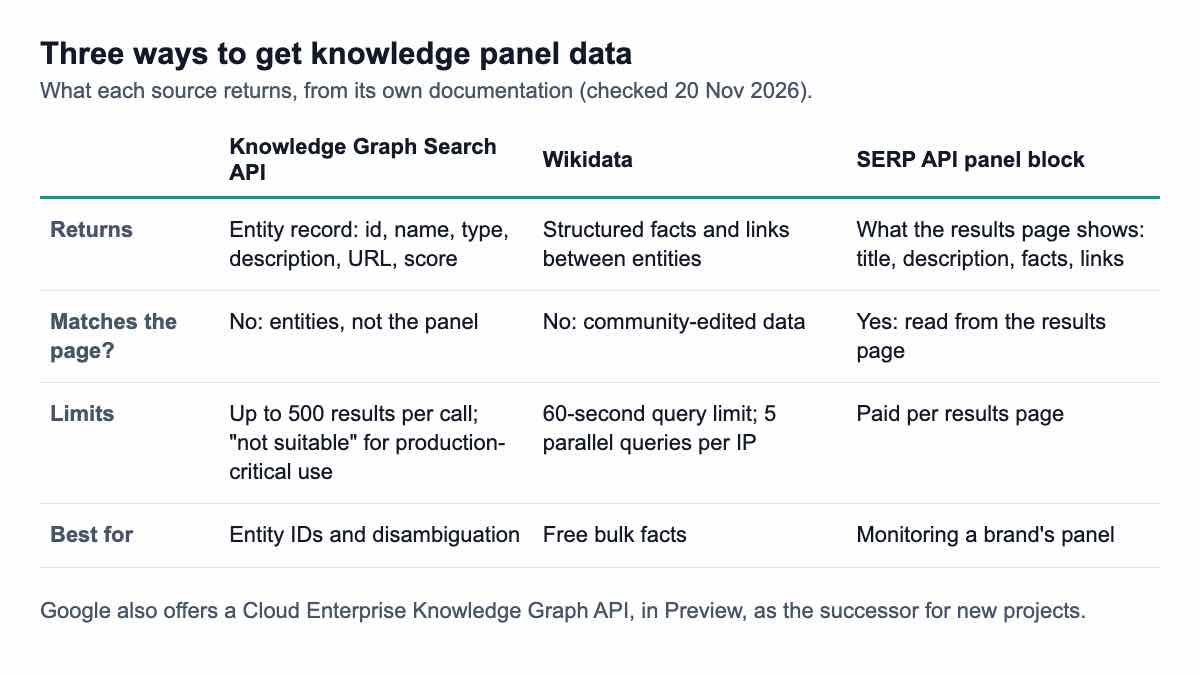
- Knowledge Graph Search API: best for turning a name into a stable entity ID and type. Limit 500 results per call. Not for anything production-critical, in Google's words.
- Wikidata: free, open, structured facts with links between entities, and the source Google itself suggests for graph data. The Query Service manual sets a 60-second query deadline and allows "5 parallel queries per IP", and clients that ignore its User-Agent policy "may be blocked completely".
- A SERP API's panel block: the panel as shown on the results page for a given query, country and day. This is the only one of the three that tells you what searchers saw. SerpApi, for example, returns a
knowledge_graphblock that its docs describe as appearing "typically on the right side", with fields such astitle,type,kgmidanddescription.
Getting the panel as JSON from a SERP API
With Serpent API, the panel arrives in the same response as the organic results. Every /api/search response has a results.knowledgePanel key: an object when the page showed a panel, null when it did not. The metadata.hasKnowledgePanel flag tells you which at a glance (docs). The panel object carries the title, description, facts and links.
curl "https://apiserpent.com/api/search?q=northwind+coffee&engine=google&country=us" \
  -H "X-API-Key: YOUR_API_KEY"
Because the key is always present, your parser never has to guess whether a missing field means "no panel" or "something broke". The panel is a paid-call feature: on a free-tier call the key is still there but empty. Add include_aio=true to the same paid request and the response also carries AI Overview fields where present, which matters for brand queries in 2026 (more below). And with pixel_position=true (paid calls, US desktop), the panel gets an on-screen position and box, useful for measuring how much of the first screen it takes (pixel position docs).
Build a knowledge panel monitor in Python
The monitor below does three jobs. It looks up a brand's entity in the Knowledge Graph Search API, fetches the live results page for the brand name, and compares today's panel with yesterday's, field by field. It also tells you when the panel disappears.
# kp_monitor.py
import json
import os

import requests

KG_KEY = os.environ.get("GOOGLE_API_KEY", "YOUR_GOOGLE_KEY")
SERP_KEY = os.environ.get("SERPENT_API_KEY", "YOUR_API_KEY")


def kg_entity(name):
    """Google Knowledge Graph Search API: the entity record."""
    r = requests.get(
        "https://kgsearch.googleapis.com/v1/entities:search",
        params={"query": name, "key": KG_KEY, "limit": 1, "languages": "en"},
        timeout=30,
    )
    r.raise_for_status()
    items = r.json().get("itemListElement", [])
    if not items:
        return None
    hit = items[0]
    return {"id": hit["result"].get("@id"), "name": hit["result"].get("name"),
            "description": hit["result"].get("description"), "score": hit.get("resultScore")}


def serp_panel(query, country="us"):
    """Serpent API: what the results page shows for the query."""
    r = requests.get(
        "https://apiserpent.com/api/search",
        params={"q": query, "engine": "google", "country": country},
        headers={"X-API-Key": SERP_KEY},
        timeout=60,
    )
    r.raise_for_status()
    data = r.json()
    return data["results"]["knowledgePanel"], data["metadata"]


def flatten(obj, prefix=""):
    """{'facts': [{'label': 'Born'}]} -> {'facts[0].label': 'Born'}"""
    out = {}
    if isinstance(obj, dict):
        for k, v in obj.items():
            out.update(flatten(v, f"{prefix}.{k}" if prefix else k))
    elif isinstance(obj, list):
        for i, v in enumerate(obj):
            out.update(flatten(v, f"{prefix}[{i}]"))
    else:
        out[prefix] = obj
    return out


def panel_changes(old, new):
    if old is None or new is None:
        return {"panel": (old is not None, new is not None)} if (old is None) != (new is None) else {}
    a, b = flatten(old), flatten(new)
    return {k: (a.get(k), b.get(k)) for k in sorted(a.keys() | b.keys()) if a.get(k) != b.get(k)}
The flatten() step is the useful trick. It turns the nested panel into flat paths such as facts[1].value, so the comparison works whatever facts a panel holds, and a report can say exactly which line changed.
This code runs on Python 3.15.2 with requests 2.34.2 (20 November 2026). For the test, only requests.get was replaced by a stub: the Knowledge Graph reply follows the structure in Google's documentation, and the panel reply uses our documented keys, over three days of sample data for a fictional brand. The output:
KG entity: {'id': 'kg:/m/0example', 'name': 'Northwind Coffee', 'description': 'Coffee company', 'score': 4850}
panel on page: True | title matches KG name: True
changed facts[1].label: None -> 'CEO'
changed facts[1].value: None -> 'Jane Doe'
day 3: {'panel': (True, False)} | hasAiOverview: False
Day two added a fact; day three lost the panel entirely. In production you would store each day's panel as JSON, run panel_changes() against the previous day and alert on two events: any change to the description or facts, and any switch between "panel" and "no panel". For a wider brand view, our brand SERP monitoring guide covers the rest of the page.
Are AI Overviews replacing brand knowledge panels?
For many brand searches, the evidence says yes. On 2 November 2026 Barry Schwartz at Search Engine Roundtable reported that "Google has moved the AI Overviews for many brand-related keywords to the right-hand column", and wrote that Google is "essentially replacing brand knowledge panels with AI Overviews". He quoted Chris Long: "Instead of a Knowledge Panel, they're showing AI Overviews for brand terms in the right column."
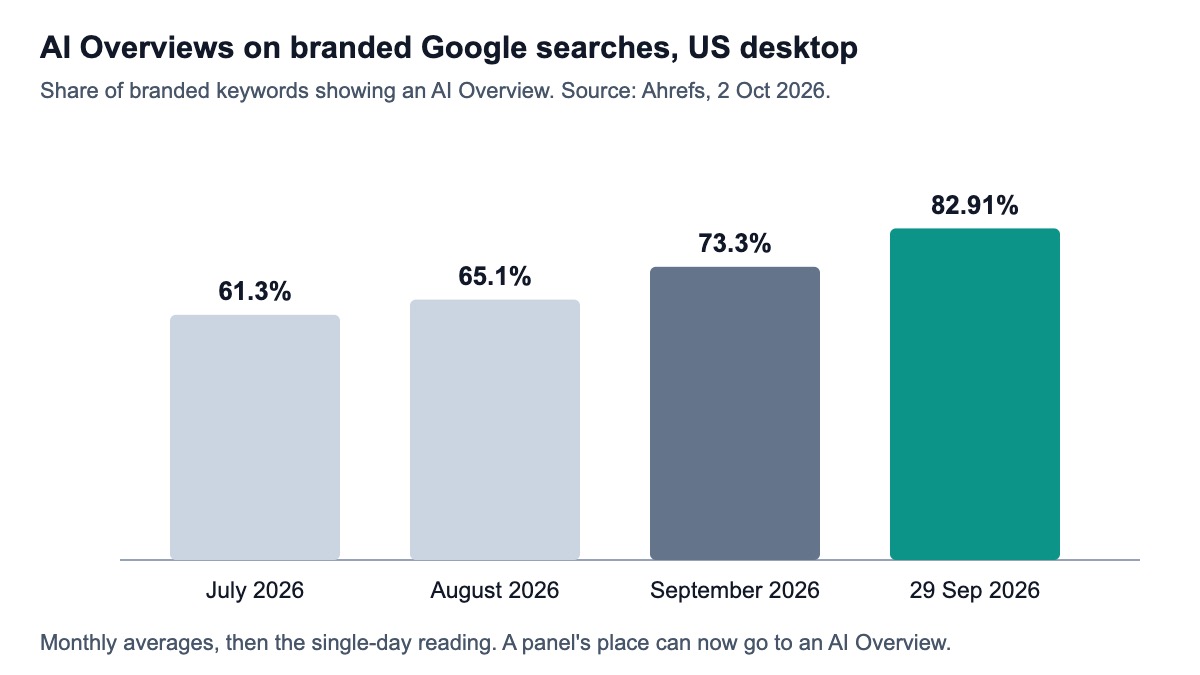
Ahrefs measured the rise a month earlier. Its study of 2 October 2026 found AI Overviews on 61.3% of US desktop results for branded keywords in July 2026, 65.1% in August and 73.3% in September, reaching 82.91% on 29 September.
Ahrefs also looked at the sources those brand overviews cite. Among 57 overviews with visible source lists, Wikipedia appeared in 71.9% and YouTube in 38.6%. In other words, the facts about your brand now come from pages you may not control, in a box that is no longer the classic panel.
For monitoring, that means one check is no longer enough. Track the panel with metadata.hasKnowledgePanel, and track AI Overviews with include_aio=true and metadata.hasAiOverview. Our guide to extracting AI Overviews through an API covers the second half.
What to do when your panel is wrong
Claim it, then suggest changes. Google's Help page says the subject of a panel or its official representative can claim it and "suggest changes", and anyone can use the feedback link in the bottom-right corner of the panel. Because panels update "automatically as information changes on the web", it also helps to correct the sources Google draws on, starting with your own site and the major reference pages about you.
A monitor makes this practical. Instead of searching your own name every week, you get a diff when a fact changes and a record of when the panel vanished or returned, which is the evidence you need when you ask Google for a correction.
Which option should you pick?
- You need entity IDs, types or autocomplete: the Knowledge Graph Search API for existing projects, Enterprise Knowledge Graph for new ones, accepting Google's warnings.
- You need free, open facts for many entities: Wikidata, within its query limits.
- You need to know what searchers see for a brand, and when it changes: a SERP API that returns the panel and the AI Overview as JSON when Google shows them, plus a monitor like the one above.
- You only check one brand by hand now and then: search for it signed out, and save a screenshot with the date.
For the rest of the results page as JSON, start with the Google SERP API overview, or see how every block is structured in our guide to parsing SERP features.
How we checked this
On 20 November 2026 I read Google's Knowledge Graph Search API overview and reference, the Cloud Enterprise Knowledge Graph Search API page and Google's "About knowledge panels" help page (4 Google sources); the Wikidata Query Service user manual (1); SerpApi's knowledge graph documentation (1); and Search Engine Roundtable's 2 November 2026 report and Ahrefs' 2 October 2026 study (2). No live searches or API calls were made. The monitor code was executed locally with only the HTTP call stubbed, using the documented response structures and sample data for a fictional brand.
What I could not verify: the Knowledge Graph Search API's daily quota and whether it charges (neither appears on the pages I read); Enterprise Knowledge Graph pricing (its pricing URL returned 404); and how often brand panels appear today, as opposed to AI Overviews. My search tool's quota ran out during research, so the gap check used the pages most likely to rank for this query rather than a fresh top-five list.
Track your brand's knowledge panel as JSON
On paid calls, Serpent API returns the knowledge panel and AI Overview fields where present, alongside the organic results, in one response, from $0.03 per 1,000 result pages — pay as you go, no subscription. Start with 10 free API calls.
Get Your Free API KeyExplore: Google SERP API · Playground · Docs · Pricing
FAQ
Is there a Google knowledge panel API?
Not one that returns the panel itself. Google's Knowledge Graph Search API returns entity records, such as a name, type, short description and official URL, and Google says it "is not suitable for use as a production-critical service". To get the panel as it appears on the results page, including its facts and links, you need a SERP API that returns the panel block, or your own browser-based scraper.
Is the Google Knowledge Graph Search API deprecated?
Google does not use the word "deprecated", but its overview page says it is "migrating this API to Cloud Enterprise Knowledge Graph" and tells new users to use that product instead. The successor is labelled Preview, and its Lookup method accepts the same /m/ entity IDs. If you are starting a new project, build against the successor, and avoid making either a critical dependency.
What is a good alternative to the Knowledge Graph Search API?
It depends on what you need. Wikidata is the free alternative for structured facts and relationships, and Google's own page points to Wikidata for graph data. If you need what the panel shows on Google for a query, a SERP API that returns the panel as JSON is the closer match. Many teams combine the two: Wikidata or Google's API for stable entity IDs, a SERP API for the live panel.
How do I get my brand's knowledge panel changed?
Claim the panel through Google's verification process, then use "suggest changes"; anyone can also send feedback through the link in the panel's bottom-right corner. Google says panels update automatically as information on the web changes, so correcting your own site and major reference pages helps too. Keep dated records of what the panel showed, for example from a daily monitor, so you can point to specific errors.
Why did my brand's knowledge panel disappear?
Google does not publish a list of reasons, and a panel can come and go as its sources change. One documented 2026 cause for brands is a layout change: Search Engine Roundtable reported on 2 November 2026 that Google moved AI Overviews for many brand queries into the right column, in place of knowledge panels. Check whether an AI Overview now appears for your brand name before assuming the panel was removed for another reason.
Sources
Google (checked 20 November 2026):
- Knowledge Graph Search API overview (last updated 26 Apr 2024)
- Knowledge Graph Search API reference
- Cloud Enterprise Knowledge Graph: Search API
- Knowledge Panel Help: About knowledge panels
Other documentation (checked 20 November 2026):
Reports and studies (checked 20 November 2026):